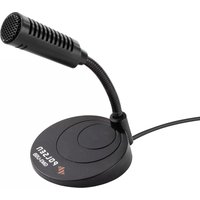
GM3-USB - Microphone Polsen - Free user manual and instructions
Find the device manual for free GM3-USB Polsen in PDF.


| Product Type | Desktop Condenser Microphone |
| Brand | Polsen |
| Model | GM3-USB |
| Polar Pattern | Omnidirectional |
| Transducer | Condenser |
| Frequency Response | 50 Hz - 20 kHz |
| Sample Rate | 24 bit, 44.1 kHz |
| Sensitivity | -40 dB |
| Connectivity | USB Standard-A (USB 2.0) |
| Power Source | USB bus-powered (5V DC, 30 mA) |
| Cable Length | 5.5 ft (1.7 m) |
| Dimensions (Length) | 4.25 in (10.8 cm) |
| Weight | 3 oz (85 g) |
| Housing Material (Base) | ABS Plastic |
| Housing Material (Grille) | Metal |
| Mute Switch | No |
| System Compatibility | Windows, macOS |
| Gooseneck Flexibility | Adjustable for precise aiming |
| Usage Scenario | Gaming, video conferences, Zoom chats |
| Cleaning Instructions | Wipe with a soft, dry cloth only |
| Safety Warning | Do not point at speakers to avoid feedback |
| Operating Temperature | 10°F to 131°F (-10°C to 55°C) |
| Storage Temperature | -4°F to 158°F (-20°C to 70°C) |
| Warranty | 2-year limited warranty |
Frequently Asked Questions - GM3-USB Polsen
User questions about GM3-USB Polsen
0 question about this device. Answer the ones you know or ask your own.
Ask a new question about this device
Download the instructions for your Microphone in PDF format for free! Find your manual GM3-USB - Polsen and take your electronic device back in hand. On this page are published all the documents necessary for the use of your device. GM3-USB by Polsen.
USER MANUAL GM3-USB Polsen
natural_image
Black desktop microphone with curved neck and base (no visible text or symbols)PRODUCT MANUAL

THANK YOU FOR CHOOSING POLSEN.
The Polsen GM3-USB microphone is an ideal tabletop mic for gaming and video conferences. Its compact form factor takes up a small footprint on your desktop, and the flexible gooseneck precisely aims the mic at the sound source. You can speak naturally during gaming sessions, video conferences, and Zoom chats without bending toward the microphone.
The GM3-USB plugs directly into an available USB port on your computer and is instantly ready for use on Windows and Mac computers. The microphone runs off the power from the USB port so batteries and charging cables aren't needed. The omnidirectional polar pattern picks up sound from 360° around the microphone so it will accurately capture a group of presenters without moving or re-aiming the microphone.
PRECAUTIONS
- Please read and follow these instructions, and keep this manual in a safe place.
- Do not turn the microphone towards loudspeakers. This can result in acoustic feedback, which can damage both the loudspeakers and microphone.
- Clean this product with only a soft, dry cloth.
- Make sure that this product is intact and that there are no missing parts.
- All images are for illustrative purposes only.
OPERATING INSTRUCTIONS
- Place the microphone on a flat surface.
- Turn down the computer's output volume and remove your headphones.
- Connect the microphone to an available USB port on your computer. If necessary, select the GM3-USB microphone as the input audio device in your computer's sound settings.

natural_image
Line drawing of a laptop connected to a desktop desk with a remote control (no text or symbols)
OPERATING INSTRUCTIONS (CONT.)
- Once the microphone is connected to the computer, increase the output volume to a comfortable listening level.
Note: If you're not being heard clearly, you may need to adjust the mic gain (input level) in your computer's audio settings. Initially set the mic gain at 50%, and adjust as needed.
- Use the gooseneck to aim the microphone at the sound source. If multiple people are using the microphone, aim the mic toward the center of the group.
SPECIFICATIONS
Transducer Condenser
Polar Pattern Omnidirectional
Frequency Response 50 Hz to 20 kHz
Sample Rate 24 bit, 44.1 kHz
Sensitivity -40 dB
Operating Voltage 5 V DC
Power Consumption 30 mA
Output Connector USB Standard-A (USB 2.0)
Mute Switch No
System Requirements Windows, macOS
Housing Material Base: ABS Plastic
Grille: Metal
Length 4.25 in. (10.8 cm)
Weight 3 oz. (85 g)
Cable Length 5.5 ft. (1.7 m)
Cable Connectors USB Standard-A male
Operating Temperature 10°F to 131°F (-10°C to 55°C)
Operating Humidity 0% to 65%
Storage Temperature -4°F to 158°F (-20°C to 70°C)
Storage Humidity 0% to 95%
TWO-YEAR LIMITED WARRANTY
This Polsen product is warranted to the original purchaser to be free from defects in materials and workmanship under normal consumer use for a period of two (2) years from the original purchase date or thirty (30) days after replacement, whichever occurs later. The warranty provider's responsibility with respect to this limited warranty shall be limited solely to repair or replacement, at the provider's discretion, of any product that fails during normal use of this product in its intended manner and in its intended environment. Inoperability of the product or part(s) shall be determined by the warranty provider. If the product has been discontinued, the warranty provider reserves the right to replace it with a model of equivalent quality and function.
This warranty does not cover damage or defect caused by misuse, neglect, accident, alteration, abuse, improper installation or maintenance. EXCEPT AS PROVIDED HEREIN, THE WARRANTY PROVIDER MAKES NEITHER ANY EXPRESS WARRANTIES NOR ANY IMPLIED WARRANTIES, INCLUDING BUT NOT LIMITED TO ANY IMPLIED WARRANTY OF MERCHANTABILITY OR FITNESS FOR A PARTICULAR PURPOSE. This warranty provides you with specific legal rights, and you may also have additional rights that vary from state to state.
To obtain warranty coverage, contact the Polsen Customer Service Department to obtain a return merchandise authorization ("RMA") number, and return the defective product to Polsen along with the RMA number and proof of purchase. Shipment of the defective product is at the purchaser's own risk and expense.
For more information or to arrange service, visit www.polsenaudio.com or call Customer Service at 212-594-2353.
Product warranty provided by the Gradus Group. www.gradusgroup.com
Polsen is a registered trademark of the Gradus Group. © 2021 Gradus Group LLC. All Rights Reserved. GG1

Brand : Polsen
Model : GM3-USB
Category : Microphone