
ALF-CAM100 - Webcam Alfatron - Free user manual and instructions
Find the device manual for free ALF-CAM100 Alfatron in PDF.


| Product Type | Webcam |
| Brand | Alfatron |
| Model | ALF-CAM100 |
| Color | Black |
| Image Sensor | CMOS |
| Maximum Resolution | Full HD 1080p (1920x1080) |
| Frame Rate | 30 fps |
| Lens Type | Fixed focus |
| Field of View | 70° |
| Built-in Microphone | Yes, mono |
| Connection Type | USB 2.0 |
| Cable Length | 1.5 m |
| Mounting Type | Clip or tripod mount |
| Compatible Operating Systems | Windows, macOS, Chrome OS |
| Power Source | USB powered (5V) |
| Low Light Correction | Yes |
| Privacy Cover | No |
| Dimensions (W x H x D) | 95 mm x 55 mm x 45 mm |
| Weight | 150 g |
| Cleaning Instructions | Clean lens with a soft, dry cloth. Avoid liquids. |
| Safety Warning | Keep away from water and moisture. Do not disassemble. |
| Repairability | Not user-serviceable. Contact support for repairs. |
Frequently Asked Questions - ALF-CAM100 Alfatron
User questions about ALF-CAM100 Alfatron
0 question about this device. Answer the ones you know or ask your own.
Ask a new question about this device
Download the instructions for your Webcam in PDF format for free! Find your manual ALF-CAM100 - Alfatron and take your electronic device back in hand. On this page are published all the documents necessary for the use of your device. ALF-CAM100 by Alfatron.
USER MANUAL ALF-CAM100 Alfatron
natural_image
Close-up of a cylindrical optical device labeled 'ALFATRON' with visible lens and base (no other text or symbols)Content
Legal Statement 01
Preface 02
Safety Precautions....03
1 Product Overview 04
1.1 Production Introduction 04
1.2 Features 04
1.3 Package list 04
1.4 Component description 05
2 Connection 05
3 Operating Description 06
4 Specification 0 8
5 Warranty....09
Legal Statement
CE F© EAC CAN ICES-3 (B)/NMB-3(B)
FCC Statement
Changes or modifications not expressly approved by the party responsible for compliance could void the user's authority to operate the equipment.
This equipment has been tested and found to comply with the limits for a Class B digital device, pursuant to Part 15 of the FCC Rules. These limits are designed to provide reasonable protection against harmful interference in a residential installation. This equipment generates uses and can radiate radio frequency energy and, if not installed and used in accordance with the instructions, may cause harmful interference to radio communications.
However, there is no guarantee that interference will not occur in a particular installation. If this equipment does cause harmful interference to radio or television reception, which can be determined by turning the equipment off and on, the user is encouraged to try to correct the interference by one or more of the following measures:
-- Reorient or relocate the receiving antenna.
-- Increase the separation between the equipment and receiver.
-- Connect the equipment into an outlet on a circuit different from that to which the receiver is connected.
-- Consult the dealer or an experienced radio/TV technician for help
This device complies with part 15 of the FCC rules. Operation is subject to the following two conditions (1) this device may not cause harmful interference, and (2) this device must accept any interference received, including interference that may cause undesired operation and after change.

Do not dispose of this product with the normal household waste at the end of its life cycle. Return it to a collection point for the recycling of electrical and electronic devices. This is indicated by the symbol on the product, user manual or packaging
The materials are reusable according to their markings. By reusing, recycling or other forms of utilization of old devices you make an important contribution to the protection of our environment.
Please contact your local authorities for details about collection points.
Preface
Overview
This document describes in detail the quick configuration of the Alfatron ALF-CAM100 series.
Symbol Conventions
For the purpose of this document, the following signs that may exist herein mean as below:
| Symbol Description | ||
 | Danger | Danger indicates an imminently hazardous situation which, if not avoided, will result in death or serious injury. |
 | Warning | Warning indicates moderately or lowly hazardous situation which, if not avoided, will result in minor or moderate injury. |
 | Caution | Caution alerts you to possible equipment damage, data loss, performance degradation or unpredictable results if you do not follow instructions. |
 | Anti -static | Alert you to static-sensitive equipment. |
 | Protection | Alert you to high voltage. |
| Against Electric Shock | ||
 | Laser Radiation | Alert you to intense laser radiation. |
| Tip | Help you with solving a problem or saving your time. | |
| Note | Additional information for the main body, which can be known as an emphasis and supplement to the main body. | |
Safety Precautions
Before using the product, read and abide by the following requirements to prevent damage to the product or your belongings.

Caution
- Transport, use, and store the product only under the appropriate temperatures and humidity.
- Install the product in awel-ventilated place and do not block the device's air vents.
· Install the product in a steady place.
· Do not place the product in damp, dusty, or smoky areas.
· Do not place the product in direct sun light or near a heat source.
· Do not let the product come in contact with liquids.
· Do not disassemble the product at will.
Important Statements
· The physical product shall prevail while this User Manual is for reference only.
- The product will automatically update itself. If there is an upgrade, no notifications will be given.
- For the latest procedure and supplementary documentation, please contact the service center.
- Should there be any doubts or any disputes over the product instructions, the company reserves the rights of final interpretation.
Product Overview
1.1 Product Introduction
Alfatron ALF-CAM100 is a video conference camera, configured with 120° field of view, 1080P HD webcam, suitable for small and medium-sized conference scenes, personal business, home or leisure place. It has a 2m USB2.0 cable.
1.2 Features
· 1080P HD camera 120°Field of view, clear and fluid picture
- Mechanical adjustable lens The lens can be adjusted vertical -30 to 30 degree and horizontally -150 to 150 degree, enabling flexible shooting angle
- Video integration Supporting Skype, WeChat, MSN and other online communication software.
1.3 Package list
Please check whether the materials are complete according to the following table when opening the box.
| No | Name | Picture | Pcs | Function Description |
| 1 | Camera |  | 1 | Conference shootingPickup and display conference audio |
| 2 | User manual |  | 1 | Help users to install, connect,and use video terminal devices |
Component description
HD network camera

Connection
Connect HD camera to a PC with the USB Cable.

natural_image
Line drawing of a laptop and a camera on a stand (no text or symbols)Operating Description
- Connecting USB cable to a computer, the following prompt will appear in the lower right corner of the computer when first time using.

- When the device driver is installed successfully, the following prompt will appear on the computer side

If you need to confirm whether the equipment has installed successfully, in "computer properties" - click on the "device manager" - click on the "image equipment" ALF-CAM100 will appear in the device list.

- If the color and resolution of video are found to be abnormal, you can use the camera adjustment software called "Amcap" to make adjustments. Check the output size, white balance and video for the corresponding values.
Check the white balance option with a default value of 4600

Video output size, select 1920*1080
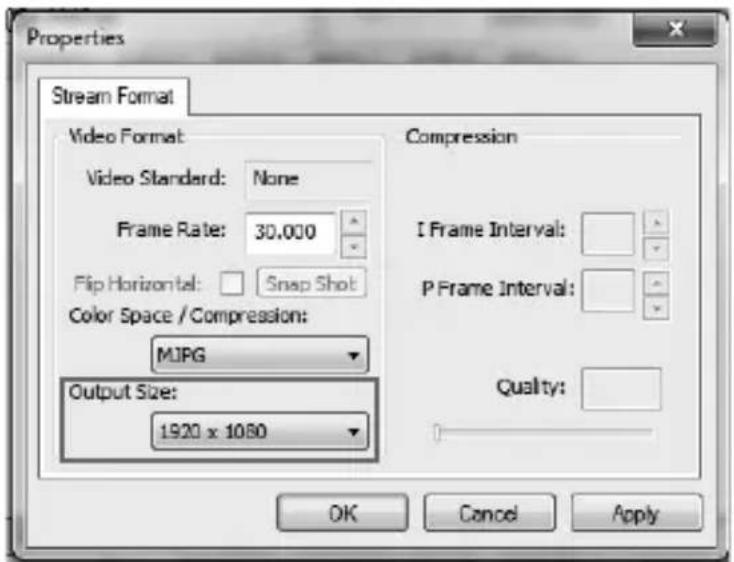
Or change the camera to "restore the default effect" in instant messaging software.
Specification
| Specification | Description |
| Dimension | Camera:104* 139* 124mm |
| Net weight | Camera:500g |
| Color | Black |
| Interface | USB 2.0 |
| Lens | 1/2.8, fixed focus, 120° Angle |
| Sensor | Full HD CMOS sensor |
| Video | 1920 * 1080 |
| Image transmission speed | Up to 30FPS |
| Aperture coefficient | F2.0 |
| Focus distance | 30~300CM (Better distance) |
| Computer system | Windows ® 7, 10 / Mac OS X 8.1 or 10.7 or higher operating system, etc. |
| Recommended conditions | Humidity: 20~85% condensation free Noise level: <48dB Storage temperature: -10° ~55° Reverberation time:<0.5 seconds |
| Certification | CE/FCC |
Warranty
1. Limited warranty in respect of Alfatron Products
1.1 This limited warranty covers defects in materials and workmanship in this product.
1.2 Should warranty service be required, proof of purchase must be presented to the Company.
The serial number on the product must be clearly visible and not have been tampered with in any way whatsoever.
1.3 This limited warranty does not cover any damage, deterioration or malfunction resulting from any alteration, modification, improper or un reasonable use or maintenance, misuse, abuse, accident, neglect, exposure to excess moisture, fire, improper packing and shipping (such claims must be presented to the carrier), lightning, power surges, or other acts of nature. This limited warranty does not cover any damage, deterioration or malfunction resulting from the installation or removal of this product from any installation, any unauthorized tampering with this product, any repairs attempted by anyone unauthorized by the Company to make such repairs, or any other cause which does not relate directly to a defect in materials and/or workmanship of this product. This limited warranty does not cover equipment enclosures, cables or accessories used in conjunction with this product.
This limited warranty does not cover the cost of normal maintenance. Failure of the product due to insufficient or improper maintenance is not covered.
1.4 The Company does not warrant that the product covered hereby, including, without limitation, the technology and/or integrated circuit(s) included in the product, will not become obsolete or that such items are or will remain compatible with any other product or technology with which the product may be used.
1.5 Only the original purchaser of this product is covered under this limited warranty. This limited warranty is not transferable to subsequent purchasers or owners of this product.
1.6 Unless otherwise specified, the goods are warranted in accordance with the manufacturer's product specific warranties against any defect attributable to faulty workmanship or materials, fair wear and tear being excluded.
1.7 This limited warranty only covers the cost of faulty goods and does not include the cost of labour and travel to return the goods to the Company's premises.
1.8 In the event of any improper maintenance, repair or service being carried out by any third persons during the warranty period without the Company's written authorization, the limited warranty shall be void.
1.9 A 7 (seven) year limited warranty is given on the aforesaid product where used correctly according to the Company's instructions, and only with the use of the Company's components.
1.10 The Company will, at its sole option, provide one of the following three remedies to whatever extent it shall deem necessary to satisfy a proper claim under this limited warranty:
1.10.1 Elect to repair or facilitate the repair of any defective parts within a reasonable period of time, free of any charge for the necessary parts and labour to complete the repair and restore this product to its proper operating condition.; or
1.10.2 Replace this product with a direct replacement or with a similar product deemed by the Company to perform substantially the same function as the original product; or
1.10.3 Issue a refund of the original purchase price less depreciation to be determined based on the age of the product at the time remedy is sought under this limited warranty.
1.11 The Company is not obligated to provide the Customer with a substitute unit during the limited warranty period or at any time thereafter.
1.12 If this product is returned to the Company this product must be insured during shipment, with the insurance and shipping charges prepaid by the Customer. If this product is returned uninsured, the Customer assumes all risks of loss or damage during shipment. The Company will not be responsible for any costs related to the removal or re-installation of this product from or into any installation. The Company will not be responsible for any costs related to any setting up this product, any adjustment of user controls or any programming required for a specific installation of this product.
1.13 Please be aware that the Company's products and components have not been tested with competitor's products and therefore the Company cannot warrant products and/or components used in conjunction with competitor's products.
1.14 The appropriateness of the goods for the purpose intended is only warranted to the extent that the goods are used in accordance with the Company's installation, classification and usage instructions.
1.15 Any claim by the Customer which is based on any defect in the quality or condition of the goods or their failure to correspond with specification shall be notified in writing to the Company within 7 days of deliver or (where the defect or failure was not apparent on reasonable inspection by the Customer) within a reasonable time after discovery of the defect or failure, but, in any event, within 6 months of delivery.
1.16 If delivery is not refused, and the Customer does not notify the Company accordingly, the Customer may not reject the goods and the Company shall have no liability and the Customer shall pay the price as if the goods had been delivered in accordance with the Agreement.
1.17 THE MAXIMUM LIABILITY OF THE COMPANY UNDER THIS LIMITED WARRANTY SHALL NOT EXCEED THE ACTUAL PURCHASE PRICE PAID FOR THE PRODUCT.
- Content
- Legal Statement
- CE F© EAC CAN ICES-3 (B)/NMB-3(B)
- FCC Statement
- Preface
- Overview
- Symbol Conventions
- Safety Precautions
- Caution
- Important Statements
- Product Overview
- Product Introduction
- Features
- Package list
- Component description
- Connection
- Operating Description
- Warranty
- Limited warranty in respect of Alfatron Products
Brand : Alfatron
Model : ALF-CAM100
Category : Webcam