
PCPE-GJG1V06 - Connection Base PANASONIC - Free user manual and instructions
Find the device manual for free PCPE-GJG1V06 PANASONIC in PDF.


| Product Type | Connection Base / Docking Station |
| Brand | Panasonic |
| Model | PCPE-GJG1V06 |
| Dimensions (approx.) | 15 cm x 10 cm x 5 cm |
| Weight (approx.) | 300 g |
| Power Input | 5V DC, 2A (via USB-C or proprietary connector) |
| Connectivity | USB-A (x2), USB-C (x1), HDMI output |
| Compatible Devices | Panasonic smartphones, tablets, and other USB-C devices |
| Charging Support | Fast charging up to 18W |
| Data Transfer Speed | USB 3.0 (5 Gbps) |
| Video Output | Up to 4K@30Hz via HDMI |
| Operating Temperature | 0°C to 40°C |
| Storage Temperature | -20°C to 60°C |
| Material | ABS plastic with anti-slip base |
| LED Indicators | Power (blue), Charging (orange), Data (green) |
| Maintenance | Wipe with a dry, soft cloth; avoid liquids |
| Safety Features | Overcurrent, overvoltage, and short-circuit protection |
| Spare Parts Availability | Power adapter and cable available from Panasonic service centers |
| Warranty | 1 year limited warranty |
| Repairability | Modular design; replaceable USB ports and power jack |
Frequently Asked Questions - PCPE-GJG1V06 PANASONIC
User questions about PCPE-GJG1V06 PANASONIC
0 question about this device. Answer the ones you know or ask your own.
Ask a new question about this device
Download the instructions for your Connection Base in PDF format for free! Find your manual PCPE-GJG1V06 - PANASONIC and take your electronic device back in hand. On this page are published all the documents necessary for the use of your device. PCPE-GJG1V06 by PANASONIC.
USER MANUAL PCPE-GJG1V06 PANASONIC
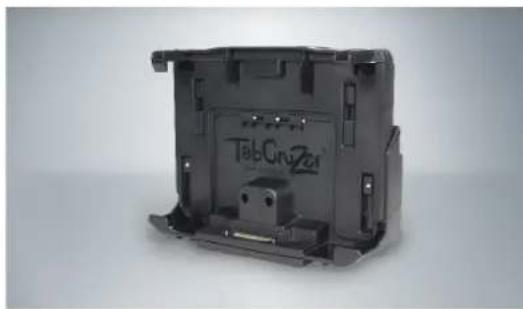

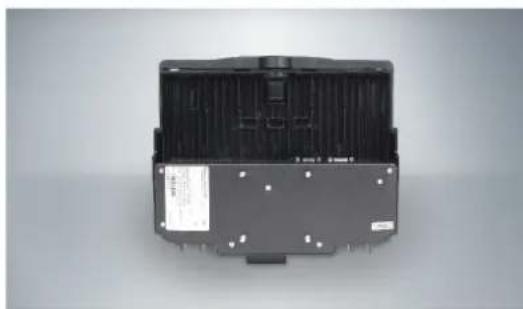
Made for each other: Gamber-Johnson's docking station perfectly compliments the Toughpad FZ-G1 offering a complete vehicle docking experience. Gamber Johnson is an industry leader in design innovation and in manufacturing high quality Toughpad vehicle solutions. Their development process includes extensive testing that results in the most rock solid docking solutions on the market today. These docks are designed, developed and manufactured to create an improved vehicle experience.
Features:
- Gamber-Johnson has worked with Panasonic to perform the appropriate tests needed to qualify the product as Toughbook Certified
• Designed using MIL-STD-810G test procedures
• Designed for the Toughpad FZ-G1 - Docking Station design accommodates extended battery, smart card reader, rear hand strap and bumper guards
-
Docking station mounting pattern is VESA 75mm
-
Docking station can be mounted either vertically or horizontally
- Alignment tabs prevent damage to the docking connector when docking the computer
• Steel and Composite design for reduced overall weight
• Rugged construction for long-term durability
• 12 month warranty with options to extend to 3 and 5 years
Gamber-Johnson manufactures vehicle docking stations intended specifically for use with the Toughpad FZ-G1 Tablet that can fit your unique in-vehicle requirements. This docking station is lightweight and has a high strength-to-weight ratio.
| SPECIFICATIONS/ MODEL NUMBERS PCPE-GJG1V05 PCPE-GJG1V06 | ||
| Electronics No No | ||
| Antenna Pass-through (TNC) No No | ||
| Key type Keyed Alike Keyed Differently | ||
| USB 3.0 ports None None | ||
| HDMI None None | ||
| VGA None None | ||
| Serial Port (D-sub 9 pin) None None | ||
| Ethernet (RJ45) None None | ||
| Power supply input (DC-IN) None None | ||
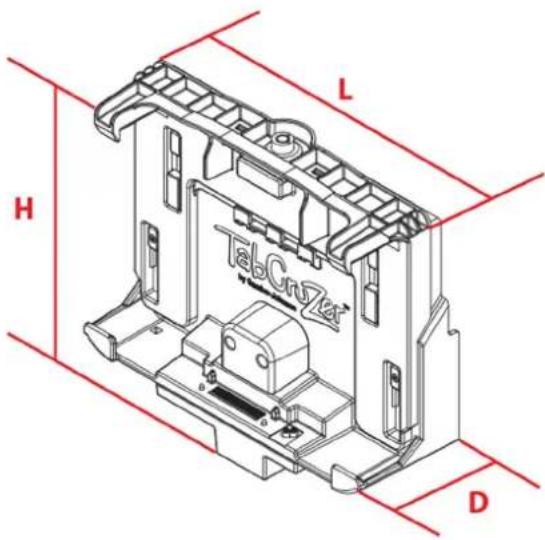
| Dimensions | ||
| Height 232.2 mm (9.14") | 232.2 mm (9.14") | |
| Length 285 mm (11.22") | 285 mm (11.22") | |
| Depth | 96.5 mm (3.8") | 96.5 mm (3.8") |
| Weight | 0.90 kg (2.0 lbs.) | 0.90 kg (2.0 lbs.) |


CERTIFICATIONS AND TESTING:
- Toughbook Certified
• RoHS, CE, FCC, TUV, C-Tick, E-Mark
• Vibration/shock testing: MIL-STD 810G
Brand : PANASONIC
Model : PCPE-GJG1V06
Category : Connection Base