
CAU-180 - Welding machine Steren - Free user manual and instructions
Find the device manual for free CAU-180 Steren in PDF.


| Product Type | Soldering/Welding Machine |
| Brand | Steren |
| Model | CAU-180 |
| Dimensions (Approx.) | 200 x 150 x 100 mm |
| Weight (Approx.) | 1.5 kg |
| Power Supply | 110-240 V AC, 50/60 Hz |
| Power Consumption | 180 W |
| Temperature Range | 200-450 °C |
| Heating Element | Ceramic or Mica |
| Tip Type | Interchangeable soldering tips |
| Display | LED temperature display |
| Functions | Temperature adjustment, standby mode, auto shut-off |
| Maintenance | Clean tip with damp sponge; replace tips when oxidized |
| Safety Features | Heat-resistant handle, insulated cable, fuse protection |
| Spare Parts | Soldering tips, heating element, stand |
| Repairability | Replaceable heating element and tips |
| General Information | Designed for electronics and light-duty soldering work |
Frequently Asked Questions - CAU-180 Steren
User questions about CAU-180 Steren
0 question about this device. Answer the ones you know or ask your own.
Ask a new question about this device
Download the instructions for your Welding machine in PDF format for free! Find your manual CAU-180 - Steren and take your electronic device back in hand. On this page are published all the documents necessary for the use of your device. CAU-180 by Steren.
USER MANUAL CAU-180 Steren
natural_image
Close-up of a black plastic component with a small metallic clip and an arrow pointing to it (no visible text or symbols)Fig. 1

natural_image
Close-up of a small, bright circular object with a white arrow pointing to it, against a dark background (no text or symbols visible)Fig. 2
natural_image
Close-up of a mechanical component with a curved arrow pointing to it, against a dark background (no visible text or symbols)STEREN PRODUCTO EMPACADO S.A. DE C.V.
Biólogo Maximlno Martínez No. 3408 Int. 3 y 4, San Salvador Xochimanca, México, D.F. 02870, RFC: SPE941215H43
ELECTRONICA STEREN DEL CENTRO, S.A. DE C.V.
Rep. del Salvador 20 A y B, Centro, 06000, México. D.F. RFC: ESC9610259N4
ELECTRONICA STEREN DE GUADALAJARA, S.A.
López Cotilla No. 51, Centro, 44100, Guadalajara, Jal. RFC: ESG810511HT6
ELECTRONICA STEREN DE MONTERREY, S.A.
Colón 130 Pte., Centro, 64000, Monterrey, N.L. RFC: ESM830202MF8
ELECTRONICA STEREN DE TIJUANA, S.A. de C.V.
Calle 2a, Juárez 7636, Centro, 22000, Tijuana, B.C.N. RFC: EST980909NU5
Before using your new Soldering iron stand, please read the following recommendations.
IMPORTANT
• Always use a soft and dry cloth in order to clean this base
FEATURES
• Simple base for all the pencil type soldering irons.
INSTRUCTIONS
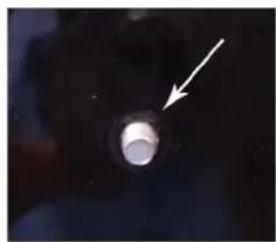
1.- Insert the screw with the soldering iron's base into the metal base.
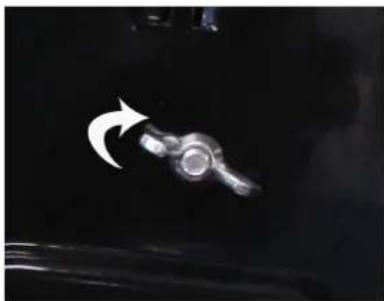
2.- Place the butterfly nut in the other screw end.

STEREN
Product: Soldering iron stand
Part number: CAU-180
Brand: Steren
WARRANTY
This Steren product is warranted under normal usage against defects in workmanship and materials to the original purchaser for one year from the date of purchase.
CONDITIONS
1.- This warranty card with all the required information, invoice or purchase ticket, product box or package, and product, must be presented when warranty service is required.
2.- If the product stills on the warranty time, the company will repair it free of charge.
3.- The repairing time will not exceed 30 natural days, from the day the claim was received.
4.- Steren sell parts, components, consumables and accessories to customer, as well as warranty service, at any of the addresses mentioned later.
THIS WARRANTY IS VOID IN THE NEXT CASES:
If the product has been damaged by an accident, acts of God, mishandling, leaky batteries, failure to follow enclosed instructions, improper repair by unauthorized personnel, improper safe keeping, among others.
a) The consumer can also claim the warranty service in the purchase establishment.
b) If you lose the warranty card, we can reissue it, if you show the invoice or purchase ticket.
RETAILER INFORMATION
Name of the retailer
Address
Product
Brand
Part number

natural_image
Close-up of a black metal object with a small metallic knob and an arrow pointing to it (no visible text or symbols)Fig. 1
natural_image
Close-up of a bright circular object with a white arrow pointing to it, against a dark background (no text or symbols)Fig. 2
3.- Turn to the right the butterfly nut type.
natural_image
Close-up of a small mechanical component with a curved arrow pointing to it, against a dark background (no visible text or symbols)4.- Ready, now you can put your soldering iron at the base.
Product design and specifications subject to change without previous notice.
Serial number
Date of delivery
In case your product fails or have any doubt, please contact your nearest retailer. If you are in Mexico, please give a call to our Call Center.
Call Center
01 800 500 9000
Brand : Steren
Model : CAU-180
Category : Welding machine