
JGSP28DENCC - Frying Pan GE - Free user manual and instructions
Find the device manual for free JGSP28DENCC GE in PDF.


| Type | Gas Range |
| Model Number | JGSP28DENCC |
| Brand | GE |
| Width | 28 inches |
| Depth | 26 inches |
| Height | 47 inches |
| Weight | 150 lbs |
| Fuel Type | Natural Gas (convertible to LP) |
| Number of Burners | 4 |
| Burner BTU (Front Left) | 9,500 BTU |
| Burner BTU (Front Right) | 15,000 BTU |
| Burner BTU (Rear Left) | 5,000 BTU |
| Burner BTU (Rear Right) | 9,500 BTU |
| Oven Capacity | 4.6 cubic feet |
| Oven Features | Convection, Self-Cleaning, Bake, Broil |
| Control Type | Knobs and Electronic Touch |
| Power Supply | 120V/60Hz for electronic components |
| Cleaning | Self-Cleaning Oven, Removable Burner Caps |
| Safety | Flame Failure Device, Child Lock |
| Spare Parts | Available through GE Appliances Parts |
| Warranty | 1 year limited |
| User Manual | 36 pages in English |
Frequently Asked Questions - JGSP28DENCC GE
User questions about JGSP28DENCC GE
0 question about this device. Answer the ones you know or ask your own.
Ask a new question about this device
Download the instructions for your Frying Pan in PDF format for free! Find your manual JGSP28DENCC - GE and take your electronic device back in hand. On this page are published all the documents necessary for the use of your device. JGSP28DENCC by GE.
USER MANUAL JGSP28DENCC GE
Safety Instructions .....2-7
Operating Instructions
Baking or Roasting....12
Broiling, Broiling Guide .....14
Clock and Timer....15
Control Lockout ....11
Cookware 9
Oven 10-21
Sabbath Feature .....18, 19
Self-Cleaning 20, 21
Special Features ....17
Surface Burners 8,9
Thermostat....19
Timed Baking & Roasting .....16
Care and Cleaning
Aluminum Foil 7, 13, 26
Burner Assembly 22
Burner Grates, Vent Grille
and Vent Grille Cap 23
Control Panel 26
Door 25
Floor 26
Knobs 22
Lift-Off Oven Door 25
Light Bulbs 23, 24
Oven Vent and
Cooktop Air Inlet 26
Owner's Manual
JGSP28
Packaging Tape....22
Painted Surfaces 26
Racks 24
Stainless Steel Surfaces .....26
Storage Drawer 24
Vent 26
Troubleshooting Tips ..... 27-30
Accessories 33
Consumer Support
Consumer Support ...... Back Cover
Ownership Registration
for Customers in
Canada only....31, 32
Warranty for Customers
in Canada 35
Warranty for Customers
in the U.S.A. 34
Write the model and serial numbers here:
Model #
Serial #
You can find them on a label behind the open oven door on the lower left corner of the range frame.
49-80535-2 11-10 GE

natural_image
Symbol of a person falling off a large block, enclosed in a circle (no text or numbers present)WARNING!
ANTI-TIP DEVICE
ALL RANGES CAN TIP
■ INJURY TO PERSONS COULD RESULT
■INSTALL ANTI-TIP
DEVICES PACKED WITH
RANGE
■ SEE INSTALLATION INSTRUCTIONS
GAS-FIRED

⚠ WARNING: If the information in this manual is not followed exactly, a fire or explosion may result causing property damage, personal injury or death.
— Do not store or use gasoline or other flammable vapors and liquids in the vicinity of this or any other appliance.
- WHAT TO DO IF YOU SMELL GAS
- Do not try to light any appliance.
Do not touch any electrical switch; do not use any phone in your building.
Immediately call your gas supplier from a neighbor's phone. Follow the gas supplier's instructions.
If you cannot reach your gas supplier, call the fire department.
— Installation and service must be performed by a qualified installer, service agency or the gas supplier.
WARNING!
For your safety, the information in this manual must be followed to minimize the risk of fire or explosion, electric shock, or to prevent property damage, personal injury, or loss of life.

ANTI-TIP DEVICE

natural_image
Two circular icons showing a person using a trash bin and a broken bucket, no text or symbols present.WARNING
- All ranges can tip.
• BURNS or other SERIOUS INJURIES can result.
• INSTALL and CHECK the ANTI-TIP bracket following the instructions supplied with the bracket.
To reduce the risk of tipping the range, the range must be secured by a properly installed anti-tip bracket. See installation instructions shipped with the bracket for complete details before attempting to install.
To check if the bracket is installed and engaged properly, remove the storage drawer or kick panel and look underneath the range to see that the leveling leg is engaged in the bracket. If the range is pulled from the wall for any reason, always repeat this procedure to verify the range is properly secured by the anti-tip bracket.
If you did not receive an anti-tip bracket with your purchase, call 1.800.626.8774 to receive one at no cost (in Canada, call 1.800.561.3344). For installation instructions of the bracket, visit GEAppliances.com (in Canada, www.GEAppliances.ca).

IMPORTANT SAFETY NOTICE
The California Safe Drinking Water and Toxic Enforcement Act requires the Governor of California to publish a list of substances known to the state to cause birth defects or other reproductive harm, and requires businesses to warn customers of potential exposure to such substances.
Gas appliances can cause minor exposure to four of these substances, namely benzene, carbon monoxide, formaldehyde and soot, caused primarily by the incomplete combustion of natural gas or LP fuels. Properly adjusted burners, indicated by a bluish rather than a yellow flame, will minimize incomplete combustion. Exposure to these substances can be minimized by venting with an open window or using a ventilation fan or hood.
The fiberglass insulation in self-clean ovens gives off a very small amount of carbon monoxide during the cleaning cycle. Exposure can be minimized by venting with an open window or using a ventilation fan or hood.

WARNING!
SAFETY PRECAUTIONS
When using electrical appliances, basic safety precautions should be followed, including the following:
Use this appliance only for its intended purpose as described in this Owner's Manual.
- Be sure your appliance is properly installed and grounded by a qualified technician in accordance with the provided installation instructions.
Before performing any service, disconnect the range power supply at the household distribution panel by removing the fuse or switching off the circuit breaker.
- Have the installer show you the location of the circuit breaker or fuse. Mark it for easy reference.
Do not leave children alone—children should not be left alone or unattended in an area where an appliance is in use. They should never be allowed to sit or stand on any part of the appliance.
■Have the installer show you the location of the range gas shut-off valve and how to shut it off if necessary.
■ Have your range installed and properly grounded by a qualified installer, in accordance with the Installation Instructions. Any adjustment and service should be performed only by qualified gas range installers or service technicians.
- Locate the range out of kitchen traffic path and out of drafty locations to prevent poor air circulation.
- Be sure all packaging materials are removed from the range before operating it to prevent fire or smoke damage should the packaging material ignite.
- Do not leave children alone or unattended where a range is hot or in operation. They could be seriously burned.
Do not attempt to repair or replace any part of your range unless it is specifically recommended in this manual. All other service should be referred to a qualified technician.
- Be sure your range is correctly adjusted by a qualified service technician or installer for the type of gas (natural or LP) that is to be used. Your range can be converted for use with either type of gas. See the Installation Instructions packed with the range.
Plug your range into a 120-volt grounded outlet only. Do not remove the round grounding prong from the plug. If in doubt about the grounding of the home electrical system, it is your personal responsibility and obligation to have an ungrounded outlet replaced with a properly grounded, three-prong outlet in accordance with the National Electrical Code. Do not use an extension cord with this appliance.
WARNING: These adjustments must be made by a qualified service technician in accordance with the manufacturer's instructions and all codes and requirements of the authority having jurisdiction. Failure to follow these instructions could result in serious injury or property damage. The qualified agency performing this work assumes responsibility for the conversion.
- Keep the hood and grease filters clean to maintain good venting and to avoid grease fires.
■ Teach children not to play with the controls or any other part of the range.
Always keep dish towels, dish cloths, pot holders and other linens a safe distance from your range.

SAFETY PRECAUTIONS
■ Always keep wooden and plastic utensils and canned food a safe distance from your range.
■ Always keep combustible wall coverings, curtains or drapes a safe distance from your range.
- Do not clean the range with flammable or volatile cleaning fluids.
■ After prolonged use of a range, high floor temperatures may result and many floor coverings will not withstand this kind of use. Never install the range over vinyl tile or linoleum that cannot withstand such type of use. Never install it directly over interior kitchen carpeting.
Do not allow anyone to climb, stand or hang on the oven door, storage drawer or cooktop. They could damage the range and even tip it over, causing severe personal injury.
CAUTION: Items of interest to children should not be stored in cabinets above a range or on the backsplash of a range—children climbing on the range to reach items could be seriously injured.
WARNING: NEVER use this appliance as a space heater to heat or warm the room. Doing so may result in carbon monoxide poisoning and overheating of the cooktop or oven.
For your safety, never use your appliance for warming or heating the room.
Large scratches or impacts to glass doors can lead to broken or shattered glass.
- Do not clean the range when the appliance is in use.
■ Never wear loose-fitting or hanging garments while using the appliance. Be careful when reaching for items stored in cabinets over the range. Flammable material could be ignited if brought in contact with flame or hot oven surfaces and may cause severe burns.
- Do not store flammable materials in an oven, a range storage drawer or near a cooktop.
Do not store or use combustible materials, gasoline or other flammable vapors and liquids in the vicinity of this or any other appliance. - Do not let cooking grease or other flammable materials accumulate in or near the range.
Do not use water on grease fires. Never pick up a flaming pan. Turn the controls off. Smother a flaming pan on a surface burner by covering the pan completely with a well-fitting lid, cookie sheet or flat tray. Use a multi-purpose dry chemical or foam-type fire extinguisher.
Flaming grease outside a pan can be put out by covering it with baking soda or, if available, by using a multi-purpose dry chemical or foam-type fire extinguisher.
Flame in the oven can be smothered completely by closing the oven door and turning the control to off or by using a multi-purpose dry chemical or foam-type fire extinguisher.
■ Let the burner grates and other surfaces cool before touching them or leaving them where children can reach them.
■ Never block the vents (air openings) of the range. They provide the air inlet and outlet that are necessary for the range to operate properly with correct combustion. Air openings are located through the rear and front center of the cooktop, at the top and bottom of the oven door, and at the bottom of the range under the storage drawer or kick panel.
- Do not lift the cooktop. Lifting the cooktop can lead to damage and improper operation of the range.

WARNING!
SURFACE BURNERS
Use proper pan size—avoid pans that are unstable or easily tipped. Select cookware having flat bottoms large enough to cover burner grates. To avoid spillovers, make sure cookware is large enough to contain the food properly. This will both save cleaning time and prevent hazardous accumulations of food, since heavy spattering or spillovers left on range can ignite. Use pans with handles that can be easily grasped and remain cool.
■ Always use the LITE position when igniting the top burners and make sure the burners have ignited.
■ Never leave the surface burners unattended at high flame settings. Boilovers cause smoking and greasy spillovers that may catch on fire.
- Adjust the top burner flame size so it does not extend beyond the edge of the cookware. Excessive flame is hazardous.
■ Use only dry pot holders—moist or damp pot holders on hot surfaces may result in burns from steam. Do not let pot holders come near open flames when lifting cookware. Do not use a towel or other bulky cloth in place of a pot holder.
- When using glass cookware, make sure it is designed for top-of-range cooking.
To minimize the possibility of burns, ignition of flammable materials and spillage, turn cookware handles toward the side or back of the range without extending over adjacent burners.
- Carefully watch foods being fried at a high flame setting.
■ Always heat fat slowly, and watch as it heats.
Do not leave any items on the cooktop. The hot air from the vent may ignite flammable items and will increase pressure in closed containers, which may cause them to burst.
If a combination of oils or fats will be used in frying, stir together before heating or as fats melt slowly.
■ Use a deep fat thermometer whenever possible to prevent overheating fat beyond the smoking point.
- Do not operate the burner without all burner parts in place.
■ Use the least possible amount of fat for effective shallow or deep-fat frying. Filling the pan too full of fat can cause spillovers when food is added.
■When preparing flaming foods under the hood, turn the fan on.
Do not use a wok on the cooking surface if the wok has a round metal ring that is placed over the burner grate to support the wok. This ring acts as a heat trap, which may damage the burner grate and burner head. Also, it may cause the burner to work improperly. This may cause a carbon monoxide level above that allowed by current standards, resulting in a health hazard.
- Foods for frying should be as dry as possible. Frost on frozen foods or moisture on fresh foods can cause hot fat to bubble up and over the sides of the pan.
■ Never try to move a pan of hot fat, especially a deep fat fryer. Wait until the fat is cool.
Do not leave plastic items on the cooktop—they may melt if left too close to the vent.
- Keep all plastics away from the surface burners.
To avoid the possibility of a burn, always be certain that the controls for all burners are at the OFF position and all grates are cool before attempting to remove them.
If range is located near a window, do not hang long curtains that could blow over the surface burners and create a fire hazard.
If you smell gas, turn off the gas to the range and call a qualified service technician. Never use an open flame to locate a leak.
■ Always turn the surface burner controls off before removing cookware.
Do not use aluminum foil to cover the grates or line any part of the cooktop. Doing so may result in carbon monoxide poisoning, overheating of the cooktop surfaces, or a potential fire hazard.

COOK MEAT AND POULTRY THOROUGHLY...
Cook meat and poultry thoroughly—meat to at least an INTERNAL temperature of 160^ F and poultry to at least an INTERNAL temperature of 180^ F. Cooking to these temperatures usually protects against foodborne illness.
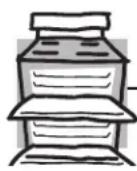
WARNING! OVEN
Stand away from the range when opening the oven door. Hot air or steam which escapes can cause burns to hands, face and/or eyes.
- Do not heat unopened food containers. Pressure could build up and the container could burst, causing an injury.
- Keep the oven vents unobstructed.
- Keep the oven free from grease buildup.
Place the oven rack in the desired position while the oven is cool. If racks must be handled when hot, do not let pot holder contact the heating elements. - When using cooking or roasting bags in the oven, follow the manufacturer's directions.
■Pulling out the rack to the stop-lock is a convenience in lifting heavy foods. It is also a precaution against burns from touching hot surfaces of the door or oven walls. - Do not use the oven to dry newspapers. If overheated, they can catch on fire.
- Do not use the oven for a storage area. Items stored in an oven can ignite.
WARNING: NEVER cover any slots, holes or passages in the oven bottom or cover an entire rack with materials such as aluminum foil. Doing so blocks air flow through the oven and may cause carbon monoxide poisoning. Aluminum foil linings may also trap heat, causing a fire hazard.
- Do not leave paper products, cooking utensils or food in the oven when not in use.
■ Make sure a broiler pan is in place correctly to reduce the possibility of grease fires.
If you should have a grease fire in a broiler pan, press the CLEAR/OFF pad and keep the oven door closed to contain fire until it burns out.

SELF-CLEANING OVEN
Do not use oven cleaners. No commercial oven cleaner or oven liner protective coating of any kind should be used in or around any part of the oven. Residue from oven cleaners will damage the inside of the oven when the self-clean cycle is used.
Do not clean the door gasket. The door gasket is essential for a good seal. Care should be taken not to rub, damage or move the gasket.
■ Before self-cleaning the oven, remove shiny, silver-colored oven racks (on some models) and all other cookware.
- Be sure to wipe up excess spillage before starting the self-cleaning operation.
If the self-cleaning mode malfunctions, turn the oven off and disconnect the power supply. Have it serviced by a qualified technician. - Clean only parts listed in this Owner's Manual.

READ AND FOLLOW THIS SAFETY INFORMATION CAREFULLY.
SAVE THESE INSTRUCTIONS
Using the gas surface burners.
Throughout this manual, features and appearance may vary from your model.

natural_image
Hand pressing a button on a wall with an arrow indicating left motion (no text or symbols)Push the control knob in and turn it to the LITE position.
How to Light a Gas Surface Burner
Push the control knob in and turn it to the LITE position.
You will hear a little clicking noise—the sound of the electric spark igniting the burner.
After the flame lights, turn the knob to adjust the flame size. If the knob stays at LITE, it will continue to click.
When one burner is turned to LITE, all the burners spark. Do not attempt to disassemble or clean around any burner while another burner is on. An electric shock may result, which could cause you to knock over hot cookware.
Sealed Gas Burners
The smaller burner (right rear position) will give the best simmer results for delicate foods, such as sauces or foods which need to cook over low heat for a long time. It can be turned down to a very low setting.
The largest burners are higher powered than the others and will bring liquids to a boil quicker.

natural_image
Simple line drawing of a cooking pot with a crossed-out black mark (no text or symbols)How to Select Flame Size
For safe handling of cookware, never let the Any flame larger than the bottom of the flames extend up the sides of the cookware. cookware is wasted and only serves to heat. Watch the flame, not the knob, as you watch the handle.
Watch the flame, not the knob, as you reduce heat. The flame size on a gas burner should match the cookware you are using.
In Case of Power Failure
In case of a power failure, you can light the gas surface burners on your range with a match. Hold a lit match to the burner, then push in and turn the control knob to the LITE position. Use extreme caution when lighting burners this way.
Surface burners in use when an electrical power failure occurs will continue to operate normally.
Before Lighting a Gas Burner
■ Make sure all grates on the range are in place before using any burner.
After Lighting a Gas Burner
Do not operate the burner for an extended period of time without cookware on the grate. The finish on the grate may chip without cookware to absorb the heat.
■ Be sure the burners and grates are cool before you place your hand, a pot holder, cleaning cloths or other materials on them.
Top-of-Range Cookware
Aluminum: Medium-weight cookware is recommended because it heats quickly and evenly. Most foods brown evenly in an aluminum skillet. Use saucepans with tight-fitting lids when cooking with minimum amounts of water.
Cast-Iron: If heated slowly, most skillets will give satisfactory results.
Enamelware: Under some conditions, the enamel of some cookware may melt. Follow cookware manufacturer's recommendations for cooking methods.
Glass: There are two types of glass cookware—those for oven use only and those for top-of-range cooking (saucepans, coffee and teapots). Glass conducts heat very slowly.
Heatproof Glass Ceramic: Can be used for either surface or oven cooking. It conducts heat very slowly and cools very slowly. Check cookware manufacturer's directions to be sure it can be used on gas ranges.
Stainless Steel: This metal alone has poor heating properties and is usually combined with copper, aluminum or other metals for improved heat distribution. Combination metal skillets usually work satisfactorily if they are used with medium heat as the manufacturer recommends.

natural_image
Cross symbol crossed over a circular ring, no text or labels presentStove Top Grills
Do not use stove top grills on your sealed gas burners. If you use the stove top grill on the sealed gas burner, it will cause incomplete combustion and can result in exposure to carbon monoxide levels above allowable current standards.
This can be hazardous to your health.
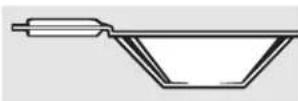
Wok This Way
We recommend that you use a 14-inch or smaller flat-bottomed wok. They are available at your local retail store. Make sure the wok bottom sits flat on the grate.
Only a flat-bottomed wok should be used.

natural_image
Symbolic illustration of a pan with a crossed-out black cross, representing cooking or heating (no text or symbols present)Do not use a round-bottomed wok on a support ring. Placing the ring over the burner or grate may cause the burner to work improperly, resulting in carbon monoxide levels above allowable standards. This could be dangerous to your health.
Using the oven controls.
Throughout this manual, features and appearance may vary from your model.

flowchart
graph TD
    A["1"] --> B["BAKE TEMP RECALL"]
    B --> C["BROIL HI/LO"]
    C --> D["13"]
    E["START ON"] --> F["CLEAR OFF"]
    F --> G["12"]
    H["SELF CLEAN"] --> I["11"]
    J["CONTROL PRESS + AND + AND HOLD FOR 3 SECONDS"] --> K["10"]
    L["+"] --> M["-"]
    N["9"] --> O["11"]
    P["3"] --> Q[" "]
    R["4"] --> S["KITCHEN TIMER ON/OFF"]
    S --> T["CLOCK"]
    T --> U["5"]
    V["7"] --> W["COOKING TIME ON/OFF"]
    W --> X["START TIME ON/OFF"]
    X --> Y["6"]
    Z["8"] --> AA["AUTOMATIC OVEN"]
Oven Control, Clock and Timer Features and Settings
BAKE/TEMP RECALL Pad
Touch this pad to select the bake function.
BAKE Light
Flashes while in edit mode—you can change the oven temperature at this point. Glows when the oven is in bake mode.
2 START/ON Pad
Must be touched to start any cooking or cleaning function.
3 Display
Shows the time of day, oven temperature, whether the oven is in the bake, broil or self-cleaning mode and the times set for the timer or automatic oven operations. The display will show "PrE" while preheating. When the oven reaches the selected temperature, the oven control will beep and the display will show the oven temperature.
Function Error Code
If "F- and a number or letter" flash in the display and the oven control signals, this indicates a function error code.
If the function error code appears during the self-cleaning cycle, check the oven door latch. The latch handle may have been moved, even if only slightly, from the latched position. Make sure the latch is moved to the right as far as it will go.
Touch the CLEAR/OFF pad. Allow the oven to cool for one hour. Put the oven back into operation. If the function error code repeats, disconnect the power to the range and call for service.
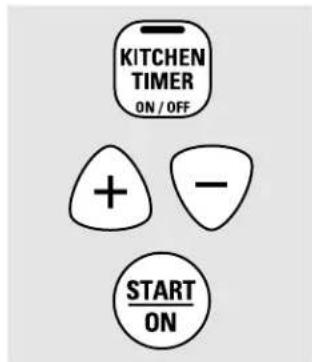
KITCHEN TIMER ON/OFF Pad
Touch this pad to select the timer feature. Then press + and - pads to adjust time.
TIMER Light
Flashes while in edit mode—you can change the set time at this point. Glows when the timer has been activated. Flashes again when the time has run out until the control is reset.
5 CLOCK Pad
To set clock, touch this pad twice and then touch the + and - pads. The time of day will flash in display when oven is first turned on.
START TIME Pad
Use along with the COOKING TIME or SELF CLEAN pads to set the oven to start and stop automatically at a time you set.
START TIME Time Light
Flashes while in edit mode—you can change the start time set time at this point. Glows when the function has been activated.
COOKING TIME Pad
Touch this pad and then touch the + or - pads to set the amount of time you want your food to cook. The oven will shut off when the cooking time has run out.
COOKING TIME Light
Flashes while in edit mode—you can change set time at this point. Glows when function has been activated. Flashes again when the time has run out until the control is reset.
AUTOMATIC OVEN Light
This lights anytime the oven has been programmed using the COOKING TIME or START TIME functions.

Oven Control, Clock and Timer Features and Settings
9 - Pad Short t
Short taps to this pad will decrease the time or temperature by small amounts. Touch and hold the pad to decrease the time or temperature by larger amounts.
10 + Pad Short t
Short taps to this pad will increase the time or temperature by small amounts. Touch and hold the pad to increase the time or temperature by larger amounts.
11 SELF CLEAN Pad
Touch this pad to select the self-cleaning function. See the Using the self-cleaning oven section.
CLEAN Light
Flashes while in edit mode—you can change the length of time for the self-clean cycle at this point. Glows when the oven is in the self-clean cycle. After the self-clean cycle, the light will turn off. Unlatch the door.
12 CLEAR/OFF Pad
Touch this pad to cancel ALL oven operations except the clock and timer.
13 BROIL HI/LO Pad
Touch this pad to select the broil function.
BROIL Light
Flashes while in edit mode—you can switch from HI to LO BROIL at this point. Glows when the oven is in broil mode.
Indicator Lights (on some pads)
EDIT mode lasts several seconds after the last pad press. START TIMEON/OFF and COOKING TIME ON/OFF will be the only pads lit if either of these options is selected. (Example START
TIME is selected with BAKE—th START TIME pad will remain lit until the clock reaches the programmed time, at which point it will turn off and the BAKE/TEMP RECALL pad light will light up).

CONTROL LOCK/UNLOCK
PRESS + AND - AND HOLD FOR 3 SECONDS
Control Lockout
Your control will allow you to lock out the touch pads so they cannot be activated when touched.
To lock/unlock the controls:
1 Touch the + and - pads at the same time for 3 seconds, until the display shows LOC ON.
2 To unlock the control, touch the + and - pads at the same time for 3 seconds, until the display shows LOC OFF.
When this feature is on and the touch pads are touched, the control will beep and the display will show LOC ON.
The control lockout mode affects all touch pads. No touch pads will work when this feature is activated.
■The adjustment will be retained in memory after a power failure.
Power Outage
CAUTION: Do not make any attempt to operate the electric ignition oven during an electrical power failure.
The oven or broiler cannot be lit during a power failure. Gas will not flow unless the glow bar is hot.
If the oven is in use when a power failure occurs, the oven burner shuts off and cannot be re-lit until power is restored. This is because the flow of gas is automatically stopped and will not resume when power is restored until the glow bar has reached operating temperature.
If a flashing time is in the display, electric power has been restored. Reset the clock.
If your oven was set for a timed oven operation and a power outage occurred, the clock and all programmed functions must be reset.
To reset the clock, touch the CLOCK pad. Enter the correct time of day by touching the + or - pads. Touch the START/ON pad.
To avoid possible burns, place the racks in the desired position before you turn the oven on.

The oven has 7 rack positions.
Before you begin...
The racks have stops, so that when placed correctly on the supports, they will stop before coming completely out, and will not tilt.
When placing and removing cookware, pull the rack out until it stops.
The bake burner is under the oven floor. Do not place foods on the oven bottom for cooking.
To remove a rack, pull it toward you, tilt the front end up and pull it out.
To replace, place the end of the rack (stop-locks) on the support, tilt up the front and push the rack in.
CAUTION: When you are using the rack in the lowest position (A), you will need to use caution when pulling the rack out. We recommend that you pull the rack out several inches and then, using two pot holders, pull the rack out by holding the sides of it. The rack is low and you could be burned if you place your hand in the middle of the rack and pull all the way out. Be very careful not to burn your hand on the door when using the rack in the lowest position (A).

How to Set the Oven for Baking or Roasting
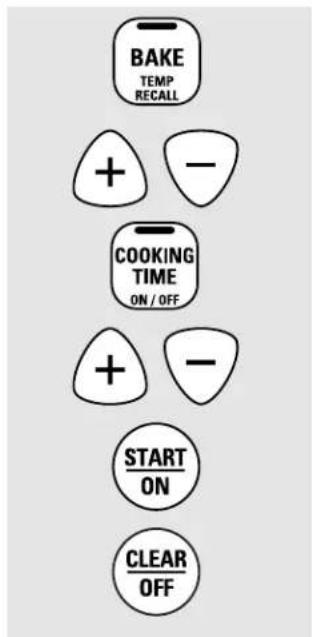
1 Touch the BAKE pad.
2 Touch the + or - pads until the desired temperature is displayed.
3 Touch the START/ON pad.
The oven will start automatically. The display will show "PrE" while preheating. When the oven reaches the selected temperature, the oven control will beep several times and the display will show the oven temperature.
To change the oven temperature during BAKE cycle, touch the BAKE pad and then the + or - pads to get the new temperature.
4 Check food for doneness at minimum time on recipe. Cook longer if necessary.
5 Touch the CLEAR/OFF pad when baking is finished and then remove the food from the oven.
NOTE: A cooling fan will automatically turn on and off to cool internal parts. This is normal, and the fan may continue to run even after the oven in turned off.
Type of Food Rack
Position
| Frozen pies (on cookie sheet) C or D |
| Angel food cake A |
| Bundt or pound cakes B or C |
| Biscuits, muffins, brownies, C or D cookies, cupcakes, layer cakes, pies |
| Casseroles C or D |
| Turkey A |
If baking four cake layers at the same time, place two layers on rack B and two layers on rack D. Stagger pans on the rack so one is not directly above the other.

Do not place foods or pizza stone directly on the oven floor.
Preheating and Pan Placement
Preheat the oven if the recipe calls for it. Preheating is necessary for good results when baking cakes, cookies, pastry and breads.
To preheat, set the oven at the correct temperature. The control will beep when the oven is preheated and the display will show your set temperature. The preheat time will vary depending on the temperature setting.
Baking results will be better if baking pans are centered in the oven as much as possible. If baking with more than one pan, place the pans so each has at least 1" to 1½" of air space around it.
Aluminum Foil
Do not use aluminum foil to line oven bottoms. The foil will trap heat below and upset the performance of the oven. Foil can melt and permanently damage the oven bottom. Damage from improper use of aluminum foil is not covered by the product warranty
Foil may be used to catch spills by placing a sheet on a lower rack, several inches below the food. Do not use more foil than necessary and never entirely cover an oven rack with aluminum foil. Keep foil at least 1-1/2" from oven walls to prevent poor heat circulation
Oven Moisture
As your oven heats up, the temperature change of the air in the oven may cause water droplets to form on the door glass. These droplets are harmless and will evaporate as the oven continues to heat up.
Oven Vent
Your oven is vented through the rear vent located through the cooktop under the vent grille. Do not block this vent when cooking in the oven—it is important that the flow of hot air from the oven and fresh air to the oven burner be uninterrupted. Avoid touching the vent openings or nearby surfaces during oven or broiler operation—they may become hot.
■ Handles of pots and pans on the cooktop may become hot if left too close to the vent.
- Do not leave plastic items on the cooktop—they may melt if left too close to the vent.
Do not leave any items on the cooktop. The hot air from the vent may ignite flammable items and will increase pressure in closed containers, which may cause them to burst.
■ Metal items will become very hot if they are left on the cooktop, and could cause burns.
How to Set the Oven for Broiling
IMPORTANT: To avoid possible burns, place the racks in the desired position before you turn the oven on.
Place the meat or fish on a broiler grid in a broiler pan designed for broiling.
2 Follow suggested rack positions in the Broiling Guide.
3 The oven door must be closed during broiling.
4 Touch the BROIL HI/LO pad once for HI Broil.
To change to LO Broil, touch the BROIL HI/LO pad again.
Use LO Broil to cook foods such as poultry or thick cuts of meat thoroughly without over-browning them.
5 Touch the START/ON pad.
6 When broiling is finished, touch the CLEAR/OFF pad.
Serve the food immediately, and leave the pan outside the oven to cool during the meal for easiest cleaning.
The size, weight, thickness, starting temperature and your preference of doneness will affect broiling times. This guide is based on meats at refrigerator temperature.
† The U.S. Department of Agriculture says "Rare beef is popular, but you should know that cooking it to only 140°F means some food poisoning organisms may survive." (Source: Safe Food Book. Your Kitchen Guide. USDA Rev. June 1985.)

The oven has 7 rack positions.
Broiling Guide
| Food or Thickness | Quantity and/ Rack First Side Second Side Position Time (min.) Time (min.) Comments | ||||
| Ground Beef | 1/2 "to 3/4 "thick D 13 8 Space evenly. | ||||
| Beef Steaks | |||||
| Rare† | 3/4 " to 1" thick | F | 6 | 4 | Steaks less than 3/2 " thick are difficult |
| Medium | 1 to 112 lbs. | E | 8 | 6 | |
| Well Done | E | 10 8 to cook rare. | Slash fat. | ||
| Rare† | 112 " thick | E | 15 | 10 | |
| Medium | 2 to 212 lbs. | E | 15 | 15 | |
| Well Done | D 20 | 20 | |||
| Chicken | 1 whole cut up | C | 25 | 25 | Brush each side with melted butter.Broil skin-side-down first. |
| 2 to 212 lbs., split lengthwise | |||||
| Breast | C | 25 | 15 | ||
| Bakery Product | |||||
| Bread (toast) | 2 to 4 slices | F | 3 | 1 | Space evenly. Place English muffins cut- side-up and brush with butter if desired. |
| English Muffin | 2 (split) | F | 3-4 | ||
| Lobster Tails | 2-4 | C | 18-20 | Do not turn over. | Cut through back of shell. Spread open.Brush with melted butter before broiling and after half of broiling time. |
| Fish Fillets | 1 lb. (1/4 "to 1/2 " thick) | E | 6 | 6 | Handle and turn very carefully. Brush with lemon butter before and during cooking, if desired. |
| Salmon | |||||
| Steaks | 2 (1" thick) | E | 10 | 5 | Turn carefully.Do not turn skin-side- down. |
| Fillets | 2 ( 1/2 "to 3/4 " thick) | E | 15 | ||
| Ham Slices(precooked) | 1/2 " thick | D | 8 | 5 | |
| 1" thick | D | 8 | 8 | ||
| Pork Chops | 2 ( 1/2 " thick) | D | 10 | 10 | Slash fat. |
| Well Done | 2 (1" thick) about 1 lb. | D | 15 | 5 | |
Not all features are on all models.
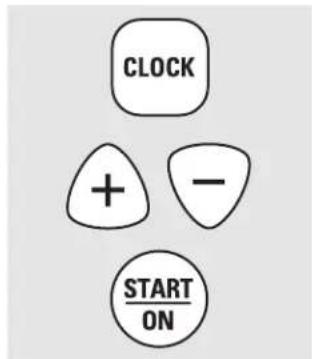
Make sure the clock is set to the correct time of day.
To Set the Clock
The clock must be set to the correct time of day for the automatic oven timing functions to work properly. The time of day cannot be changed during a delayed cooking or a delayed self-cleaning cycle.
1 Touch the CLOCK pad twice.
2 Touch the + or - pads.
If the + or - pads are not touched within one minute after you touch the CLOCK pad, the display reverts to the original
setting. If this happens, touch the CLOCK pad twice and reenter the time of day.
3 Touch the START/ON pad until the time of day shows in the display. This enters the time and starts the clock.
To check the time of day when the display is showing other information, simply touch the CLOCK pad. The time of day shows until another pad is touched.
To Turn Off the Clock Display
If you have several clocks in your kitchen, you may wish to turn off the time of day clock display on your range.
1 Touch the CLOCK pad once to turn off the time of day display. Although you will not be able to see it, the clock maintains the correct time of day.
2 Touch the CLOCK pad twice to recall the clock display.
The CLEAR/OFF pad does not affect the timer.
To Set the Timer
The timer does not control oven operations. The maximum setting on the timer is 9 hours and 59 minutes.
1 Touch the KITCHEN TIMER ON/OFF pad.
2 Touch the + or - pads until the amount of time you want shows in the display. The maximum time that can be entered in minutes is 59. Times more than 59 minutes should be changed to hours and minutes.
If you make a mistake, touch the KITCHEN TIMER ON/OFF pad and begin again.
3 Touch the START/ON pad. The time will start counting down, although the display does not change until one minute has passed.
4 When the timer reaches :00, the control will beep 3 times followed by one beep every 6 seconds until the KITCHEN TIMER ON/OFF pad is touched.
To Reset the Timer
If the display is still showing the time remaining, you may change it by touching the KITCHEN TIMER ON/OFF pad, then touching the + or - pads until the time you want appears in the display.
If the remaining time is not in the display (clock, start time set time or cooking time are in the display), recall the remaining time by touching the KITCHEN TIMER ON/OFF pad and then touching the + or - pads to enter the new time you want.
To Cancel the Timer
Touch the KITCHEN TIMER ON/OFF pad twice.
Using the timed baking and roasting features (on some models).
Do not lock the oven door with the latch during timed cooking. The latch is used for self-cleaning only.
NOTE: Foods that spoil easily—such as milk, eggs, fish, stuffings, poultry and pork—should not be allowed to sit for more than 1 hour before or after cooking. Room temperature promotes the growth of harmful bacteria. Be sure that the oven light is off because heat from the bulb will speed harmful bacteria growth.
How to Set an Immediate Start and Automatic Stop
The oven will turn on immediately and cook for a selected length of time. At the end of the cooking time, the oven will turn off automatically.
1 Touch the BAKE pad.
2 Touch the + or - pads to set the oven temperature.
3 Touch the COOKING TIME pad.
NOTE: If your recipe requires preheating, you may need to add additional time to the length of the cooking time.
4 Touch the + or - pads to set the baking time.
The cooking time that you entered will be displayed. (If you select Cooking Time first and then adjust the Bake Temperature, the oven temperature will be displayed instead).
5 Touch the START/ON pad.
The display shows either the oven temperature that you set or the cooking time countdown. (The display starts with "PrE" if showing the oven temperature.)
The oven will continue to cook for the programmed amount of time, then turn off automatically.
6 Touch the CLEAR/OFF pad to clear the display if necessary.
Remove the food from the oven. Remember, even though the oven shuts off automatically, foods continue cooking after controls are off.

How to Set a Delayed Start and Automatic Stop
The oven will turn on at the time of day you set, cook for a specific length of time and then turn off automatically.
Make sure the clock shows the correct time of day.
NOTE: If you would like to check the times you have set, touch the START TIME pad to check the start time set time you have set or touch the COOKING TIME pad to check the length of cooking time you have set.
When the oven turns on at the time of day you have set, the display will show "PrE" until it reaches the selected temperature, then it will display the oven temperature.
At the end of cooking time, the oven will turn off and the end-of-cycle tone will sound.
8 Touch the CLEAR/OFF pad to clear the display if necessary.
Remove the food from the oven. Remember, even though the oven shuts off automatically, foods continue cooking after controls are off.
Special features of your oven control. GEAppliances.com
Your new touch pad control has additional features that you may choose to use. The following are the features and how you may activate them.
The special feature modes can only be activated while the display is showing the time of day. They remain in the control's memory until the steps are repeated.
When the display shows your choice, touch the START/ON pad. The special features will remain in memory after a power failure.
NOTE: The Sabbath feature and the Thermostat Adjustment feature are also Special Features, but they are addressed separately in the following sections.

12 Hour Shut-Off
With this feature, should you forget and leave the oven on, the control will automatically turn off the oven after 12 hours during baking functions or after 3 hours during a broil function.
If you wish to turn OFF this feature, follow the steps below.
1 Touch the BAKE and BROIL HI/LO pads at the same time for 3 seconds until the display shows SF.
2 Touch the CLOCK pad. The display will show ON (12 hour shut-off). Touch the CLOCK pad repeatedly until the display shows OFF (no shut-off).
3 Touch the START/ON pad to activate the no shut-off and leave the control set in this special features mode.
Using the Sabbath Feature (on some models).
(Designed for use on the Jewish Sabbath and Holidays)
The Sabbath feature can be used for baking/roasting only. It cannot be used for broiling, self-cleaning or Start Time cooking.
NOTE: The oven light comes on automatically (on some models) when the door is opened and goes off when the door is closed. The bulb may be removed. See the Oven Light Replacement section. On models with a light switch on the control panel, the oven light may be turned on and left on.

flowchart
graph TD
    A["BAKE TEMP RECALL"] --> C["CLOCK"]
    B["BROIL HI/LO"] --> C
    C --> D["START ON"]
    D --> E["+"]
    E --> F["START ON"]
    G["BAKE TEMP RECALL"] --> H["-"]
When the display shows ⊃ the oven is set in Sabbath. When the display shows ⊃ the oven is baking/roasting.
How to Set for Regular Baking/Roasting
NOTE: To understand how the oven control works, practice using regular baking (non-Sabbath) before entering Sabbath mode.
Make sure the clock shows the correct time of day and the oven is off.
1 Touch and hold both the BAKE and BROIL HI/LO pads, at the same time, until the display shows SF.
2 Tap the CLOCK pad until SAb appears in the display.
3 Touch the START/ON pad and will appear in the display.
4 Touch the BAKE pad. No signal will be given.
5 The preset starting temperature will automatically be set to 350.° Tap the + or - pads to increase or decrease the temperature in 5° increments. The temperature can be set between 170° and 550.° No signal or temperature will be given.
6 Touch the START/ON pad.
7 After a random delay period of approximately 30 seconds to 1 minute, will appear in the display indicating that the oven is baking/roasting if doesn't appear in the display, start again at Step 4.
To adjust the oven temperature, touch the BAKE pad and tap the + or - pads to increase or decrease the temperature in 5° increments. Touch the START/ON pad.
NOTE: The CLEAR/OFF and COOKING TIME pads are active during the Sabbath feature.
To exit Sabbath feature see next page.

flowchart
graph TD
    A["BAKE TEMP RECALL"] --> B["CLOCK"]
    C["BROIL HI/LO"] --> B
    B --> D["START ON"]
    D --> E["COOKING TIME ON/OFF"]
    E --> F["+"]
    F --> G["START ON"]
When the display shows ⊃ the oven is set in Sabbath. When the display shows ⊃ the oven is baking/roasting.
How to Set for Timed Baking/Roasting—Immediate Start and Automatic Stop
NOTE: To understand how the oven control works, practice using regular (non-Sabbath) Immediate Start and Automatic Stop before entering the Sabbath mode.
Make sure the clock shows the correct time of day and the oven is off.
1 Touch and hold both the BAKE and BROIL HI/LO pads, at the same time, until the display shows SF.
2 Tap the CLOCK pad until SAb appears in the display.
3 Touch the START/ON pad and will appear in the display.
4 Touch the COOKING TIME pad.
5 Touch the + or - pads to set the desired length of cooking time between 1 minute and 9 hours and 59 minutes. The cooking time that you entered will be displayed.
6 Touch the START/ON pad.
7 Touch the BAKE pad. No signal will be given.
8 The preset starting temperature will automatically be set to 350.° Tap the + or - pads to increase or decrease the temperature in 5° increments. The temperature can be set between 170° and 550.° No signal or temperature will be given.
9 Touch the START/ON pad.
After a random delay period of approximately 30 seconds to 1 minute, will appear in the display indicating that the oven is baking/roasting if doesn't appear in the display, start again at Step 7.
To adjust the oven temperature, touch the BAKE pad and tap the + or - pads to increase or decrease the temperature in 5° increments. Touch the START/ON pad.
When cooking is finished, the display will change from to indicating that the oven has turned OFF but is still set in Sabbath. Remove the cooked food.

flowchart
graph TD
    A["CLEAR/OFF"] --> B["BAKE TEMP RECALL"]
    B --> C["BROIL HI/LO"]
    C --> D["CLOCK"]
    D --> E["START/ON"]
How to Exit the Sabbath Feature
1 Touch the CLEAR/OFF pad.
2 If the oven is cooking, wait for a random delay period of approximately 30 seconds to 1 minute, until only is in the display.
3 Touch and hold both the BAKE and BROIL HI/LO pads, at the same time, until the display shows SF.
4 Tap the CLOCK pad until ON or OFF appears in the display. ON indicates that the oven will automatically turn off after 12 hours. OFF indicates that the oven will not automatically turn off. See the Special Features section for an explanation of the 12 Hour Shut-Off feature.
5 Touch the START/ON pad.
NOTE: If a power outage occurred while the oven was in Sabbath, the oven will automatically turn off and stay off even when the power returns. The oven control must be reset.
Adjust the oven thermostat—Do it yourself!
You may find that your new oven cooks differently than the one it replaced. Use your new oven for a few weeks to become more familiar with it. If you still think your new oven is too hot or too cold, you can adjust the thermostat yourself.
Do not use thermometers, such as those found in grocery stores, to check the temperature setting of your oven. These thermometers may vary 20–40 degrees.
NOTE: This adjustment will not affect the broiling or the self-cleaning temperatures. The adjustment will be retained in memory after a power failure.

To Adjust the Thermostat
1 Touch the BAKE and BROIL HI/LO pads at the same time for 2 seconds until the display shows SF.
2 Touch the BAKE pad. A two-digit number shows in the display.
3 The oven temperature can be adjusted up to (+) 35^ F hotter or (−) 35^ F cooler. Touch the + pad to increase the temperature in 1-degree increments.
Touch the - pad to decrease the temperature in 1-degree increments.
4 When you have made the adjustment, touch the START/ON pad to go back to the time of day display. Use your oven as you would normally.
NOTE: This adjustment will not affect the broiling or self-cleaning temperatures. It will be retained in memory after a power failure.
The type of margarine will affect baking performance!
Most recipes for baking have been developed using high-fat products such as butter or margarine (80% fat). If you decrease the fat, the recipe may not give the same results as with a higher-fat product.
Recipe failure can result if cakes, pies, pastries, cookies or candies are made with low-fat spreads. The lower the fat content of a spread product, the more noticeable these differences become.
Federal standards require products labeled "margarine" to contain at least 80% fat by weight. Low-fat spreads, on the other hand, contain less fat and more water. The high moisture content of these spreads affects the texture and flavor of baked goods. For best results with your old favorite recipes, use margarine, butter or stick spreads containing at least 70% vegetable oil.
Using the self-cleaning oven.
Never force the latch handle. Forcing the handle will damage the door lock mechanism.

natural_image
Line drawing of a hand cleaning a window with a cloth (no text or symbols)Wipe up heavy soil on the oven bottom.
Before a Clean Cycle
We recommend venting your kitchen with an open window or using a ventilation fan or hood during the first self-clean cycle.
Remove racks, broiler pan, broiler grid, all cookware and any aluminum foil from the oven.
The shiny, silver-colored oven racks (on some models) can be self-cleaned, but they will darken, lose their luster and become hard to slide.
Soil on the front frame of the range and outside the gasket on the door will need to be cleaned by hand. Clean these areas with hot water, soap-filled steel wool pads or cleansers such as Soft ScrubRinse well with clean water and dry.
Do not clean the gasket. The fiberglass material of the oven door gasket cannot withstand abrasion. It is essential for the gasket to remain intact. If you notice it becoming worn or frayed, replace it.
Wipe up any heavy spillovers on the oven bottom.
Make sure the oven light bulb cover is in place and the oven light is off.
IMPORTANT: The health of some birds is extremely sensitive to the fumes given off during the self-cleaning cycle of any range. Move birds to another well-ventilated room.

natural_image
Hand holding a pen or tool with an arrow indicating direction (no text or symbols present)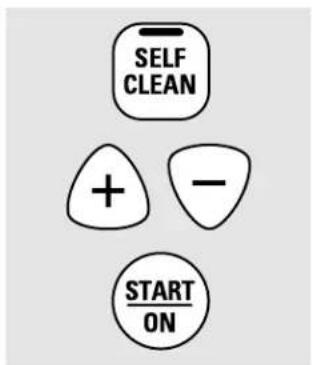
How to Set the Oven for Cleaning
Follow the directions in the Before a Clean Cycle section.
1 Latch the door.
2 Touch the SELF CLEAN pad.
3 Touch the + or - pads until the desired Clean Time is displayed.
The Clean Time is normally 4 hours. You can change the Clean Time to any time between 3 and 5 hours, depending on the amount of soil in your oven.
4 Touch the START/ON pad.
The self-clean cycle will automatically begin after CLEAN is displayed and the time countdown appears in the display.
While the oven is self-cleaning, you can touch the CLOCK pad to display the time of day. To return to the clean countdown, touch the SELF CLEAN pad.
The oven shuts off automatically when the clean cycle is complete, and 0:00 will flash in the display.
5 Slide the latch handle to the left as far as it will go and open the door.
It will not be possible to unlatch the oven door until the temperature drops below the lock temperature and the clean light goes off.
When the clean light is off, unlatch the door.

natural_image
Hand holding a tool with an arrow indicating direction (no text or symbols)
How to Delay the Start of Cleaning
Make sure the clock shows the correct time of day.
Latch the door.
2 Touch the SELF CLEAN pad.
3 Using the + or - pads, enter the desired clean time.
The display will show the start time set time. It will not be possible to unlatch the oven door until the temperature drops below the lock temperature and the clean light goes off.
When the clean light is off, unlatch the door.
The Clean Time is normally 4 hours. You can change the Clean Time to any time between 3 and 5 hours, depending on the amount of soil in your oven.
4 Touch the START TIME pad. The earliest start time you can set will appear in the display.
5 Using the + or - pads, enter the time of day you want the clean cycle to start.
6 Touch the START/ON pad.
To Stop a Clean Cycle
Touch the CLEAR/OFF pad.
Wait until the oven has cooled below the locking temperature to unlatch the door. You will not be able to open the door right away unless the oven has cooled below the locking temperature.
After a Clean Cycle
You may notice some white ash in the oven. Wipe it up with a damp cloth after the oven cools.
If white spots remain, remove them with a soap-filled scouring pad and rinse thoroughly with a vinegar and water mixture.
These deposits are usually a salt residue that cannot be removed by the clean cycle.
If the oven is not clean after one clean cycle, repeat the cycle.
■ You cannot set the oven for cooking until the oven is cool enough for the door to be unlatched.
■While the oven is self-cleaning, you can touch the CLOCK pad to display the time of day. To return to the clean countdown, touch the COOKING TIME pad.
■ Apply a small amount of vegetable oil to a paper towel and wipe the edges of the oven racks with the paper towel. Do not spray with Pan® or other lubricant sprays.
Care and cleaning of the range.
Be sure all controls are off and all surfaces are cool before cleaning any part of the range.
natural_image
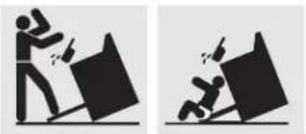
Two black-and-white illustrations showing a person pushing a block and another falling with a broken object (no text or symbols)WARNING: If your range is removed for cleaning, servicing or any reason, be sure the anti-tip device is reengaged properly when the range is replaced. Failure to take this precaution could result in tipping of the range and cause injury.
How to Remove Protective Shipping Film and Packaging Tape
Carefully grasp a corner of the protective shipping film with your fingers and slowly peel it from the appliance surface. Do not use any sharp items to remove the film. Remove all of the film before using the appliance for the first time.
To assure no damage is done to the finish of the product, the safest way to remove the adhesive from packaging tape on new appliances is an application of a household liquid dishwashing detergent. Apply with a soft cloth and allow to soak.
NOTE: The adhesive must be removed from all parts. It cannot be removed if it is baked on.
Control Knobs
The control knobs may be removed for easier cleaning. Make sure the knobs are in the OFF positions and pull them straight off the stems for cleaning. The knobs can be cleaned in a dishwasher or they may also be washed with soap and water. Make sure the insides of the knobs are dry before replacing. Replace the knobs in the OFF position to ensure proper placement.
natural_image
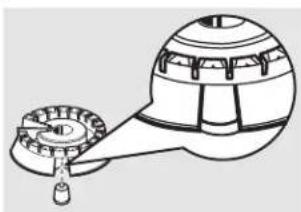
Technical line drawing of a mechanical device with gears and a handle (no text or symbols)Make sure the slot in the burner head is positioned over electrode.

DO NOT OPERATE THE BURNER WITHOUT ALL BURNER PARTS IN PLACE.
Burner Assembly
The burner assemblies should be washed regularly and, of course, after spillovers. Turn all controls off before removing burner parts. The burner grates, burner heads and burner caps can be removed for easy cleaning.
The electrode of the spark igniter is exposed beyond the surface of the burner base. When cleaning the cooktop, be careful not to snag the electrode of the spark igniter with your cleaning cloth. Damage to the igniter could occur. To avoid snagging a cloth on the spark igniter, leave the burner heads in place when cleaning the cooktop.
Be careful not to push in any cooktop controls while cleaning the cooktop. A slight electrical shock might result which could cause you to knock over hot cookware.
Wash burner parts with an all-purpose non-abrasive cleaner and warm water. Soak stubborn soil. Dry them with a cloth—do not reassemble while wet.
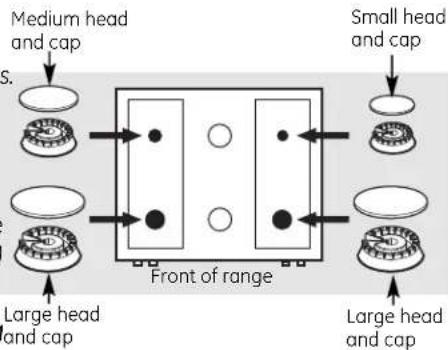
To reassemble the surface burners:
1 Place burner heads over the electrodes on the cooktop, in the correct locations according to their size.
2 Place the matching size caps onto the heads. Make sure that the heads and caps are placed in the correct locations.
After cleaning, first replace the vent grille and vent grille cap. Replace the side grates so that they fit over the tabs on the vent grille. Make sure the grates are positioned securely over the burners and that they

are stable and level.

Burner Grates, Vent Grille and Vent Grille Cap
Porcelain enamel burner grates, vent grille and vent grille cap should be washed regularly and, of course, after spillovers.
Wash them in hot, soapy water and rinse with clean water. You may also use abrasive cleaners and scouring pads, if needed. Dry them with a cloth—don't put them back on the cooktop wet.
Although they're durable, the grates, vent grille and vent grille cap will gradually lose their shine, regardless of the best care you can give them. This is due to their continual exposure to high temperatures.
Do not operate a burner for an extended period of time without cookware on the grate. The finish on the grate may chip without cookware to absorb the heat.
After cleaning, first replace the vent grille and the vent grille cap.
Replace the side grates so that they fit over the tabs on the vent grille. Make sure the grates are positioned securely over the burners and that they are stable and level.
Rubber Grate Feet
For stability, your cooktop has rubber feet on the burner grates. If any of these rubber feet should become damaged or lost, replace them immediately.
To order replacement rubber grate feet, please call our toll-free number:
National Parts
Center 800.626.2002 (U.S.)
800.661.1616 (Canada)
Rubber Grate Feet.....#WB02T10101
Oven Light Bulbs (if included)
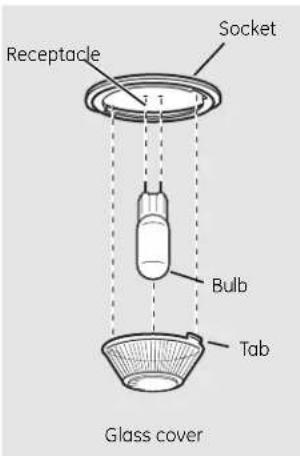
NOTE: The glass cover should be removed only when cold. Wearing latex gloves may offer a better grip.
CAUTION: Before replacing your oven light bulb, disconnect the electrical power to the oven at the main fuse or circuit breaker panel.
Be sure to let the light cover and bulb cool completely.
For your safety, do not touch a hot bulb with bare hands or a damp cloth.
To remove:
7 Turn the glass cover counterclockwise 1/4 turn until the tabs of the glass cover clear the grooves of the socket.
2 Using gloves or a dry cloth, remove the bulb by pulling it straight out.
To replace:
1 Use a new 130-volt halogen bulb, not to exceed 50 watts.
2 Using gloves or a dry cloth, remove the bulb from its packaging. Do not touch the bulb with bare fingers.

3 Push the bulb straight into the receptacle all the way.
4 Place the tabs of the glass cover into the grooves of the socket. Turn the glass cover clockwise 1/4 turn to engage.
For improved lighting inside the oven, clean the glass cover frequently using a wet cloth. This should be done when the oven is completely cool.
5 Reconnect electrical power to the oven.
Care and cleaning of the range.

natural_image
Technical line drawing of a mechanical component with a flanged top and a circular base (no text or symbols)Oven Light Replacement (if included)
CAUTION: Before replacing your oven light bulb, disconnect the electrical power to the range at the main fuse or circuit breaker panel.
Be sure to let the light cover and bulb cool completely.
To remove the cover:
1 Twist lens counterclockwise about a quarter turn to remove. Do not remove any screws to remove the cover.
2 Replace bulb with a 40-watt appliance bulb or two-prong halogen bulb as appropriate.
To replace the cover:
1 Line up tabs of lens in front of tabs on housing and rotate clockwise to engage. 2 Connect electrical power to the range.
Storage Drawer Removal
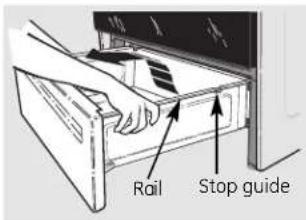
To remove the drawer:
1 Pull the drawer out until it stops.
2 Lift the front of the drawer until the stops clear the guides.
3 Remove the drawer.
To replace the drawer:
1 Place the drawer rails on the guides.
2 Push the drawer back until it stops.
3 Lift the front of the drawer and push back until the stops clear the guides.
4 Lower the front of the drawer and push back until it closes.

Oven rack
Oven Racks
All oven racks may be cleaned by hand with an abrasive cleaner or steel wool. After cleaning, rinse the racks with clean water and dry with a clean cloth. Gray porcelain-coated oven racks may remain in the oven during the self-cleaning cycle without being damaged. The shiny, silver-colored oven racks may remain in the oven during the self-cleaning cycle, but they will lose their luster and become hard to slide.
It will be necessary to grease all oven rack side edges with a light coating of vegetable oil after cleaning them by hand or in the oven. This will help maintain the ease of sliding the racks in and out of the oven.

natural_image
Simple diagram of a rectangular frame with a central dark rectangle and diagonal lines, no text or symbols present.Do not rub or clean the door gasket—it has an extremely low resistance to abrasion.
If you notice the gasket becoming worn, froyed or damaged in any way or if it has become displaced on the door, you should have it replaced.
Cleaning the Oven Door
To clean the inside of the door:
Because the area inside the gasket is cleaned during the self-clean cycle, you do not need to clean this by hand.
The area outside the gasket and the door liner can be cleaned with a soap-filled or plastic scouring pad, hot water and detergent. Rinse well with a vinegar and water solution.
To clean the outside of the door:
■ Use soap and water to thoroughly clean the top, sides and front of the oven door. Rinse well. You may also use a glass cleaner to clean the glass on the outside of the door. Do not let water drip into the vent openings.
If any stain on the door vent trim is persistent, use a soft abrasive cleaner and a sponge-scrubber for best results.
■ Spillage of marinades, fruit juices, tomato sauces and basting materials containing acids may cause discoloration and should be wiped up immediately. When surface is cool, clean and rinse.
Do not use oven cleaners, cleaning powders or harsh abrasives on the outside of the door.
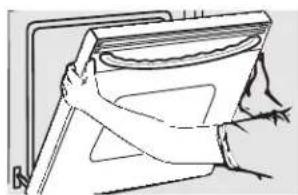
Lift-Off Oven Door
The door is very heavy. Be careful when removing and lifting the door.
Do not lift the door by the handle.
To remove the door:

Pull hinge locks down to unlock.
natural_image
Line drawing of a hand holding a container with a handle, no text or symbols presentRemoval position
1 Fully open the door.
2 Pull the hinge locks down toward the door frame, to the unlocked position. A tool, such as a small flat-blade screwdriver, may be required.
3 Firmly grasp both sides of the door at the top.
4 Close door to the door removal position, which is halfway between the broil stop position and fully closed.
5 Lift door up and out until the hinge arm is clear of the slot.
To replace the door:
1 Firmly grasp both sides of the door at the top.
2 With the door at the same angle as the removal position, seat the indentation of the hinge arm into the bottom edge of the hinge slot. The notch in the hinge arm must be fully seated into the bottom of the slot.
3 Fully open the door. If the door will not fully open, the indentation is not seated correctly in the bottom edge of the slot.
4 Push the hinge locks up against the front frame of the oven cavity to the locked position.

5 Close the oven door.
Care and cleaning of the range.
Stainless Steel Surfaces (on some models)
Do not use a steel wool pad; it will scratch the surface.
To clean the stainless steel surface, use warm sudsy water or a stainless steel cleaner or polish. Always wipe the surface in the direction of the grain. Follow the cleaner instructions for cleaning the stainless steel surface.
To inquire about purchasing stainless steel appliance cleaner or polish, or to find the location of a dealer or Mabe Parts Store nearest you, please call our toll-free number:
National Parts Center 1.800.626.2002 (U.S.) 1.800.661.1616 (Canada)
GEAppliances.com (U.S.) www.GEAppliances.ca (Canada)
Painted Surfaces
Painted surfaces include the top and sides Do not use commercial oven cleaners, of the door, and the drawer front. Clean cleaning powders, steel wool or harsh these with soap and water or a vinegar and abrasives on any painted surface. water solution.

Oven Vent and Cooktop Air Inlet
The oven is vented through an opening in the cooktop under the grille. The cooktop takes in air through the air inlet located through the cooktop.
Never cover these openings with aluminum foil or any other material. This would prevent the vents from working properly.
Control Panel
If desired, the touch pads may be turned off before cleaning.
See the Control Lockout section.
Clean up splatters with a damp cloth.
Remove heavier soil with warm soapy water. Do not use abrasives of any kind.
Turn on the touch pads after cleaning.

Removable Oven Floor
To remove the oven floor for easier cleaning:
1 Remove the oven door using the instructions in the Lift-Off Oven Door section.
2 Grasp oven floor at the rear finger slots on each side, lift it up, push it back and pull it out.
3 Clean the oven floor with warm soapy water.
IMPORTANT: Always replace the removable floor before the next use.

Troubleshooting Tips
Save time and money! Review the charts on the following
pages first and you may not need to call for service.
| Problem Possible Causes What To Do | ||
| Burners have yellow or yellow-tipped flames | The combustion quality of burner flames needs to be determined visually. | Use the illustrations below to determine if your burner flames are normal. If burner flames look likeA, call for service. Normal burner flames should look likeBorC, depending on the type of gas you use. With LP gas, some yellow tipping on outer cones is normal.   A-Yellow flames B-Yellow tips C-Soft blue flamesCall for service on outer cones Normal for naturalNormal for LP gas gas A-Yellow flames B-Yellow tips C-Soft blue flamesCall for service on outer cones Normal for naturalNormal for LP gas gas |
| Control knobs will not turn | Knob isn't pushed down. | To turn from theOFFposition, push the knob in and then turn. |
| Burners do not light | Plug on range is not completely inserted in the electrical outlet. | Make sure electrical plug is plugged into a live, properly grounded outlet. |
| Gas supply not connected or turned on. | See the Installation Instructions that came with your range. | |
| A fuse in your home may be blown or the circuit breaker tripped. | Replace the fuse or reset the circuit breaker. | |
| Burner parts not replaced correctly. | See the Care and cleaning of the range section. | |
| Control Lockout feature is activated | IfLOC ONappears in the display, the oven control is locked. Turn this feature off to use the oven. See the Control Lockout section. | |
| Ticking sound of spark igniter persists after burner lights | Control knob is still in the LITE position. | Turn the knob out of theLITEposition to the desired setting.Turn the burner off and relight. If ticking is still present, call for service. |
| Burner flames very large or yellow | Improper air to gas ratio. | If range is connected to LP gas, check all steps in the Installation Instructions that came with your range. |
| Oven light does not work | Light bulb is loose or defective. | Tighten or replace the bulb. |
| Switch operating light is broken. | Call for service. | |
| Oven will not work | Plug on range is not completely inserted in the electrical outlet. | Make sure electrical plug is plugged into a live, properly grounded outlet. |
| A fuse in your home may be blown or the circuit breaker tripped. | Replace the fuse or reset the circuit breaker. | |
| Oven controls improperly set. | See the Using the oven section. | |
| Door left in the locked position. | If necessary, allow the oven to cool; then unlock the door. | |
Before you call for service...

Troubleshooting Tips
| Problem Possible Causes What To Do | ||
| Food does not bake or roast properly | Oven controls improperly set. | • See the Using the oven section. |
| Rack position is incorrect or the rack is not level. | • See the Using the oven section. | |
| Incorrect cookware or cookware of improper size being used. | • See the Using the oven section. | |
| Oven thermostat needs adjustment. section. | • See the Adjust the oven thermostat - Do it yourself! | |
| Food does not broil properly | Oven controls improperly set. | • Make sure you touch the BROIL HI/LO pad. |
| Improper rack position being used. | • See the Broiling Guide. | |
| Cookware not suited for broiling. | • For best results, use a pan designed for broiling. | |
| In some areas the power (voltage) may be low. | • Preheat the broil element for 10 minutes. • Broil for the longest period of time recommended in the Broiling Guide. | |
| Oven temperature too hot or too cold | Oven thermostat needs adjustment. | • See the Adjust the oven thermostat - Do it yourself! section. |
| Oven door is crooked | The door is out of position. | • Because the oven door is removable, it sometimes gets out of position during installation. Remove and replace the oven door. See the Lift-Off Oven Door section. |
| Storage drawer is crooked | Rear drawer support is on top of the guide rail. | • Reposition the drawer. See the Storage Drawer Removal instructions in the Care and cleaning of your range section. |
| Storage drawer won't close | Rear drawer support is on top of the guide rail. | • Reposition the drawer. See the Storage Drawer Removal instructions in the Care and cleaning of your range section. |
| Clock and timer do not work inserted in the electrical outlet, grounded outlet. | Plug on range is not completely | Make sure electrical plug is plugged into a live, properly |
| A fuse in your home • Replace the fuse or reset the circuit breaker.may be blown or thecircuit breaker tripped. | ||
| Oven controls improperly set. | See the Using the clock and timer section. | |
| Oven will not self-clean | Oven controls improperly set. | See the Using the self-cleaning oven section. |
| Oven door is not in the locked position. • Make sure you move the door latch handle all the way to the right. | ||
| "Crackling" or "popping" sound | This is the sound of the metal heating and cooling during both the cooking and cleaning functions. | This is normal. |
| Excessive smoking during a clean cycle | Excessive soil. | Touch the CLEAR/OFF pad. Open the windows to rid the room of smoke. Wait until the light on the SELF CLEAN pad goes off. Wipe up the excess soil and reset the clean cycle. |
| Oven door will not open after a clean cycle | Oven too hot. | Allow the oven to cool below locking temperature. |
| Oven not clean after a clean cycle | Oven controls not properly set. | See the Using the self-cleaning oven section. |
| Oven was heavily soiled. | Clean up heavy spillovers before starting the clean cycle. Heavily soiled ovens may need to self-clean again or for a longer period of time. | |
| "F-and a number or letter" flash in the display | You have a function error code. | Touch the CLEAR/OFF pad. Put the oven back into operation. |
| If the function code repeats. • Disconnect all power to the range for at least 30 seconds and then reconnect power. If the function error code repeats, call for service.• If a function error code appears during the self-cleaning cycle, check the oven door latch. The latch may have been moved, if only slightly, from the locked position. Make sure the latch is moved to the right as far as it will go. Touch the CLEAR/OFF pad.Allow the oven to cool for one hour. Put the oven back into operation. | ||
Before you call for service...

Troubleshooting Tips
| Problem Possible Causes What To Do | ||
| Display flashes "bAd" then "linE" with a from the house to the unit loud tone is miswired. | The installed connection | • Contact installer or electrician to correct miswire. |
| Control signals after entering cooking time or start time cleaning time. | You forgot to enter a bake temperature or | • Touch the BAKE pad and desired temperature or the SELF CLEAN pad and desired clean time. |
| Display goes blank | A fuse in your home may be blown or the circuit breaker tripped. | • Replace the fuse or reset the circuit breaker. |
| The clock is in black-out mode. | • See the Using the clock and timer section. | |
| Display flashes | Power failure. | • Reset the clock. |
| Unable to get the display to show "SF" | Oven control pads were not touched properly. | • The BROIL HI/LO and BAKE pads must be touched at the same time and held for 3 seconds. |
| Power outage, clock flashes | Power outage or surge. | • Reset the clock. If the oven was in use, you must reset it by touching the CLEAR/OFF pad, setting the clock and resetting any cooking function. |
| "Burning" or "oily" odor emitting from the vent | This is normal in a new oven and will disappear in time. | • To speed the process, set a self-clean cycle for a minimum of 3 hours. See the Using the self-cleaning oven section. |
| Strong odor | An odor from the insulation around the inside of the oven is normal for the first few times the oven is used. | • This is temporary. |
| Fan noise | A cooling fan may automatically turn on and off. | • This is normal. The cooling fan will turn off and on to cool internal parts. It may run after the oven is turned OFF. |
Please place in envelope and mail to:

For Canadian
Customers
CUT ALONG THIS LINE AND RETURN CARD—THANKS
| OWNERSHIP REGISTRATION CERTIFICATE - FICHE D'INSCRIPTION DU PROPRIÉTAIRE | |||||
| Please register your product to enable us to contact you in the remote event a safety notice is issued for this product and to allow for efficient communication under the terms of your warranty, should the need arise. | Veuillez enregistrer votre produit afin de nous permettre de communiquer avec vous si jamais un avis de sécurité concernant ce produit était émis et de communiquer facilement avec vous en vertu de votre garantie, si le besoin s'en fait sentir. | ||||
| REGISTER ON-LINE: www.geappliances.ca ENREGISTREMENT SUR INTERNET À: www.electromenagersge.ca | MAIL TO: P.O. BOX 1780, MISSISSAUGA POSTER À: ONTARIO, L4Y 4G1 | ||||
| ☐ MR./M ☐ MRS./MME. ☐ MISS/MLLE ☐ MS. | FIRST NAME/PRÉNOM | LAST NAME/NOM | |||
| STREET NO/N° RUE | STREET NAME/RUE | APT. NO / APP./RR# | |||
| CITY/VILLE | PROVINCE | POSTAL CODE/POSTAL | |||
| AREA CODE/IND. RÉG. | TELEPHONE | ||||
| DID YOU PURCHASE A SERVICE CONTRACT FOR THIS APPLIANCE? YES/OUI ☐ Y/A ☐ I FYES/SI OUI: EXPIRATION AVEZ-VOUS ACHETÉ UN CONTRAT DE SERVICE POUR CET APPAREIL? NO/NON ☐ D/J | |||||
| NAME OF SELLING DEALER/NOM DU MARCHAND | MODEL/MODÈLE | ||||
| INSTALLATION DATE/DATE D'INSTALLATION Y/A ☐ M ☐ D/J | CORRESPONDENCE ☐ ENGLISH CORRESPONDANCE ☐ FRANÇAIS | SERIAL/SÉRIE | |||
| ☐ I do not wish to receive any promotional offers regarding this product. ☐ Je ne désire pas recevoir d'offres promotionnelles concernant ce produit. | |||||

Looking For Something More? (Not all accessories are available for all models.)
You can find these accessories and many more at GEAppliances.com (U.S.) or www.GEAppliances.ca (Canada), or call 800.626.2002 (U.S.) or 800.661.1616 (Canada) (during normal business hours). Have your model number ready.
natural_image
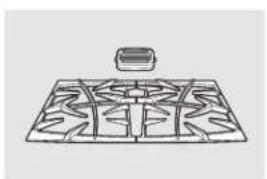
Diagram of a grid-patterned structure with a small rectangular object on top (no text or symbols)Grates

natural_image
Technical line drawing of four mechanical components with no visible text or symbolsSurface Burner Heads and Caps
natural_image
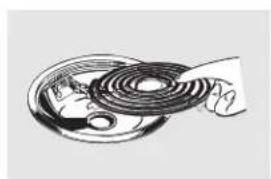
Illustration of a coiled cable or wire with a hand holding it, no text or symbols presentSurface Elements and Drip Pans

natural_image
Simple line drawing of a round, segmented object resembling a fruit or seed (no text or symbols)Knobs

natural_image
Pure technical line drawing of a rectangular grid structure without any text, numbers, or symbolsOven Racks

natural_image
Pure architectural line drawing of a curved road or path (no text or symbols)Oven Elements

natural_image
Two simple light bulb illustrations, one with a bulb and the other with a bulb, labeled 'or' (no text or symbols on the bulbs themselves)Light Bulbs
Experience these other great products to keep your kitchen looking great!
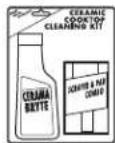
Ceramic Cooktop
Cleaning Kit:
Includes cleaner,
scraper and pad
WX10X117GCS

Ceramic Cooktop
Cleaning Wipes
WX10X305
Stainless Steel Appliance Polish Wipes
WX10X10001

Stainless Steel
Appliance
Cleaner
PM10X311
Get the most out of your Broiler Pan! (Not for use with Broiler Drawer models.)
Use your pan and grid cover to broil hamburgers, seafood, steaks, vegetables, bacon, chops and so much more! The pan below catches the excess fats and oils.
- Genuine GE Part
- Easy To Clean
• One-Year Warranty
Limited Time Offer! Free Shipping!
When you order your broiler pan within 30 days of purchasing your GE cooking product.
Small Large\* XL\*\*
Part # WB48X10055 WB48X10056 WB48X10057
Dimensions
8-3/4"W×1-1/4"H×13-1/2"D
12-3/4"W×1-1/4"H×15-1/4"D
15-1/2"W×1-1/4"H×19"D
* The large (standard) broil pan does not fit in 20"/24" ranges.
** The XL pan does not fit in 24" wall ovens, 27" drop-ins or 20"/24" ranges.
To place your order, call 800.626.2002 (U.S.), 800.661.1616 (Canada) or mail this form to:
In the U.S.: GE Parts, P.O. Box 221027, Memphis, TN 38122-1027. In Canada: GE Parts, 1 Factory Lane, Moncton, N.B. E1C 9M3

Broiler Pan Order Form
Quantity ____ ______ ______
Part Number
Model Number
Brand
Date of Purchase
First Name
Last Name
Address
City
Phone
Check ____
Serial Number
State
Zip Code
Call 800.626.2002 in the U.S. or 800.661.6161 in Canada for current pricing. All credit card orders must be called in.
GE Gas Range 32. (For customers in the United States)

All warranty service provided by our Factory Service Centers, or an authorized Customer Care® technician. To schedule service, visit us on-line at GEAppliances.com, or call 800.GE.CARES (800.432.2737). Please have serial number and model number available when calling for service.
Staple your receipt here. Proof of the original purchase date is needed to obtain service under the warranty.
For The Period Of: GE Will Replace:
One Year
From the date of the Any part of the range which fails due to a defect in materials or workmanship. During this limited one-year warranty, GE will also provide, free of charge, all labor and in-home service to original purchase replace the defective part.
What GE Will Not Cover:
■ Service trips to your home to teach you how to use the product.
■Improper installation, delivery or maintenance.
■ Product damage or failure of the product if it is abused, misused, modified, used for other than the intended purpose, or used commercially.
■ Replacement of house fuses or resetting of circuit breakers.
■ Damage to the product caused by accident, fire, floods or acts of God.
■Incidental or consequential damage caused by possible defects with this appliance.
■ Damage caused after delivery.
■ Product not accessible to provide required service.
EXCLUSION OF IMPLIED WARRANTIES—Your sole and exclusive remedy is product repair as provided in this Limited Warranty. Any implied warranties, including the implied warranties of merchantability or fitness for a particular purpose, are limited to one year or the shortest period allowed by law.
This warranty is extended to the original purchaser and any succeeding owner for products purchased for home use within the USA. If the product is located in an area where service by a GE Authorized Servicer is not available, you may be responsible for a trip charge or you may be required to bring the product to an Authorized GE Service location for service. In Alaska, the warranty excludes the cost of shipping or service calls to your home.
Some states do not allow the exclusion or limitation of incidental or consequential damages. This warranty gives you specific legal rights, and you may also have other rights which vary from state to state. To know what your legal rights are, consult your local or state consumer affairs office or your state's Attorney General.
Warrantor: General Electric Company. Louisville, KY 40225
GE Gas Range Warranty. (For customers in Canada)
All warranty service provided by our Factory Service Centres or an authorized Customer Care® technician. To schedule service, visit us on-line at www.GEAppliances.ca or call 1.800.561.3344. Please have serial number and model number available when calling for service.
Staple your receipt here. Proof of the original purchase date is needed to obtain service under the warranty.
For The Period Of: Mabe Will Replace:
One Year
From the date of the
Any part of the range which fails due to a defect in materials or workmanship. During this limited one-year warranty, Mabe will also provide, free of charge, all labor and in-home
original purchase service to replace the defective part.
What Mabe Will Not Cover:
■ Service trips to your home to teach you how to use the product.
■Improper installation, delivery or maintenance.
■ Product damage or failure of the product if it is abused, misused, modified, used for other than the intended purpose, or used commercially.
■ Replacement of house fuses or resetting of circuit breakers.
■ Damage to the product caused by accident, fire, floods or acts of God.
■ Incidental or consequential damage caused by possible defects with this appliance.
■ Damage caused after delivery.
■ Product not accessible to provide required service.
EXCLUSION OF IMPLIED WARRANTIES—Your sole and exclusive remedy is product repair as provided in this Limited Warranty. Any implied warranties, including the implied warranties of merchantability or fitness for a particular purpose, are limited to one year or the shortest period allowed by law.
This warranty is extended to the original purchaser and any succeeding owner for products purchased in Canada for home use within Canada. In-home warranty service will be provided in areas where it is available and deemed reasonable by Mabe to provide.
Some provinces do not allow the exclusion or limitation of incidental or consequential damages, so the above exclusion may not apply to you. This warranty gives you specific legal rights, and you may also have other rights which vary from province to province. To know what your legal rights are in your province, consult your local or provincial consumer affairs office.
Warrantor: Mabe Canada Inc., Burlington, Ontario

GE Appliances Website
In the U.S.: GEAppliances.com
Have a question or need assistance with your appliance? Try the GE Appliances Website 24 hours a day, any day of the year! For greater convenience and faster service, you can now download Owner's Manuals, order parts or even schedule service on-line. In Canada: www.GEAppliances.ca

Schedule Service In the U.S.: GEAppliances.com
Expert GE repair service is only one step away from your door. Get on-line and schedule your service at your convenience any day of the year! Or call 800.GE.CARES (800.432.2737) during normal business hours.
In Canada, call 1.800.561.3344

Real Life Design Studio In the U.S.: GEAppliances.com
GE supports the Universal Design concept—products, services and environments that can be used by people of all ages, sizes and capabilities. We recognize the need to design for a wide range of physical and mental abilities and impairments. For details of GE's Universal Design applications, including kitchen design ideas for people with disabilities, check out our Website today. For the hearing impaired, please call 800.TDD.GEAC (800.833.4322).
In Canada, contact: Manager, Consumer Relations, Mabe Canada Inc.
Suite 310, 1 Factory Lane
Moncton, N.B. E1C 9M3

Extended Warranties In the U.S.: GEAppliances.com
Purchase a GE extended warranty and learn about special discounts that are available while your warranty is still in effect. You can purchase it on-line anytime, or call 800.626.2224 during normal business hours. GE Consumer Home Services will still be there after your warranty expires. In Canada, call 1.888.261.2133

Parts and Accessories In the U.S.: GEAppliances.com
Individuals qualified to service their own appliances can have parts or accessories sent directly to their homes (VISA, MasterCard and Discover cards are accepted). Order on-line today, 24 hours every day or by phone at 800.626.2002 during normal business hours.
Instructions contained in this manual cover procedures to be performed by any user. Other servicing generally should be referred to qualified service personnel. Caution must be exercised, since improper servicing may cause unsafe operation.
Customers in Canada should consult the yellow pages for the nearest Mabe service center, or call 1.800.661.1616.

Contact Us In the U.S.: GEAppliances.com
If you are not satisfied with the service you receive from GE, contact us on our Website with all the details including your phone number, or write to: General Manager, Customer Relations
GE Appliances, Appliance Park
Louisville, KY 40225
In Canada: www.GEAppliances.ca, or write to: Director, Consumer Relations, Mabe Canada Inc.
Suite 310, 1 Factory Lane
Moncton, N.B. E1C 9M3
Register Your Appliance In the U.S.: GEAppliances.com
Register your new appliance on-line-at your convenience! Timely product registration will allow for enhanced communication and prompt service under the terms of your warranty, should the need arise. You may also mail in the pre-printed registration card included in the packing material. In Canada: www.GEAppliances.ca
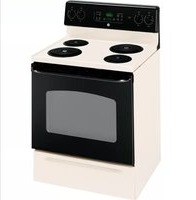
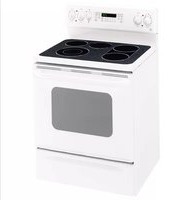


- Safety Instructions .....2-7
- Operating Instructions
- Care and Cleaning
- Owner's Manual
- Troubleshooting Tips ..... 27-30
- Accessories 33
- Consumer Support
- Serial #
- WARNING!
- ANTI-TIP DEVICE
- - WHAT TO DO IF YOU SMELL GAS
- WARNING
- IMPORTANT SAFETY NOTICE
- SAFETY PRECAUTIONS
- SURFACE BURNERS
- COOK MEAT AND POULTRY THOROUGHLY...
- WARNING! OVEN
- SELF-CLEANING OVEN
- Using the gas surface burners.
- How to Light a Gas Surface Burner
- Sealed Gas Burners
- How to Select Flame Size
- In Case of Power Failure
- Before Lighting a Gas Burner
- After Lighting a Gas Burner
- Top-of-Range Cookware
- Stove Top Grills
- Wok This Way
- Using the oven controls.
- Oven Control, Clock and Timer Features and Settings
- BAKE/TEMP RECALL Pad
- START/ON Pad
- Display
- Function Error Code
- KITCHEN TIMER ON/OFF Pad
- TIMER Light
- CLOCK Pad
- START TIME Pad
- START TIME Time Light
- COOKING TIME Pad
- COOKING TIME Light
- AUTOMATIC OVEN Light
- - Pad Short t
- + Pad Short t
- SELF CLEAN Pad
- CLEAN Light
- CLEAR/OFF Pad
- BROIL HI/LO Pad
- BROIL Light
- Indicator Lights (on some pads)
- Control Lockout
- To lock/unlock the controls:
- Power Outage
- Before you begin...
- How to Set the Oven for Baking or Roasting
- Preheating and Pan Placement
- Aluminum Foil
- Oven Moisture
- Oven Vent
- How to Set the Oven for Broiling
- To Set the Clock
- To Turn Off the Clock Display
- To Set the Timer
- To Reset the Timer
- To Cancel the Timer
- Using the timed baking and roasting features (on some models).
- How to Set an Immediate Start and Automatic Stop
- How to Set a Delayed Start and Automatic Stop
- Special features of your oven control. GEAppliances.com
- Hour Shut-Off
- Using the Sabbath Feature (on some models).
- How to Set for Regular Baking/Roasting
- How to Set for Timed Baking/Roasting—Immediate Start and Automatic Stop
- How to Exit the Sabbath Feature
- Adjust the oven thermostat—Do it yourself!
- To Adjust the Thermostat
- The type of margarine will affect baking performance!
- Using the self-cleaning oven.
- Before a Clean Cycle
- How to Set the Oven for Cleaning
- How to Delay the Start of Cleaning
- To Stop a Clean Cycle
- After a Clean Cycle
- Care and cleaning of the range.
- How to Remove Protective Shipping Film and Packaging Tape
- Control Knobs
- Burner Assembly
- To reassemble the surface burners:
- Burner Grates, Vent Grille and Vent Grille Cap
- Rubber Grate Feet
- National Parts
- Oven Light Bulbs (if included)
- To remove:
- To replace:
- Oven Light Replacement (if included)
- To remove the cover:
- To replace the cover:
- Storage Drawer Removal
- To remove the drawer:
- To replace the drawer:
- Oven Racks
- Cleaning the Oven Door
- To clean the inside of the door:
- To clean the outside of the door:
- Lift-Off Oven Door
- The door is very heavy. Be careful when removing and lifting the door.
- To remove the door:
- To replace the door:
- Stainless Steel Surfaces (on some models)
- Do not use a steel wool pad; it will scratch the surface.
- Painted Surfaces
- Oven Vent and Cooktop Air Inlet
- Control Panel
- Removable Oven Floor
- To remove the oven floor for easier cleaning:
- Before you call for service...
- Troubleshooting Tips
- Looking For Something More? (Not all accessories are available for all models.)
- Experience these other great products to keep your kitchen looking great!
- Get the most out of your Broiler Pan! (Not for use with Broiler Drawer models.)
- Limited Time Offer! Free Shipping!
- Small Large\* XL\*\*
- Broiler Pan Order Form
- GE Gas Range 32. (For customers in the United States)
- For The Period Of: GE Will Replace:
- One Year
- What GE Will Not Cover:
- GE Gas Range Warranty. (For customers in Canada)
- For The Period Of: Mabe Will Replace:
- What Mabe Will Not Cover:
- GE Appliances Website
- Schedule Service In the U.S.: GEAppliances.com
- Real Life Design Studio In the U.S.: GEAppliances.com
- Extended Warranties In the U.S.: GEAppliances.com
- Parts and Accessories In the U.S.: GEAppliances.com
- Contact Us In the U.S.: GEAppliances.com
- Register Your Appliance In the U.S.: GEAppliances.com
Brand : GE
Model : JGSP28DENCC
Category : Frying Pan