
151566 - Unknown MANHATTAN - Free user manual and instructions
Find the device manual for free 151566 MANHATTAN in PDF.


| Product Type | USB to Serial Converter |
| Model Number | 151566 |
| Brand | Manhattan |
| Connectivity | USB 2.0 to DB9 RS-232 Serial |
| Chipset | Prolific PL-2303 |
| Plug and Play | Yes |
| Hot-Swappable | Yes |
| System Requirements | Windows XP/Vista/7/8/8.1/10, Linux, Mac OS 9.x/10.x or above |
| Warranty | 3 Years |
| Package Contents | USB to Serial Converter, Driver CD, User Manual |
| Data Transfer Rate | Up to 115.2 Kbps |
| Power Source | Bus-powered via USB port |
| Dimensions (approx.) | 5 x 2 x 1 cm (2 x 0.8 x 0.4 in) |
| Weight (approx.) | 30 g (1 oz) |
| Color | Black |
| Cable Length (approx.) | 1 m (3.3 ft) |
| Operating Temperature | 0°C to 50°C (32°F to 122°F) |
| Storage Temperature | -20°C to 70°C (-4°F to 158°F) |
| Certifications | CE, FCC |
Frequently Asked Questions - 151566 MANHATTAN
User questions about 151566 MANHATTAN
0 question about this device. Answer the ones you know or ask your own.
Ask a new question about this device
Download the instructions for your Unknown in PDF format for free! Find your manual 151566 - MANHATTAN and take your electronic device back in hand. On this page are published all the documents necessary for the use of your device. 151566 by MANHATTAN.
USER MANUAL 151566 MANHATTAN
USB to Serial Converter
User Manual
Models 151283, 151566, 151801, 151832, 151849, 151856, 151917, 174947, 205146 & 205153

natural_image
Close-up of a black VGA connector with a metallic cable, labeled 'Model: 15156' (no other text or symbols)Model: 151566

natural_image
Two USB connectors with I/O ports, shown in black and white (no text or symbols on the devices themselves)
natural_image
Close-up of a USB model with two black USB connectors and a white USB connector, shown against a transparent cable (no text or symbols on the devices themselves)Model: 174947

manhattanproducts.com
Thank you for purchasing this Manhattan® USB to Serial Converter (Models 151283, 151566, 151801, 151832, 151849, 151856, 151917, 174947, 205146, and 205153).
Some features of this product are:
- Plug-and-play
• Hot-swappability - Three-Year Warranty (For a complete list of country-specific warranties, go to manhattanproducts.com/warranty.)
System Requirements
- USB port
• Windows XP/Vista/7/8/8.1/10 or Linux or Mac 9.x/10.x or above
Package Contents
• USB to Serial Converter
• User manual and driver CD
NOTE: The instructions for this manual show the driver installation of a Serial Converter with a Prolific chipset – “PL-2303 USB to Serial”. The images in this manual refer to the steps for Windows 7 users. The procedures and instruction screens for other chipsets and operating systems may vary slightly. Some screen images have been modified to fit the format of this manual.
To Install the Driver
- Before plugging the converter in to the computer, load the included driver CD and double-click "PL-2303 Driver Installer Program" to display the Welcome screen of the InstallShield Wizard. Click Next.

- The Setup Status screen will display to indicate the progress of the installation. When the InstallShield Wizard Complete screen (below) displays, click Finish. Note: If you inadvertently connected the converter to the PC while running the driver installation, unplug it and re-connect so the system can detect it.

- With the USB to Serial Converter connected to the PC USB port, Windows should detect the driver as "Prolific USB-to-Serial Comm Port." Go to Device Manager and check for the "Prolific USB-to-Serial Comm Port" device and the COM port number assigned by Windows.

To Uninstall the Driver
- On your desktop, go to Start / Control Panel / Uninstall a Program (Add or Remove Programs). Select/highlight "PL-2303 USB-to-Serial" and click Uninstall (Remove).

- InstallShield Wizard will then start the maintenance program and prompt you to choose modify, repair or remove the driver. Click Remove, then Next to begin the driver uninstall.

- The InstallShield Wizard will prompt you to confirm the uninstall. Click Yes to continue.

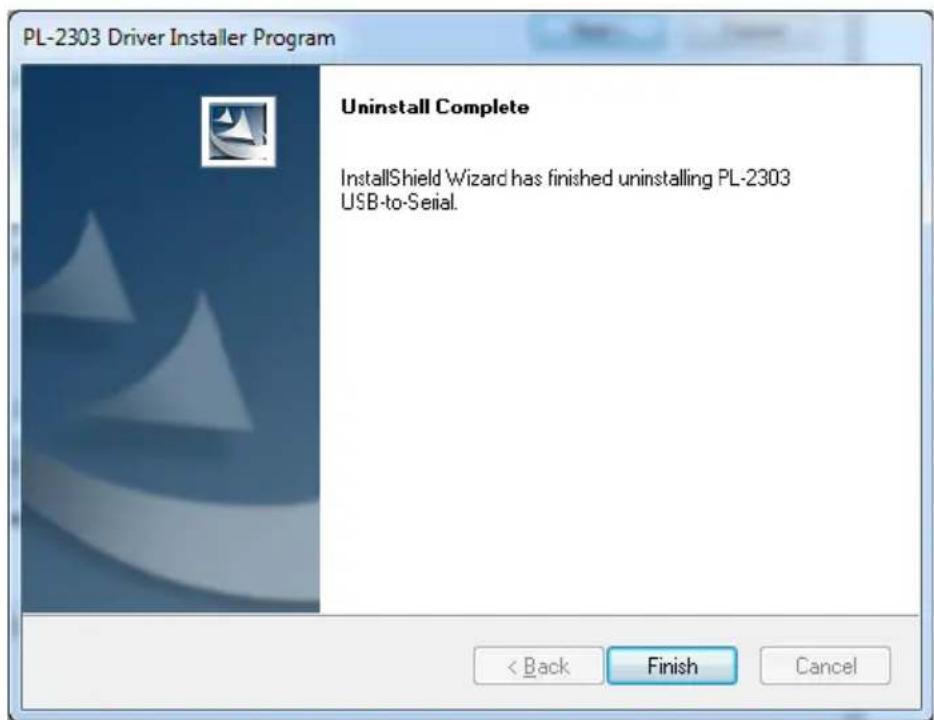
- Wait for the InstallShield Wizard to complete the uninstall process. When the Uninstall Complete screen displays, click Finish to end the program. Wait a few seconds more until the "PL-2303 USB-to-Serial" program is removed from the Control Panel Uninstall (Add or Remove Programs) program list.
manhattan® Life just got easier.™
Brand : MANHATTAN
Model : 151566
Category : Unknown