
RM418-R4 - Computer keyboard Black Box - Free user manual and instructions
Find the device manual for free RM418-R4 Black Box in PDF.


| Product Type | 1U Rackmount Keyboard Drawer with Trackball Mouse |
| Brand | Black Box |
| Model | RM418-R4 |
| Construction | 16-gauge steel |
| Dimensions (H x W x D) | 1.75 x 17.4 x 15.75 in (4.4 x 44.2 x 40 cm) |
| Weight | 15 lb (6.8 kg) |
| Mouse Type | Trackball |
| Interface | PS/2 (keyboard and mouse combo) and USB via included adapter |
| Included Accessories | 2 rear-mounting L-brackets, 4 fasteners, 2-in-1 PS/2 cable, PS/2 to USB adapter, set of keys, CD-ROM with manual |
| Mounting Type | Rackmount, 1U, rear support brackets |
| Compatibility | Standard 19-inch racks, servers with USB or PS/2 ports |
| Power Source | Powered via PS/2 or USB connection from host computer |
| Hot-Pluggable | Keyboard drawer is hot-pluggable; connected devices may not be |
| Operating Temperature | 32 to 122°F (0 to 50°C) |
| Storage Temperature | -4 to 140°F (-20 to 60°C) |
| Color | Black |
| Form Factor | Retracting keyboard drawer |
| Maintenance | Clean with a soft, dry cloth; avoid liquids |
| Safety | Turn off power to connected devices before connecting |
Frequently Asked Questions - RM418-R4 Black Box
User questions about RM418-R4 Black Box
0 question about this device. Answer the ones you know or ask your own.
Ask a new question about this device
Download the instructions for your Computer keyboard in PDF format for free! Find your manual RM418-R4 - Black Box and take your electronic device back in hand. On this page are published all the documents necessary for the use of your device. RM418-R4 by Black Box.
USER MANUAL RM418-R4 Black Box
1U Rackmount Keyboard Drawer, Trackball or Touchpad Type
The retracting keyboard that fits into only 1U of rack space.
Models available with trackball or touchpad mouse.

natural_image
Black server rack with open top and side panel, showing internal keyboard and drive slots (no visible text or symbols)1. Specifications
Construction — 16-gauge steel
Size — 1.75"H x 17.4"W x 15.75"D (4.4 x 44.2 x 40 cm)
Weight — 15 lb. (6.8 kg)
2. Overview
2.1 Introduction
The Rackmount Keyboard Drawers are available in two models. The RM419-R3 has a two-button touchpad, and the RM418-R4 has a trackball mouse.
2.2 What's Included
Your package should include the following items. It anything is missing or damaged, contact Black Box Technical Support at 724-746-5500 or info@blackbox.com.
- Rackmount Keyboard Drawer with Trackball Mouse (RM418A-R4) or Rackmount Keyboard Drawer with Touchpad Mouse (RM419-R3)
• (2) rear-mounting L-brackets
• (4) fasteners for rear-mounting L-brackets
• (1) 2-in-1 PS/2 keyboard and mouse cable
• (1) PS/2 to USB adapter
• (1) set of keys
• (1) CD-ROM containing this user manual in PDF format
NOTE: You may also need hardware (not included) to mount the drawer in the rack.
3. Installation Steps
- Install each rear L-bracket using two fasteners. Leave the fasteners slightly loose. See Figure 1.

natural_image
Technical line drawing of a server rack with an attached device and a magnified inset showing internal components (no text or symbols)Figure 1. Installing the fasteners.
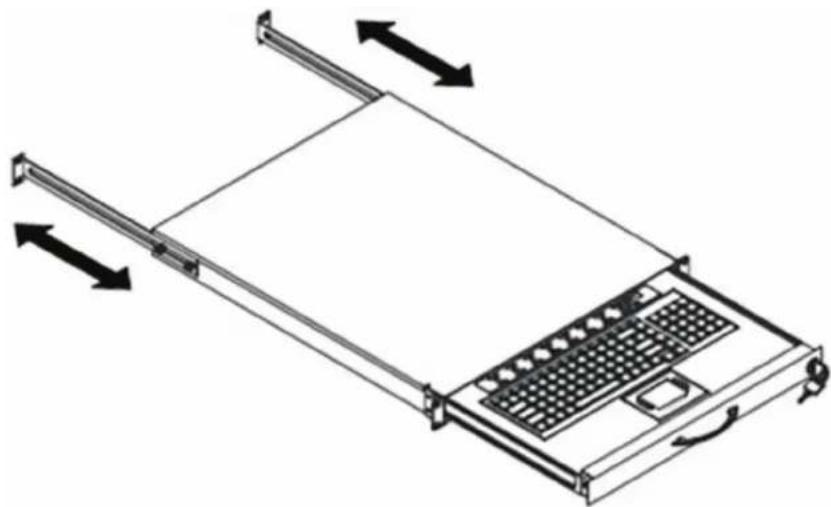
- Measure the front and rear mounting depth of the rack and align each rear L-bracket to a suitable length. Tighten the fasteners. See Figure 2.
natural_image
Diagram of a server rack with directional arrows indicating movement or force (no text or symbols)Figure 2. Aligning the L-brackets.
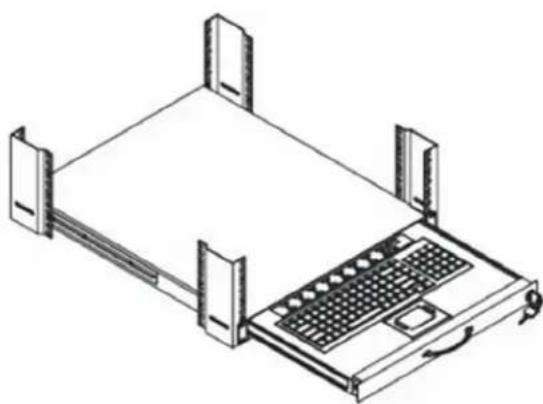
- Install the keyboard drawer into the rack. See Figure 3. Hardware for mounting the drawer to the rack is not included.
natural_image
Isometric line drawing of a rack-mounted server with a keyboard and drive unit (no text or symbols)Figure 3. Installing the keyboard drawer into the rack.
- Connect to the server via a USB or PS/2 interface. See Figure 4.

Figure 4. Connecting to the server.
CAUTION: The keyboard drawer is hot-pluggable, but components of connected devices may not be hot-pluggable. Before attempting to connect any devices to the keyboard drawer, turn off the power to them. Apply power to connected devices again only after the keyboard is receiving power.
4. Structure Drawing
Figure 5 identifies the components of the Keyboard Drawer.

Figure 5. Keyboard Drawer components.
Black Box Tech Support: FREE! Live. 24/7.
Tech support the way it should be.

natural_image
Close-up portrait of a smiling man with short hair and beard, holding a small object (no text or symbols visible)Great tech support is just 30 seconds away at 724-746-5500 or blackbox.com.

BLACK BOX®
NETWORK SERVICES
About Black Box
Black Box provides an extensive range of networking and infrastructure products. You'll find everything from cabinets and racks and power and surge protection products to media converters and Ethernet switches all supported by free, live 24/7 Tech Support available in 30 seconds or less.
© Copyright 2012. Black Box Corporation. All rights reserved. Black Box ^® and the Double Diamond logo are registered trademarks of BB Technologies, Inc. Any third-party trademarks appearing in this manual are acknowledged to be the property of their respective owners.
Brand : Black Box
Model : RM418-R4
Category : Computer keyboard