PLCM4375WIR - Rear Camera Pyle - Free user manual and instructions
Find the device manual for free PLCM4375WIR Pyle in PDF.


| Product Type | Rear View Backup Camera |
| Brand | Pyle |
| Model | PLCM4375WIR |
| Dimensions (Camera) | Approx. 1.5 x 1.2 x 1.0 inches |
| Weight (Camera) | 0.5 oz (14 g) |
| Power Input | 12V DC (connects to reverse light) |
| Video Output | Composite video (RCA) |
| Waterproof Rating | IP68 (fully submersible) |
| Night Vision | Built-in IR LEDs, automatic |
| Viewing Angle | 170° wide angle |
| Mounting | License plate bracket or surface mount |
| Operating Temperature | -4°F to 140°F (-20°C to 60°C) |
| Maintenance | Wipe lens with soft dry cloth; avoid harsh chemicals |
| Safety Warning | For backup assistance only; not a substitute for mirrors |
| Compatible Displays | Any monitor with RCA composite input |
| Installation | Hardwired to reverse light circuit; basic wiring skills required |
| Repair / Spare Parts | Non-user-serviceable; replacement unit recommended |
| Warranty | 1 year limited (check Pyle for details) |
Frequently Asked Questions - PLCM4375WIR Pyle
User questions about PLCM4375WIR Pyle
0 question about this device. Answer the ones you know or ask your own.
Ask a new question about this device
Download the instructions for your Rear Camera in PDF format for free! Find your manual PLCM4375WIR - Pyle and take your electronic device back in hand. On this page are published all the documents necessary for the use of your device. PLCM4375WIR by Pyle.
USER MANUAL PLCM4375WIR Pyle
natural_image
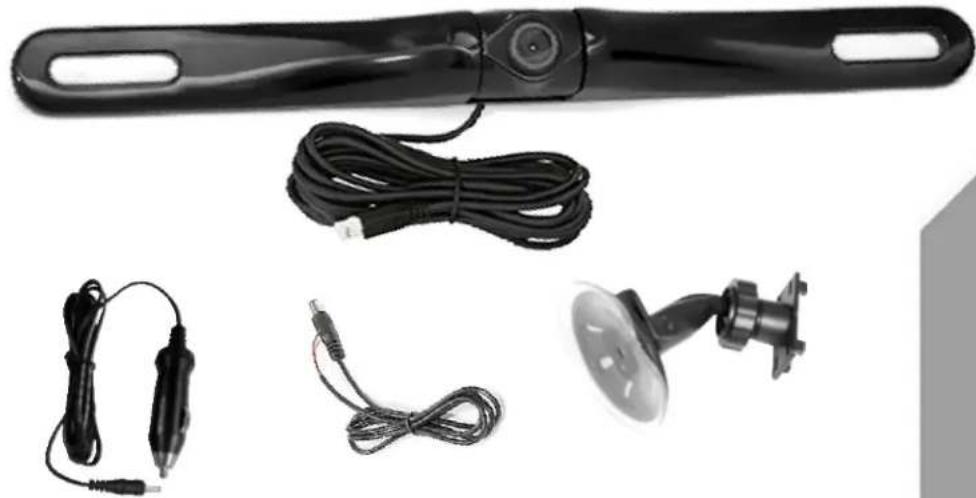
Product photo of a black handheld device with attached cables and a small circular component (no visible text or symbols)Please read all of the installation instructions carefully before installing the product. Improper installation will void manufacturer's warranty. The installation instructions do not apply to all types of vehicles, and are written as guidelines to assist in installing the system. Please consult an experienced technician if you are not comfortable installing the product. Prior to using and installing the Backup Camera System, please read the safety information provided in this user manual. Be sure to use the product as outlined in this user manual. Altercation or modifications carried out without appropriate authorization may invalidate the user's right to operate the equipment.
WARNING: Failure to read and follow these warnings and instructions may result in serious injury, including damaged property, so please pay close attention and exhibit the utmost care.
- The Digital Backup Camera is designed as an aid to the driver in detecting potentially hazardous driving conditions, obstructions, and large stationary objects. You, the driver, must also remember to drive safely and properly. Use of the Digital Backup Camera is not a substitute for safe, proper and legal driving practices.
- Never back up while looking only at your connected monitor display screen. You should always check behind and around the vehicle when backing up just as you would if the vehicle did not have the Digital Backup Camera. Always make sure your driving area is clear. Always back up slowly and with caution.
- Never depend on the Backup Camera entirely when backing up. The image on the monitor display screen may be slightly different from actual and real-time conditions. Objects viewed in the rear view monitor differ from actual distances because a wide-angle lens is used. So use the camera as an aid and always follow intended driving practices to properly judge distances from objects.
- The Backup Camera's assisted low lux lighting performance feature is also an aid to a driver. Always use your own eyes to confirm the vehicle's surroundings, as the displayed image may be not well lit or not entirely visible. Always proceed with caution and perform double-checks before proceeding.
- The area displayed by the Backup Camera is limited. It does not display objects that are close to or just below the bumper, underneath the vehicle, or objects out of the camera's view. The camera's view can change according to your vehicle's orientation on the road or changing road conditions.
- Be sure to check the camera is properly functioning, is properly positioned and securely mounted, every time you operate your vehicle.
- Make sure your trunk or hatch operates correctly, as intended, before and after installation.
- Proceed with caution when cleaning your vehicle around the camera. Avoid excess water exposure around the camera especially with spraying or a power washer.
- Please make sure to keep the camera clean and unobstructed from any debris
- Follow all traffic laws and motor vehicle regulations.
- Consult local laws and regulations for any restrictions on installation or use.
- Using a Backup Camera System is not adequate enough to completely eliminate a vehicle's blind spot. Always remember to drive with caution, following all traffic laws.
System Installation and Wiring
Notes:
Camera System installation on diesel vehicles may require a slightly different wiring install. These installation instructions do not apply to all types of vehicles. They are meant only as a general guide due to the large number of vehicle makes and models. Consult your local motor vehicle laws on the use of this product to be sure it is permitted.
Through installation of this backup camera system, you should be sure as to not degrade, damage or compromise the safety of any system or device on your vehicle.
Improper installation and wiring of the Vehicle Back-Up Camera system may damage the vehicle's electrical system, including vital vehicle computer and operating systems. That could lead to an accident or fire, causing property damage and /or serious personal injury. It is highly recommended to seek professional installation advice from a qualified auto electrician or, in the alternative, to have the installation performed by a qualified auto electrician.
Please ensure that monitor is secured and mounted where it would NOT obstruct any OEM vehicle safety features. In an event of an accident, manufacturer is not responsible for bodily injury caused by the monitor being a projectile. Select location for mounting the monitor in desired location. Ensure monitor location will not obstruct your vision while driving.
The manufacturer assumes no liability for damage caused to your vehicle due to improper installation or use.
Caution: This unit is designed to operate on a 12V/24V DC NEGATIVE GROUND electrical system. Connecting to other types of electrical systems will cause damage to your vehicle. Please contact the manufacturer if you are unaware of the system type in your vehicle.
Quick Installation:
The 2.4 G wireless modules come in two parts, they are used as the "Transmitter" and the "Receiver". When installing, the "Transmitter", should be connected to the camera (the camera is preferably mounted in the rear of the vehicle, just above the license plate). The receiver is built in the display monitor. This receives the signal from the camera connected to the transmitter.
Connect the transmitter's red power wire, of the DC 12V input cable, to the positive 12V reverse tail light in the rear of your car. Then connect the black wire, of the DC 12V input cable, and ground properly. The transmitter then connects to the camera, and will supply power to the camera directly.
Installation Transcript:
- Locate the reverse taillight wiring behind your vehicle's reverse light. You may need to remove an interior panel, or other cover, in order to locate the wiring. Connect a wireless module to the reverse light.
- Connect the camera to the wireless module, then mount the camera in the desired location.
- Mount the display monitor.
Camera Connection (Using the Wireless Transmitter):
a. Connect the wireless module's Red wire to your vehicle's reverse light positive wire.
b. Connect the wireless module's Black wire to your vehicle's reverse light negative wire.
c. Ensure the wires are safely and securely connected, with proper isolation applied to all connections.
d. Determine the best location to mount the wireless modules, as they are not waterproof and need a safe and secure location.
Monitor Connection
a. Stick the monitor to window shield using the suction cup.
b. Use the cigarette plug to get power.
Notes:
- Determine the best location for the camera (Keep in mind that you must run the cable from the camera to the transmitter). You may need to drill a small hole in the panel near your license plate (The camera is preferably mounted just above the license plate).
- Be sure when running the connection cables to leave a small amount of slack so you can still move the camera around the license plate, if you decide to slightly adjust the camera's positioning at a later time.
- Test the camera and monitor system once you have completed installation. Activate your car and turn the key into the accessory position. Your connected monitor will automatically power on if properly connected to a power source. Placing your vehicle in reverse should provide a picture.
PLCM4375WIR

5, DC power input
6, Optional AV input
- Long press for power ON/OFF; Short press for Video1/Video2 switch.
- Positive Adjustment
3, Menu - Negative Adjustment
DC

Monitor

Cigarette plug
natural_image
Black plastic mechanical component with two circular slots (no text or symbols visible)Camera
DC
+12v
-12v

Taillight
Video Transmitter
Brand : Pyle
Model : PLCM4375WIR
Category : Rear Camera