Steren MOV-1010 - Mobile Device Charger

MOV-1010 - Mobile Device Charger Steren - Free user manual and instructions

Find the device manual for free MOV-1010 Steren in PDF.

📄 2 pages English EN Download 💬 AI Question 10 questions ⚙️ Specs
Notice Steren MOV-1010 - page 1
Pick your language and provide your email: we'll send you a specifically translated version.
Product Type Mobile Device Charger
Brand Steren
Model MOV-1010
Compatibility Smartphones, tablets, and other USB-charged devices
Input Voltage 100-240 V AC, 50/60 Hz
Output Voltage 5 V DC
Output Current 1 A (single port) / 2.1 A (dual port, if applicable)
Charging Port Type USB-A
Number of Ports 1
Cable Length 1 m (approx.)
Dimensions 60 x 30 x 25 mm
Weight 50 g
Material ABS plastic
Color White
LED Indicator Yes, power on indicator
Safety Features Overcharge protection, short circuit protection, overcurrent protection
Operating Temperature 0°C to 40°C
Storage Temperature -20°C to 60°C
Certifications CE, RoHS

Frequently Asked Questions - MOV-1010 Steren

What devices are compatible with the Steren MOV-1010 charger?
The MOV-1010 is compatible with most smartphones, tablets, and other devices that charge via USB. It provides 5V output, making it suitable for devices requiring up to 1A charging current.
Can I use this charger with a device that requires more than 1A?
It is not recommended. The charger's maximum output current is 1A. Using it with a device that draws more current may cause overheating or damage. Always check your device's charging specifications.
Does the MOV-1010 support fast charging?
No, this charger delivers standard 5V 1A output, which is not fast charging (e.g., Qualcomm Quick Charge or USB Power Delivery). Charging will be slower compared to fast chargers.
Is the charger safe to leave plugged in overnight?
Yes, the charger includes overcharge protection to prevent battery damage. However, for optimal battery health, it is best to unplug once fully charged.
What should I do if the charger stops working?
First, check the power outlet and cable. If the charger still does not work, try a different USB cable. If the issue persists, the charger may be defective and should be replaced. Do not attempt to repair it yourself.
Can I use the MOV-1010 abroad?
Yes, it supports input voltages from 100-240V AC, making it suitable for use worldwide. You may need a plug adapter for different outlet shapes.
How do I clean the charger?
Unplug the charger before cleaning. Use a dry, soft cloth to wipe the exterior. Do not use liquids or abrasives as they may damage the device.
What does the LED indicator mean?
The LED lights up when the charger is connected to a power source and functioning properly. It does not indicate charging status of the connected device.
Is the charger compatible with iPhone devices?
Yes, it can charge iPhones using a standard USB-to-Lightning cable (not included). The 1A output is suitable for older iPhone models; newer models may charge slower.
Can I charge multiple devices at once?
The MOV-1010 has only one USB port, so it can charge one device at a time. For multiple devices, consider using a multi-port charger.

User questions about MOV-1010 Steren

0 question about this device. Answer the ones you know or ask your own.

Ask a new question about this device

The email remains private: it is only used to notify you if someone responds to your question.

No questions yet. Be the first to ask one.

Download the instructions for your Mobile Device Charger in PDF format for free! Find your manual MOV-1010 - Steren and take your electronic device back in hand. On this page are published all the documents necessary for the use of your device. MOV-1010 by Steren.

USER MANUAL MOV-1010 Steren

Before using the product, please read the following instructions.

IMPORTANT

  • This device is not intended for use by people (including children), whose physical, sensory or mental abilities are different or reduced, or who lack experience or knowledge.
  • Children should be supervised to ensure they do not use theDevice as a 50%.
    • The battery should not be exposed to water, fire or sunlight.
    It must be 100% charged before using it for the first time.

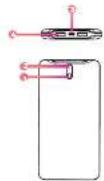
PARTS

  1. On/off button
  2. LED indicators
  3. Micro USB power port
  4. USB ports

Steren MOV-1010 - PARTS - 1

LOADING THE BACKUP BATTERY INDIC

Option 1

Connect the battery, in a USB port of a computer, for 16 hours to fully charge it.

Steren MOV-1010 - LOADING THE BACKUP BATTERY INDIC - 1

Option 2

It uses a 1 A USB eliminator to connect the battery to an electrical contact (for 12 hours).

Steren MOV-1010 - LOADING THE BACKUP BATTERY INDIC - 2

ORS SPECIFICATION

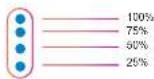
The LED indicators will turn on and off consecutively, depending on the load percentage, as shown in the following image.
Steren MOV-1010 - ORS SPECIFICATION - 1

After charging the battery, you can press the on/off button to check the available charge.

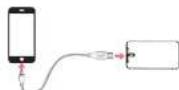
LOADING DEVICES
Steren MOV-1010 - LOADING DEVICES - 1

On some devices it may be necessary to press the on / off button to start charging to eloo it, it must be pressed 2 times in a row.
You can see in the indicators the percentage of remaining charge stored in the backup canopy.

Input: 5 Vrms, 1.4 Output: 5 Vrms, 2.1 A max. www.steren.com

Table of contents Click a title to access it
Manual assistant
Powered by Anthropic
Waiting for your message
Product information

Brand : Steren

Model : MOV-1010

Category : Mobile Device Charger