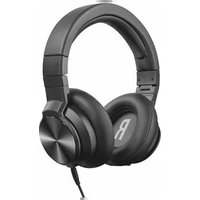
DJ-500PRO - Headphones TRUST - Free user manual and instructions
Find the device manual for free DJ-500PRO TRUST in PDF.


Pick your language and provide your email: we'll send you a specifically translated version.
| Brand | Trust |
| Model | DJ-500PRO |
| Product Type | Over-ear DJ Headphones |
| Driver Size | 50 mm |
| Frequency Response | 20 Hz - 20 kHz |
| Impedance | 32 ohms |
| Maximum Input Power | 100 mW |
| Sensitivity | 100 dB |
| Cable Length | 2.5 m |
| Plug Type | 3.5 mm + 6.3 mm adapter |
| Foldable Design | Yes |
| Adjustable Headband | Yes |
| Ear Cushion Material | Leatherette |
| Color | Black |
| Weight | 280 g |
| Dimensions (folded) | 19 x 16 x 8 cm |
| Power Source | Passive (no battery required) |
| Cleaning | Wipe with dry cloth; do not use liquid cleaners |
| Safety Warning | Do not use at high volume for prolonged periods to prevent hearing damage |
| Spare Parts | Ear pads and cable available separately |
| Repairability | User-replaceable ear pads and cable |
Frequently Asked Questions - DJ-500PRO TRUST
How do I connect the DJ-500PRO to my device?
Plug the 3.5 mm jack into your device. For devices with a 6.3 mm jack, use the included adapter.
Are the ear pads replaceable?
Yes, the ear pads are replaceable. You can purchase spare ear pads from Trust or authorized retailers.
Can I use these headphones for studio monitoring?
The DJ-500PRO are designed for DJing but can be used for basic monitoring. They have a balanced sound with good bass response.
How do I clean the headphones?
Wipe the headphones with a soft, dry cloth. Do not use water or cleaning agents. For ear pads, gently remove dust with a lint-free cloth.
What is the warranty period?
Trust offers a 2-year warranty on the DJ-500PRO. Keep your proof of purchase for warranty claims.
Are these headphones compatible with smartphones?
Yes, they work with any device that has a 3.5 mm headphone jack, including smartphones, tablets, and laptops.
Do I need batteries?
No, the DJ-500PRO are passive headphones and do not require batteries.
How do I adjust the headband?
Gently pull the ear cups downward to extend the headband. Slide them to fit your head size comfortably.
Can I fold the headphones for storage?
Yes, the ear cups rotate and fold inward for compact storage. Always fold them before placing in the included pouch or bag.
What should I do if the cable is damaged?
The cable is detachable. You can replace it with a standard 3.5 mm audio cable. Contact Trust for compatible replacements.
User questions about DJ-500PRO TRUST
0 question about this device. Answer the ones you know or ask your own.
Ask a new question about this device
No questions yet. Be the first to ask one.
Download the instructions for your Headphones in PDF format for free! Find your manual DJ-500PRO - TRUST and take your electronic device back in hand. On this page are published all the documents necessary for the use of your device. DJ-500PRO by TRUST.
USER MANUAL DJ-500PRO TRUST

Trust URBAN
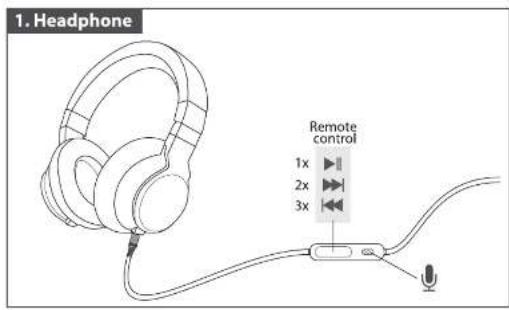
![[USER GUIDE] DJ PRO HEADSET]](/content/2026/05/1081791/images/623580de3b16eb7cc0a88cfb54188ee1bbe1a6f237b5afe79bee05418a1dd449.jpg)


Manual assistant
Powered by Anthropic
Waiting for your message
Product information
Brand : TRUST
Model : DJ-500PRO
Category : Headphones