
KIDS-CD30 - Karaoke system Hamilton Buhl - Free user manual and instructions
Find the device manual for free KIDS-CD30 Hamilton Buhl in PDF.


| Product Type | Karaoke System |
| Brand | Hamilton Buhl |
| Model | KIDS-CD30 |
| Color | Multicolor (Red/Blue/White) |
| Dimensions (Approx.) | 12.5 x 8.0 x 4.5 inches (31.8 x 20.3 x 11.4 cm) |
| Weight | 2.5 lbs (1.13 kg) |
| Power Source | 6 x AA batteries (not included) or AC adapter (included) |
| Disc Playback | CD player (CD, CD-R, CD-RW compatible) |
| Audio Output | Built-in stereo speakers (2 x 3W) |
| Microphone Input | 1 x 1/4" (6.35mm) microphone jack |
| Microphone Included | Yes, 1 wired microphone |
| Controls | Volume, Echo, Tone, Repeat, Skip, Play/Pause |
| Special Features | LED light show on speakers, built-in handle, microphone storage |
| Safety Certification | CE, RoHS compliant |
| Recommended Age | 3 years and up |
| Cleaning Instructions | Wipe with a dry, soft cloth. Do not use liquids or sprays. |
| Repair and Parts | Contact Hamilton Buhl support for service and replacement parts. |
| Warranty | 1-year limited warranty |
| Included Accessories | AC adapter, user manual, 1 microphone |
Frequently Asked Questions - KIDS-CD30 Hamilton Buhl
User questions about KIDS-CD30 Hamilton Buhl
0 question about this device. Answer the ones you know or ask your own.
Ask a new question about this device
Download the instructions for your Karaoke system in PDF format for free! Find your manual KIDS-CD30 - Hamilton Buhl and take your electronic device back in hand. On this page are published all the documents necessary for the use of your device. KIDS-CD30 by Hamilton Buhl.
USER MANUAL KIDS-CD30 Hamilton Buhl
natural_image
Colorful portable radio with red, blue, and yellow front panels and a yellow microphone (no visible text or symbols)USER MANUAL
Kids CD30
PLEASE READ THIS USER MANUAL COMPLETELY BEFORE OPERATING THIS UNIT AND RETAIN THIS BOOKLET FOR FUTURE REFERENCE.
HAMILTON BUHL
80 LITTLE FALLS
FAIRFIELD, NJ 07004
PHONE: 800-631-0868
WWW.HAMILTONBUHL.COM
WARNING
TO PREVENT FIRE OR SHOCK HAZARD, DO NOT USE THIS PLUG WITH AN EXTENSION CORD, RECEPTACLE OR OTHER OUTLET UNLESS THE BLADES CAN BE FULLY INSERTED TO PREVENT BLADE EXPOSURE. TO PREVENT FIRE OR SHOCK HAZARD, DO NOT EXPOSE THIS APPLIANCE TO RAIN OR MOISTURE.

The lightning flash and arrow head within the triangle is a warning sign alerting you of “dangerous voltage” inside the product.
CAUTION
RISK OF ELECTRIC SHOCK DO NOT OPEN
CAUTION: TO REDUCE THE RISK OF ELECTRIC SHOCK DO NOT REMOVE COVER (ON BACK), NO USER SERVICEABLE PARTS INSIDE REFER SERVICING TO QUALIFIED SERVICE PERSONNEL.

The exclamation point within the triangle is a warning sign alerting you of important instructions accompanying the product.
The Caution Marking is located at the bottom enclosure of the apparatus.
IMPORTANT SAFETY INSTRUCTIONS
- Read these instructions.
- Keep these instructions.
- Heed all warnings.
- Follow all instructions.
- Do not use this apparatus near water.
- Cleaning-Unplug this product from the wall outlet before cleaning. Do not use liquid cleaners or aerosol cleaners. Clean only with dry cloth.
-
Do not block any ventilation openings. Install in accordance with the manufacturer's instructions.
-
Do not place this product on an unstable cart, stand, tripod, bracket, or table. The product may fall, causing serious injury to a child or adult, and serious damage to the product. Use only with a cart, stand, tripod, bracket, or table recommended by the manufacturer, or sold with the product. Any mounting of the product should follow the manufacturer's instructions, and should use a mounting accessory recommended by the manufacturer. A

product and cart combination should be moved with care-quick stops, excessive force and uneven surfaces may cause the product and cart combination to overturn.
-
Do not install near any heat sources such as radiators, heat registers, stoves, or other apparatus (including amplifiers) that product heat.
-
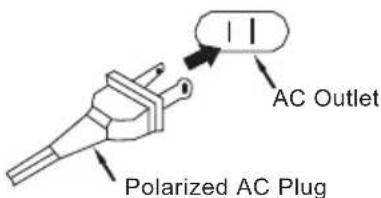
Do not defeat the safety purpose of the polarized or grounding-type plug. A polarized plug has two blades with one wider than the other. A grounding type plug has two blades and a third grounding prong. The wide blade or the third prong is provided for your safety. If the provided plug does not fit into your outlet, consult an electrician for replacement of the obsolete outlet.
-
Protect the power cord from being walked on or pinched particularly at plugs, convenience receptacles, and the point where they exit from the apparatus.
-
Only use attachments/accessories specified by the manufacturer.
-
Unplug this apparatus during lightning storms or when unused for a long periods of time.
-
Refer all servicing to qualified service personnel. Servicing is required when the apparatus has been damaged in any way, such as power-supply cord or plug is damaged, liquid has been spilled or objects have fallen into the apparatus, the apparatus has been exposed to rain or moisture, does not operate normally, or has been dropped.
-
This appliance shall not be exposed to dripping or splashing water and that no object filled with liquids such as vases shall be placed on the apparatus.
- Do not overload wall outlet. Use only power source as indicated.
- Use replacement part as specified by the manufacturer.
- Upon completion of any service or repairs to this product, ask the service technician to perform safety checks.
- Power Sources - This product should be operated only from the type of power source indicated on the marking label. If you are not sure of the type of power supply to your home, consult your product dealer or local power company. For products intended to operate from battery power, or other sources, refer to the operating instruction.
- Object and Liquid Entry - Never push objects of any kind into this product through openings as they may touch dangerous voltage points or short-out parts that could result in a fire or electric shock. Never spill liquid of any kind on the product.
- Damage Requiring Service - Unplug this product from the wall outlet and refer servicing to qualified service personnel under the following conditions:
a) When the power-supply cord or plug is damaged,
b) If liquid has been spilled, or objects have fallen into the product, c) If the product has been exposed to rain or water,
d) If the product does not operate normally by following the operating instructions. Adjust only those controls that are covered by the operating instructions as an improper adjustment of other controls may result in damage and will often require extensive work by a qualified technician to restore the product to its normal operation.
e) If the product has been dropped or damaged in any way, and
f) When the product exhibits a distinct change in performance - this indicates a need for service.
This symbol indicates that this product incorporates double insulation between hazardous mains voltage and user accessible parts.

SAVETHESE INSTRUCTIONS
CAUTION
CLASS11LASER PPRODUCT
CLASS 1 LASER PRODUCT APPAREIL LASER DE CLASSE 1 PRODUCTO LASER DE CLASE 1
CAUTION INVISIBLE LASER
RADIATION WHEN OPEN AND INTERLOCKS
DEFEATED
AVOID EXPOSURE TO BEAM.

natural_image
Warning symbol with black sunburst inside triangle (no text or numbers)This product contains a low power device
Follow the advice below for safe operations.
ON PROTECTION AGAINST LASER ENERGY EXPOSURE
- As the laser beam used in this compact disc player is harmful to the eyes, do not attempt to disassemble the casing.
- Stop operation immediately if any liquid or solid object should fall into the cabinet.
-
Do not touch the lens or poke at it. If you do, you may damage the lens and the player may not operate properly.
-
Do not put anything in the safety slot. If you do, the laser diode will be ON when the CD door is still open.
- If the unit is not to be used for a long period of time, make sure that all power sources are disconnected from the unit. Remove all batteries from the battery compartment, and unplug the AC cord from the wall outlet. Make it a practice to remove the AC cord by grasping the main body and not by pulling the cord.
- This unit employs a laser. The use of controls or adjustment or performance of procedures other than those specified here may result in exposure to hazardous radiation.
Should any trouble occur, remove the power source and refer servicing to qualified personnel.
COMPLIANCE WITH FCC REGULATIONS
This device complies with Part 15 of the FCC Rules. Operation is subject to the following two conditions:
(1) this device may not cause harmful interference, and
(2) this device must accept any interference received, including interference that may cause undesired operation.
NOTE : This equipment has been tested and found to comply with the limits for a Class B digital device, pursuant to Part 15 of the FCC Rules. These limits are designed to provide reasonable protection against harmful interference in a residential installation. This equipment generates uses and can radiate radio frequency energy and, if not installed and used in accordance with the instructions, may cause harmful interference to radio communications. However, there is no guarantee that interference will not occur in a particular installation. If this equipment does cause harmful interference to radio or television reception, which can be determined by turning the equipment off and on, the user is encouraged to try to correct the interference by one or more of the following measures:
- Reorient or relocate the receiving antenna.
- Increase the separation between the equipment and receiver.
- Connect the equipment into an outlet on a circuit different from that to which the receiver is connected.
- Consult the dealer or an experienced radio/TV technician for help.
WARNING: Changes or modifications not expressly approved by the party responsible for compliance could void the user's authority to operate the equipment.
PROTECT YOUR FURNITURE!!
This system is equipped with non-skid rubber ‘feet’ to prevent the product from moving when you operate the controls. These ‘feet’ are made from non-migrating rubber material specially formulated to avoid leaving any marks or stains on your furniture. However certain types of oil based furniture polishes, wood preservatives, or cleaning sprays may cause the rubber ‘feet’ to soften, and leave marks or a rubber residue on the furniture.
To prevent any damage to your furniture we strongly recommend that you purchase small self-adhesive felt pads, available at hardware stores and home improvement centers everywhere, and apply these pads to the bottom of the rubber ‘feet’ before you place the product on fine wooden furniture.

FRONT VIEW

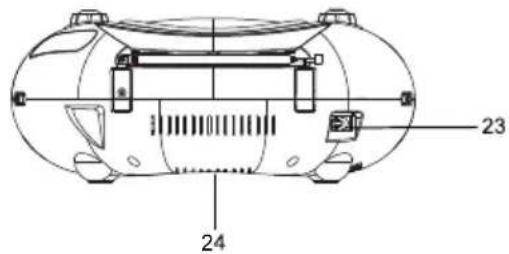
REAR VIEW
- Carrying Handle
- FM Antenna
- CD Door
- Function Selector
5 Volume Control
6 Dial Scale
7 Band Selector
8 Tuning Knob
9 Program Button
10 Stop ■ Button - Repeat Button
-
Program Indicator
-
Repeat Indicator
- Power Indicator
- Headphone Jack
- LED Display
- Skip Backward ◀◀◀ Button
- Play/Pause ▶|| Button
- Skip Forward ▶▶▶ Button
- Play/Pause Indicator
- FM Stereo Indicator
- MIC Jack
- AC Power Socket
- Battery Compartment
POWER SOURCE
The unip operates on 8 X 'C' size (UM-2) batteries (Not included) or from AC120V \~ 60Hz line power.
For best performance and longer operating time, we recommend the use of alkaline batteries.

- Remove the Battery Door.
- Following the polarity (+ and -) diagram as shown inside the battery compartment, insert 8 'C' size (UM-2) batteries.
- Replace the Battery Door.
BATTERY WARNING
- Be sure that the batteries are installed correctly. Wrong polarity may damage the unit.
- (a) Do not mix old and new batteries.
(b) Do not mix alkaline, standard (carbon-zinc) or rechargeable (nickel-cadmium) batteries.
- If the unit is not to be used for an extended period of time, remove the batteries. Old or leaking batteries can cause damage to the unit and may void the warranty.
- Do not dispose of batteries in fire, batteries may explode or leak.
B. AC POWER CONNECTION
- Insert one end of power cord to the AC Socket on the back of the unip
- Insert the power cord to the AC Socket (#23).
- Connect the power cord to AC power source.
- When the unit is operated from AC power source, the internal battery source will automatically be disconnected.
CAUTION:
TO PREVENT ELECTRIC SHOCK, MATCH WIDE BLADE OF PLUG TO WIDE SLOT. FULLY INSERT.
RADIO RECEPTION
- Set the Function Selector (# 4) to "RADIO".
- Set the Band Selector (# 7) to "AM" or "FM" for the desired radio band.
- Turn the Tuning Knob (# 8) to select the desired radio station.
- Adjust the Volume Control (# 5) to obtain the desired sound level from the Built-in Speakers.
- To turn the Radio off, set the Function Selector (# 4) to the "OFF" position.
TIPS FOR BEST RADIO RECEPTION
- To insure maximum FM tuner reception, the Telescopic Antenna (#2) should be fully extended and rotated to obtain the best possible station reception.
- The AM antenna is built into the unit. When tuning in AM reception, be sure to place the unit in a vertical position. To insure best AM reception, try repositioning the unit until the best station reception is obtained.
Note: This CD player will not only play commercial CDs, but also self-compiled CD-R/RW discs. Do not attempt to play CD-ROM, CDI, VCD, DVD or computer CDs.
Notes on CD-R/RW Discs
- Because of non-standardized format definition/production of CD-R/RW, playback quality and performance are not guaranteed.
- Manufacturer is not responsible for the playability of CD-R/RW due to recording conditions such as PC performance, writing software, media ability, etc.
- Do not attach a label or seal to either side of the CD-R/RW disc. It may cause a malfunction.
PLAYING A CD
- Open the CD Door (# 3) by pressing down where the OPEN/CLOSE is indicated on the CD Door (# 3).
- Carefully place an audio CD with its label side upward in the CD compartment and close the CD Door by pressing on the CD Door (# 3) where OPEN/CLOSE is indicated on the CD Door (# 3).
-
Set the Function Selector (# 4) to the "CD" position. The POWER Indicator (# 14) will light. The LED Display (# 16) will briefly display flashing "-" and then the total number of tracks on the CD will appear in the LED Display (# 16) after a few seconds.
-
Press the CD Play/Pause ▶Button (#18). The Play/Pause Indicator (# 20) will light steadily and the CD will start playing from the first track.
-
Adjust the Volume Control (# 5) to obtain the desired sound level from the Built-in Speakers.
-
To pause playback, press the CD Play/Pause ▶Button (#18). The Play/Pause Indicator (#20) will flash. To resume playing, press the CD Play/Pause ▶Button (# 18) again.
-
You can choose to play your favorite track directly by pressing either the Skip Forward ▶▶▶Button (# 19) or Skip Backward ◀◀Button (# 17). The LED Display (# 18) will indicate the correct track number selected.

-
To locate a particular section within a track, press and hold the CD Search Forward ▶▶▶Button (# 19) or CD Search Backward ◀◀◀Button (# 17) until the section is found. Release the button to continue playing your selection.
-
To repeat a particular track, press the CD Repeat Button (#11) until the CD Repeat Indicator (#13) flashes.
-
To repeat the entire CD, press the CD Repeat Button (#11) until the CD Repeat Indicator (#13) light steadily.
-
To stop playing, press the CD Stop ■ Button (#10).
-
When you wish to turn off the CD Player, set the Function Selector (# 4) to the "OFF" position. The Power Indicator (# 14) will go off.
CD PROGRAMMED PLAY
This function allows the tracks to be played in a programmed sequence. NOTE: Program can only be set in STOP mode.
- In CD stop mode, press the Program Button (# 9) once. Program No. "01" will appear and blink in the LED Display (#16).
- Press the CD Skip Forward ▶▶▶ Button (# 19) or CD Skip Backward ◀◀◀ Button (# 17) to select the song to be programmed. For example track 5 is selected.
- Press the Program Button (#9) again to store selection. The LED Display (#16) will go to "02" and blink to prompt for input.
- Press the CD Skip Forward ▶▶| Button (# 19) or CD Skip Backward ◀◀ button (# 17) to select the next song to be programmed and press the CD Program Button (# 9) to store the second selection.


-
You can repeat steps #2 - #4 to program up to 20 tracks. The programmed tracks will be shown in the LED Display (#16) one by one in the programmed sequence after the 20th selection has been stored.
-
To check the programmed tracks, press the Program Button (#9) repeatedly until the last Program No. appears and flashes in the Display and then press the Program Button (# 9) once again. The programmed tracks will be displayed one by one in the programmed sequence.
-
Press the CD Play/Pause ▶Button (#18) to start playing in the programmed sequence. The Program Indicator (#14) will light steadily. To stop programmed play, press the CD Stop ■Button (#10).
-
After all the programmed tracks have been played the player stops but the program remains in the memory.
-
Press the Play/Pause ▶Button (#18) to begin programmed playback again.
-
Normally all the programmed tracks will be played through once and then stop. However, you can use the Repeat function to repeatedly play a certain track (Repeat 1) or all tracks in the program (Repeat All). You can also tap the CD Skip Forward ▶▶Button (#19) to go directly to other tracks ahead or use CD Skip Backward ◀◀Button (#17) to go back to previous track(s) during program play.
-
To review/edit the programmed tracks during play, press the CD Stop ■ Button (#10) and then the CD Program Button (#9), "01" will show in the LED DISPLAY (#16) and Program Indicator (#12) will both flash. If you do not want to change any track in the program, press CD Stop ■ Button (#10).
-
To edit a programmed track, use the CD Skip Forward ▶▶■ Button (#19) or CD Skip Backward ◀◀Button (#17) to select a new track and press CD Program Button (#9) to confirm. To skip forward, press CD Program Button (#9) until you reach the program number of the track you want to change.
-
To cancel program play, press the CD Stop ■ Button (#10) twice while program playback is running or open the CD Door (#3) in stop mode. The Program Indicator (#12) will go off.
USING HEADPHONES (NOT INCLUDED)
Inserting the plug of your headphones into the Stereo Headphone Jack (#15) will enable you to listen to the CD or Radio music in private. When using headphones, the Built-in Speakers will be disconnected.
READ THIS IMPORTANT INFORMATION BEFORE USING YOUR HEADPHONES
- Avoid extended play at very high volume as it may impair your hearing.
- If you experience ringing in your ears, reduce the volume or shut off your unit.
- Do not use while driving a motorized vehicle. This is dangerous and also illegal in some states.
- Keep the volume at a reasonable level even if your headset is an open-air type designed to allow you to hear outside sounds. Please note excessive high volume may still block outside sounds.
- Plug the Dynamic microphone (Included) into the MIC jack (#22) on the front side of your unit. Their output is mixed with playback from Radio or CD.
- On the microphone, there is an ON/OFF switch. Ensure that you set the switch to ON position during the usage.
- Adjust the master Volume control to obtain the desired volume level.
- You can start to sing-along with the music playback.
CARE AND MAINTENANCE
- Clean your unit with a damp (never wet) cloth. Solvent or detergent should never be used.
- Avoid leaving your unit in direct sunlight or in hot, humid or dusty places.
-
Keep your unit away from heating appliances and sources of electrical noise such as fluorescent lamps or motors.
-
If drop-outs or interruptions occur in the music during CD play, or if the CD fails to play at all, its bottom surface may require cleaning. Before playing, wipe the disc from the center outwards with a good soft cleaning cloth.

natural_image
Simple line drawing of a hand holding a bird, no text or symbols presentTROUBLESHOOTING GUIDE
| Symptom | Possible Cause Solution | |
| Noise or sound distorted on AM or FM broadcast | Station not tuned properly for AM or FM.FM: Telescopic antenna is not fully extended.AM: Internal antenna is not positioned correctly | Fine tune the AM or FM broadcast station.FM: Fully extend the FM Telescopic antenna.AM: Reposition the unit until the best reception is obtained. |
| AM or FM no sound | Unit not in Tuner mode, AM or FM band.Volume at minimum | Slide function selector to select AM or FM. Increase Volume |
| CD player will not play | Unit not in CD function mode.CD is installed incorrectly.If the CD is self-compiled, the media used may not be compatible with the player. | Select CD function mode. Insert CD with label side up. Use better quality blank media and retest. |
| CD skips while playing | Disc is dirty or scratched. Wipe CD with clean cloth or use another disc. | |
| Intermittent sound from CD Player | Dirty or defective disc.Dirty pick up lens.Player is subject to excessive shock or vibration | Clean or replace the defective disc.Use a CD-lens cleaning disc to clean the lens.Relocate the player away from shock or vibration |
| No sound from Mic | Volume control is set to minimum.Mic is off | Adjust the volume to MAX, and then re-adjust to a comfortable level.Turn on the mic with the ON/OFF switch located on the mic. |
SPECIFICATIONS
Power Requirement: AC120V 60Hz 14W
Battery (Not included): DC1.5V 'C' (UM2) x 8
Frequency Range: FM: 88-108MHz
AM: 530-1710KHz
Microphone:
600 Ohm Impedance w/3.5mm Dynamic microphone
HB Hamilton Buhl™
Warranty Registration Instructions

natural_image
Silhouette of a person with long hair using a laptop to observe three arrows (no text or symbols)Visit: www.hamiltonbuhl.com
- Click on Customer Support
- Click on Product Warranty Registration Form
- Please fill out all fields marked with * to register your product
Our Mission:
Since our founding in 1933 Hamilton Buhl continues to evolve as a leader in technology products for education and industry. Our products are embraced by educators, corporate trainers, presenters, government agencies, and hospitals for their daily presentation, from classrooms to the board room, Hamilton Buhl has the presentation product for you.
80 Little Falls Road, Fairfield, NJ 07004
Some exciting new products from Hamilton Buhl

natural_image
Two headsets labeled SC-AMV and MS2G-AMV, shown from different angles (no additional text or symbols visible)Deluxe Headsets with 3.5mm TRRS plug

natural_image
Black-and-white photo of a flat-screen TV displaying a scenic mountain landscape (no text or symbols visible)9" DVD Player Induction Technology

natural_image
Black rectangular electronic device labeled HA-967, no visible text or symbols on the device itselfTape to MP3 Converter Bluetooth Boom Box


natural_image
Black portable electronic device labeled HB-100BT, showing front panel and control buttons (no readable text beyond label)uetooth Boom Box
natural_image
Black electronic device labeled VENU-80, showing internal components and casing (no readable text beyond label)65 Watt Portable PA
- USER MANUAL
- Kids CD30
- WARNING
- CAUTION
- RISK OF ELECTRIC SHOCK DO NOT OPEN
- IMPORTANT SAFETY INSTRUCTIONS
- SAVETHESE INSTRUCTIONS
- CLASS11LASER PPRODUCT
- ON PROTECTION AGAINST LASER ENERGY EXPOSURE
- COMPLIANCE WITH FCC REGULATIONS
- PROTECT YOUR FURNITURE!!
- POWER SOURCE
- BATTERY WARNING
- AC POWER CONNECTION
- CAUTION:
- RADIO RECEPTION
- TIPS FOR BEST RADIO RECEPTION
- Notes on CD-R/RW Discs
- PLAYING A CD
- CD PROGRAMMED PLAY
- USING HEADPHONES (NOT INCLUDED)
- READ THIS IMPORTANT INFORMATION BEFORE USING YOUR HEADPHONES
- CARE AND MAINTENANCE
- SPECIFICATIONS
- HB Hamilton Buhl™
- Warranty Registration Instructions
- Visit: www.hamiltonbuhl.com
- Our Mission:
- Some exciting new products from Hamilton Buhl
Brand : Hamilton Buhl
Model : KIDS-CD30
Category : Karaoke system