
F200 - Smartphone TCL - Free user manual and instructions
Find the device manual for free F200 TCL in PDF.


Pick your language and provide your email: we'll send you a specifically translated version.
| Product Type | Smartphone |
| Brand | TCL |
| Model | F200 |
| Display Size | 5.5 inches |
| Display Resolution | 1280 x 720 pixels (HD) |
| Processor | Quad-core 1.3 GHz |
| RAM | 2 GB |
| Internal Storage | 16 GB |
| Expandable Storage | microSD up to 128 GB |
| Rear Camera | 8 MP with autofocus and LED flash |
| Front Camera | 5 MP |
| Operating System | Android 9.0 Pie (Go edition) |
| Battery Capacity | 3000 mAh (removable) |
| Dimensions | 156.2 x 75.6 x 8.2 mm |
| Weight | 168 g |
| SIM Support | Dual SIM (Micro-SIM, dual stand-by) |
| Connectivity | Wi-Fi 802.11 b/g/n, Bluetooth 4.2, GPS, microUSB 2.0 |
| Sensors | Accelerometer, proximity, light |
| Maintenance | Clean with a soft, dry cloth. Avoid liquids and abrasives. |
| Safety | Do not disassemble. Use only approved chargers and accessories. |
| Spare Parts & Repairability | Battery, screen, and charging port available at authorized service centers. |
Frequently Asked Questions - F200 TCL
How do I insert the SIM card and microSD card?
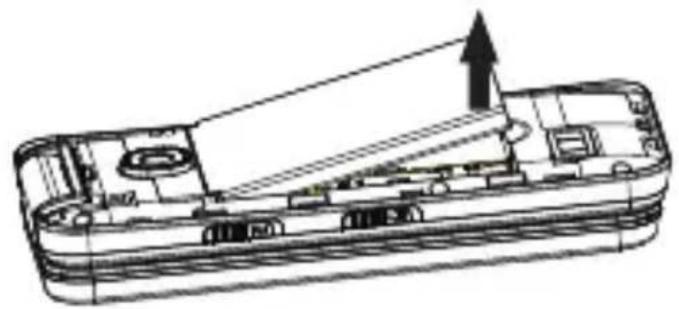
Turn off the phone. Locate the SIM tray on the left side (or back cover for removable battery models). Use the ejector tool to pop out the tray. Place the nano-SIM (or micro-SIM) and microSD card in the correct slots, then reinsert the tray. For models with a removable back cover, remove the cover and battery, then insert the cards.
How can I extend battery life?
Lower screen brightness, disable unused connectivity (Wi-Fi, Bluetooth, GPS), close background apps, and enable battery saver mode in Settings > Battery. Avoid extreme temperatures and fully discharge the battery regularly.
What should I do if the screen freezes or the phone is unresponsive?
Press and hold the Power button for about 10-15 seconds until the device restarts. If that does not work, try a forced restart by pressing and holding both the Power and Volume Down buttons simultaneously for 10 seconds.
How do I take a screenshot?
Press and hold the Power button and Volume Down button simultaneously for about 2 seconds. The screen will flash, and the screenshot will be saved in the Gallery app.
How can I free up storage space?
Go to Settings > Storage. Use the 'Free up space' option to remove unused apps, temporary files, and cached data. You can also move photos and videos to a microSD card.
Why is my phone not charging?
Check the charging cable and adapter for damage. Try a different outlet. Ensure the microUSB port is clean and free of debris. If the battery is removable, reseat it. If still not charging, try a different cable or charger.
How do I connect to Wi-Fi?
Go to Settings > Network & Internet > Wi-Fi. Toggle Wi-Fi on, select your network from the list, enter the password, and tap Connect. You can also manage saved networks here.
How do I perform a factory reset?
Back up your data first. Go to Settings > System > Advanced > Reset options > Erase all data (factory reset). Confirm by following on-screen instructions. Alternatively, you can reset via recovery mode by powering off, then pressing Power + Volume Up.
How do I update the software?
Go to Settings > System > Advanced > System update. Check for updates. If an update is available, download and install it over a Wi-Fi connection. Ensure battery is above 50% before starting.
What should I do if the phone gets wet?
Immediately turn off the phone, remove the battery if possible, and dry external moisture with a soft cloth. Do not use heat sources like a hairdryer. Place the phone in a bag of uncooked rice or silica gel for 24-48 hours. Do not reassemble until completely dry.
User questions about F200 TCL
0 question about this device. Answer the ones you know or ask your own.
Ask a new question about this device
No questions yet. Be the first to ask one.
Download the instructions for your Smartphone in PDF format for free! Find your manual F200 - TCL and take your electronic device back in hand. On this page are published all the documents necessary for the use of your device. F200 by TCL.
USER MANUAL F200 TCL
natural_image
Technical line drawing of an open smartphone showing internal components and casing (no text or symbols)2.3 使用合格的维修服务
natural_image
Technical line drawing of a device casing with internal compartments and an upward arrow indicating motion (no text or symbols)B
natural_image
Technical line drawing of a mechanical device with internal components and an upward arrow indicating motion (no text or symbols)安装时按以下步骤进行:
natural_image
Technical line drawing of a multi-layered electronic device casing with internal compartments and a downward arrow indicating a component (no text or symbols present)1.2 电池的充电
natural_image
Exploded view diagram of a smartphone showing internal components and casing (no text or labels)natural_image
Technical line drawing of an open smartphone case with internal components and no visible text or symbols惠州 TCL 移动通信有限公司
TCL
Table of contents
Click a title to access it
Manual assistant
Powered by Anthropic
Waiting for your message
Product information
Brand : TCL
Model : F200
Category : Smartphone