
Yzo 19855 - Loudspeaker TRUST - Free user manual and instructions
Find the device manual for free Yzo 19855 TRUST in PDF.


Pick your language and provide your email: we'll send you a specifically translated version.
| Product Type | Portable Bluetooth Speaker |
| Brand | Trust |
| Model | Yzo 19855 |
| Dimensions (Approx.) | 100 x 100 x 50 mm |
| Weight (Approx.) | 200 g |
| Power Source | Built-in rechargeable battery via USB-C |
| Battery Capacity | 2000 mAh |
| Playback Time (Approx.) | Up to 10 hours at moderate volume |
| Charging Time | Approx. 2-3 hours |
| Bluetooth Version | 5.0 |
| Wireless Range | Up to 10 m (33 ft) |
| Audio Output Power | 5 W (RMS) |
| Frequency Response | 100 Hz - 20 kHz |
| Driver Size | 45 mm |
| Impedance | 4 Ω |
| Signal-to-Noise Ratio | >80 dB |
| Supported Audio Codecs | SBC, AAC |
| Controls | Power, Volume +/-, Play/Pause, Bluetooth pairing button |
| Additional Features | Hands-free speakerphone, built-in microphone |
| Water Resistance | No (not waterproof, keep dry) |
| Safety Precautions | Do not expose to water, heat, or drop. Use only supplied cable. |
| Cleaning & Maintenance | Wipe with soft dry cloth. Do not use solvents. |
| Spare Parts & Repairability | Not user-serviceable. Contact Trust support for issues. |
| Package Contents | Speaker, USB-C charging cable, user manual |
Frequently Asked Questions - Yzo 19855 TRUST
How do I pair the Trust Yzo 19855 speaker with my phone?
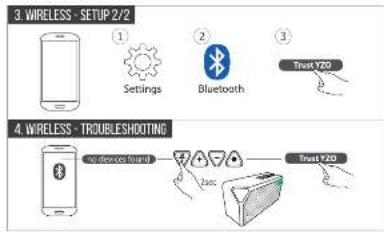
Turn on the speaker by pressing the power button. The LED will flash blue. Enable Bluetooth on your phone and select 'Trust Yzo 19855' from the list. If prompted, enter 0000 as the PIN.
What is the battery life of the Yzo 19855?
The battery life is up to 10 hours at moderate volume. Actual battery life may vary depending on volume level and audio content.
How do I charge the speaker?
Use the included USB-C cable to connect the speaker to a USB power adapter or computer. The LED will turn red during charging and change to green when fully charged. Charging time is approximately 2-3 hours.
Can I use the speaker while it's charging?
Yes, you can use the speaker while it is connected to a power source. However, it is recommended to fully charge before first use.
Is the Yzo 19855 waterproof?
No, the speaker is not waterproof. Avoid exposure to water, rain, or splashes. Keep it away from liquids to prevent damage.
How do I adjust the volume?
Use the + and - buttons on the top of the speaker to increase or decrease volume. You can also adjust volume from your connected device.
What should I do if the speaker does not connect to my device?
Ensure the speaker is in pairing mode (LED flashing blue). Turn off Bluetooth on your device and turn it on again. Delete the speaker from your Bluetooth list and re-pair. If issues persist, reset the speaker by pressing and holding the power button for 10 seconds.
Can I use the speaker as a hands-free speakerphone?
Yes, the speaker has a built-in microphone. When a call comes in, press the play/pause button to answer. Press again to end the call.
How do I reset the speaker?
To reset the speaker, press and hold the power button for about 10 seconds until the LED turns off and then on again. This will clear the pairing list and restore default settings.
What is the warranty period for Trust Yzo 19855?
The standard warranty period is 2 years from the date of purchase. Keep your receipt as proof of purchase. For warranty claims, contact Trust customer support.
User questions about Yzo 19855 TRUST
0 question about this device. Answer the ones you know or ask your own.
Ask a new question about this device
No questions yet. Be the first to ask one.
Download the instructions for your Loudspeaker in PDF format for free! Find your manual Yzo 19855 - TRUST and take your electronic device back in hand. On this page are published all the documents necessary for the use of your device. Yzo 19855 by TRUST.
USER MANUAL Yzo 19855 TRUST

flowchart
graph TD
    A["Device with icons"] --> B["Warning icon"]
    B --> C["Other inputs"]
    D["Hand icon"] --> E["Warning icon"]
    E --> F["Warning icon"]
    G["Music icon"] --> H["Warning icon"]

![Trust URBAN [USER GUIDE] WIRELESS SPEAKER](/content/2026/05/1081511/images/3630d4f6b9997bc6d07711c1288c49b04bcc0e6923698bd8188bd8538d64dcc5.jpg)



Manual assistant
Powered by Anthropic
Waiting for your message
Product information
Brand : TRUST
Model : Yzo 19855
Category : Loudspeaker