
39ME412V - Television MAGNAVOX - Free user manual and instructions
Find the device manual for free 39ME412V MAGNAVOX in PDF.


| Product Type | LED TV |
| Screen Size | 39 inches |
| Resolution | 1920 x 1080 (Full HD) |
| Refresh Rate | 60 Hz |
| Brightness | 250 cd/m² |
| Contrast Ratio | 3000:1 (Static) |
| Viewing Angle | 178° / 178° |
| Audio Output | 8W + 8W |
| Connectivity | 2 x HDMI, 1 x USB, 1 x Composite, 1 x RF, 1 x Optical, 1 x Headphone |
| Dimensions (with stand) | 886 x 555 x 200 mm |
| Dimensions (without stand) | 886 x 515 x 80 mm |
| Weight (with stand) | 8.2 kg |
| Weight (without stand) | 7.8 kg |
| Power Consumption (typical) | 70 W |
| Standby Power Consumption | < 0.5 W |
| Power Supply | 100-240V AC, 50/60Hz |
| VESA Mount Pattern | 200 x 200 mm |
| Tuner | ATSC / NTSC (Analog) |
| Remote Control | IR Remote with batteries included |
| Warranty | 1 year limited |
| Cleaning Instructions | Use a soft dry cloth; do not use liquid or abrasive cleaners. |
Frequently Asked Questions - 39ME412V MAGNAVOX
User questions about 39ME412V MAGNAVOX
0 question about this device. Answer the ones you know or ask your own.
Ask a new question about this device
Download the instructions for your Television in PDF format for free! Find your manual 39ME412V - MAGNAVOX and take your electronic device back in hand. On this page are published all the documents necessary for the use of your device. 39ME412V by MAGNAVOX.
USER MANUAL 39ME412V MAGNAVOX
Thank you for choosing Magnavox.
Need help fast?
Read your Owner's Manual first for quick tips that make using your Magnavox product more enjoyable. If you have read your instructions and still need assistance, you may access our online help at www.magnavox.com/support or call 18663413738 while with your product (and Model / Serial number)

Positioning the TV 6
Regulatory notices 6
Environmental care 6
3 Get started 7
Features 7
Supplied accessories 7
Symbols used in this Owner's Manual 7
Attaching the base 8
Mounting the unit on your furniture 8
Managing cables 8
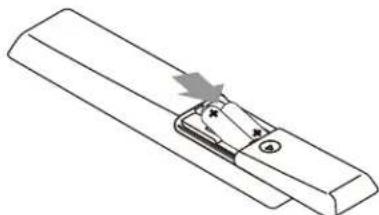
Installing the remote control batteries 8
Remote control 9
Control panel 10
Terminals 10
Connecting the antenna or the cable 11
Plugging in the AC power cord 11
Initial setup 12
4 Use your TV 13
Switching on your TV and putting it in standby mode 13
Adjusting volume 13
Switching channels 13
Watching channels from an external device 14
Using auto mode 14
Sleep timer 14
Freeze mode 14
Switching audio mode 14
fun-Link options 15
Changing picture format 15
TV screen information 16
5 Use more of your TV
Displaying the main menu 17
Picture 18
Sound 19
Setup 19
Autoprogram 19
Channel list 20
Add channels 20
Antenna confirmation 20
Features 21
Caption settings 21
Child and ratings lock 22
PC settings 24
fun-Link (HDMI CEC) 25
Setting your location to home 26
E-sticker 26
Language 26
USB 27
6 Upgrade your TV software 28
Checking your current software version 28
Upgrading the software 28
7 Connecting devices
Selecting your connection quality 29
Connecting your devices 29
8 Useful tips
FAQ 32
Troubleshooting 32
9 Information
Glossary 34
Maintenance 34
10 Specifications
11 Warranty
-
Return your Product Registration Card or visit at www.magnavox.com/support today to get the very most from your purchase.
Registering your model with MAGNAVOX makes you eligible for all of the valuable benefits listed below, so don't miss out.
Complete and return your Product Registration Card at once or visit at www.magnavox.com/support to ensure:
\*Product Safety Notification
By registering your product, you'll receive notification - directly from the manufacturer - in the rare case of a product recall or safety defect.
\*Additional Benefits
Registering your product guarantees that you'll receive all of the privileges to which you're entitled, including special money-saving offers.
Know these safety symbols

CAUTION: TO REDUCE THE RISK OF ELECTRIC SHOCK, DO NOT REMOVE COVER (OR BACK). NO USER-SERVICEABLE PARTS INSIDE. REFER SERVICING TO QUALIFIED SERVICE PERSONNEL.
The caution marking is located on the rear or bottom of the cabinet.

The lightning flash with arrowhead symbol, within an equilateral triangle, is intended to alert the user to the presence of uninsulated "dangerous voltage" within the apparatus's enclosure that may be of sufficient magnitude to constitute a risk of electric shock to persons.

The exclamation point within an equilateral triangle is intended to alert the user to the presence of important operating and maintenance (servicing) instructions in the literature accompanying the apparatus.
WARNING: To reduce the risk of fire or electric shock, do not expose this apparatus to rain or moisture. Apparatus shall not be exposed to dripping or splashing and no objects filled with liquids, such as vases, shall be placed on the apparatus.
CAUTION: To prevent electric shock, match wide blade of plug to wide slot, fully insert.
MAGNAVOX Visit our World Wide Web Site at www.magnavox.com/support
CHILD SAFETY:
It Makes A Difference How and Where You Use Your Flat Panel Display
Congratulations on your purchase! As you enjoy your new product, please keep these safety tips in mind:

natural_image
Prohibition sign with red circle and crossed-out black rectangle, featuring a basketball on wooden blocks (no text or symbols)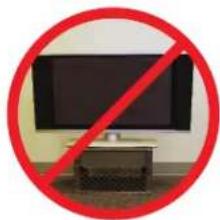
natural_image
Prohibition symbol showing a black monitor inside a room with a red diagonal line crossing it, next to a desk (no text or symbols)THE ISSUE
- The home theater entertainment experience is a growing trend and larger flat panel displays are popular purchases. However, flat panel displays are not always supported on the proper stands or installed according to the manufacturer's recommendations.
- Flat panel displays that are inappropriately situated on dressers, bookcases, shelves, desks, speakers, chests or carts may fall over and cause injury.
THIS MANUFACTURER CARES!
• The consumer electronics industry is committed to making home entertainment enjoyable and safe.
TUNE INTO SAFETY
- One size does NOT fit all. Follow the manufacturer's recommendations for the safe installation and use of your flat panel display.
- Carefully read and understand all enclosed instructions for proper use of this product.
- Don't allow children to climb on or play with furniture and television sets.
- Don't place flat panel displays on furniture that can easily be used as steps, such as a chest of drawers.
- Remember that children can become excited while watching a program, especially on a "larger than life" flat panel display. Care should be taken to place or install the display where it cannot be pushed, pulled over, or knocked down.
- Care should be taken to route all cords and cables connected to the flat panel display so that they cannot be pulled or grabbed by curious children.
WALL MOUNTING: IF YOU DECIDE TO WALL MOUNT YOUR FLAT PANEL DISPLAY, ALWAYS:
- Use a mount that has been recommended by the display manufacturer and/or listed by an independent laboratory (such as UL, CSA, ETL).
- Follow all instructions supplied by the display and wall mount manufacturers.
- If you have any doubts about your ability to safely install your flat panel display, contact your retailer about professional installation.
• Make sure that the wall where you are mounting the display is appropriate.
Some wall mounts are not designed to be mounted to walls with steel studs or old cinder block construction. If you are unsure, contact a professional installer. - A minimum of two people are required for installation. Flat panel displays can be heavy.

CEA
www.CE.org/safety
Important Safety Instructions
- Read these instructions.
- Keep these instructions.
- Heed all warnings.
- Follow all instructions.
-
Do not use this apparatus near water.
-
Clean only with dry cloth.
-
Do not block any ventilation openings. Install in accordance with the manufacturer's instructions.
-
Do not install near any heat sources such as radiators, heat registers, stoves, or other apparatus (including amplifiers) that produce heat.
-
Do not defeat the safety purpose of the polarized or grounding-type plug. A polarized plug has two blades with one wider than the other. A grounding type plug has two blades and a third grounding prong. The wide blade or the third prong are provided for your safety. If the provided plug does not fit into your outlet, consult an electrician for replacement of the obsolete outlet.
-
Protect the power cord from being walked on or pinched particularly at plugs, convenience receptacles, and the point where they exit from the apparatus.
-
Only use attachments / accessories specified by the manufacturer.
-
Use only with the cart, stand, tripod, bracket, or table specified by the manufacturer, or sold with the apparatus. When a cart is used, use caution when moving the cart / apparatus combination to avoid injury from lip-over.

- Unplug this apparatus during lightning storms or when unused for long periods of time.
- Refer all servicing to qualified service personnel. Servicing is required when the apparatus has been damaged in any way, such as power-supply cord or plug is damaged, liquid has been spilled or objects have fallen into the apparatus, the apparatus has been exposed to rain or moisture, does not operate normally, or has been dropped.
Note to the CATV system installer:
This reminder is provided to call the CATV system installer's attention to Article 820-40 of the NEC that provides guidelines for proper grounding and, in particular, specifies that the cable ground shall be connected to the grounding system of the building, as close to the point of cable entry as practical.
Example of Antenna Grounding as per NEC - National Electric Code

Wall Mount Bracket Kit
Brand: SANUS
Model # Screw dimension
| 19ME402V | SAN10b M4 x 0.472" (12mm) | |
| 22ME402V | ||
| For 26 inch TVs, screws w/washers are required. (sold separately) | ||
| 26ME402V | SAN213b | M4 x 0.472" (12mm)+Washer 0.039" (T1mm) |
| 32ME402V | VM200s M4 x 0.472" (12mm) | |
| 39ME412V | SAN25b M4 x 0.472" (12mm) | |
- The recommended Wall Mount Bracket Kit (sold separately) allows the mounting of the TV on the wall.
- For detailed information on installing the wall mount, refer to the Wall Mount Instruction Book.
- Funai is not responsible for any damage to the product or injury to yourself or others if you elect to install the TV Wall Mount Bracket or mount the TV onto the Bracket on your own.
• The Wall Mount Bracket must be installed by experts
Funai is not liable for these types of accidents or injury noted below.
• Install the Wall Mount Bracket on a sturdy vertical wall.
- If installed onto a ceiling or slanted wall, the TV and Wall Mount Bracket may fall which could result in a severe injury.
- Do not use screws that are longer or shorter than their specified length. If screws too long are used this may cause mechanical or electrical damage inside the TV set. If screws too short are used this may cause the TV set to fall.
- Do not fasten the screws by excessive force. This may damage the product or cause the product to fall, leading to an injury.
- For safety reasons use 2 people to mount the TV onto a Wall Mounting Bracket.
- Do not mount the TV onto the Wall Mounting Bracket while your TV is plugged in or Turned On. It may result in an electrical shock injury.
When installing the unit on the wall, allow this much space.
Top: 11.8 inches (30cm)
Left and right side: 5.9 inches (15cm)
Bottom: 3.9 inches (10cm)
1 Notice
MAGNAVOX is a registered trademark of Philips Electronics North America Corporation and is used by Funai Electric Co., Ltd. and Funai Corporation, Inc. under license from Philips Electronics North America.
Funai reserves the right to change products at any time without being obliged to adjust earlier supplies accordingly.
The material in this Owner's Manual is believed adequate for the intended use of the system. If the product or its individual modules or procedures are used for purposes other than those specified herein, confirmation of their validity and suitability must be obtained. Funai warrants that the material itself does not infringe any United States patents. No further warranty is expressed or implied.
Funai cannot be held responsible neither for any errors in the content of this document nor for any problems as a result of the content in this document. Errors reported to Funai will be adapted and published on the Funai support website as soon as possible.
Pixel characteristics
This LCD product has a high number of color pixels. Although it has effective pixels of 99.999% or more, black dots or bright points of light (red, green or blue) may appear constantly on the screen. This is a structural property of the display (within common industry standards) and is not a malfunction.
Warranty
No components are user serviceable. Do not open or remove covers to the inside of the product. Repairs may only be done by Service Centers and official repair shops. Failure to do so shall void any warranty, stated or implied.
Any operation expressly prohibited in this Owner's Manual, any adjustments or assembly procedures not recommended or authorized in this Owner's Manual shall void the warranty.
Federal Communications Commission Notice
This equipment has been tested and found to comply with the limits for a Class B Digital device, pursuant to part 15 of the FCC Rules. These limits are designed to provide reasonable protection against harmful interference in a residential installation. This equipment generates, uses, and can radiate radio frequency energy and, if not installed and used in accordance with the instructions, may cause harmful interference to radio communications. However, there is no guarantee that interference will not occur in a particular installation. If this equipment does cause harmful interference to radio or television reception, which can be determined by turning the equipment off and on, the user is encouraged to try to correct the interference by one or more of the following measures:
• Reorient or relocate the receiving antenna.
- Increase the separation between the equipment and the receiver.
- Connect the equipment into an outlet on a circuit different from that to which the receiver is connected.
- Consult the dealer or an experienced radio or television technician for help.
Declaration of Conformity
Trade Name: MAGNAVOX
Responsible Party : FUNAI CORPORATION, Inc.
Model: 39ME412V, 32ME402V, 26ME402V,
22ME402V, 19ME402V
Address : 19900 Van Ness Avenue, Torrance, CA
90501 U.S.A.
Telephone Number: 1 866 341 3738
Modifications
This apparatus may generate or use radio frequency energy. Changes or modifications to this apparatus may cause harmful interference unless the modifications are expressly approved in the Owner's Manual. The user could lose the authority to operate this apparatus if an unauthorized change or modification is made.
Cables
Connections to this device must be made with shielded cables with metallic RFI / EMI connector hoods to maintain compliance with FCC Rules and Regulations.
Canadian notice
This Class B Digital apparatus complies with Canadian ICES-003. Standard Television Receiving Apparatus, Canada BETS-7 / NTMR-7.
Copyright
All other registered and unregistered trademarks are the property of their respective owners.

The terms HDMI and HDMI High-Definition Multimedia Interface, and the HDMI Logo are trademarks or registered trademarks of HDMI Licensing LLC in the United States and other countries.

Manufactured under license from Dolby Laboratories. Dolby and the double-D symbol are trademarks of Dolby Laboratories.

SRS is a trademark of SRS Labs, Inc. TruSurround XT technology is incorporated under license from SRS Labs, Inc. SRS TruSurround XT ® creates a truly immersive surround sound experience with rich bass and clear dialog from only two speakers.

ENERGY STAR ® is a joint program of the U.S. Environmental Protection Agency and the U.S. Department of Energy helping us all save money and protect the environment through energy efficient products and practices.
Consumer Notice:
This TV has been set to maximize energy efficiency while delivering the best possible picture using the factory installed home mode settings. Changing or enabling other features in this TV (e.g. brightened backlighting) will possibly increase energy consumption beyond the original ENERGY STAR ® qualified limits.
Portions of this software are copyright © The FreeType Project (www.freetype.org).
The American Academy of Pediatrics discourages television viewing for children younger than two years of age.
© 2012 Funai Electric Co., Ltd. All rights reserved. No part of this Owner's Manual may be reproduced, copied, transmitted, disseminated, transcribed, downloaded or stored in any storage medium, in any form or for any purpose without the express prior written consent of Funai. Furthermore, any unauthorized commercial distribution of this Owner's Manual or any revision hereto is strictly prohibited.
2 Important
Positioning the TV
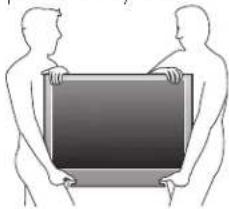
• Large screen TVs are heavy. 2 people are required to carry and handle a large screen TV.
• Make sure to hold the upper and bottom frames of the unit firmly as illustrated.
• Install the unit in a horizontal and stable position.
- Do not install the unit in direct sunlight or in a place subject to dust or strong vibration.
- Depending on the environment, the temperature of this unit may increase slightly. This is not a malfunction.
- Avoid a place with drastic temperature changes.
- Do not place anything directly on top or bottom of the unit.
- Depending on your external devices, noise or disturbance of the picture and / or sound may be generated if the unit is placed too close to them. In this case, please ensure enough space between the external devices and the unit.
- Do not insert the AC power cord into the power socket outlet before all the connections are made.
- Ensure that you always have easy access to the AC power cord or plug to disconnect the TV from the power.
- Before you move the TV, disconnect attached cables to prevent damage to connectors.
- Be sure to unplug the AC power cord from the AC outlet before moving or carrying the unit.
natural_image
Two silhouettes of two people holding a large rectangular object (no text or symbols visible)Regulatory notices
Do not place the unit on the furniture that is capable of being tilted by a child and an adult leaning, pulling, standing or climbing on it. A falling unit can cause serious injury or even death.
This apparatus should not be placed in a built-in installation such as a bookcase or rack unless proper ventilation is provided. Make sure to leave a space of 4 inches (10cm) or more around this apparatus.
Press ⏻ to turn the unit on and go into standby mode. To completely turn Off the unit, you must unplug the AC power cord. Disconnect the AC plug to shut the unit off when trouble is found or not in use. The AC plug shall remain readily available.
Never use a gas duster on this TV. The gas trapped inside of this unit may cause ignition and explosion.
CAUTION: Danger of explosion if battery is incorrectly replaced. Replace only with the same or equivalent type.
WARNING: Batteries (battery pack or battery installed) shall not be exposed to excessive heat such as sunshine, fire or the like.
WARNING: To prevent injury, this apparatus must be securely attached to the furniture / wall in accordance with the instructions. Tipping, shaking, or rocking the unit may cause injury / death.
Environmental care

The packaging of this product is intended to be recycled.
Contact your local authorities for information about how to recycle the packaging.
For product recycling information, please visit - www.magnavox.com
End of life directives
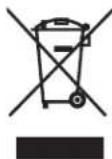
Magnavox pays a lot of attention to produce environment-friendly products in green focal areas. Your new TV contains materials which can be recycled and reused. At the end of its life, specialized companies can dismantle the discarded TV to concentrate the reusable materials and to minimize the amount of materials to be disposed of. Please ensure you dispose of your old TV according to local regulations.
Disposal of used batteries
The batteries supplied do not contain the heavy metals mercury and cadmium. Nevertheless, in many areas batteries may not be disposed of with your household waste. Please ensure you dispose of batteries according to local regulations.
3 Get started
Features
- DTV / TV / CATV
You can use your remote control to select channels which are broadcast in Digital format and conventional Analog format. Also, cable subscribers can access their cable TV channels.
• Information display
You can display the title, contents (DTV only) and other information of the current program on the TV screen.
- Autoprogram
This unit automatically scans and memorizes channels available in your area, eliminating difficult setup procedures.
- Child lock
This feature allows you to block children's access to inappropriate programs.
- Closed Caption decoder
Built-in Closed Caption decoder displays text for Closed Caption supported programs.
- MTS / SAP tuner
Audio can be selected from the remote control.
- Auto Standby
If there is no input signal and no operation for 15 minutes, the unit will go into Standby mode automatically.
- Sleep timer
You can set the unit to go into Standby mode after a specific amount of time.
- Choices for on-screen language
Select your on-screen language: English, Spanish or French.
- Stereo sound function
• PLL frequency synthesized tuning
Provides free and easy channel selection and lets you tune directly to any channel using the number and decimal point “•” buttons on the remote control.
• Various adjustment for picture and sound
Customizes image quality suitable for your room and sets your sound preference.
- fun-Link via HDMI link
fun-Link allows your other HDMI link devices to be controlled by the HDMI cable connected to your TV.
- HDMI Input
- HDMI-DVI Input
If your video device has DVI Output jack, use an HDMI-DVI conversion cable to connect the unit.
- Component Video Input
- PC Input
- AV Input
- USB terminal
The picture (JPEG) and video (Motion JPEG) files stored on a USB Memory Stick can be played back on this unit.
• Digital Audio Output
• Headphone Audio Output
Supplied accessories
Owner's Manual

Quick Start guide
Registration card
Remote Control and
batteries (AAA, 1.5V × 2)

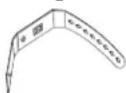
Cable management tie
TV base and screws

Screws packed with this unit:
| Model Quantity Size | ||
| 39ME412V 3 | M4 × 20 | |
| 32ME402V | 3 | M4 × 14 |
| 26ME402V | ||
| 22ME402V | 2 | |
| 19ME402V | ||

Note
- If you lose the screws, please purchase the above-mentioned Phillips head screws at your local store.
- If you need to replace these accessories, please refer to the part name or No. with the illustrations and call our toll free customer support line found on the cover of this Owner's Manual.
When using a universal remote control to operate this unit.
- Make sure the component code on your universal remote control is set to our brand. Refer to the instruction book accompanying your remote control for more details.
• We do not guarantee 100% interoperability with all universal remote controls.
Symbols used in this Owner's Manual
The following is the description for the symbols used in this Owner's Manual. Description refers to:
Digital TV operation
Analog/Cable TV operation
• If neither symbol appears, the operation is applicable to both.
Attaching the base
You must attach the base to the unit to have it as a table top unit. Be sure the front and rear of the base match the proper direction. For large screen TVs, at least 2 people are required for these steps.
1

2


Note
- Make sure to use a table which can support the weight of this unit and is larger than this unit.
• Make sure the table is in a stable location. - When attaching the base, ensure that "FRONT" with "arrow" written on the bottom of the base is downward. If it's not downward, the 2 hooks don't fit into the base.
- When attaching the base, ensure that all screws are tightly fastened. If the base is not properly attached, it could cause the unit to fall, resulting in injuries as well as damage to the unit:
- To remove the base from this unit, unscrew the Phillips head screws in step 2. Be careful not to drop the base when you remove it.
Mounting the unit on your furniture
Screw this unit on your furniture tightly using wood screw (not supplied) in the hole at the back of the base as shown.
- Recommended screw dimension: 3/16 × 3/4 inches (5.1 × 20 mm)
rear of this unit
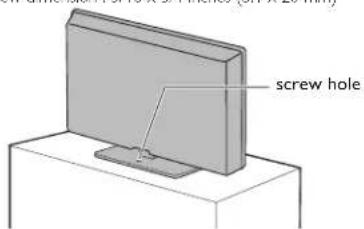

Note
- When you remove this unit make sure to unscrew the wood screw from your Wood Stand, Furniture and other wood item.
Managing cables
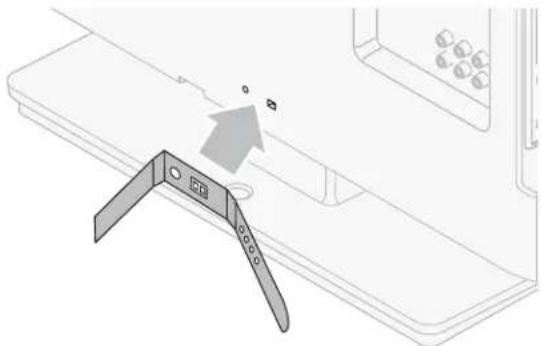
Route your antenna cable and all other cables through the cable management tie at the back of the TV.
The holder helps keep your cables tidy and easily manageable.
1 Attach the cable management tie as illustrated below.
natural_image
Diagram showing a device with a triangular bracket and a small inset image, no text or symbols present2 Pass cables through the cable management tie to avoid tangles.

natural_image
Diagram of a cable connector with colored wires (red, green, blue) inserted into a device panel (no text or symbols)Installing the remote control batteries
natural_image
Pure technical line drawing of a mechanical component with no text or symbols1 Slide the battery cover off the back of the remote control.
2 Insert the 2 supplied batteries (AAA, 1.5V). Be sure the + and - ends of the batteries line up with the markings inside the case.
3 Slide the cover back into position.

Note
- Remove the batteries if not using the remote control for an extended period of time.
Remote control
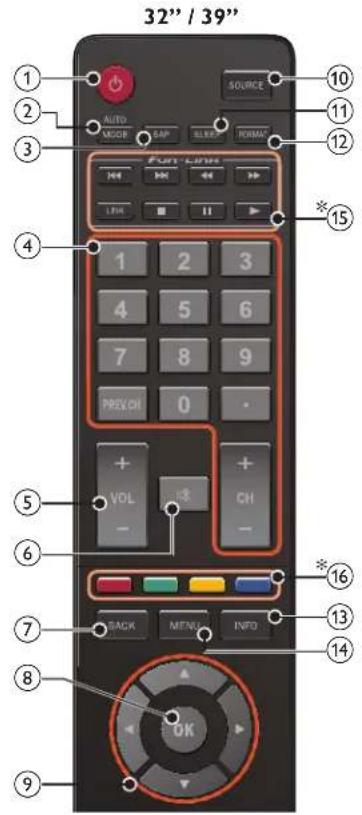

* These buttons may differ depending on the product you purchased.
① ⏻ (POWER-ON / STANDBY-ON) Press to Turn the unit On and go into Standby mode. To completely Turn Off the unit, you must unplug the AC power cord.
② AUTO MODE Cycles through preset picture and sound settings.
③ SAP Digital Mode (DTV) : Press to select the Audio language. Analog Mode(TV) : Press to select the Audio mode.
④ 0 - 9 (NUMBER buttons) Press to select channels.
• (DOT) Press to shift the subchannel from the main channel. PREV.CH
Press to return to the previously viewed channel. CH + I - Press to select channels.
⑤ VOL + / - Press to adjust the volume.
⑥ ☑(MUTE) Press to turn the sound On and Off.
⑦ BACK Press to return to the previous menu operation.
⑧ OK Press to decide the command of setting when the main menu is displayed.
⑨ ▲▼◀▶ (NAVIGATION buttons) Press to move left / right / up / down through the items.
⑩ SOURCE Toggle to select the connected devices.
⑪ SLEEP Press to activate the sleep timer.
⑫ FORMAT Selects a picture format.
⑬ INFO Displays information about the TV channel or accessory device.
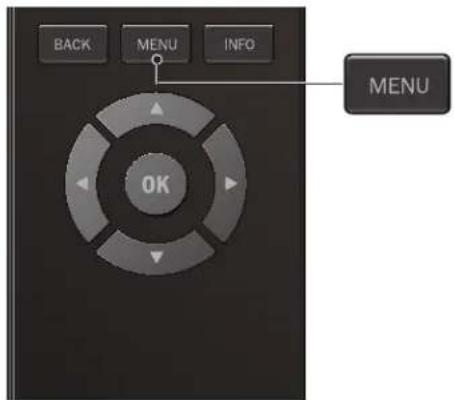
⑭ MENU Press to display the main menu.
*15 |◀◀/▶▶| Press to skip backward or forward chapters, titles or tracks on a disc.
◀◀ / ▶▶ Press to search backward or forward through the disc. LINK Press to call up various menu's from your fun-Link connected device through an HDMI cable.
Press to stop the disc playback. Press to pause the disc playback. Press to begin or restart the disc playback.
*16 COLOR buttons Functionally useful for fun-Link.
*⑰ FREEZE Press to freeze screen image.
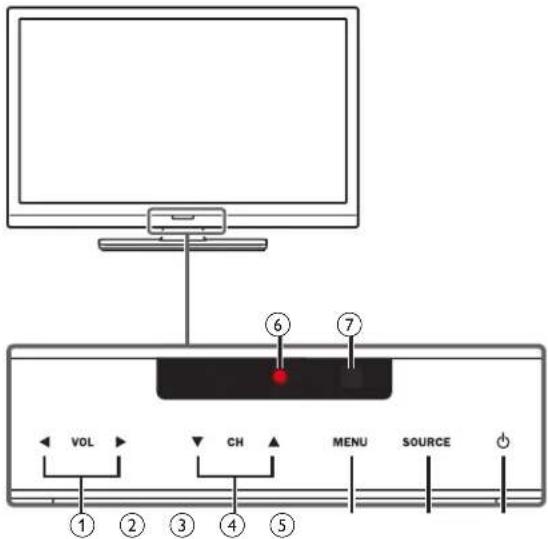
Control panel
Terminals

① VOL ◀/▶
Touch to adjust volume down (◀) / up (▶) or to move left (◀) / right (▶) when selecting menu items.
② CH ▲/▼
Touch to select channels or to move up (▲) / down (▼) when selecting menu items.
③ MENU
Touch to display the main menu.
④ SOURCE
Touch to select the connected devices.
⑤ ⏻ (POWER-ON / STANDBY-ON)
Touch ⏻ to Tum the unit On and go into Standby mode. To completely Tum Off the unit, you must unplug the AC power cord.
⑥ Power On indicator
Lights up red when the unit is in Standby mode and flashes while the unit is Turning On.
⑦ Infrared sensor
Receives IR signals from remote control.
⑧ Digital Audio Output jack
Digital Audio (S/PDIF) Output to home theaters and other Digital Audio systems.
⑨ Component (Y/Pb/Pr) / Composite Video (VIDEO) Input jacks for VIDEO
Composite Video Input (VIDEO) jack is shared jack with Component Video Input (Y) jack.
⑩ Analog Audio (L/R) Input jacks
Connect Analog Audio signals from;
- HDMI-DVI / Analog Audio (L/R) jacks signal
- Component Video / Analog Audio (L/R) jacks signal
- Composite Video / Analog Audio (L/R) jacks signal
- PC Connection / Analog Audio (L/R) jacks signal with Stereo mini 3.5mm plug Audio cable on PC
⑪ HDMI Input jack(s)
Digital audio and video Input from high definition Digital devices such as Blu-ray disc players, cable boxes and satellite set-top boxes.
⑫ PC Input jack
VGA cable connection for PC.
⑬ USB terminal
Data Input from USB Memory Stick only.
Do not connect any device to this terminal such as; Digital camera, keyboard, mouse, etc.
⑭ 75 ohm Cable / Antenna connection
Signal Input from an antenna, cable or satellite.
⑮ Headphone Audio Output jack
Headphone 3.5mm stereo jack for personal listening.
* These HDMI 2 and HDMI 3 Inputs are available on 26 inch and larger screen size TVs.
Connecting the antenna or the cable
Be sure your antenna or other device is connected properly before plugging in the AC power cord.
If you connect to an antenna through RF cable
Any DTV programs that are broadcasted in your area can be received for free through an antenna connection.

If you connect a set-top box through RF cable
If the TV is connected to a cable box or satellite set-top box via a coaxial connection, set the TV to channel 3, 4 or the channel specified by the service provider.

If you connect a set-top box through HDMI
If the TV is connected to a cable box or satellite set-top box via HDMI, make sure you select the correct Source by using SOURCE.

If you connect a set-top box through Component Video Input
If the TV is connected to a cable box or satellite set-top box via Component Video Input, make sure you select the correct Component Video Source by using SOURCE.

Connecting a set-top box, Blu-ray disc / DVD recorder via composite connectors and Analog Audio
Do not place your recorder too close to the screen because some recorders can be susceptible to signals.


Note
- If you have any question about the DTV's antenna, visit www.antennaweb.org for further information.
- Depending on your antenna system, you may need different types of combiners (mixers) or separators (splitters) for HDTV signal. The minimum RF bandpass on these devices is 2,000MHz or 2GHz.
- For your safety and to avoid damage to this unit, please unplug the RF coaxial cable from the antenna input jack before moving the unit.
- If you did use an antenna to receive Analog TV, it should also work for DTV reception. Outdoor or attic antennas will be more effective than a set-top box or inside antenna.
- To Tum On your reception source easily between antenna and cable, install an antenna selector.
- If you are not receiving a signal from your cable service, contact the Cable provider.
- Only the left loudspeaker reproduces sound for mono equipment. Use a mono to stereo adapter (not supplied) for sound reproduction via all internal loudspeakers.
Plugging in the AC power cord
Make sure that the AC power cord must be plugged to an AC outlet after all the necessary connections are made.

Caution
- Do not connect the AC power cord to a power supply outside the indicated voltage of this unit (AC 120V).
- Connecting the AC power cord to a power supply outside of this range may result in fire or electrical shocks.

Note
• Each time you plug in the AC power cord, no operations will be performed for a few seconds. This is not a malfunction.
These operations are accessible by remote control. Some may also be accessible by control panel on the main unit.
Initial setup
This section will guide you through the unit's initial setting which includes selecting a language for your on-screen menu and autoprogram, which automatically scans and memorizes viewable channels.
Before you begin:
Make sure the unit is connected to antenna or cable.
1 After making all the necessary connections, press to Turn On the unit.
- It may take a few moments to Turn On the unit for the first time.
- Initial setup menu appears automatically after the unit is Tumed On.
2 Use ▲▼ to select the on-screen language from the choices (English / Español / Français) on the right side of the TV screen, then press OK.
3 Use ▲▼ to select Antenna for TV channels or Cable for CATV channels, then press OK.
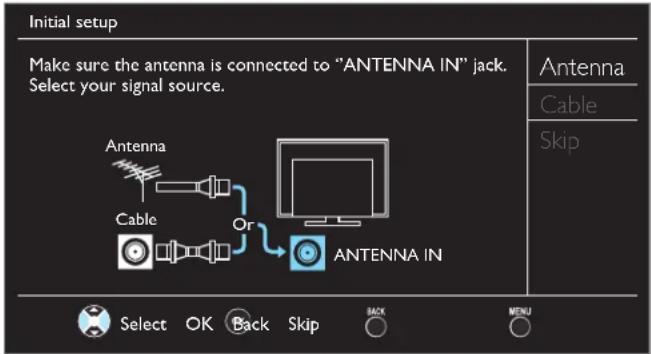
- When Antenna is selected, the TV detects antenna signals. It searches for DTV and Analog TV channels available in your area.
- When Cable is selected, the TV detects signals supplied by cable. It searches for DTV, Analog TV and Cable channels available in your area.
• Autoprogram will begin.

4 Use ▲▼ to select the desired location setting, then press OK. Home is ENERGY STAR® qualified setting.

- Select Retail, the unit will be set up with predefined setting for retail displays. In this setting, the power consumption may possibly exceed the limited requirement of the ENERGY STAR® qualification.
- Select Home, the unit is set to maximize the energy efficiency for home setting and it can be adjusted through a choice of picture and sound quality according to your preference. Use this setting to remove the E-sticker if visible from the display!! p. 26
- When the initial setup is completed, the lowest memorized channel with the confirmation message of the location setting will be displayed on the TV screen.
- You must set Home in step 4. Otherwise, Picture and Sound settings you adjusted will not be memorized after the unit goes into Standby mode.

Note
- If you are not receiving a signal from your cable service, contact the Cable provider;
- If you press ⏻ or MENU during autoprogram, this setup of TV channels will be canceled.
- The initial autoprogram function can be executed for either Antenna or Cable only once. When you change the connection (Antenna / Cable), set Autoprogram again. ▶ p. 1?
- If there is no signal Input from the antenna terminal and no operation for several seconds after you Turn On the unit, helpful hints appears. Follow the instructions listed on the TV screen.

After an initial setup is completed...
• If you want to scan the channels automatically again.
Autoprogram p. 19
- You can add the desired cable and Analog channels unmemorized by autoprogram.
Add channels p. 20
• If you want to change to another language.
Language p. 215
• If you want to change the location setting.
Location p. 25
4 Use your TV
Switching on your TV and putting it in standby mode

To Turn Power On or to Turn Standby On
- Touch or press ⏻ on the front panel or the remote control.

Note
- Energy consumption contributes to air and water pollution. When the AC power cord is plugged in, your TV consumes energy. Your TV has very low standby power consumption.
Adjusting volume
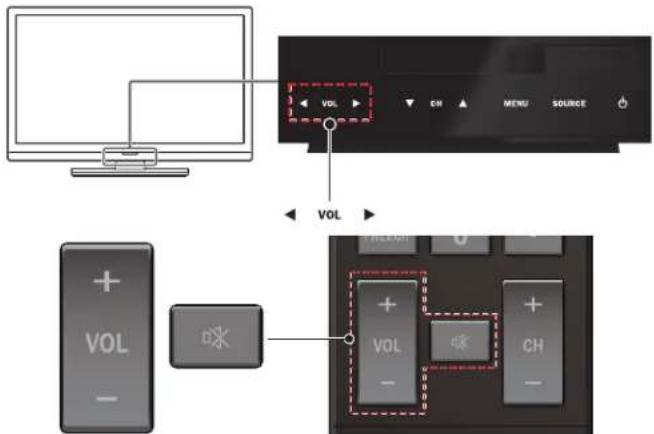
• The above image is an example for 32 inch and larger screen size TVs. It may differ depending on what product you purchased.
To increase or decrease volume
- Touch VOL ◀(down) / ▶(up) on the front panel or press VOL + / - on the remote control.
To mute or unmute sound - Press on the remote control to mute the sound.
- Press ☑ again or VOL + / - to recover the original sound.
Switching channels

- The above image is an example for 32 inch and larger screen size TVs. It may differ depending on what product you purchased.
To select Channels by using CH ▲/▼ or CH + / -
- Touch CH ▲(up) / ▼(down) on the front panel or press CH +/− on the remote control.
To select Channels by using the NUMBER buttons
Digital TV operation
- For Digital channels, press a number followed by a dot “•” and the corresponding sub channel number.
- When selecting Digital channel 11.1
Be sure to press • before entering the subchannel number.

Analog/Cable TV operation
- When selecting cable or Analog channel 11
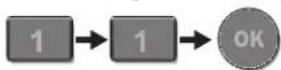
Press PREV.CH to return to the previously viewed channel.

Note
- To select the non-memorized channels, use the NUMBER buttons.
• No Signal will appear on the TV screen after the subchannel broadcast is over - Audio only program message will appear on the TV screen, when you receive only sound signal.
Watching channels from an external device
Switching Each Input Mode can easily switch with the remote control between TV (DTV or Analog TV) and external devices when they are connected to the unit.
1 Turn On a set-top box or the connected device.
- The picture from your set-top box or the connected device might appear automatically on the TV screen.
If the picture does not appear

Press SOURCE repeatedly to select the set-top box or the connected device and wait a few seconds till the picture appears.
e.g.)

flowchart
graph TD
    A["Source"] --> B["TV"]
    A --> C["HDMI1"]
    A --> D["HDMI2"]
    A --> E["HDMI3"]
    A --> F["Video"]
    A --> G["PC"]
    B --> H["11.1 HD"]
    C --> H
    D --> I["I1 HDMI2"]
    E --> J["PC HDMI"]
    F --> K["Video or Component"]
    G --> L["Component"]
    H --> M["DTV / TV channel"]
    I --> M
    J --> M
    K --> M
    L --> M
- Pressing ▲ reverses the direction of the Input modes.
- The above image is an example for 26 inch and larger screen size TVs. It may differ depending on what product you purchased.
2 Use the remote control of the set-top box or the connected device to select channels.
Using auto mode
1 Press AUTO MODE to set your TV to a predefined picture and sound setting.

2 Use ▲▼ to select one of the following settings:
| Auto picture | Auto sound | Description |
| Personal | The customized settings you defined using the Picture and Sound menu | |
| Standard | For normal TV viewing | |
| Vivid | Enhanced picture contrast, sharpness and sound for viewing in a well-lit room | |
| Sports | Brilliant picture settings and clear sound for high action | |
| Movie | Deep picture and powerful sound settings for a cinematic experience | |
| Game | - | Optimized for PCs and game consoles |
| Eco | - | Eco TV settings for low power consumption |
| - | Music | Optimized for music playback |
| - | News | Controls picture tone and set the anchor's voice at a comfortable volume |
Sleep timer
Sleep Timer can set the unit to go into Standby mode after an incremental period of time.

Press SLEEP repeatedly to change the amount of time (increases the time by 30 minutes up to 120 minutes).

Press SLEEP once to call up the display for checking the remaining time.
• To cancel sleep timer, press SLEEP repeatedly until Off is displayed.
Freeze mode
(Available for 26 inch and smaller screen size TVs)
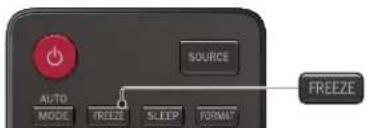
Freeze Mode can freeze the image shown on the TV screen for 5 minutes.
Press FREEZE to freeze the image.
II Freeze
• The sound Output will not be paused.
• To cancel freeze mode, press any buttons except
Switching audio mode

Digital TV operation
1 Press SAP to display the currently selected language and the number of available languages.

2 Press SAP repeatedly to cycle through the available audio languages.

Note
• Available languages differ depending on the broadcast.
- Other is displayed when the audio language cannot be acquired or the acquired languages are other than English, French or Spanish.
Analog/Cable TV operation
1 Press SAP to display the currently selected audio mode.
2 While receiving an MTS broadcast, press repeatedly to cycle through the available audio channels.
e.g.) When all audio are available


STEREO : Outputs stereo-audio
SAP : Outputs second audio program
MONO : Outputs mono-audio
fun-Link options
(Available for 32 / 39 inch TVs)
If you have our brand products such as Blu-ray disc player or DVD recorder that are compatible with fun-Link functions, connect them to this unit via an HDMI cable so you can simply operate various items from this unit's remote control.
Before you begin:
You must set On in Device control and fun-Link control. p. 2.5 Otherwise, LINK does not work even if you connected our brand devices to this unit.
To enjoy fun-Link, verified and recommended devices are as follows;
MAGNAVOX
MBP1300 MBP5320 MRD430B MRD733B
1 Press LINK to display fun-Link options menu.
| fun-Link options |
| Device-menu |
| Device-contents |
| Device-favorite |
| Device-menu | Controls the menu of your connected fun-Link device. |
| Device-contents | Controls the top menu of your DVD or Blu-ray discs. |
| Device-favorite | Controls the pop-up menu of your Blu-ray discs. |
2 Use ▲▼ or OK on this unit's remote control to operate the desired functions for your devices.

Note
- Some of fun-Link functions may not be available depending on your fun-Link devices or discs.
- You must connect this unit to our brand fun-Link devices and be sure its fun-Link (HDMI CEC) setting is also set to On.
• We do not guarantee 100% interoperability with other brands of HDMI link compliant devices.
Changing picture format
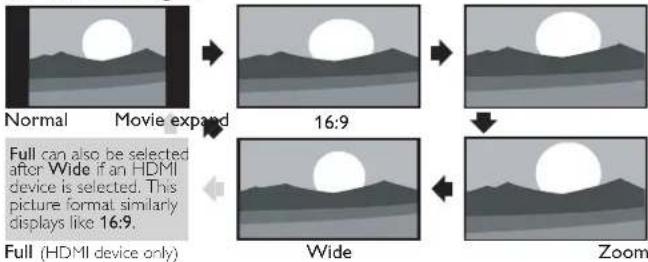
Display modes can be selected when your TV receives a 16:9 or 4:3 video signal.
Three types of display modes can be selected for a PC Input signal.
Press FORMAT repeatedly to switch the TV aspect ratio.

For 16:9 video signal

flowchart
graph TD
    A["Normal"] --> B["Movie expand4:3"]
    B --> C["Full can also be selected after Wide if an HDMI device is selected. This picture format similarly displays like Normal."]
    C --> D["Full (HDMI device only)"]
    D --> E["Wide Zoom"]
| Normal | Original size. |
| 4:3 | Shortened horizontally.Sidebars appear on both edges of the screen. |
| Movie expand | Vertically stretched to fill the screen.This only crops out the top of the picture. |
| Zoom | Maximum size without changing its horizontal and vertical ratio. |
| Wide | Horizontally stretched picture.This crops out the left and right sides of the picture. |
For 4:3 video signal
flowchart
graph TD
    A["Normal"] --> B["Movie expand"]
    B --> C["16:9"]
    C --> D["Full can also be selected after Wide if an HDMI device is selected. This picture format similarly displays like 16:9."]
    D --> E["Wide"]
    E --> F["Zoom"]
    F --> G["Full (HDMI device only)"]
| Normal | Original size.Sidebars appear on both edges of the screen. |
| 16:9 | Stretched horizontally to fill the screen. |
| Movie expand | Stretched more vertically at the top of the screen.This crops out the top of the picture. |
| Zoom | Maximum size that is more vertically stretched to fill the screen.This crops out the top and bottom of the picture. |
| Wide | Original size and the edges stretched horizontally to fill the screen. |
For PC Input signal
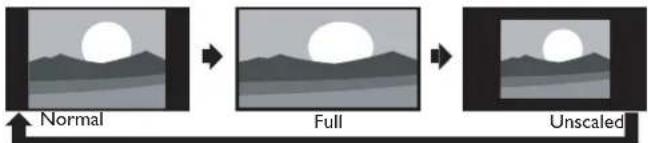
flowchart
graph LR
    A["Normal"] --> B["Full"]
    B --> C["Unscaled"]
- This unit can also be connected to your PC that has a DVI terminal. Use an HDMI-DVI conversion cable for this Video connection and it requires Stereo mini 3.5mm plug Audio cable for Analog Audio signal as well.
• Refer to 16:9 video signal on this page if PC has HDMI Output.
| Normal | Proportionately stretched picture.Sidebars appear on both edges of the screen. |
| Full | Stretched out of proportion to fill the screen. |
| Unscaled | Original size. |
TV screen information
You can display the currently selected channel or other information such as the aspect ratio on the TV screen.
In the Digital mode, the detailed broadcasting information for the current off the air channel such as program title and program guides are displayed.
1 Press INFO.
Digital TV operation
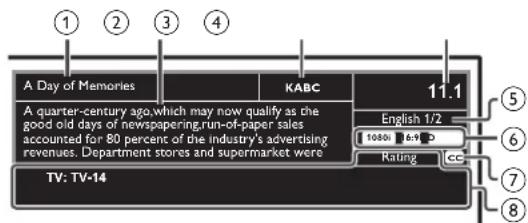
① program title
② program guide
(The program guide added to broadcasting information is displayed to a maximum of 4 lines.)
③ broadcast station
Analog/Cable TV operation

④ channel number
Switching channels p. 13
⑤ audio language (DTV) / audio mode (Analog TV)
Switching audio mode p. 14
⑥ program's image aspect ratio
Changing picture format p. 15
⑦ CC (not available if Closed Caption is set to Off)
Caption settings p. 21
⑧ child lock rating
Child and ratings lock p. 22
2 Press INFO to hide the information.

Note
- When the program guide consists of more than 4 lines, use ▲▼ to scroll to the next / previous lines.
- No description provided. is displayed when the program guide is not provided.
- While the program guide is displayed, the Closed Caption function is interrupted.
- In external Input mode, the following screen is displayed; e.g.) When an external device is connected to Video Input jack.

• The information display will automatically disappear in 5 seconds.
5 Use more of your TV
This section describes the overview of the main menu displayed when you press MENU.
The main menu consists of the function setting items below.
Displaying the main menu
1 Press MENU to display the main menu.
| Picture | Auto picture | Personal |
| Sound | Backlight | 18 |
| Setup | Contrast | 50 |
| Features | Brightness | 30 |
| Language | Color | 30 |
| USB | Tint | 0 |
| Sharpness | 2 | |
| Advanced settings |
2 Use ▲▼ to select the desired menu and an item, then press OK or use ▲▼◀▶ to determine the setting.
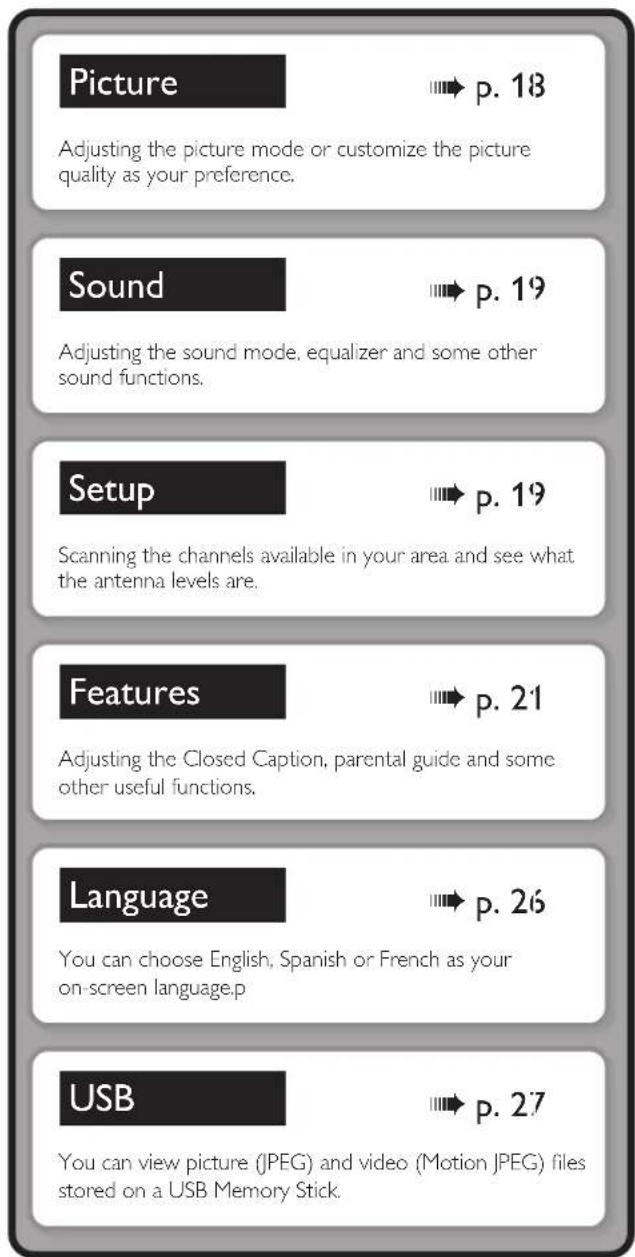
3 When the setting is completed, press MENU or BACK to exit.
Picture
Before you begin:
You must set Home in Location. p. 26
Otherwise, personalized picture and sound settings will not be memorized after the unit goes into Standby mode.
1 Press MENU and use ▲▼ to select Picture then press OK.
| Picture | Auto picture | Personal |
| Sound | Backlight | 18 |
| Setup | Contrast | 50 |
| Features | Brightness | 30 |
| Language | Color | 30 |
| USB | Tint | 0 |
| Sharpness | 2 | |
| Advanced settings |
2 Use ▲▼◀▶ to select the item you want to adjust, then press OK.
| Auto picture | to select the desired setting, then press OK(Personal, Standard, Vivid, Sports, Movie, Game and Eco)When you adjust the following settings, Personal will be set automatically. | |
| Cursor◀ Cursor ▶ | ||
| Backlight | to reduce power consumption | to set the backlight brighter |
| Contrast | to decrease contrast to increase contrast | |
| Brightness | to decrease brightness to increase brightness | |
| Color | to decrease color intensity | to increase color intensity |
| Tint | to add red to add green | |
| Sharpness | to soften to sharpen | |
| * Advanced settings | to select the desired setting, then press OK(Color alignment, Noise reduction, Black stretch, Dynamic contrast and Gamma) | |
*You can set a particular about picture quality in Advanced settings.
| Picture | Color alignment | Normal |
| Sound | Noise reduction | On |
| Setup | Black stretch | On |
| Features | Dynamic contrast | On |
| Language | Gamma | Gamma 2 |
| USB |
| Color alignment | Color temperature mode | to set the color temperature to Personal, Cool, Normal and WarmWhen you adjust the following settings, Personal will be set automatically. | |
| Cursor ◀ Cursor ▶ | |||
| Red gain | to decrease contrast with red | to increase contrast with red | |
| Green gain | to decrease contrast with green | to increase contrast with green | |
| Blue gain | to decrease contrast with blue | to increase contrast with blue | |
| Red offset | to decrease brightness with red | to increase brightness with red | |
| Green offset | to decrease brightness with green | to increase brightness with green | |
| Blue offset | to decrease brightness with blue | to increase brightness with blue | |
| Noise reduction | Off | to set noise reduction to Off | |
| On | to reduce noise in an image | ||
| Black stretch | Off | to set black stretch to Off | |
| On | to enhance black color | ||
| Dynamic contrast | Off | to set dynamic contrast to Off | |
| On | to enhance contrast in an image automatically | ||
| Gamma | Gamma 1 | to change the gamma setting | |
| Gamma 2 | |||
| Gamma 3 | |||
Sound
Before you begin:
You must set Home in Location. p. 26
Otherwise, personalized picture and sound settings will not be memorized after the unit goes into Standby mode.
1 Press MENU and use ▲▼ to select Sound, then press OK.
| Picture | Auto sound Standard | |
| Sound | Equalizer | |
| Setup | SRS TruSurround XT On | |
| Features | Auto volume leveling Off | |
| Language | TV speakers On | |
| USB | Primary MTS | Stereo |
2 Use ▲▼◀▶ to select the item you want to adjust, then press OK.
| Auto sound | to select the desired setting, then press OK. (Personal, Standard, Vivid, Sports, Movie, Music and News)When you adjust the following settings (Equalizer, SRS TruSurround XT and Auto volume leveling), Personal will be set automatically. |
Adjust the tonal quality for each frequency.
| Equalizer | Cursor ◀ | Cursor ▶ |
| to adjust the each level of tonal qualityPress BACK to go back to the previous menu. | ||
This selects sound modes for more spatial or surround sound reproduction.
| SRS TruSurround XT | Off | to set SRS TruSurround XT® to Off |
| On | to set SRS TruSurround XT® to On |
This function keeps a constant loudness differential between the TV commercials and the programs.
| Auto volume leveling | Off | to remove the auto volume leveling |
| On | to reduce volume differences between the TV commercials and the programs |
You can select the Audio Output from the unit's speakers or not. If your amplifier is HDMI link function compatible and connected by an HDMI cable to this unit, some sound operations such as volume up can be changed by using this unit's remote control. Make sure fun-Link control is set to On. p. 2;
| TV speakers | On | to output sound from the unit's speakers |
| Off | not to output sound from the unit's speakers | |
| CEC Link | to control Audio Output from your connected fun-Link Compliant Devices with VOL + / - by using this unit's remote control. |
You can set the output mode as a default for the sound mode (Analog TV only). This setting is not interlocked when you change the output mode by pressing SAP. Refer to Switching audio mode. p. 14
| Primary MTS | Stereo | to output stereo-audio |
| Mono | to output mono-audio | |
| SAP | to output second audio program |
Setup
Before you begin:
Make sure the unit is connected to antenna or cable.
1 Press MENU and use ▲▼ to select Setup, then press OK.
| Picture | Autoprogram |
| Sound Channel list | |
| Setup Add channels | |
| Features Antenna | |
| Language | |
| USB | |
2 Adjust the following items.
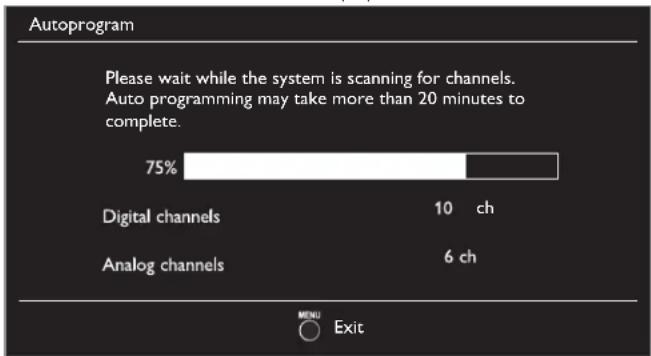
Autoprogram
Be sure the RF cable is correctly connected to this unit and you are registered with your cable TV provider when you install Cable channels.
1 Use ▲▼ to select Autoprogram, then press OK.
- If you run Autoprogram when you have locked channels, a message appears asking to enter your PIN. Enter your PIN in order to complete the installation. You need to set the channel lock again after the installation.
2 Use ▲▼ to select an appropriate option, then press OK.
- When Antenna is selected, the TV detects antenna signals. It searches for DTV and Analog TV channels available in your area.
- When Cable is selected, the TV detects signals supplied by cable. It searches for DTV, Analog TV and Cable channels available in your area.

Continued on next page.
- When the scanning and memorizing are completed, the lowest memorized channel will be displayed.

Note
- After setting Autoprogram, using CH +/− skips unavailable programs automatically.
- If you are not receiving a signal from your cable service, contact the Cable provider.
- If you press ⏻ or MENU during autoprogram, the setup of TV channels will be canceled.
- Even if Autoprogram is completed, the channel setting will be lost if the AC power cord is unplugged before the unit goes into Standby mode by pressing ⏻.
- The PIN Code will be required once you set a PIN code in the Child and ratings lock. p. 2?
- If you want to change your PIN code, follow the instruction of Change PIN. p. 24
Channel list
The channels selected here can be skipped when selecting the channels using CH +/-.
Those channels can still be selected with the NUMBER buttons.
1 Use ▲▼ to select Channel list, then press OK.
2 Use ▲▼ to select the channel you want to remove, then press OK.

- The channel display for the removed channel darkens. You will not be able to select the channel again using CH +/−.
- To reactivate a removed channel, use ▲▼ and press OK. The registered channels are highlighted.
- When you remove a main channel, its subchannels are removed as well.

Note
- The channel with DTV indicated on the display is ATSC. Otherwise the channel is Analog TV.
Add channels
This function lets you add the off the air Analog TV or Analog Cable channels that were not added by the autoprogram due to reception conditions during the initial setting.
1 Use ▲▼ to select Add channels, then press OK.
2 Use the NUMBER buttons to enter the number of the channel you want to add, then press OK.


Note
- If setup completes successfully, Added to the channel list. is displayed.
- If external Input is used, it is not possible to register the channel and Unavailable will be displayed on the TV screen.
- Some channels cannot be selected by CH +/-. Use the NUMBER buttons to select the memorised channels.
Antenna confirmation
Digital TV operation
This function lets you check the Digital signal strength of each channel.
1 Use ▲▼ to select Antenna, then press OK.
2 Use the NUMBER buttons or CH +/- to select the channel for which you want to check the Digital signal strength.


Note
- If the channel is set to Analog channel or external Input, you cannot confirm the antenna condition.
Features
1 Press MENU and use ▲▼ to select Features, then press OK.
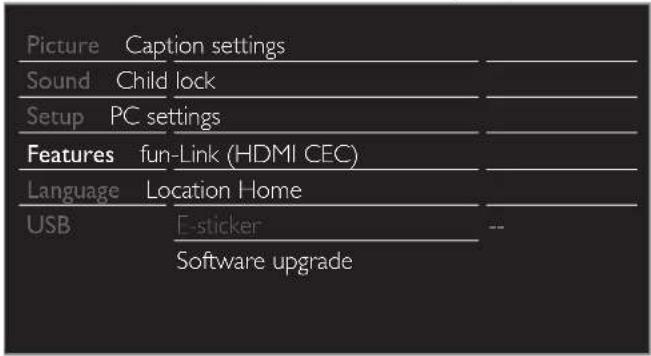
2 Adjust the following items.
Caption settings
Closed Captioning displays the audio portion of programming as text superimposed over the video.
1 Use ▲▼ to select Caption settings, then press OK.
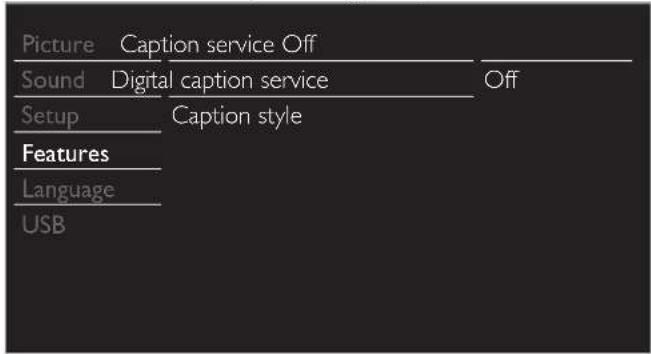
2 Use ▲▼◀▶ to select the item you want to adjust, then press OK.
Digital TV operation
In addition to the basic Closed Caption, DTV has its own Closed Caption called Digital caption service. Use this menu to change the settings for Digital caption service.
| Digital caption service | Off | Selects if you do not want Digital caption service. |
| CS-1 to CS-6 | Selects one of these before changing any other item in Caption settings menu. Choose CS-1 under normal circumstances. |
Analog/Cable TV operation
| Caption service | Off | Select if you do not want caption service. | |
| CC-1 and T-1 | The primary caption and text services. The captioning or text is displayed in the same language as the program's dialog (up to 4 lines of script on the TV screen). | ||
| CC-3 and T-3 | Rarely available and broadcasters use them only in special conditions, such as when CC-1 and CC-3 or T-1 and T-3 are not available. •There are 3 display modes according to programs: | ||
| CC-2, CC-4, T-2 and T-4 | Paint-on | Displays Input characters on the TV screen immediately. | |
| Pop-on | Once characters are stored in memory, they are displayed all at once. | ||
| Roll-up | Displays the characters continuously by scrolling (max. 4 lines). | ||
You can choose the size, font, color, background and other characteristics of the caption text.
| Caption style | Font | Font style | Closed Captioning font style, size, color and transparency can be changed. |
| Font size | |||
| Font color | |||
| Font opacity | |||
| Background | Background color | Background color and transparency of the displayed caption can be switched. | |
| Background opacity | |||
| Edge | Edge color | Edge color and type of the displayed caption can be switched. | |
| Edge type |

- Review your setting choice made below by looking in the upper right corner of the displayed setting box (not all selections show the differences selected).
Continued on next page.

Note
- Digital caption service that you can switch differs depending on the broadcast description.
- Caption style will not effect if the User setting is set to Off.
- Closed Captioning service may not be controlled by this unit's menu options if you are watching television through an external cable or satellite set-top box. In which case you will need to use the menu options on the external set-top box to control Closed Captioning.
• The captions do not always use correct spelling and grammar. - Not all TV programs and product commercials include Closed Caption information. Refer to your area. TV program listings for the TV channels and times of Closed Caption shows. The captioned programs are usually noted in the TV listings with service marks such as CC.
- Not all captioning services are used by a TV channel during the transmission of a Closed Caption program.
- Closed Caption will NOT be displayed when you are using an HDMI connection.
• To show the Closed Caption on your TV screen, broadcast signal must contain the Closed Caption data. - Not all TV programs and commercials have the Closed Caption or all types of the Closed Caption.
- Captions and texts may not exactly match the TV voice.
- Changing channels may delay the Closed Caption for a few seconds.
- Adjusting or muting the volume may delay the Closed Caption for a few seconds.
- Abbreviations, symbols and other grammatical shortcuts may be used in order to keep pace with the on-screen action. This is not a malfunction.
- The caption or text characters will not be displayed while the main menu or functions display is shown.
- If a black box appears on the TV screen, this means that the Closed Caption is set to the text mode. To clear the box, select CC-1, CC-2, CC-3, CC-4 or Off.
- If the unit receives poor quality television signals, the captions may contain errors or there might be no captions at all. Some possible causes of poor quality signals are:
- Automobile ignition noise
- Electric motor noise
- Weak signal reception
- Multiplex signal reception (ghosts or screen flutter)
- Data dropout and Pixelation (for DTV only)
- The unit retains the Closed Caption setting if the power fails.
- When the unit receives special effects playback signal (e.g. Search, Slow and Still) from a VCR's video Output channel (ch3 or ch4), the unit may not display the correct caption or text.
Child and ratings lock
You can prevent your children from watching certain programs or certain channels by locking the TV controls and by using ratings.
1
Use ▲▼ to select Child lock, then press OK.
| Picture Caption settings | |
| Sound Child lock | |
| Setup PC settings | |
| Features fun-Link (HDMI CEC) | |
| Language Location Home | |
| USB F-sticker Software upgrade |
2 Use the NUMBER buttons to enter the 4-digit numbers for your PIN code.
- When you have not set up your PIN code, enter 0, 0, 0, 0.
- When the PIN code is correct, Child lock menu is displayed.
See the following description for setting each item.
| Picture | Channel lock |
| Sound | US movie ratings lock |
| Setup | US TV ratings lock |
| Features | Canadian English rating |
| Language | Canadian French rating |
| USB | Region ratings lockClear region ratings lockChange PIN |

Note
- When you select a rating and set it to ☒ or □, the higher ratings will be blocked automatically. The lower ratings will be available for viewing.
- When you set the highest rating to □, all ratings turn to □ automatically.
- To block any inappropriate programs, set your limits in US movie ratings lock, US TV ratings lock and Region ratings lock.
- The child lock setting will be retained after a power failure or after the power is
removed for longer than 10 seconds (except the PIN code reverts to 0000).
Child and ratings lock ➞ p. 22:
- Region ratings lock and Clear region ratings lock will be available when the unit receives a Digital broadcast using the new rating system.
- For the United States, the unit may download the Region Ratings Lock Table, if required.
• The Canadian rating systems on this unit are based on CEA-766-A and CRTC policy.
Channel lock
Particular channels or external Input modes can be invisible in this function.
3
Use ▲▼ to select Channel lock, then press OK.
4
Use ▲▼ to select the particular channels or external Input, then press OK repeatedly to switch between view and block.
- indicates that the channel or Input Source is locked.
- indicates that the channel or Input Source is not locked.
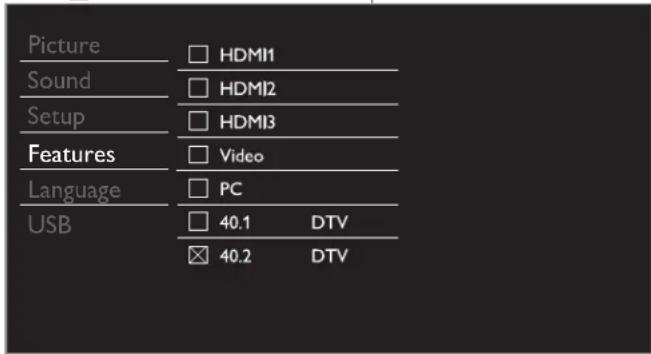
- The above image is an example for 26 inch and larger screen size TVs. It may differ depending on what product you purchased.
Setting US movie and TV ratings
US movie ratings lock is the rating system created by MPAA.
US TV ratings lock has controlled access to individual programs based on their age ratings and content rating.
3 Use ▲▼ to select US movie ratings lock or USTV ratings lock, then press OK.
4 Use ▲▼ to select the desired rating, then press OK repeatedly to switch between view and block.
- For US TV ratings, you can further set the sub ratings to block specific elements of programming.
• or indicates that the rating is locked.
• Indicates that the rating is not locked.
US movie ratings lock
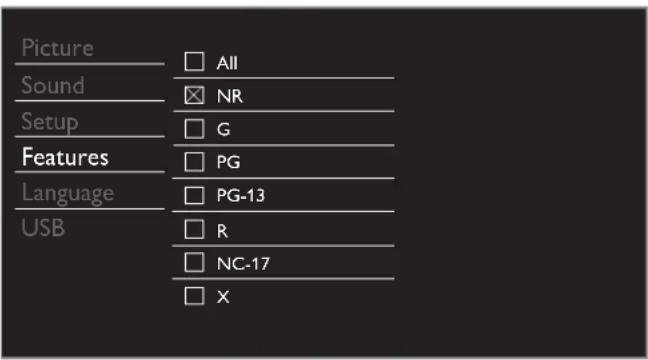
US TV ratings lock
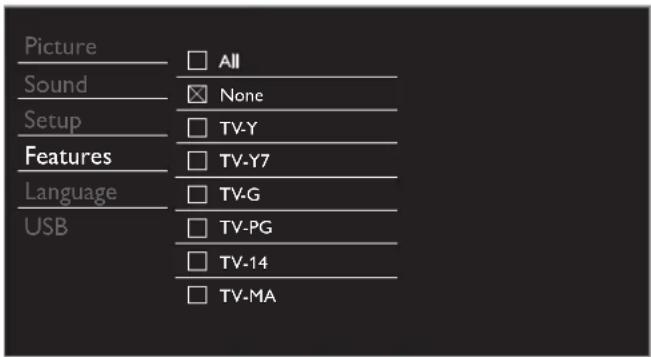
| US movie ratings | US TV ratings | Description |
| All | All ratings locked including no rating | |
| NR None | No rating | |
| - TV-Y | Appropriate for all children | |
| - TV-Y7 | Appropriate for all children 7 and older | |
| G | TV-G | General audience |
| PG | TV-PG | Parental guidance suggested |
| PG-13 | - | Unsuitable for children under 13 |
| - | TV-14 | Unsuitable for children under 14 |
| R | - | Restricted under 17 requires accompanying parent or adult guardian |
| NC-17 | - | No one under 17 admitted |
| X | TV-MA | Mature audience only |
To set the sub ratings
As for TV-Y7, TV-PG, TV-14 or TV-MA, you can further set the sub ratings to block specific elements of programming. To set the sub ratings, follow the step below.
Use ▲▼◀▶ to select the desired rating, then press OK repeatedly to switch between ☒ and □

| US TV ratings | Sub Rating |
| TV-Y7 | (FV) Fantasy Violence |
| TV-PG | (D) Dialog(L) Language(S) Sex(V) Violence |
| TV-14 | |
| TV-MA | (L) Language(S) Sex(V) Violence |

Note
- Blocked sub rating will appear beside the main rating category in USTV ratings lock menu.
- You cannot block a sub rating if the main rating is set to □
- Changing the category to ☒ or □ automatically changes all its sub ratings to the same (☒ or □).
Canadian English or Canadian French ratings
You can select the rating for Canadian English or Canadian French broadcasting.
3 Use ▲▼ to select Canadian English rating or Canadian French rating, then press OK.
4 Use ▲▼ to select the desired rating, then press OK repeatedly to switch between view and block.
• Indicates that the rating is locked.
• indicates that the rating is not locked.
| Canadian English rating | Canadian French rating | Description |
| All | Locked all ratings | |
| E | Exempt program | |
| C | - | For all children |
| C8+ - | For children over 8 | |
| G | General audience | |
| - 8ans+ | Unsuitable for ages under 8 | |
| PG | - | Parental guidance suggested |
| - 13ans+ | Unsuitable for ages under 13 | |
| 14+ - | Unsuitable for ages under 14 | |
| - 16ans+ | Unsuitable for ages under 16 | |
| 18+ 18ans+ | Adult audience only | |

Note
- The V-Chip can block non rated programs as per "CEA-608-E sec. L3". If the option to block NR, None or E programs is used in US movie ratings lock, USTV ratings lock, Canadian English rating or Canadian French rating accordingly "unusual results may occur and the unit may not receive emergency bulletins or other types of programming" / Emergency Bulletins (Such as EAS messages, weather warnings and others) / Locally originated programming / News / Political / Public Service Announcements / Religious / Sports / Weather.
Change PIN
Although the default PIN code (0000) is supplied with the unit, you can set your own PIN code.
3 Use ▲▼ to select Change PIN, then press OK.
4 Press the NUMBER buttons to enter the new 4-digit PIN code. - Enter PIN code again in Confirm PIN. entry field.


Note
- Make sure new PIN code and confirm PIN code must be exactly the same. If they are different, the space is cleared for reentering.
- Your PIN code will be erased and returns to the default PIN code (0000) when a power failure occurs.
- If you forget the PIN code, unplug the AC power cord then wait for 10 seconds to plug the AC power cord in again.
The unit will restore the PIN code to 0000 as the factory default.
PC settings
This function lets you adjust the PC screen position, clock and phase during PC Input.
Use ◀▶ to adjust Clock setting to stabilize the PC screen and Phase setting to improve the clarity of the PC screen.
1 Use ▲▼ to select PC settings, then press OK.
| Picture | Auto adjustment | |
| Sound | ||
| Setup | Horizontal position | 0 |
| Features | Vertical position | 0 |
| Language | Clock | 0 |
| USB | Phase | 0 |
2 Use ▲▼ to select the item you want to adjust, then press OK.
- The horizontal/vertical position, clock and phase of the PC screen are automatically adjusted.
| Auto adjustment | Select if you want to adjust automatically. | |
| Cursor ◀ | Cursor ▶ | |
| Horizontal position | to move PC screen left | to move PC screen right |
| Vertical position | to move PC screen down | to move PC screen up |
| Clock | to decrease setting value to increase setting value | |
| Phase | ||

Note
- You may not obtain an appropriate screen with Auto adjustment for some signals. In this case, adjust the settings manually.
- Adjust Phase setting after Clock setting has been properly adjusted.
fun-Link (HDMI CEC)
This function allows you to operate the linked functions between our brand devices with a fun-Link feature and this unit connecting through an HDMI cable. You must connect this unit to our brand fun-Link devices and be sure its fun-Link (HDMI CEC) setting is also set to On.
1 Use ▲▼ to select fun-Link (HDMI CEC), then press OK.
| Picture fun-Link control | On | |
| Sound | Auto device off | On |
| Setup | Auto TV on | On |
| Features | Device control | On |
| Language | Device list | |
| USB | ||
- The above image is an example for 32 / 39 inch TVs. It may differ depending on what product you purchased.
2 Use ▲▼◀▶ to select the item you want to adjust, then press OK.
Set the fun-Link control On or Off. The following additional settings will be grayed out when you set to Off.
| fun-Link control | Off | Disables all fun-Link. |
| On | Selects if you have connected an external device that is compatible with the fun-Link function. |
You can set your device to Tum Off by interlocking from this unit's power.
| Auto device off | Off | Your connected fun-Link device stays on even if the unit goes into Standby mode. |
| On | Your connected fun-Link device Tums Off automatically when the unit goes into Standby mode. |
This unit will Turn On when the Power On signal is sent from your connected fun-Link device.
| Auto TV on | Off | This unit stays in Standby mode even if you Tum On your connected fun-Link device. |
| On | This unit Tums on automatically when you Tum On your connected fun-Link device. |
You can operate some functions such as disc playback or call up the menu of the connected devices, by using this unit's remote control. Device control is available for 32 / 39 inch TVs only.
| Device control | Off | Disables the device control. |
| On | PLAY►/STOP■/FWD►/REV◄◄/SKIP►I/SKIPI◄◄/PAUSE II/LINK/▲▼◄►/OK/BACK/the NUMBER buttons/RED/GREEN/BLUE/YELLOW can be used to controyour connected fun-Link devices by this unit's remote control. |
Device list
This function lets you see the product model number or name of connected devices.
Use ▲▼ to select the desired fun-Link devices listed on the TV screen, then press OK.
Your connected fun-Link device will be Turned On if the device is in Stand by mode.
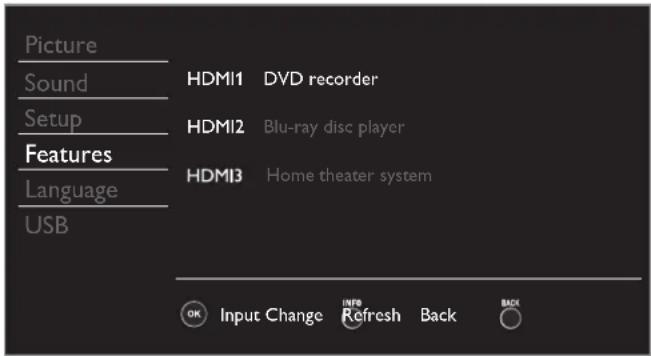
- The above image is an example for 26 inch and larger screen size TVs. It may differ depending on what device you connected.
Setting your location to home
You can set the location of your TV to Home or Retail. Choosing Home gives you full flexibility to change predefined settings for picture and sound.
1 Use ▲▼ to select Location, then press OK.
| Picture | Caption settings | |
| Sound | Child lock | |
| Setup | PC settings | |
| Features | fun-Link (HDMI CEC) | |
| Language | Location Home | |
| USB | E-sticker | -- |
| Software upgrade |
2 Use ▲▼ to select Home or Retail, then press OK.
| Retail | The unit will be set up with predefined settings for retail displays. In this setting, the power consumption may possibly exceed the limit requirement of the ENERGY STAR® qualification. |
| Home | This setting is ENERGY STAR® qualified.The unit is set to maximize the energy efficiency for home setting and it can be adjusted through a choice of picture and sound quality according to your preference. |

Note
- You must set Home. Otherwise, personalized picture and sound settings will not be memorized after the unit goes into Standby mode.
E-sticker
When you set Location to Retail store, E-sticker (Electronic Sticker) is displayed. E-sticker can be Turned Off using procedure below.
1 Use ▲▼ to select E-sticker, then press OK.
2 Use ▲▼ to select Off, then press OK.
| Off | You can Tum Off E-sticker. |
| Top | E-sticker is displayed on top of the TV screen. |
| Bottom | E-sticker is displayed on bottom of the TV screen. |

Note
- If you select Home, E-sticker will not be displayed.
Language
1 Press MENU and use ▲▼ to select Language, then press OK.
| Picture | ||
| Sound | Select your menu language. | English |
| Setup | ||
| Features | Seleccione el idioma para el menú. | Español |
| Language | ||
| USB | Sélectionnez la langue du menu. | Français |
2 Use ▲▼ to select English, Español or Français, then press OK.

Note
- If you need the English menu instead of the Spanish or French menu's, press MENU. Use ▲▼ to select Idioma or Langue, then press OK. Use ▲▼ to select English then press OK. Press MENU to exit the main menu.
USB
Your TV is fitted with a USB connection that enables you to view photos or watch Motion JPEG files stored on a USB Memory Stick.
1 Connect the USB Memory Stick to the USB terminal on the side of your TV.
2 Press MENU and use ▲▼ to select USB, then press OK.
- The highlighted text will move to the name of your USB Memory Stick, then press OK again.

3 Use ▲▼ to select the Picture or Video, then press OK.
- The files recorded under the following specifications are required.
| Picture (JPEG) | Upper limit | 24Mpixel | |
| Video(Motion JPEG) | Size 320 | x 240 (QVGA) | |
| Frame rate | 30fps | ||
| Audio type | LPCM | Sampling frequency(32 kHz, 44.1 kHz or 48 kHz)Quantization bit rate (16 bit) | |

Note
- Up to 2GB (FAT16) or 8GB (FAT32) capacity can be supported.
- Up to 10,000 files or 1,000 folders with 19 hierarchies can be recognized.
- Up to 255 English characters can be recognized.
- This unit does not support MTP(Media Transfer Protocol).
• This unit supports FAT16 and FAT32 file systems. - If the file is not supported, an error message appears.
- When the USB Memory Stick is not recognized, try reconnecting it again.
- We cannot be held responsible if your USB Memory Stick is not supported, nor will we accept any liability for damage or loss of stored data.
- A file name exceeding 128 characters or contains a dot character is not supported on this TV.
• Progressive JPEG files are not supported. - Only a Motion JPEG file with an ".avi" extension is supported. An extension ".mov" is not supported.
- During Motion JPEG playback, "Pause", "Forward" and "Reverse" do not work on this unit.
Picture (JPEG)
1 Use ▲▼ to select the desired file, then press OK.

- To toggle between List and Thumbnails press the NUMBER 2 button each time.
- The unit goes to the Slide show automatically. To pause/play the Slide show, press OK.
- Use the NUMBER buttons (1 through 4) to see the file detail (1) or change the following settings (2 \~ 4). See the description on the top of the next column.
| Item | Detail |
| 1More Detail | Press 1 to display file details below.Name, Album, Date, Size and Next.Press 1 again to remove file details. |
| 4Start show | Press 4 or OK to start the Slide show.While the Slide show is on, the following 2 settings will be displayed. |
| 2Transitions | Press 2, then use ▲▼ to select the transition mode choosing from;None, Dissolve, Wipe right, Wipe left, Wipe up.Wipe down, Box in and Box out. |
| 3Slide time | Press 3, then use ▲▼ to change the display time choosing from; Short, Medium and Long. |
| 4Stop show | Press 4 or OK to stop the Slide show.While the Slide show is Off, the following 2 settings will be displayed. |
| 2Rotate | Every press on 2 will turn the picture clockwise by 90 degrees. |
| 3Zoom | Press 3, then use ▲▼ to select the zoom factor (1x, 2x or 4x). Press OK to set the zoom factor. |
Video (Motion JPEG)
1 Use ▲▼ to select the desired file, then press OK.

- To stop playback and return to the file list, press BACK, OK or CH+.
- Press CH – to play back from the beginning.
| Item | Detail |
| 1More Detail | Press 1 to display file details below. Title, Director, Date and Duration. Press 1 again to remove file details. |
6 Upgrade your TV software
Magnavox continuously tries to improve its products and we strongly recommend that you upgrade the TV software when upgrades are available.
New software can be downloaded from our website at www.magnavox.com/support/download_list.php using the model number of your TV to find information.
Checking your current software version
1 Press MENU and use ▲▼ to select Features, then press OK.
2 Use ▲▼ to select Software upgrade, then press OK.
| Picture | Current software info |
| Sound | Upgrade |
| Setup | |
| Features | |
| Language | |
| USB |
3 Use ▲▼ to select Current software info, then press OK.
- The version and a description of the current software is displayed.

Upgrading the software
You can upgrade the software by using USB Memory Stick.
Preparing for the software upgrade
You require the following equipment :
• A PC with web browsing capability.
- An archive utility that supports the ZIP-format (e.g. WinZip for Windows or StuffIt for Mac OS).
- An empty clean formatted USB Memory Stick.

Note
- Only FAT / DOS-formatted portable memory is supported.
- Use only software upgrades that can be found on the Magnavox web site.

Warning
- When the software upgrade is running, don't press any buttons.
- Do not remove the USB Memory Stick during the software upgrade.
- If an error occurs during the upgrade, retry the procedure or for further assistance, please contact Call Center.
Downloading the software
Find information and software related to your TV and download the latest software upgrade file to your PC.
1 On your PC, open a web browser and go to www.magnavox.com/support/download_list.php
2 Enter the model number in the "Type the Model Number..." field.
3 Click the desired software to be downloaded.
- Decompress the ZIP-file.
4 Copy the upgrade file to the root directory of the USB Memory Stick.
Starting the software upgrade
1 Connect your USB Memory Stick with the upgrade file to the USB terminal on the side of your TV.
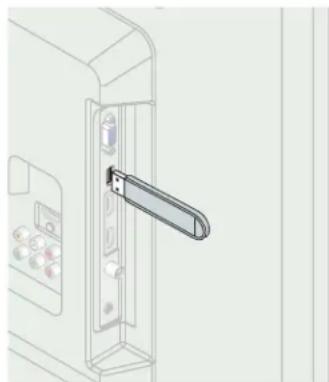
natural_image
Line drawing of a door handle opening with control panel and buttons (no text or symbols)2 Press MENU and use ▲▼ to select Features, then press OK.
3 Use ▲▼ to select Software upgrade, then press OK.
4 Use ▲▼ to select Upgrade, then press OK.
5 Read the on-screen instructions and confirm that you want to continue with the installation.
| Picture | Start now | |
| Sound | Would you like to upgrade the software? | |
| Setup | ||
| Features | ||
| Language | ||
| USB |
6 When the software upgrade is completed, press ⬆ set the unit to go into Standby mode, then remove the USB Memory Stick and then press ⬆ again to Tum the unit On.
- The TV starts up with the new software. For further assistance, please contact Call Center.
7 Connecting devices
No supplied cables are used with these connections:
- Please purchase the necessary cables at your local store.
Before you connect AC power cord:
Be sure other devices are connected properly before plugging in the AC power cord.
Selecting your connection quality
HDMI - Highest quality

natural_image
Illustration of a coiled cable with two USB connectors (no text or symbols)Supports high-definition Digital signals and gives highest picture and sound quality. Video and audio signals are combined in one cable. You must use HDMI for full high-definition video and to enable fun-Link (HDMI CEC).

Note
- Magnavox HDMI supports HDCP (High-bandwidth Digital Contents Protection). HDCP is a form of Digital Rights Management that protects high definition content in Blu-ray discs or DVDs.
Component (Y Pb Pr) - High quality

natural_image
Two identical coiled electrical cables with colored connectors, no text or symbols visibleSupports high-definition Analog signals but gives lower picture quality than HDMI. Component (Y/Pb/Pr) Video cables combine red / green / blue video cables with red / white audio (L/R) cables. Match the cable colors when you connect to the TV.
Composite - Basic quality

natural_image
Coiled audio/video cable with multiple colored connectors (no text or symbols visible)For analog connections. Composite Video / Audio Analog cable usually combine a yellow video cable with red / white audio (L/R) cables. With this unit, yellow cable must be connected to Y (green) of Component Video Input jacks.
Connecting your devices
HDMI Digital connection
HDMI connection offers the highest picture quality.
HDMI (High-Definition Multimedia Interface) transports high definition Digital video and multi-channel Digital Audio through a single cable.

HDMI-DVI connection
This unit can be connected to your device that has a DVI terminal. Use an HDMI-DVI conversion cable for this connection and it requires audio cable for Analog Audio signal as well.


Note
- Use an HDMI cable with the HDMI logo (a certified HDMI cable). High Speed HDMI cable is recommended for the better compatibility.
For HDMI connection
- The unit accepts 180i / 180p / 720p / 1080, 1080p 24/30/60Hz of video signals, 32kHz / 44.1kHz and 48kHz of audio signals.
- This unit accepts 5.1 channel audio signal (Dolby Digital) and 2 channel audio signal (LPCM).
- This unit accepts only signals in compliance with EIA861.
For HDMI-DVI connection
• The unit accepts 480i, 480p, 720p, 1080i and 1080p video signals.
- HDMI-DVI connection requires separate audio connections as well and the audio signals are output as Analog (L/R) Audio.
• DVI does not display 480i image which is not in compliance with EIA/CEA-861/861B.
Component Analog Video Connection
Component Analog Video connection offers better picture quality for video devices connected to the unit.
If you connect to the unit's Component Video (Y/Pb/Pr) Input jacks, connect Analog Audio cables to the Analog Audio (L/R) Input jacks.
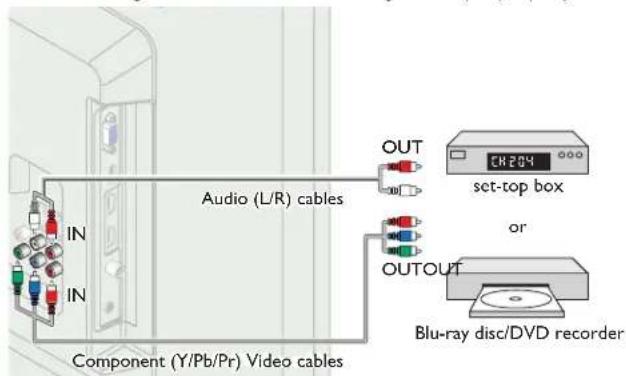

Note
• The unit accepts 480i / 480p / 720p and 1080i of video signals for this connection.
Composite Analog Video Connection
Composite Analog Video connection offers standard picture quality for video devices connected to the unit.
If you connect to the unit's Composite Video (Y/VIDEO) Input jack, connect audio cables to the Audio (L/R) Input jacks. When the Audio is monaural, then only connect to the Audio L Input jack.
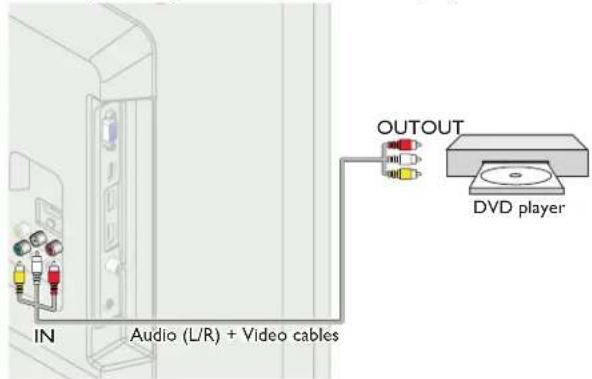

Note
- With this unit, yellow cable must be connected to Y (green) of Component Video Input jacks.
- Whenever you connect to the Composite Video Input jack (Y/VIDEO), you must disconnect the Component Video Input jacks (Pb and Pr). If you leave those jacks connected, it may cause of unstable picture.
- Only the left loudspeaker reproduces sound for mono equipment. Use a mono to stereo adapter (not supplied) for sound reproduction via all internal loudspeakers.
Digital Audio Output Connection
If you connect this unit to an external Digital Audio device, you can enjoy multi-channel audio like 5.1ch Digital broadcasting sound.
Use a Digital Audio coaxial cable to connect the unit to external Digital Audio devices.

PC connection
HDMI connection
This unit can be connected to your PC that has a HDMI terminal. Use an HDMI cable for this Digital connection.

HDMI-DVI connection
This unit can be connected to your PC that has a DVI terminal. Use an HDMI-DVI conversion cable for this Video Digital connection and it requires Stereo mini 3.5mm plug Audio cable for Analog Audio signal as well.

VGA connection
This unit is equipped with a PC Input jack. If you connect this unit to your PC, you can use this unit as a PC monitor.
Use a VGA cable for this Video connection and it requires a Stereo mini 3.5mm plug Audio cable for Analog Audio signal as well.

The following video signals can be displayed:
| Format Resolution Refresh rate | ||
| VGA 640 x 480 | 60Hz | |
| SVGA 800 x 600 | ||
| XGA 1,024 x 768 | ||
| WXGA | 1,280 x 768 | |
| 1,360 x 768 | ||
| FHD 1,920 x 1,080 | ||
Other formats or non-standard signals will not be displayed correctly.
* FHD will only display for 39 inch TVs.

Note
- Please purchase the VGA cable or HDMI-DVI conversion cable that has a female core.
• The following operations may reduce noise.
Attach a ferrite core to the AC power cord of your PC.
Unplug the AC power cord and use the built-in battery of your PC. - Use an HDMI cable with the HDMI logo (a certified HDMI cable). High Speed HDMI cable is recommended for the better compatibility.
• The unit accepts 180i, 180p, 720p, 1080i and 1080p video signals. - HDMI-DVI connection requires separate audio connections as well and the audio signals are output as Analog (L/R) Audio.
• DVI does not display 480i image which is not in compliance with FIA/CFA-861/861B.
USB Memory Stick
This unit offers easy playback of picture (JPEG) and video (Motion JPEG) files.
Insert the USB Memory Stick into the USB terminal shown below.
USB → p.27
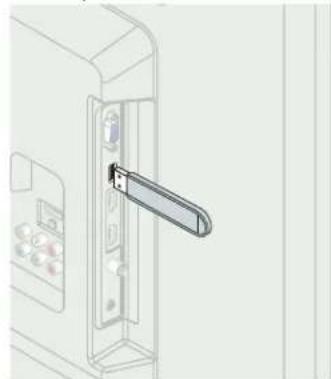
natural_image
Line drawing of a door handle opening with control panel and buttons (no text or symbols)
Note
• The unit recognizes only a USB Memory Stick.
- Do not use a USB hub or an extension cable to connect an external hard disk drive to the unit. (Not supported.)
• A USB Memory Stick is always inserted to this unit directly.
• A USB Memory Stick is not supplied with this unit.
• We do not guarantee that all USB Memory Sticks can be supported by this unit.
- Be sure to keep a backup copy of the original files on your device before you play them back on this unit. We have no responsibilities for damage or loss of your stored data.
- To protect your USB Memory Stick files from being erased place the write protect sliding tab in the protect position.
- When you are ready to remove a USB Memory Stick, set the unit to go into Standby mode to avoid any damage to your data and the unit.
- A USB Memory Stick that requires its own driver or the device with a special system such as fingerprint recognition are not supported.
- This unit is not allowed to use the USB Memory Stick which requires an external power supply (500mA or more).
8 Useful tips
FAQ
| Question Answer | |
| My remote control does not work.What should I do? | Check the antenna or cable connection to the main unit.Check the batteries of the remote control.Check if there is an obstacle between the infrared sensor window and the remote control.Test the signal Output use IR Signal Check p. 34If okay, then possible infrared sensor trouble.Aim the remote control directly at the infrared sensor window on the front of the unit.Reduce the distance to the unit.Re-insert the batteries with their polarities (+/-) as indicated.When there is an infrared-equipped device such as PC near this unit, it may interrupt the remote control signal of this unit. Move the infrared-equipped device away from this unit, change the angle of the infrared sensor or Turn Off the infrared communication function. |
| How come the Initial setup appears every time I Turn On this unit? | Connect the RF coaxial cable to the unit directly and run the initial setup.Make sure to complete the initial setup before the unit goes into Standby mode. |
| Why can I not watch some RF signal TV programs. | Autoprogram must be completed when you set up the unit for the first time or move it to a location where previously unavailable channels are broadcast.Make sure Autoprogram has been completed p. 1?The selected channel may not be broadcasting.When Autoprogram is interrupted and not completed, some channels will not be received. Make sure to complete the Autoprogram, p. 1?The selected channel cannot be viewed by the Child and ratings lock setting p. 2?The unit requires some kind of antenna Input. An indoor antenna (Digital or VHF/UHF), an external antenna (Digital or VHF/UHF) or an RF coaxial cable from your wall cable/satellite box needs to be plugged into the unit. |
| How come there is no image from the connected external devices? | Check if the correct Input mode is selected by pressing SOURCE or using CH +/- . Refer to Watching channels from an external device. p. 14Check the antenna, cable or other Input connection to the unit.When using the Component Video connection check that the Green (Y), Blue (Pb/Cb) and Red (Pr/Cr) connectors are connected to their corresponding colored jacks on the unit. |
| When I enter a channel number, it changes automatically. | Many Digital channels have alternate channel numbers. The unit changes the numbers automatically to the ones signifying the broadcasting station channel number. These basic numbers used for previous Analog broadcasts. (e.g., Input ch# 30 automatically changes to ch# 6.1) |
| Why are captions not displayed entirely? Or, captions are delayed behind the dialog. | Captions that are delayed a few seconds behind the actual dialog are common for live broadcasts. Most captioning production companies can display a dialog to maximum of 220 words per minute. If a dialog exceeds that rate, selective editing is used to insure that the captions remain up-to date with the current TV screen dialog. |
| How can I set the clock ? · There is no clock function on this unit. | |
| I cannot change the Child lock setting because my PIN code no longer works. | If a Power failure occurs for longer than 10 seconds the child lock setting is retained, but the PIN code is reset to the default code 0000. Refer to Child and ratings lock p. 22 |
Troubleshooting
If the unit does not perform properly when operated as instructed in this Owner's Manual, check the following chart and all connections once before calling for service.
| Symptom Remedy | |
| No power • Make sure the AC power cord is plugged in. | • Make sure that the AC outlet supplies the proper voltage, plug another electrical appliance into the AC outlet to ensure that the AC outlet operates normally.• If a power failure occurs, unplug the AC power cord for 1 minute to allow the unit to reset itself. |
| Control buttons do not work. | • Press only one button at a time. Do NOT press more than one button at the same time.• Ensure that no buttons on the remote control are depressed and move freely. |
Continued on next page.
| Symptom Remedy | |
| Power is ON but no screen image. | Check whether the connection of the antenna, cable receiver or satellite box is connected correctly.Check whether all the cables to the unit are connected to the correct Output jack of your device like Blu-ray disc/DVD recorder.Make sure that the selected Input mode is connected to the working Input jack.Check if your computer is NOT in sleep mode when the Input mode of this unit is in PC mode.Tap any key on the keyboard to wake up your computer. |
| No picture or sound Check if the Power is on. | Check whether all the cables to the unit are connected to the correct Output jack of your device like Blu-ray/DVD recorder.View other TV channels. The problem might be limited to the broadcasting station or weak signal strength.Unplug the AC power cord and wait for about 1 minute, then plug the AC power cord and Tum On the unit again.Check whether the connection of the antenna, cable receiver or satellite box is connected correctly.Make sure that the selected Input mode is connected to the working Input jack.Check if your computer is NOT in sleep mode when the Input mode of this unit is in PC mode.Tap any key on the keyboard to wake up your computer.Make sure that the sound is not muted. Press so that the volume bar and current volume level will appear on the TV screen.Make sure that the volume is NOT set to 0 oX. If so, use VOL + / - to adjust to the desired volume. |
| No color View other TV channels. | The problem might be limited to the broadcasting station or weak signal strength.Adjust Color in Picture settings p. 18 |
| No sound, distorted sound or incorrect Audio Sound is heard when using the HDMI-DVI connections. | Make sure that the Analog Audio signals from the HDMI-DVI device are connected to the Analog Audio (L/R) Input jacks.When using Component Analog Video, Composite Analog Video or PC VGA Video make sure that the Analog Audio (L/R) connectors are mounted into the Audio (L/R) Input jacks. |
| Adjusted Picture or Sound settings are not effective every time the unit is Turned On. | You must set Home in Location p. 26Otherwise, the settings you adjusted will not be memorized after the unit goes into Standby mode. |
| Sound OK, picture poor Electrical interference from nearby appliances may affect picture quality.Adjust Contrast and Brightness in Picture settings p. 18View other TV channels. The problem might be limited to the broadcasting station or weak signal strength.For the best picture quality, watch High Definition wide screen programs.If the HD content is not available, watch Standard Definition programs instead. | |
| Picture OK, sound poor | View other TV channels.The problem might be limited to the broadcasting station or weak signal strength.Check if the audio cable is connected into the unit correctly. |
| You see a distorted picture or hear an unusual sound. | You may be getting interference from electrical appliances, automobiles, motorcycles or fluorescent lights.Try moving the unit to another location to see if this is the cause of the problem. |
| Ghosts, lines or streaks in picture | Electrical interference from nearby appliances may affect picture quality.View other TV channels. The problem might be limited to the broadcasting station or weak signal strength. |
| You see noise or trash on the screen. | When the capabilities of the unit exceed the capabilities of the Digital broadcasting, the signal will be increased to match the capabilities of the display of the unit. This may cause noise or trash. |
| Different color marks on the TV screen | View other TV channels. The problem might be limited to the broadcasting station, missing data or pixelation. |
| You switch to a different Input and the volume changes. | This unit will memorize the volume level from the last time you adjusted it.If the volume of the sound from another device is higher or lower, then the loudness will change.Make sure Auto volume leveling is set to On. p. 19 |
| You switch to a different Input and the screen size changes. | This unit will memorize the viewing mode from the last time you used the particular Input modes. |
| The display image does not cover the entire screen. | If you are using the unit as a PC monitor, make sure that Horizontal position and Vertical position in PC settings are set correctly.If you are watching TV or using the Composite Video, Component Video or HDMI with 480i Input, press FORMAT repeatedly to switch various screen modes. |
| Captions are displayed as a white box. No caption is displayed in the Closed Caption-supported program. | Interference from buildings or weather conditions may cause captioning to be incomplete if watching Analog TV signals.Broadcasting station may shorten the program to insert advertisements.The Closed Caption decoder cannot read the information of the shortened program. |
| Black box is displayed on the TV screen. | The text mode is Selected. For caption, select CC-1, CC-2, CC-3, CC-4 or Off. |

Note
- The LCD screen is manufactured to provide many years of useful life. Occasionally a few non active pixels may appear as a fixed point of blue, green or red. This is not to be considered a defect in the LCD screen.
- Some functions are not available in specific modes, but this is not a malfunction. Read the description in this Owner's Manual for more details on correct operations.
9 Information
Glossary
Analog TV (NTSC)
Acronym that stands for National Television Systems Committee and the name of Analog broadcasting standards.
Off the air Analog TV signals are no longer being sent by major broadcasting stations in the USA.
Aspect ratio
The width of a TV screen relative to its height. Conventional TVs are 4:3 (in other words, the TV screen is almost square); widescreen models are 16:9 (the TV screen is almost twice as wide as its height).
CEC (Consumer Electronics Control)
This allows you to operate the linked functions between our brand devices with CEC feature and this unit. We do not guarantee 100% interoperability with other brands of CEC compliant devices.
Component Video
This is a video signal format that conveys each of 3 principal colors of light (red, blue and green) through different signal lines. This allows the viewers to experience picture colors as original as it is. There are several signal formats, including Y / Pb / Pr and Y / Cb / Cr.
Dolby Digital
The system developed by Dolby Laboratories to compress Digital sound. It offers stereo sound (2ch) or multi-channel audio.
DTV (ATSC)
Initialism that stands for Advanced Television Systems Committee and the name of the Digital broadcasting standards.
E-sticker
E-sticker is showing set features, technical information, etc on this TV set that is displayed on the TV screen mainly used by TV retailers. Previously the information was on a printed sticker that was put on the display.
HDMI (High-Definition Multimedia Interface)
Interface that supports all uncompressed, Digital Audio / Video formats including set-top box, Blu-ray / DVD recorder or Digital television, over a single cable.
HDTV (High Definition TV)
Ultimate Digital format that produces high resolution and high picture quality.
PIN code
A stored 4-digit number that allows access to parental control features.
SAP (Secondary Audio Program)
Second-audio channel delivered separately from main-audio channel. This audio channel is used as an alternate in bilingual broadcasting.
SDTV (Standard Definition TV)
Standard Digital format that is similar to the Analog TV picture quality.
SRS TruSurround XT®
Creates a truly immersive surround sound experience with rich bass and clear dialog from only two speakers.
Maintenance
Cabinet Cleaning
- Wipe the front panel and other exterior surfaces of the unit with a soft cloth.
- Never use a solvent or alcohol. Do not spray insecticide liquid near the unit. Such chemicals may cause damage and discoloration to the exposed surfaces.
Panel Cleaning
Wipe the panel of the unit with a soft cloth. Before cleaning the panel, disconnect the AC power cord.
Servicing
Should your unit become inoperative, do not try to correct the problem yourself. There are no user serviceable parts inside. Call our toll free customer support line found on the cover of this Owner's Manual to locate an authorized service center.
IR Signal Check
If the remote control is not working properly, you can use a Digital camera (including a cellular phone with built-in camera) to see if it is sending out an infrared signal.
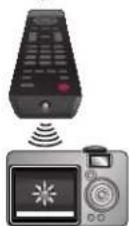
With a Digital camera (including built-in cell phone cameras): Point the Digital Camera towards the remote control infrared diode at the front of the remote control. Press any button on the remote control and look through the camera display. If the infrared pulsating light appears through the camera, the remote control is sending out an IR signal.
10 Specifications
| Model # 39ME412V | 32ME402V 26ME402V | 22ME402V / 19ME402V | ||
| Picture | ||||
| Type | FHD(1920 x 1080 pixels 60Hz) | WXGA(1366 x 768 pixels 60Hz) | ||
| Aspect ratio 16:9 | ||||
| Viewing angles | 178° (V) by 178° (H) | 170° (V) by 170° (H) | 150° (V) by 160° (H) | 160° (V) by 170° (H) |
| Built-in Digital tuner ATSC / NTSC | ||||
| Sound | ||||
| Mono / Stereo Mono, Stereo, SRS TruSurround XT | ||||
| Power Output (RMS watts) 10 W x 2 8 W x 2 2W x 2 | ||||
| Equalizer | 5 band | |||
| Ease of use | ||||
| Picture format | SD (4:3 Source) : Normal / 16:9 / Movie expand / Zoom / WideHD (16:9 Source) : Normal / 4:3 / Movie expand / Zoom / WideHDMI AV (4:3 Source) : Normal / 16:9 / Movie expand / Zoom / Wide / FullHDMI AV (16:9 Source) : Normal / 4:3 / Movie expand / Zoom / Wide / FullPC Source : Normal / Full / Unscaled(Refer to HDMI AV (16:9 Source) above if PC has HDMI Output.) | |||
| Photo Slide show | JPEG files only | |||
| Video playback | Motion JPEG 320 x 240, 30fps and file extension ".avi" only | |||
| Connectivity | ||||
| Component Video Input (Y/Pb/Pr) | 1supporting video signals : 480i/p, 720p, 1080i 60Hz | |||
| Composite Video Input (shared terminal with Y of components) | 1 | |||
| HDMI Input | 3 | 1 | ||
| supporting video signals :480i/p, 720p, 1080i/p,24Hz-60HzPC-Input signal up to FHD(1920 x 1080) | supporting video signals :480i/p, 720p, 1080i/p, 24Hz-60HzPC-Input signal up to WXGA (1360 x 768) | |||
| Audio L/R Input | 1 | |||
| PC Input | via VGA, HDMI and HDMI-DVI + Analog Audio L/R | |||
| USB | 1 | |||
| Digital Audio Output | 1supporting Dolby Digital | |||
| Headphone Output | 11/8 inches (3.5mm) | |||
| Power | ||||
| Power requirements | 120V~AC +/- 10%, 60Hz +/- 0.5% | |||
| Temperature | ||||
| Operating temperature | 41 °F (5 °C) to 104 °F (40 °C) | |||
• Specifications are subject to change without prior notice.
LIMITED WARRANTY
NINETY (90) DAY LABOR / ONE (1) YEAR PARTS
WARRANTY COVERAGE:
This warranty obligation is limited to the terms as set forth below.
WHO IS COVERED:
This product warranty is issued to the original purchaser or the person receiving the product as a gift against defects in materials and workmanship as based on the date of original purchase (“Warranty Period”) from an Authorized Dealer. The original sales receipt showing the product name and the purchase date from an authorized retailer is considered such proof.
WHAT IS COVERED:
This warranty covers new products if a defect in material or workmanship occurs and a valid claim is received within the Warranty Period. At its option, the company will either (1) repair the product at no charge, using new or refurbished replacement parts, or (2) exchange the product with a product that is new or which has been manufactured from new, or serviceable used parts and is at least functionally equivalent or most comparable to the original product in current inventory, or (3) refund the original purchase price of the product. Replacement products or parts provided under this warranty are covered against defects in materials and workmanship from the date of the replacement or repair for ninety (90) days or for the remaining portion of the original product's warranty, whichever provides longer coverage for you. When a product or part is exchanged, any replacement item becomes your property and the replaced item becomes company property. When a refund is given, your product becomes company property. Note: Any product sold and identified as refurbished or renewed carries a ninety (90) day limited warranty.
Replacement product can only be sent if all warranty requirements are met. Failure to follow all requirements can result in delay.
WHAT IS NOT COVERED - EXCLUSIONS AND LIMITATIONS:
This Limited Warranty applies only to new company manufactured products that can be identified by the trademark, trade name, or logo affixed to it. This Limited Warranty does not apply to any hardware product or any software, even if packaged or sold with the product, as manufacturers, suppliers, or publishers may provide a separate warranty for their own products packaged with the bundled product.
The company is not liable for any damage to or loss of any programs, data, or other information stored on any media contained within the product, or other additional product or part not covered by this warranty. Recovery or reinstallation of programs, data or other information is not covered under this Limited Warranty.
This warranty does not apply (a) to damage caused by accident, abuse, misuse, neglect, misapplication, or non-supplied product, (b) to damage caused by service performed by anyone other than company approved Authorized Service Location, (c) to a product
or a part that has been modified without written company permission, or (d) if any serial number has been removed or defaced, or (e) product, accessories or consumables sold "AS IS" without warranty of any kind by including refurbished product sold "AS IS" by some retailers.
This Limited Warranty does not cover:
• Shipping charges to return defective product.
- Labor charges for installation or setup of the product, adjustment of customer controls on the product, and installation or repair of antenna/signal source systems outside of the product.
- Product repair and/or part replacement because of improper installation or maintenance, connections to improper voltage supply, power line surge, lightning damage, retained images or screen markings resulting from viewing fixed stationary content for extended periods, product cosmetic appearance items due to normal wear and tear, unauthorized repair or other cause not within the control of the company.
- Damage or claims for products not being available for use, or for lost data or lost software.
- Damage from mishandled shipments or transit accidents when returning product.
- A product that requires modification or adaptation to enable it to operate in any country other than the country for which it was designed, manufactured, approved and/or authorized, or repair of products damaged by these modifications.
- A product used for commercial or institutional purposes (including but not limited to rental purposes).
- Product lost in shipment and no signature verification receipt can be provided.
- Failure to operate per Owner's Manual.
TO OBTAIN ASSISTANCE...
Contact the Customer Care Center at: 1 866 341 3738
REPAIR OR REPLACEMENT AS PROVIDED UNDER THIS WARRANTY IS THE EXCLUSIVE REMEDY FOR THE CONSUMER, WITH THE ISSUING COMPANY NOT LIABLE FOR ANY INCIDENTAL OR CONSEQUENTIAL DAMAGES FOR BREACH OF ANY EXPRESS OR IMPLIED WARRANTY ON THIS PRODUCT. EXCEPT TO THE EXTENT PROHIBITED BY APPLICABLE LAW, ANY IMPLIED WARRANTY OF MERCHANTABILITY OR FITNESS FOR A PARTICULAR PURPOSE ON THIS PRODUCT IS LIMITED IN DURATION TO THE DURATION OF THIS WARRANTY.
Some states do not allow the exclusions or limitation of incidental or consequential damages, or allow limitations on how long an implied warranty lasts, so the above limitations or exclusions may not apply to you.
MAGNAVOX
FUNAI CORPORATION, Inc.
19900 Van Ness Avenue, Torrance, CA 90501
- Need help fast?
- Get started 7
- Use your TV 13
- Use more of your TV
- Upgrade your TV software 28
- Connecting devices
- Useful tips
- Information
- Specifications
- Warranty
- Return your Product Registration Card or visit at www.magnavox.com/support today to get the very most from your purchase.
- \*Product Safety Notification
- \*Additional Benefits
- Know these safety symbols
- MAGNAVOX Visit our World Wide Web Site at www.magnavox.com/support
- CHILD SAFETY:
- THE ISSUE
- THIS MANUFACTURER CARES!
- TUNE INTO SAFETY
- WALL MOUNTING: IF YOU DECIDE TO WALL MOUNT YOUR FLAT PANEL DISPLAY, ALWAYS:
- Important Safety Instructions
- Note to the CATV system installer:
- Wall Mount Bracket Kit
- Brand: SANUS
- Funai is not liable for these types of accidents or injury noted below.
- When installing the unit on the wall, allow this much space.
- Notice
- Pixel characteristics
- Warranty
- Federal Communications Commission Notice
- Declaration of Conformity
- Modifications
- Cables
- Canadian notice
- Copyright
- Consumer Notice:
- Portions of this software are copyright © The FreeType Project (www.freetype.org).
- Important
- Positioning the TV
- Regulatory notices
- Environmental care
- End of life directives
- Disposal of used batteries
- Get started
- Features
- Supplied accessories
- Note
- Symbols used in this Owner's Manual
- Digital TV operation
- Analog/Cable TV operation
- Attaching the base
- Mounting the unit on your furniture
- Managing cables
- Installing the remote control batteries
- Remote control
- Control panel
- Terminals
- Connecting the antenna or the cable
- If you connect to an antenna through RF cable
- If you connect a set-top box through RF cable
- If you connect a set-top box through HDMI
- If you connect a set-top box through Component Video Input
- Connecting a set-top box, Blu-ray disc / DVD recorder via composite connectors and Analog Audio
- Plugging in the AC power cord
- Caution
- Initial setup
- Before you begin:
- Use your TV
- Watching channels from an external device
- Turn On a set-top box or the connected device.
- Using auto mode
- Sleep timer
- Freeze mode
- Switching audio mode
- fun-Link options
- (Available for 32 / 39 inch TVs)
- MAGNAVOX
- Changing picture format
- TV screen information
- Press INFO.
- Press INFO to hide the information.
- Displaying the main menu
- Picture
- Sound
- Setup
- Autoprogram
- Channel list
- Add channels
- Antenna confirmation
- Caption settings
- Child and ratings lock
- Channel lock
- Setting US movie and TV ratings
- US movie ratings lock
- US TV ratings lock
- Canadian English or Canadian French ratings
- Change PIN
- PC settings
- fun-Link (HDMI CEC)
- Use ▲▼ to select fun-Link (HDMI CEC), then press OK.
- Use ▲▼◀▶ to select the item you want to adjust, then press OK.
- Device list
- Setting your location to home
- E-sticker
- Language
- USB
- Picture (JPEG)
- Video (Motion JPEG)
- Upgrade your TV software
- Checking your current software version
- Upgrading the software
- Preparing for the software upgrade
- Warning
- Downloading the software
- Starting the software upgrade
- No supplied cables are used with these connections:
- Selecting your connection quality
- Connecting your devices
- HDMI Digital connection
- HDMI-DVI connection
- For HDMI connection
- For HDMI-DVI connection
- Component Analog Video Connection
- Composite Analog Video Connection
- Digital Audio Output Connection
- PC connection
- HDMI connection
- VGA connection
- USB Memory Stick
- Troubleshooting
- Glossary
- Analog TV (NTSC)
- Aspect ratio
- CEC (Consumer Electronics Control)
- Component Video
- Dolby Digital
- DTV (ATSC)
- HDMI (High-Definition Multimedia Interface)
- HDTV (High Definition TV)
- PIN code
- SAP (Secondary Audio Program)
- SDTV (Standard Definition TV)
- SRS TruSurround XT®
- Maintenance
- Cabinet Cleaning
- Panel Cleaning
- Servicing
- IR Signal Check
- LIMITED WARRANTY
- NINETY (90) DAY LABOR / ONE (1) YEAR PARTS
- WARRANTY COVERAGE:
- WHO IS COVERED:
- WHAT IS COVERED:
- WHAT IS NOT COVERED - EXCLUSIONS AND LIMITATIONS:
- This Limited Warranty does not cover:
- TO OBTAIN ASSISTANCE...
Brand : MAGNAVOX
Model : 39ME412V
Category : Television