
DR230107 - Projection screen Draper - Free user manual and instructions
Find the device manual for free DR230107 Draper in PDF.


| Product Type | Portable Projection Screen |
| Brand | Draper |
| Model | DR230107 (Traveller) |
| Manual Type | Operating Instructions |
| Number of Pages | 1 |
| Screen Mechanism | Pull-up with bail and gooseneck |
| Height Adjustment | Adjustable upright |
| Base Legs | Rotatable perpendicular to case |
| Carrying Strap | Rotatable or removable |
| Setup Steps | Rotate legs, open case, insert upright, raise bail, hook onto gooseneck |
| Collapsing Procedure | Reverse setup; slowly allow screen to roll into case |
| Caution | Do not release bail during collapse; damage may result |
| Case Latches | Press down gently above each latch to open or close |
| Troubleshooting - Screen Not Extending | Check for obstructions, ensure case lid fully open, roller properly seated |
| Troubleshooting - Screen Not Closing | Check roller for interference |
| Troubleshooting - Screen Tilting | Ensure legs perpendicular; if so, adjust location to less severe incline |
| Maintenance - Surface Care | Do not write on viewing surface |
| Maintenance - Case Care | Do not fasten anything to screen case or viewing surface |
| Power Source | None (manual operation) |
| Manufacturer | Draper Inc., 411 S. Pearl St., Spiceland, IN 47385 USA |
| Contact | Phone: 765-987-7999, Fax: 765-987-7142, Email: draper@draperinc.com, Web: www.draperinc.com |
| Copyright | 2004 Draper Inc. |
Frequently Asked Questions - DR230107 Draper
User questions about DR230107 Draper
0 question about this device. Answer the ones you know or ask your own.
Ask a new question about this device
Download the instructions for your Projection screen in PDF format for free! Find your manual DR230107 - Draper and take your electronic device back in hand. On this page are published all the documents necessary for the use of your device. DR230107 by Draper.
USER MANUAL DR230107 Draper
Operating Instructions
Traveller Portable Projection Screen by Draper
Caution
① Read instructions through completely before proceeding, and save for future reference.
② Nothing should be fastened to screen case or viewing surface.
③ Do not write on viewing surface.
NOTE: Screen has been thoroughly inspected and tested at factory and found to be operating properly prior to shipment.
Setting Up the Screen
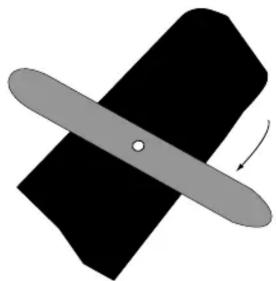
① Rotate legs (attached to bottom) until they are perpendicular to screen case (see Fig. 1).
natural_image
Diagram of a bandage with an arrow indicating direction (no text or symbols)Figure 1
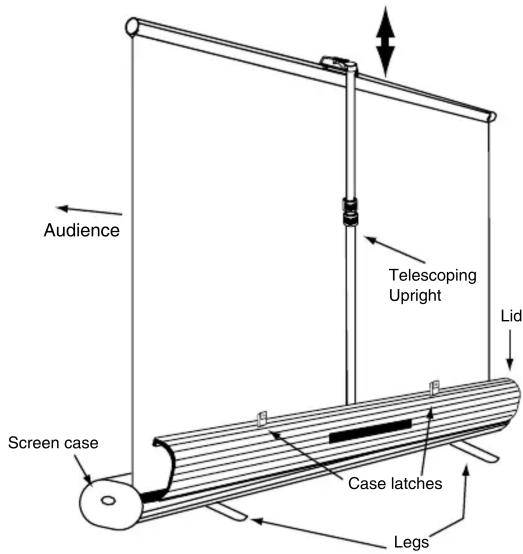
② Rotate carrying strap so it does not interfere with opening case. You can also remove the carrying strap by sliding down then off (see Fig. 2).

natural_image
Simple line drawing of a mechanical component with downward arrows indicating motion (no text or symbols)Figure 2 (side view)
③ Unlatch and open screen case.
④ Remove upright from clips in case behind screen.
⑤ Place upright in upright stand, located inside case and centered on back of screen. Adjust upright according to necessary screen height (see Fig. 3).

natural_image
Diagram showing a mechanical component being inserted into a black plate with a circular hole (no text or symbols present)Figure 3

natural_image
Diagram of a mechanical component with rotational arrows indicating motion (no text or symbols)⑥ Grasp screen bail and pull up in steady motion to raise screen. Hook bail onto upright gooseneck (see Fig. 4). Adjust upright again if necessary.

natural_image
Technical line drawing of a mechanical component with no visible text or symbolsFigure 4
Collapsing the Screen
① Generally reverse procedures used for screen setup.
Please Note: Do not let go of the screen bail when collapsing the screen; damage to screen could result. Slowly allow screen to roll into the case.
Troubleshooting
Screen will not fully extend:
Make sure the screen surface is not “catching” on anything. Make sure case lid is fully open. Make sure roller is properly seated.
Screen will not close:
Check roller to make sure nothing is interfering with operation.
Screen tips forward or backward:
Make sure legs are perpendicular to screen case. If they are, screen may be located on too severe an incline.
Case Latches will not open:
Press gently down on screen case just above each latch while opening.
Case Latches will not close:
Press gently down on screen case just above each latch while closing.
Carrying strap will not rotate out of the way so case will open:
Loosen or remove carrying strap altogether (see below).

natural_image
Line drawing of a mechanical component with a meshed part and a separate circular feature (no text or symbols)DRAPER
411 S. Pearl St., Spiceland, IN 47385 USA ■ 765-987-7999 ■ fax 765-987-7142
e-mail draper@draperinc.com ■ www.draperinc.com
Copyright © 2004 Draper Inc.
Form Traveller_Inst04
Print ed in U.S.A.
If you encounter any diffi culties installing or ser vic ing your Traveller, call your dealer or Draper, Inc., in Spiceland, Indiana, 765/987-7999; fax 765/987-7142; or email draper@draperinc.com.
- Operating Instructions
- Traveller Portable Projection Screen by Draper
- Caution
- Setting Up the Screen
- Collapsing the Screen
- Troubleshooting
- Screen will not fully extend:
- Screen will not close:
- Screen tips forward or backward:
- Case Latches will not open:
- Case Latches will not close:
- Carrying strap will not rotate out of the way so case will open:
- DRAPER
Brand : Draper
Model : DR230107
Category : Projection screen