
LDR-075 - Regulator Nexa - Free user manual and instructions
Find the device manual for free LDR-075 Nexa in PDF.


| Type of product | Regulator |
| Brand | Nexa |
| Model | LDR-075 |
| Dimensions (H x W x D) | 120 x 70 x 45 mm |
| Weight | 0.3 kg |
| Power supply | AC 220-240V ~ 50/60Hz |
| Rated output voltage | 220V ± 5% |
| Maximum output current | 10 A |
| Main functions | Voltage stabilization, surge protection, overload protection |
| Usage | For domestic and light commercial electronic devices |
| Installation | Plug-and-play, wall-mountable |
| Display | LED indicators for power and status |
| Operating temperature | 0°C to 40°C |
| Storage temperature | -20°C to 60°C |
| Humidity | 10% to 90% (non-condensing) |
| Materials | Flame-resistant ABS plastic |
| Safety standards | CE, RoHS compliant |
| Protection class | IP20 |
| Maintenance | Wipe with dry cloth, avoid liquids |
| Spare parts & repairability | Replaceable fuse (type F 10A), contact professional for repairs |
| Warranty | 2 years |
Frequently Asked Questions - LDR-075 Nexa
User questions about LDR-075 Nexa
0 question about this device. Answer the ones you know or ask your own.
Ask a new question about this device
Download the instructions for your Regulator in PDF format for free! Find your manual LDR-075 - Nexa and take your electronic device back in hand. On this page are published all the documents necessary for the use of your device. LDR-075 by Nexa.
USER MANUAL LDR-075 Nexa
Max. last 75 W @ 12 VDC
Frokvers System Note (433,92 MHz)
Declaration of coniversity that is largely as www.nexa.se
NEXA
NEXA AB, DATAVÄGEN 375, 436 32 ASKIM, SWEDEN
Incornea.30 | www.pexa.30
SVENSKA
RADERING AV MINNESPLATS
RADERING AV ALLA MINNESPLATSER.
BEKRÄFTELSE AV RADERING ALLA MINNESPLATSER
Max. load 75 W @ 12 VDC
Frequency System Nexa (433.92 MHz)
Range up to 30 m
Memory slots B
IP rating IP20 Indoor use
Dimensions, W x H x D 40 x 44 x 15 mm
A declaration of conformity is available at www.nese.be
NEXA
NEXA AB, DATAVÄGEN 375, 436 32 ASKIM. SWEDEN Inno8nexa.ac | www.nexa.ac
ENGLISH
Dimmer receiver for permanent installation with adjustable minimum brightness. Suitable for LED strips and LED fixtures for constant voltage (built-in current limitation) of 12-24V.
SAFETY
Read through all of the instructions first. Call in a professional if necessary. Nexa cannot be held liable if the product is used for any purpose other than the one for which it is designed, or if there is failure to comply with the instructions. Never connect bulbs or equipment exceeding the receiver's maximum stated load – this could lead to faults, short-circuiting or fire. Do not attempt to repair the product. The product contains no repairable parts.
INSTALLATION
Connect the positive conductor from the voltage source (AC/DC adapter) to + and the negative conductor to - on DC in, the load's positive conductor + and negative conductor to - on DC out on the LDR-075.
See also wiring diagram
LINKING
-
Power up the LDR-075
-
Press the learn button, the LED indicator will start to flash
-
Press the "ON" button for the selected channel on a System Nexa transmitter within 15 seconds
LINKING CONFIRMATION
The LED indicator lights steadily, if there is a bulb connected to the receiver it will flash twice.
DELETING A MEMORY SLOT
-
Press the team button
-
Press the "OFF" button for the selected channel on a System Nexa transmitter within 15 seconds
DELETION CONFIRMATION
The LED indicator lights steadily, if there is a bulb connected to the receiver it will flash twice.
DELETING ALL MEMORY SLOTS.
-
Press and hold down the learn button for 6 seconds, the LED indicator starts to flash rapidly
-
Release the learn button and then briefly press it again.
CONFIRMATION OF THE DELETION OF ALL MEMORY SLOTS
The LED indicator lights steadily, if there is a bulb connected to the receiver it will flash twice.
MEMORY
The LDR-075 has 6 memory slots which means that it can be controlled by up to six transmitters at the same time.
DIMMER SETTINGS
There are a total of four levels for lowest dimmer level where 4 is the lightest and 1 the darkest. The receiver is supplied set to the highest level (4).
SET THE LOWEST DIMMER LEVEL
-
Light the connected lamp using the transmitter
-
Press the training button twice. The LED indicator starts to flash and the connected lamp dims to the lowest level currently set
-
Press the 'OFF' button for the selected channel on the
transmitter to lower the level one step and "ON" to raise the level one step
- Press the training button twice to confirm the selected dimmer level
If the connected bulb starts to flicker or goes out completely, go back one step in the lowest dimmer level settings.
SETTING THE LOWEST DIMMER LEVEL CONFIRMATION
The LED indicator lights steadily. If there is a bulb connected to the receiver it will flash twice.
CONTROL
The receiver can be controlled in a number of ways.
-
Using a trained System Nexa remote control
-
Using other trained System Nexa transmitters
-
Using a Nexa Bridge
OTHER INFORMATION
Range indoors: up to 30 m (optimal conditions). The range is very dependent on local conditions, if there is metal in the vicinity for example. The thin metal coating in low emissivity energy glass has a negative effect on the range of radio signals for example. There may be restrictions on the use of the unit outside the EU. If appropriate, you should check that the unit complies with local regulations. Max. load: Never connect bulbs or equipment that exceed the maximum load of the receiver. This could lead to faults. short-circuitting or fire.
Life-support equipment: Never use Nexa's products for life-support equipment or other devices where faults or interference could have life-threatening consequences.
Interference: All wireless units can suffer from interference that can affect performance and range. Because of this, the minimum distance between two receivers should be at least 50 cm
Repair: Do not attempt to repair the product. It does not contain any repairable parts.
Watertightiness: The product is not waterproof. Make sure it remains dry at all times. Damp will cause the internal electronics to corrode and this could lead to short-circuiting, faults and a risk of electric shock.
Cleaning: Clean the product using a dry cloth. Do not use chemicals, solvents or strong cleaning agents.
Environment: Do not expose the product to intense heat or cold as this could damage or shorten the service life of the electric circuits.
WIRING DIAGRAM
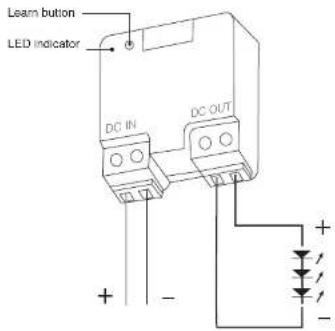
NEXA

LDR-075
BOKSDIMMER LED 12-24 V
TEKNISKE SPESIFIKASJONER
| LDR-075 |
| Storwistle 12-24 V DC |
| Maks. bolasting 75 W vdd 12 V DC |
| Prokvens System Nowe [433,50 MHz] |
| Hekkevide oppli 30 m |
| Minoplasser S stk |
| IP-Klassifisering IP20 innenders bruk |
| Mäl, B x H x D 40 x 44 x 15 mm |
Declaration of conformity / Sansvarserkbering er tilgergetig per avravere
NEXA
NEKA AB, DATAVÄGEN 375, 436 32 ASKIM. SWEDEN Inno8nexa.ac | www.nexa.ac
NÖRSK
SLETTING AV MINNEPLASS
SLETTE ALLE MINNEPLASSER.
BEKREFTELSE AV SLETTING AV ALLE MINNEPLASSER
MUISTIPAIKAN TYHJENNYS
- NEXA
- SVENSKA
- RADERING AV MINNESPLATS
- RADERING AV ALLA MINNESPLATSER.
- BEKRÄFTELSE AV RADERING ALLA MINNESPLATSER
- ENGLISH
- SAFETY
- INSTALLATION
- LINKING
- LINKING CONFIRMATION
- DELETING A MEMORY SLOT
- DELETION CONFIRMATION
- DELETING ALL MEMORY SLOTS.
- CONFIRMATION OF THE DELETION OF ALL MEMORY SLOTS
- MEMORY
- DIMMER SETTINGS
- SET THE LOWEST DIMMER LEVEL
- SETTING THE LOWEST DIMMER LEVEL CONFIRMATION
- CONTROL
- OTHER INFORMATION
- NÖRSK
- SLETTING AV MINNEPLASS
- SLETTE ALLE MINNEPLASSER.
- BEKREFTELSE AV SLETTING AV ALLE MINNEPLASSER
- MUISTIPAIKAN TYHJENNYS
Brand : Nexa
Model : LDR-075
Category : Regulator