
DSPRO StageGrid 4000 - Audio recorder WAVES - Free user manual and instructions
Find the device manual for free DSPRO StageGrid 4000 WAVES in PDF.


| Product Type | Audio Recorder / Stage Grid Interface |
| Brand | Waves |
| Model | DSPRO StageGrid 4000 |
| Dimensions (W x D x H) | 483 x 300 x 44 mm (19-inch, 1U rackmount) |
| Weight | 4.2 kg |
| Power Supply | AC 100-240 V, 50/60 Hz, internal redundant PSU |
| Power Consumption | 60 W max |
| Input Channels | 64 (Dante / AES67) + 8 analog |
| Output Channels | 64 Dante + 4 analog |
| Recording Media | Internal SSD (480 GB) + expandable via USB |
| Recording Format | WAV (up to 96 kHz, 24-bit), multichannel support |
| Network Features | Dante, AES67, redundant network ports |
| Control | Front panel touchscreen, web interface, Waves plugin integration |
| Cooling | Fanless (passive cooling) |
| Operating Temperature | 0°C to 40°C |
| Storage Temperature | -20°C to 60°C |
| Relative Humidity | 10% to 80% (non-condensing) |
| Maintenance & Cleaning | Use a dry, soft cloth to clean the exterior. Do not use any solvents or abrasive cleaners. |
| Safety Warnings | Do not expose to rain or moisture. Ensure proper ventilation. Disconnect power before servicing. |
| Spare Parts & Repair | Contact Waves support or authorized service centers. Internal power supply and SSD are replaceable. |
| Repairability | Modular design with field-replaceable SSD and power supply unit. Consult manual for disassembly instructions. |
Frequently Asked Questions - DSPRO StageGrid 4000 WAVES
User questions about DSPRO StageGrid 4000 WAVES
0 question about this device. Answer the ones you know or ask your own.
Ask a new question about this device
Download the instructions for your Audio recorder in PDF format for free! Find your manual DSPRO StageGrid 4000 - WAVES and take your electronic device back in hand. On this page are published all the documents necessary for the use of your device. DSPRO StageGrid 4000 by WAVES.
USER MANUAL DSPRO StageGrid 4000 WAVES
natural_image
Front view of a black stagegrid 4000 microprocessor unit with multiple ports and connectors (no visible text or labels beyond branding)System Requirements....3
Hardware....4
Package Contents....4
Rack Installation....5
Setups 6
Front Panel 10
Back Panel....12
Software 13
Control Panel 16
Firmware Update 22
Specifications 23
ABOUT
STAGEGRID 4000
Thank you for choosing DSPRO STAGEGRID 4000 for your SoundGrid system.
This stagebox features 32 microphone inputs and 16 analog outputs. When used in conjunction with Waves eMotion LV1, it provides an excellent solution for live mixing.
The preamplifiers were designed with attention to every detail in order to achieve a pure sound and superior clarity that reveal quality of the eMotion LV1mixing console. Its performance compares to the best systems on the market.
Designed for the road, DSPRO STAGEGRID 4000 components were carefully selected to improve system reliability and strength, including redundant power supply units.
The main features are:
• 32 Microphone or line inputs
• 16 balanced analog outputs on XLR connectors
• 4 Stereo AES / EBU inputs and 4 outputs
• Sample Rates from 44.1 kHz to 96 kHz
• 2 Headphone outs with individual volume controls
• Word Clock input and output, BNC connectors
• SoundGrid Ethernet connection
• Redundant AC power supply
SoundGrid
SoundGrid is a flexible and scalable network audio distribution infrastructure for studio, broadcast, and live high fidelity applications, providing uncompressed multichannel, low-latency audio.
There are several SoundGrid hardware options for IO and real-time audio processing, so a network can be configured in different ways to meet the most demanding situations.
System Requirements
• A STAGEGRID connected to a computer.
- At least one SoundGrid software host is installed (SoundGrid Studio, Multirack, or eMotion LV1). SoundGrid Studio is Windows and MAC compatible. Please consult the Waves website for currently-supported OS versions and DAWs.
- Ethernet Cable CAT5e/6/7. Additional details on network infrastructure can be found on the Waves website.
○ Cable specifications: www.waves.com/support/ethernet-cables-for-soundgrid-systems
- Switches specifications: www.waves.com/support/network-switches-for-soundgrid-systems
For your convenience, register your SoundGrid product at the Waves website to receive exclusive offers for SoundGrid system owners.
HARDWARE
Package contents
- One STAGEGRID 4000
- Two power cords
- One Safety Instructions Guide
- One serial number label
The unit serial number can be found on the label on the back panel of the device. For future reference, take note of the Serial number:
S/N: ____

Rack Installation
STAGEGRID 4000 is a standard 19" rack mount, four RU in height.
A fan at the rear panel provides proper cooling for the unit. Air exits the enclosure through front and sides. Do not obstruct the air low.
To ensure that the equipment operates within the full rated temperature range, it is necessary to maintain a distance of one rack unit from other equipment.
If more than one STAGEGRID 4000 is used, it is possible to group two units together, as shown in this figure.

Regularly clean the dust filter located on top of the fan—without using water or any other liquid. If a replacement is required, a 45ppi filter should be used.
Setups
Studio
The simplest implementation of the device is to use the STAGEGRID as an audio interface for a native DAW.
Using SoundGrid driver, all channels will be seen as a local interface and the control panel will allow you to set all equipment parameters.

flowchart
graph TD
    A["STUDIO"] --> B["Computer"]
    B --> C["Audio Device"]
    C --> D["Speaker 1"]
    C --> E["Speaker 2"]

Soundgrid Analog
- STAGEGRID 4000
- Host
Live
By adding a Waves server, all real-time processing is offloaded from the host computer, allowing for more power-demanding plugins.
With eMotion LV1 on the host computer, you'll have a complete 32-channel software mixing console. eMotion LV1 is a light, flexible, and powerful mixing console with up to eight plugins per channel.

flowchart
graph TD
    A["LIVE"] --> B["4"]
    B --> C["3"]
    C --> D["2"]
    D --> E["1"]
    E --> F["2"]
    F --> G["3"]
    G --> H["4"]

Soundgrid Analog
- STAGEGRID 4000
- Waves Server One
- Network switch
- Host laptop
Large PA
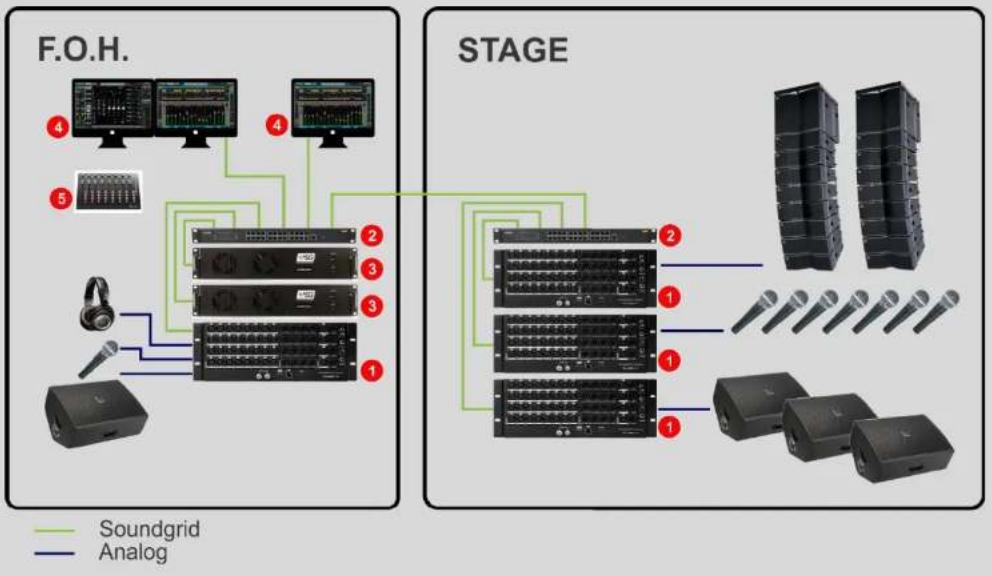
To increase the channel count, more STAGEGRID 4000s can be added to the system. Network components are connected with Ethernet switches, so configurations can easily be modified according to the needs of event.
In this example, two servers are used together for redundancy, significantly increasing fault tolerance. The system is divided between between stage and house mix positions.
flowchart
graph TD
    subgraph F.O.H.
        A["1"] --> B["2"]
        C["3"] --> D["4"]
        E["5"] --> F["6"]
        G["1"] --> H["2"]
        I["3"] --> J["4"]
        K["1"] --> L["2"]
        M["3"] --> N["4"]
        O["1"] --> P["2"]
        Q["3"] --> R["4"]
        S["1"] --> T["2"]
        U["3"] --> V["4"]
        W["1"] --> X["2"]
        Y["3"] --> Z["4"]
        AA["1"] --> AB["2"]
        AC["3"] --> AD["4"]
        AE["1"] --> AF["2"]
        AG["3"] --> AH["4"]
        AI["1"] --> AJ["2"]
        AK["3"] --> AL["4"]
        AM["1"] --> AN["2"]
        AO["3"] --> AP["4"]
        AQ["1"] --> AR["2"]
        AS["3"] --> AT["4"]
        AU["1"] --> AV["2"]
        AW["3"] --> AX["4"]
        AY["1"] --> AZ["2"]
        BA["3"] --> BB["4"]
        BC["1"] --> BD["2"]
        BE["3"] --> BF["4"]
        BG["1"] --> BH["2"]
        BI["3"] --> BJ["4"]
        BK["1"] --> BL["2"]
        BM["3"] --> BN["4"]
        BO["1"] --> BP["2"]
        BQ["1"] --> BR["2"]
        BS["3"] --> BT["4"]
        BU["1"] --> BV["2"]
        BW["3"] --> BX["4"]
        BY["1"] --> BZ["2"]
        CA["3"] --> CB["4"]
        CC["1"] --> CD["2"]
        CE["3"] --> CF["4"]
        GD["1"] --> DH["2"]
        DI["3"] --> DJ["4"]
        DK["1"] --> DL["2"]
        DM["3"] --> DJ
        EX["1"] --> DY["2"]
        DX["3"] --> DY
        DY --> DB["Dy"]
        DY --> DV["Dy"]
        DY --> DW["Dy"]
    end

    subgraph STAGE
        X["1"] --> Y["2"]
        Z["3"] --> AA["4"]
        AB["1"] --> AB
        AC["3"] --> AC
        AD["1"] --> AD
        AE["3"] --> AE
        AF["1"] --> AF
        AG["Dy"] --> AH["Dy"]
        AI["Dy"] --> AJ["Dy"]
        AK["Dy"] --> AK
        AL["Dy"] --> AL
        AM["Dy"] --> AM
        AN["Dy"] --> AN
        AO["Dy"] --> AO
        AP["Dy"] --> AP
        AQ["Dy"] --> AQ
        AR["Dy"] --> AR
        AS["Dy"] --> AS
        AT["Dy"] --> AT
    end
- STAGEGRID 4000 (4x)
- Network switch (2x)
- Waves Extreme Server (2x)
- Host and Recording DAW
- Control surface (optional)
Front Panel
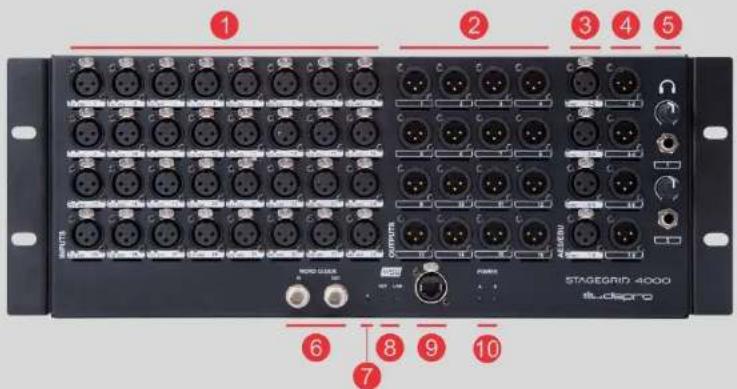
- 32 mic/line inputs
- 16 line outputs
- 4 AES/EBU stereo inputs
- 4 AES/EBU stereo outputs
- 2 Headphones
- Word Clock IN and OUT
- Reset button
- Network LEDs:
a. NET – SoundGrid network status
■ Blue: Synchronized with a SoundGrid host application
■ Red: no SoundGrid sync
■ Yellow: Firmware updating
■ White: Unit malfunction
■ Cycling colors: Used to identify the equipment
b. LINK – Ethernet status
■ Green: Link up
■ Blink: Link up and network activity
- Off: Link down
9. SoundGrid Gigabit Ethernet port
10. Power status LEDs
a. Power A and B
■ Green: Power OK
■ Red: Power fail
Back Panel
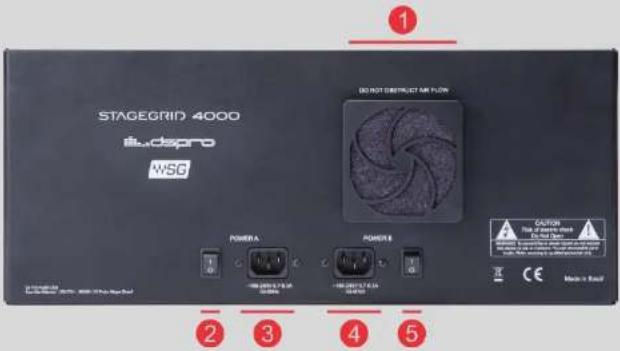
- Device fan. Air flows from the back to front and sides.
- Power A On/Off switch
- Power A connector
- Power B connector
- Power B On/Off switch
SOFTWARE
To use STAGEGRID 4000, you must first install the Waves SoundGrid application and the device drivers.
Software is installed to the host computer using the the Waves Central application, a platform for managing user resources and licenses. Download Waves Central at: www.waves.com/downloads/central.
Use your Waves ID to log in to Waves Central.

- Select "INSTALL"
- Select "Online"
- Search for "STAGEGRID"
- Select STAGEGRID to add it to the Selected products column.
- Start the Install
14 of 26 STAGEGRID 4000 User Guide rev.01
When installation is complete, run SoundGrid Studio and follow these steps:

- Select SETUP tab
- Select SYSTEM INVENTORY
- At Rack A, add SoundGrid IO devices
- Select Add Device->Network Devices->SG4000 to allocate STAGEGRID 4000
After adding a STAGEGRID to the System Inventory, the following screen will appear:

- FW: To perform a device firmware update (check "Firmware Update" for detailed procedure)
Blue: New firmware available
Red: New mandatory firmware available
Grey: Firmware up to date.
-
ID: Identify the device by cycling NET LED colors on the front panel of the device
-
Gear: Access the device's control panel
Control Panel
The control panel has five tabs:
• About: Device description
• System: System details
- Clock: Clock setup
• Input: Input ports setup
• Output: Output ports setup
16 of 26 STAGEGRID 4000 User Guide rev.01
Input tab

- Selected channel group
- Navigation arrows between channel groups
- Detailed output VU meter
- Preamp gain control fader -4 dB to 60 dB
- Channel phantom power on/off button
17 of 26 STAGEGRID 4000 User Guide rev.01
AES Input tab

- SYNC: AES/EBU operation status:
○Green: Synchronized
○ Orange: Clock slip. Same sample rate but non-identical clock.
- Red: Different sample rate
oGrey: No signal
Output Tab

- Selected channel group
- Navigation arrows to move between channel groups
- Detailed output VU meter
CLOCK Tab
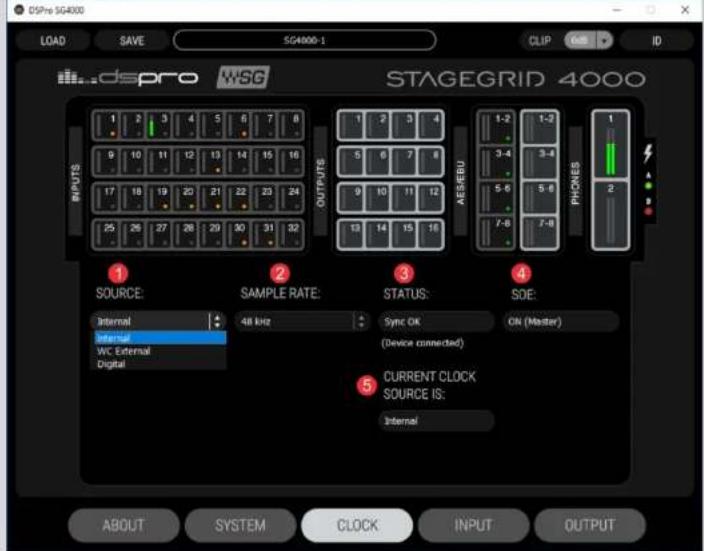
1. SOURCE: The device clock source
When the device is the SOE Master, these options are available:
- Internal: Clock is internally generated.
○ WC External: Clock is synchronized to Word Clock input. - Digital: Clock is synchronized to AES/EBU input. A second drop-down menu selects the port.
When the equipment is SOE Slave, no options are available.
- SAMPLE RATE: Selects the network sample rate between: 44.1 kHz, 48 kHz, 88.2 kHz, and 96 kHz. Available only when the device is SOE Master.
- STATUS: Displays current selected clock source synchronization status.
- SOE: Indicates if the device is the (SOE) network clock master or slave.
- CURRENT CLOCK SOURCE: Indicates the current clock source, based on previous configurations and fallback mechanisms.
Firmware Update
Use a SoundGrid host application to perform firmware updates. The color of the FW button on a device's icon indicates firmware status.
- BLUE: An optional update is available.
- RED: A mandatory update is available. It will not be possible to use the unit without performing the update
• GREY: current firmware is up to date.
In the event of a failure during the upgrade process, or any other failure that prevents the device from being recognized by the host application, the following recovery procedure may be performed:
- Turn off the device power.
- Press the reset button "R" (on the front panel of the device).
- Turn on the device while keeping the reset button pressed.
- Release the button only after the device has started
This will boot the equipment into forced update mode, which can be verified by a yellow "NET" LED.
SPECIFICATIONS
Dimensions:
Height: 176 mm (4RU)
Width: 430 mm (for 19" rack)
Depth: 300 mm (not including connectors)
Power supply:
Voltage: 110 or 240 VAC
Frequency: 50 Hz or 60 Hz
Power: 60 W
Environmental specifications:
Operating temperature: 0°C to 40°C
Relative humidity: Up to 90% non-condensing
Interfaces:
Analog inputs: 32
Analog outputs: 16
AES/EBU inputs: 4
AES/EBU outputs: 4
23 of 26 STAGEGRID 4000 User Guide rev.01
Word Clock in: 1
Word Clock out: 1
SoundGrid: 1
Headphones: 2
Analog Inputs:
Impedance: 2.86 kOhms
Gain range: -4 dB to 60 dB
Max input level: 28 dBu (-4 dB gain)
Dynamic range: 115 dB (-60 dBFS, 20 dB gain, 1 kHz, A-weighted)
THD: 0,002 % (-1 dBFS, 20 dB gain, 1 kHz, A-weighted)
Equivalent input noise: -128 dBu (60 dB gain, A-weighted, 150 ohms)
Frequency response: +/- 0.1 dB (20 Hz to 40 kHz at 96 kHz sampling rate)
Phase Shift: <10^ at 20 kHz
Analog Outputs:
Output impedance: 50 ohms
Max output Level (0dBFS): 24 dBu
Dynamic range: 115 dB (-60 dBFS, 1 kHz, A-weighted)
THD: 0,002 % (-1 dBFS, 20 dB gain, 1 kHz, A-weighted)
Frequency response: +/- 0.1 dB (20 to 40 kHz at 96 kHz)
Phase shift: <5^ at 20 kHz
AES/EBU IN/OUT:
Standard: AES3 (2009)
Sample rates: 44.1, 48, 88.2 and 96 kHz
Impedance: 110 ohms
Headphones:
Output Power: 150 mW per channel on 16 ohms
Dynamic range: 100 dB
SoundGrid:
Interface: Gigabit Ethernet
Connector: Neutrik EtherCON
Word Clock
Connector: BNC
Impedance: 75 Ohms
Voltage level: 5V TTL
25 of 26 STAGEGRID 4000 User Guide rev.01
- ABOUT
- STAGEGRID 4000
- SoundGrid
- System Requirements
- HARDWARE
- Package contents
- Rack Installation
- Setups
- Studio
- Live
- Large PA
- Front Panel
- b. LINK – Ethernet status
- SoundGrid Gigabit Ethernet port
- Power status LEDs
- a. Power A and B
- Back Panel
- SOFTWARE
- Control Panel
- SOURCE: The device clock source
- Firmware Update
- SPECIFICATIONS
Brand : WAVES
Model : DSPRO StageGrid 4000
Category : Audio recorder