
JPC - Television Radial Engineering - Free user manual and instructions
Find the device manual for free JPC Radial Engineering in PDF.


| Product Type | Passive Junction Box |
| Connectors | 4x 1/4" TRS jacks |
| Signal Type | Unbalanced / Balanced |
| Passive / Active | Passive (no power required) |
| Ground Lift | Ground lift switch on rear panel |
| Isolation | Transformer isolated (internal) |
| Chassis Material | 14-gauge steel with durable powder coat |
| Dimensions (W x D x H) | 4.5 x 3.5 x 1.5 inches (114 x 89 x 38 mm) |
| Weight | 1.0 lb (0.45 kg) |
| Application | Connecting instruments, pedals, and amplifiers |
| Signal Routing | Parallel or series (via internal configuration) |
| Noise Reduction | Eliminates ground loops and hum |
| Included Accessories | 4x rubber feet, user manual |
| Operating Temperature | 0°C to 50°C (32°F to 122°F) |
| Maintenance | Wipe with dry cloth; no cleaning solvents |
| Safety | No user-serviceable parts; refer to qualified service |
| Compliance | CE, RoHS |
Frequently Asked Questions - JPC Radial Engineering
User questions about JPC Radial Engineering
0 question about this device. Answer the ones you know or ask your own.
Ask a new question about this device
Download the instructions for your Television in PDF format for free! Find your manual JPC - Radial Engineering and take your electronic device back in hand. On this page are published all the documents necessary for the use of your device. JPC by Radial Engineering.
USER MANUAL JPC Radial Engineering
RADIAL ENGINEERING 3 YEAR TRANSFERABLE WARRANTY
RADIAL ENGINEERING LTD. ("Radial") warrants this product to be free from defects in material and workmanship and will remedy any such defects free of charge according to the terms of this warranty. Radial will repair or replace (at its option) any defective component(s) of this product (excluding finish and wear and tear on components under normal use) for a period of three (3) years from the original date of purchase. In the event that a particular product is no longer available, Radial reserves the right to replace the product with a similar product of equal or greater value. To make a request or claim under this limited warranty, the product must be returned prepaid in the original shipping container (or equivalent) to Radial or to an authorized Radial repair center and you must assume the risk of loss or damage. A copy of the original invoice showing date of purchase and the dealer name must accompany any request for work to be performed under this limited warranty. This limited warranty shall not apply if the product has been damaged due to abuse, misuse, misapplication, accident or as a result of service or modification by any other than an authorized Radial repair center.
THERE ARE NO EXPRESSED WARRANTIES OTHER THAN THOSE ON THE FACE HEREOF AND DESCRIBED ABOVE. NO WARRANTIES WHETHER EXPRESSED OR IMPLIED, INCLUDING BUT NOT LIMITED TO, ANY IMPLIED WARRANTIES OF MERCHANTABILITY OR FITNESS FOR A PARTICULAR PURPOSE SHALL EXTEND BEYOND THE RESPECTIVE WARRANTY PERIOD DESCRIBED ABOVE OF THREE YEARS. RADIAL SHALL NOT BE RESPONSIBLE OR LIABLE FOR ANY SPECIAL, INCIDENTAL OR CONSEQUENTIAL DAMAGES OR LOSS ARISING FROM THE USE OF THIS PRODUCT. THIS WARRANTY GIVES YOU SPECIFIC LEGAL RIGHTS, AND YOU MAY ALSO HAVE OTHER RIGHTS, WHICH MAY VARY DEPENDING ON WHERE YOU LIVE AND WHERE THE PRODUCT WAS PURCHASED.

Radial™
engineering
Radial Engineering Ltd.
1845 Kingsway Ave, Port Coquitlam, BC V3C 1S9, Canada
tel: 604-942-1001 • fax: 604-942-1010
email: info@radialeng.com
JPC MK3- Manual v3.1 part#: R870 0020 00 / 08-2022


JPC MK3
STEREO PC D.I. BOX
ISOLATED IN · ACTIVE OUT
USER GUIDE
Radial Engineering Ltd.
1845 Kingsway Ave, Port Coquitlam, BC V3C 1S9, Canada
tel: 604-942-1001 • fax: 604-942-1010
email: info@radialeng.com
BLOCK DIAGRAM AND SPECIFICATIONS
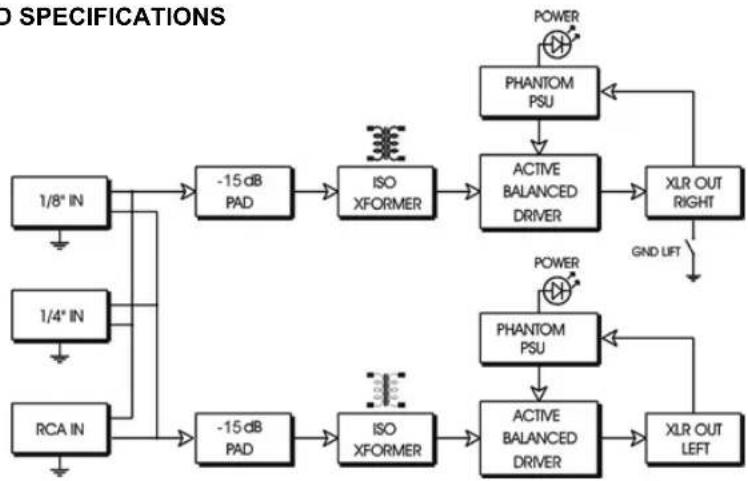
flowchart
graph TD
    A["1/8" IN"] --> B["-15 dB PAD"]
    C["1/4" IN"] --> D["-15 dB PAD"]
    E["RCA IN"] --> F["-15 dB PAD"]
    B --> G["ISO XFORMER"]
    D --> H["ISO XFORMER"]
    F --> I["ISO XFORMER"]
    G --> J["ACTIVE BALANCED DRIVER"]
    H --> J
    I --> K["ACTIVE BALANCED DRIVER"]
    J --> L["XLR OUT RIGHT"]
    K --> M["XLR OUT LEFT"]
    N["POWER"] --> O["PHANTOM PSU"]
    O --> P["ACTIVE BALANCED DRIVER"]
    Q["GND LIFT"] --> R["XLR OUT RIGHT"]
    S["POWER"] --> T["PHANTOM PSU"]
    T --> U["ACTIVE BALANCED DRIVER"]
| JPC Specifications | |
| Type of D.I.: Stereo active 48V phantom powered | |
| Input impedance: Unbalanced 10K-Ohms | |
| Output impedance: Balance 600-Ohms | |
| Frequency response: 20Hz to 20kHz | |
| Linear performance: +/- 2dB from 20Hz to 20kHz | |
| Total harmonic distortion: 0.06% @ 20Hz, 0.005% @ 1kHz | |
| Phase distortion: 0.02° at 1kHz | |
| Maximum input voltage: 3.12 Volts RMS (9V peak) | |
| Output level -30dBu w/o pad (0dBu/ref: 1V RMS input) | |
| -45dBu w/ pad (0dBu/ref: 1V RMS input) | |
| Input connections: 1/4" TS, 3.5mm TRS, stereo RCA x 2 | |
| Output connections: XLR balanced, AES pin-2 HOT | |
| Size: 3.5" wide, 2" high, 5.5" deep | |
| Weight: 1kg or 2lbs | |
| Construction: Welded 14-gauge steel | |
| Finish: Baked enamel coating | |
JPC USER GUIDE
Stereo PC Direct Box
TABLE OF CONTENTS PAGE
Introduction....1
Input & output panel features ....2
Inside view & features ....3
Connecting the JPC....4
JPC features....7
Frequently asked questions....8
Block diagram and specifications....11
Warranty ....Back cover
Radial™
Radial Engineering Ltd.
1845 Kingsway Ave, Port Coquitlam BC V3C 1S9, Canada
tel: 604-942-1001 • fax: 604-942-1010
email: info@radialeng.com
Features and specifications are subject to change without notice.
INTRODUCTION
Congratulations on your purchase of the Radial JPC direct box.
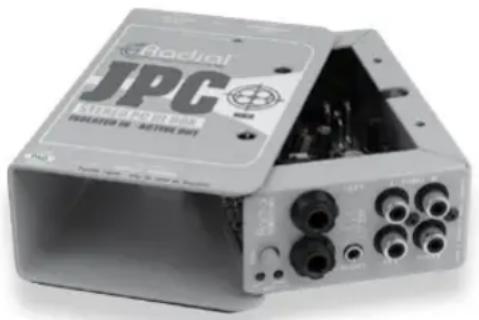
The Radial JPC is a stereo direct box that has been specifically designed to interface computer sound cards and other consumer electronic products with professional sound systems. It is unique in that it combines the advantages of transformer-isolated inputs with an active drive circuit, giving you the 'best of both worlds' in a compact and extremely flexible package.
Transformer coupled inputs have the unique advantage of isolating the 'source' from the 'destination'. This proven approach eliminates 60-cycle hum and buzz caused by ground loops when two electrically powered devices are connected together. Because the active circuit does all of the impedance conversion and balancing, a dedicated 1:1 transformer can be used. This results in a hybrid design that is at once great sounding, compact and more affordate.
As with all great designs, simplicity is a fundamental trait, and the Radial JPC certainly fits the bill. A choice of 14 , 3.5mm and RCA input / thru-put connectors make interfacing a snap with all types of equipment. A single switch inserts a -15dB pad into both channels, two power LEDs (one for each channel) confirm 48V phantom is turned on, and a pair of XLR output connectors round out the feature set.
Of course like all Radial products, the JPC is built to handle the most abusive environments. Our unique bookend design protects switches and connectors from damage while the 14-gauge steel I-beam construction eliminates outside stress that could torque the PC board and cause solder joint failure. A full-bottom no-slip pad provides electrical insulation and mechanical isolation while also helping the JPC 'stay-put' on hectic stages.
Although the JPC is really easy to use, we highly suggest you read through this manual and familiarize yourself with the JPC's features. This will help you make the most out of this marvellous device. We also suggest visiting our web site at www.radialeng.com for more information and updates. Should you have any questions or concerns that are not covered in this manual we invite you to contact us by email at info@radialeng.com.
natural_image
Exterior view of a Radial JPC audio recording device (no visible text or symbols on body)Now plug in your JPC and let the show begin!
Radial®
True to the Music
The sound is distorted.
Try turning down the level from the source or depressing the -15dB pad to reduce the input signal from the source. Excessive levels can saturate the input transformers, which could cause distortion. Make sure you are supplying the JPC with a full 48V phantom supply. Some inexpensive mixers will supply lower voltages, which could starve the JPC's circuit.
I am hearing buzz / hum.
Check the ground lift switch on the side of the JPC. Select the lifted position for the JPC to isolate the input ground from the output. This will eliminate buzz & hum caused by voltage potential between the input source device and the main console at the other end of the XLR outputs.
Can the JPC be rack mounted?
Yes. With the Radial J-Rak, as many as 8 JPCs may be mounted in two standard 19" rack spaces. The J-Rak allows the JPC inputs to face either to the front or the rear of the rack as needed.

natural_image
Exterior view of a black radial audio workstation (no visible text or labels beyond branding)Radial J-Rack
Can I use any input as an output?
Yes, any unused input can also be used as an output. The input side of the JPC is wired in parallel. The signal from one stereo input will be available on the other connectors as a stereo output. RCA jacks are a very common connector found on most consumer electronics. This is why the JPC has a dual stereo set of RCA jacks labelled 'input' and 'thru-put'. However, on some occasions it may be necessary to patch a stereo signal from a device with RCA jacks, like a CD player, to a device with 3.5mm jacks, like a notebook computer. The JPC can perform as a connector adapter while at the same time output a balanced signal on XLR connectors.
Can I use the Radial JPC like a regular DI box for instruments?
Although the Radial JPC was designed to work with computer sound cards and other consumer level hi-impedance devices, it can also be used with active instruments such as acoustic guitars that have built-in pick-up pre-amplifiers with internal batteries. We do not, however, recommend using the JPC with passive instruments like a bass guitar, as the input transformers low impedance may introduce some loading due to the impedance mismatch.
Will it then harm the JPC if I connect a bass to it?
No, of course not. We only state this advisory as we make DIs for instruments such as the J48 and JDI that are simply better for instruments. The JPC will certainly work in a pinch.
Can I use the JPC on keyboards?
Yes. Just make sure you do not overload the JPC by driving too much signal through it. The JPC's smaller transformers are designed for consumer type levels. Keyboards, samplers and drum machines usually output a much more dynamic and uncompressed level. The JDI, the Duplex, ProD1 and ProD2 are better suited for electronic musical instruments.
What is the advantage of transformer isolating the inputs?
When any two pieces of electrically powered equipment are connected together, they form a circuit. Most often, the reference voltages from each device differs, causing stray voltage to appear at the connections, which in turn can cause system noise commonly known as ground loops. By isolating the inputs through a transformer, we are physically de-coupling the signal path, and thus, eliminating any opportunity for ground loops in the system.
I am not getting any sound.
Check to see if you have the 48V phantom power turned on at your mixer. The two LEDs on the JPC will illuminate when phantom power is present.
FEATURES AND FUNCTIONS

95
INPUT PANEL
- -15dB Pad is used to prevent loud sources from overloading the JPC's audio circuit.
- 48V Power LEDs let you know that phantom has been turned on and is powering the two channels.
- Dual 1/4" jacks can be use for a stereo device or two mono signals.
- 3.5mm TRS stereo mini connector designed for direct connection of PCs, laptops, and portable audio devices without adaptors.
- Stereo RCA connectors are great for connecting consumer electronics like CD players, VCRs and DJ mixers. RCA thru-puts provide a duplicate output for splitting and routing flexibility.
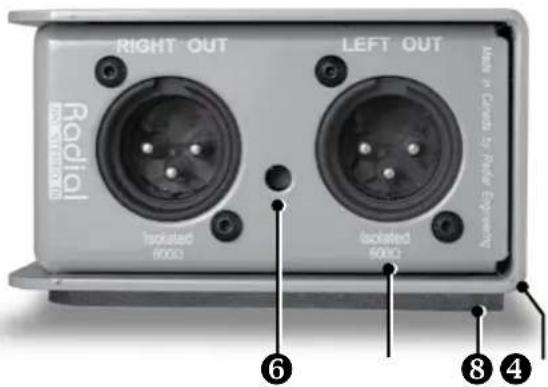
OUTPUT PANEL
- Ground lift switch breaks the ground connection between the input and the output. The default position is lifted to prevent hum from ground loops.
- Stereo left and right XLR male output connectors are isolated from the chassis and follow AES standard with pin-2 hot.
- No-slip full rubber bottom provides mechanical isolation, electrical insulation and 'stay-put-ability!'
- 14-gauge steel bookend design creates a protective zone around buttons and connectors. Tough baked enamel finish for years of 'great looking' performance.
INSIDE VIEW

- Isolated XLR connectors to eliminate chassis ground potential.
- Active drive circuit electronically balances stereo signals for long cable runs without loss.
-
Transformers on both inputs provide 100% isolation to eliminate hum and noise from ground loops.
-
Military grade PC board with full surface ground plane to reduce RF noise susceptibility.
- High duty-cycle switches for a maintenance free long life.
- Welded I-beam construction makes it impossible to torque the PC board.
FREQUENTLY ASKED QUESTIONS
What is a direct box anyway?
The name ‘direct box’ comes from direct insert box. This is why these marvelous contraptions are also called D.I.'s. 'Direct Insertion' means exactly that: To insert a signal directly or take an audio signal from the source and send it directly to a mix point or recorder.
Direct boxes perform several important functions: They are designed as impedance matching and signal balancing devices. This means that they take the high impedance source and 'transform' it to the low impedance used in balanced sound systems. Balanced signals inherently cancel noise and due to their lower impedance, can travel much further. Balanced signals are the norm in professional recording, broadcast and live sound. By properly matching the impedance you will enjoy better sound, less noise and an extended frequency response.
What kinds of audio devices will the JPC work with?
Virtually any electronic audio device that outputs an unbalanced, hi-z signal. See the chart below for more details.
| JPC Input | Compatible Device |
| 3.5mm Notebook computers | |
| Personal music & MP3 players | |
| Solid state voice recorders | |
| Micro-cassette recorders | |
| Any device with a 3.5mm output | |
| RCA CD players | |
| Cassette players/recorders | |
| Video cassette recorders | |
| Any device with RCA outputs | |
| 1/4" Stereo electronic musical instruments | |
| Stereo headphone outputs | |
The -15dB pad
This push-button switch reduces the input level going to the JPC circuit. Some audio devices with overly powerful outputs can overload the JPC inputs. Simply depress the pad switch if the sound is distorted.
Phantom power LED indicators
The JPC is powered by 48V phantom thru the XLR outputs, and automatically turns on when phantom power is activated. Activating phantom power can cause a loud transient signal spike. Make sure your system levels are turned off before activating phantom power. The two power-on LEDs on the front panel will illuminate when phantom power is present. If the LED's do not light, check to see if the phantom power for each channel is active at the console. The JPC is not equipped to run off a battery or a separate power supply.
Transformer isolation
Probably the most challenging aspect when setting up a sound system is reducing system noise. The most common problem is buzz and hum due to ground loops. This is generally caused by two pieces of equipment, each with its own separate ground path, and differing voltage potentials, interacting together. The JPC eliminates this problem by providing 100% transformer isolation on both inputs.
Using the ground lift
To ensure the widest possible compatibility with a variety of audio devices, a ground lift switch is provided on the JPC. The default position is lifted (pushed in) as the JPC's transformers are designed to isolate the input ground from the output. However, there may be times when a ground path thru the JPC is desired. In these circumstances, the switch by-passes the input transformers to provide the input source with a path to ground (pin-1).
Using the XLR output
The JPC XLR outputs follow the AES standard with pin-2 hot. This is generally connected to a microphone snake or directly into a mixing console. As a phantom powered device, this is also where the JPC derives it's working power. The output is mic level and as such, should be connected to a mic pre-amp such as is common in professional mixers.
Plug and play easy
Ultimately, a good direct box should be plug and play easy to use. The JPC is a sophisticated device on the inside that is designed to be easy to use on the outside. By understanding the design, we feel that you can now make better use of the features that are built into this marvelous direct box.
CONNECTING THE JPC
Caution! Make sure all levels are down before connecting!
The JPC is powered by 48V phantom thru the XLR outputs, and automatically turns on when phantom power is activated. Activating phantom power at the console can cause a loud transient signal spike which could cause a big "bang" in your sound system or even cause a speaker to blow. Make sure your system levels are turned off before connecting the JPC and activating phantom power.
The JPC is designed to make connecting all types of audio signals easy. The JPC features a combination of standard stereo connectors found on PCs and consumer electronic devices. These are connected just like a home stereo system. Cables that ship with many devices will work with the 3.5mm and RCA inputs. The JPC can even interface electronic musical instruments, like keyboards and drum machines with 1/4" cables. Or, in a pinch, the JPC can be used as a standard instrument D.I. Finally, the JPC's 'thru-put' feature gives you the option to split the signal and adapt from one connector type to another.
The Inputs and thru-puts
The JPC is outfitted with a wide array of connectors to make life easy during hectic set-ups. It is important to note that the 3.5mm mini jack is a stereo TRS (tip-ring-sleeve) connector. The ring connects to channel-1 (left), the tip to channel-2 (right) and the sleeve is a common ground. The RCA jacks follow standard left and right configuration and also feature parallel thru-put jacks for convenience. One of the wonderful features of the JPC is that all inputs on the front panel are wired in parallel and may also be used as thru-puts.
Radial engineering
True to the Music
3.5mm TRS stereo input
This is a standard connector used on notebook computers and personal music players. It uses a mini Tip, Ring, Sleeve (TRS) jack in a stereo configuration. When used with the -15dB PAD, this input can be used with headphone level outputs. When using a headphone output as a source, be sure to turn down the headphone level to minimum. Even with the -15dB PAD a headphone amplifier can overload the JPC when it's level is not set to minimum.
RCA stereo inputs
These jacks accept unbalanced, consumer audio signals. Virtually any audio output that appears on an RCA connector can be connected to this input. This includes a long list of electronics like CD players, cassette recorders, AM/FM tuners, video cassette recorders, etc.
RCA thru-puts
A duplicate of the input signal is available at the RCA thru-put connectors. This feature can come in handy to split the signal to a second mixer or tape recorder.
Un-used connectors as thru-puts
All of the JPC's input connectors are paralleled together. This means that any unused inputs can also be a thruput to split the stereo signal and/or adapt one format connector to another. For example, one can connect a CD player using the RCA stereo input jacks and use the 3.5mm jack as a thru-put to split the signal to a notebook computer. It also works the other way. When the 3.5mm jack is used as an input, the RCA thru-puts can be used to connect a recorder or second mixer. Clever!
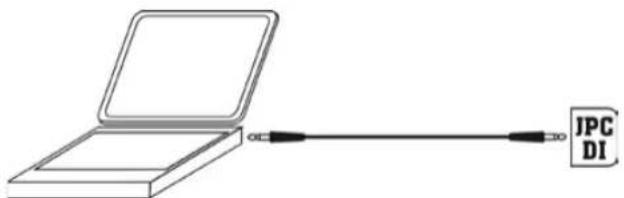
Notebook PC with single stereo 3.5mm cable

Cass, CD, or VCR connected with stereo RCA cable

flowchart
graph TD
    A["Input Module"] --> B["JPC DI"]
    B --> C["Output Module"]
    D["Laptop"] --> B
    E["External Display"] --> B
    F["External Display"] --> B
    G["External Display"] --> B
    H["External Display"] --> B
    I["External Display"] --> B
    J["External Display"] --> B
    K["External Display"] --> B
    L["External Display"] --> B
    M["External Display"] --> B
    N["External Display"] --> B
    O["External Display"] --> B
    P["External Display"] --> B
    Q["External Display"] --> B
    R["External Display"] --> B
    S["External Display"] --> B
    T["External Display"] --> B
    U["External Display"] --> B
    V["External Display"] --> B
    W["External Display"] --> B
    X["External Display"] --> B
    Y["External Display"] --> B
    Z["External Display"] --> B
3.5mm input used as thru-put to connect laptop
Dual mono 1/4" TRS input
These two unbalanced 1/4" input jacks are used with stereo devices like electronic musical instruments and PC audio recording interfaces that output left and right signals on separate jacks.
A 1/4" headphone output from a stereo device may also be connected to the JPC 1/4" inputs with a stereo-to-dual mono adaptor cable as show to the right. Engage the PAD when using a headphone outputs as a source.
Using the JPC as an instrument D.I.
Although the Radial JPC is designed to work with computer sound cards and other consumer level hi-impedance devices, it can also be used with instruments that feature active electronics such as acoustic guitars that have a built-in pick-up and pre-amplifier, bass guitars with active pickups and electronic keyboards.
We do not, however, recommend using the JPC with instruments that have passive pickups, like a standard bass guitar or contact pezio pickups. The JPCs input transformers will introduce impedance loading when used with passive pickups due to the impedance mismatch. Impedance loading will cause high frequency loss that may be unacceptable. The Radial JDI, ProD1, J48 and Pro48 are D.I.s better suited because the input impedance is designed to match instrument with passive pickups.

Stereo 1/4" TRS connector wired to dual mono connectors

flowchart
graph TD
    A["Electric Guitar"] --> B["JPC Mk3"]
    B --> C["Display Module 1"]
    B --> D["Display Module 2"]
    B --> E["Display Module 3"]
    C --> F["Output Display"]
    D --> G["Output Display"]
    E --> H["Output Display"]
An instrument with active pickups connects to the 1/4" input. If a thru-put to an amp is required an adaptor must be applied to the like RCA output.
- RADIAL ENGINEERING 3 YEAR TRANSFERABLE WARRANTY
- JPC MK3
- USER GUIDE
- JPC USER GUIDE
- Stereo PC Direct Box
- TABLE OF CONTENTS PAGE
- INTRODUCTION
- Radial®
- The sound is distorted.
- I am hearing buzz / hum.
- Can the JPC be rack mounted?
- Can I use any input as an output?
- Can I use the Radial JPC like a regular DI box for instruments?
- Will it then harm the JPC if I connect a bass to it?
- What is the advantage of transformer isolating the inputs?
- I am not getting any sound.
- INPUT PANEL
- OUTPUT PANEL
- INSIDE VIEW
- FREQUENTLY ASKED QUESTIONS
- What is a direct box anyway?
- What kinds of audio devices will the JPC work with?
- The -15dB pad
- Phantom power LED indicators
- Transformer isolation
- Using the ground lift
- Using the XLR output
- Plug and play easy
- CONNECTING THE JPC
- Caution! Make sure all levels are down before connecting!
- The Inputs and thru-puts
- Radial engineering
- 3.5mm TRS stereo input
- RCA stereo inputs
- RCA thru-puts
- Un-used connectors as thru-puts
- Dual mono 1/4" TRS input
- Using the JPC as an instrument D.I.
Brand : Radial Engineering
Model : JPC
Category : Television