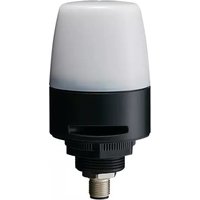
NE-ILNB-M - Signal lumineux PATLITE - Free user manual and instructions
Find the device manual for free NE-ILNB-M PATLITE in PDF.


| Product Type | LED Signal Tower (Stack Light) |
| Model | NE-ILNB-M |
| Brand | PATLITE |
| Number of Lights | 1 (single module) |
| Light Color | Amber (typical) |
| Light Source | LED |
| Dimensions (Height x Diameter) | Approx. 40 mm x 50 mm |
| Weight | Approx. 30 g |
| Power Supply Voltage | DC 24V |
| Power Consumption | 0.5 W (max) |
| Current Consumption | 20 mA |
| Operating Temperature Range | -20°C to +50°C |
| Protection Rating | IP65 (dust and water jet) |
| Housing Material | Polycarbonate |
| Mounting Type | Direct or bracket mount |
| Flashing Function | Yes, built-in |
| Buzzer Included | No |
| Certification | CE, RoHS |
| Wire Connection | M12 connector or pre-wired |
| Lifespan | 50,000 hours |
| Application | Industrial status indication, machine alerts |
| Maintenance | Wipe with dry cloth; no user-serviceable parts |
| Safety Precautions | Disconnect power before installation or cleaning |
| Spare Parts Availability | Contact PATLITE support or authorized distributors |
Frequently Asked Questions - NE-ILNB-M PATLITE
User questions about NE-ILNB-M PATLITE
0 question about this device. Answer the ones you know or ask your own.
Ask a new question about this device
Download the instructions for your Signal lumineux in PDF format for free! Find your manual NE-ILNB-M - PATLITE and take your electronic device back in hand. On this page are published all the documents necessary for the use of your device. NE-ILNB-M by PATLITE.
USER MANUAL NE-ILNB-M PATLITE
IO-Link Signal Beacons
INSTRUCTION MANUAL
Digest Version
TYPE NE-IL
Notice to Customer Thank you very much for purchasing our Patite products.
- Request the installation and wiring to be performed by a professional contractor if construction work is involved.
- Prior to installation, read this manual thoroughly before using this product to ensure correct use.
- In addition, please store this manual for future reference when performing maintenance, repairs or inspections.
- Visit our homepage (https://www.patite.com/) and download the "Complete Operation Manual: NE-IL" to find out more about the opening method and features.
- If there are any questions concerning this product, refer to
- In there are any questions concerning this product, refer to the contact information at the end of this document and contact your nearest PATLITE Sales Representative.
1 Read this First (Safety Precautions)
Warning
Failure to observe the following may result in death or serious injury.
• To prevent from short-circuits or damage, observe the following:
-Be sure the power is disconnected before replacement or repair, including the replacement of the fuse.
-Use this product in a properly maintained condition. (Replace or repair if the globe, case, etc. are damaged.)
- If installing this product requires construction work, ask a specialist in order to avoid fire, or personal injury.
- When this product is used for security purposes, it should be inspected daily. In order to be recommended that you use the virtual Together with other security products.
It is recommended that you use this product together with other security products.
• After installation, do not use this product to climb up onto the equipment with. Failure to comply will result in
product damage and/or failing off the machinery.
Failure to comply with the following points may result in injury.
- Be sure to put a fuse in the wiring circuit between the power source and equipment for protection. If a fuse is not added, it
may result in product and/or equipment failure
- Be sure to prevent electrostatic damage due to discharge when working with this product for wiring, exchanging units,
setting up parameters, etc. by discharging static electricity on your body, etc.
• Do not disassemble or detach during operation.
Caution
Figure 4. To comply with the following points may result in injury, physical loss or damage
2 Model Number Configuration

flowchart
graph TD
    A["Assembly Model"] --> B["NE"]
    A --> C["IL"]
    A --> D["Touch Sensor"]
    A --> E["Buzzer"]
    A --> F["LED Unit Color"]
    A --> G["Multi-factor"]
    H["X With Touch Sensor/General Purpose"] --> I["T With Touch Sensor"]
    H --> J["N No Touch Sensor"]
    K["B With Buzzer"] --> L["M Multi-factor"]
Model Number Example NE-ILXB-M • Touch Sensor (General-Purpose DigitalAnalog Input) • Buzzer • Multicolor • IO-Link
3 Part Names and Outer Appearance

-4.
4 Installation
* The following requirements are necessary for proper installation:
- Install the signal beacons where excessive vibration is not present.
- Install the signal beacons on a sturdy surface.
- Install the signal beacons on a level surface.
- Install the signal beacons where an enough space to touch the
touch sensor can be secured around the globe. (Only for
NE-IXB-M and NE-ILTB-M
* When waterproofing, apply a sealing coating onto the nuts on the
backside of the installation surface
(1) Remove the M30 nut
(2) Fix on the mounting surface with the M30 nut.
(3) Connect the M12 cable to the M12 Connector
■Installation Dimension
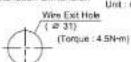

Installation Example
- Caution - This product is for indoor use only. (Do not use it outdoors.)
• Do not leave the product, or use it without globe installed.
- Do not apply excessive force when mounting/removing the globe. Failure to comply will result in damage.
- Use a soft cloth moistened with water to clean the globe or case. (Do not use thinner, benzine, gasoline or oil.)
- The waterproof sheet must be used before installation.
This product has a 1mm thick waterproof sheet at the bottom of the case. However, because installation surface
unevenness may cause a lack of waterproofing protection, it is recommended to apply sealant between the unit
and the installation surface to maintain waterproof conditions.
5 Wiring
- Make sure the power is OFF before wiring. A short circuit may damage internal circuits.
• Ensure the proper working voltage is used. Improper voltage will damage internal circuits.
- Do not pull the wire out or push it into the case.
- Be sure the wiring is done properly. Any mistakes in wiring may result in damage.
- Be sure to put a fuse in the wiring circuit between the power source and equipment for protection. If a fuse is not
added, it may result in product and/or equipment failure.
Wiring Example

NE-LX(B-M)

NE-ILTB-MINE-ILNB-M

-5-
6 Specifications
| Model | NE-ILNB-M | NE-ILTB-M | NE-ILXB-M |
| Rated Voltage | 24V DC | ||
| Maximum Current Consumption | 100mA | ||
| Mounting Direction | Upright | ||
| Operating Temperature Range (Relative Humidity) | -25°C~60°C(Less than 90%RH, No Condensation) | ||
| Protection Rating | IP65, NEMA TYPE 4X, 13 | ||
| Touch Sensing Input Method | - | Electrostatic Capacitance | |
| Mass | 0.10kg | ||
IO-Link
| Communication Specification | Revision | 1.1 |
| Baudrate | COM2 (38.4 kbps) | |
| Data Length | Process Data: 2 bytes / 2 bytes (write / reply) | |
| Vendor ID | 763 | |
| Device ID | 60001 | |
• Conformity Standards
• EMC Directive (EN61000-6-4, EN61000-6-2)
-UL508.CSA-C22.2 No 14
- KC (KN61000-6-4, KN61000-6-2)
• RoHS Directive (EN50581)
· FCC Part 15 Support B Class A
• Conformity requirements for the UL Standard:
• Maximum surrounding air temperature rating of 60 °C
- This product is designed for use on a flat surface for a Type 1 Enclosure.
+ Use a "class 2" power supply specified in the guidelines under UL1310.
• For use in Pollution Degree 2 Environment
Conformity requirements for the CE Marking: This product complies to EN standards and allows the CE Marking
This product can be tested and found to comply with the limits for a Class A device, pursuant to EMC
This product has been sold and found to comply with the limits for a case A device pursuant to EWC DIRECTIVE. These limits are designed to provide reasonable protection against harmful interference when the
Equipment is operated in a commercial environment. This product must not be used in residential areas.
• Conformity to FCC Compliance:
This equipment has been tested and found to comply with the limits for a Class A digital device, pursuant to Part 15 of the FCC Rules. These limits are designed to provide reasonable protection against harmful interference when the equipment is operated in a commercial environment. The equipment generates, uses, and can radiate radio frequency energy and, if not installed and used in accordance with the instruction manual, may cause harmful interference to radio communications. Operation of this equipment in residential area is likely to cause harmful interference in which case the user will be required to correct the interference at his own expense.
(Note) • Dimensions and specifications may change without notice due to
continual product improvement
- PATLITE and the PATLITE logo is a trademark, or registered
trademark of the PATLITE Corporation of Japan and each country
(Importer for EU)
PATLITE Europe GmbH Am Soeldnermoos 8, D-85399 Halbergmoos, Germany
-6-
- IO-Link Signal Beacons
- INSTRUCTION MANUAL
- TYPE NE-IL
- Read this First (Safety Precautions)
- Warning
- Failure to observe the following may result in death or serious injury.
- Caution
- Figure 4. To comply with the following points may result in injury, physical loss or damage
- Model Number Configuration
- Part Names and Outer Appearance
- Installation
- Wiring
- Wiring Example
Brand : PATLITE
Model : NE-ILNB-M
Category : Signal lumineux