
PC-112563 - Loudspeaker Perfect Choice - Free user manual and instructions
Find the device manual for free PC-112563 Perfect Choice in PDF.


| Product Type | Portable Bluetooth Speaker |
| Brand | Perfect Choice |
| Model | PC-112563 |
| Color | Black |
| Dimensions (H x W x D) | 7.5 x 7.5 x 15 cm (3 x 3 x 6 inches) |
| Weight | 350 g (0.77 lbs) |
| Speaker Driver | 1 x 40 mm |
| Power Output | 5W |
| Frequency Response | 100 Hz - 20 kHz |
| Impedance | 4 ohms |
| Bluetooth Version | 5.0 |
| Wireless Range | 10 m (33 ft) |
| Battery Capacity | 1200 mAh |
| Playtime | 6-8 hours |
| Charging Port | Micro USB |
| Input Rating | 5V 1A |
| Waterproof Rating | IPX5 (splash-proof) |
| Controls | Power, Volume +/-, Play/Pause, Next/Previous, Bluetooth Pairing |
| Microphone | Yes (hands-free calling) |
| Compatibility | All Bluetooth-enabled devices |
| Included Accessories | Micro USB cable, User Manual |
| Cleaning Instructions | Wipe with a soft dry cloth; do not use liquids or abrasive cleaners. |
| Safety Precautions | Do not disassemble; avoid exposure to water beyond IPX5 rating; use only the specified charger. |
| Spare Parts Availability | Battery may be replaced by a qualified technician; other parts not available separately. |
| Warranty | 1 year limited warranty |
Frequently Asked Questions - PC-112563 Perfect Choice
User questions about PC-112563 Perfect Choice
0 question about this device. Answer the ones you know or ask your own.
Ask a new question about this device
Download the instructions for your Loudspeaker in PDF format for free! Find your manual PC-112563 - Perfect Choice and take your electronic device back in hand. On this page are published all the documents necessary for the use of your device. PC-112563 by Perfect Choice.
USER MANUAL PC-112563 Perfect Choice
BURJ: NFC AND BLUETOOTH® TOWER SPEAKER
Conexión
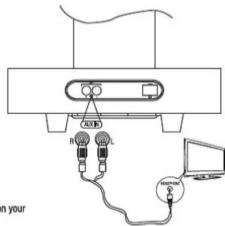
- Connect one audio external outputs (e.g. video player)
- Connect the power cord to the speaker and then to wall power source
Warning: Check that the power cable is correctly inserted in the unit
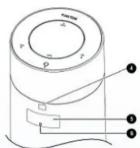
Main unit top
I. FUNCTION. Press this button repeatedly to select a source. (Aux 1 / EM / RT)
- POWER. Press this button to turn on or switch to the
Eco Power standby mode
-
VOLUMEN + / - Increase or decrease the volume
-
Remote control sensor.
-
LED DISPLAY. Show the current status.
-
POWER LIGHT Indicate power mode.
USER GUIDE
ENGLISH
Read this user guide carefully
before using the speaker. PC-112563


Tip: If the connected Bluetooth device supports Audio Video Remote Control Profile (AVRC P), you can use the player's remote control to play music stored on the device.
Paring using NFC
With Near Field Communication (NFC) you can easily pair and connect your speaker to your compatible device by Bluetooth connection.
If the compatible device supports NFC follow these steps:
1.— Activate NFC feature in your device
2.- Turn on the speaker and select Bluetooth source
3.- Touch the NFC area with your device, the unit will pair and connect with your device.
4.—Touch again if you want o disc
FM Radio
To listen your radio stations follow these steps: 1.— Make sure you have selected "Tuner" like audio source.
2.-Press and hold the buttons ◀/▶ (until the digits change), then release the button, the FM frequency changed automatically until you find a radio station with signal
General warnings and safety information
To enjoy your device for a long time we advice you:
- Handle your device with care. Do not drop, knock or shake the device
- Do not attempt to open the device
- For cleaning use a damp cloth - Avoid that cables are hanging
- Avoid that cables are hanging or loose on the floor, this could cause an accident. - To disconnect cables, do it pull the connector.
- 10 disconnect cables, but Technical specifications
Power source: 120 V\~60 Hz 30 W
Connector: RCA
Power output: Total: 100 W
Subwoofer: 50 W
Satellites: 25 W x 2 RMS
Technical specifications are subject to
change without prior notice
For details on NFC,
see the user guide of the device

Control Remoto
1.- BASS Select a preset sound effect: Bass 1, Bass2 or Bass 3 2.- Tune to a radio station by searching backward (FM mode) Adjust brightness level in standby mode
3.- Start or pause playback 4.- Press and hold to turn off the product and switch to EcoPower standby mode. Mute or resume sound of the unit
5.-Select a audio source,
6.—Increase of decrease volume level 7.—Tune to a radio station by searchingforward (FM mode). Adjust brightness level in standby mode 8.—Press and hold this button to set the clock.
Basic operation
After making the necessary connections turn on the device and selects the audio source order is as follows: AUX 1 -> TUNER -> BLUT
These audio input sources are displayed on the front display, depending which one you choice will have to follow the steps for audio playback
AUX 1
- Connect an audio source in the auxiliary input in the base of the tower, use 3.5 mm – RCA cable included
- Playing the audio from your audio device
Bluetooth
To listen to music by a Bluetooth connection 1. Turn on Bluetooth function on your device. 2. Press and hold ▶/× button on remote control for some seconds to activate Bluetooth pairing mode, display panel shows "PAR". 3. Search for Bluetooth device with your device, 4. Select "PC-112563" in the pairing list and connect □ Note If is necessary enter default password "0000" 5. If the pairing succeeds, display panel shows "BLU T" 6. To disconnect connection, turn off the Bluetooth function device or switch the unit to other source

We invite you to consult the full manual of the product on our website
www.perfectchoice.me
You will find this in the "Search & downloads" section
FCC note
This device complies with Part 15 of the FCC Rules.
Operation is subject to the following two conditions: (1) this device may not cause harmful interference, and (2) this device must accept any interference received, including interference that may cause undesired operation.
THE MANUFACTURER IS NOT RESPONSIBLE FOR ANY RADIO OR TV INTERFERENCE CAUSED BY UNAUTHORIZED MODIFICATIONS OR CHANGE TO THIS EQUIPMENT. SUCH MODIFICATIONS OR CHANGE COULD VOID AND CHANGE ANNTENA WHICH THE MANUFACTURER PROVIDES.
IT IS THE USER'S AUTHORITY TO OPERATE THE EQUIPMENT.
This equipment has been tested and found to comply with the limits for a Class B digital device, pursuant to part 15 of the FCC Rules. These limits are designed to provide reasonable protection against harmful interference in a residential installation. This equipment generates uses and can radiate radio frequency energy and, if not installed and used in accordance with the instructions, may cause harmful interference to radio communications. However, there is no guarantee that interference will not occur in a particular installation. If this equipment does cause harmful interference to radio or television reception, which can be determined by turning the equipment off and on, the user is encouraged to try to correct the interference by one or more of the following measures:
• Reorient or relocate the receiving antenna.
- Increase the separation between the equipment and receiver.
- Connect the equipment into an outlet on a circuit different from that to which the receiver is connected.
- Consult the dealer or an experienced radio/TV technician for help.
To maintain compliance with FCC's RF exposure guidelines, this equipment should be installed and operated with a minimum distance of 20cm between the radiator and your body.
D
This device supports Near Field Communication (NFC) technology as specified by the NFC Forum, NFC technology makes life easier and more convenient for consumers around the world by making it simpler to make transactions, exchange digital content, and connect electronic devices with a touch.
"The N Mark is a trademark or registered trademark of NFC Forum, Inc. in the United States and in other countries."
If you have any question or doubts please do not hesitate to contact us:
Technical support
MEXICO
MX, GDL y MTY 4777 0853
Rest of the country 01800 148 1828
soporte@perfectchoice.me
REST OF THE WORLD
+52 33 3283 1500
+1 855 7373 246
support@perfectchoice.me
Brand : Perfect Choice
Model : PC-112563
Category : Loudspeaker