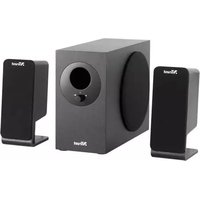
SoundForce 2.1 - Loudspeaker TRUST - Free user manual and instructions
Find the device manual for free SoundForce 2.1 TRUST in PDF.


Pick your language and provide your email: we'll send you a specifically translated version.
| Product Type | 2.1 Speaker System |
| Brand | Trust |
| Model | SoundForce 2.1 |
| Speaker Configuration | Subwoofer + 2 Satellites |
| Total Power Output (RMS) | Approx. 40W |
| Frequency Response | 40Hz - 20kHz |
| Impedance | 4 ohms (subwoofer), 8 ohms (satellites) |
| Driver Units | 5.25" subwoofer, 3" full-range satellites |
| Connectivity | 3.5mm AUX input, USB power (optional) |
| Power Supply | AC 100-240V, 50/60Hz via external adapter |
| Dimensions (Subwoofer) | Approx. 200 x 300 x 250 mm (WxHxD) |
| Dimensions (Satellite) | Approx. 90 x 140 x 80 mm each |
| Weight (Subwoofer) | Approx. 3.5 kg |
| Weight (Satellite) | Approx. 0.5 kg each |
| Color | Black |
| Material | Wood (subwoofer), Plastic (satellites) |
| Remote Control | Included (battery CR2032) |
| Included Accessories | Remote control, 3.5mm audio cable, power adapter, user manual |
| Usage | Desktop, PC, TV, music players |
| Cleaning | Wipe with dry cloth; avoid liquids |
| Safety Features | Overvoltage protection, automatic shut-off |
| Spare Parts Availability | Contact Trust support; remote and adapter available |
Frequently Asked Questions - SoundForce 2.1 TRUST
How do I connect the SoundForce 2.1 to my computer?
Use the included 3.5mm audio cable to connect the subwoofer's AUX input to your computer's headphone or line-out jack.
Why is there no sound from the speakers?
Check if the speakers are powered on, the volume is turned up, and the audio cable is securely connected. Also ensure the source device is playing audio.
Can I connect the SoundForce 2.1 to my TV?
Yes, if your TV has a 3.5mm headphone jack or RCA output. Use an appropriate cable (RCA to 3.5mm may be needed).
How do I clean the speakers?
Unplug the system and wipe with a soft, dry cloth. Do not use water or cleaning agents.
The remote control doesn't work.
Replace the CR2032 battery. Ensure there is no obstruction between remote and the IR sensor on the subwoofer.
What is the maximum volume?
The system can reach high volume levels, but to prevent distortion or damage, avoid setting the volume above 90% for extended periods.
Can I use the speakers with a Bluetooth adapter?
The SoundForce 2.1 does not have built-in Bluetooth. You can connect an external Bluetooth receiver to the AUX input.
How do I position the speakers for best sound?
Place the subwoofer on the floor near a wall. Position satellites at ear level, angled slightly toward you.
The speakers emit a humming noise.
Hum can be caused by ground loops. Try using a different power outlet or a ground loop isolator on the audio cable.
Can I replace the fuse?
The power adapter may have a built-in fuse. If it blows, contact Trust support for a replacement adapter.
User questions about SoundForce 2.1 TRUST
0 question about this device. Answer the ones you know or ask your own.
Ask a new question about this device
No questions yet. Be the first to ask one.
Download the instructions for your Loudspeaker in PDF format for free! Find your manual SoundForce 2.1 - TRUST and take your electronic device back in hand. On this page are published all the documents necessary for the use of your device. SoundForce 2.1 by TRUST.
USER MANUAL SoundForce 2.1 TRUST
natural_image
Three black audio speakers with speaker stands, no visible text or labelsSoundForce 2.1
1

natural_image
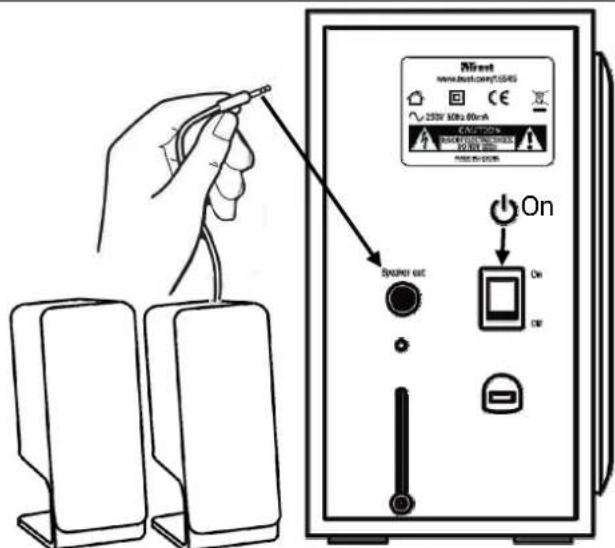
Illustration of a hand inserting a plug into a speaker into a box (no text or symbols)2
3

4

5

6

Table of contents
Click a title to access it
Manual assistant
Powered by Anthropic
Waiting for your message
Product information
Brand : TRUST
Model : SoundForce 2.1
Category : Loudspeaker