
Rack 2 - Rack Heritage Audio - Free user manual and instructions
Find the device manual for free Rack 2 Heritage Audio in PDF.


| Product Type | Rack chassis for 80 Series modules |
| Compatible Modules | Heritage Audio 80 Series modules (e.g., 8173, 2264E Legacy) |
| Channels | 2 slots, each with independent output control |
| Inputs – Mic/Line | 2 x female XLR, gold-plated, Neutrik |
| Inputs – DI | 2 x 1/4" TS (front), discrete Class A JFET, ultra-high impedance |
| Outputs | 2 x male XLR, gold-plated, Neutrik |
| Phantom Power | +48V per channel, illuminated push-button switch, <260 mA @ 48V DC |
| Compression Linking | Prepared for linking two 2264E compressors (buses A and B) |
| Output Attenuator | Per channel, rotary knob, 0 to -inf dB |
| Impedance Switch Access | Space on front panel to allow module impedance switch through |
| Power Supply | External via IEC connector, included; accepts 90 – 240 V AC |
| Power Switch | Front panel, easy access |
| Construction | Handmade in EU with same mechanical components as vintage Series 80 consoles |
| Dimensions (W x H x L) | 315 mm x 128 mm (3U) x 482 mm |
| Warranty | 2 years limited, to original purchaser |
| Edge Connector | 18-pin edge connector per slot, powers and connects modules |
Frequently Asked Questions - Rack 2 Heritage Audio
User questions about Rack 2 Heritage Audio
0 question about this device. Answer the ones you know or ask your own.
Ask a new question about this device
Download the instructions for your Rack in PDF format for free! Find your manual Rack 2 - Heritage Audio and take your electronic device back in hand. On this page are published all the documents necessary for the use of your device. Rack 2 by Heritage Audio.
USER MANUAL Rack 2 Heritage Audio
natural_image
Front view of a heritage audio rack unit with visible circuit board, power switches, and output ports (no readable text or symbols beyond branding)
USER MANUAL
Thank you for choosing the 80 Series RACK 2. Heritage Audio is dedicated to bringing you 'the sound of yesterday for tomorrow'. We specialize in capturing that unique, enticing sound that everybody has fallen in love with. For years engineers, producers and musicians have been yearning for that classic vibe. Usually the only option is to search for old, used original equipment that is almost always in a questionable state of operation. This brings with it a whole lot of other issues, making the experience less than desirable. Not to mention the very high prices asked for this equipment, which makes them virtually unobtainable for the great majority. Now it's possible to obtain that same sound with a brand new piece that will give you all the problem-free, heavy-duty use you'll need for years of music making history.
Peter Rodriguez
CEO
Heritage Audio - Madrid, Spain

© 2022 Heritage Audio S.L. is the sole owner of the copyright of all information and drawings contained in this manual which are not to be copied or reproduced by any means or disclosed in part or whole to any third party without written permission.
Heritage Audio reserves the right to alter specifications without notice. The information in this manual has been carefully checked and is believed to be accurate at the time of publication. However, no responsibility is taken by us for inaccuracies, errors or omissions nor any liability assumed for any loss or damage resulting either directly or indirectly from use of the information contained within it.
TABLE OF CONTENTS
| INTRODUCTION | 2 |
| CONTENTS | 2 |
| DESCRIPTION | 3 |
| GETTING STARTED | 4 |
| APPLICATIONS | 6 |
| SPECIFICATIONS | 7 |
| TROUBLE SHOOTING | 7 |
| WARRANTY STATEMENT | 8 |
| REGISTRATION | 8 |
| RECALL SHEETS | 9 |

Our Rack 2 is handmade in the EU employing the same exact ISEP mechanical components used in the Series 80 consoles with aluminium rails, guides, etc. This will ensure your original vintage modules, as well as any of the currently made modules, will fit like a glove.
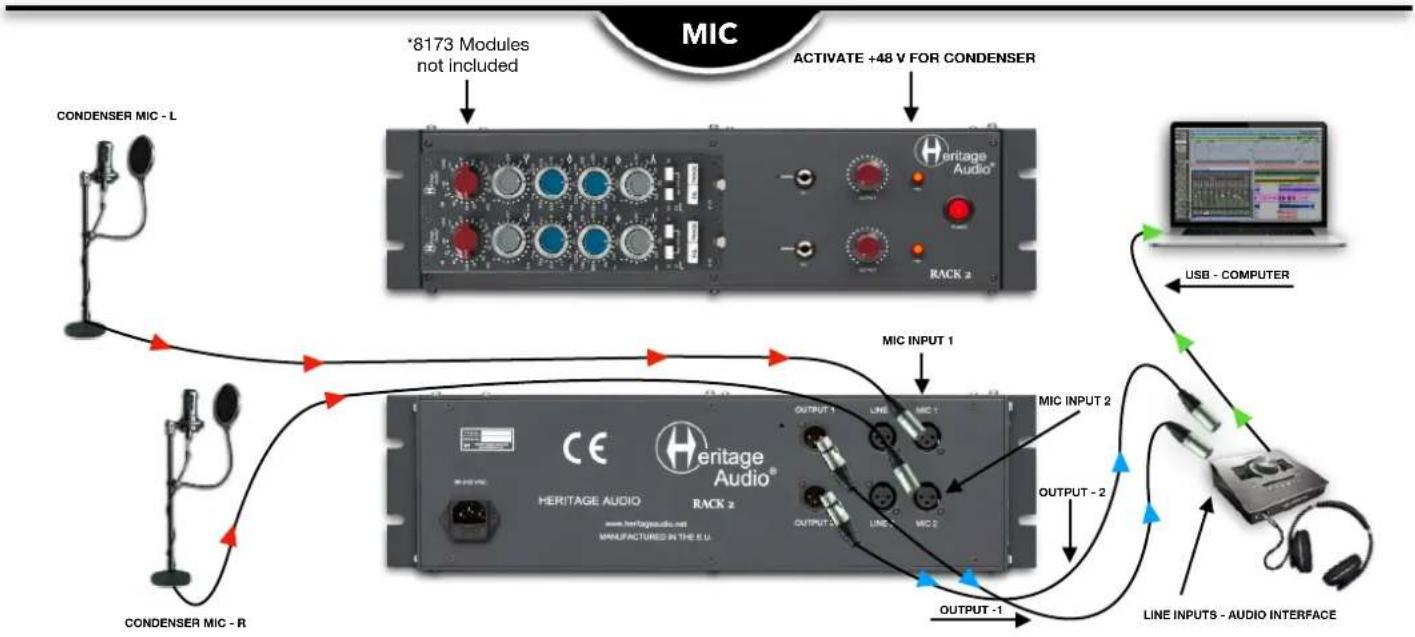
Every channel has its own output control to attenuate the signal before the output transformer as well as an illuminated phantom switch to provide 48 V.
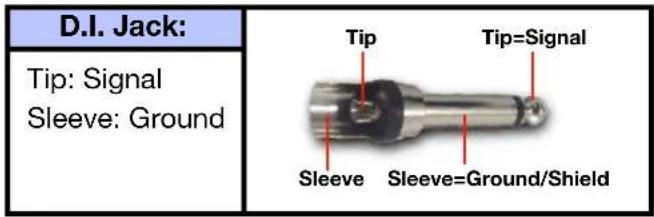
In addition, 2 discrete Class-A ultra high impedance JFET Direct Inputs have been implemented, allowing for direct injection of hi impedance instruments. These take priority over the MIC inputs and are before the input transformers.
The Rack 2 is also ready for linking up to two 2264E (Legacy Product) compressors.
Back panel features Neutrik gold plated XLR connectors for MIC and LINE inputs, as well as LINE outputs.
External power is connected via a popular IEC type connector. It accepts voltage from 90V-240 V. A power cable is included with the Rack 2.


| 1 | 2 | 3 | 4 | 5 |
| SECURITY RAILTo fasten and secure the 80 Series Modules in place. | 2 x EDGE CONNECTORTo connect and power the 80 Series Modules. | Impedance Switch Space Opening to allow the Impedance Switch through. | 2 x D.I. JACK INPUT Discreet Class A JFET Instrument Input. | OUTPUT ATTENUATORAttenuates from 0 to -inf. |
| 6 | 7 | |||
| PHANTOM POWER SWITCHActivates the 48 V power for Condenser MICs. | POWER SWITCHFront panel easy access. | |||

flowchart
graph TD
    A["RACK 2 EDGE CONNECTOR PIN OUT"] --> B["1"]
    A --> C["2"]
    A --> D["3"]
    A --> E["4"]
    A --> F["5"]
    A --> G["6"]
    A --> H["7"]
    A --> I["8"]
    A --> J["9"]
    A --> K["10"]
    A --> L["11"]
    A --> M["12"]
    A --> N["13"]
    A --> O["14"]
    A --> P["15"]
    A --> Q["16"]
    A --> R["17"]
    A --> S["18"]
    B --> T["To Pin V"]
    C --> U["Hi"]
    C --> V["Lo"]
    D --> W["0V"]
    E --> X["Hi"]
    E --> Y["Lo"]
    F --> Z["To Pin V"]
    G --> AA["Line I/P"]
    H --> AB["Link"]
    I --> AC["0V"]
    J --> AD["Unbalanced O/P"]
    K --> AE["HI"]
    K --> AF["Lo"]
    L --> AG["BAL O/P"]
    M --> AH["To Pin V"]
    N --> AI["+24V"]
    O --> AJ["-3dBu"]
    P --> AK["0dBu"]
    Q --> AL["Technical Earth Link"]
    R --> AM["-20dBu"]
REAR

| 1 | 2 | 3 | 4 |
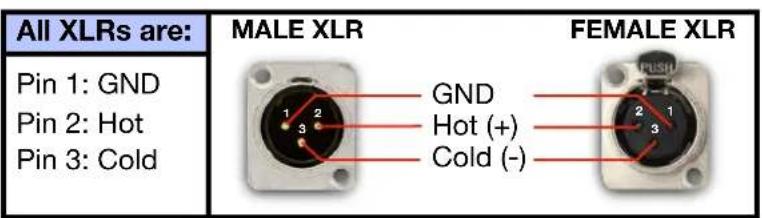
| POWER CONNECTORStandard IEC connects the external power supply. Accepts 90-240 V AC. | LINE OUTPUT2 x Male XLR, Gold Plated. | LINE INPUT2 x Female XLR, Gold Plated. | MIC INPUT2 x Female XLR, Gold Plated. |
flowchart
graph TD
    A["CONDENSER MIC - L"] --> B["*8173 Modules not included"]
    B --> C["RACK 2"]
    C --> D["ACTIVATE +48 V FOR CONDENSER"]
    D --> E["USB - COMPUTER"]
    E --> F["LINE INPUTS - AUDIO INTERFACE"]
    F --> G["OUTPUT -1"]
    G --> H["MIC INPUT 1"]
    H --> I["OUTPUT -2"]
    I --> J["Line INPUTS - AUDIO INTERFACE"]
    J --> K["MIC INPUT 2"]
    K --> L["OUTPUT -1"]
    L --> M["LINE INPUTS - AUDIO INTERFACE"]
    M --> N["MIC INPUT 1"]
    N --> O["OUTPUT -2"]
    O --> P["Line INPUTS - AUDIO INTERFACE"]
    P --> Q["MIC INPUT 2"]
    Q --> R["OUTPUT -1"]
    R --> S["Line INPUTS - AUDIO INTERFACE"]
    S --> T["MIC INPUT 1"]
    T --> U["OUTPUT -2"]
    U --> V["Line INPUTS - AUDIO INTERFACE"]
    V --> W["MIC INPUT 2"]

flowchart
graph TD
    A["Guitar FX PEDAL"] -->|D.I. INPUT 2| B["Heritage Audio® RACK 2"]
    B -->|D.I. INPUT 1| C["Heritage Audio® RACK 2"]
    C -->|Output - 1| D["Line Inputs - AUDIO INTERFACE"]
    D -->|USB - COMPUTER| E["Computer Interface"]
    E -->|Output - 2| F["Line Inputs - AUDIO INTERFACE"]
    F -->|Guitar FX PEDAL| G["Guitar FX Pedal"]
    style A fill:#f9f,stroke:#333
    style B fill:#ccf,stroke:#333
    style C fill:#cfc,stroke:#333
    style D fill:#fcc,stroke:#333
    style E fill:#cff,stroke:#333
    style F fill:#ffc,stroke:#333

flowchart
graph TD
    A["8173 Modules not included"] --> B["RACK 2"]
    B --> C["Line INPUT -1"]
    C --> D["Line INPUT -2"]
    D --> E["LINE OUTPUTS - KEYBOARD"]
    E --> F["Line OUTPUTS - KEYBOARD"]
    F --> G["Line INPUT -2"]
    G --> H["Line INPUT -2"]
    H --> I["OUTPUT -1"]
    I --> J["OUTPUT -2"]
    J --> K["OUTPUT -2"]
    K --> L["Line INPUTS - AUDIO INTERFACE"]
    L --> M["USB - COMPUTER"]

- Handcrafted in the EU employing the same mechanical components used in vintage Series 80 consoles.
- Neutrik gold-plated XLRs for Mic and Line inputs.
- Neutrik gold plated XLRs outputs.
- Illuminated red pushbuttons for +48 V phantom power (Less than 260 mA @ 48 V DC).
- 2 discrete Class A ultra-high-impedance JFET DI inputs.
• Prepared for Compression Linking of buses A and B. - Separate output controls per slot.
- Dimensions (W x H x L): 315 mm x 128 mm (3U) x 482 mm.
TROUBLE SHOOTING

natural_image
Abstract black-and-white graphic of a human head silhouette with a question mark and a small symbol (no text or labels)
natural_image
Illustration of a glowing incandescent light bulb with a stylized 'H' symbol on its side (no text or labels)| PROBLEMS | SOLUTIONS |
| There doesn’t seem to be any power feeding the RACK 2. | Make sure it has been connected to an outlet. Accepts between 90 V-240 V. |
| I’m trying to use a condenser microphone but it doesr seem to recognise it. | Make sure you have activated the 48 V button for the corresponding channel. |
| I’m getting too much signal at my DAW. | Try reducing the OUTPUT with the red knob on the right. |
| I’d like to change the Impedance from 1200 to 300 Ω but don’t know how. | There is a switch on the back of the modules that will allow this. You will have to remove the module first to access it. |
* For any further doubts or questions please get in contact with us at: support@heritageaudio.com
LIMITED 2 YEAR WARRANTY
Heritage Audio 80 Series RACK 2 is warranted by Heritage Audio SL to be free from defects in materials and workmanship for the period of 2 years to the original purchaser. In the event of such defects, the product will be repaired without charge or, at our option, replaced with a new one if delivered to Heritage Audio prepaid, together with a copy of the sales slip or other proof of purchase date. The warranty excludes problems due to normal wear, abuse, shipping damage or failure to use the product in accordance with the specifications.
Heritage Audio shall not be liable for damages based upon inconvenience, loss of use of the product, loss of time, interrupted operation or commercial loss or any other damages, whether incidental, consequential or otherwise.
This warranty is not transferable.
Heritage Audio and the Heritage Audio "H" logos are registered Trademarks owned and/or licensed by Heritage Audio.

natural_image
Interior view of a audio recording equipment setup with a heritage audio jack and external instruments (no readable text or symbols on main components)REGISTRATION
Please visit our website: https://heritageaudio.com/registration/

Session / Title: ____ Track: ____ Connected Equipment: ____


Session / Title: ____ Track: ____ Connected Equipment: ____
Date: ____ Instrument: ____ Notes: ____
Switch ON Switch OFF

natural_image
Abstract black and white diagonal line design (no text or symbols)
www.heritageaudio.com
HERITAGE AUDIO. C/ Alfonso Gómez, 38, 3C. 28037 Madrid – Spain. Tel: +34 917 266 189
info@heritageaudio.com
Brand : Heritage Audio
Model : Rack 2
Category : Rack