
PRJTP80 - Projection screen Pyle - Free user manual and instructions
Find the device manual for free PRJTP80 Pyle in PDF.


| Product Type | Projection Screen |
| Brand | Pyle |
| Model | PRJTP80 |
| Screen Material | White matte fabric |
| Screen Diagonal | 80 inches |
| Aspect Ratio | 16:9 |
| Gain | 1.1 |
| Viewing Angle | 160 degrees |
| Setup Type | Portable tripod / floor stand |
| Folded Dimensions | 70 x 5 x 5 inches |
| Weight | 10 lbs |
| Power Requirement | None (manual screen) |
| Main Functions | Provides a smooth, wrinkle-resistant projection surface for movies, presentations, and gaming |
| Maintenance | Wipe with a soft, dry cloth; do not use water or solvents |
| Cleaning | Use a soft brush to remove dust; avoid abrasive cleaners |
| Safety | Ensure tripod legs are fully extended and locked; keep away from sharp objects |
| Spare Parts Availability | Contact Pyle customer service for replacement screen or parts |
| Repairability | Not user-serviceable; refer to authorized service center |
| Included Accessories | Carrying bag, tripod stand, tie-down straps |
| Compatibility | Works with all standard projectors (DLP, LCD, LCoS) |
| Warranty | 1 year limited warranty |
Frequently Asked Questions - PRJTP80 Pyle
User questions about PRJTP80 Pyle
0 question about this device. Answer the ones you know or ask your own.
Ask a new question about this device
Download the instructions for your Projection screen in PDF format for free! Find your manual PRJTP80 - Pyle and take your electronic device back in hand. On this page are published all the documents necessary for the use of your device. PRJTP80 by Pyle.
USER MANUAL PRJTP80 Pyle
Floor Standing Portable Fold-Out Roll-Up Tripod Manual Projector Screen
USER GUIDE
SETUP
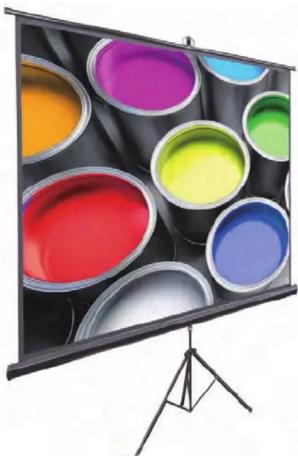
Choose a suitable place for setup, open the tripod feet first, pull out the upper bar to a suitable height and lock into place. Then hang the pull rod above to the goose neck and adjust the screen height. Then finally x/lock the screen at the desired position. After use, release the screen and slide the unit back into the housing.
USEFUL INFORMATION
a. The tripod legs should be placed on a smooth, level surface.
b. When adjusting the height of screen, please do so slowly and carefully.
natural_image
Illustration of a projector screen displaying colorful paint buckets on a tripod (no text or symbols)WARNINGS
The screen cannot be folded. Do not use fingers or had objects against the screen surface. Avoid moisture, especially chemical, exposure to the stand and screen. Keep the screen far away from the high temperature objects or fire. If the screen is dirty, wash it by gently wipes of a broom or soft material rag, do not use organic solvents or chemicals to clean the screen surface. When pulling the screen down, do so slowly and at a vertical. Do not pull it roughly. Stop pulling as soon as the black border is visible, otherwise you risk damage and malfunction of the unit. After use, place the screen back into the housing in order to avoid damage or debris. If you do not use the unit for an extended period of time, please store the unit safely in it's original box.
Features:
- Quick & Easy Projector Screen Setup
• Lightweight, Portable, and Durable - White Matte Fabric Premium Viewing Surface
- Fold-Out Steel Tripod Legs and Roll-Up Screen Style
- Designed for Instant Setup, Portability, Mobile Projection
- Black Masking Border for Optimum Image Focus and Alignment
- Allows for Clear and Vivid Image / Video Capture
- Manual Auto-Locking Pull Feature
- Perfect for the Home, Office, or Classroom
SPECIFICATIONS
| VIEWING AREAM | STANDING DIMENSIONS | TOTAL FOLDED/CLOSED DIMENSIONS | WEIGHT | |
| PRJTP60 | 29.4"×52.3"(60" Diagonal) | 4.3"×7.3"×58.9"28.7" | 14.02"×58.5" | |
| PRJTP80 | 41.2"×73.2"(80" Diagonal) | 4.3"×7.3"82.2" 28.7" | 15.4"×82.1" | |
| PRJTP103 | 60"×80"(100" Diagonal) | 4.1"×7.3"89.8"33.1" | 80.2"×89.8" | |
| PRJTP102 | 49"×87.1"(100" Diagonal) | 4.3"×7.3"94.8"33.1" | 24.8"×90.9" | |
| PRJTP120 | 72"×96"(120" Diagonal) | 4.5"×7.3"103.1"31.6" | 23.05"×102.8" |

VISIT US ONLINE:
Have a question?
Need service or repair?
Want to leave a comment?
PyleUSA.com/ContactUs
Questions? Issues?
We are here to help!
Phone: (1) 718-535-1800
Email: support@pyleusa.com

Brand : Pyle
Model : PRJTP80
Category : Projection screen