
IMPACT DSP - Headphones SIEMENS - Free user manual and instructions
Find the device manual for free IMPACT DSP SIEMENS in PDF.


| Brand | Siemens |
| Model | IMPACT DSP |
| Product Type | Headphones |
| Category | Over-ear wireless headphones |
| Dimensions (approx) | 200 x 180 x 80 mm |
| Weight (approx) | 250 g |
| Connectivity | Bluetooth 5.0 |
| Wireless Range | Up to 10 meters |
| Battery Type | Rechargeable lithium-ion |
| Battery Life | Up to 20 hours |
| Charging Port | USB-C |
| Charging Time | Approximately 2 hours |
| Driver Size | 40 mm |
| Frequency Response | 20 Hz - 20 kHz |
| Impedance | 32 ohms |
| Digital Signal Processing | Yes (DSP) |
| Noise Cancellation | Active noise cancellation |
| Controls | On-ear buttons for volume, playback, and calls |
| Microphone | Built-in omnidirectional |
| Ear Cushion Material | Memory foam with leatherette |
| Headband Material | Adjustable stainless steel with padding |
| Foldable | Yes |
| Operating Temperature | 0°C to 40°C |
| Safety Certifications | CE, FCC |
| Care Instructions | Wipe with a dry cloth; avoid moisture |
Frequently Asked Questions - IMPACT DSP SIEMENS
User questions about IMPACT DSP SIEMENS
0 question about this device. Answer the ones you know or ask your own.
Ask a new question about this device
Download the instructions for your Headphones in PDF format for free! Find your manual IMPACT DSP - SIEMENS and take your electronic device back in hand. On this page are published all the documents necessary for the use of your device. IMPACT DSP by SIEMENS.
USER MANUAL IMPACT DSP SIEMENS
With the CE marking, Siemens confirms that this hearing instrument fulfils all relevant European guidelines, in particular directive 93142 EEC of the European Council applying to medical products.
For the products with e2e wireless 2.0 Siemens additionally confirms compliance with the European Directive 99/SEC (RSFTE) concerning radio and telecommunications terminal equipment.
Our quality management system, certified by an independent authority, assures consistently high product quality and reliability to the customer.
According to EU guidelines for disposal read the "disposal information" brochure.
Represented in the UK by:

Siemens
eming
[Non-Text]
The Ground Truth image displays a single, solid horizontal line. According to Rule 2 (UNDERSCORE & LINE RULES), this is a stylistic or background line, not a placeholder underscore. Therefore, the OCR result must ignore it and output nothing or only meaningful text. The provided OCR content is "____", which consists of four underscores. This is an incorrect interpretation of the line as a placeholder, violating the rule that stylistic lines must be ignored. The OCR has hallucinated underscores where none should exist based on the GT's visual context. Hence, the OCR result is inconsistent with the Ground Truth.
I try an y high
Coffier.
[Non-Text]
[Non-Text]
6.5
CE
0123
[NO TEXT]
图
-
The Ground Truth image displays a single, solid horizontal line. According to Rule 2 (UNDERSCORE & LINE RULES), this is a stylistic or background line, not a placeholder underscore. Therefore, the OCR result must ignore it and output nothing or only meaningful text. The provided OCR content is "____", which consists of four underscores. This is an incorrect interpretation of the line as a placeholder, violating the rule that stylistic lines must be ignored. The OCR has hallucinated underscores where none should exist based on the GT's visual context. Hence, the OCR result is inconsistent with the Ground Truth.
The Ground Truth image displays a single, solid horizontal line. According to Rule 2 (UNDERSCORE & LINE RULES), this is a stylistic or background line, not a placeholder underscore. Therefore, the OCR result must ignore it and output nothing or only meaningful text. The provided OCR content is "____", which consists of four underscores. This is an incorrect interpretation of the line as a placeholder, violating the rule that stylistic lines must be ignored. The OCR has hallucinated underscores where none should exist based on the GT's visual context. Hence, the OCR result is inconsistent with the Ground Truth.
The Ground Truth image displays a single, solid horizontal line. According to Rule 2 (UNDERSCORE & LINE RULES), this is a stylistic or background line, not a placeholder underscore. Therefore, the OCR result must ignore it and output nothing or only meaningful text. The provided OCR content is "____", which consists of four underscores. This is an incorrect interpretation of the line as a placeholder, violating the rule that stylistic lines must be ignored. The OCR has hallucinated underscores where none should exist based on the GT's visual context. Hence, the OCR result is inconsistent with the Ground Truth.
The Ground Truth image displays a single, solid horizontal line. According to Rule 2 (UNDERSCORE & LINE RULES), this is a stylistic or background line, not a placeholder underscore. Therefore, the OCR result must ignore it and output nothing or only meaningful text. The provided OCR content is "____", which consists of four underscores. This is an incorrect interpretation of the line as a placeholder, violating the rule that stylistic lines must be ignored. The OCR has hallucinated underscores where none should exist based on the GT's visual context. Hence, the OCR result is inconsistent with the Ground Truth.
。
The Ground Truth image displays a single, solid horizontal line. According to Rule 2 (UNDERSCORE & LINE RULES), this is a stylistic or background line, not a placeholder underscore. Therefore, the OCR result must ignore it and output nothing or only meaningful text. The provided OCR content is "____", which consists of four underscores. This is an incorrect interpretation of the line as a placeholder, violating the rule that stylistic lines must be ignored. The OCR has hallucinated underscores where none should exist based on the GT's visual context. Hence, the OCR result is inconsistent with the Ground Truth.
The Ground Truth image displays a single, solid horizontal line. According to Rule 2 (UNDERSCORE & LINE RULES), this is a stylistic or background line, not a placeholder underscore. Therefore, the OCR result must ignore it and output nothing or only meaningful text. The provided OCR content is "____", which consists of four underscores. This is an incorrect interpretation of the line as a placeholder, violating the rule that stylistic lines must be ignored. The OCR has hallucinated underscores where none should exist based on the GT's visual context. Hence, the OCR result is inconsistent with the Ground Truth.
Fitting the audio shoe to the hearing instrument
It is possible to connect audio accessories through an audio shoe. Ask your NHS Audiologist for details.
Fitting
7.1
Before the audio shoe can be connected
to the hearing instrument the follow steps have to be fulfilled:
▶ Open the battery comp
▶ Open the audio shoe cover
▶ Close the battery compartment
am-17
Attaching the audio shoe
(1)
and hook the two nib
into the small recesses
L
[Non-Text]
the inner side of the
hearing instruments
housing until it snaps
into the end position.
Removing the audio shoe

To remove the audio shoe, slide it in the opposite direction.
With the connected audio shoe, the battery compartment switch is disabled and the hearing instrument can only be switched off with the push button.
Safety instructions for hearing
instruments with audio input.
- _i (2014)
The audio input may be connected to line-operated equipment only if the
time operated equipment only in the equipment fulfils the safety
requirement IEC 65 / DIN VDE 0860.
e2e wireless ^™ for IMPACT e2e systems
m = 311
NOTICE The performance of the e2e wireless system could be affected by electro-magnetic interference, such as computer monitors or halogen lamp systems controlled by a switching power supply. Move away from the source of interference if you experience difficulty.
In some countries restrictions for the usage of wireless equipment exist. ▶ Refer to local authorities for further information
Children's safety device for the battery
This special feature prevents children from unintentionally removing the battery.
Open the battery compartment to the first stop to switch off, do not open the battery door fully.


General notes on safety
WARNING
Connect the audio input only to equipment which conforms with the safety requirements of
IEC 65/BS EN 60065 AnGLE adapter including plug
Choking hazard posed by
small parts.
▶ Keep batteries, hearing instruments and accessories
instruments and accessories out of children's reach
▶ If swallowed consult a physician
or a hospital immediatley
3
If infants, small children or mentally disabled persons need
mentally unused persons need to wear hearing instruments
ensure adequate supervision
▶ Check the integrity of the
hearing instruments regularly
Consult your NHS Audiologist in the housing is deformed
▶ Keep the battery compartment
locked. Verify the prope
function of the locking
mechanism
NOTICE
NOTICE Your hearing instruments are sensitive to extreme heat, high humidity, strong magnetic fields (> 0.1T), X-rays and mechanical stress
▶ Do not expose your hearing
instruments to extreme temperature or high humidity
▶ Do not leave them in direct sunlight
▶ Do not wear them in the shower, or
when applying makeup, perfume, aftershave haircrew or suntan lotion
▶ Do not wear your hearing
instruments when you are exposed
to short-waves, a strong magnetic field, which frequently field or wave
field, a high frequency field or X-rays. Do not place your hearing.
instruments in a microwave oven
- 2017年 ,公司实现扭亏为盈
Leaking batteries damage hearing instruments
▶ Turn the hearing instruments off
when not in use to preserve
battery life
▶ Remove batteries when the instruments are not in use for a
instruments are not in use for a prolonged period of time
-
- 3.
NOTICE
NOTICE Batteries contain harmful substance
that pollute the environment.
▶ Do not throw away batteries into
household refuse - Diagnos batteries according to
▶ Dispose batteries according to national regulations or return to
National Regulations of Retain to your NHS Audiologist
,
WARNING
Hazard of explosion!
Do not use your hearing
instruments in areas where there is a degree of cyclotron
there is a danger of explosions (e.g. mining)
(2) 12 (3)
IN CASE OF INSTRUMENT FAILURE
IN CASE OF INSTRUMENT FAILURE Is the instrument switched on?
▶ Is the battery inserted?
Is the battery run down?
Is the battery compartment closed
Is the sound opening in the Life! I stepped with way?
CIC
CARE
CAKE Clean the ear mould regularly to
clean the car should flag remove built up ear wax.

IMPACTM,DP&DSP Instructions and guidance
SIEMENS
Issue 1: July 2009 / JMS165 /Pt No: XXXXXXX
[Non-Text]
[Non-Text]
[Non-Text]
[Non-Text]
[Non-Text]
[Non-Text]
[Non-Text]
[Non-Text]
[Non-Text]
[Non-Text]
[Non-Text]
[Non-Text]
[Non-Text]
[Non-Text]
[Non-Text]
[Non-Text]
[Non-Text]
[Non-Text]
[Non-Text]
[Non-Text]
[Non-Text]
[Non-Text]
[Non-Text]
[Non-Text]
[Non-Text]
[Non-Text]
[Non-Text]
[Non-Text]
[Non-Text]
[Non-Text]
[Non-Text]
[Non-Text]
[Non-Text]
[Non-Text]
[Non-Text]
[Non-Text]
[Non-Text]
[Non-Text]
[Non-Text]
[Non-Text]
[Non-Text]
[Non-Text]
[Non-Text]
[Non-Text]
[Non-Text]
[Non-Text]
[Non-Text]
[Non-Text]
[Non-Text]
[Non-Text]
[Non-Text]
[Non-Text]
[Non-Text]
[Non-Text]
[Non-Text]
[Non-Text]
[Non-Text]
[Non-Text]
[Non-Text]
[Non-Text]
[Non-Text]
[Non-Text]
[Non-Text]
[Non-Text]
[Non-Text]
[Non-Text]
[Non-Text]
[Non-Text]
[Non-Text]
[Non-Text]
[Non-Text]
[Non-Text]
[Non-Text]
[Non-Text]
[Non-Text]
[Non-Text]
[Non-Text]
[Non-Text]
[Non-Text]
[Non-Text]
[Non-Text]
[Non-Text]
[Non-Text]
[Non-Text]
[Non-Text]
[Non-Text]
[Non-Text]
[Non-Text]
[Non-Text]
[Non-Text]
[Non-Text]
[Non-Text]
[Non-Text]
[Non-Text]
[Non-Text]
[Non-Text]
[Non-Text]
[Non-Text]
[Non-Text]
[Non-Text]
[Non-Text]
[Non-Text]
[Non-Text]
[Non-Text]
[Non-Text]
[Non-Text]
[Non-Text]
[Non-Text]
[Non-Text]
[Non-Text]
[Non-Text]
[Non-Text]
[Non-Text]
[Non-Text]
Your IMPACT
hearing instrument
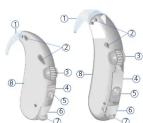
□
IMPACT DP

IMPACT DSPIMPACT M
Features
-
Earhook
-
Microphone opening
-
Volume control
-
Cover for programming socket
-
Program button
-
Audio input
-
Battery compartment
- Colour-coded, typeplate
red = right instrument
blue = left instrument
Changing the batteries
- Open the battery


Low Battery indicator Selecting Switching the
instrument on/off
Your hearing instrument may be
programmed to inform you when the battery should be replaced for best
system performance. You may hear an
intermittent series of beeps and/or experience low amplification power or
experience low amplification power of volume. Change the battery when
either of these occur
On:
Close the battery
compartment fully to switch on.
(二) 本次股东大会的召集和召开程序
[Non-Text]
[Non-Text]

Off:
Press open the battery
compartment to the first stop to switch of
the step to obtain of

[Non-Text]
[Non-Text]
[Non-Text]

hearing program
Your IMPACT hearing instrument can
be programmed with up to 5 hearing programs which are selected with a
programs which are selected with a program button. Each time the button
is pressed the instrument changes to the next program, which is confirmed
the next program, which is confirmed with beep tones. The number of beep
tones is the same as the selected
program.
Your NHS Audiologist will complete
your program details below:
-


[Non-Text]
IMPACT will always be on program 1 when initially switched on
When immediately switched on

On/Off using the program button
2017 Using the program button
Your IMPACT hearing instrument can also
instrument can also be programmed by
your NHS Audiologist
to be turned on and off using the program
button.
[Non-Text]
To turn your hearing instrument off,
press and hold the program button for approximately 3 seconds. To turn your
hearing instrument on again, press and held the program button for
hold the program button for approximately 3 seconds. Please note
that when you turn your hearing
instrument off using the program button, you must wait approximately 10
seconds for the instrument to reset
before turning it back on using the program button.
program outcome

Power-on delay
Your hearing instrument may be
Four hearing instruments may be equipped with a "power-on delay"
feature.
This feature delays sound from entering
your hearing instrument when it is first turned on, so that you may insert the
turned on, so that you may lose hearing instrument into your ear
without experiencing unpleasant
feedback (whistling).
Using the volume control

Your IMPACT hearing instrument is
fully automatic. There is no need to
manually adjust the volume control.
However, if you prefer manual
volume control, your IMPACT hearing instrument can be programmed for
instrument can be programmed for manual adjustment. This will be
done by your NHS audiologist.


the wheel shaped volume control can
be rotated up (lower) or down
(older) of down (softer) to select
the desired listening volume
Rotate the wheel listening volume.
To increase volume, place your
index finger gently against the volume control wheel and rotate it.
upward. If your system is equipped
with a warning tone for volume control limits, once it is heard
control limits, once it is heard, adjusting the volume control further
in that direction will have no effect. To derive the volume, state the
To reduce the volume, rotate the wheel in the opposite direction.
(1)
NOTICE If you have having instrument has not
If your hearing instrument has not been programmed for manual
control adjustment, the volume
will automatically adjust and rotating the volume control
wheel will have no effect.
The Ground Truth image displays a single, solid horizontal line. According to Rule 2 (UNDERSCORE & LINE RULES), this is a stylistic or background line, not a placeholder underscore. Therefore, the OCR result must ignore it and output nothing or only meaningful text. The provided OCR content is "____", which consists of four underscores. This is an incorrect interpretation of the line as a placeholder, violating the rule that stylistic lines must be ignored. The OCR has hallucinated underscores where none should exist based on the GT's visual context. Hence, the OCR result is inconsistent with the Ground Truth.
[Non-Text]
[Non-Text]
[Non-Text]
[Non-Text]
[Non-Text]
[Non-Text]
[Non-Text]
[Non-Text]
[Non-Text]
[Non-Text]
[Non-Text]
[Non-Text]
[Non-Text]
[Non-Text]
[Non-Text]
[Non-Text]
[Non-Text]
[Non-Text]
[Non-Text]
[Non-Text]
[Non-Text]
[Non-Text]
[Non-Text]
[Non-Text]
[Non-Text]
[Non-Text]
[Non-Text]
[Non-Text]
[Non-Text]
[Non-Text]
[Non-Text]
[Non-Text]
[Non-Text]
[Non-Text]
[Non-Text]
[Non-Text]
[Non-Text]
[Non-Text]
[Non-Text]
[Non-Text]
[Non-Text]
[Non-Text]
[Non-Text]
[Non-Text]
[Non-Text]
[Non-Text]
[Non-Text]
[Non-Text]
[Non-Text]
[Non-Text]
[Non-Text]
[Non-Text]
[Non-Text]
[Non-Text]
[Non-Text]
[Non-Text]
[Non-Text]
[Non-Text]
[Non-Text]
[Non-Text]
[Non-Text]
[Non-Text]
[Non-Text]
[Non-Text]
[Non-Text]
[Non-Text]
[Non-Text]
[Non-Text]
[Non-Text]
[Non-Text]
[Non-Text]
[Non-Text]
[Non-Text]
[Non-Text]
[Non-Text]
[Non-Text]
[Non-Text]
To increase volume, place your index finger gently against the volume control wheel and rotate it upward. If your system is equipped with a warning tone for volume control limits, once it is heard, adjusting the volume control further in that direction will have no effect. To reduce the volume, rotate the wheel in the opposite direction.
NOTICE If your hearing instrument has not been programmed for manual control adjustment, the volume will automatically adjust and rotating the volume control wheel will have no effect.
[Non-Text]
[Non-Text]
[Non-Text]
[Non-Text]
[Non-Text]
[Non-Text]
[Non-Text]
[Non-Text]
[Non-Text]
[Non-Text]
[Non-Text]
[Non-Text]
[Non-Text]
[Non-Text]
[Non-Text]
[Non-Text]
[Non-Text]
[Non-Text]
[Non-Text]
[Non-Text]
[Non-Text]
[Non-Text]
[Non-Text]
[Non-Text]
[Non-Text]
[Non-Text]
[Non-Text]
[Non-Text]
[Non-Text]
[Non-Text]
[Non-Text]
[Non-Text]
[Non-Text]
[Non-Text]
[Non-Text]
[Non-Text]
[Non-Text]
[Non-Text]
[Non-Text]
[Non-Text]
[Non-Text]
[Non-Text]
[Non-Text]
[Non-Text]
[Non-Text]
[Non-Text]
[Non-Text]
[Non-Text]
[Non-Text]
[Non-Text]
[Non-Text]
[Non-Text]
[Non-Text]
[Non-Text]
[Non-Text]
[Non-Text]
[Non-Text]
[Non-Text]
[Non-Text]
[Non-Text]
[Non-Text]
[Non-Text]
[Non-Text]
[Non-Text]
[Non-Text]
[Non-Text]
[Non-Text]
[Non-Text]
[Non-Text]
[Non-Text]
[Non-Text]
[Non-Text]
[Non-Text]
[Non-Text]
[Non-Text]
To increase volume, place your index finger gently against the
index finger gentry against the volume control wheel and rotate it
upward. If your system is equipped with a warning tone for volume
with a warning tone for volume control limits, once it is heard,
adjusting the volume control further
In that direction will have no effect. To reduce the volume, rotate the
wheel in the opposite direction.
NOTICE
NOTICE If your hearing instrument has not
been programmed for manual control adjustment, the volume
control adjustment, the volume will automatically adjust and
rotating the volume control
wheel will have no effect.
The Ground Truth image displays a single, solid horizontal line. According to Rule 2 (UNDERSCORE & LINE RULES), this is a stylistic or background line, not a placeholder underscore. Therefore, the OCR result must ignore it and output nothing or only meaningful text. The provided OCR content is "____", which consists of four underscores. This is an incorrect interpretation of the line as a placeholder, violating the rule that stylistic lines must be ignored. The OCR has hallucinated underscores where none should exist based on the GT's visual context. Hence, the OCR result is inconsistent with the Ground Truth.
Brand : SIEMENS
Model : IMPACT DSP
Category : Headphones