
K8 - Docking Station Infiniton - Free user manual and instructions
Find the device manual for free K8 Infiniton in PDF.


Pick your language and provide your email: we'll send you a specifically translated version.
| Product Type | Docking Station |
| Brand | Infiniton |
| Model | K8 |
| Dimensions (W x D x H) | 20 cm x 15 cm x 5 cm |
| Weight | 500 g |
| Power Supply | USB-C (5V/3A) or AC adapter (optional) |
| USB Ports | 3 x USB 3.0 (Type-A) |
| HDMI Port | 1 x HDMI 1.4 (up to 4K@30Hz) |
| Ethernet Port | Gigabit Ethernet (RJ45) |
| Audio Port | 3.5 mm headphone/microphone combo |
| Compatible Devices | Laptops and tablets with USB-C or Thunderbolt 3 |
| Operating Systems | Windows, macOS, Chrome OS, Linux |
| Charging Support | Pass-through charging up to 60 W |
| Material | Aluminum alloy body |
| LED Indicator | Power and data activity |
| Maintenance | Wipe with a soft, dry cloth. Do not use abrasive cleaners. |
| Safety | Avoid exposure to liquids and extreme temperatures. |
| Spare Parts / Repairability | Not user-serviceable. Contact support for issues. |
Frequently Asked Questions - K8 Infiniton
Is the Infiniton K8 compatible with my MacBook Pro?
Yes, the K8 is compatible with MacBook Pro models that have a USB-C or Thunderbolt 3 port. It supports video output up to 4K@30Hz via HDMI.
Does the docking station charge my laptop?
The K8 supports pass-through charging up to 60 W via USB-C Power Delivery, so it can charge most laptops while connected.
How many external monitors can I connect?
The K8 has one HDMI port, allowing you to connect one external monitor. For dual monitors, consider a model with multiple video outputs.
Can I use the K8 with a Chromebook?
Yes, the K8 works with Chrome OS devices that support USB-C Alt Mode. It provides USB, HDMI, and Ethernet connectivity.
What is the maximum data transfer speed?
The USB 3.0 ports support data transfer speeds up to 5 Gbps. The Ethernet port supports Gigabit speeds (1000 Mbps).
Do I need to install drivers?
No, the K8 is plug-and-play. For some advanced features, you may need to enable USB-C Alt Mode or Power Delivery in your device settings.
Can I use the audio port for both headphones and microphone?
Yes, the 3.5 mm combo port supports both headphone output and microphone input when using a compatible headset.
What should I do if my device is not recognized?
First, check the USB-C connection. Ensure your device supports USB-C Alt Mode. Restart your device or try a different USB-C cable. If the issue persists, contact support.
Does the K8 work with iPad Pro?
Yes, the K8 is compatible with iPad Pro models that have a USB-C port. It can provide USB, HDMI, and Ethernet connectivity.
How do I clean the docking station?
Disconnect the device and wipe it with a soft, dry cloth. Avoid using liquid cleaners or abrasive materials to prevent damage.
User questions about K8 Infiniton
0 question about this device. Answer the ones you know or ask your own.
Ask a new question about this device
No questions yet. Be the first to ask one.
Download the instructions for your Docking Station in PDF format for free! Find your manual K8 - Infiniton and take your electronic device back in hand. On this page are published all the documents necessary for the use of your device. K8 by Infiniton.
USER MANUAL K8 Infiniton
 | INSTRUCTIONS | PACKAGING LIST |
| All the instructions should be read carefully before operation and follow the instructions.The speaker should be situated away from heat sources such as radiators, and not exposed to most air or water.Please the unit on a stable surface, to prevent it from being fall down.The speaker should be connected to a power supply only of the type described in the operating instructions.The user should not attempt to repair the speaker. If you are not professional.Disconnect the power cable from the outlet & switch off Before cleaning the unit. Only use soft cloth, no burst absorbers or chemicals to clean, as it will damage the surface finishing.The power cable of the speaker should be unglopped from the outlet and Power switch should be off when left unused for a long period of time.-2- | Speaker: 10csUser Manual: 10csSterco Audio And USB Charging Cable: 10cRemote control: 10csMicrophone: 10pc -3- -3- | |
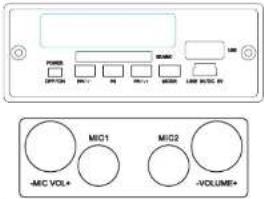 OFF/ION1. "OFF" means Power off, "ON" means Power on, speaker will enter into the play mode which same as last time.Charging insert out power to "OC S. OV", then it can rem exchange built-in battery.Play/Pause/Mode1. Insert the audio equipment to the "AUDIO-IN", press "MODE" for long time,when light turns green, it turns to play mode and the speaker can play music from mobile phones MP3 Computer and other audio.2. MP3 functionSD/BusU discInsert card to "SD/MMC". It will play music from SD card insert U disc, it will play music from U disc.FM/Press "MODE" for long time,it enters into the FM mode after light turns red.MODE/PLAY1.MODE M:MP3 MODE:short press to play/pause function;FM MODE:short press to research/save channel function;BT Mode:Short press to BT functionInsert Audio:press shortly to science function;Long press,you can choose SD/USB/FMAUX function.-4- OFF/ION1. "OFF" means Power off, "ON" means Power on, speaker will enter into the play mode which same as last time.Charging insert out power to "OC S. OV", then it can rem exchange built-in battery.Play/Pause/Mode1. Insert the audio equipment to the "AUDIO-IN", press "MODE" for long time,when light turns green, it turns to play mode and the speaker can play music from mobile phones MP3 Computer and other audio.2. MP3 functionSD/BusU discInsert card to "SD/MMC". It will play music from SD card insert U disc, it will play music from U disc.FM/Press "MODE" for long time,it enters into the FM mode after light turns red.MODE/PLAY1.MODE M:MP3 MODE:short press to play/pause function;FM MODE:short press to research/save channel function;BT Mode:Short press to BT functionInsert Audio:press shortly to science function;Long press,you can choose SD/USB/FMAUX function.-4- | 2.FM/MWIV:Short press, it will be PREV song.long press to volume down;FM mode,short press to save channel,long press to volume down;Audio in mode,it's no function.3.FM/MWIV:MP 3 MODE:short press, it will be NEXT song.long press for volume up by steps;FM mode,short press,it's save channel,long press for volume up by steps;For Audio in mode,it's no function.Remote Control1."POWER key:press "POWER" key,it will power off,press one more time,it will power on.2."MODE" key:Press the "MODE" key,you can choose SD/USB/FMAUX mode.3."NEXT" key in MP 3 mode,short press to read long long press to test forward. In FM mode,short press to save channel,long press to search FM channel.4."PREV" key in MP 3 mode,short press to PREV song.long press to test backward.5."VOL-" key:Press "VOL-" for volume down by steps,and "VOL-" for volume up by steps.6."EG" key:press s,you can choose different mode,Jazz,Rock,Bass,Normal,and Class).7."USB/TI" key:Choose the USB or TI function8.Repeat Function press "Repeat" key for one time to single song repeat,while press one more time,for all songs repeat.9."0-3 number" keyFor FM,I," a FM channel number;For MP 3,IT's song number.BT ControlPush switch to power onPress M button(BT),BT indoor light will onOn your BT device turn on BT and scan for devices in its BT menu.When:-1,-1" appears on the device list of your BT device,just click it the passing is success all. The speaker is ready to play model.-5- | Portable Digital Wooden SpeakerOuter put: RMS 5kFrequency: 80-100kHzDrive unit: 4"x14dS/N; >86dBPower supply: ~5V-USB 3.5 stere head.Lithium battery: 80mAh -6- -6- |
| CE CertificateTo be introduced with sound sound as if the 10GHz/1MHz clock-20kHz bus, Batchingbox completely thrust 120000000000000000000000000000000000000000000000000000000000000000000000000000000000000000000000000000 | 2017-10 | |
Manual assistant
Powered by Anthropic
Waiting for your message
Product information
Brand : Infiniton
Model : K8
Category : Docking Station