
NID-1001 - Tablet Naxa - Free user manual and instructions
Find the device manual for free NID-1001 Naxa in PDF.


| Type of Product | Tablet |
| Model | NID-1001 |
| Brand | Naxa |
| Display Size | 10.1 inches |
| Display Resolution | 1280 x 800 pixels |
| Processor | Quad-core ARM Cortex-A7 |
| RAM | 2 GB |
| Internal Storage | 32 GB |
| Expandable Storage | microSD up to 128 GB |
| Operating System | Android 10 (Go Edition) |
| Battery Capacity | 6000 mAh |
| Battery Life | Up to 8 hours mixed usage |
| Charging Port | USB-C |
| Rear Camera | 5 MP |
| Front Camera | 2 MP |
| Wi-Fi | 802.11 b/g/n |
| Bluetooth | 4.2 |
| Dimensions | 240 x 160 x 9 mm |
| Weight | 520 g |
| Power Input | 5V/2A via USB-C |
| Maintenance | Clean with dry cloth; avoid liquids |
| Safety Features | No hazardous materials; keep away from heat |
| Spare Parts & Repairability | Battery and screen replaceable by technician |
| General Information | Designed for multimedia and basic tasks |
Frequently Asked Questions - NID-1001 Naxa
User questions about NID-1001 Naxa
0 question about this device. Answer the ones you know or ask your own.
Ask a new question about this device
Download the instructions for your Tablet in PDF format for free! Find your manual NID-1001 - Naxa and take your electronic device back in hand. On this page are published all the documents necessary for the use of your device. NID-1001 by Naxa.
USER MANUAL NID-1001 Naxa
THE NEW GENERATION IN TECHNOLOGY
10.1" Core™ Pro Tablet with 8GB Memory
NID-1001

Instruction Manual
Please read carefully before use and keep for future reference.
Table of Contents
Thank You 4
In the Box 4
Important Information About Your Tablet...5
At a Glance 6
Getting Started......8
Power On/Power Off 8
Sleep Mode....8
Charging....8
Connecting to a Wireless Network 8
Using the Touchscreen 9
Using the Home Screen....10
Using the Navigation Icons....10
About the Notification Panel....11
About the Quick Settings Panel 12
Using the Lock Screen 12
Using the On-Screen Keyboard....13
Entering Text....13
Basic Editing....13
Entering Text by Swipe (Gesture Typing)......14
Entering Text by Talking (Dictation)......14
Making Yourself at Home ....15
Adding an App Icon to the Home Screen....15
Adding Widgets to the Home Screen....16
Using Folders on the Home Screen....16
Changing the Wallpaper 17
Managing & Using Apps....18
About the Apps....18
Manage your Calendar ....18
Using the Camera....19
Managing Downloads....20
Connecting to Wi-Fi Networks......21
Adding a Network 21
Adding a Network Manually 21
Removing a Network....22
Setting Advanced Wi-Fi Options....22
Connecting to Bluetooth ® Devices.....23
Adjusting the System Settings......24
WIRELESS & NETWORKS 24
DEVICE 25
PERSONAL....28
ACCOUNTS....29
SYSTEM....30
Other Connections......31
Connect to a Computer via USB 31
Using HDMI Out....31
Tuning Your Tablet's Performance......32
Optimizing battery life....32
To extend the life of your battery 32
Check battery level and usage details 32
Troubleshooting 34
Warnings and Precautions....35
Specifications 38
Support 39
Thank You
We know you have many choices when it comes to technology; thank you for choosing us here at Naxa Electronics. Established in 2001 in Los Angeles, California, we are dedicated to delivering products that entertain and delight.
We trust that you will be happy with your purchase. Please read this manual carefully and save it for reference. You may also find the latest FAQ, documentation, and other product material at our website. Come visit us on the web at www.naxa.com and see all that we have to offer!
In the Box
Please take a moment to make sure that you have everything in the list below. Although we make every effort to ensure that each Naxa device is securely packed and sealed, we know a lot can happen in between us and you. If anything is missing, check back with your local retailer to get immediate assistance. If they cannot help you, please contact our Naxa Support team at www.naxa.com/naxa_support.
• NID-1001
- USB cable
- AC power adapter
Important Information About Your Tablet
Please read the following carefully; these are important things to know about your tablet before you get started.
- Do not drop the unit. Avoid forceful shaking of the display to prevent damage or unusual operation.
- Do not touch the unit with metal objects to avoid short circuits.
- Schedule regular backup of your data to prevent the loss of important data. Always backup your data before upgrading the firmware.
- Do not disassemble. Do not wipe the surface of the unit with alcohol, thinner or benzene.
- Do not disconnect the tablet while it is formatting or uploading/downloading. Doing so may corrupt your data.
- Do not allow water or foreign objects to enter the tablet.
-
Do not use the tablet in places that are extremely hot, cold, dusty, or humid.
-
Specifications are subject to change and improvement without notice.
MEANING OF THE DUSTBIN SYMBOL

Protect our environment: do not dispose of electrical equipment in your domestic waste. Please return any electrical equipment that you will no longer use to the collection points provided for their disposal. These simple steps can help to avoid the potential effects that incorrect waste disposal can cause on the environment and human health. This will contribute to recycling and other forms of re-use of electrical and electronic equipment. Information concerning where the equipment can be disposed of can be obtained from your local authorities.


ANDROID

Made in China
At a Glance

1 Touch screen Display and touch screen.
2 Front camera Designed for use with video chat apps.
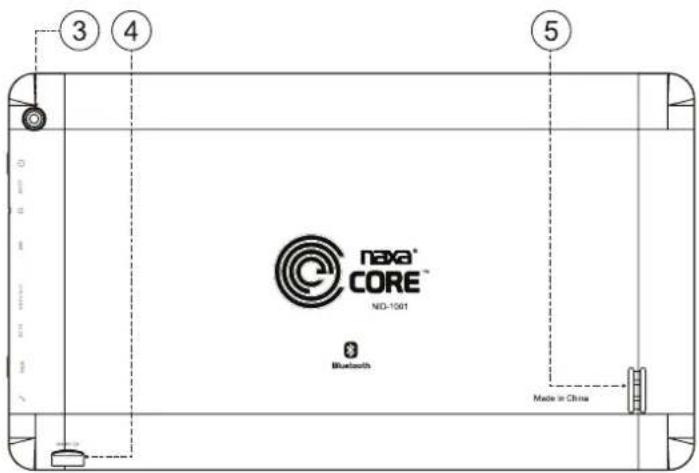
3 Rear camera Great for taking quick pictures and videos.
4 microSD slot Load a microSD card for additional storage.
5 Speaker Built-in speaker
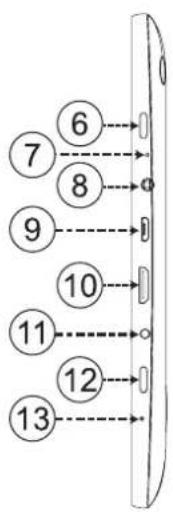
flowchart
graph TD
    A["6"] --> B["0"]
    C["7"] --> D["8"]
    E["8"] --> F["0"]
    G["9"] --> H["10"]
    I["10"] --> J["11"]
    K["11"] --> L["0"]
    M["12"] --> N["0"]
    O["13"] --> P["0"]
| 6 (POWER) Press and hold to turn the tablet on. | |
| Press and hold to access the power menu to turn the tablet off. | |
| 7 RESET Press to turn the tablet off and back on if it should freeze or exhibit other abnormal behavior. (You may need something small like a paperclip to press the button.) | |
| 8 3.5mm headphone output jack. | |
| 9 USB USB (micro type B) connector. | |
| Connect to a computer to sync data. | |
| 10 HDTV out HDMI mini connector for output to an HDTV. | |
| 11 DC 5V DC 5V Input. Use the included power adapter to charge the tablet. | |
| 12 BACK | Press to return to the previous screen. |
| 13 MIC | Built-in microphone. |
Getting Started
Power On/Power Off
Press and hold the ⬤button until the screen turns on and displays the start-up logo (about 5 seconds).
Press and hold the ⬤button until the tablet presents the power menu (about 3 seconds). Tap OK or Power Off to turn the tablet off.
Sleep Mode
Place the tablet into Sleep mode to conserve power.
To place the tablet into Sleep mode, press the button once while the tablet is on. The screen will turn off.
To wake the tablet from Sleep mode, press the button again. The screen will turn on. (It may take a second or two for the tablet to wake from sleep.)
Charging
When the battery level is low, the tablet will prompt you to charge the tablet. Connect the provided power adapter to the DC 5V input connector to charge the tablet.

To improve the performance and life of the battery, charge the tablet for an additional 15 minutes after the tablet indicates that it has been fully charged.
Connecting to a Wireless Network
Your tablet works best when it is connected to the Internet. Connect to a wireless network to experience the best that your tablet has to offer. To learn how to connect to a wireless network, refer to the section "Connecting to Wi-Fi Networks".
Using the Touchscreen
Use your fingers to manipulate icons, buttons, menus, the onscreen keyboard, and other items on the touchscreen. You can also change the screen's orientation.
To select or activate something, tap it gently with your finger.
To type something (e.g., a name, password, or a website address), just tap where you want to type. A keyboard will appear on the screen; tap the keyboard to type.
Other common gestures include:
| Tap & Hold Tap | an item & hold your finger over it until an action occurs. Do not lift your finger from the screen. |
Tap & Drag Tap an item & hold your finger over it for a moment; then, without lifting your finger, drag your finger along the screen until you reach the target position. Try using Tap & Drag to re-position icons on the Home screen.
| Double Tap | Tap an item quickly twice. In some apps (such as Browser), you can zoom in (and out) by double tapping on an image or section of text. |
| Swipe or Slide | Slide your finger quickly across the surface of the screen. Do not pause when your finger first touches the screen to avoid dragging items accidentally. Swipe up or down to browse a list of items, or try swiping left or right on a Home screen to view other Home screens. |
| Pinch-to-Zoom | In some apps (such as Browser and Gallery), you can zoom in and out by placing two fingers on the screen at once and pinching them together (to zoom out) or spreading them apart (to zoom in) |
| Rotate the Screen | On most screens, the orientation of the display will automatically rotate with your tablet as you turn it. You can change this option from the Display setting screen. |
Using the Home Screen
The Home screen is the first thing you'll see when you turn on the tablet. The Home screen can display app icons, widgets, and folders.
- To open an app, folder, or widget (tools), tap its icon.
- To see additional Home screens, swipe the screen left or right.
- To return quickly to the main, center Home screen, tap the Home icon displayed in the bottom left corner.
- At the bottom of each home screen is the Favorites tray. At the center of the Favorites tray is the All Apps icon.

• To open an app in the Favorites tray, tap it.
- You can customize the Favorites tray with apps that you use a lot. To move apps in and out of the Favorites tray (or anywhere else on a home screen), tap and hold it, then drag it with your finger into position.
Using the Navigation Icons
The Navigation icons are displayed at the bottom of the screen. These three icons are always accessible. No matter what you are doing, you can always tap these icons to browse the different screens of your tablet.
IconNameDescription

Switch Apps
Tap this icon to display a list of apps that you've worked with recently. Tap the thumbnail image of any app to switch to it. Swipe up and down to browse the list. To remove an app from the list, swipe the thumbnail off the screen to the left or right.

Screen shot
Tap to save the current screen as a picture to review or share.

Home Tap this icon to go to the Home screen. If there are multiple Home screens, tap Home again to return to the center Home screen.
IconNameDescription

Back Tap this icon to return to the previous
screen, even if it was in a different app.
Tapping Back repeatedly will return you to the Home screen; you cannot go back further than the Home screen.
You can also press the BACK button found on the side of the tablet.

Volume down
Tap to lower the volume level. This icon is visible only when the tablet is held horizontally.

Volume up
Tap to raise the volume level. This icon is visible only when the tablet is held horizontally.

The Navigation icons may fade away if the screen has not been touched in a while – for example, when watching a video. Simply tap the lower left corner of the screen to display them again.
About the Notification Panel
Notifications from apps will appear at the top of your screen. Notifications may let you know that a message or e-mail has arrived, or that it's time for a meeting.
Swipe down from the top of the screen to open the Notification Panel.


Dismiss all notifications

Some notifications have additional actions you can take.

Some notifications can be expanded by swiping down.
- Tap a notification to open the app that sent the notification.
- Some notifications may allow you to swipe down to view more information about it. Place your finger inside the notification and swipe down slowly to expand the notification.
- Swipe the notification left or right to dismiss it, or tap the “Dismiss all” icon at the top right.

System icons on the right show the current wireless and network connection strength, battery level, and more.
About the Quick Settings Panel
The Quick Settings panel allows you to easily adjust commonly used options (e.g., Wi-Fi settings, display brightness, main settings).
Swipe down from the top right corner of any screen to open the Quick Settings panel.
Using the Lock Screen
Customize the lock screen settings to prevent unauthorized use of your tablet.
- From Quick Settings Panel or the All Apps screen, tap the Settings icon.
- Browse to Personal > Security > Screen Lock.
- Tap the type of lock to use on the Lock Screen (Slide, Pattern, PIN, Password, or None).
After you set a lock here, the tablet will display the lock screen whenever you turn the screen on. You will need to enter the pattern, PIN, or other password to continue using the tablet.
If your tablet is playing music when the screen locks, you can continue listening or can pause the selection without unlocking the screen.
Screen lock options are listed in the approximate order of the strength of their security, starting with "None" and "Slide," which provide no security. Face Unlock and Pattern provide minimal security, although it can be more convenient than the stronger options.
Naxa recommends that you always establish a strong PIN or password for security.
Using the On-Screen Keyboard
Entering Text
Enter text using the onscreen keyboard. Some apps automatically display the keyboard when necessary; in others you display the keyboard by tapping where you want to type.

As you type, the keyboard displays suggestions above the top row of keys. To accept a suggestion, tap it.
To make the keyboard go away, tap the Close icon found at the bottom of the screen.

Basic Editing
- Moving the insertion point: Tap where you want to type. The cursor blinks in the new position, and a green tab appears below it. Drag the tab to move the cursor.
- Selecting text: Tap & hold (or double-tap) within the text. The nearest word will be highlighted with tabs at each end of the highlighted selection. Tap & drag the tabs to change the selection. The tabs will disappear after a few moments; to make them reappear, tap the text again.
- Deleting text: Tap to delete selected text or the characters before the cursor.
- Cut, copy, paste: Select some text, then tap the Paste icon.

Tips & Shortcuts:
- To type in capital letters: Tap the Shift key once to switch to capital letters for one letter. Tap & hold the Shift key to type in capital letters. Release the Shift key to return to typing in lower case letters.
- To turn caps lock on: Double-tap the Shift key to turn Caps Lock on. The Shift key will be highlighted to indicate that Caps Lock is active. To turn Caps Lock off, tap the Shift key again.
- To show numbers or symbols: Tap the ?123 key. To see more choices, tap the =\< key.
- To type special characters: Some keys can produce alternate characters (e.g., accented vowels). Tap & hold these keys to see alternate letters or symbols, then tap the one you want to type.
- To change the input language or keyboard: Tap and hold the microphone key to view the input options menu.
Related settings
Settings > Personal > Language & input
Entering Text by Swipe (Gesture Typing)
To type words using a swipe type motion, slide your finger across the letters of the word that you want to type (as if drawing a line between each letter). Do not release your finger from the screen until you have finished the word.

It is not necessary to use the space bar between words. Simply start swiping the next word when you're ready and a space will be entered between words.
If a word is not recognized when gesture typing, you can type it out manually.
Gesture typing works best in English. Other languages may have partial support or may not be supported at all.
Entering Text by Talking (Dictation)
To enter words by dicatation, tap the microphone key on the keyboard. When you see the microphone image, speak what you want to type.

Dication works best in English. Other languages may have partial support or may not be supported at all.
When speaking in English, you may say "comma," "period," "full stop," "question mark," or "exclamation mark" to enter punctuation.
Making Yourself at Home
Personalize your home screens to make your tablet work best for you!
Adding an App Icon to the Home Screen
Add icons of the apps you use the most to your Home screen.
- Go to the Home screen where you want to place the app icon.
- Tap the All Apps icon in the center of the Favorites tray.
- Find the app that you want. Apps are listed alphabetically; swipe left or right if necessary.
- Tap and hold the app until the Home screen appears, drag it into place, then release your finger.

To remove an app icon from the Home screen, tap & hold the icon, then drag it to the Remove icon at the top of the screen.
Adding Widgets to the Home Screen
Some apps have Widgets that can be placed on a Home screen. Widgets are like windows into your apps; they allow you to use some features of the app quickly from the Home screen.
- Go to the Home screen where you want to place the widget.
- Tap the All Apps icon in the center of the Favorites tray.
- Swipe to the right past your apps to find the widget that you want.
- Tap and hold the widget until the Home screen appears, drag it into place, then release your finger.

If you have dragged the widget to a Home screen that doesn't have room for it, the widget will not be added.
Some widgets will prompt you to make additional choices before it is added to the Home screen.
To remove a widget from the Home screen, tap & hold the icon, then drag it to the Remove icon at the top of the screen.
Using Folders on the Home Screen
You can combine several app icons in a folder. Drop one app icon over another on a Home screen, and the two icons will be combined.
On any Home screen, you can
- Open a folder: Tap it. The folder opens:
- Rename a folder: Tap the folder label.
- Reposition an icon on the screen: Tap & hold the icon, then drag the icon to where you want it.

Place related app icons in the same folder (e.g., video apps, game apps, communication apps, etc.).
Changing the Wallpaper
Wallpapers are background images that you can use to personalize your Home screens. Your wallpaper can be a custom image, one of the wallpaper images included with the tablet, or a Live Wallpaper (i.e., an animated wallpaper).
To change the wallpaper:
- Tap & hold on an empty part of a Home screen. A list of wallpaper options will appear.
- Tap a wallpaper source:
- Live Wallpapers: Choose an animated wallpaper. (Using a live wallpaper may reduce your tablet's battery life.)
- Wallpapers: Choose an image that has been designed for use as a wallpaper.
- Tap Set Wallpaper to finish.
Additional wallpapers may be downloaded from the Internet or Android application markets.

You may have additional wallpaper options to choose from if you have other photo or imaging apps installed on your tablet.
Related settings
Settings > Device > Display > Wallpaper
Managing & Using Apps
To see all your apps, tap the All Apps icon. (The All Apps icon is on any Home screen at the center of the Favorites tray.) The All Apps screen will show you all of your apps, including those you have downloaded yourself.
You can move app icons to any of your Home screens.
From All Apps, you can:
• See additional app screens: Swipe left or right.
- Launch an app: Tap its icon.
- Place an app icon on a Home screen: Tap & hold the app icon, then drag the icon into place.
- Explore your widgets: Swipe right past the apps to the widgets.
- Learn more about an app: Tap and hold the app icon, drag it to the App Info icon at the top of the screen, then release your finger.
- Uninstall an app: Tap and hold the app icon, drag it to the Uninstall icon at the top of the screen, then release your finger.

Some apps are required by your tablet and cannot be uninstalled.
After you open an app, you can usually adjust its settings by tapping the Menu icon near the top or bottom of the screen.
About the Apps
Some apps have been preinstalled on the tablet for your convenience. You can learn more about these apps by reading this section.

Some apps may not work if certain region and network service requirements are not met.
Manage your Calendar
The Calendar app lets you view and edit your schedule.
When you sign into a Google Account, any existing calendar events from that account will be synced with
your Calendar app. After that, all of your events will stay in sync automatically, whether you make changes on your Tablet, or from another device that is synced to your Google Account. As you add events from different sources, they are synced automatically across all the places you need them.
To view your Calendar, tap on the Home screen or All Apps screen.
To change the Calendar view, tap the tabs at the top of the screen labeled Day, Week, Month, or Agenda.
Swipe to scroll vertically or horizontally. In the Day or Week views, spread your fingers apart or pinch them together to zoom in or out.
From any of these views, you can:
- Read or edit event details. Tap an event to view its details.
- Manage events and calendars. Tap the icons across the top of the screen or tap Menu for additional options.
Using the Camera
The Camera app is a combination camera and cam-corder.
To take pictures and videos, first tap the Camera icon on a Home screen or the All Apps screen.
You can view photos and videos you take with the camera in the Super-HD Play app.
When Camera starts, you can:
- Take a picture (or start a video recording). Tap the blue button.
- Switch between camera and camcorder modes. Tap the camera or camcorder icons in the bottom right corner of the screen.
- Switch between the front and rear camera. Tap the switch camera icon.
• View the most recently taken picture. Tap the thumbnail in the top right corner of the screen. - Share the picture by tapping the icons displayed along the right side of the image (you must be
signed into your Google Account or other account that allows picture sharing).
Managing Downloads
Files, apps, and other items you download from your email, app marketplaces, or in other ways are saved to your tablet's internal storage. Use the Downloads app to view, open, or delete what you've downloaded.
Downloaded files are stored in the Download directory that's visible when your tablet is connected to a computer. You can view and copy files from this directory.
To open Downloads and manage downloaded files:
- Tap the Downloads icon from a Home screen or the All Apps screen.
- Tap an item to open it.
- Tap the headings of earlier downloads to view them.
- Check items you want to share. Then tap the Share icon and choose a sharing method from the list.
-
Check items you want to delete. Then tap the Trash icon.
-
At the bottom of the screen, tap Sort by size or Sort by date to switch back and forth.
Installing apps from unknown sources is not recommended. Make sure you know and trust the source of your apps.
To install apps from an unknown source, you will need to allow your tablet to do so. Go to Settings > Security > Device Administration to do so.
Connecting to Wi-Fi Networks
Your tablet works best when it is connected to the Internet. Your tablet can connect wirelessly to the Internet using Wi-Fi networks.
Wi-Fi is a wireless networking technology that can provide Internet access at distances of up to 100 meters, depending on the Wi-Fi router and your surroundings.
To use Wi-Fi, you connect to a wireless access point, or "hotspot." Some hotspots are open and you can simply connect to them. Others implement security features that require other steps to set up, such as digital certificates or other ways to ensure that only authorized users can connect.
Adding a Network
If you're adding a Wi-Fi network when first setting up your device, Wi-Fi is turned on automatically.
- Tap the Settings icon in the All Apps screen (or the Quick Settings panel).
- Under Wireless & networks, slide the Wi-Fi switch to the On position. The device scans for available Wi-Fi networks and displays the names of those it finds. Secured networks are indicated with a Lock icon.
- Tap a network name to see more details or to connect to it. If the network is secured, you will be prompted to enter a password or other credentials. (If you don't know the password, you will need to ask the owner of the network to provide it.) If the tablet finds a network that you connected to previously, it will connect to it automatically.
Adding a Network Manually
Some Wi-Fi networks are configured so that the tablet cannot detect them automatically. These networks need to be added manually.
Under Wireless & Networks, tap Wi-Fi to select it.
- Tap the “+” icon found in the upper right of the screen to open the Add Network settings.
- Enter the SSID (name) of the network. If necessary, enter security or other network configuration details.
- Tap Save.
The information about the network is saved. Your tablet will connect to this network automatically the next time you come within range.
Removing a Network
To forget a network or to modify its settings, tap & hold the network name.
- You may want the tablet to forget a network if you don't want to connect automatically or if you no longer use the network.
- Modify a network's settings to change the password or to configure its advanced options (i.e., Proxy and static IP settings). Networks are config-
ured by default to not use proxy servers and to use automatic IP addressing. Proxy settings need to be added for each individual Wi-Fi network.
Setting Advanced Wi-Fi Options
Under Wireless & Networks, tap Wi-Fi to select it. Tap the Menu icon and choose Advanced.
These are the settings you can adjust:
- Network notification: By default, when Wi-Fi is on, you receive notifications in the Status bar when your device detects an open Wi-Fi network. Un-check this option to turn off notifications
- Keep Wi-Fi on during sleep: To conserve mobile data usage, your device stays connected to Wi-Fi when the screen goes to sleep. Tap this option to change this default behavior: either to stay connected to Wi-Fi only when the device is connected to a charger (when battery life isn't a problem), or to disconnect from Wi-Fi during sleep.
- Avoid poor connections: Don't use a Wi-Fi network unless it has a good internet connection.
- Wi-Fi optimization: Minimize battery usage when Wi-Fi is on. This screen also displays the following information:
- MAC address: The unique Media Access Control (MAC) address of your tablet when connected to a Wi-Fi network.
- IP address: The Internet Protocol (IP) address assigned to the device by the Wi-Fi network you are connected to (unless you used the IP settings to assign it a static IP address).
Related settings
Settings > Wireless & networks > Wi-Fi
Settings > Wireless & networks > Data usage
Connecting to Bluetooth® Devices
Your Naxa tablet can connect to wireless Bluetooth devices
Bluetooth technology works with computers, headsets, speakers, and other compatible devices to help users stay connected wirelessly. Utilizing the 2.4GHz ISM transmission spectrum for global audio & digital data, Bluetooth has created a new wave in modern communication.
To connect to a device, make sure that Bluetooth is turned on. You will need to go through a one-time "pairing" process to establish a secure connection to your tablet.
- Tap the Settings icon in the All Apps screen (or the Quick Settings panel).
- Under Wireless & networks, slide the Bluetooth switch to the On position.
- Set the device to temporarily broadcast its identity
(that is, set it to "Discoverable" or "Pairing" mode). This will allow the tablet to detect the device. Refer to the documentation that came with your device to learn more.
- Tap Search for Devices in the upper right corner of the screen. The tablet will attempt to detect the device.
- The name of the device will appear under the heading Available Devices. Tap on the device to pair it to your tablet.
- If your device is protected by a PIN code, the tablet will prompt you to enter the code in order to connect. (Popular default codes are "0000" and "1111".)
- Devices that have been paired to your tablet appears under the heading Paired Devices. Tap the name of a paired device to connect to it.
Adjusting the System Settings
- Tap the Settings icon on a Home screen or the All Apps screen.
- The left column displays a list of the system settings. Tap a setting to display its options in the right column.

The settings described here may change slightly depending on which tablet version you have.
Additional help is available online from Google at https://support.google.com/nexus/#topic=3415468.
WIRELESS & NETWORKS
Wi-Fi Options
To learn about the Wireless & Networks options, refer to the section "Connecting to Wi-Fi Networks".
Bluetooth Options
To learn about the Bluetooth options, refer to the section "Connecting to Bluetooth® devices".
Data Usage Options
See how much data has been used by your tablet over time, and how much data has been used by each of your applications.
More Options
- Airplane Mode: Check this option to turn off ALL wireless radios.
- Ethernet: This option is not used by your tablet.
• VPN: Add a VPN network for secure networking. - Portable hotspot: Enable a connection to the Internet over USB. This option is not used by your tablet.
- Mobile networks: This option is not used by your tablet.
- 3G Support Information: This option is not used by your tablet.
DEVICE
Sound
Adjust the sound options of the tablet.
Display
Adjust the display options of the tablet.
Storage
Adjust the storage options of the tablet.
Battery
Adjust the battery options of the tablet.
Apps
The Apps settings allow you to adjust several aspects of the way your tablet uses memory.
You'll see four tabs at the top of the screen; swipe left/right to change tabs. Each tab displays a list of apps or their components.
- Downloaded. Displays apps you've downloaded from apps marketplaces.
- On SD Card. Displays apps that are installed on the memory card.
- Running. Displays all apps, processes, and services that are currently running or that have cached processes, and how much RAM they are using. The graph at the bottom of the Running tab shows the total RAM in use and the amount free. At the top right corner of the screen, tap Show cached processes or Show running services to switch back and forth.
- All. Displays all apps that came with your tablet and all apps that you have downloaded from apps marketplaces.
To switch the order of the lists displayed in the Downloaded or All tabs, tap Menu > Sort by name or Sort by size.
To view details about an app or other item listed under any tab, tap its name. The information and controls available vary among different types of apps, but commonly include:
- Force stop button: Stops an app that is misbehaving. Stopping an app, process, or service may cause your device to stop working correctly. You may need to restart your tablet after doing this.
- Uninstall button: Deletes the app and all of its data and settings.
- Disable button: Prevents the app from running, but does not uninstall it. This option is available for some apps and services that can't be uninstalled.
- Move to SD card/Move to Device: Change where the application is installed. Applications will work best when installed to internal (device) memory. Not all apps can be moved to the SD card.
- Clear data button: Delete an app's settings and other data without removing the app itself.
- Clear cache: If the app stores data in a temporary area of the tablet's memory, lists how much information is stored, and includes a button for deleting the data.
- Launch by default: If you have configured an app to launch certain file types by default, you can clear that setting here.
- Permissions: Lists the kinds of information about your tablet and data the app has access to.
A note about memory usage
You typically don't need to worry about managing apps beyond installing, opening, and using them. But there may be times when you want to know more about what's happening behind the scenes.
Apps use two kinds of memory: internal storage and RAM. They use internal storage for themselves and any files, settings, and other data they use. They also use RAM (memory designed for temporary storage and fast access) when they're running.
Your tablet manages and carefully guards the portion of internal storage where the system, apps, and most data for those apps are stored, because this area may contain your private information. It's not possible to view this portion of internal storage when you connect your device to a computer with a USB cable. The other portion of internal storage, where music, downloaded files, and so on are stored, remains visible for your convenience.
Your tablet also manages how apps use RAM. It may cache some things you've been using recently, for quicker access if you need them again, but it will erase the cache if it needs the RAM for new activities. You affect the way apps use internal storage directly and indirectly in many ways; for example, by:
• Installing or uninstalling apps.
- Downloading files in Browser, mail, and other apps.
- Creating files (for example, by taking pictures).
- Deleting downloaded files or files you created.
- Copying files between your device and a computer via USB.
You rarely need to manage the way apps use RAM. But you can monitor RAM usage and stop them if they misbehave.
Users
If you share your tablet with other people, you can set up different profiles for each user. Each user can have a profile with their own accounts, customized lock screens, home screens, and other settings.
Set up your own user account first, then hand the tablet over to another person. Allow them to set up their own space.
What each user can do with the tablet will be nearly the same. However, only the tablet's owner can remove any user completely, or uninstall other user's apps. (The first user is automatically set to be the owner.)
To add a new user, you must be the owner.
- Tap on Add User in the upper right corner of the screen. Follow the on-screen instructions to complete the process.
- Users may customize their own info from the Users settings screen. Users may change their picture, their nickname, or add/change additional text to describe the user.
To switch between users:
- The lock screen will display each user's image and nickname. Choose a user by tapping their image and then unlock the screen.
PERSONAL
Location access
Adjust the location services options of your tablet.
Security
Set screen lock: Depending how you use your tablet, you may want to set some form of automatic screen lock to prevent unauthorized access. If a screen lock has been set, the screen locks when your tablet's display goes to sleep. Select one of the screen lock types from the list and then
follow the onscreen instructions to set the lock. The screen lock types are listed in approximate order of strength.
- Slide provides no protection, but lets you get to the Home screen quickly, or open the Camera app to start taking pictures immediately.
-
Pattern lets you draw a simple pattern with your finger to unlock the tablet.
-
PIN requires four or more numbers. Hold the tablet vertically, enter your pin, and then enter your pin once more to confirm.
- Password requires four or more letters or numbers. Hold the tablet vertically, enter your password, and then enter your password once more to confirm. This is the most secure option, as long as you create a strong password. For best security, specify a password that is at least 8 characters long, contains a mixture of numbers, letters, and special symbols, and doesn't contain any recognizable words or phrases.
Language and Input
Adjust the Language and Input options of your tablet.
Backup & Reset
Adjust the Backup & reset options of your tablet.
ACCOUNTS
You can use multiple Google Accounts and Microsoft Exchange ActiveSync accounts on your tablet.
You may also be able to add other kinds of accounts, depending on your apps. Some you can add in the Accounts & Sync screen, as described here. Others you add using an app that works with those kinds of accounts. For example, you can add IMAP and POP3 email accounts with the Email app.
- Add Account: Tap Add Account, then choose the type of account to add. Follow the onscreen instructions to enter information about the account. To add some accounts, you may need to obtain details from system administrator about the service to which the account connects. For example, you may need to know the account's domain or server address. Most accounts require a username and password, but the details depend on the kind of account and the configuration of the service you're connecting to. Depending on the kind of account, you may be asked to configure what kinds of data you want to sync, the name of the account, and other details.
When you're finished, the account is added to the list in Accounts & sync. Depending on how you con-
figured the account, email, contacts, and other information will start syncing to your tablet.
- Remove an account: Tap the account type in the left column, then tap the name of an account to select it. Tap the Menu icon at the top right corner of the screen and choose "Remove account". Remove an account to delete it and all information associated with it from your tablet, including email, contacts, settings, and so on.
- Manually sync an account: Tap the name of an account, then tap the Menu icon at the top right corner of the screen and choose "Sync Now".
- Account sync options: Tap the name of an account to choose which types of data to sync. Some apps, such as Gmail and Calendar, have separate synchronization settings that provide more fine-grained control. In such cases, the settings you select at the account level are still valid. For some accounts, syncing is bi-directional; changes that you make to the information on your tablet are made to the copy of that information on the web. Your Google Account works this way. Other accounts
support only one-way sync: the information on your mobile device is read-only.
SYSTEM
Adjust the System options of your tablet.
- Date & Time
- Accessibility
- Developer options
- About Tablet
Other Connections
Connect to a Computer via USB
You can use a USB cable to connect your tablet to a computer in order to transfer music, pictures, and other files in both directions.
When you connect your tablet to the USB port on your computer, the tablet will prompt you to turn on USB storage.
- Tap Turn on USB storage to make your tablet's storage available to your computer. You can now copy files back and forth as you would with any other external storage drive.
- Tap Turn off USB storage to use your tablet normally while your computer charges the battery.
Related Settings
Settings > Device > Storage > Menu > USB computer connection
Using HDMI Out
Connect the tablet to an external display (like a TV) with a mini HDMI to HDMI cable (type A to type C).
Tuning Your Tablet's Performance
Optimizing battery life
You can extend your battery's life between charges by turning off features that you don't need. You can also monitor how much power your apps and system resources are using.
To adjust the settings described here, first tap the Settings icon on a Home screen or the All Apps screen.
To extend the life of your battery
- If you aren't using Wi-Fi, use the Settings app to turn it off.
- If you have a navigation app, map, or other app that uses Location services, do not leave it open when you are not using it.
-
Lower the screen brightness level and set a shorter Sleep timeout (Settings > Device > Display).
-
If you don't need it, turn off automatic syncing for all apps (Settings > Personal > Accounts & sync). Note that this means you need to sync manually to collect messages, email, and other recent information, and you won't receive notifications when updates occur.
- If you know you won't be near a Wi-Fi network for a while, switch to Airplane mode. Press and hold the power button until the Tablet options dialog appears, then tap Airplane Mode.
Check battery level and usage details
Tap Settings > Device > Battery.
- The charge status and charge level of the battery are displayed at the top of the screen. The discharge graph shows battery level over time since you last charged the device, and how long you've been running on battery power.
- The list at the bottom of the screen shows detailed battery usage information for individual apps and services. Tap a graph for more details. The details screen for some apps includes buttons that allow
you to adjust settings affecting power usage, or to stop the app completely.
Some apps or services are required for your tablet to work correctly. Do not stop apps or services that you do not recognize.
Restart your tablet if it starts behaving abnormally.
Troubleshooting
This guide lists common problems and their solutions. Please refer to this guide before requesting service. If you need further assistance, please contact Naxa Technical Support (www.naxa.com/naxa_support/).
What if the device is abnormal during operation?
Answer:
- Reboot the device to see if it works OK.
- Charge the device by the charger to activate the battery. Make sure it has power before you operate it.
- It is suggested to upgrade the OS of the device by professional.
Why the standby time is so short sometimes?
Answer: the use time of the battery is all depend on the temperature and use instance. If the temperature is too high or too low, the use time of the battery might be effected. It is suggest using the device in normal
temperature. The using time is also affected by increased volume and frequently operation.
Why does my tablet feel hot?
Answer: The tablet can get quite hot if it is running a complex application, the screen is set to the highest brightness level, or when it is being charged. This is normal and should not cause the tablet to function abnormally.
Why is my tablet not working properly?
Answer: Some apps on that you may install on your tablet could cause it to behave abnormally. If this happens to you, reset the tablet and then remove the app in question.
Warnings and Precautions

CAUTION: TO REDUCE THE RISK OF FIRE AND ELECTRIC SHOCK, DO NOT REMOVE THE COVER (OR BACK) OF THE UNIT. REFER SERVICING ONLY TO QUALIFIED SERVICE PERSONNEL.

The lightning flash with arrowhead symbol within an equilateral triangle is intended to alert the user to the presence of uninsulated "dangerous voltage" within the product's enclosure that may be of significant magnitude to constitute risk of electric shock
The exclamation point within an equilateral triangle is intended to alert the user to the presence of important operation and servicing instructions in the literature accompanying the appliance.
CAUTION
- Do not block the ventilation openings or holes.
- Do not place any naked flames (such as lighted candles) on the apparatus.
- When discarding batteries, follow all local rules and laws governing the disposal of batteries. Consider the environmental impact of your actions!
- To prevent fire or shock hazard, do not expose this appliance to rain or moisture.
Important Safety Information
- Read Instructions: All the safety and operating instructions should be read before the product is operated.
- Retain Instructions: The safety and operating instruction should be retained for future reference.
- Heed Warnings: All warnings on the product and in the operating instructions should be adhered to.
- Follow Instructions: All operating and usage instructions should be followed.
- Cleaning: Unplug this product from the wall outlet before cleaning. Do not use liquid cleaners or aerosol cleaners. Use a damp cloth for cleaning.
- Attachments: Use only attachments recommended by the manufacturer. Use of other attachments may be hazardous.
- Water and Moisture: Do not use this product near water (e.g., near a bathtub, washbowl, kitchen sink, laundry tub, in wet basements, or near a swimming pool and the like).
- Ventilation: Slots and openings in the cabinet are provided for ventilation to ensure reliable operation of the product and to protect it from overheating. These openings should never be blocked by placing the product on a bed, sofa, rug, or other similar surface. This product should not be placed in a built-in installation such as a bookcase or rack unless proper ventilation is provided or the manufacturer instructions have been adhered to.
- Power Sources: This product should be operated only from the type of power source indicated on the rating label. If you are not sure of the type of power supply to your home, consult your product dealer or
local power company. For products intended to operate from battery power or other sources, refer to the operating instructions.
-
Grounding or Polarization: This product may be equipped with a polarized alternating-current line plug that has one blade wider than the other. This plug will only fit into the power outlet in one direction. This is a safety feature. If you are unable to insert the plug fully into the outlet, try reversing the direction of the plug. If the plug should still fail to fit, contact an electrician to replace the obsolete outlet. Do not defeat the safety purpose of the polarized plug.
-
Power-Cord Protection: Power supply cords should be routed so that they are not likely to be walked on or pinched by items placed upon or against them, paying particular attention to cords at plugs, convenience receptacles, and at the point which they exit from the product.
-
Protective Attachment Plug: The product may be equipped with an attachment plug with overload protection. This is a safety feature. See the operating instructions for replacement or directions to reset the protective device. If replacement of the plug is required, be sure the service technician has used a replacement plug that has the same overload protection as the original plug as specified by the manufacturer.
-
Lightning: For added protection for this product, unplug it from the wall outlet and disconnect the antenna or cable system during a lightning storm or when it is left unattended and unused for long periods of time. This will prevent damage to the product due to lightning or power-line surges.
-
Overloading: Do not overload wall outlets, extension cords, or integral convenience receptacles as this can result in a risk of fire or electric shock.
-
Object and Liquid Entry: Never push objects of any kind into this product through openings as they may touch dangerous voltage points or
short-out parts that could result in a fire or electric shock. Never spill liquid of any kind on the product.
-
Servicing: Do not attempt to service this product yourself as opening or removing covers may expose you to dangerous voltage or other hazards. Refer all servicing to qualified service personnel.
-
Damage Requiring Service: Unplug this product from the wall outlet and refer servicing to qualified service personnel under the following conditions: a) when the power-supply or plug is damaged; b) if liquid has been spilled or if objects have fallen into the product; c) if the product has been exposed to rain or water; d) if the product does not operate normally by following the operating instructions. Adjust only those controls that are covered by the operating instructions as improper adjustment of other controls may result in damage and will often require extensive work by a qualified technician to restore the product to its normal operation; e) if the product has been dropped or damaged in any way; f) when the product exhibits a distinct change in performance—this indicates a need for service.
-
Replacement Parts: When replacement parts are required, be sure that your service technician has used replacement parts specified by the manufacturer or have the same characteristics as the original part. Unauthorized substitutions may result in fire, electric shock, or other hazards.
-
Safety Check: Upon completion of any service or repairs to this product, ask the service technician to perform safety checks to ensure that the product is in proper operating condition.
-
Wall or Ceiling Mounting: The product should be mounted to a wall or ceiling only as recommended by the manufacturer.
-
Heat: The product should be situated away from heat sources such as radiators, heat registers, stoves, or other products (including amplifiers) that produce heat.
WARNING:
This product contains lead, a chemical known to the State of California to cause cancer and birth defects or other reproductive harm. Wash hands after handling.
FCC NOTICE
This device complies with Part 15 of the FCC Rules. Operation is subject to the following two conditions: (1) this device may not cause harmful interference, and (2) this device must accept any interference received, including interference that may cause undesired operation.
Note: This equipment has been tested and found to comply with the limits for a Class B digital device, pursuant to Part 15 of the FCC Rules. These limits are designed to provide reasonable protection against harmful interference in a residential installation. This equipment generates, uses and can radiate radio frequency energy and, if not installed and used in accordance with the instructions, may cause harmful interference to radio communications. However, there is no guarantee that interference will not occur in a particular installation. If this equipment does cause harmful interference to radio or television reception, which can be determined by turning the equipment off and on, the user is encouraged to try to correct the interference by one or more of the following measures:
- Reorient or relocate the receiving antenna.
- Increase the separation between the equipment and receiver.
- Connect the equipment into an outlet on a circuit different from that to which the receiver is connected.
- Consult the dealer or an experienced radio/TV technician for help.
CAUTION ON MODIFICATIONS
Any changes or modifications not expressly approved by the grantee of this device may void the authority granted by the FCC to operate the equipment.
Trademark & Regulatory Statements
Bluetooth® is a registered trademark of Bluetooth SIG, Inc. Other trademarks and names are those of their respective owners.
Specifications
| Screen Type 10.1" LCD touchscreen | |
| Screen Resolution 1024x600 | |
| Built-in Memory 8GB | |
| Memory Card Support | microSD, microSDHC |
| Wireless Radios Wi-Fi | 802.11b/g/nBluetooth® 4.0 |
| Operating System Android 4.4 | |
| Front Camera 0.3MP | |
| Rear Camera 2MP* | |
| Output HDMI (mini type C) | 3.5mm headphone |
| Computer Interface USB (micro type B) | |
| Processor Cortex A7 1.3 GHz (quad core) | |
| Graphics Processor Mali 450 | |
| Chipset MTK 8127 | |
| RAM 1 GB DDR3 | |
| Power Source | Rechargeable battery (5000 mAh)AC 100-240V adapter |
Battery Life** 5–6 hours
* Maximum interpolated resolution.
** Estimated time; battery life will vary depending on use conditions.
Note: Product are improved continuously. We reserve the right to modify the product and specifications without prior notice.
Support
If you have problems with your device, please consult the instructions in this manual. Please also visit us on the web at www.naxa.com to get up to the minute news, alerts, and documentation for your device. For additional assistance, please contact Naxa Technical Support.
NAXA Technical Support
2320 East 49th St.
Vernon, CA 90058
http://www.naxa.com/naxa_support/
- 10.1" Core™ Pro Tablet with 8GB Memory
- Instruction Manual
- Table of Contents
- Connecting to Wi-Fi Networks......21
- Connecting to Bluetooth ® Devices.....23
- Adjusting the System Settings......24
- Other Connections......31
- Tuning Your Tablet's Performance......32
- Troubleshooting 34
- Warnings and Precautions....35
- Specifications 38
- Support 39
- Thank You
- In the Box
- Important Information About Your Tablet
- MEANING OF THE DUSTBIN SYMBOL
- Getting Started
- Power On/Power Off
- Sleep Mode
- Charging
- Connecting to a Wireless Network
- Using the Touchscreen
- Using the Home Screen
- Using the Navigation Icons
- IconNameDescription
- About the Notification Panel
- About the Quick Settings Panel
- Using the Lock Screen
- Using the On-Screen Keyboard
- Entering Text
- Basic Editing
- Tips & Shortcuts:
- Related settings
- Entering Text by Swipe (Gesture Typing)
- Entering Text by Talking (Dictation)
- Making Yourself at Home
- Adding an App Icon to the Home Screen
- Adding Widgets to the Home Screen
- Using Folders on the Home Screen
- Changing the Wallpaper
- Managing & Using Apps
- About the Apps
- Manage your Calendar
- Using the Camera
- Managing Downloads
- Connecting to Wi-Fi Networks
- Adding a Network
- Adding a Network Manually
- Removing a Network
- Setting Advanced Wi-Fi Options
- Connecting to Bluetooth® Devices
- Adjusting the System Settings
- WIRELESS & NETWORKS
- Bluetooth Options
- Data Usage Options
- More Options
- DEVICE
- Sound
- Display
- Storage
- Battery
- Apps
- A note about memory usage
- Users
- PERSONAL
- Location access
- Security
- Language and Input
- Backup & Reset
- ACCOUNTS
- SYSTEM
- Other Connections
- Connect to a Computer via USB
- Using HDMI Out
- Tuning Your Tablet's Performance
- Optimizing battery life
- To extend the life of your battery
- Check battery level and usage details
- Troubleshooting
- What if the device is abnormal during operation?
- Why the standby time is so short sometimes?
- Why does my tablet feel hot?
- Why is my tablet not working properly?
- Warnings and Precautions
- CAUTION
- Important Safety Information
- WARNING:
- FCC NOTICE
- CAUTION ON MODIFICATIONS
- Trademark & Regulatory Statements
- Support
Brand : Naxa
Model : NID-1001
Category : Tablet