
SWO-KEF1PA - Remote control SWANN - Free user manual and instructions
Find the device manual for free SWO-KEF1PA SWANN in PDF.


| Product Type | Remote Control |
| Brand | Swann |
| Model | SWO-KEF1PA |
| Dimensions (approx.) | 120 x 40 x 20 mm |
| Weight (with battery) | 50 g |
| Power Source | CR2032 3V Lithium Battery |
| Battery Life | Up to 2 years under normal use |
| Operating Frequency | 433.92 MHz |
| Range (open area) | Up to 100 m |
| Number of Buttons | 4 (Arm, Disarm, Panic, Auxiliary) |
| Functions | Arm/Disarm security system, Panic alarm, Auxiliary control |
| Compatibility | Swann security systems with RF receiver |
| Water Resistance | IP54 (splash resistant) |
| Case Material | ABS plastic |
| Color | White / Black |
| Indicator LED | Red LED on button press |
| Included Accessories | Remote control, CR2032 battery, manual |
| Cleaning Instructions | Wipe with dry cloth; do not use solvents |
| Storage Temperature | -10°C to 50°C |
| Replacement Parts | Battery CR2032; remote available from Swann |
Frequently Asked Questions - SWO-KEF1PA SWANN
User questions about SWO-KEF1PA SWANN
0 question about this device. Answer the ones you know or ask your own.
Ask a new question about this device
Download the instructions for your Remote control in PDF format for free! Find your manual SWO-KEF1PA - SWANN and take your electronic device back in hand. On this page are published all the documents necessary for the use of your device. SWO-KEF1PA by SWANN.
USER MANUAL SWO-KEF1PA SWANN
At a Glance Compliance Information
Thank you for choosing the Smart Home Key Fob. The Smart Home Key Fob allows you to activate Home, Away and Night modes without the need for a smartphone.

FCC Statement This device complies with part 15 of the FCC Rules. Operation is subject to the following two conditions: (1) This device may not cause harmful interference, and (2) This device must accept any interference received, including interference that may cause undesired operation.
CE marking on this product represents the product is in compliance with all directives that are applicable to it.
图
Correct Disposal of this product. This marking indicates that this product should not be disposed with other household wastes throughout the EU. To prevent possible harm to the environment or human health from uncontrolled waste disposal, recycle it responsibly to
promote the sustainable reuse of material resources. To return your used device, please use the return and collection systems or contact the retailer where the product was purchased. They can take this product for environment safe recycling.
Battery Safety Information
- This product contains a coin/button cell battery. If the coin/button cell battery is swallowed, it can cause severe internal burns in just 2 hours and can lead to death. Keep away from babies and small children at all times. As a child safety precaution, always attach the included key
ring to secure the back cover and prevent access to the battery.
- If battery is swallowed or placed inside any part of the body, immediately seek medical help.
- Risk of explosion if battery is replaced by an incorrect type. Dispose of used batteries promptly in accordance with local regulations
Limited Warranty Terms & Conditions
Swann Communications warrants this product against defects in workmanship and material for a period of one (1) year from its original purchase date. You must present your receipt as proof of date of purchase for warranty validation. Any unit which proves defective during the stated period will be repaired without charge for parts or labour or replaced at the sole discretion of Swann. The end user is responsible for all freight charges incurred to send the product to Swann's repair centres. The end user is responsible for all shipping costs incurred when shipping from and to any country other than the country of origin.
The warranty does not cover any incidental, accidental or consequential damages arising from the use of or the inability to use this product. Any costs associated with the fitting or removal of this product by a tradesman or other person or any other costs associated with its use are the responsibility of the end user. This warranty applies to the original purchaser of the product only and is not transferable to any third party. Unauthorized end user or third party modifications to any component or evidence of misuse or abuse of the device will render all warranties void. By law some countries do not allow limitations on certain exclusions in this warranty. Where applicable by local laws, regulations and legal rights will take precedence.
Need Help?
USA & Canada 1800 627 2799 Australia 1800 788 210
UK & Europe 0808 168 9031 New Zealand 0800 479 266
[No text]
二
#
support.swann.com
SMARTHONE-KFVER1E
© Swann Communications 2018
Activating the Key Fob Pairing the Key Fob
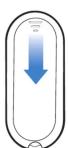
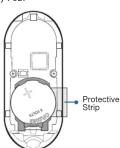
1 Slide the back cover off. 2 Pull out the protective strip to
engage the battery and activate
IMPORTANT: Make sure to replace the key ring once you have finished setting up the Key Fob.
1 From the Smart Home web portal, click or tap My Settings > Key Fobs > add device. The System Setup screen is displayed and your Smart DVR/Hub automatically goes into pairing mode.
Note: You can skip this step if the System Setup screen is already displayed (during the Smart DVR/Hub registration process, or when you are setting up other smart home accessories).
2 Press the Connect button on the Key Fob. The status LED blinks once. When the Key Fob has paired with your Smart DVR/Hub, the status LED blinks twice.

3 Follow the on-screen instructions to complete the setup.
The Key Fob works as a remote control within your Smart Home system, offering a quick and convenient way for you to activate a particular security mode whether you are staying, leaving or arriving home.
Arming your system with the Key Fob
Double-press the Away or Night button to arm your Smart Home system in Away or Night mode. The LED blinks green and then red twice for Night mode and thrice for Away mode as confirmation. There is a entry/exit delay period which allows you enter, leave or walk freely around the inside of the premises, before your system is active in Away or Night mode. The default entry/exit delay period is 20 seconds. You
can easily configure the Entry/Exit Delay period from the Smart Home web portal via My Settings > Smart Hub.
Disarming your system with the Key Fob
Double-press the Home button to disarm your Smart Home system. The LED blinks green and then red as confirmation.
Tip: Have a Smart Home Siren accessory connected? Simply use the Key Fob to immediately turn off the alarm by double-pressing the Home button.
TroubleshootingHow it works?
The Key Fob is not pairing with my Smart DVR/Hub
Reset the Key Fob - press and hold the Connect button until the status LED blinks rapidly. Then, try pairing the Key Fob again.
The Key Fob is not working. The Status LED does not light up when I double-press any of the Home, Away or Night buttons
The Key Fob is running low on battery power. Replace the battery in the Key Fob with one fresh "CR2032" lithium battery immediately.
Brand : SWANN
Model : SWO-KEF1PA
Category : Remote control