
Sport Wireless Heart Rate - Headphones JBL - Free user manual and instructions
Find the device manual for free Sport Wireless Heart Rate JBL in PDF.


| Product Type | Wireless In-Ear Headphones with Heart Rate Monitor |
| Brand | JBL (Under Armour) |
| Model | Sport Wireless Heart Rate |
| Connectivity | Bluetooth 4.0 with A2DP, AVRCP, HFP, HSP |
| Driver Size | 5.8 mm Dynamic |
| Frequency Response | 10 Hz - 22 kHz |
| Battery Type | Rechargeable Lithium-Ion (3.7V, 2 x 50 mAh) |
| Charging | Micro USB cable |
| Heart Rate Sensor | Optical sensor in left earbud, tap right earbud for reading |
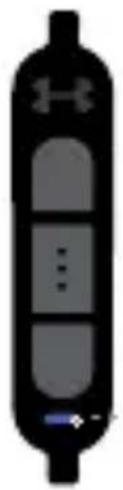
| Controls | 3-button inline remote (music, phone, volume) |
| App Compatibility | UA Record™ (iOS/Android) and MapMyRun™ |
| Fit Accessories | 4 sizes of enhancers, sport clip for stability |
| LED Indicators | Power ON/OFF, pairing mode, device connected, low battery, charging |
| Safety | Not a medical device; consult physician before exercise |
Frequently Asked Questions - Sport Wireless Heart Rate JBL
User questions about Sport Wireless Heart Rate JBL
0 question about this device. Answer the ones you know or ask your own.
Ask a new question about this device
Download the instructions for your Headphones in PDF format for free! Find your manual Sport Wireless Heart Rate - JBL and take your electronic device back in hand. On this page are published all the documents necessary for the use of your device. Sport Wireless Heart Rate by JBL.
USER MANUAL Sport Wireless Heart Rate JBL
UNDER ARMOUR.
HSPORT WIRELESS
HEART RATE



GET STARTED
ua.com/headphones-support
To setup and enjoy all the f UA Sport Wireless Heart Rate, you'll need to connect it to your phone using the UA Record™ mobile app.
- Download and install UA Record™ from the iOS App or Google Play store. Launch UA Record™ app to create an account or login with an existing account.

- Select the icon in the upper right hand
- Tap on "UA Sport Wireless Heart Rate". Follow the on-screen instructions to finish setup.
* Bluetooth should be ON to allow UA Record™ to connect to accessories.
SETUP USING OTHER APPS
Your UA Sport Wireless Heart Rate is compatible with other apps that support heart rate sense MapMyRun™.
-
Go to your phone's settings menu and er Bluetooth.
-
With the headphones powered ON and your device in search mode, select UA | JBL A to connect. This will include a unique series numbers.
-
After pairing UA | JBL Audio, follow the instructions to connect the heart rate sensor

1. SELECT YOUR SIZE
1.1 Everyone's ears are different. Try all four sizes of enhancers to determine your correct fit.

1.2 The correct size will fill the bowl of your ear fit snugly against the edge of the bowl.

* Need help finding the correct size?
Contact Fit Specialist :
US: 1-(800) 336-4525 / jbl.com/contactus
UK: +44 1707278113 / ua.jblsupport.eu@harman.com
http://jbl.com/contactus
2. ATTACH ENHANCERS
2.1 Align the sound tunnels and gently stretc the enhancer around the edge of the bud

2.2 Wrap the enhancer around the edge of bud and guide into place. Carefully stretch the enhancer so as not to tear.

3. HOW TO WEAR
3.1 Insert the earbud into the ear at a slight and rotate back to lock into place.

3.2 Lift the earloop over the back of your

3. HOW TO WEAR
3.3 The cord should be worn behind the need for secure fit and optimal performance.
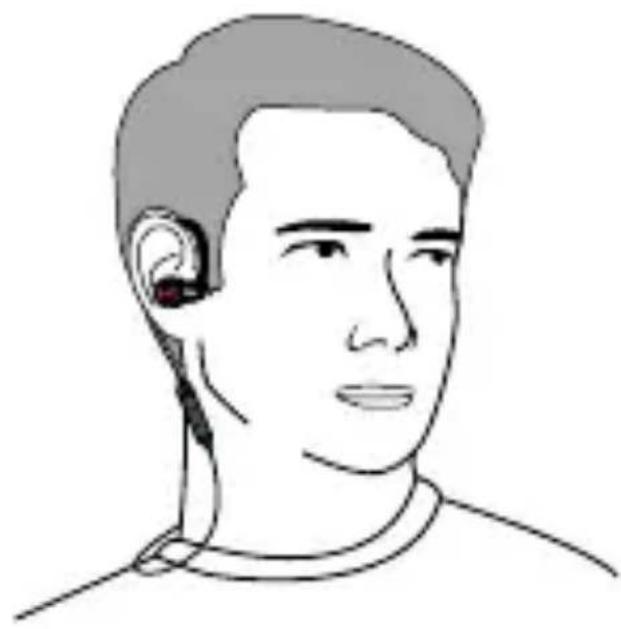
3.4 The optional Sport Clip provides increased stability, and improves the security of the

3. HOW TO WEAR
3.5 For best connectivity wear your mobile device in an armband.

4. 4HEART4RATE
4.1 The sensor is located in the left earbud. left enhancer will have a cutout for the s and should be fully exposed.

4.2 The enhancer should fit snugly behind the Trag u s of t h e ea r. An au dib le al er know if the earbud should be adjusted.

4. 4HEART4RATE
4.3 Tap the UA logo on the right ear bud fc instant audible heart rate reading.

5. PAIR BLUETOOTH/POWER/CHARGE
5.1 Begin with the headphones powered off, and your Bluetooth audio device powered and in search mode.
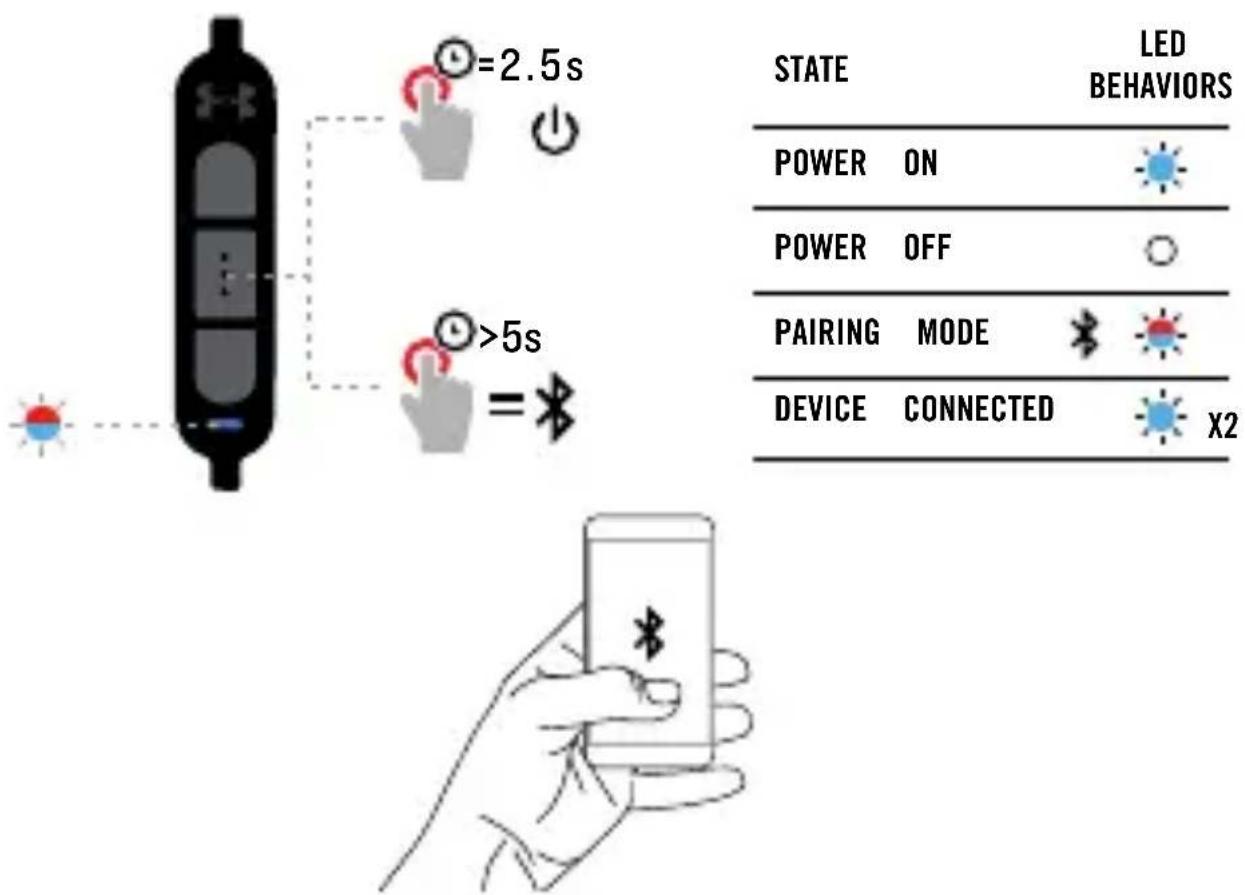
| STATE | LED BEHAVIORS | |
| POWER | ON | |
| POWER | OFF | |
| PAIRING | MODE | |
| DEVICE | CONNECTED | |
Press and hold the center button until the in light flashes blue/red. Find and confirm "UA | JBL", from the Bluetooth device list.
5.2 Charging Port & Battery Status

| STATE | LED BEHAVIORS | |
| LOW | BATTERY |  |
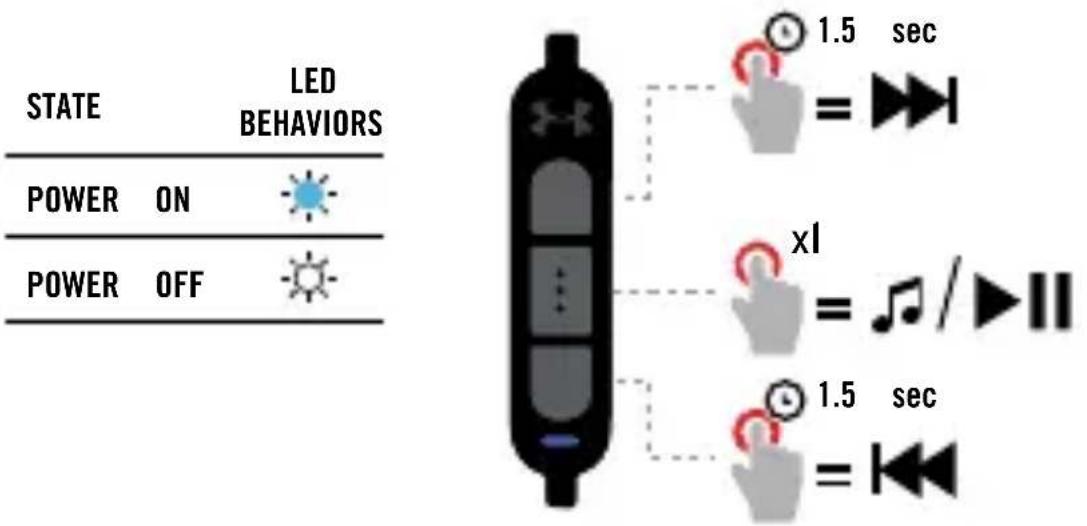
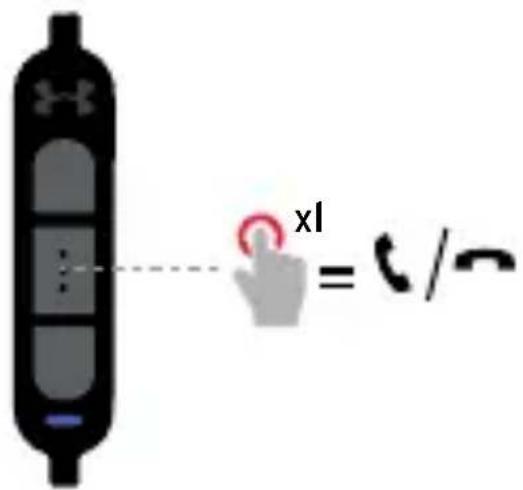
6. 3-BUTTON COMMAND
6.1 Music Control
6.2 Phone Control
6.3 Volume Control

8. LED BEHAVIORS
| State | LED Behaviors |
| No device connected | |
| Pairing mode | |
| Device connected | |
| Low battery | |
| Charging battery |
5.1 Begin with the headphones powered off, and your Bluetooth audio device powered on and in search, mode. Press and hold the center button until the indicator light flashes blue/red. Find and confirm "UA | JBL Audio" from the Bluetooth device list. 5.2 Port de charge et état de la batterie.
6. COMMANDE 3 BOUTONS
CÓMO EMPEZAR: ua.com/headphones-support
5.1 Begin with the headphones powered off, and your Bluetooth audio device powered on and in Press and hold the center button until the flashes blue/red. Find and confirm "UA | JBL from the Bluetooth device list.
MODO DE USAR: ua.com/headphones-support
5.1 Begin with the headphones powered off, and your Bluetooth audio device powered on and in Press and hold the center button until the flashes blue/red. Find and confirm "UA | JBL from the Bluetooth device list.• 5.2 Porta de carga e nível de bateria
6. TRÊS BOTÕES DE CONTROLE
5.1. Begin with the headphones powered off, and your Bluetooth audio device powered on and in Press and hold the center button until the flashes blue/red. Find and confirm "UA | JBL from the Bluetooth device list. 5.2. Ladeanschluss Akkustatus
PER INIZIARE: ua.com/headphones-support
5.1 Begin with the headphones powered off, and your Bluetooth audio device powered on and in Press and hold the center button until the flashes blue/red. Find and confirm "UA | JBL from the Bluetooth device list.
AAN DE SLAG: ua.com/headphones-support
INSTALLATIE MET UA RECORD™ APP
5.1 Begin with the headphones powered off, and your Bluetooth audio device powered on and in search mode. Press and hold the center button until the indicator light flashes blue/red. Find and confirm "UA | JBL Audio" from the Bluetooth device list.
KOMME I GANG: ua.com/headphones-support
OPPSETT MED UA RECORD™
2. SETTE PÅ PROPPENE
5.1 Begin with the headphones powered off, and your
Bluetooth audio device powered on and in search media. Press and hold the center button until the indicator light
flashes blue/red. Find and confirm "UA | JBL Audio"
from the Bluetooth device list. • 5.2 Ladeport & batterist
6.3-KNAPPS KONTROLL
6.1 Musikkontroll • 6.2 Telefonkontroll • 6.3 Volumkontroll

ALOITA: ua.com/headphones-support
ASENNUS UA RECORD™ -OHJELMAN AVULLA
5.1 Begin with the headphones powered off, and your Bluetooth audio device powered on and in search mode. Press and hold the center button until the indicator light flashes blue/red. Find and confirm "UA | JBL Audio" from the Bluetooth device list.
5.2 Latausauiko ja parislon 1ila
KOM IGÅNG: ua.com/headphones-support
KONFIGURERA MED HJÄLP AV UA RECORD™
KONFIGURERA MED HJÄLP AV ANDRA APPAR
5.1 Begin with the headphones powered off, and your Bluetooth audio device powered on and in search mode. Press and hold the center button until the indicator light flashes blue/red. Find and confirm "UA | JBL Audio" from the Bluetooth device list.
•5.2 Laddningsportochbatteristatus
6. 3-KNAPPSKOMMANDO
6.1 Musikkontroll • 6.2 Telefonkontroll • 6.3 Volymkontroll
| PÅ-LÄGE | |
| troll AV-LÄGE | |
| PARKOPPLINGSLÄGE | |
| ANSLUTEN ENHET | X2 |
| LÄGT BATTERI |
SÅDAN KOMMER DU I GANG: ua.com/headphones-support
OPSÄETNING MED UA RECORD™
5.1 Begin with the headphones powered off, and your
Bluetooth audio device powered on and in search STATUS Press and hold the center button until the indicator light
flashes blue/red. Find and confirm "UA | JBL Audio" from the Bluetooth device list.
5.2 Opladningsstik og batteristatus
6. 3-KNAPS STYRING
にイチップをぶてセットむま。うくCarefully stretch enhancer so as not to tear.
か
- 装着方法 せ ヤン
5.1 Begin with the headphones powered off, and your
Bluetooth audio device powered on and in search mode.
Press and hold the center button until the indicator light
flashes blue/red. Find and confirm "UA | JBL Audio"
from the Bluetooth device list.5.2?充電ポート&
バッテー残量
- 3ボタ・コマド
START: ua.com/headphones-support
KONFIGURACJA ZA POMOCA UA RECORD™
5.1 Begin with the headphones powered off, and STAN Bluetooth audio device powered on and in search mode. Press and hold the center button until the indicator light flashes blue/ed. Find and confirm "UA | JBL WAZASILANIA from the Bluetooth device list. • 5.2 Gniazdo ładowania
6. STEROWANIE 3 PRZYCISKAMI
시작: ua.com/headphones-support
UA RECORD™를 사용하여 설정
5.1 Begin with the headphones powered off, and your Bluetooth audio device powered on and in search mode. Press and hold the center button until the indicated Elight flashes blue/red. Find and confirm "UA | JBL Audio" from the Bluetooth device list.
•5.2 충전 포트 및 배터리 상태
6.3버튼 명령
快速入门: ua.com/headphones-support
2.1 对准耳道并轻轻拉伸增强器边缘。• 2.2 套入增强器并包住耳塞边缘。Carefully stretch enhancer so as not to tear.
- 如何佩戴
5.1 Begin with the headphones powered off, and Bluetooth audio device powered on and in search mode. Press and hold the center button until the flashless blu-ged. Find and confirm "UA | JBI Audio" from the Bluetooth device list.
- 5.2 充电端口和电池状态
- 三键式命令
ua.com/headphones-support
2.1 對齊聲音隧道並沿耳塞邊緣輕輕擴展加固器。• 2.2 讓加固器沿耳塞邊緣包覆,並引導入位。Carefully stretch enhancer so as not to tear.
- 如何佩带
5.1 Begin with the headphones powered off Bluetooth audio device powered on and in search mode. Press and hold the center button until the flash is at blue/ged. Find and confirm "UA | JBL Audio" from the Bluetooth device list.
5.2 充電連接埠和電池狀態
6.3 鍵指令
MEMULAI: ua.com/headphones-support
PENGATURAN MENGGUNAKAN UA RECORD™
5.1 Begin with the headphones powered off, and your KONDISI Bluetooth audio device powered on and in search mode.
Press and h ld the center bu ton until the indicator light
flashes blue/red. F nd and confirm "UA | JBL from the Bluetooth device list. • 5.2 Port Pengisian
Daya & Status Baterai
6. PERINTAH 3-TOMBOL
6.1 Kontrol Musik • 6.2 Kontrol Telepon • 6.3 Kontrol
| KONDISI | POLA | LED | ||
| ch mode. | ||||
| cator light | ||||
| udio" | ||||
| POWER | ON | (MENYALA) | ||
| POWER | OFF | (MATI) | ||
| MODEne | PENYAMBUNGAN | |||
| PERANGKAT | TERHUBUNG | X2 | ||
| DAYA | BATERAI | LEMAH | ||
TECH SPECS
SPÉC. TECHNIQUES / ESPECIFICACIONES TÉCNICAS ESPECIFICAÇÕES TÉCNICAS /
- Premium 5.8mm Dynamic Dri
- Frequency Response: 10 Hz - 2
- Connection: Micro USB cable for charging
• Support: BT 4.0, A2DP v1.2, AVRCP v1.4, HFP v1.6, HSP v1.2 - Bluetooth transmitter frequency range: 2.402 - 2.480GHz
- Bluetooth transmitter power: < 4dBm
- Bluetooth transmitter modulation: GFSK, π /4 DQPSK, 8DPSK
- Battery type: Rechargeable Lithium Ion Cylindrical Cell (3.7V 2x50 mAh)
FR
The UA Sport Wireless Heart Rate is not a device and should not be treated as such. (physician before starting any exercise or work routine. Strenuous exercise can pose serious inherent health risks and you expressly assume such risks.
If you experience any pain, feel weak, dizzy, exhausted, or become short of breath, immediate stop your workout. The heart rate measurement this device are only estimations and its accuracy depends on a multitude of factors.
This device is not as accurate as a heart in medical device and should only be relied up or recreational purposes.

(01)07896359544325
C€1856
TR02979_B
HSPORT WIRELESS HEART RATE
- HSPORT WIRELESS
- HEART RATE
- GET STARTED
- SETUP USING OTHER APPS
- SELECT YOUR SIZE
- ATTACH ENHANCERS
- HOW TO WEAR
- 4HEART4RATE
- PAIR BLUETOOTH/POWER/CHARGE
- 3-BUTTON COMMAND
- 6.1 MUSIC CONTROL
- 6.2 PHONE CONTROL
- 6.3 VOLUME CONTROL
- LED BEHAVIORS
- COMMANDE 3 BOUTONS
- TRÊS BOTÕES DE CONTROLE
- INSTALLATIE MET UA RECORD™ APP
- OPPSETT MED UA RECORD™
- SETTE PÅ PROPPENE
- 6.3-KNAPPS KONTROLL
- ASENNUS UA RECORD™ -OHJELMAN AVULLA
- 5.2 LATAUSAUIKO JA PARISLON 1ILA
- KONFIGURERA MED HJÄLP AV UA RECORD™
- KONFIGURERA MED HJÄLP AV ANDRA APPAR
- 3-KNAPPSKOMMANDO
- OPSÄETNING MED UA RECORD™
- 3-KNAPS STYRING
- KONFIGURACJA ZA POMOCA UA RECORD™
- STEROWANIE 3 PRZYCISKAMI
- PENGATURAN MENGGUNAKAN UA RECORD™
- PERINTAH 3-TOMBOL
- TECH SPECS
- FR
- HSPORT WIRELESS HEART RATE
Brand : JBL
Model : Sport Wireless Heart Rate
Category : Headphones