
CLS-AOCH/60-98 - Cables for Computers and Peripherals Kramer - Free user manual and instructions
Find the device manual for free CLS-AOCH/60-98 Kramer in PDF.


| Product Type | Active Optical UHD Pluggable HDMI Cable |
| Model | CLS-AOCH/60-98 (Low Smoke & Halogen Free) |
| Video Resolution | Up to 4K@60Hz (4:4:4) |
| Audio Support | PCM 8ch, Dolby TrueHD, DTS-HD Master Audio |
| HDMI Compliance | HDCP 2.2, HDR, EDID, CEC |
| Connector Type | Male HDMI Type A (on both ends after adaptors), Micro HDMI Type D (intermediate) |
| Assembly Dimensions (WxDxH) | 2.22 cm x 7.1 cm x 0.99 cm (0.874" x 2.79" x 0.39") |
| Micro HDMI Port Dimensions (WxDxH) | 1.23 cm x 4.9 cm x 0.8 cm (0.484" x 1.93" x 0.31") |
| Type A HDMI Port Dimensions (WxDxH) | 3.1 cm x 4 cm x 0.95 cm (1.22" x 1.57" x 0.37") |
| Cable Diameter | 3.4 mm |
| Cable Bending Radius | 6 mm (minimum) |
| Cable Pulling Strength | 500 N (50 kg, 110 lbs) |
| Available Lengths | 10m, 15m, 20m, 30m, 40m, 50m, 60m, 70m, 80m, 90m, 100m (33ft–328ft) |
| Cable Jacket Material | Low Smoke Halogen Free (LSHF) – black |
| Power Supply | External 5V via micro-USB on Display side (optional) |
| Power Consumption | 0.75 W max |
| Operating Temperature | 0° to +50°C (32° to 122°F) |
| Storage Temperature | -30° to +70°C (-22° to 158°F) |
| Operating Humidity | 5% to 85% RH non-condensing |
| Safety Warning | Disconnect before servicing; avoid excessive bending or pinching |
| Maintenance | Clean with dry cloth; do not use liquid cleaners |
| Repairability | Non-repairable; replace entire cable if damaged |
Frequently Asked Questions - CLS-AOCH/60-98 Kramer
User questions about CLS-AOCH/60-98 Kramer
0 question about this device. Answer the ones you know or ask your own.
Ask a new question about this device
Download the instructions for your Cables for Computers and Peripherals in PDF format for free! Find your manual CLS-AOCH/60-98 - Kramer and take your electronic device back in hand. On this page are published all the documents necessary for the use of your device. CLS-AOCH/60-98 by Kramer.
USER MANUAL CLS-AOCH/60-98 Kramer
Installation Instructions
MODELS:
CLS-AOCH/60-XX (Low Smoke & Halogen Free Version)
CP-AOCH/60-XX (Plenum Version)
Active Optical UHD Pluggable HDMI Cable


P/N:

Rev:

SAFETY WARNING
Disconnect the unit from the power supply before opening and servicing
For the latest information on our products and a list of Kramer distributors, visit our Web site where updates to this user manual may be found.
We welcome your questions, comments, and feedback.
www.kramerAV.com
info@kramerel.com
CLS-AOCH/60-XX / CP-AOCH/60-XX Active Optical UHD Pluggable HDMI Cable
Congratulations on purchasing your Kramer CLS-AOCH/60-XX / CP-AOCH/60-XX Plug and Play active Fiber Optic UHD Pluggable HDMI Cable which is suited for critical and versatile installations.
The CLS-AOCH/60-XX / CP-AOCH/60-XX provides an extremely high quality signal over a wide range of resolutions, up to 4K@60Hz (4:4:4). This cable is available in different lengths from 33ft (10m) to 328ft (100m). The CLS-AOCH/60-XX / CP-AOCH/60-XX has a slim design to let you pull the cables easily (together with the supplied pulling tool) through small-sized conduits.
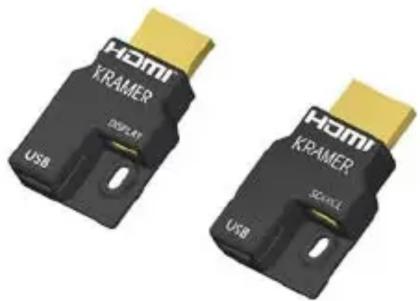
natural_image
Two identical black USB connectors labeled 'KRAMER' with gold contacts, shown from different angles (no text beyond branding)Figure 1: HDMI Connector plugs (Source and Display)
The CLS-AOCH/60-XX / CP-AOCH/60-XX is ideal for long distance transmission in professional AV systems, indoor and outdoor digital signage and kiosks, home theater systems, surgical theaters, facility automation systems and whenever high resolution video and audio are required.
Features
The CLS-AOCH/60-XX / CP-AOCH/60-XX:
• Supports a wide range of resolutions up to 4K@60Hz (color space 4:4:4) 3D and Deep Color
• Supports Multi-channel audio, Dolby True HD, DTS-HD Master Audio
• Is HDMI compliant: EDID, CEC, HDCP (2.2), HDR (High Dynamic Range)
- Reduced EMI and RFI
- Includes a micro USB port to optionally connect an external 5V power supply (if required, this is typically connected on the display side)
• Has high pulling strength and compression load
- Has Source / Display clearly printed on the connector as well as tagged on the cable for easy identification
Cable Dimensions
The CLS-AOCH/60-XX / CP-AOCH/60-XX includes four optical fibers and six AWG 28 wires with compact size HDMI connectors. On the source side, the micro HDMI connector enables smooth pulling of the cable. The SOURCE end connects to the source (for example, a DVD, Blu-ray or game console box) and the DISPLAY end to the acceptor (for example, a projector, an LCD display or a tablet device), see Figure 2 (note that SOURCE appears here as an example).


Figure 2: HDMI Connectors – SOURCE and DISPLAY (with Dimensions in mm)
CLS-AOCH/60-XX / CP-AOCH/60-XX Plug and Play Installation
Before installing the cable, make sure that you have an HDMI graphic card or devices with an HDMI port (for example, a PC, laptop, DVD/Blue-ray player or any other video/audio signal source device).

Optical fiber cable is not robust physically compared to conventional copper cable materials. Even though this cable is designed to be resistant to artificial strengths on the cable, CLS-AOCH/60-XX / CP-AOCH/60-XX can be damaged if it is excessively pinched, twisted or kinked when being installed and after being installed. Take care not to bend or twist the cable tightly.
When CLS-AOCH/60-XX / CP-AOCH/60-XX is installed into the conduit, the fiber pulling strength and the bending radius are the key conditions to safe installation of the cable.
Do not disassemble or modify the products, especially the HDMI connector head parts.
To install the CLS-AOCH/60-XX / CP-AOCH/60-XX:
- Unpack the cable from the package with care and remove the cable tie.
- Place the micro-HDMI (Type D) connector inside the Pulling Tool and close its cover.

Note that you can pull the cable either from the display side or the source side (as shown in Figure 3), but you have to make sure that the cable polarity is correct (tagged Source if pulling the source side or Display if pulling the display side).
- Attach the pulling cable to the Pulling Tool.


Figure 3: Attaching the Pulling Tool
-
Carefully install the cable (for example, in the wall or conduit or under the floor).
-
Connect the:
-
SOURCE HDMI adaptor to the micro-HDMI connector SOURCE end of the cable.
■ DISPLAY HDMI adaptor to the micro-HDMI connector DISPLAY end of the cable. -
Secure the connection on each side using the supplied locking screws.
-
Plug the SOURCE connector head of the cable into the source devices. Do not plug the SOURCE connector to the display device.
-
Plug the DISPLAY connector head of the cable into the display devices. Do not plug the DISPLAY connector to the source device.
-
Switch on the power of the source and display devices.
-
If required, connect an external power source via the micro-USB connector on the DISPLAY side.
Troubleshooting
If you have encountered a problem, check that:
• The source and display devices are both switched on
• Both HDMI connector heads are fully plugged into the devices
• The cable or its jacket is not physically damaged
• The cable is not bent or kinked

Note that it is important to connect the cable correctly as marked on the end of each connector: SOURCE to the source side and DISPLAY to the acceptor side.
Specifications
| Audio and Power | ||||
| Video Resolution: | Up to 4K@60Hz (4:4:4) | |||
| Embedded Audio Support: | PCM 8ch, Dolby Digital True HD, DTS-HD Master Audio | |||
| HDMI Support: | HDCP 2.2, HDR, EDID, CEC | |||
| Cable Assembly | ||||
| HDMI Connector: | Male HDMI Type A Connector | |||
| Dimensions: | Micro HDMI port: 1.23cm x 4.9cm x 0.8cm (0.484" x 1.93" x 0.31") W, D, HType A HDMI port: 3.1cm x 4cm x 0.95cm (1.22" x 1.57" x 0.37") W, D, HAssembly: 2.22cm x 7.1cm x 0.99cm (0.874" x 2.79" x 0.39") W, D, H | |||
| Cable Structure: | Hybrid Optical Fiber Cable | |||
| Cable Jacket Material: | UL Plenum (CMP-OF) and LSHF (Low Smoke Halogen Free) | |||
| Cable Jacket Color: | UL Plenum: black; LSHF: black | |||
| Cable Diameter: | 3.4mm | Cable Bending Radius: | 6mm | |
| Cable Pulling Strength: | 500N (50kg, 110lbs) | Micro USB Cable | External 5V power supply cable | |
| Power | ||||
| Power Supply HDMI: | Power is supplied from an external USB connector on the display side | |||
| Power Consumption: | 0.75W max. | |||
| General | ||||
| Operating Temperature: | 0° to +50°C (32° to 122°F) | Storage Temperature: | -30° to +70°C (-22° to 158°F) | |
| Operating Humidity: | 5% to 85%, RHL non-condensing | |||
| Available Length: | 33ft (10m), 50ft (15m), 66ft (20m), 98ft (30m), 131ft (40m), 164ft (50m), 197ft (60m), 230ft (70m), 262ft (80m), 295ft (90m) and 328ft (100m) | |||
Brand : Kramer
Model : CLS-AOCH/60-98
Category : Cables for Computers and Peripherals