
70-1065-30 - Accessoire pour mobilier Extron - Free user manual and instructions
Find the device manual for free 70-1065-30 Extron in PDF.


| Product Type | AV Interface / Switcher |
| Brand | Extron |
| Model | 70-1065-30 |
| Dimensions (Approx.) | 4.3 x 2.1 x 1.2 in (109 x 53 x 30 mm) |
| Weight (Approx.) | 0.5 lb (0.23 kg) |
| Power Consumption | 5 W (typical) |
| Input Voltage | 100-240 VAC, 50/60 Hz (via external power supply) |
| Video Input | One (1) HDMI or VGA (depending on variant) |
| Video Output | One (1) HDMI or VGA (depending on variant) |
| Audio Support | Embedded digital audio |
| Control Interface | RS-232 or USB (for firmware updates) |
| Main Functions | Signal switching, scaling, EDID management |
| Maintenance | Clean with dry cloth; do not use liquids |
| Safety | Use only provided power supply; keep away from moisture |
| Spare Parts | Contact Extron support for replacement power supplies or cables |
| Reparability | Professional repair only; no user-serviceable parts inside |
| Operating Temperature | 32°F to 104°F (0°C to 40°C) |
| Certifications | CE, FCC, RoHS |
| Warranty | 3 years (standard Extron warranty) |
Frequently Asked Questions - 70-1065-30 Extron
User questions about 70-1065-30 Extron
0 question about this device. Answer the ones you know or ask your own.
Ask a new question about this device
Download the instructions for your Accessoire pour mobilier in PDF format for free! Find your manual 70-1065-30 - Extron and take your electronic device back in hand. On this page are published all the documents necessary for the use of your device. 70-1065-30 by Extron.
USER MANUAL 70-1065-30 Extron
Retractor SM Horizontal Bracket • Installation Guide
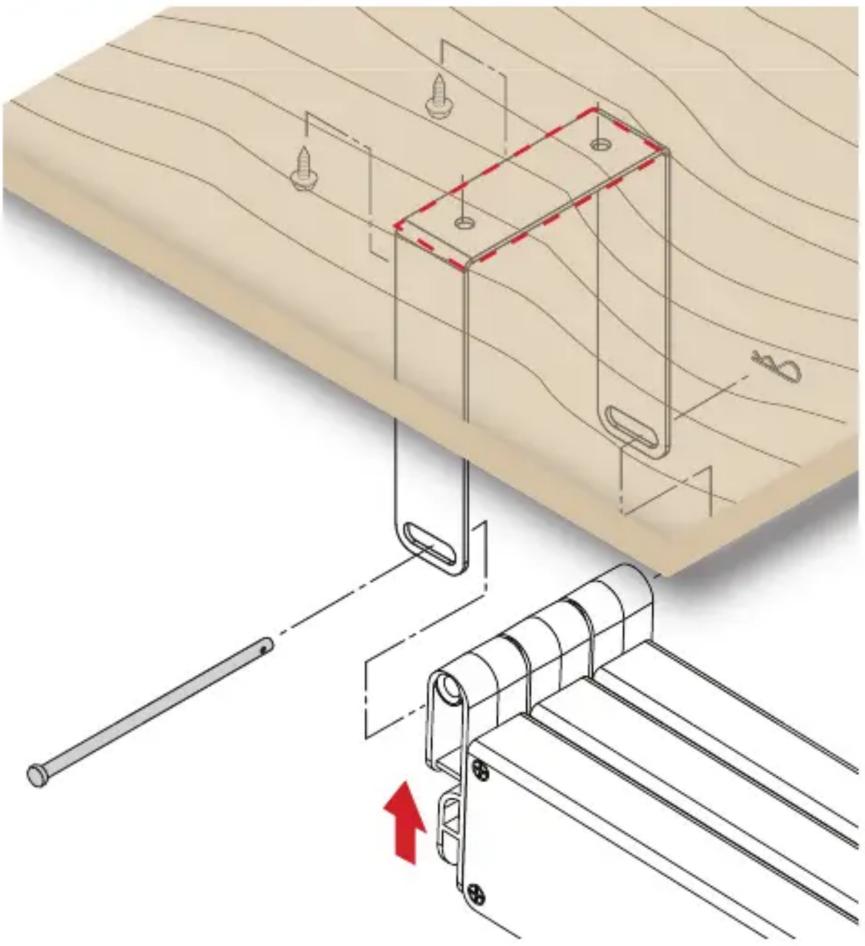
The Cable Retractor SM series requires this mounting bracket for horizontal installations. Use the Horizontal Mounting Bracket to fix the Retractor under the table. Slotted holes allow for tolerance in placing the bracket.
See the Retractor SM Installation Guide at www.extron.com prior to beginning this installation.
ATTENTION:
To ensure accuracy follow these procedures:
- With the Retractors installed in the enclosure, attach the horizontal mounting bracket to the Retractor end caps using the provided pin and clip.

- Raise the Retractors with attached bracket to the desired mounting location.
NOTE: Be certain the system is perpendicular to the enclosure to prevent binding of the pulley system.
- Ensure the bracket is flush with surface and trace a line around the bracket perimeter.
- Lower the assembly and remove the Horizontal Bracket from the Retractors.
natural_image
Technical illustration of a wooden hinge assembly with mounting holes and a pull rod, showing no text or symbols.-
Position the bracket inside the lines drawn in step 3 and fasten with the supplied screws.
-
Raise the Retractor system up into the installed bracket, run the pin through the bracket and end caps, and secure with the supplied clip.
| Extron USA Headquarters+800.633.9876 (Inside USA/Canada Only)Extron USA - West Extron USA - East+1.714.491.1500 +1.919.850.1000+1.714.491.1517 FAX +1.919.850.1001 FAX | Extron Europe+800.3987.6673 (Inside Europe Only)+31.33.453.4040+31.33.453.4050 FAX | Extron India1800.3070.3777 (Inside India Only)+91.80.3055.3777+91.80.3055.3737 FAX | |
| Extron Japan+81.3.3511.7655+81.3.3511.7656 FAX | Extron China+86.21.3760.1568+86.21.3760.1566 FAX | ||
| Extron Asia+65.6383.4400+65.6383.4664 FAX | Extron Middle East+971.4.299.1800+971.4.299.1880 FAX | Extron Korea+82.2.3444.1571+82.2.3444.1575 FAX | |
Brand : Extron
Model : 70-1065-30
Category : Accessoire pour mobilier