
AAP 301 - Audio/Video Accessories Extron - Free user manual and instructions
Find the device manual for free AAP 301 Extron in PDF.


| Product Type | Audio/Video Wall Plate |
| Model | AAP 301 |
| Brand | Extron |
| Dimensions (H x W) | 3.5 x 1.75 inches (single gang) |
| Depth | 0.5 inches |
| Weight | 0.1 lb (45 g) |
| Material | Metal with black finish |
| Power Requirement | Passive (no power required) |
| Connector Type | RCA, BNC, or 3.5mm (depending on variant) |
| Mounting | Standard single gang wall box |
| Primary Function | Connect audio/video signals to wall-mounted sources or displays |
| Signal Types | Composite video, stereo audio |
| Impedance | 75 ohms (video), 50 ohms (audio) |
| Frequency Response | 20 Hz - 20 kHz (audio) |
| Operating Temperature | 32°F to 104°F (0°C to 40°C) |
| Humidity | 10% to 90% non-condensing |
| Cleaning | Wipe with a soft, dry cloth |
| Safety | Indoor use only |
| Compliance | RoHS, CE |
| Warranty | 2 years |
| Included Accessories | Mounting screws, installation guide |
| Spare Parts | Contact Extron support |
| Repairability | Non-serviceable; replace if faulty |
Frequently Asked Questions - AAP 301 Extron
User questions about AAP 301 Extron
0 question about this device. Answer the ones you know or ask your own.
Ask a new question about this device
Download the instructions for your Audio/Video Accessories in PDF format for free! Find your manual AAP 301 - Extron and take your electronic device back in hand. On this page are published all the documents necessary for the use of your device. AAP 301 by Extron.
USER MANUAL AAP 301 Extron
AAP 301 and AAP 302 Installation Instructions
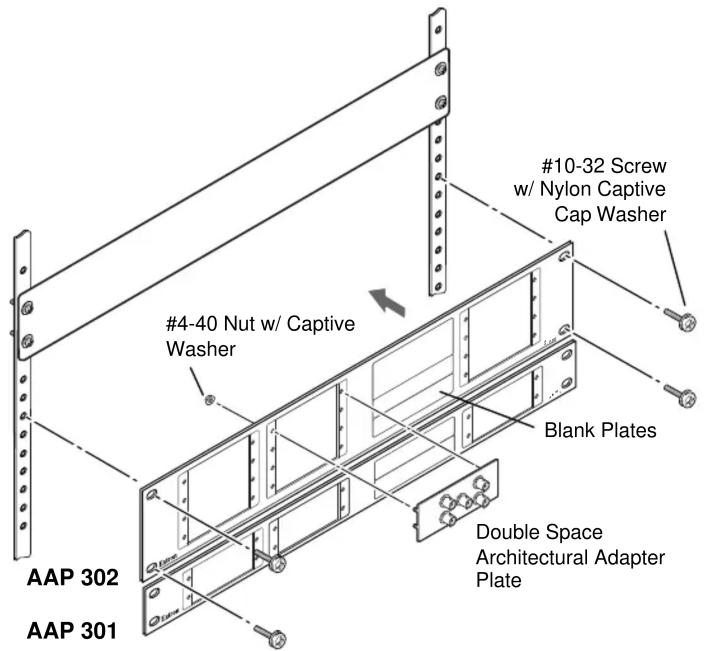
The Extron AAP 301 and AAP 302 are 1U and 2U high metal panels that support the installation of AAP (Architectural Adapter Plate) panels into an equipment rack. The AAP 301 has four AAP openings that can be populated with up to eight single space or four double space AAPs. The AAP 302 has four AAP openings that can be populated with up to 16 single space or 8 double space AAPs.
- Cable the rear of the AAPs to be installed before attaching the AAPs to the panel. If applicable, refer to the cabling information in the documentation for the AAP.
- Insert the adapter plate screws through the holes in the faceplate. Attach the adapter plates to the faceplate with the provided #4-40 nuts with captive washers. Fill unused openings with the provided blank AAPs.
- Secure the panel to the rack using the supplied machine screws. See the figure on the reverse side of this card.
| Extron USA - West Headquarters | Extron USA - East | Extron Europe | Extron Asia | Extron Japan | Extron China | Extron Dubai |
| +800.633.9876Inside USA / Canada Only | +800.3987.6673Inside Europe Only | +800.7339.8766Inside Asia Only | +81.3.3511.7655+81.3.3511.7656 FAX | +400.883.1568Inside China Only | +971.4.2991800+971.4.299180 FAX | |
| +1.919.863.1794+1.714.491.1500+1.714.491.1517 FAX | +1.919.863.1797 FAX | +31.33.453.4040+31.33.453.4050 FAX | +65.6383.4400+65.6383.4664 FAX | +86.21.3760.1568+86.21.3760.1566 FAX | 68-637-01 Rev. B08 08 |
AAP 301 and AAP 302 Installation Instructions (Cont'd)
Brand : Extron
Model : AAP 301
Category : Audio/Video Accessories