
COM-655 - Keyboard Steren - Free user manual and instructions
Find the device manual for free COM-655 Steren in PDF.


| Product Type | Cordless keyboard and mouse combo |
| Brand | Steren |
| Model | COM-655 |
| Keyboard Input | 3 V DC (2 x AAA batteries) |
| Mouse Input | 3 V DC (2 x AAA batteries) |
| Receiver Input | 5 V DC (from USB port) |
| Operating Frequency | 2.4 GHz |
| Operating Range | Up to 10 m (33 ft) |
| Mouse Resolution | Adjustable (high/low via button) |
| Multimedia Keys | 8 (Web, Email, Play/Pause, Vol-, Vol+, Media Player, Mute, Calculator) |
| Power Saving | Yes |
| Operating Temperature | 5°C to 40°C |
| Operating Humidity (Mouse) | 20% to 90% |
| Synchronization | Automatic; manual resync by pressing ESC+Z |
| Cleaning | Use a soft, dry cloth |
| Safety Precautions | Do not expose to extreme temperatures, do not open, avoid liquid contact |
| Battery Type | AAA (4 total: 2 for keyboard, 2 for mouse) |
| Warranty | 1 year (conditions apply) |
| Package Contents | Keyboard, mouse, USB receiver, user manual |
| Compatibility | Windows, Mac (standard USB HID) |
| Color | Black |
Frequently Asked Questions - COM-655 Steren
User questions about COM-655 Steren
0 question about this device. Answer the ones you know or ask your own.
Ask a new question about this device
Download the instructions for your Keyboard in PDF format for free! Find your manual COM-655 - Steren and take your electronic device back in hand. On this page are published all the documents necessary for the use of your device. COM-655 by Steren.
USER MANUAL COM-655 Steren
natural_image
Black desktop computer keyboard and mouse on a light blue grid background (no text or symbols visible)natural_image
Black rectangular electronic device with a small screen icon above it, no visible text or symbols on the device itself.- Ratón

natural_image
Close-up of a black device with a magnified inset showing internal components (no visible text or symbols)Cordless keyboard and mouse combo
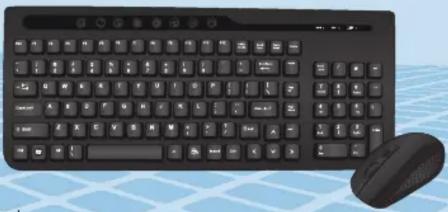
natural_image
Black desktop computer keyboard and mouse on a light blue grid background (no text or symbols visible)Instruction Manual
0714b
Before using your new Steren's product, please read this instruction manual to prevent any damage.
IMPORTANT

The instructions of this manual are for reference about the product.
There may be differences due to updates.
Please check our website (www.steren.com) to obtain the latest version of the instruction manual.
CAUTIONS
- Do not expose the keyboard or the mouse to extreme temperatures.
- Do not attempt to open any of them, it may cause a malfunction and void the warranty.
• Always use a soft, dry cloth for cleaning.
HIGHLIGHTS
- Adjustable mouse resolution using a button.
• 2.4 GHz frequency.
• 10 m operating range (mouse and keyboard).
• Energy saving system.
- 8 multimedia controls on the keyboard.
CONTROLS
Mouse
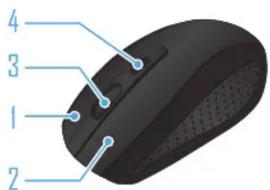

-
Right button
-
Left button
-
Scroll wheel
-
Resolution control: Set the points per inch movement of the pointer. You can choose between high and low.
-
On / off switch
-
Optical sensor
-
Battery compartment
-
Receiver slot
Keyboard
Button Function
| Opens the web browser window. | |
| Opens the default e-mail program. | |
| Starts / pauses music playback. | |
| — | Decreases the volume level. |
| + | Increases the volume level. |
| Opens the default media player. | |
| Disables the audio output. | |
| Opens the calculator. |
INSTRUCTIONS
Inserting batteries
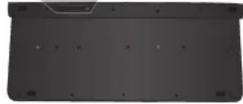
- Keyboard
- Remove the cover of the battery compartment, located on the backside.
- Install 2 AAA batteries observing polarity.
- Replace the compartment cover.

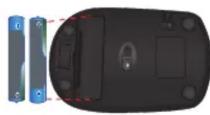
- Mouse
- Lift the lid of the battery compartment, located at the bottom.
- Insert 2 AAA batteries, paying attention to its polarity.
- Replace the compartment cover.
When you're not using the keyboard or mouse for a long time, remove the batteries to avoid damage.
INSTALLATION

natural_image
Close-up of a black electronic device with a close-up inset showing a connector (no text or symbols visible)- Remove the receiver at the bottom of the mouse and insert it into a USB port on the computer.
- Move the power switch on the mouse to the ON position.

The drivers automatically update. Both the keyboard and mouse will be ready to use. Remember that the maximum distance you can have between the computer (with the USB receiver connected) and devices is 10 m.
If the synchronization between the keyboard and the receiver is lost, perform the following steps:
- Remove the batteries from the keyboard and the receiver from the computer.
-Reinsert the batteries and press ESC and Z keys at the same time. The battery LED will flash to indicate that the keyboard is ready to synchronize.
-Insert the receiver into the computer. After a few seconds the LED will flash quickly to indicate that synchronization has been successful. You can use the Start button to confirm it.
TROUBLESHOOTING
Trouble Solution
• The computer does not detect devices
- Check that the batteries are sufficiently charged.
- Make sure that the receiver is plugged into a USB port.
- Move the mouse power switch to the ON position.
- Reduce the distance between the receiver and devices (max. 10 m).
SPECIFICATIONS
Keyboard
Input: 3 V = (2 x AAA)
Operating temperature: 5 - 40 °C
Mouse
Input: 3 V = (2 x AAA)
Humidity operating: 20-90%
USB receiver
Input: 5 V = (x USB)

Product design and specifications are subject to change without notice.


STEREN
Product: Cordless keyboard and mouse combo
Part number: COM-655
Brand: Steren
WARRANTY
This Steren product is warranted under normal usage against defects in workmanship and materials to the original purchaser for one year from the date of purchase.
CONDITIONS
- This warranty card with all the required information, invoice or purchase ticket, product box or package, and product, must be presented when warranty service is required.
- If the product is in the warranty time, the company will repair it free of charge.
- The repairing time will not exceed 30 natural days, from the day the claim was received.
- Steren sell parts, components, consumables and accessories to customer, as well as warranty service, at any of the addresses mentioned later.
THIS WARRANTY IS VOID IN THE NEXT CASES:
If the product has been damaged by an accident, acts of God, mishandling, leaky batteries, failure to follow enclosed instructions, improper repair by unauthorized personnel, improper safe keeping, among others.
a) The consumer can also claim the warranty service in the purchase establishment.
b) If you lose the warranty card, we can reissue it, if you show the invoice or purchase ticket.
RETAILER INFORMATION
Name of the retailer
Address
Product
Brand
Serial number
Date of deliver
In case your product fails or have questions, please contact your nearest dealer. If you are in Mexico, please call to our Call Center.
01 800 500 9000
Brand : Steren
Model : COM-655
Category : Keyboard