
FR-430 - CD Player KIDdesigns - Free user manual and instructions
Find the device manual for free FR-430 KIDdesigns in PDF.


| Product Type | CD Player for Kids |
| Brand | KIDdesigns |
| Model | FR-430 |
| Dimensions | Approximately 14.5 x 14.5 x 2.5 cm |
| Weight | Approximately 0.3 kg |
| Power Source | 2x AA batteries (not included) or optional AC adapter |
| Playback Media | CD, CD-R, CD-RW |
| Main Functions | Play, pause, skip forward/backward, repeat, shuffle, volume control, anti-skip protection |
| Display | LCD showing track number and elapsed time |
| Audio Output | Headphone jack (3.5mm) |
| Battery Life | Up to 10 hours of continuous playback |
| Material | ABS plastic |
| Cleaning & Maintenance | Wipe with a soft dry cloth; do not use liquids or abrasive cleaners |
| Safety | Not for children under 3 due to small parts; use under adult supervision |
| Repairability | Not user-serviceable; contact KIDdesigns customer support for issues |
| Box Contents | CD player, user manual, warranty card |
Frequently Asked Questions - FR-430 KIDdesigns
User questions about FR-430 KIDdesigns
0 question about this device. Answer the ones you know or ask your own.
Ask a new question about this device
Download the instructions for your CD Player in PDF format for free! Find your manual FR-430 - KIDdesigns and take your electronic device back in hand. On this page are published all the documents necessary for the use of your device. FR-430 by KIDdesigns.
USER MANUAL FR-430 KIDdesigns
IMPORTANT SAFETY INSTRUCTIONS
- Read these instructions. 2. Keep these instructions. 3. Read all working 4. Follow all instructions
- Heed all warning. 4. Follow all instruct
- Do not use this appropriate non-water
- Do not use this apparatus near water . 6. Clean only with dry cloth.
- Do not block any ventilation openings. Install in accordance with the manufacture's instructions.
- Do not install near any heat sources such as radiators, heat registers, stoves, or other apparatus (including amplifiers) that produce heat.
- Do not defeat the safety purpose of the polarized or grounding plug. A polarized plug has two blades with one wider than the other. A grounding plug has two blades and a third grounding prong. The wide blade or the third prong is provided for your safety. If the provided plug does not fit into your outlet, consult an electrician for replacement of the obsolete outlet.
- Protect the power cord from being walked on or pinched particularly at the plugs, convenience receptacles, and at the point where they exit from the apparatus.
- Only use attachments/accessories specified by the manufacturer.
- Use only with the cart, stand, tripod, bracket, or table specified by the manufacturer, or sold with the apparatus. When a cart or rack is used, use caution when moving the cart/apparatus combination to avoid injury from tip-over.
- Unplug the apparatus during lightning storms or when unused for long periods of time.
- Refer all servicing to qualified personnel. Servicing is required when the apparatus has been damaged in any way. Examples of damage include: Power supply cord or plug is damaged, liquid has been spilled or objects have fallen into the apparatus, the apparatus has been exposed to rain or moisture, does not operate normally, or has been dropped.

Portable Cart Warning
IMPORTANTES INSTRUCTIONS DE SÉCURITÉ
Use of controls or adjustments or performance of procedures other than those specified may result in hazardous radiation exposure.
ATTENTION :
* Caution Marking was located at bottom enclosure of the apparatus. Les marquages sont inscrits en bas de l'appareil.
CAUTION
RISK OF ELECTRIC SHOCK
DO NOT OPEN
ATTENTION
ATTENTION RISQUE DE CHOC ÉLECTROULE
7 NOQUE DE 01/06 ELECTRÈAQUE NE PAS OUVRIR !
CAUTION - TO REDUCE THE RISK OF ELECTRIC SHOCK, DO NOT REMOVE COVER (OR BACK) NO USER-SERVICEABLE PARTS INSIDE. REFER TO QUALIFIED SERVICE PERSONNEL.
AVERTISSEMENT - POUR RÉDUIRE LE RISQUE DE CHOC ÉLECTRIQUE, NE RETIREZ PAS LE COUVERCLE (OU L'ARRIÈRE) AUCUN USER-SERVICING AU PERSONNEL DE SERVICE QUALIFIÉ.

The exclamation point within an equilateral triangle is intended to alert the user to the presence of important operating and maintenance (servicing) instructions in the literature accompanying the appliance.
- The apparatus shall not be exposed to dripping or splashing and that no objects filled with liquids, such as vases, shall be placed on apparatus.
- Battery shall not be exposed to excessive heat such as sunshine, fire or the like.
This Compact disc player is classified as a Class 1 LASER PRODUCT. THE CLASS 1 LASER PRODUCT label is located on the rear exterior.
● Avoid installing the unit in locations described below:
1. Places exposed to direct sunlight or close to heat radiating appliances such as electric heaters, or other equipments that radiate too much heat.
- Places subjected to constant vibration.
- Unventilated or dusty places
- Humid or moist places
● Operate buttons and switches as instructed in the manual. - Before turning on the power for the first time, make sure that the power cord is properly installed and the voltage switch is correctly set.
● Store your CD or other devices in a cool area to avoid damage from heat.
Printed in China
eKids™
CD Boombox with Microphone
Model: 430
FCC Information
This device complies with FCC radiation exposure limits set forth for an uncontrolled environment.
This device complies with Part 15 of the FCC Rules. Operation is subject to the following two conditions: (1) this device may not cause harmful interference, and (2) this device must accept any interference received, including interference that may cause undesired operation.
This equipment has been tested and found to comply with the limits for a Class B digital device, pursuant to part 15 of the FCC Rules. These limits are designed to provide reasonable protection against harmful interference in a residential installation. This equipment generates uses and can radiate radio frequency energy and, if not installed and used in accordance with the instructions, may cause harmful interference to radio communications. However, there is no guarantee that interference will not occur in a particular installation. If this equipment does cause harmful interference to radio or television reception, which can be determined by turning the equipment off and on, the user is encouraged to try to correct the interference by one or more of the following measures:
• Reorient or relocate the receiving antenna.
- Increase the separation between the equipment and receiver.
- Connect the equipment into an outlet on a circuit different from that to which the receiver is connected.
- Consult the dealer or an experienced radio/TV technician for help.
Any changes or modifications not expressly approved by the party responsible for compliance could void the user's authority to operate the equipment This device complies with Industry Canada licence-exempt RSS standard(s). Operation is subject to the following two conditions: (1) this device may not cause interference, and (2) this device must accept any interference, including interference that may cause undesired operation of the device. Le présent appareil est conforme aux CNR d'Industrie Canada applicables aux appareils radio exempts de licence. L'exploitation est autorisée aux deux conditions suivantes : (1) l'appareil ne doit pas produire de brouillage, et (2) l'utilisateur de appareil doit accepter tout brouillage radioélectrique subi, même si le brouillage est susceptible d'en compromettre le fonctionnement. CAM (IFS-3) (nNMR-5/m)
Getting Started
ACCESSORIES:
Instruction Booklet: 1pc
AC Cord: 1 pc
Microphone: 1 pc
POWER SOURCE
This unit is designed to be operated on AC or DC power.
AC OPERATION
Plug the tail of AC power cord into AC socket on the unit and the plug into household AC outlet.
DC OPERATION
Open the BATTERY COMPARTMENT DOOR. Install 6 pcs UM-2/C size batteries (not included) into compartment. Please follow correct polarities as indicated. Disconnect the power supply cable from the back of unit.
For the Best Possible Performance
- Only use the recommended/supplied batteries or equivalent.
- Use alkaline batteries for longer life.
- Do not mix old and new batteries, and do not mix alkaline, carbon-zinc or rechargeable nickel-cadmium batteries
- Insert batteries with proper polarity (+/−) as indicated
- Remove exhausted batteries from product.
- Recharge rechargeable batteries under adult supervision.
- Do not attempt to recharge non-rechargeable batterie
- Do not open batteries or heat them beyond normal ambient temperatures.
• To prevent battery leakage or damage remove batteries from a product if it will not be used for a month or longer - Use extreme caution handling leaking batteries (avoid direct contact with eyes and skin). If battery leakage comes in contact with eyes, IMMEDIATELY flush the eye with lukewarm and gently flowing water for at least 30 minutes. If skin contact occurs, wash skin with clear water for at least 15 minutes. Seek medical attention if any symptoms occur.
- Store in cool, dry, ventilated area away from hazardous or combustible material.
- Do not dispose of batteries in the household trash or fire.
- Follow applicable laws and local regulations for the disposal and transportation of batteries.
- Batteries must be disposed of separately at your local waste recycling center. Do not dispose of them in your household waste bin.
POWER REQUIREMENTS:
Power Source: AC120V \~ 60Hz
DC 9V 1.5V UM-2/C x 6pcs (battery not included)

XX430-081115-A
BASIC FUNCTION
SWITCHING ON THE UNIT
Slide the FUNCTION switch to CD/AUX or RADIO and the power indicator will light up on the front of the unit.
- Slide the FUNCTION switch to OFF, and the power indicator will turn off.
ADJUSTING VOLUME
Rotate the VOLUME CONTROL clockwise or counterclockwise to increase or decrease volume.
RADIO OPERATION
-
Slide the FUNCTION switch to RADIO position.
-
Slide the BAND switch to select AM or FM.
Note: The FM STEREO indicator will be on if you are receiving an FM stereo program.
- Tune to your desired station by rotating the TUNING KNOB.
-
Do not take it with a hand for that set up the next station in AM
-
Rotate the unit back and forth to get the best reception in AIM program, or place the unit in open space.
-
Turn off the radio by sliding the FUNCTION switch to "OFF" position
Note: This unit includes a built-in FM antenna for added safety.
CD OPERATION
Discs for playback
This system is CD/DA-CDR-CDRW compatible. Keep discs free of dirt and scratches. Do not touch the unit's CD lens.
LOADING A DISC
-
Set the FUNCTION switch to CD/AUX position.
-
Open the CD door.
-
Place an audio CD into the tray with the label side facing up.
-
Close the CD door. The total number of tracks will appear in the display.
-
To start playback, press PLAY/PAUSE button.
Note:
- To ensure good system performance, wait until the disc tray completely reads the disc before proceeding.
- If no disc is loaded into the compartment, or the disc is placed upside down, the display will show "No".
PLAYING A DISC
- Press the PLAY/PAUSE button on the unit to start playback. The playback
starts from track 1, "▶" will appear on the display.
-
To interrupt playback, press the PLAY/PAUSE button, "▶" and the track number will flash on the display.
-
To resume playback, press the PLAY/PAUSE button again
-
To stop playback, press the STOP button, and the total number of tracks will appear in the display.
SELECTING A DESIRED TRACK/PASSAGE
- Press the CD SKIP/SEARCH NEXT/BACK buttons repeatedly in stop mode or during play until the desired track appears on the display.
- Press the PLAY/PAUSE button to start play.
To search for a particular passage during playback, press and hold the CD SKIP/SEARCH NEXT/BACK buttons to scan the current playing track at high speed until desired point passage, and then release the button. Playback will start again from this point.
This unit provides one 3.5mm Mic Jack for Karaoke function. The microphone is available in all modes. Connect a 3.5mm microphone to the mic jack, then turn on the microphone.
CONTROLS
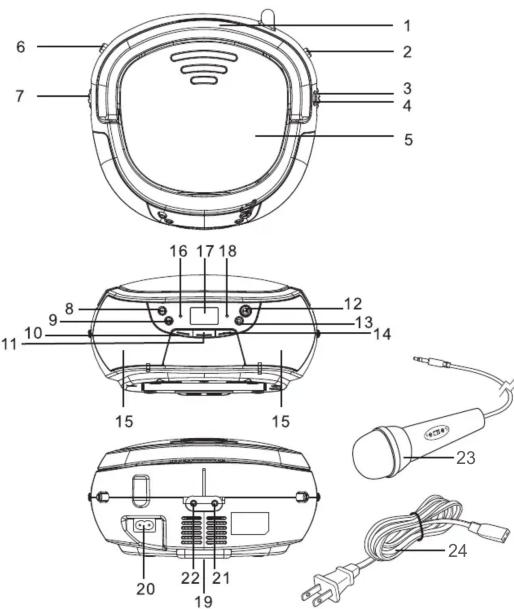
| 1. HANDLE | 9. CD SKIP/SEARCH | 17. LCD DISPLAY |
| 2. AM/FM | BACK BUTTON | 18. FM STEREO INDICATOR |
| 3. TUNING CONTROL | 10. REPEAT BUTTON | 19. BATTERY COMPARTMENT |
| 4. DIAL SCALE | 11. PROGRAM BUTTON | 20. AC SOCKET |
| 5. CD COMPARTMENT | 12. PLAY/PAUSE BUTTON | 21. AUX-IN JACK |
| 6. FUNCTION SWITCH | 13. CD STOP BUTTON | 22. MIC JACK |
| 7. VOLUME CONTROL | 14. RANDOM BUTTON | 23. MICROPHONE |
| 8. CD SKIP/SEARCH | 15. SPEAKERS | 24. AC POWER CORD |
| NEXT BUTTON | 16. POWER INDICATOR |
PROGRAM TRACKS
-
In stop mode, press the PROGRAM button, the PROG will flash and the 01 indicator will be on.
-
Press the CD SKIP/SEARCH NEXT button to select the first desired track to be programmed.
-
Press the PROGRAM button to enter. The display will show "02".
-
Repeat steps 2 & 3 to store other desired tracks until all tracks are programmed (max 20 tracks).
-
Press "PROG" button once more and all the programmed track numbers will be shown one by one.
-
Press the PLAY/PAUSE button to start playback from the first programmed track. (Press the STOP button to stop program playback.)
Note: To erase the Program memory, you can either press the STOP button when the disc is stopped, or open the CD compartment lid.
REPEAT
You can play one track or all tracks on the disc repeatedly.
-
To repeat a single track, press the REPEAT button once in play mode, "REPEAT 1" will flash on the display. To cancel, press the REPEAT button until "REPEAT 1" disappears from the display.
-
To repeat ALL tracks, press REPEAT button until "REPEAT ALL" shows steady on the display. To cancel, press the REPEAT button control until "REPEAT ALL" disappears from the display.
RANDOM PLAY
Press the RANDOM button in play mode until "RDM" shows steady on the display. The random play will start from the next track automatically (or press CD skip forward button), until all tracks are played. Press the RANDOM button again to cancel.
AUX-IN OPERATION
This unit has an AUX-IN jack, through this jack other audio sources (MP3 players, etc) can be connected to this unit and be amplified.
-
Set the FUNCTION switch to CD/AUX position.
-
Connect the audio cable into the AUX-IN jack and the other end connect to the AUDIO OUT jack of the external audio source. The unit will change to AUX mode automatically.
-
Press PLAY on the external audio source to start playback.
Limited One-Year Warranty
eKids warrants this product to be free from defects in workmanship and materials, under normal use and conditions, for a period of one (1) year from the date of original purchase. Should this product fail to function in a satisfactory manner, it is best to first return it to the store where it was originally purchased. Should this fail to resolve the matter and service still be required by reason of any defect or malfunction during the warranty period, eKids will repair or, at its discretion, replace this product without charge. This decision is subject to verification of the defect or malfunction upon delivery of this product to the Factory Service Center authorized by Customer Service Order. If you need to check the number of services at 1-888-TOP-TOYS to obtain Return Authorization Number and shipping instructions.
Disclaimer of Warranty
NOTE: This warranty is valid only if the product is used for the purpose for which it was designed. It does not cover (i) products which have been damaged by negligence or willful actions, misuse or accident, or which have been damaged by the use of any liability whatsoever, or otherwise, due to the limitations of the Company's subsidiaries and other non-cash charges, including losses and damage, or losses in the products or equipment, or losses in the products or equipment, or losses in the products or equipment, or losses in the products or equipment, or losses in the products or equipment, or losses in the products or equipment, or losses in the products or equipment, or losses in the products or equipment, or losses in the products or equipment, or losses in the products or equipment, or losses in the products or equipment, or losses in the products or equipment, or losses in the products or equipment, or losses, except to the provisions of the Company's subsidiaries and other non-cash charges, (ii) damage to digital media players, CDs or tape cassettes (if applicable); (iii) the cost of shipping this product to the Factory Service Center and its return to the owner. This warranty is valid only in the United States of America and does not extend to owners of the product other than to the original purchaser. In no way to purchase any material property from any of these properties located outside the U.S. market outside the U.S. government. If such a property has been sold for sale, the property shall be liable to you or any third party for any consequential or incidental damages, any lost profits, actual, exemplary or punitive damages. (Some states do not allow limitations on implied warranties or exclusion of consequential damages, so these restrictions may not apply to you.) This warranty gives you specific legal and/or compliance requirements.
Your acknowledgement and agreement to fully and completely abide by the above mentioned disclaimer of warranty is contractually binding to you upon your transfer of currency (money order, cashier's check, or credit card) for purchase of your eKids product.
Distributed by eKids, LLC
For questions or comments please call our toll-free number: 1-888-TOP-TOYS
Also visit our website: www.ekids.com
1299 Main Street Rahway, NJ 07065

- IMPORTANT SAFETY INSTRUCTIONS
- IMPORTANTES INSTRUCTIONS DE SÉCURITÉ
- ATTENTION :
- CD Boombox with Microphone
- FCC Information
- Getting Started
- ACCESSORIES:
- POWER SOURCE
- AC OPERATION
- DC OPERATION
- For the Best Possible Performance
- POWER REQUIREMENTS:
- BASIC FUNCTION
- SWITCHING ON THE UNIT
- ADJUSTING VOLUME
- RADIO OPERATION
- CD OPERATION
- Discs for playback
- LOADING A DISC
- Note:
- PLAYING A DISC
- SELECTING A DESIRED TRACK/PASSAGE
- PROGRAM TRACKS
- REPEAT
- RANDOM PLAY
- AUX-IN OPERATION
- Limited One-Year Warranty
Brand : KIDdesigns
Model : FR-430
Category : CD Player