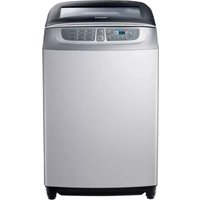
USER MANUAL WAF500L SAMSUNG
Washing Machine User Manual
Planet First
100%
Recycled Paper
This manual is made with 100% recycled paper.
imagine the possibilities
Thank you for purchasing a Samsung product.
To receive a more complete service, please register your product at
www.samsung.com/register
SAMSUNG
Features
• Wobble Technology (Option)
The Wobble Technology provides enhanced fabric protection by controlling the flow of water in an innovative way.
Wobble Technology cleans even delicate fabrics thoroughly, eliminating tangles and preventing fabric damage caused by friction.
• Digital Inverter Motor (Option)
Samsung digital inverter motor can offer more efficient energy and more powerful washing performance. By balancing the laundry better, it can provide longer durability for your washing machine.
- Diamond Drum
The diamond-shaped drum creates high water pressure, effectively removing dirt from the laundry. The diamond drum minimizes fabric damage, extending the lifetime of the fabric. The glittering inner tube is both beautiful and powerful in the wash effect it creates.
- Fuzzy Control
Fuzzy control operates with the best washing program by sensing the wash load like artificial intelligence.
- A transparent tempered glass window
With the transparent tempered glass, you can rely on and use your washing machine for longer.
• Power Wash (Option)
You can control the strength of water flow and spinning speed during both washing and spinning with the digital inverter motor, in a smarter way for your fabric.
- Magic Wash (Option)
You can control the strength of water flow (High-Mid-Low) when washing with a conventional motor.
- Magic Filter
This unique magic filter ensures that all the lint inside the tub is captured for top-quality filtering results, delivering consistently effective cleaning results.
2_features
- Child Lock
The Child Lock function ensures that curious little hands are kept out of your washing machine.
This safety feature stops your children from operating the washing machine and alerts you when it is activated.
- Air Turbo Option
Air Turbo option saves your valuable time, ensuring that your clothes dry faster than from line drying.
- (Eco) Tub Clean
Samsung's Eco Clean Tub is specially designed to remove dirt and biofilm in the tub without special chemical detergent. This innovative function keeps drum extremely clean by soaking and spinning only with the water.
- Dual display
By providing buttons for all the functions on a wide display panel, users can easily select a function.
- Aqua preserve
Samsung's Aqua Preserve reduced waste of water by reusing last rinsed out water. After rinsing the clothes lastly, the washing machine keeps the water before final spin-dry and use it again to save water and your money!
(This function is only available to use when you select twice of rinsing)
- Smart Check
Samsung's Smart Check, an automatic error-monitoring system, detects and diagnoses problems at an early stage and provides quick and easy solutions.
- Last Setting Function
This function automatically remembers the course and option that you chose last time. You don't have to control the same setting repeatedly next time.
Safety Instructions
Please note that the following precautions for safety are intended to prevent unpredictable danger and damage by helping you use the product properly and safely.
When using hot water in washing, please make sure that the water temperature does not exceed 50°C.
- Plastic parts may be deformed or damaged, and an electric shock or a fire may occur.
IMPORTANT SAFETY PRECAUTIONS

WARNING: To reduce the risk of fire, electric shock, or injury to persons when using your appliance, follow basic precautions, including the following:
Do not let children (or pets) play in or on your washing machine. The washing machine door does not open easily from the inside, and children may be seriously injured if trapped inside.
This appliance is not intended for use by persons (including children) with reduced physical, sensory, or mental capabilities, or lack of experience and knowledge, unless they have been given supervision or instruction concerning use of the appliance by a person responsible for their safety.
This appliance can be used by children aged from 8 years and above and persons with reduced physical, sensory, or mental capabilities or lack of experience and knowledge if they have been given supervision or instruction concerning use of the appliance in a safe way and understand the hazards involved. Children shall not play with the appliance.
Cleaning and user maintenance shall not be performed by children without supervision.
Children should be supervised to ensure that they do not play with the appliance.
If the power plug or power cord is damaged, it must be replaced by the manufacturer, a service agent, or a similarly qualified person.
This appliance should be positioned so that the power plug, the water supply taps, and the drain pipes are accessible.
For washing machines with ventilation openings on the base, ensure that the opening is not obstructed by a carpet or any other obstacles.
Please use the new hoses. Do not use the old hoses.
WARNING ⚠️
There might be serious injury or fatal accident when you violate this instruction.
- If the plug (power supply cord) is damaged, it must be replaced by the manufacturer or its service agent or a similarly qualified person in order to avoid a hazard.
- Do not pull the cord off or touch it with moist hands.
- An electric shock or a fire may take place.
- Do not bend the power supply cord by force or press it with heavy things.
- An electric shock or a fire may take place.
- Do not install the washer nearby electric implement or don't put a candle light or cigarette light on the washer.
- A fire may take place.
- During operation, do not put your hands or metal materials under the washer.
- You may be hurt by spinning board beneath the washer.
- Stay away from the washer when the bottom of the washer sinks into the water.
- There might be an electric shock. Please wait until the water drains out completely.
- Do not put laundry stained with gasoline, benzene, or alcohol in the washer, and keep the materials away from the washer.
- An explosion or a fire may take place.
- During spinning, don't put your hand in the spinning tub.
- It may hurt your hands. If it does not stop within 15 seconds after you open the lid, call service agent immediately.
- This appliance is not intended for use by young children or infirm persons unless they have been adequately supervised by a responsible person to ensure that they can use the appliance safely.
Young children should be supervised to ensure that they do not play with the appliance.
- This appliance has to be connected to the plug endurable to proper power consumption.
- This appliance has to be positioned so that the plug is accessible after installation.
- No user-serviceable parts inside. Refer any servicing to qualified service personnel.
- Otherwise this may cause a mechanical error, electric shock, fire or physical damage.
- The product warranty does not cover problems resulting from disassembling the product.
- Do not use this product for business purposes.
- For washing machines with ventilation openings in the base, a carpet must not obstruct the openings.
CAUTIONS
There might be a slight injury or damage when you violate this instruction.
- Don't install it in the area with moisture or outdoor where it has rain or snow.
- An electric shock or a fire may take place.
- Please unplug the power supply cord when you do not use it.
- An electric shock or a fire may take place.
- If there is dust or water on the power supply plug and its connected part, please remove it completely.
- An electric shock or a fire may take place.
- Do not make your kids look into the inside of the washer.
- If your kid falls into the washer, his life could be in danger.
- Ventilate immediately without touching the power plug if gas is leaking.
- An electric shock or a fire may take place if it catches flame.
- If the washer makes strange noise, smell or smoke, unplug it promptly and call service agent.
- An electric shock or a fire may take place.
- When cleaning, don't spray water to the parts of the washer directly.
- It may make its life span shorten. Also an electric shock or fire may take place.
- Do not use the strong acid cleaning agent.
- Don't use several appliances together with an outlet.
- A fire may take place due to unusual heat.
- Don't press the button with an awl or pin.
- An electric shock or a fire may take place.
- Use the new hose-sets and old hose-sets should not be reused.
- If the damage is found on the current cord in use, it should be replaced by manufacturer, service center or authorized person in order to avoid the risk.
- Connect the grounding wire to the shell plate, and bury it under at least 25cm of earth: alternatively, connect the ground wire to the appropriate pin on a properly grounded power receptacle. Never connect the wire to a telephone line, lightning rod, or gas pipe.
- The product you have purchased is designed for domestic use only. The use for business purposes qualifies as product misuse. In this case, the product will not be covered by the standard warranty provided by Samsung and no responsibility can be attributed to Samsung for malfunctions or damages resulting from such misuse.
Safety instructions
Contents
Setting up your washer
8
8 Description of parts
11 How to wash automatically depends on the laundry
12 Control panel
Manual functions
16
16 Manual functions
Installation & maintenance
17
17 Environment
17 Levelling
17 Connecting the water supply hose
18 Assembling the rat protection panel (option)
19 How to connect the drain hose (option)
20 Calibration mode
20 Adding detergent
21 Adding fabric softener
21 Water supply connector filter
21 Cleaning the filter
22 Cleaning the pump filter (option)
22 Cleaning the detergent compartment
TROUBLESHOOTING
23
23 Troubleshooting
WASHING MACHINE WON'T WORK?
24
24 Washing machine won't work?
SPECIFICATION
26
26 Specification
contents_7
Setting Up Your Washer
DESCRIPTION OF PARTS
The User's Manual is for common use.
Make use of the User's Manual depending upon your washing machine model.

8 Setting Up Your Washer
CHECKING BEFORE WASHING AND CARING FOR GARMENTS
Must follow the checkpoints in order to avoid machine problems or damages on garments.
- If the below problems are caused by customer's faults, separate service fee will be charged.
Checkpoints Before Starting Washing
Check if the clothes are bleaching or not.
- Add liquid detergent to a white towel and the garment where you can't notice well. Then, rub together strongly. Check if the color transferred to the towel.
- Be careful with scarves and imported clothes, as they tend to discolor easily.
- Check for stains or partial dirt.
- If stains are found, use a towel dampened with detergent and rub in one direction.
- Before washing, pre-treat the sleeves, collar, dress hem, and pockets by brushing them with detergent.
Wrinkle-processed wool clothes are specially treated by fixing them with threads before washing. The threads should be removed after the clothes are dried.
Non-washable laundry
Clothes that are easily deformed even when soaked in water.
- Even when soaked in water, neckties, brassieres, jackets, suits, and coats can easily deform, such as shrinking and discoloring on the garment surfaces, because they are mostly made of rayon, polynosic, and their blends.
- Wrinkle-processed, embossed, or resin-processed products are prone to deformation even when soaked in water.
- Easily discoloring products made of cotton and wool, wrinkled silk, leather products, leather accessories, leather-trimmed clothes, and their accessories.
- Do not wash clothes without care instructions or material labels.
About Detergent
- If detergent does not dissolve well, use warm water (about 40 °C) to dissolve it.

- Use an appropriate amount.
- Even if an excess amount of detergent is used, there is not much difference in washing results. It may cause damage to the garments because rinsing is insufficient.
- The bleaching agent may cause damage to garments since it is strong alkali.
- Do sufficient rinsing because the powder detergent is easily remained on the garments causing bad odors.
- If too much detergent is used or cold water is used, it doesn't dissolve completely and remain on the garments, hose or spin basket, causing contamination on clothes.
- In case of reserved washing, detergents must be put in the detergent box. If the powder detergents are spread on laundry directly, it may cause discoloration.
setting up your washer_9
setting up your washer
CARING FOR CLOTHES BEFORE WASHING
Take out personal belongings from pockets.
- Caution, Check the pockets! Hairpins and coins cause damages to clothes and washing machine. They make noise and problems to the machine. Must check the pocket.
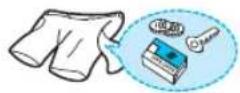
If pants zippers are open while washing, the spin basket may be damaged. The zipper should be closed and fixed with a string before washing.
• Metal on the clothing may cause damage to the clothes and the tub. - Turn clothing with buttons and embroidered clothes inside out before washing them. - Clothing with long strings may become entangled with other clothes, and may cause damage to the clothing. Be sure to fix the strings before washing.
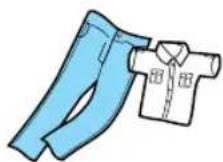
- This may cause the laundry to be ejected or cause the washing machine to vibrate abnormally, which may result in personal injury or damage the washing machine, the floor or the clothing. (Diapers, waterproof clothing, raincoats, umbrella covers, skiwear, car cover sheets, and sleeping bags, etc.).
- When the tub rotates, water may become trapped in the waterproof clothing or fabric and can collect in a corner, causing abnormal vibrations. In addition, the laundry rises and may be ejected and cause personal injury.
Shake the dirt or soils from clothes.
- Soil and sands may rub delicate garments to cause damages and the washing result may be unsatisfactory.
Do pre-washing for white socks, sleeves, and collars before the main washing.
- For stains and dirt on collars, sleeves, hems, and pockets, apply some detergent to them and apply it lightly with a brush before washing.
- Use powdered or liquid detergent. Do not use soap as the tub may become dirty from the dirt on it.
Turn inside out for those nappy clothes before washing.
- If clothes have too much foreign matter, separate them for washing. Other clothes may pick up those dirty matters (dirt, thread).
- Wash black colored clothes and cotton towels separately. If they are washed together, towels may pick up dirty matters. Check before washing.

Cashmilon and those garments having big volume and lightweight (eg. Lasedecorated clothes, lingerie, nylon stocking, synthetic fabrics etc.) may rise and cause damages to the clothes and problems to the machine. Use the laundry net or wash them separately.
- Must put those long stringed clothes, lase-worked clothes, bed cover sheet, wool clothes into a laundry net before washing.
- Put delicate clothes in the laundry net.
- Use only those commercial laundry net for washing.

Curtains, fl oating garments or blue jeans shall be pressed not to fl oat on the water.
- If they are floated on the water, press Start/Pause button to stop and press them to sock in the water. If the washing goes on with clothes floating on the water, it may cause damages to the clothes and the washing machine as well as unsatisfactory washing result.
10_setting up your washer
HOW TO WASH AUTOMATICALLY DEPENDS ON THE LAUNDRY
Before starting washing, check the following:
- Connect the water supply hose to the water tap. Leave the tap open. Plug the power cord in. Make sure to lay down the drain hose.
Washing for the first time
Before washing clothes for the first time, you must run a complete cycle without clothes. To do this:
- Press the Power button.
- Open the detergent drawer and insert a little detergent.
- Turn on the water supply to the washing machine.
- Press the Start/Pause button. This will remove any water from the manufacturer's test run remaining in the machine.
Special notes!
Automatic Sensing Function
- According to the selected program, the amount of laundry is automatically sensed and then the appropriate water level, wash time, rinse cycle, and spinning time are automatically selected for the automatic wash.
- After the power is on, a program is selected and the Start/Pause button is pressed. Then, the washing board starts spinning without water. This action senses how much laundry is in the washing basket, not a machine problem. After this sensing process, water supplies automatically.
Adding Detergent and Softener
- It senses the amount of laundry and indicates the water level. Then, it starts water supply right away.
- During the water supply, it is possible to open the detergent box and add detergent. However, it is better to press the Start/Pause button to stop water supply and add detergent. Close the lid and press the Start/Pause button again. This way is much more convenient.
- If the softener is inserted in the softener dispenser, it automatically adds it in at the last rinsing cycle.
Put the laundry into the washer and add detergent as well.
- Be careful not to overload. Use the right detergent for the fabrics you are washing.

- If the lid is open while running, the washing machine stops automatically for safety. (Except, water supply continues while the lid is open.)
- When hot water is selected, both cold and hot water are supplied for the first 20 seconds in order to protect the clothes.
- It is possible to control the washing time, rinsing cycle, and spinning time at every program during the washing.
setting up your washer
CONTROL PANEL
For more details, see the control panel of your washing machine.
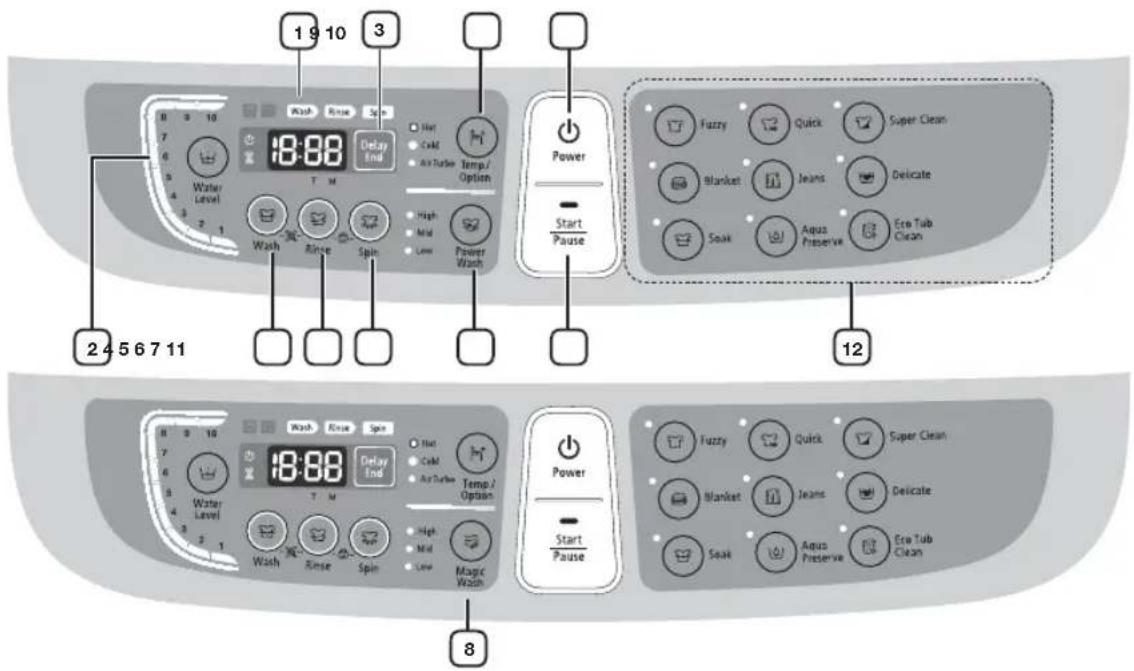
| 1 Digitalgraphicdisplay | Displays the remaining wash time.Displays the reserved delay end time.Displays the error state if a problem occurs in the washing machine so that you can take action. |
| 2 Water Level | The water level is automatically adjusted. However, you can select the water level manually by pressing this button. |
| 3 Delay End | Press this button to select a specific time in which your washing machine will finish to wash.You can set the Delay End from 1 to 19 hours.Turn off your washing machine to cancel a reserved Delay End |
| 4 Wash | Press this button to perform a wash only or to adjust the washing time.You can set the wash time from between 6 to 30 minutes. |
| 5 Rinse | Press this button to perform a rinse only or to adjust the rinse count.You can set the rinse count up to five times. |
| 6 Spin | Press this button to perform a spin cycle only or to adjust the spin time.You can set the spin time from between 1 to 9 minutes.When only a spin is selected, the spin time will be different from the total remaining time. This is because the total remaining time includes the actual spin time and the times for water draining and stopping. |
| 7 Power Wash (Option) | You can control the strength of water flow when both washing and spinning by the digital inverter motor, with smarter way for your fabric. |
| 8 Magic Wash (Option) | You can control the strength of water flow (High-Mid-Low) when washing by conventional motor. |
| 9 Temp./Option | Press this button repeatedly to cycle through the water temperature and Air Turbo option:Cold > Cold, Air Turbo > Cold/Hot > Cold/Hot, Air Turbo > Hot > Hot, Air Turbo |
| 10 Power | Press this button once to operate.Press it again to turn the power off. |
| 11 Start/Pause | Use to pause and restart the operation.To change the washing procedure during an operation, press this button to stop, and again to restart after changing the procedure. |
| 12 Cycle | Fuzzy Selects the best washing program automatically. |
| Quick | If you want to wash those frequently used towels or less dirty laundry time. Because washing is speedy, it is good for light or less stained laundry. |
| Super Clean Use for cleaner washing. |
| Blanket Big volume laundry like blanket and bed cover sheets |
| Jeans For a more thorough wash. |
| Delicate Washable sweater, cardigan, delicate clothes etc. |
| Soak | Press this button to perform a soak wash.Soak time is set up as minutes. Can not change the soak time. |
| Aqua Preserve | If you wish to reuse the remaining water from the rinse cycle.This option helps save the amount of water used. |
| Eco Tub Clean | Use this program to clean the tub, it will keep the tub clean and sanitary.The TUB CHECK LED is turned on to notify the user that it is time to clean the tub.The powerful spinning force of the washing tub pulsator removes the contaminations from the exterior of the washing tub to prevent odors or secondary contamination. |
setting up your washer
CHILD LOCK
This function is for protecting children, the elderly, and the frail.
- Press the Power button.
- To activate the Child Lock function, press and hold both the Rinse and Spin buttons down simultaneously for 3 seconds. (If the Child Lock function is activated, the Child Lock icon blinks.)
- Operations after activating the Child Lock function.
- Even if the Child Lock function is activated, every button works until the door opens.
- When you open the door during the Child Lock is being activated, the alarm sounds and an error message appears. In 30 seconds, draining begins automatically. However, if you close the door within 30 seconds, water will not be drained. (Displayed error message "CL", "dE").
- To add laundry after activating the Child Lock function, you must deactivate the Child Lock function.
- To deactivate the Child Lock function, press and hold both the Rinse and Spin buttons simultaneously for 3 seconds again. (If the Child Lock function is deactivated, the Child Lock icon is turned off.)
- To clear "CL" display, after draining is complete, close the door of the washing turn the power off and then on.

- This function is for preventing injury and malfunction of the product because of inappropriate operations or actions by children, the elderly or the frail.
- If the door opens when the Child Lock function is activated, the water is drained by force to prevent children from drowning.
- To add laundry after activating the Child Lock function, you must deactivate the Child Lock.
- Even if the power is turned off and then on when the Child Lock is activated, the Child Lock remains activated.

- Once Child Lock is activated, even when the power is turned off, if the door is opened, water is automatically drained in 30 seconds.
- The Child Lock function cannot be deactivated when CL is displayed. (However, the Child Lock function can be deactivated when the dE error is displayed.)
14_setting up your washer
SMART CHECK

This function enables you to check the status of the washing machine using a smartphone.

The Smart Check function has been optimized for:
Galaxy S and Galaxy S2
iPhone 4 and iPhone 4S
Downloading the Samsung Smart Washer app
Download the Samsung Smart Washer app to your mobile phone from the Android market or Apple App store and install it. You can easily find it by searching for "Samsung Smart Washer".
Using the Smart Check function
- Hold down the Wash and Rinse buttons at the same time for 3 seconds when an error occurs to run the Smart Check function. Alternatively, the Smart Check function can be run if no button is pressed after the washing machine is turned on.
- The LED segments on the display panel rotate for 2 or 3 seconds and the Smart Check code is displayed on the washing machine's display panel.
- Run the Samsung Smart Washer app on your smartphone and tap the Smart Check button.

'Smart Check' may be changed to 'Smart Check' depending on the language selected.
- Focus your smartphone's camera on the Smart Check code displayed on the washing machine's display panel.

- If light from a light bulb, fluorescent bulb, or lamp is reflected on the display panel of the washing machine, the smartphone may not be able to easily recognize the Smart Check code.
- If you hold the smartphone at too wide an angle relative to the front of the display panel, it may not be able to recognize the error code. For best results, hold the smartphone so that the front of the display panel and the smartphone are parallel or nearly parallel.
- If it focuses correctly, the Smart Check code is automatically recognized, and the detailed information of the status of your washing machine, the error, and the countermeasures are displayed on your smartphone.
- If the smartphone fails to recognize the Smart Check code more than twice, please enter the Smart Check code displayed on your washing machine's display panel into the Samsung Smart Washer app manually.
setting up your washer_15
manual functions
Possible to select the function for each program.
(Example) For a simple washing as the little dirt program:
Power → Select the little dirt program → Wash → Start/Pause
WASH ONLY | Press thePowerbutton.Press theWashbutton.Press theStart/Pausebutton.Washing goes on for 1 times.When theWashbutton is pressed during washing, the wash time can be changed to between 6 and 30 minutes in duration. |
RINSE ONLY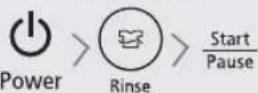 | Press theRinsebutton.Press theStart/Pausebutton.Rinsing goes on for 1 times.When theRinsebutton is pressed, the rinse times can be changed to between 1 to 5 times in duration. |
SPIN ONLY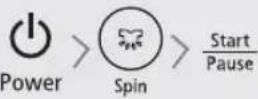 | Press theSpinbutton.Press theStart/Pausebutton.Spin drying goes on for 4 minutes.When theSpinbutton is pressed, the spin time can be changed to from 1 to 9 minutes. |
WASH AND RINSE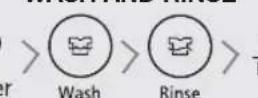 | Press theWashandRinsebutton.Press theStart/Pausebutton once.Detects the amount of laundry, and determines wash and rinse time period automatically. (Option)When theWashandRinsebutton is pressed, wash time period is determined between 6 to 30 minutes, and rinse time is determined between 1 and 5 times. |
RINSE AND SPIN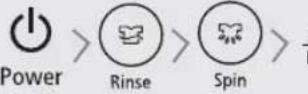 | Press theRinseandSpinbutton.Press theStart/Pausebutton once.Rinsing and spin drying follow.When theRinseandSpinbutton is pressed, the number of rinse times is determined between 1 and 5, and spin time period for drying is determined between 1 to 9 minutes. |
WASH, RINSE AND SPIN > StartPause > StartPause | Press theWash,RinseandSpinbutton.Press theStart/Pausebutton once.Wash,RinseandSpinis performed. |
16_manual functions
installation & maintenance
The User's Manual is for common use.
Make use of the User's Manual depending upon your washing machine model.
ENVIRONMENT
Leave some space
Maintain at least 10 cm between the washer and the wall.
Place the washer on a sturdy flat surface.
If the washer is placed on an uneven or weak surface, noise or vibration occurs. (Allowable is 1°)
Adjust the legs for even placement.
Never install the washer near water.
Do not place the washer in steamy rooms or where the washer is directly exposed to rain. Moisture may destroy the electrical insulation causing an electrical shock hazard.
Avoid direct sunlight or heaters.
As plastic and electrical components are affected by direct heat, never place the washer near furnaces, boilers, etc. Do not place under direct sunlight.
LEVELLING
- If the washer is not leveled with the ground, it makes the machine tremble more or be out of order. So, make sure that the washer is leveled properly.
SEE IF THE MACHINE IS PLACED LEVEL BY CHECKING THE POSITION OF THE WASHING TUB.
- Open the lid of the machine, pour water into the tub up to the level just below the pulsator, and adjust the legs so that the pulsator is positioned at the center of the water as shown in the figure.
- Place the machine more than 10 cm away from the wall.
- Adjust the legs on feet for levelling.

CONNECTING THE WATER SUPPLY HOSE
- Remove the adaptor from the water supply hose.

- First, using a "+" type screw driver, loosen the four screws on the adaptor. Next, take the adaptor and turn part (b) following the arrow for gap about 5 mm between them.

- Connect adaptor to the water tap by tightening the screws firmly. Then, turn part (b) following the arrow and put (a) and (b) together.

- Connect the water supply hose to the adaptor. Pull down the part (c) of the water supply hose. When the part (c) is released, the hose is automatically connected to the adaptor making a 'click' sound.

- Connect the other end of the water supply hose to the inlet water valve at the back of the washer. Screw the hose clockwise all the way in.
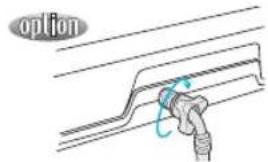
5-1. Connect the other end of the water supply hose to the inlet water valve at the back side of the washer. Screw the hose clockwise all the way in.
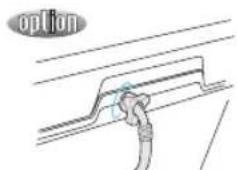
- If the water tap is a screw type, assemble a water supply hose that fits to the tap as shown. After completing connection, if water leaks from the hose, then repeat the same steps.
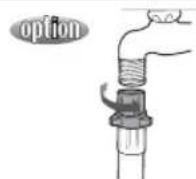
After completing connection, if water leaks from the hose, then repeat the same steps. Use the most conventional type of faucet for water supply. In case the faucet is square or too big, remove the spacing ring before inserting the faucet into the adaptor.
ASSEMBLING THE RAT PROTECTION PANEL (OPTION)
Tilt the washer a little and lift up the panel until it clicks as shown in the figure.
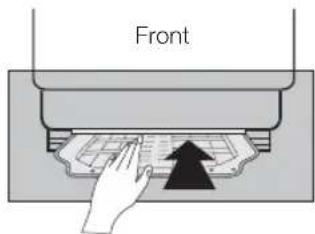
- Insert the rat protection panel into the assembling hole on the front side to the end.

- If you have difficulty inserting the panel, lift up the washer a little and insert it.
HOW TO CONNECT THE DRAIN HOSE (OPTION)
IN CASE OF PUMP-DRAINED WASHER
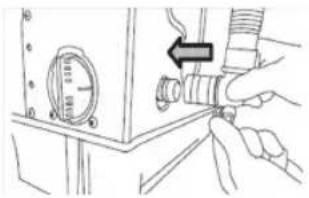
Be sure to join tightly the drain hose into the drain-outlet on the side of the machine.
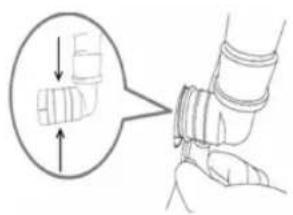
Verify that the retaining ring stays in its correct position.
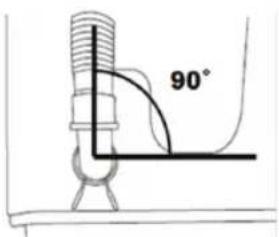
The drain hose has to be arranged vertically at 90° to the base.
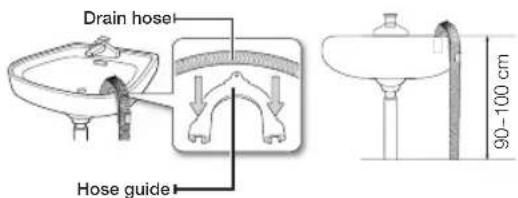
Install the drain hose in the position of about 90~100 cm above the ground. The end of the drain hose cannot be sunk under water.
CALIBRATION MODE
Your Samsung washing machine detects the laundry weight automatically.
For more accurate weight detection, please run Calibration Mode after the installation.
To run Calibration Mode, follow these steps:
- Remove laundry or any contents in the machine.
- Press the Delay End and Spin buttons simultaneously, and then press the Power button. The machine turns on with "Cb"
- Press the Start/Pause button to activate "Calibration Mode".
- The drum rotates for approximately 4 minutes.
- When "Calibration Mode" is finished, "End" appears on the display, and the machine automatically turns off. The washing machine is now ready for use.
ADDING DETERGENT
- Open the detergent drawer and then add the powder detergent into the detergent compartment.
- Add detergent evenly so that it doesn't brim over the edge of the drawer.
- Open the detergent drawer and then add the powder detergent into the detergent compartment.
- Add detergent evenly so that it doesn't brim over the edge of the drawer.
- Use a reasonable amount of detergent.
If you use more detergent than the standard quantity or the water temperature is too low and the detergent does not dissolve in the water completely, it may remain on the laundry and in the hose, causing dirtying and discoloring of the laundry.
- If you use a powder detergent and it remains on the laundry, it may cause a bad odor. Rinse the laundry sufficiently in fresh water.
- Use a reasonable amount of detergent.
If you use more detergent than the standard quantity or the water temperature is too low and the detergent does not dissolve in the water completely, it may remain on the laundry and in the hose and tub, causing damage such as dirtying and discoloring of the laundry.
- If you use a powder detergent and it remains on the laundry, it may cause a bad odor. Rinse the laundry sufficiently in fresh water.
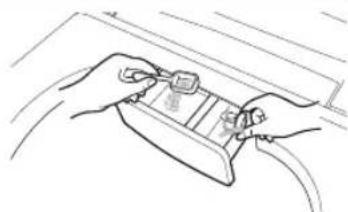

If you spread a powder detergent over the laundry directly, it may result in discoloration. Make sure to insert it into the detergent compartment.

If the water pressure is low, the detergent may remain in the detergent compartment.
20_installation & maintenance
ADDING FABRIC SOFTENER
- When the proper amount (one time dose) of fabric softener is stored in the softener inlet, it is automatically added during the last rinse cycle.
- Do not add detergent, bleach or starch into the softener inlet.
- Using too much softener may produce unsatisfactory results.
- Do not open the lid during the Spin cycle. If added too early, its effectiveness will decrease.
- Do not leave the softener in the softener dispenser for a long time as it may congeal.

If the water pressure is low, the fabric softener may remain in the softener compartment. In this case, put the fabric softener into the tub directly.
WATER SUPPLY CONNECTOR FILTER
- Pull out the filter and wash it thoroughly.

Perform this operation periodically.

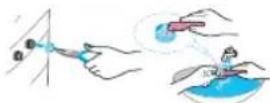
- Insert the filter and connect the hose to the inlet water valve tightly.
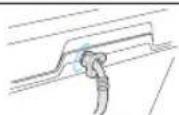
- Check for leaks. Note: tighten the connector.
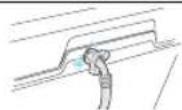
CLEANING THE FILTER
Clean the filter net regularly to keep the washer clean.
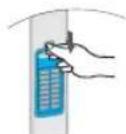
- Push the upper part of the filter and pull it in.
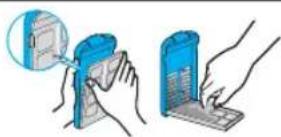
- Open the cover as shown in the figure.
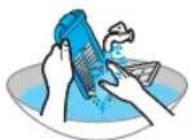
- Clean the filter.

- Close the cover, insert the lower part of the filter into the basket first, then push the filter until it clicks into place.
installation & maintenance_21
installation & maintenance
CLEANING THE PUMP FILTER (OPTION)
- Place a rag or towel under the wash filter to avoid wetting the floor, rotate the filter counterclockwise, and pull it out.
- Remove any dirt from the filter.
- Return the filter to its place by rotating the filter clockwise until it locks into position.


CLEANING THE DETERGENT COMPARTMENT
- Separate the detergent compartment from the washer.
- Separate and clean the Rinse-Cap from the detergent compartment.
- Assemble the Rinse-Cap and insert the detergent compartment into the washer.
22_installation & maintenance
troubleshooting
| PROBLEM CHECK | |
| Washing machine won't work | Is the water tap opened?Is the washer plugged in?Is the power cut off?Is there enough water? |
| Water dose not drain | Is the drain hose down? (No pump)Is the drain hose frozen?Is the drain hose clogged?If the water dose not drain in 30 minutes, a buzzer will sound, and the remaining time indicator will show "5E". |
| Water is not supplied | Is the water tap opened?Is the water cut off?Is the water supply hose or hose connection clogged?Are they blocked the filters net of water supply connector?Is the water tap frozen?If the water supply is not finished in 1 hour or there is no change in the water level 5 minutes (10minutes for some models) after the water supply has started, the buzzer rings and "4E" is displayed on the remaining time indicator. |
| Spinning does not work | Is the laundry spread out evenly in the washer?In the washer set on a sturdy fl at surface? |
| Water is overfl owed | Restart after spinning.If the error sign still indicates, call agency. |
| This indicates that a Child Lock error occurred drained with an a | The error message blinks at a 1 second interval and the water is arm sound.(Displayed message: “CL” or “dE”)This function is to prevent children from drowning when falling into the wash tub. When draining is complete and you turn the power off and then on, the washing machine will operate normally.To clear “CL” display, after draining is complete, close the door of the washing machine, turn the power off and then on.Is the Start/Pause button pressed? |
| Water leakage error | Check if the end of the drain hose is placed on the floor. (The hose should be hung over the pump - hose guide.)Check if the drain hose is clogged by any foreign substances.If the error remains, call the service center. |
troubleshooting_23
washing machine won't work?
| PROBLEMCHECK | |
| The power is cut off. Is the electric voltage normal? |
|
|
|
|
| Is the drain hose down? Put the drain hose down. |
|
|
|
| Is the drain hose folded? Unfold the drain hose. |
|
|
| Is the drain hose outlet clogged? Remove the waste cleanly. |
| Washing machine won't work. Is the washer lid open?Close the lid. |
|
|
|
|
|
|
|
|
| Is the water filled to the water level?If the water pressure is low, it takes a long time to start washing. |
|
|
|
|
| Is the faucet closed?Open the faucet to supply water. |
|
|
|
| If the drain hose and spin basket are frozen, do as follows. | Add hot water to the frozen water tap and remove the drain hose. Soak into hot water.Pour hot water into the spin basket for about 10 minutes.Put a hot water towel on the drain hose connector.If the drain hose defrosts, connect again and check for proper water draining. |
| The water drains out immediately. | The drain is clogged with coins or pins. The drain hose is hung over the drain hose hook. Half fill the spin basket with water and try for spinning again. |
| The water leaks at the water supply hose connector. | If the faucet connecting part is loose, water may leak.Repeat the assembling steps again. (Refer to "Connecting the water supply hose") |
| Check if the rubber packing of water supply hose is in the right position.Screw tightly again. |
| Is the water supply hose folded?Unfold the hose. |
| If the water supply is too strong, water may leak.Close the faucet a little. |
| Is water leaking from the faucet itself?Fix the faucet. Water is not supplied. |
24_washing machine won't work?
| PROBLEM CHECK | |
| The water leaks at the water supply hose connector. | Did you press the Start/Pause button after selecting the water supply? ➔ If the Start/Pause button is not pressed, water is not supplied. Press the Start/Pause button. |
| Is the faucet closed? ➔ Turn on the faucet. |
| Is the filter net at the water supply hose connector clogged with dirty matters? ➔ Clean the filter net by brushing with a toothbrush. |
| Is the water supply cut off? ➔ If the water supply is suspended, turn off the faucet and power off. |
| Spinning makes loud noises and vibrations. | Check if the laundry is spread evenly in the washer. ➔ Spread out the laundry evenly and start again. |
| Check if the washing machine levels on a sturdy fl at fl oor. ➔ Set the machine at level. |
| Is the handle for leveling legs loose? ➔ Adjust the legs on the feet for leveling. |
| Is around the washing machine filled with unnecessary stuffs? ➔ Remove those unnecessary things away from the wash machine. |
washing machine won't work?_25
specifi cation
WA14F5L4, WA12F5L4
| MAX. MASS OF DRY CLOTH IN kg | WA14F5L4 | 14.0 kg | STANDARD WATER LEVEL | 10 | 14kg | 92 |
| WA12F5L4 | 12.0 kg 12/10.5kg 79 | | |
| POWER CONSUMPTION | WASH 600 | W 9 | | 76 |
| SPIN 300 | W 8 | | 70 |
| DIMENSIONS(mm) | W610XL670XH983(LOW BASE)W610XL670XH1003(HIGH BASE) | 7 | 65 |
| 6 | 57 |
| WEIGHT 41.0 Kg 5 | | | 52 |
| WATER PRESSURE | 0.05~0.78 Mpa(0.5 ~ 8.0 kg·f/cm 2 ) | 4 | 47 |
| WASHING TYPE Stirring Type 3 | | | 42 |
| WATER USAGE 154 2 | | | 39 |
| SPIN SPEED | 700 rpm | 1 | 35 |
WA13F5S4
| MAX. MASS OF DRY CLOTH IN kg | WA13F5S4 | 13.0 kg | STANDARD WATER LEVEL | 10 | 92 |
| POWER CONSUMPTION | WASH 480 W 9 | | 76 |
| SPIN 280 W 8 | | 70 |
| DIMENSIONS(mm) | W610XL670XH983(LOW BASE)W610XL670XH1003(HIGH BASE) | 7 | 65 |
| 6 | 57 |
| WEIGHT 42.0 Kg 5 | | | 52 |
| WATER PRESSURE | 0.05~0.78 Mpa(0.5 ~ 8.0 kg·f/cm 2 ) | 4 | 47 |
| WASHING TYPE Stirring Type 3 | | | 42 |
| WATER USAGE 154 2 | | | 39 |
| SPIN SPEED | 700 rpm | 1 | 35 |
26_specifi cation
RECOMMENDED LOAD
Use the next table to determine the quantity of clothes you wish to wash.
| TYPE OF CLOTHING | WA16F7*/WA15F7* | WA17F7*/WA18F7* |
| Jeans 3 4 | | |
| Cotton Pants 2 2 | | |
| T-Shirt 4 5 | | |
| Tank Top 4 4 | | |
| Sweatshirt 3 3 | | |
| Sport Pant's 3 3 | | |
| Large Towel 7 7 | | |
| Shirt 4 7 | | |
| Underware 10 12 | | |
| Small Towel 13 13 | | |
SAMSUNG

DC68-03272L 04
QUESTIONS OR COMMENTS?
| Country CALL OR VISIT US ONLINE AT | |
| ARGENTINA | 0800-333-3733 | www.samsung.com |
| CHILE | 800-SAMSUNG(726-7864)From mobile 02-24 82 82 00 | www.samsung.com/cl |
| COLOMBIA | 01-8000 112 112Bogotá: 6001272 | www.samsung.com/co |
| COSTA RICA | 0-800-507-7267 | www.samsung.com/latin (Spanish)www.samsung.com/latin_en (English) |
| JAMAICA | 1-800-234-7267 | www.samsung.com |
| MEXICO | 01-800-SAMSUNG(726-7864) | www.samsung.com |
| PANAMA | 800-7267 | www.samsung.com/latin (Spanish)www.samsung.com/latin_en (English) |
| PUERTO RICO | 1-800-682-3180 | www.samsung.com |
| TRINIDAD & TOBAGO | 1-800-SAMSUNG(726-7864) | www.samsung.com |
| VENEZUELA | 0-800-100-5303 | www.samsung.com |
| SOUTH AFRICA | 0860-SAMSUNG(726-7864 ) | www.samsung.com |
Code No. DC68-03272L_04_EN