
Mini Pop-Up Book - Graphic tablet FABER-CASTELL - Free user manual and instructions
Find the device manual for free Mini Pop-Up Book FABER-CASTELL in PDF.


| Product Type | Graphic Tablet |
| Brand | Faber-Castell |
| Model | Mini Pop-Up Book |
| Active Area | Approximately 6 x 4 inches (15.2 x 10.2 cm) |
| Pressure Sensitivity | 2048 levels |
| Resolution | 2540 LPI |
| Pen Technology | Battery-free, electromagnetic resonance |
| Pen Buttons | 2 programmable buttons |
| Tablet Buttons | 4 customizable express keys |
| Connectivity | USB 2.0 |
| Compatible Systems | Windows 7+, macOS 10.10+, Linux (basic) |
| Dimensions | 7.5 x 6.3 x 0.3 inches (19 x 16 x 0.8 cm) |
| Weight | 0.55 lb (250 g) |
| Power Source | USB bus-powered |
| Battery | None (pen and tablet are batteryless) |
| Main Functions | Digital drawing, sketching, painting, note-taking |
| Cleaning and Maintenance | Wipe with a soft, dry cloth. Avoid liquids. |
| Safety | Complies with FCC, CE, RoHS |
| Spare Parts and Repairability | Replacement pens and nibs available; tablet not user-serviceable |
| General Information | Designed for beginners and mobile use; portable size |
Frequently Asked Questions - Mini Pop-Up Book FABER-CASTELL
User questions about Mini Pop-Up Book FABER-CASTELL
0 question about this device. Answer the ones you know or ask your own.
Ask a new question about this device
Download the instructions for your Graphic tablet in PDF format for free! Find your manual Mini Pop-Up Book - FABER-CASTELL and take your electronic device back in hand. On this page are published all the documents necessary for the use of your device. Mini Pop-Up Book by FABER-CASTELL.
USER MANUAL Mini Pop-Up Book FABER-CASTELL
www.creativityforkids.com

instruction section on our web site pop-up books, visit the product For more instructions on making
*Remember, turn the pages gently and treat your pop-up book with care. When closing each page, please make sure your pop-up is tucked safely inside.
and friends.
You can also include print out photos of family and friends. Just make sure you get adult permission before cutting any photograph. You are the author and illustrator; when your book is complete be sure to sign your name and date it. Then share your story with family
onto the next page.
Make sure you allow the marker to dry thoroughly before you move
Mini POP - UP Book
WARNING:
CHOKING HAZARD - Small parts.
Not for Children under 3 years.
Ages 5 to 95
A little bitty book filled with big possibilities! This kit includes a hardbound book with ten pages, mini markers and fun color-in stickers. Make your story come to life with fun and easy pop-up elements
Brainstorm!
Decide what you would like to write about. Your book can be about anything you are interested in- adventure, poetry, pets, friends, family, art, sports and so much more.
Adding Pop-Ups to your Page
There is no right or wrong way to create your book, but some of the pop-up and motion pieces fit better on certain pages.
FOLDED SPRING- Use the two long strips of paper to fold together and form a spring- this will make your artwork jump off the page!
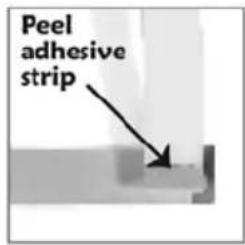
Peel & stick one end of a strip to the end of another.
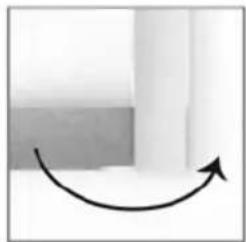
Fold the bottom piece over the top piece.

Fold down.
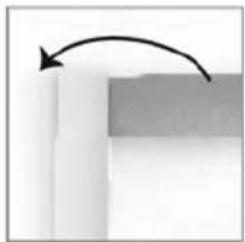
Fold over.

Continue folding until you reach the end of both strips.

Once your spring is complete use the adhesive strip to attach it to your book. Add art or a small sticker to the top of the spring.

SPIRAL - This could be a snake, a snail or maybe a slide. Decorate and then peel and press it into place as shown.

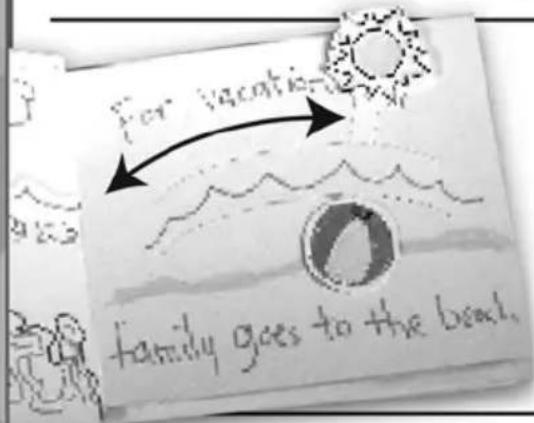
WAND - Slide this into the rainbow-like arch on page 1. Peel and stick one of the four circle shapes to both ends of the wand to keep it from sliding out of the arch. Add artwork or stickers to decorate and watch it fly across the page.
PEEK-A-BOO FLAPS -
Decorate the inside and outside of the flaps and then peel and stick them in place. You can include a secret message or a surprise picture inside.

Flap closed

Flap open
more tips on back...



Brand : FABER-CASTELL
Model : Mini Pop-Up Book
Category : Graphic tablet