SU9 - Smoke detector Conair - Free user manual and instructions
Find the device manual for free SU9 Conair in PDF.


| Product Type | Hair Dryer |
| Brand | Conair |
| Model | SU9 |
| Wattage | 1875 W |
| Number of Speeds | 2 |
| Heat Settings | 3 |
| Cool Shot Button | Yes |
| Included Attachments | Concentrator, Diffuser |
| Ionic Technology | Yes |
| Swivel Cord | Yes |
| Cord Length | 6 ft (1.8 m) |
| Weight | 1.2 lbs (0.54 kg) |
| Dimensions (L x W x H) | 9 x 3 x 8 in (22.9 x 7.6 x 20.3 cm) |
| Color | Black |
| Material | Plastic |
| Voltage | 110-120 V (US standard) |
| Auto Shut-Off | Overheat protection |
| Cleaning | Unplug and wipe with damp cloth; clean filter regularly |
| Warranty | 2 years limited |
| Certifications | ETL, UL |
Frequently Asked Questions - SU9 Conair
User questions about SU9 Conair
0 question about this device. Answer the ones you know or ask your own.
Ask a new question about this device
Download the instructions for your Smoke detector in PDF format for free! Find your manual SU9 - Conair and take your electronic device back in hand. On this page are published all the documents necessary for the use of your device. SU9 by Conair.
USER MANUAL SU9 Conair
IMPORTANT SAFETY INSTRUCTIONS
When using an electrical appliance, basic precautions should always be taken, including the following:
READ ALL INSTRUCTIONS BEFORE USING THIS APPLIANCE
DANGER — To reduce the risk of electric shock:
1) Do not use in bathtub or in a shower.
2) Do not place or store appliance where it can fall or be pulled into a tub or sink.
Do not place in or drop into water or other liquid.
WARNING
1) This appliance is not for use by children or individuals with certain disabilities.
2) Use this appliance only for its intended use as described in this manual.
3) Never operate this appliance if it is not working properly, or if it has been dropped or
damaged, or dropped into water. Return the appliance to a service center for
examination and repair.
4) Never drop or insert any object into any of the openings.
SAVE THESE INSTRUCTIONS
OPERATING INSTRUCTIONS
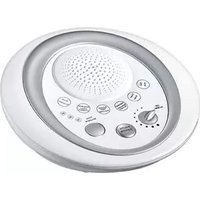
Congratulations on your purchase of the Conair® Serene Sounds System. This system provides soothing sounds to relax you and to mask unwanted noise. The Conair® Serene Sounds System allows you to create a soothing environment at home, at the office or anywhere you would like to relax. Used as directed, the Conair® Serene Sounds System will provide you with dependable service and can be used anywhere as it is battery operated. The Conair® Serene Sounds System operates with three 1.5 volt AA batteries (not included).
FEATURES
1) 6 High-Quality Digital Recordings (press sound on/off to change sounds)
-Summer Night: Relax to the soothing sounds of summe
-Rainfall: Ease the mind with the peaceful patter of rain.
-Ocean Waves: Wash away tension with the calming effect of the incoming tide.
-Babbling Brook: Soothe your soul with the serenity of a flowing stream
-Heartbeat: Calm little ones with the rhythmic beating of a heart.
-Tropical Forest: Travel to a world full of tranquil tropical sounds.
2) Speaker for realistic sound quality.
3) Variable volume control with ON/OFF
4) Sound control button (chosen sound lights up).
5) 15-30 & 60-minute timer (chosen time lights up).
6) Uses three AA batteries (not included).
TO INSERT BATTERIES
1) Unlatch and lift off the battery compartment door (located on the bottom of the
sound system).
2) Insert three AA 1.5 volt alkaline batteries, as shown inside the battery compartment.
3) Replace the battery compartment door and return the sound system to its
upright position.
NOTE
Use only alkaline batteries. Do not mix old and new batteries. Do not mix alkaline, standard (carbon-zinc) or rechargeable (nickel cadmium) batteries. Replace all batteries of a set at the same time. Clean the battery contacts and those of the device prior to battery installation. Remove used batteries promptly. Remove batteries when storing the machine for an extended period of time.
FCC MARKINGS
This device complies with Part 15 of the FCC Rules. Operation is subject to the following two conditions: (1) this device may not cause harmful interference, and (2) this device must accept any interference received, including interference that may cause undesired operation.
NOTE
This equipment has been tested and found to comply with the limits for a Class B digital device, pursuant to Part 15 of the FCC Rules. These limits are designed to provide reasonable protection against harmful interference in a residential installation. This equipment generates, uses and can radiate radio frequency energy and, if not installed and used in accordance with the instructions, may cause harmful interference to radio communications. However, there is no guarantee that interference will not occur in a particular installation. If this equipment does cause harmful interference to radio or television reception, which can be determined by tuning the equipment off and on, the user is encouraged to try to correct the interference by one or more of the following measures: • Reorient or relocate the receiving antenna.
- Increase the separation between the equipment and receiver.
- Connect the equipment into an outlet on a circuit different from that to which the
receiver is connected.
- Consult the dealer or an experienced radio/TV technician for help.
HOW TO OPERATE THE CONAIR®
Serene Sounds SYSTEM
1) Insert three AA batteries (not included) as shown inside the battery compartment, on the bottom of the sound system. LED will light to show power ON.
the bottom of the sound system. LED will light to show power ON.
2) Turn the ON/OFF switch clockwise to turn on the SOUND system. The sound system will generate the natural sound selected the last time the system was used.
2) Choose one of six natural sounds by pressing the sound button once, then again for
3) Choose one of six natural sounds by pressing the sound button, the next sound and then continue to other sounds as desired.
4) To turn off the Conair® Serene Sounds System, turn the ON/OFF switch to the
OFF position. The sound that was last selected will be remembered and it will be
reproduced automatically the next time your sound system is turned on.
5) To adjust the speaker volume, turn the volume control counter clockwise.
6) To set the timer (optional), press the TIMER button repeatedly until the desired time
(15, 30 or 60 minutes) lights up. The sound system will turn off automatically at the
end of the selected time. To turn off the sound system manually, turn the volume
CARE OF YOUR CONAIR® SERENE SOUNDS SYSTEM
1) Before cleaning remove the batteries.
2) Clean the Serene Sounds System only with a soft, slightly damp cloth.
Never allow water or any other liquid to come into contact with the sound system,
3) DO NOT IMMERSE IN ANY LIQUID TO CLEAN. Never use abrasive cleaners.
4) Do not attempt to repair the Serene Sounds System.
■ Battery Compartment uses 3 AA batteries (not included)
LIMITED ONE YEAR WARRANTY
Conair will (at our option) repair or replace your appliance free of charge for 12 months from
the date of purchase if the appliance is defective in workmanship or materials.
To obtain service under this warranty, return the defective product to the service center
nearest you, together with your sales slip and \$5.00 for postage and handling, California
residents need only provide proof of purchase and should call 1-800-3-CONAIR for
shipping instructions. In the absence of a 12 months from the date of manufacture.
ANY IMPLIED WARRANTIES, OBLIGATIONS OR LIABILITIES, INCLUDING PUT NOT
ANY IMPLIED WARRANTIES, OBLIGATIONS OR LIABILITIES, INCLUDING BUT NOT LIMITED TO THE IMPLIED WARRANTY OF MERCHANTABILITY AND FITNESS FOR
A PARTICULAR PURPOSE, SHALL BE LIMITED IN DURATION TO THE 12 MONTH
DURATION OF THIS WARRANTY. Some states do not allow limitations on how long an
implied warranty lasts, so the above limitations may not apply to you.
IN NO EVENT SHALL CONAIR BE LIABLE FOR ANY SPECIAL, INCIDENTAL OR
CONSEQUENTIAL DAMAGES FOR BREACH OF THIS OR ANY OTHER WARRANTY
EXPRESS OR IMPLIED, WHATSOEVER. Some states do not allow the exclusion or
limitation of special, incidental or consequential damages, so the above limitation may not apply to you.
not apply to you.
This warranty gives you specific legal rights, and you may also have other rights which vary
from state to state.
Service Centers
Conair Corporation Conair Corporation
Service Department Service Department
150 Milford Road 7475 North Glen Harbor Blvd. East Windsor NJ 20509 Glendale 17 05007
East Windsor, NJ 08520 Glendale, AZ 85307
Visit us on the web at: www.conair.com
©2012 Conair Corporation SU9
East Windsor, NJ 08520, Glendale, AZ 85307 12PS130344
serene sounds with timer

natural_image
Close-up of a circular electronic device with control buttons and a perforated top panel (no visible text or symbols)INSTRUCTION BOOKLET FOR ALL SU9 MODELS
For your safety and continued enjoyment of this product, always read the instruction book carefully before using

Brand : Conair
Model : SU9
Category : Smoke detector