
QCE535X - Cooker HUSQVARNA - Free user manual and instructions
Find the device manual for free QCE535X HUSQVARNA in PDF.


Pick your language and provide your email: we'll send you a specifically translated version.
| Product Type | Freestanding Electric Cooker |
| Brand | Husqvarna |
| Model | QCE535X |
| Energy Type | Electric |
| Oven Type | Fan-assisted with conventional heating |
| Oven Capacity | 65 L |
| Hob Type | Ceramic glass with 4 cooking zones |
| Number of Hob Zones | 4 |
| Dimensions (H x W x D) | 900 x 600 x 600 mm |
| Weight | 55 kg |
| Oven Functions | Convection, Grill, Bottom Heat, Defrost, Rotisserie |
| Power Consumption (Oven) | 2.5 kW |
| Energy Efficiency Class | A |
| Cleaning | Enamel interior with catalytic back panel |
| Safety Features | Child lock, cool door, automatic shut-off |
| Display | Digital LED timer and temperature |
| Warranty | 2 years |
| Color | Stainless steel |
Frequently Asked Questions - QCE535X HUSQVARNA
How do I set the timer on the Husqvarna QCE535X cooker?
Press the Timer button, then use the +/- buttons to set the desired time. Confirm with Start. The oven will beep when time is up.
What is the best way to clean the ceramic hob?
Wipe with a damp cloth and a mild detergent after each use. For burnt-on residues, use a ceramic hob scraper and a dedicated cleaner. Avoid abrasive sponges.
How do I activate the child lock?
Press and hold the Lock key for 3 seconds. The display will show a lock icon. Repeat to deactivate.
Can I use aluminium foil in the oven?
Yes, but avoid covering the entire oven floor or touching the heating elements. Use small pieces to prevent heat reflection that may affect cooking.
Why is my oven not heating up properly?
Check the power supply and ensure the oven is plugged in. Verify that the timer is set correctly. If the problem persists, the heating element may need replacement.
How do I use the rotisserie function?
Place the meat on the rotisserie spit, fix it with the forks, and insert into the motor socket. Select the Rotisserie function and set temperature. Ensure the drip tray is placed at the bottom.
What does the catalytic liner do?
The catalytic liner absorbs grease and food splatters during cooking. It cleans itself by burning off residues at high temperatures (above 300°C). Wipe off ash after cooling.
How do I replace the oven light bulb?
Disconnect the power. Remove the glass cover by turning it counterclockwise. Replace with a G9 halogen bulb (40W max) and reassemble.
What is the maximum weight for the rotisserie?
The maximum recommended weight is 5 kg. Ensure the spit is properly balanced and the forks are tight.
How do I defrost food in this cooker?
Select the Defrost function. Enter the weight of the food using the controls. The oven will set the optimal time and power level. Turn the food halfway.
User questions about QCE535X HUSQVARNA
0 question about this device. Answer the ones you know or ask your own.
Ask a new question about this device
No questions yet. Be the first to ask one.
Download the instructions for your Cooker in PDF format for free! Find your manual QCE535X - HUSQVARNA and take your electronic device back in hand. On this page are published all the documents necessary for the use of your device. QCE535X by HUSQVARNA.
USER MANUAL QCE535X HUSQVARNA
natural_image
Line drawing of a microwave oven with control panel and tray (no text or symbols)Inbyggnadsugn
Innbyningsovn
Ugnens ventilation
natural_image
Diagram of a microwave oven with airflow arrows indicating heat distribution (no text or labels)natural_image
Top-down schematic of an oven with fan and vent, showing internal structure without any text or symbolsVärm upp ugnen
Signalur/timer
Tillbehör
natural_image
Four blank rectangular trays with different internal patterns, no text or symbols presentUgnsemalj
natural_image
Top-down schematic of a kitchen appliance with ventilation system and storage racks (no text or symbols)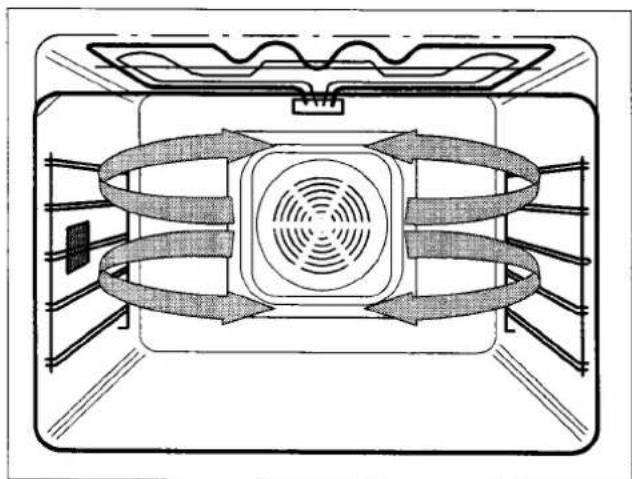
natural_image
Diagram of a refrigerator interior showing airflow patterns around the vent and fan (no text or labels)Pizza/paj

natural_image
Diagram of a microwave oven interior showing airflow patterns around the vent and fan (no text or labels)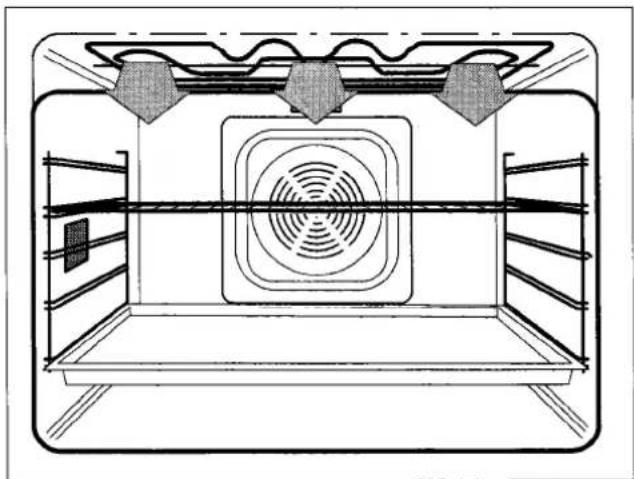
natural_image
Technical line drawing of an oven with ventilation duct and heating elements (no text or symbols)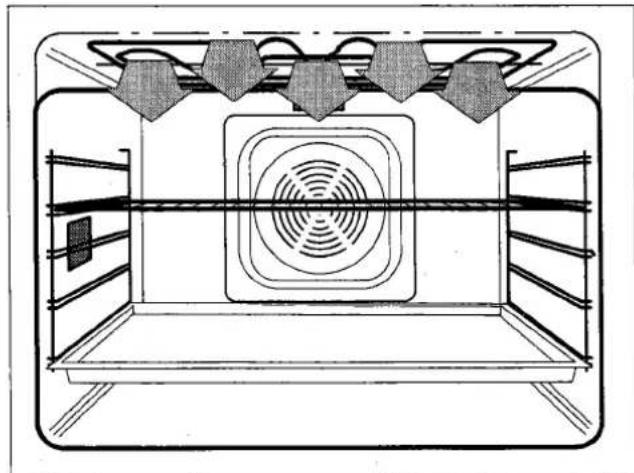
natural_image
Technical line drawing of a room interior with ventilation duct and ceiling-mounted fixtures (no text or symbols)
natural_image
Diagram of a double boiler interior showing airflow patterns around the vent (no text or labels)Lågtemperaturstekning

natural_image
Diagram of a refrigerator interior showing airflow patterns around the vent and fan (no text or labels)
natural_image
Cross-sectional diagram of an indoor vertical farm with concentric rings and leafy structures (no text or labels)Roterande grillspett


natural_image
Diagram of a rooster inside an oven with airflow arrows indicating process (no text or symbols)Tips och råd
Allmänt om bakning
natural_image
Top-down schematic of a microwave oven with fan and vent (no text or labels)
natural_image
Top-down view of a portable electronic device with ventilation grille and fan (no visible text or symbols)
natural_image
Diagram of mechanical components including a cylindrical part, cylindrical tube, and textured base with intersecting lines (no text or symbols)Ugnens tak
natural_image
Technical line drawing of a mechanical component with hands operating it, no text or symbols present
natural_image
Top-down schematic of a microwave oven with fan and vent system (no text or labels)Byte av ugnslampa

natural_image
Diagram of a mechanical assembly with labeled components (no text or symbols present)Lampa sidovägg:
natural_image
Diagram showing a hand inserting a grid into a panel, with an open panel containing a small jar and a thermometer inside (no text or symbols)natural_image
Technical line drawing of an oven with a fan and vent, showing internal structure without any text or symbols.
Husqvarna
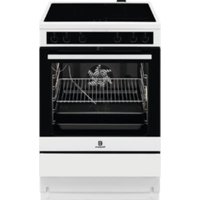
Table of contents
Click a title to access it
Manual assistant
Powered by Anthropic
Waiting for your message
Product information
Brand : HUSQVARNA
Model : QCE535X
Category : Cooker