ECGW9000 - Air Conditioning Ecron - Free user manual and instructions
Find the device manual for free ECGW9000 Ecron in PDF.


| Product Type | Portable Air Conditioner |
| Model | ECGW9000 |
| Brand | Ecron |
| Cooling Capacity | 9000 BTU/h |
| Energy Efficiency Ratio (EER) | 2.8 |
| Power Supply | 115V / 60Hz |
| Power Consumption (Cooling) | 950 W |
| Airflow Volume (Max) | 250 CFM |
| Dehumidification Capacity | 1.2 L/h |
| Noise Level (Low/High) | 48 / 55 dB(A) |
| Dimensions (W x D x H) | 18 x 15 x 30 inches |
| Weight (Net) | 48 lbs |
| Refrigerant Type | R-410A |
| Operating Modes | Cool, Fan, Dehumidify |
| Thermostat Control | Digital, Remote Control Included |
| Timer Function | Up to 24 hours |
| Air Filter | Washable, Reusable |
| Maintenance | Clean filter every 2 weeks |
| Safety Features | Overheat Protection, Auto Shut-off |
| Spare Parts Availability | Filter, Remote, Drain Hose |
| Manual Pages | 48 (EN) |
Frequently Asked Questions - ECGW9000 Ecron
User questions about ECGW9000 Ecron
0 question about this device. Answer the ones you know or ask your own.
Ask a new question about this device
Download the instructions for your Air Conditioning in PDF format for free! Find your manual ECGW9000 - Ecron and take your electronic device back in hand. On this page are published all the documents necessary for the use of your device. ECGW9000 by Ecron.
USER MANUAL ECGW9000 Ecron
natural_image
Line drawing of an ECRON air conditioner unit (no text or symbols on the device itself)Fig. 3
LIMPIEZA Y MANTENIMIENTO

ADVERTENCIA
natural_image
Diagram of a hand holding a rectangular object with arrows indicating upward and downward motion (no text or symbols)Fig. 4a

Fig. 4b
natural_image
Illustration of hands holding a grid-like object with a tool, no text or symbols presentnatural_image
Line drawing of a car air conditioner unit with cooling fins and airflow direction arrows (no text or symbols)natural_image
Illustration of two different air conditioner unit designs with hand gestures indicating airflow direction (no text or symbols)Fig. a
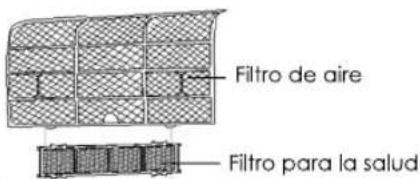
natural_image
Technical line drawing of a mechanical component with internal grid structure (no text or symbols)Fig. c

natural_image
Diagram of a car air conditioner unit with airflow arrows indicating airflow direction (no text or symbols)$$ \begin{array}{r}\mid \ \mid \ \mid \ \mid \ \mid \ \mid \ \mid \ \mid \ \mid \ \mid \ \mid \ \mid \ \mid \ \mid \ \mid \ \mid \ \mid \ \mid \ \mid \ \mid \ \mid \ \mid \ \mid \ \mid \ \mid \ \mid \ \mid \ \mid \ \mid \ \mid \ \mid \ \mid \ \mid \ \mid \ \end{array} $$
44
$$ - \quad | \quad | \quad - $$
Negro

$$ \begin{array}{r}\mid \ \mid \ \mid \ \mid \ \mid \ \mid \ \mid \ \mid \ \mid \ \mid \ \mid \ \mid \ \mid \ \mid \ \mid \ \mid \ \mid \ \mid \ \mid \ \mid \ \mid \ \mid \ \mid \ \mid \ \mid \ \mid \ \mid \ \mid \ \mid \ \mid \ \mid \ \mid \ \mid \ \mid \ \end{array} $$
46
$$ \begin{array}{r}\text{-} \quad \text{-}\ \mid \quad \text{-} \end{array} $$
Negro
Garantía
ECRON
Brand : Ecron
Model : ECGW9000
Category : Air Conditioning