
WE605 - Washing machine Welco - Free user manual and instructions
Find the device manual for free WE605 Welco in PDF.


Pick your language and provide your email: we'll send you a specifically translated version.
| Product Type | Freestanding Washing Machine |
| Model | WE605 |
| Brand | Welco |
| Rated Capacity | 6 kg |
| Spin Speed | 600 rpm |
| Energy Class | A+ |
| Width | 60 cm |
| Depth | 60 cm |
| Height | 85 cm |
| Weight | 70 kg |
| Power Supply | 220-240 V ~ 50 Hz |
| Power Consumption | 2200 W |
| Water Pressure | 0.05 - 0.8 MPa |
| Number of Programs | 15 |
| Noise Level (Wash) | 62 dB(A) |
| Noise Level (Spin) | 78 dB(A) |
| Display | LED Indicator |
| Child Lock | Yes |
| Start Delay | Up to 24 hours |
| Drum Material | Stainless Steel |
| Maintenance | Clean filter regularly, descale every 3 months |
| Safety Features | Overflow protection, unbalanced load detection |
Frequently Asked Questions - WE605 Welco
How to clean the pump filter?
Turn off the machine, open the filter cover (bottom right front), place a container, unscrew the filter, and remove debris. Clean and reassemble.
What does the 'Child Lock' function do?
It locks the control panel to prevent accidental presses. Activate by pressing and holding the Child Lock button for 3 seconds.
Why is the washing machine not spinning?
Check if the load is unbalanced, the drain filter is clogged, or the spin speed is set to low. Also ensure the drain hose is not kinked.
How to clean the detergent drawer?
Remove the drawer by pressing the release lever. Wash with warm water and a soft brush, then dry and reinsert.
What should I do if the machine leaks?
Check the inlet hose connections, the drain hose attachment, and the door seal. Tighten or replace parts as needed. If the leak persists, contact service.
How to level the washing machine?
Adjust the four adjustable feet by turning them clockwise or counterclockwise until the machine is stable and level. Use a spirit level.
How to run a drum cleaning cycle?
Empty the drum, add a drum cleaner or white vinegar, select the Drum Clean program (if available) or run a hot wash at 90°C with an empty machine.
What does the 'Start Delay' option mean?
It allows you to preset the washing machine to start automatically after a set delay (up to 24 hours). Press the Delay button repeatedly to set the time.
How to resolve error codes?
Refer to the manual for an error code list. Common codes: E01 (door lock issue), E03 (drain problem). Try resetting by unplugging for 5 minutes.
Where can I find spare parts for this model?
Spare parts such as belts, hoses, and filters are available online or from authorized service centers. Use the model number WE605 for accurate parts.
User questions about WE605 Welco
0 question about this device. Answer the ones you know or ask your own.
Ask a new question about this device
No questions yet. Be the first to ask one.
Download the instructions for your Washing machine in PDF format for free! Find your manual WE605 - Welco and take your electronic device back in hand. On this page are published all the documents necessary for the use of your device. WE605 by Welco.
USER MANUAL WE605 Welco
natural_image
Abstract black curved arrow and circular emblem on white background (no text or symbols)Fig. 1

natural_image
Close-up of a black mechanical component with a circular hole and a separate 3D arrow-shaped object (no text or symbols visible)Fig. 2

natural_image
Simple diagram showing a black circle, white circle, and arrow on a grid background (no text or symbols)Fig. 3
REGLAGE DES PIEDS
natural_image
Close-up of a mechanical component with a metallic clip and black base (no visible text or symbols)Fig.4

natural_image
Pure mechanical assembly diagram without any text, numbers, or symbolsFig.5
RACCORDEMENT ELECTRIQUE
natural_image
Close-up of a car interior with visible engine and dashboard components (no text or symbols)Fig.6
natural_image
Illustration of a hand holding a tool with floating objects above, set against a textured background (no text or symbols)Fig. 7
RACCORDEMENT DU TUYAU DE VIDANGE
natural_image
Diagram showing a car interior with a circular vent and a mechanical component, alongside a 3D map highlighting a specific area (no text or labels)Fig. 10

natural_image
Illustration of a hand holding a pen and a small cylindrical object, both without any text or symbols.Fig.11
FILTRE DE POMPE DE VIDANGE
natural_image
Line drawing of a hand holding a small object, possibly a tool or component, with no visible text or symbols.Fig. 12

natural_image
Line drawing of a hand fastening a mechanical ring component (no text or symbols)Fig. 13
BAC A PRODUITS
natural_image
Simple line drawing of a hand pressing down on a wall with control panel and patterned area below (no text or symbols)Fig 14
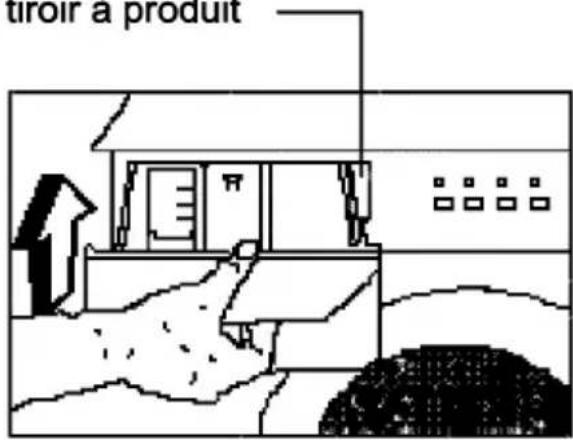
Table of contents
Click a title to access it
Manual assistant
Powered by Anthropic
Waiting for your message
Product information
Brand : Welco
Model : WE605
Category : Washing machine