
E300 - Server Smart-AVI - Free user manual and instructions
Find the device manual for free E300 Smart-AVI in PDF.


| Product Type | Server |
| Brand | Smart-AVI |
| Model | E300 |
| Form Factor | 1U Rackmount |
| Dimensions (W x D x H) | 17.3 x 10.5 x 1.7 in (44 x 26.7 x 4.3 cm) |
| Weight | 10.5 lb (4.8 kg) |
| Power Supply | AC 100-240V, 50/60Hz, 250W |
| Processor | Intel Xeon E-2300 Series (configurable) |
| Memory | Up to 128GB DDR4 ECC |
| Storage | 4 x 3.5" SATA/SAS hot-swap bays |
| Networking | 2 x Gigabit Ethernet ports |
| Management | IPMI 2.0 with dedicated LAN |
| Expansion Slots | 1 x PCIe 3.0 x16, 1 x PCIe 3.0 x8 |
| Operating Temperature | 0°C to 40°C (32°F to 104°F) |
| Humidity | 10% to 80% non-condensing |
| Cooling | 3 x 40mm hot-swap fans |
| Security | TPM 2.0, chassis intrusion detection |
| Compliance | FCC, CE, RoHS |
| Warranty | 3 years limited |
| Included Accessories | Power cord, rack mount kit, quick start guide |
Frequently Asked Questions - E300 Smart-AVI
User questions about E300 Smart-AVI
0 question about this device. Answer the ones you know or ask your own.
Ask a new question about this device
Download the instructions for your Server in PDF format for free! Find your manual E300 - Smart-AVI and take your electronic device back in hand. On this page are published all the documents necessary for the use of your device. E300 by Smart-AVI.
USER MANUAL E300 Smart-AVI
| VIDEO | |
| Format HDMI 1.4 / | VGA |
| DVI Compliance Single-link DVI-D 1.1 w/ adaptor | |
| HDCP Compliance | 1.0/1.1 |
| Resolution | Up to 3840 x 2160 @30Hz |
| Outputs | (1) HDMI Local loop with Digital L-PCM Audio, (1) VGA HD15 Analog |
| Inputs | (1) HDMI with Digital L-PCM Audio, DVI with HDMI to DVI adapter |
| Maximum Cable Length | HDMI 20 ft. |
| Video Stream Output | MPEG-4 Part 10 / AVC (H.264) |
| AUDIO | |
| Audio Input (1) 3.5 | mm, analog stereo |
| Audio Output | (1) 3.5 mm local loop, analog stereo |
| Audio Stream Support | MPEG4-GENERIC, MPEG4-LATM |
| OTHER | |
| Network Connector | (1) RJ-45 |
| Streaming Protocols | RTP, RTSP, RTCP, UDP |
| Command Protocols | TCP/IP, UPnP, HTTPS |
| USB | (1) Type B Female, Firmware update only |
| RS-232 | (1) DB9 Female, Function forthcoming |
| Compression H.26 | 4/Mpeg4 Part 10 (AVC) |
| 4 Pin-Din Connector | Power, Do not use. |
| Power Adapter PS | VDC4A |
| Dimensions 9" W x 4" D x 1.8" H | |
| Weight .75 lbs. | |
| Working Temp. 32 | to 113°F (0 to 45 °C ) |
| Working Humidity | 20 to 80% RH (no condensation) |
| Storage Temp. -40 | to 131°F (-40 to 55 °C ) |
| Storage Humidity | 5 to 95% RH (no condensation) |
WHAT'S IN THE BOX
| PART NO. | QTY | DESCRIPTION |
| SAVI-ST-E300 | 1 | 1080p H.264 Streaming Encoder |
| PS5VDC4A | 1 | Power Adapter |
| 1 | Quick Start Guide |
NOTICE
The information contained in this document is subject to change without notice. SmartAVI makes no warranty of any kind with regard to this material, including but not limited to, implied warranties of merchantability and fitness for particular purpose.
SmartAVI will not be liable for errors contained herein or for incidental or consequential damages in connection with the furnishing, performance or use of this material.
No part of this document may be photocopied, reproduced, or translated into another language without prior written consent from SmartAVI Technologies, Inc.
20170525
800.AVI.2131
Tel: (818) 503-6200 | Fax: (818) 503-6208 11651 Vanowen St. North Hollywood, CA 91605
SmartAVI.com
Smart-AVM SMART AUDIO VIDEO INNOVATION
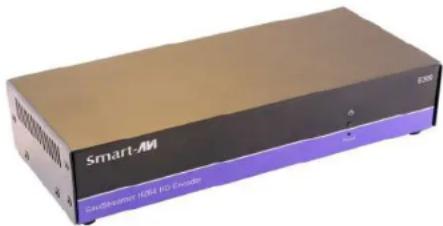
SaviStreamer E300 Encoder
Full HD, Low-Bandwidth 1080p Streaming Encoder
natural_image
Exterior view of a Smart-AM device with purple and black casing (no visible text or symbols on body)Capture and stream or record high-definition A/V signals from a media source and create a seamless extension over IP to one or more decoder units
Quick Start Guide
INTRODUCTION
The E300 video distribution over IP solution consists of an E300 encoder and decoders that can extend or record Up to 3840 x 2160 @30Hz video and audio over a standard network at user-defined low bit rates for excellent quality and minimal network bandwidth consumption. The E300 encoder streams or records high-quality video and audio and uses the H.264 video compression standard. It can stream to D300 decoders or any device or PC that supports the required network protocols. It can also record to a shared network or NAS drive.
FEATURES
- Extend/record Up to 3840 x 2160 @30Hz video and audio
•H.264 compression for high-quality, low-bandwidth AV-over-IP - Support for wide-screen & standard aspect ratios and many resolutions
- Scale streams before distribution for lower bandwidth consumption
•HDMI or analog audio support - Record up to 1080p@60Hz/1920x1200 to a shared network drive
- Recorded user-defined file name includes timestamp for easy file management
- Operates on standard 100/1000Mb Ethernet networks
•Network bit-rate control (100 Kbps - 25 Mbps) - Fine-tune encode/decode parameters and adjust bit rates
•Reliable, solid-state, energy-efficient design - Local real-time pass-through and confidence preview on encoder
-User access from secured PC
APPLICATIONS
●Retail Store Displays
•Business Lobbies
•Restaurants
- Digital Signage
●Airports & Transportation Hubs
•Hospitals
•Schools & Universities
flowchart
graph TD
    A["E300 ENCODER"] --> B["Local Video Monitoring (HDMI or VISA)"]
    A --> C["HDMI SOURCE"]
    B --> D["TCB-IP LAN"]
    C --> E["TCB-IP LAN"]
    F["D300 DECODER (Solid Separately)"] --> G["TCB-IP LAN"]
    F --> H["TCB-IP LAN"]
    I["D300 DECODER (Solid Separately)"] --> J["TCB-IP LAN"]
    I --> K["TCB-IP LAN"]
    style A fill:#f9f,stroke:#333
    style F fill:#ccf,stroke:#333
    style I fill:#cfc,stroke:#333
HARDWARE INSTALLATION
- Position the E300 conveniently and keep it unplugged.
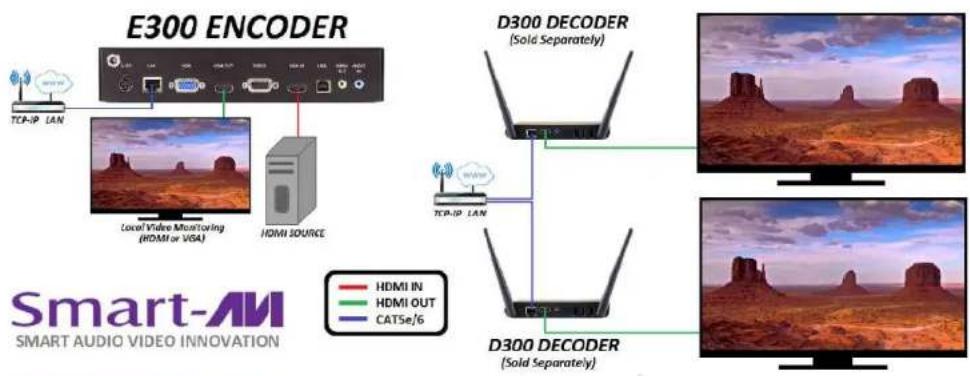
- Connect the E300 HDMI IN connector to an HDMI Source.
- Optionally connect a VGA or HDMI display to the E300 VGA or HDMI OUT connector for local monitoring of the streaming video signal and power on the display.
- Connect the RJ45 LAN port on the E300 to your network.
- Power on the E300 Encoder and wait a few seconds for the unit to initialize.
- Use IP scanner software to identify the IP address of the E300 and make a note of it.
- Power off the E300.
- See the D300 decoder documentation to set up the decoder at this point. When the D300 is ready continue with the next step.
- Power on the E300 Encoder and wait a few seconds for the unit to initialize.
- Power on the connected video source and start streaming to the E300.
- If needed power cycle or reboot the D300 decoder to start displaying the video stream.

Figure 1
Brand : Smart-AVI
Model : E300
Category : Server