
EZ Press DPP143 - Iron Conair - Free user manual and instructions
Find the device manual for free EZ Press DPP143 Conair in PDF.


| Type | Steam Iron |
| Brand | Conair |
| Model | EZ Press DPP143 |
| Power Supply | 120V ~ 60Hz |
| Wattage | 1500W |
| Soleplate Material | Non-stick |
| Water Tank Capacity | 8 oz (approx. 240 ml) |
| Dimensions (L x W x H) | 12 x 5.5 x 5 inches |
| Weight | 2.5 lbs (approx.) |
| Cord Length | 8 ft (120V models) |
| Variable Steam | Yes, with adjustable knob |
| Spray Function | Yes |
| Shot of Steam | Yes (burst function) |
| Temperature Control | Adjustable dial |
| Vertical Steaming | Yes |
| Auto Shut-Off | Yes, after 30 seconds of inactivity |
| Anti-Drip System | Yes |
| Self-Cleaning | Yes |
| Water Fill Opening | Wide mouth for easy filling |
| Safety Features | Auto shut-off, heat-resistant handle |
| Maintenance | Empty water after each use; clean soleplate with damp cloth |
Frequently Asked Questions - EZ Press DPP143 Conair
User questions about EZ Press DPP143 Conair
0 question about this device. Answer the ones you know or ask your own.
Ask a new question about this device
Download the instructions for your Iron in PDF format for free! Find your manual EZ Press DPP143 - Conair and take your electronic device back in hand. On this page are published all the documents necessary for the use of your device. EZ Press DPP143 by Conair.
USER MANUAL EZ Press DPP143 Conair
• No. 10, 2016, 10, 2017
When using your iron, basic precautions should always be followed, including the following:
READ ALL INSTRUCTIONS
READ ALL INSTRUCTIONS BEFORE USING
-
Use iron only for its intended use.
-
To protect against a risk of electric shock, do not
immerse the iron in water or other liquid.
- The iron should always be turned off before unplugging from an outlet. Never vank cord to
disconnect from outlet; instead, grasp plug and
pull to disconnect.
-
Do not allow cord to touch hot surfaces.
-
Let iron cool completely before putting away.
-
Lean and loosely around sand was up
-
Loop cord loosely around cord wrap when storing.
-
Always disconnect iron from when filling with or emptying water and when not in use.
-
Be careful to avoid spilling water over iron when filling.
-
Do not operate any appliance with a damaged cord or plug or after the appliance malfunctions or is dropped or damaged in any manner.
-
If the product requires attention within the warranty period, call the toll-free number listed in the warranty section of this manual for information on examination, repair, or electrical or mechanical adjustment.
-
To avoid the risk of electric shock, do not disassemble the iron; instead, take it to an authorized service center for examination and repair. Incorrect reassembly can cause risk of
electric shock when the iron is used.
- This appliance should not be used by or near
children or persons with disabilities.
-
Do not leave iron unattended while connected or on an ironing board.
-
Always position iron carefully to prevent it from falling if ironing board is accidentally moved or cord is pulled. Always use heel rest.
-
Burns can occur from touching hot metal parts, hot water or steam.
-
Use caution when you turn a steam iron up down. There may be hot water in reservoirs.
down. There may be not water in reservoir. 17. If you need to clean the iron, unplug and allow to cool. Use a slightly damp cloth and wipe down the outside of the iron. Do not use cleaning agents or place the iron in water or cleaning fluids.
-
Burns can occur from touching hot metal parts, hot water, or steam. Use caution when you turn a steam iron upside down or use vertical burst of steam — there may be hot water in the water tank. Avoid rapid movement of iron to minimize water spillage.
-
When using burst of steam, always direct the steam vents away from your body and others.
-
Do not operate in the presence of explosive and/or flammable fumes.
-
Do not use iron outdoors.
-
This product is for household use only, not for commercial or industrial use.
-
Be sure dual voltage selecto voltage position before plugging iron into wall outlet. This appliance was set at the factory to operate at 120 volts. Refer to Operating Instructions section of this manual for conversion to 240 volt operation.
SPECIAL
INSTRUCTIONS
To avoid circuit overload, do not operate another high wattage appliance on the same circuit. If an extension cord is absolutely necessary, a 15-ampere rated cord with a polarized plug and UL, CSA or NOM approval should be used. Cords rated for less amperage may overheat. Care should be taken to arrange the cord so that it cannot be pulled on or tripped over.
SAVE THESE
INSTRUCTIONS
。
This appliance has a polarized plug (one blade is wider than the other). As a safety feature, this plug will fit into a polarized outlet only one way. If the plug does not fit fully into the outlet, reverse the plug. If it still does not fit, contact a qualified electrician. Do not attempt to defeat this safety feature.
Thanks for your purchase of the Conair™ EZ Press. We have used the highest quality materials in the production of this clothing iron to lasting performance.
Please be sure to read the following instructions carefully before you use your Conair™ EZ Press for the first time. Once you have familiarized yourself with this appliance, please save this instruction's in correct manual for future reference.
OPERATING
INSTRUCTIONS
PREPARING FOR FIRST USE
Before first use, remove all labels from the soleplate and housing. Before you use the iron to press fabrics for the first time, heat it to the highest temperature setting without adding any water, then turn the iron off, allow to cool, and unplug iron.
- The tank can be filled with ordinary tap water. However, for optimal performance, distilled water is suggested.
a. Using a clean measuring cup, slowly fill the tank until the water reaches the Max indicator DO NOT OVERFILL.
b. Wipe off any water that may have spilled on the outside of the iron with a soft clean cloth. 2. Set the iron on a stable, flat surface when selecting the settings. We recommend using a
quality ironing board as the pressing surface. Be sure to give yourself enough room to maneuver them but are in the pressing.
- Plug the iron into a 120V electrical receptacle. Make sure that no other high wattage appliances are plugged into the same circuit.
-
Align fabric setting "dot" with setting indicator located on tank under handle.
-
The iron will heat up to the setting on the dial. Once the temperature is reached, the ready indicator will go off and the iron is ready to use.
- For steam use, please ensure that the dial is set to the 3-dot setting to prevent water from dripping.
FABRIC CARE TIP Start with delicate, low-temp fabrics first and move up to high-temp fabrics like linen. You can choose from minimum one dot (•), to two dots (••) or three dots (•••). See the accompanying chart to match the dots to your fabric.
TEMPERATURE CONTROL DIAL
(one dots) (two dots) (three dots)
| Low Medium | High | |
| Acrylic | Silk | Wool |
| Nylon | Rayon | Cotton |
| Polyester | Linen | |
This iron is capable of both dry pressing and steam pressing. Dry pressing is best for delicate fabrics, like silk, that may be damaged by steam.
- To dry press, choose a fabric setting between Min and Medium (● two dots).
Be sure the variable steam control is in the off position; otherwise water may drip from soleplate. 2. To press with steam, set the temperature control dial to the steam icon or higher (Max setting). Be sure the variable steam control is in the steam position.
- The burst of steam is used to eliminate tough wrinkles. While pressing, push the burst of steam button to get a maximum steam through the fabric. Too many bursts in a row will cool the soleplate and take the iron out of the appropriate temperature setting. If temperature is below the steam setting, water may drip from soleplate.
FABRIC CARE TIP Dry pressing is also a good second step after steam pressing cotton pants, to achieve a crisp crease.
VERTICAL STEAMING
This iron will help remove wrinkles and freshen garments on hangers, or draperies, with bursts of steam.
-
Hang the item that you want to treat, such as a suit jacket.
-
Set the iron to the highest setting: 3 dots.
-
Hold the iron with the soleplate facing the fabric, but not touching it.
-
Turn the vertical steam control from 0 to (steam iron) to activate steam burst
-
Press the burst of steam button. Make sure the burst of steam is penetrating the fabric. Repeat until the wrinkles have been removed or the fabric has been freshened to your liking.
When you have finished pressing or vertical steaming, unplug the iron. Be sure to allow the iron to cool completely before storing.
CONVERTING VOLTAGE
Iron is factory set to operate at 120 volts. To convert iron to operate at 240V, make sure iron is unplugged. Move dual voltage switch from 120V position to 240V position. If necessary use a small screwdriver to help move the switch. Follow Operating Instructions.

07NP256
61endale, AZ 85307
Service Department
Donair Corporation
Service Center:
©2007 CONAIR CORPORATION
FAMILIARÍCESE CON SU
PLANCHA DE VAPOR EZ PRESS™

which vary from state to state.
limitation of special, incidental, or consequential damages, so the above limitation may not apply to you. This warranty gives you specific legal rights, and you may also have other rights.
Some states do not allow the exculsion or
CONSEQUENTAL DAMAGES FOR REACH OF THIS OR ANY OTHER WARRANTY, EXPRESS OR IMPULDED,
FOR ANY SPECIAL, INCIDENTAL, OR
IN NO EVENT SHALL CONAIR BE LIABLE
long an implied warranty lasts, so the above
Some states do not allow limitations on how
IN DOCUMENT TO THE 12 MONTH DOCUMENT OF THIS WRITTEN, LIMITED WARRANTY.
PARTICULAR PURPOSE, SHALL BE LIMITED
MERCHANTABILITY AND FITNESS FOR A
ON CLARILITES, INCLUDING BOL NOT LIMITED TO THE IMULIED WARRANTY
ANY IMPULDED WARRANTIES, OBLIGATIONS,
from the date of manufacture.
insuclonics: In the absence of a purchase
and should call 1-800-3-COUNTOR for shipping instructions to the above of a purchase
residents need only provide proof of purchase
listed below together with your purchase receipt and \$3.00 for postage and handling, California
to obtain service under this warranty, result
To obtain approval of the necessary
of purchase if the appearance is detective in
Conari will repari or replace (at our opinion) your unit free of charge for 12 months from the date
LIMITED ONE YEAR WARRANTY
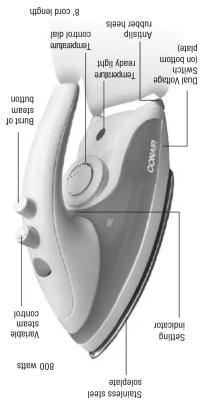
8' cord length
• When storing the iron turn the steam control to "no steam" setting. Try to store the iron sitting on the heel rest; enough to produce steam:
• Make sure that you are using the burst of steam in the highest setting, if not, the iron will not be hot
Water leaks from the solpate
• Make sure the water tank is full.
steam" setting.
• The steam control must not be set to the „no
• The iron will produce steam only at the highest setting (three dots). Make sure the iron is set to that setting.
Iron does not steam
on. Make sure to select a tabnc.
• Make sure that the iron is plugged in and turned
Iron does not heat
TOURBLESHOOTING
If the iron has been dropped, undipy the iron were found in a very few years of damage or if you hear any loose bars or similar to the iron. Greatly, there is obvious damage for it for damage. If there is obvious damage for it, and inspect it for damage. If there is obvious damage for it, and inspect it for damage. If there is obvious damage for it, and inspect it for damage. If there is obvious damage for it, and inspect it for damage. If there is obvious damage for it, and inspect it for damage. If there is obvious damage for it, and inspect it for damage. If there is obvious damage for it, and inspect it for damage. If there is obvious damage for it, and inspect it only damaged. If there is obvious damage for it, and inspect it only damaged. If there is obvious damage for it, and inspect it only damaged. If there is obvious damage for it, and inspect it only damaged. If there is obvious damage for it, and inspect it only damaged. If there is obvious damage for it, and inspect it only damaged. If there is obvious damage for it, and inspect it only damaged. If there is obvious damage for it, and inspect it only damaged.
WARNING
EZ PRESS 1
GET TO KNOW YOUR
©2007 CONAIR CORPORATION
Centro de servicio:
Conair Corporation
Service Department
7475 N. Glen Harbor Blvd. Glendale, AZ 85307
definite, 12: 00:01
07NP256


Brand : Conair
Model : EZ Press DPP143
Category : Iron