
VR400BMG - VCR MAGNAVOX - Free user manual and instructions
Find the device manual for free VR400BMG MAGNAVOX in PDF.


| Product Type | VHS Video Cassette Recorder |
| Brand | Magnavox |
| Model | VR400BMG |
| Video Head System | 4-head helical scan |
| Recording Format | VHS (NTSC) |
| Playback Compatibility | VHS tapes, SP/LP/EP modes |
| Timer Recording | 8-event/1-month programmable |
| Inputs | RF antenna input, AV input (RCA composite) |
| Outputs | RF modulator output, AV output (RCA composite) |
| Audio | Monaural, frequency 100 Hz – 10 kHz |
| Power Supply | AC 120V, 60Hz |
| Power Consumption | 22 W (typical) |
| Dimensions (W x D x H) | 430 x 280 x 90 mm (16.9 x 11.0 x 3.5 in) |
| Weight | 4.0 kg (8.8 lbs) |
| Operating Temperature | 5°C to 40°C (41°F to 104°F) |
| Remote Control | Infrared, with VCR/TV mode switch |
| Maintenance | Clean video heads with approved cleaning cassette; keep vents clear |
| Safety | Unplug during storms; avoid moisture; use grounded outlet |
| Spare Parts & Repairability | Contact Magnavox service for belts, heads, power supply |
| General Information | Front-loading VCR with auto-tracking; manual fine tuning |
Frequently Asked Questions - VR400BMG MAGNAVOX
User questions about VR400BMG MAGNAVOX
0 question about this device. Answer the ones you know or ask your own.
Ask a new question about this device
Download the instructions for your VCR in PDF format for free! Find your manual VR400BMG - MAGNAVOX and take your electronic device back in hand. On this page are published all the documents necessary for the use of your device. VR400BMG by MAGNAVOX.
USER MANUAL VR400BMG MAGNAVOX
Video Cassette Recorder Owner's Manual

natural_image
Exterior view of a black Magnavox CD-ROM device (no visible text or symbols on body)MAGNAVOX
Return your Warranty Registration Card today to ensure you receive all the benefits you're entitled to.
Once your purchase is registered, you're eligible to receive all the privileges of owning this product. So complete and return the Warranty Registration Card enclosed with your purchase at once. And take advantage of these important benefits.
Warranty Verification
Registering your product within 10 days confirms your right to maximum protection under the terms and conditions of your warranty.
Owner Confirmation
Your completed Warranty Registration Card serves as verification of ownership in the event of product theft or loss.
Model Registration
Returning your Warranty Registration Card right away guarantees you'll receive all the information and special offers which you qualify for as the owner of your model.
MAGNAVOX
Smart. Very smart.®
Congratulations on your purchase, and welcome to the "family!"

Dear Magnavox product owner:
Thank you for your confidence in this product. You've selected one of the best-built, best-backed products available today. And we'll do everything in our power to keep you happy with your purchase for many years to come.
As a member of the Magnavox “family,” you're entitled to protection by one of the most comprehensive warranties and outstanding service networks in the industry.
What's more, your purchase guarantees you'll receive all the information and special offers for which you qualify, plus easy access to accessories from our convenient home shopping network.
And most importantly, you can count on our uncompromising commitment to your total satisfaction.
All of this is our way of saying welcome - and thanks for investing in a Magnavox product.
P.S. Remember, to get the most from your product, you must return your Warranty Registration Card within 10 days. So please mail it to us right now!
Know these
safety symbols

This "bolt of lightning" indicates uninsulated material within your unit may cause an electrical shock. For the safety of everyone in your household, please do not remove product covering.
The “exclamation point” calls attention to features for which you should read the enclosed literature closely to prevent operating and maintenance problems.
WARNING: TO PREVENT FIRE OR SHOCK HAZARD, DO NOT EXPOSE THIS EQUIPMENT TO RAIN OR MOISTURE.
CAUTION: To prevent electric shock, match wide blade of plug to wide slot, fully insert.
Below, enter your product's model number and serial number, which are located on the rear of the cabinet. Keep this information for future reference.
Model No.
Serial No.
Welcome to your VCR owner's manual.
This manual has six sections: Setting Up Your VCR; Description of Controls; Basic Operations; Recording; Playing; and Information You May Need. The instructions explain all of the VCR's features, which are listed below. You cannot hurt your VCR by trying the features! So read on – and relax.
Features
- Auto Satellite Link
• Automatic Channel Setup
• Automatic Head Cleaner
• Automatic Playback Features
• Automatic Tracking Adjustment - Display Panel
- Front Panel Menu Access
• High Quality (HQ) System
• 19 micron head - Improves the picture quality - On-Screen Displays in English or Spanish
• One-Touch Recording
• Real-Time Counter - Remote Control
- Repeat Play
• S-VHS Quasi Play Back (SQPB)
• Special Effects Playback: Forward and Reverse Searching; Still; Slow
• Special Search Functions: Index; Time; Quick Find -
Timer Recording
-
Picture Select
Safety Precautions
Warning: To prevent fire or shock hazard, do not expose this equipment to rain or moisture.
FCC Warning: Any unauthorized changes or modifications to this equipment void the user's authority to operate it.
This VCR, equipped with a High Quality (HQ) system, is compatible with existing Video Home System (VHS) equipment.
Philips Consumer Electronics Company recommends that you use only video cassette tapes that are labeled with the VHS mark. The use of other tapes may result in poor picture quality and excessive deposits on the video heads, which may not be covered by the warranty if damage occurs.
Note to the Cable TV System Installer: This reminder is provided to call the Cable TV system installer's attention to Article 820-40 of the National Electrical Code, which provides guidelines for proper grounding – in particular, specifying that the cable ground shall be connected to the grounding system of the building, as close to the point of cable entry as possible.
Declaration of Conformity
Model Number: VR400BMG
Trade Name: Magnavox
Responsible Party: Philips Consumer Electronics
P.O. Box 14810
Knoxville, TN 37914-1810
(865) 521-4316

As an ENERGY STAR® Partner, Philips Consumer
Electronics Company has determined that this product meets the ENERGY STAR® guidelines for energy efficiency.
ENERGY STAR® is a U.S. registered mark.
Using products with the ENERGY STAR® label can save energy. Saving energy reduces air pollution and lowers utility bills.
Copyright 2000 Philips Consumer Electronics Company. All rights reserved.
Helpful Hints
- Before doing anything else, record the VCR's model and serial numbers in the spaces provided on page two. These numbers will help us assist you if you ever call for help.
- Your new product and its packaging contain materials that can be recycled and reused. Specialized companies can recycle your product to increase the amount of reusable materials and to minimize the amount that needs to be properly disposed.
Your product uses batteries that should not be thrown away when depleted but should be disposed of as small chemical waste.
Please find out about the local regulations on disposal of your old product, batteries, and packaging whenever you replace existing equipment.
4 Table of Contents
Setting Up Your VCR
Introduction 3
Table of Contents 4
Before Using Your VCR 5
Hookups Without a Cable Box/Direct Broadcast System 6-7
Hookups With a Cable Box/Direct Broadcast System 8-9
Hookups With a Stereo TV 10
Turning on Your VCR 11
Automatic Channel Setup 12-13
Setting the Clock 14-15
Language Selection 16
Description of Controls
On-Screen Status Displays 17
Remote Control Buttons 18-19
VCR Display Panel 20
Front Panel 21
Rear Panel 22
Basic Operations
Playing 23
Recording 24
Recording
One-Touch Recording 25
Timer Recording 26-30
Auto Satellite Link Using a Satellite Tuner 31
Recording One Channel/Watching Another 32
Rerecording (Tape Duplication) 33
Playing
Repeat Play 34
Special Effects Playback 35
Picture Select 36
Real-Time Counter Memory 37
Index Search 38
Time Search 39
Quick Find 40
Automatic Playback Features .... 41
Information You May Need
Helpful Hints 42-43
Glossary 44
Specifications 45
Limited Warranty 46
Index 47
Supplied Accessories 48
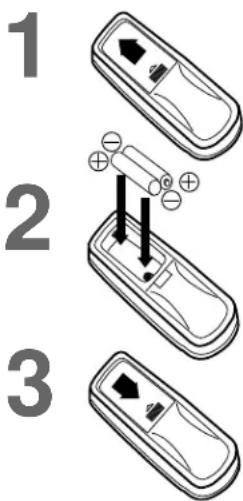
Putting Batteries in the Remote Control
1
Remove the battery compartment lid on the bottom of the remote control by sliding the lid in the direction of the arrow.
2
Insert two AA batteries inside the battery compartment with their + and - ends aligned as indicated.
3
Replace the battery compartment lid.
Using the Remote Control
- Point the remote control at the VCR's remote sensor (see page 21) when using the remote control to operate the VCR.
- Do not put objects between the remote control and the VCR.
Recording Prevention
Video cassette tapes have record tabs to ensure that recordings are not erased accidentally.
1
To prevent recording, break off the tab with a screwdriver.
2
To allow recording, cover the hole with cellophane tape.
VCR maintenance
- In this VCR, use only tapes with the VHS mark.
- Make sure any light adhesive stick-on notes are removed from the video cassette tape before putting the tape in the VCR. Removable labels like these can jam the VCR.
- Periodic maintenance is required to maintain your VCR's excellent performance. This VCR has an Automatic Head Cleaner. However, the video heads will require replacement eventually. Only an authorized service center should perform this service.

Helpful Hints
- The remote control and its batteries are supplied.
- Do not mix alkaline and manganese batteries.
- Do not mix old and new batteries.
6 Hookups Without a Cable Box / Direct Broadcast System
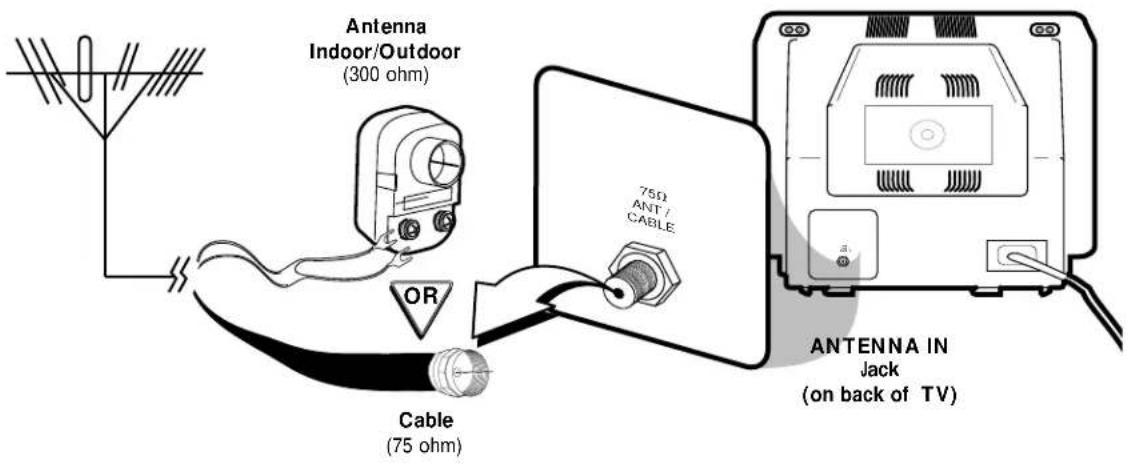
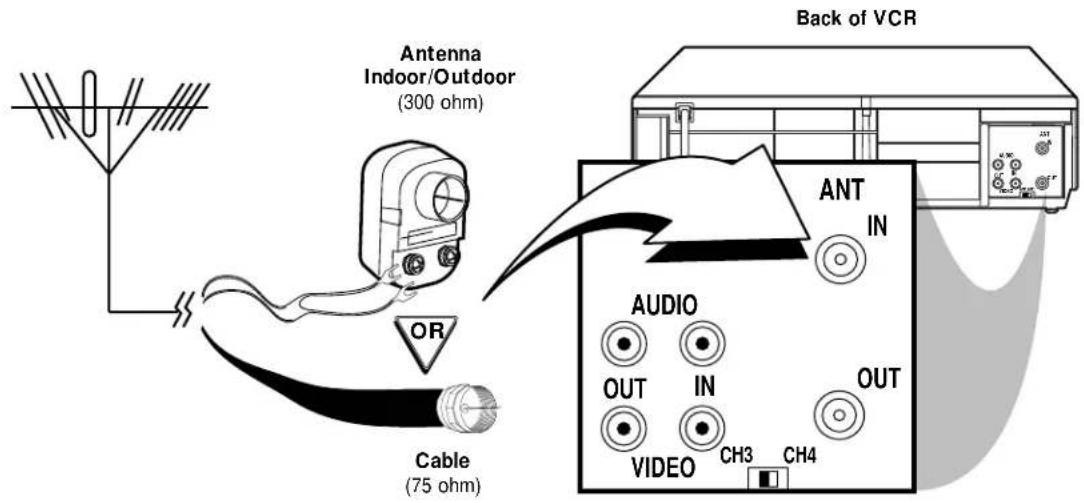
The basic VCR/TV connection – antenna/cable to VCR to TV – is shown below. If you have a Cable Box or a Direct Broadcast System, please see pages eight-nine. If you have a Stereo TV, please see page 10. After you hook up the VCR, go to page 11 to turn on the VCR.
1
Disconnect the antenna or cable from your TV.
2
Connect the antenna or cable to the ANT(enna) IN Jack of your VCR.
Hookups Without a Cable Box / Direct Broadcast System (cont'd) 7
3
Connect the RF coaxial cable (supplied) to the OUT Jack on the back of the VCR and to the ANTENNA IN Jack on the TV. (You may use either a snap-on type (supplied) or screw-on type of coaxial cable, whichever you prefer.)

4
Plug in the AC power cords of the TV and the VCR.
5
Set the CH3/CH4 switch on the back of the VCR to CH3 or CH4, whichever channel is not used or least used in your area. Set the TV to the same channel. For example, when playing a tape, if the CH3/CH4 switch is set to CH3, the TV should be on channel 03.

flowchart
graph TD
    A["Device"] -->|CH 4 or CH 3| B["Switch"]
    B -->|CH3 / CH4| C["Ch3 CH4"]
    C --> D["Audio"]
    D --> E["OUT"]
    D --> F["IN"]
    D --> G["VIDEO"]
    G --> H["CH3"]
    G --> I["CH4"]
    J["Ant"] --> K["IN"]
    J --> L["OUT"]
6
You are ready to turn on the VCR. Please go to page 11 before turning on the VCR.
8 Hookups With a Cable Box / Direct Broadcast System
There are two ways to connect your Cable Box/DBS to the VCR. With this connection:
- You may view any channel.
- You must select channels at the Cable Box/DBS. Channels cannot be changed at the VCR.
- You may not view a channel other than the one you are recording.
- You may not program channels at the VCR.
- You can only program a timer recording for one channel at a time. Set the TV and the VCR to the Cable Box/DBS output channel (channel 03 or 04), and set your Cable Box/DBS to the channel you want to record. When you enter the channel you want to record in a timer recording, select channel 03 or 04 (the Cable Box/DBS output channel). (This is step 7 on page 28.) Leave the Cable Box/DBS on for a timer recording.

Connections
1
Connect a Cable signal to the IN Jack on the Cable Box/DBS.
2
Use an RF coaxial cable (supplied) to connect the OUT Jack on the Cable Box/DBS to the ANT(enna) IN Jack on the VCR.
3
Use a second RF coaxial cable to connect the OUT Jack on the VCR to the TV's ANTENNA IN Jack.
Recording/Viewing Any Channel
1
With the VCR on and in VCR position (the VCR/TV light will appear on the display panel), use the CHANNEL ▲/▼ buttons to set the VCR to the Cable Box/DBS output channel (channel 03 or 04).
2
Set the TV to the same channel to which you set the VCR. Set the CH3/CH4 switch on the back of the VCR to the same channel.
3
Select the channel you want to view/record at the Cable Box/DBS.
Hookups With a Cable Box / Direct Broadcast System (cont'd) 9
With this connection:
- You may watch one channel while recording another.
- You may not record scrambled channels.

Connections
1
Connect a Cable signal to the VCR's ANT(enna) IN Jack.
2
Use an RF coaxial cable (supplied) to connect the OUT Jack on the VCR to the IN Jack on the Cable Box/DBS.
3
Use a second RF coaxial cable to connect the OUT Jack on the Cable Box/DBS to the ANTENNA IN Jack on the TV.
Recording One Channel/Watching Another
1
Put the Cable Box/DBS on the same channel as the VCR's CH3/CH4 switch. (Make sure the TV is on the Cable Box/DBS output channel, 03 or 04.)
Then, with the VCR in VCR position (the VCR/TV light will appear on the display panel), use the CHANNEL ▲/▼ buttons to select the channel you want to record at the VCR. Start the recording.
2
Press the VCR/TV button once to put the VCR in TV position. (The VCR/TV light will disappear.)
3
Select the channel you want to watch at the Cable Box/DBS.
Helpful Hint
- When you play a tape, make sure the Cable Box/DBS is set to the same channel as the CH3/CH4 switch on the VCR. Set the TV to the Cable Box/DBS output channel (03 or 04).
10 Hookups With a Stereo TV

• Audio and Video cables are not supplied.
1
Connect the antenna or cable to the ANT(enna) IN Jack on the back of the VCR.
2
Connect a video cable to the yellow VIDEO OUT Jack on the back of the VCR. Then, connect the other end of the video cable to the VIDEO IN Jack on your TV.
3
Connect an audio cable to the white AUDIO OUT Jack on the back of the VCR. Then, connect the other end of the audio cable to the AUDIO IN Jack on your TV.
(If your TV has Right and Left AUDIO IN Jacks, you must use a "Y" splitter audio cable as illustrated to deliver audio to the TV's right and left channels.)
4
Turn on your TV, making sure it is in Line Input mode. Please refer to your TV owner's manual for details.
Helpful Hint
- This hookup will not give you stereo sound. To get stereo sound, use the connections on pages six-seven and select the channel to be viewed at the TV (with the VCR turned off).
- Before turning on your VCR, make sure there are batteries in the remote control and the VCR and TV are connected (see pages five-10).
- You can not set up channels if you are using a Cable Box/DBS.
- The instructions on this page only work when you turn on the VCR for the first time. If there is a power failure or if the VCR is unplugged for more than one minute, you may need to repeat the instructions on this page.
1
Press the POWER button. The POWER light and the VCR/TV light will appear.
2
Turn on the TV. Set it to the same channel as the CH3/CH4 switch on the back of the VCR. The menu shown below will appear.
![LANGUAGE SELECT ►ENGLISH [ON] ESPAÑOL](/content/2026/05/1071023/images/0c1fc5a80061ff3fb6ab70db619b90c290828b84a0036499a0ff42b9868592aa.jpg)
3
Press the PLAY button or the STOP button to select ENGLISH or ESPAÑOL. [ON] will appear beside your choice.
4
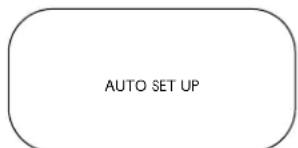
Press the F.FWD button or the MENU button. AUTO SET UP will appear on the screen.
5
Press the MENU button, the F.FWD button, or the REWIND button to begin automatic channel setup. AUTO SET UP will flash on the screen. When channels are set up, the TV will go to the lowest channel available.
The VCR will memorize all available channels, so when you use the CHANNEL ▲/▼ buttons, you'll only scan through channels that you receive.
2 Turn on the TV.

Helpful Hints
- If you do not see any on-screen displays when you turn on the VCR, check your hookups, then try again. If you still do not see any on-screen displays, follow the steps under "Automatic Channel Setup" on page 12 and "Language Selection" on page 16.
- If you try to set up channels when there is no antenna or cable connected to the VCR, programming will appear to take place. Eventually, AUTO SET UP will appear on the screen steadily, and channel programming will stop. Connect an antenna or cable to the ANT(enna) IN jack of the VCR, then press the MENU button, the F.FWD button, or the REWIND button again. Channel programming will begin again.
12 Automatic Channel Setup
Although your VCR may automatically set up the channels you receive when you turn it on for the first time, this function lets you set up channels again. Make sure:
- The VCR is on and is in VCR position. (The VCR/TV light will appear on the display panel. If it does not, press the VCR/TV button once.)
1
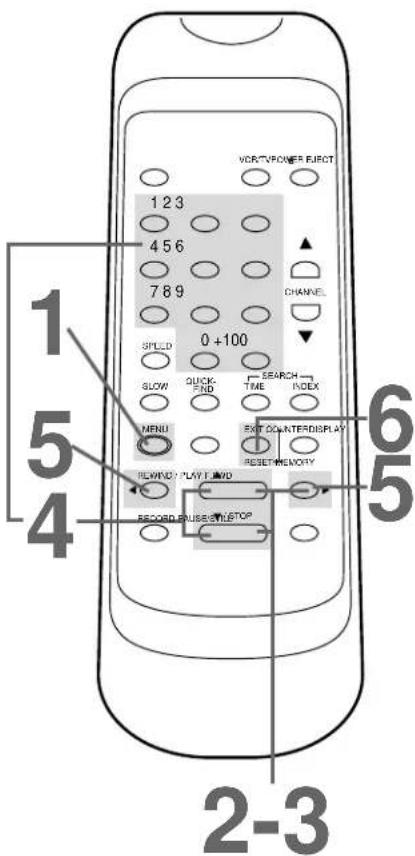
Press the MENU button until the main menu appears.
MENU
▶ TIMER PROGRAMMING AUTO REPEAT [OFF] PICTURE SELECT CHANNEL SET UP CLOCK SET LANGUAGE SELECT AUTO SATELLITE LINK
2
Press the PLAY button or the STOP button repeatedly to select CHANNEL SET UP. Then, press the F.FWD button.
-MENU-
TIMER PROGRAMMING AUTO REPEAT [OFF] PICTURE SELECT CHANNEL SET UP CLOCK SET LANGUAGE SELECT AUTO SATELLITE LINK
3
Press the PLAY button or the STOP button repeatedly to select AUTO SET UP.
CHANNEL SET UP
▶ AUTO SET UP
MANUAL SET UP
4
Press the F.FWD button. The VCR will memorize all available channels. When setup is complete, the lowest channel you receive will appear on the screen.

Helpful Hints
- Line Input mode will always be stored in the VCR's memory as channel 00. When you select channel 00 with the CHANNEL ▲/▼ buttons or the Number buttons, Lineln Rear (L1) will appear on the screen.
- You can not program channels if you are using a Cable Box/DBS. Details are on pages eight-nine.
Adding/Deleting Channels
The channels you no longer receive or seldom watch can be deleted from the memory. You also may add new channels into the memory. Make sure:
- The VCR is on and in VCR position. (The VCR/TV light will appear. If it does not, press the VCR/TV button once.)
1
Press the MENU button until the main menu appears.
2
Press the PLAY button or the STOP button repeatedly to select CHANNEL SET UP. Then, press the F.FWD button.
-MENU-
TIMER PROGRAMMING AUTO REPEAT [OFF] PICTURE SELECT
▶ CHANNEL SET UP CLOCK SET LANGUAGE SELECT AUTO SATELLITE LINK
3
Press the PLAY button or the STOP button repeatedly to select MANUAL SET UP. Then, press the F.FWD button.
CHANNEL SET UP
AUTO SET UP
▶ MANUAL SET UP
4
Press the Number buttons or press the PLAY button or the STOP button repeatedly until your desired channel number appears.
MANUAL SET UP
CHANNEL 30 (TV) ADD
5
Press the F.FWD button or the REWIND button so that ADD or DELETE flashes on the screen.
6
While your choice is flashing, press the COUNTER RESET/EXIT button. The channel you added or deleted will appear. The channel will be added or deleted, whichever was flashing on the screen when you exited the menu.
14 Setting the Clock
Follow the steps below to set your VCR's clock. Make sure:
- The VCR is on and in VCR position. (The VCR/TV light will appear. If it does not, press the VCR/TV button once.)
1
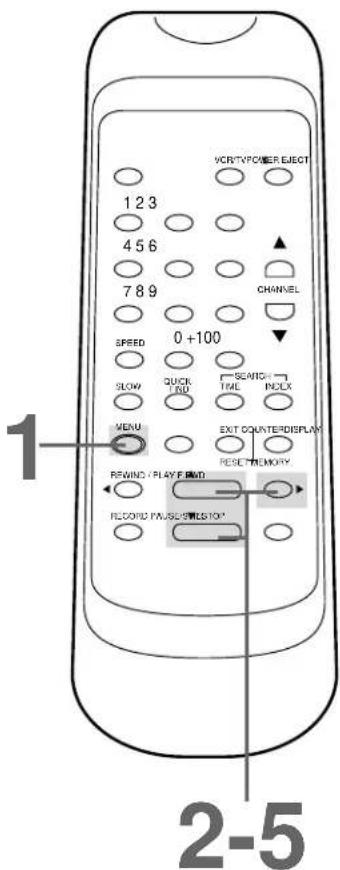
Press the MENU button until the main menu appears.
-MENU-
▶ TIMER PROGRAMMING AUTO REPEAT [OFF] PICTURE SELECT CHANNEL SET UP CLOCK SET LANGUAGE SELECT AUTO SATELLITE LINK
2
Press the PLAY button or the STOP button repeatedly to select CLOCK SET. Then, press the F.FWD button.
CLOCK SET
MONTH DAY YEAR
! ----
HOUR MINUTE AM/PM
3
While the MONTH space is flashing, press the PLAY button or the STOP button repeatedly until the desired month appears. Then, press the F.FWD button.
CLOCK SET
MONTH DAY YEAR
03
HOUR MINUTE AM/PM
-- : ----
4
While the DAY space is flashing, press the PLAY button or the STOP button repeatedly until the desired day appears. Then, press the F.FWD button.
CLOCK SET
MONTH DAY YEAR
03 / 20=----
HOUR MINUTE AM/PM
5
While the YEAR space is flashing, press the PLAY button or the STOP button repeatedly until the desired year appears. Press the F.FWD button. The day of the week will appear automatically.
CLOCK SET
MONTH DAY YEAR
03 / 202000
HOUR MINUTE AM/PM
- : - - - -
Helpful Hints
- If the clock has never been set, the CLOCK SET menu may appear immediately when you press the MENU button. If this happens, follow the instructions from step 3 above.
• To display the time, press the DISPLAY button repeatedly until the time appears on the screen.
• Power failures that last for more than one minute can cause you to lose your clock setting. - Press the REWIND button to go back one step from the current step during steps 4-8.
6
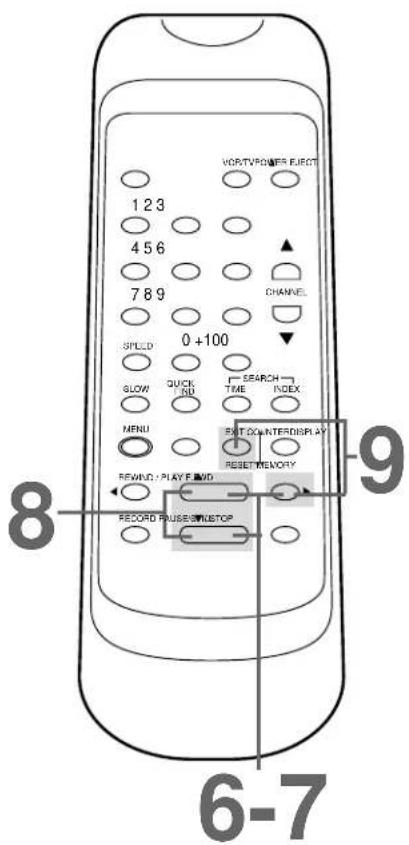
While the HOUR space is flashing, press the PLAY button or the STOP button repeatedly until the desired hour appears. Then, press the F.FWD button.

7
While the MINUTE space is flashing, press the PLAY button or the STOP button repeatedly until the desired minute appears. Then, press the F.FWD button.

8
While the AM or PM space is flashing, press the PLAY button or the STOP button repeatedly to point to AM or PM. Your selection will flash on the screen in the AM/PM space.

9
Press the COUNTER RESET/EXIT button or the F.FWD button to start the clock.
Helpful Hint
- To reset the clock, follow steps 1-2 on page 14. Select the information you want to change using the F.FWD button or the REWIND button. When the desired information is flashing, use the PLAY button or the STOP button to enter the correct information. Press the COUNTER RESET/EXIT button to
16 Language Selection
Follow the steps below to change the language of the on-screen menus and displays. Make sure:
- The VCR is on and in VCR position. (The VCR/TV light will appear. If it does not, press the VCR/TV button once.)
1
Press the MENU button until the main menu appears.
-MENU-
▶ TIMER PROGRAMMING AUTO REPEAT [OFF]
PICTURE SELECT
CHANNEL SET UP
CLOCK SET
LANGUAGE SELECT
AUTO SATELLITE LINK
2
Press the PLAY button or the STOP button repeatedly to select LANGUAGE SELECT. Then, press the F.FWD button.
-MENU-
TIMER PROGRAMMING
AUTO REPEAT [OFF]
PICTURE SELECT
CHANNEL SET UP
CLOCK SET
▶ LANGUAGE SELECT AUTO SATELLITE LINK
3
Press the PLAY button or the STOP button to select ENGLISH or ESPAÑOL. [ON] will appear beside your choice.
LANGUAGE SELECT
▶ ENGLISH [ON]
ESPAÑOL
4
Press the COUNTER RESET/EXIT button to exit.

Helpful Hint
• If you accidentally select Spanish and need English:
1) Press the MENU button until the main menu appears.
2) Press the PLAY button or the STOP button repeatedly to choose SELEC. IDIOMA, then press the F.FWD button.
3) Press the PLAY button or the STOP button to select ENGLISH.
4) Press the COUNTER RESET/EXIT button to exit.
You may access on-screen status displays by pressing the DISPLAY button repeatedly. On-screen status displays may include the current time, channel, and other information.
- Press the DISPLAY button once. The COUNT on-screen status display will appear for five seconds. After five seconds, only the real-time counter will appear on the screen. This counter shows you the elapsed playing time of the tape (from the point at which the real-time counter was set to zero).
- Press the DISPLAY button once again. The CLOCK on-screen status display will appear for five seconds. After five seconds, only the current time will appear on the screen (the clock must be set). (If you are watching TV, the current channel number will also appear on the screen.)
- Press the DISPLAY button once again. The on-screen status display will disappear.
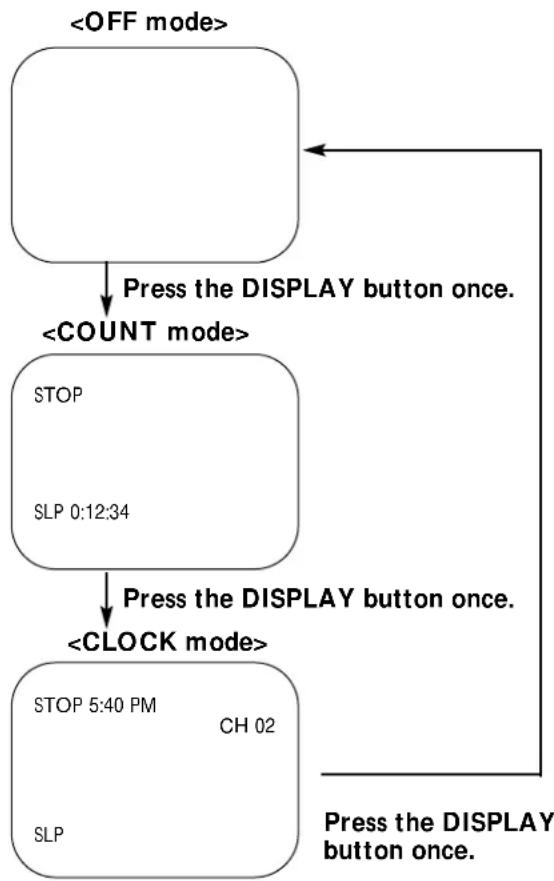
flowchart
graph TD
    A["<<OFF mode>"] --> B["Press the DISPLAY button once."]
    B --> C["<<COUNT mode>"]
    C --> D["STOP\nSLP 0:12:34"]
    D --> E["Press the DISPLAY button once."]
    E --> F["<<CLOCK mode>"]
    F --> G["STOP 5:40 PM\nCH 02\nSLP"]
    G --> H["Press the DISPLAY button once."]
Helpful Hints
- If the channel you select has no broadcast, the screen will be solid blue.
- You may bring up a status display at any time by pressing the DISPLAY button. (The exception is when viewing a still picture or a slow motion picture, or when F.FWD or REWIND is pressed during playback.)
- Channel numbers (when tuned) appear on the screen for a few sec-
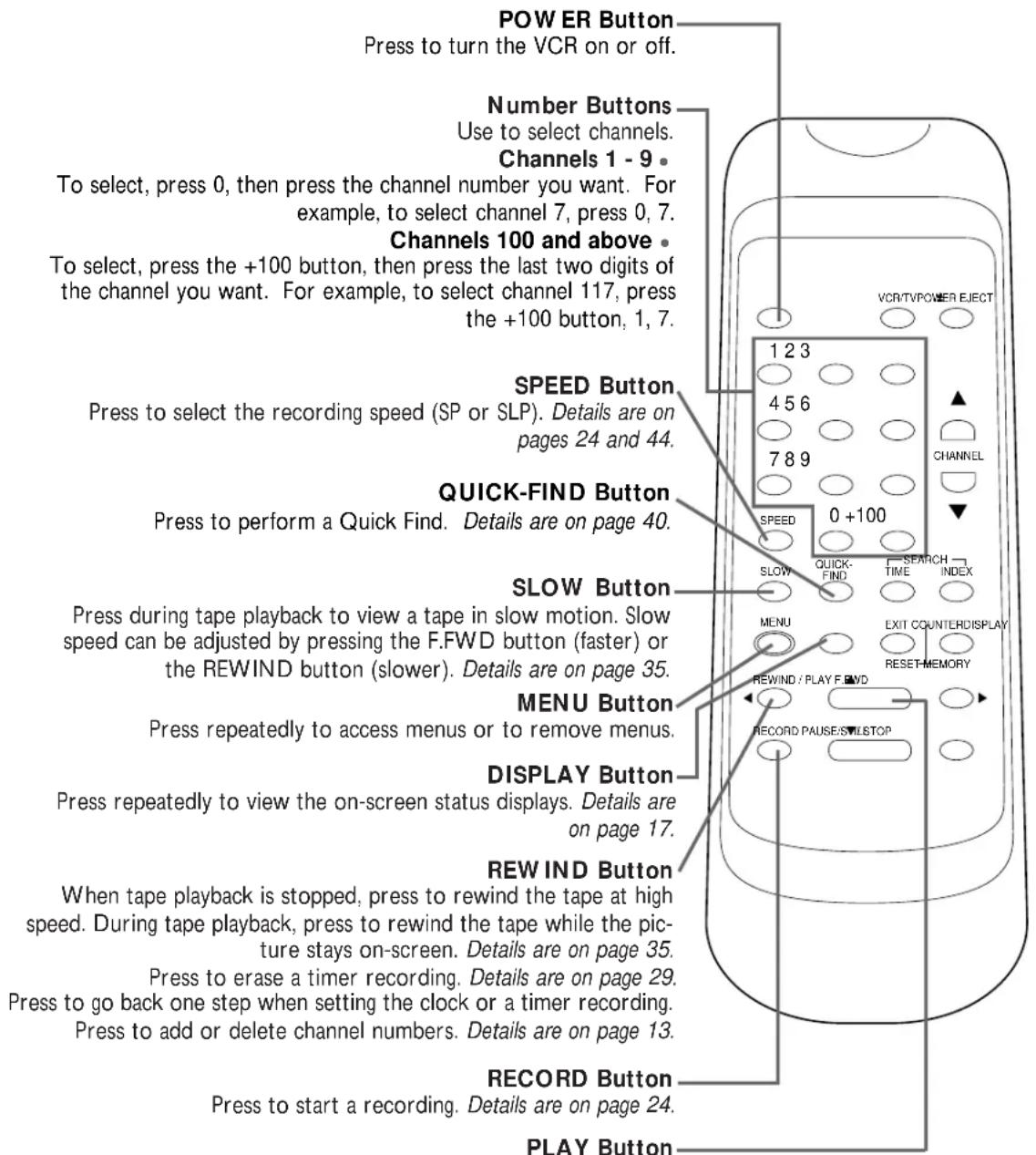
Press to play a tape. Also, press to release Slow, Search, or Still mode and to return to normal playback. Details are on page 35. Use to enter digits and information when programming a function in the on-screen menu (setting the clock, for example). Press to select an item in the on-screen menu.

When tape playback is stopped, press to fast forward the tape at high speed. During tape playback, press to fast forward the tape while the picture stays on-screen. Details are on page 35. Press to change the setting of an item in the VCR menu or press to proceed to the next menu. Press to add or delete channel numbers. Details are on page 13.

Remote Sensor
Receives a signal from your remote control so you can operate your VCR from a distance.
VCR/TV Button
Use to select the signal that your TV receives.
• VCR Position
Use to watch a tape, to watch a program while recording it, or to watch a TV broadcast using the CHANNEL ▲/▼ or Number buttons to change channels at the VCR. The VCR/TV light will appear when the VCR is in VCR position.
• TV Position
Use to watch TV (changing channels at the TV) or to watch one program while recording another. Details are on page 32.
F.FWD (Fast Forward) Button
When tape playback is stopped, press to fast forward the tape at high speed. During tape playback, press to fast forward the tape while the picture stays on the screen. Details are on page 35. Press to select an item in the VCR menu.
PLAY Button
Press to play a tape. Also, press to release Slow, Search, or Still mode and return to normal play-back. Details are on page 35. Press to select an item in the VCR menu.
STOP/EJECT Button
Press once to stop the tape. When tape playback is stopped, press to eject the tape. Press to select an item in the VCR menu.
REW (ind) Button
When tape playback is stopped, press to rewind the tape at high speed. During tape playback, press to rewind the tape while the picture stays on the screen. Details are on page 35. Press to go back one step when setting the clock or a timer recording.
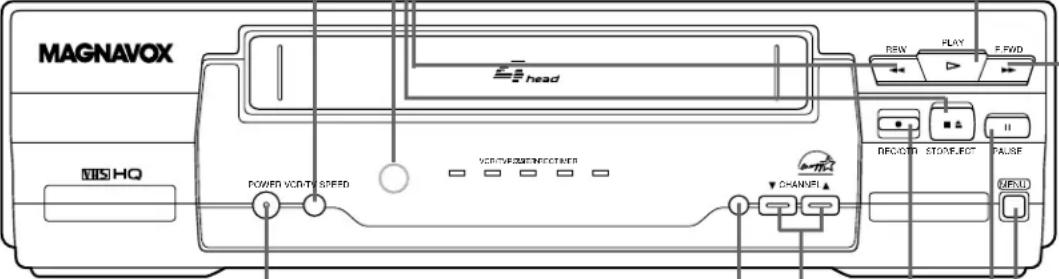
POWER Button
Press to turn the VCR power on and off.
SPEED Button
Press to select the recording speed (SP or SLP). Details are on pages 24 and 44.
CHANNEL ▲/▼ Buttons
Press to scan up or down through the VCR's channels.
TRACKING Function
During normal tape playback or slow motion tape playback, press the CHANNEL ▲/▼ buttons to adjust the tracking. Details are on page 41.
REC(ord)/OTR Button
Press once to start a recording. Details are on page 24. Press repeatedly to start a One-Touch Recording (an immediate recording, 30 minutes to eight hours long) of the channel you are watching. Details are on page 25.
PAUSE Button
While recording, press to temporarily stop the recording. Press a second time to resume normal recording. Details are on page 24. You can not pause a One-Touch Recording. Details are on page 25. During tape playback, press to freeze the picture. Press repeatedly to advance the still picture frame by frame. Details are on page 35.
MENU Button
Press repeatedly to access menus or to remove menus.
Read and follow the steps below to play a tape.
1
Turn on the TV and set it to channel 3 or 4, whichever channel to which the CH3/CH4 switch on the back of the VCR is set.
2
Insert a tape in the VCR. The POWER, VCR/TV, and CST.IN lights will appear. If the tape's record tab has been removed, playback will begin automatically.
3
If playback does not start automatically, press the PLAY button.
4
Press the STOP button to stop playback.
5
Press the REWIND button to rewind the tape.
6
Press the EJECT button to remove the tape.
S-VHS Quasi Play Back (SQPB)
This unit has a SQPB function that allows you to view a tape recorded in S-VHS format. A tape recorded in S-VHS format will play the same as a tape recorded in normal format. This unit detects whether the tape is recorded in S-VHS format or in normal format.
1 Turn on the TV. 2 Insert a tape.

Helpful Hints
- If the tape you want to play is already in the VCR, make sure the VCR power is on and the VCR is in VCR position. (Press the VCR/TV button so that the VCR/TV light appears.) Then, press the PLAY button.
- Other playback options and features are on pages 34-41.
- When you play a tape recorded in S-VHS format on this unit, you can not get the high resolution that would be available on an S-VHS VCR. Noise lines (black and white streaks) may appear on the picture
- If AUTO REPEAT is set to ON, playback will begin automatically, even when the record tab is intact.
24 Recording
Read and follow the steps below to record a television program.
1
Turn on the TV; set it to channel 3 or 4, whichever channel the CH3/CH4 switch on the back of the VCR is set to.
2
Insert a tape with its record tab intact (see page five) in the VCR. The POWER, VCR/TV, and CST.IN lights will appear.
3
If the VCR/TV light does not appear, press the VCR/TV button so that the VCR/TV light appears.
4
Press the SPEED button until the desired tape speed (SP or SLP) appears on the screen. The tape speed will disappear after about five seconds.
You can change the tape speed while the VCR is recording, but some distortion may appear on the tape. Details about tape speed are on page 44.
5
Use the CHANNEL ▲/▼ buttons or the Number buttons to select the channel to be recorded.
6
Press the RECORD button once to start recording. The REC(ord) light will appear. If the tape is missing the record tab, the VCR will eject the tape.
7
To pause the recording (for example, during commercials), press the PAUSE/STILL button once. The REC(ord) light will flash.
To resume recording, press the RECORD button or the PAUSE/STILL button again. The REC(ord) light will appear.
8
Press the STOP button to stop recording.
1 Turn on the TV. 2 Insert a tape.

Helpful Hints
- Other recording options are on pages 25-33.
- The VCR will record in a preset volume.
- Pause mode will automatically switch to Stop mode after five minutes to protect the VCR and the tape from damage. When a recording is paused, you may review the pause time remaining with the ■ marks on-screen. Each ■ mark equals one minute remaining. During the last minute of paused recording, the ■ mark will flash.
- If any menu is activated on the TV screen, the RECORD button on the remote control does not function. Press the COUNTER RESET/EXIT button to remove the menu. Then, press the RECORD button.
The One-Touch Recording function allows you to program an immediate timed recording 30 minutes to eight hours long. Before you begin, make sure:
- Channels are set up.
- The desired recording speed (SP, SLP) has been selected with the SPEED button.
- There is a tape in the VCR. Make sure the tape's record tab is intact and the tape is long enough to record the program(s).
- The VCR is in VCR position. (The VCR/TV light will appear. If it does not, press the VCR/TV button once.)
Starting an OTR
1
Use the CHANNEL (▲/▼) buttons or the Number buttons to select the channel you want to record.
2
Press the REC(ord)/OTR button on the VCR repeatedly until the desired recording length (30 minutes to eight hours) appears in the upper left corner of the screen.
Recording will begin immediately.
- The RECORD button on the remote control cannot be used to start an OTR.
OTR (0:30)
Stopping an OTR
To stop an OTR before recording is finished, press the STOP button on the remote control. To cancel the OTR but continue recording, press the REC(ord)/OTR button on the VCR repeatedly until REC appears in the upper left corner of the screen.
2 Press the REC(ord)/OTR button on the VCR repeatedly.

Helpful Hints
- To change the recording length while an OTR is in progress, press the REC(ord)/OTR button on the VCR repeatedly until the desired length appears on the screen.
- You can not pause recording during an OTR.
- If the preset time for a timer recording comes up during an OTR, the OTR has priority. The timer recording will not occur.
- To show the time remaining for an OTR, press the DISPLAY button repeatedly until OTR and the time remaining appear in the upper left corner of the screen.
- If the end of the tape is reached during an OTR, the VCR will stop recording, eject the tape, and turn itself off.
26 Timer Recording
Follow the steps below to program your VCR to record TV programs while you're away from home. You can program up to seven timer recordings. For each one, the VCR will turn itself on, record, and turn itself off automatically. Before you begin make sure:
- Channels are set up.
- The clock is set.
- There is a tape in the VCR. Make sure the tape's record tab is intact and the tape is long enough to record the program(s).
- The VCR is in VCR position. The VCR/TV light will appear. If it does not, press the VCR/TV button once.
1
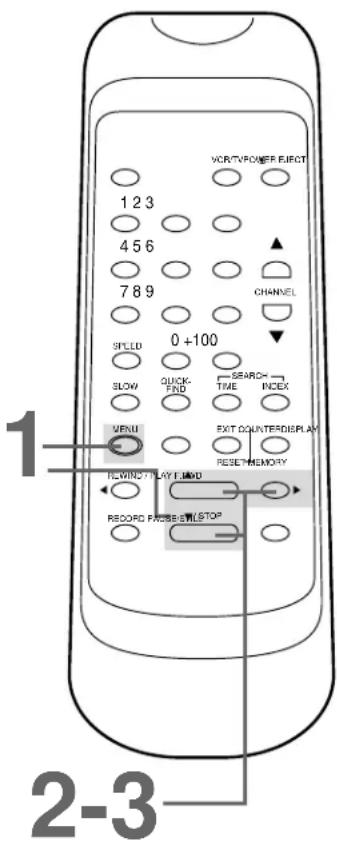
First, press the MENU button until the main menu appears. Next, press the PLAY button or the STOP button repeatedly to select TIMER PROGRAMMING. Then, press the F.FWD button. Program numbers that do not have a timer recording stored will flash.
- MENU
▶ TIMER PROGRAMMING AUTO REPEAT [OFF] PICTURE SELECT CHANNEL SET UP CLOCK SET LANGUAGE SELECT AUTO SATELLITE LINK
2
Press the PLAY button or the STOP button repeatedly to select a program number. Then, press the F.FWD button. (If you select a program number that already has a timer recording stored, information about that program will appear. Press the PLAY button or the STOP button to select another program number.)
PROGRAM NUMBER = 1 DATE --/-- START TIME --:-- -- END TIME --:-- -- CHANNEL -- REC SPEED --
3
Press the PLAY button or the STOP button repeatedly to select a ONCE, DAILY, or WEEKLY recording. When the arrow is beside your choice, press the F.FW D button.
- ONCE - The VCR will record a TV program on any day you choose, up to 12 months away.
- DAILY - The VCR will record a TV program at the same time on the same channel every day, Monday through Friday.
- WEEKLY - The VCR will record a TV program at the same time on the same channel every week, for example, every Monday.
PROGRAM NUMBER 1
▶ ONCE DAILY WEEKLY
4
Press the PLAY button or the STOP button repeatedly until the desired month appears. Then, press the F.FWD button.
Next, press the PLAY button or the STOP button repeatedly until the desired day appears. Then, press the F.FWD button.
The day of the week will appear automatically. You can not program the VCR to record more than one year in advance.

5
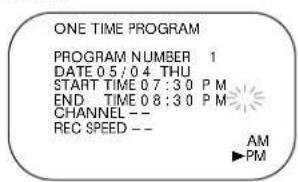
Enter the recording's start time.
Press the PLAY button or the STOP button repeatedly until the desired hour appears. Press the F.FWD button. Press the PLAY button or the STOP button repeatedly until the desired minute appears. Press the F.FWD button.
Finally, press the PLAY button or the STOP button to point to AM or PM. AM or PM will flash beside the time. Press the F.FWD button.

6
Repeat the procedure in step 5 to set the recording's end time.
Instructions continue on page 28.

Helpful Hints
- The TIMER PROGRAMMING menu will not appear at step 1 if the clock is not set. Follow the steps on pages 14-15 to set the clock.
- Enter the information while the space is flashing.
- Press the REWIND button to go back one step from the current step during steps 2-8.
- To stop a started timer recording, press the STOP/EJECT button on the VCR.
More Helpful Hints are on page 42.
28 Timer Recording (cont'd)
7
Press the PLAY button or the STOP button repeatedly until the desired channel number appears. Then, press the F.FWD button.
- If you are using a standard antenna/cable hookup (as shown on pages six-seven), select the channel of the TV program you want to record.
- If you are recording from line input, select Lineln Rear (L1). (Lineln Rear (L1) is located at the channel 00.)
- If you are using a Cable Box/DBS, select the Cable Box/DBS output channel (03 or 04). Select the channel you want to record at the Cable Box/DBS. Leave the Cable Box/DBS on for the timer recording. Details are on page eight.
ONE TIME PROGRAM
PROGRAM NUMBER 1 DATE 05/04 THU START TIME 07:30 P M END TIME 08:30 P M CHANNEL 16 REC SPEED --
8
Press the PLAY button or the STOP button repeatedly to select a tape speed. The arrow will appear beside your choice. The selected tape speed will flash beside REC SPEED.
ONE TIME PROGRAM
PROGRAM NUMBER 1 DATE 05/04 THU START TIME 07:30 P M END TIME 08:30 P M CHANNEL 16 REC SPEED S P SP SLP
9
Press the COUNTER RESET/EXIT button.
10
Press the POWER button to turn off the VCR. The TIMER light will appear. (The TIMER light will flash if there is not a tape in the VCR.)
If a timer recording will take place several hours or days from now, you may use the VCR until time for the timer recording. Just make sure you turn off the VCR about five minutes before the scheduled start time.

Turn off the VCR for the recording.
Insert a tape in the VCR. Leave the Cable Box/DBS on (if applicable).
Cancelling a Timer Recording
1
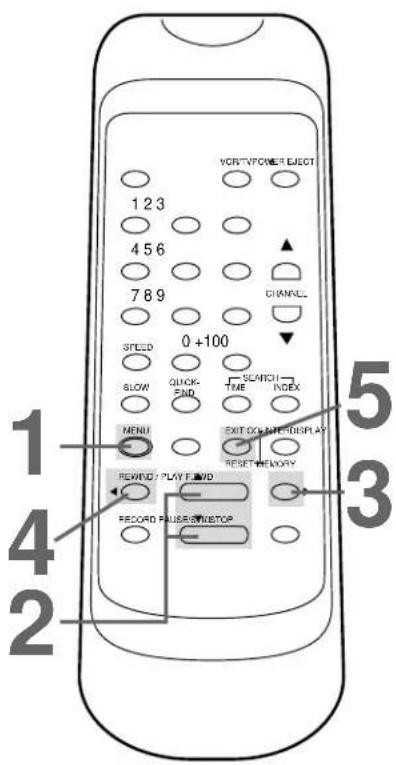
Press the MENU button. The details of your program appear on the screen.
TIMER PROGRAMMING
DATE STA/END CH
▶1 05/04 07:30 PM 16
THU 08:30 PM SP
3 05/11 10:00 PM 125
W THU 10:54 PM SLP
5 05/21 11:00 PM 40
DAILY 11:30 PM SLP
2
Press the PLAY button or the STOP button to select the program number you want to cancel.
3
Press the F.FW D button.
ONE TIME PROGRAM
PROGRAM NUMBER 1
DATE 05/04 THU
START TIME 07:30 PM
END TIME 08:30 PM
CHANNEL 16
REC SPEED SP
4
While the program number is flashing, press the REWIND button to cancel the timer recording.
5
Press the COUNTER RESET/EXIT button to exit.
30 Timer Recording (cont'd)
Correcting a Timer Recording
If you need to correct a timer recording after you have finished setting the program, follow these steps. Make sure the VCR is on and is in VCR position. (The VCR/TV light will appear. If it does not, press the VCR/TV button once.)
1
Press the MENU button. The details of your program appear on the screen.
TIMER PROGRAMMING
DATE STA/END CH ▶1 05/04 07:30 PM 16 THU 08:30 PM SP 3 05/11 10:00 PM 125 W THU 10:54 PM SLP 5 05/21 11:00 PM 40 DAILY 11:30 PM SLP
2
Press the PLAY button or the STOP button to select the timer recording you want to correct.
NOTE: If some empty program numbers exist, the lower program number appears on the screen by pressing the REWIND button. In this case, you can enter the new program.
3
Press the F.FW D button.
ONE TIME PROGRAM
PROGRAM NUMBER 1 DATE 05/04 THU START TIME 07:30 PM END TIME 08:30 PM CHANNEL 16 REC SPEED SP
4
Select the information you want to change using the F.FWD button. Press the REWIND button to go back one step. (There is an exception. Do not press the REWIND button while the program number is flashing. If you do, you will cancel the timer recording completely.)
5
While the information is flashing, enter the correct information by pressing the PLAY button or the STOP button.
6
When all the information is correct, press the COUNTER RESET/EXIT button to exit. Turn off the VCR before the timer recording.

Auto Satellite Link Using a Satellite Tuner 31
If you connect your VCR to a satellite tuner that has the Electronic Program Guide, the VCR will turn itself on, record, then turn itself off. First, read the owner's manual of your satellite tuner; then, follow the steps below. Before you begin:
- Use audio and video cables to connect the VCR's AUDIO/VIDEO IN jacks to the satellite tuner's AUDIO/VIDEO OUT jacks.
- Press the SPEED button to select the desired recording tape speed (SP or SLP).
- Set the clock. Details are on pages 14-15.
- Put a tape in the VCR. Make sure the tape's record tab is intact and the tape is long enough to record the program(s).
1
Set the program to be recorded on the satellite tuner. See your satellite tuner owner's manual for details.
2
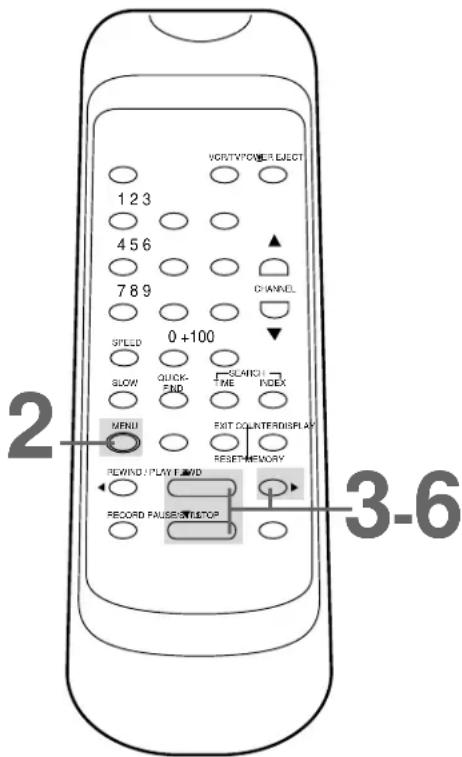
Press the MENU button until the main menu appears.
3
Press the PLAY button or the STOP button to select AUTO SATELLITE LINK. Then, press the F.FWD button.
The current time appears on the screen.
- If you want the VCR to begin recording immediately, press the F.FWD button again, then go to step 6.
- If you want to tell the VCR the time to start recording, go to step 4.
4
Press the PLAY button or the STOP button until the desired hour (AM or PM) appears. Then, press the F.FWD button.

5
Press the PLAY button or the STOP button until the desired minute appears.

6
Press the F.FWD button. [ON] will appear briefly beside AUTO SATELLITE LINK. Then, the VCR will turn itself off and the TIMER light will appear on the display panel.
1 Set the program to be recorded on the satellite tuner.
Helpful Hints
- To stop an Auto Satellite Link recording that is in progress, press the STOP/EJECT button on the VCR.
- If a program has copy guard protection, it may not record clearly.
- When you use this feature, the first few seconds of a program may not be recorded.
- If your satellite tuner synchronizes the recording start time with the broadcasting start time, refer to the tuner's owner's manual.
- When you turn on the VCR power, the AUTO SATELLITE LINK will be cancelled.
- If the start time for a timer recording comes up during an Auto Satellite Link recording, the timer recording has priority.
32 Recording One Channel/Watching Another
1
Press the RECORD button to start a recording of the current channel. Details are on page 24.
2
Press the VCR/TV button to put the VCR in TV position. The VCR/TV light will disappear.
3
Use the TV remote control to select the channel you want to watch at the TV.
4
To return to the channel being recorded, use the TV remote control to select channel 3 or 4, whichever channel the CH3/CH4 switch on the back of the VCR is set to.
5
Press the VCR/TV button on the VCR remote control to put the VCR in VCR position. The VCR/TV light will appear. The channel being recorded will appear on the screen.
6
To stop recording, press the STOP button.
3
Select the channel you want to watch at the TV.
4
Set the TV to channel 3 or 4.

Helpful Hint
- If you use a Cable Box/DBS, you may not be able to watch one channel while recording another. Details are on pages eight-nine.
1. Audio cable from AUDIO OUT Jack of VCR 1 to AUDIO IN Jack of VCR 2

- Video cable from VIDEO OUT Jack of VCR 1 to VIDEO IN Jack of VCR 2
- RF coaxial cable from the OUT jack of VCR2 to the TV's ANTENNA IN Jack
1
VCR 1 will play your tape. Insert a prerecorded tape in VCR 1. If the tape does not have a record tab, playback begins. If this happens, press the STOP/EJECT button on VCR 1 once.
2
VCR 2 will record your tape. Insert a blank tape in VCR 2. Make sure the record tab is intact (details are on page five). Make sure the VCR 2 power is on and VCR 2 is in VCR position. (The VCR/TV light will appear. If it does not, press the VCR/TV button once.)
3
Turn on the TV and set it to channel 3 or 4, whichever channel the CH3/CH4 switch on VCR 2 is set to.
4
Point the remote control at VCR 2. Press the Number buttons 0, 0. Lineln Rear (L1) will appear on the screen.
5
Point the remote control at VCR 2. Use the SPEED button to select SP or SLP.
6
Press the PLAY button on VCR 1 and the REC(ord)/OTR button on VCR 2 at the same time.
7
To stop recording, press the STOP/EJECT button on VCR 2 once, then stop the tape on VCR 1.
Helpful Hints
- Unauthorized recording of copyrighted television programs, video tapes, or other materials may infringe on the rights of copyright owners and violate copyright laws.
- If a program has copyright protection, it may not record clearly.
- Audio and video cables are not supplied.
- The illustration uses two VCRs just like yours. Different VCRs may operate differently.
- When Lineln Rear (L1) appears on the screen, the screen will be blue.
34 Repeat Play
Follow the steps below to program the VCR to play a tape over and over. Make sure:
- The VCR is on and is in VCR position. The VCR/TV light will appear on the front panel. If it does not, press the VCR/TV button once.
• There is a tape in the VCR.
1
Press the MENU button until the main menu appears.
-MENU
▶ TIMER PROGRAMMING AUTO REPEAT [OFF] PICTURE SELECT CHANNEL SET UP CLOCK SET LANGUAGE SELECT AUTO SATELLITE LINK
2
Press the PLAY button or the STOP button repeatedly to select AUTO REPEAT.
-MENU
TIMER PROGRAMMING ▶ AUTO REPEAT [OFF] PICTURE SELECT CHANNEL SET UP CLOCK SET LANGUAGE SELECT AUTO SATELLITE LINK
3
Press the F.FWD button so that [ON] appears next to AUTO REPEAT. Tape playback will begin immediately. AUTO REPEAT ▶ will appear on the screen briefly.
(If you are fast forwarding or rewinding the tape, you must first press the COUNTER RESET/EXIT button to exit, then press the PLAY button to begin tape playback.)
The VCR will play the tape to the end, rewind it, then play it again. (TV programming will appear on the screen while the tape is rewinding.)

Helpful Hints
- To cancel AUTO REPEAT, follow steps 1-2 above. At step 3. press the F.FWD button so that [OFF] appears beside AUTO REPEAT. Press the COUNTER RESET/EXIT button to exit.
- The COUNTER MEMORY button does not function if AUTO REPEAT is set to [ON].
- The real-time counter memory is cancelled if AUTO REPEAT is set to [ON].
Forward and Reverse Searching (SP/LP/SLP)
1
During tape playback, press and release the F.FW D button or the REWIND button. A fast forward or reverse picture search will begin.
2
To return to playback, press the PLAY button.
Super High Speed Searching (LP/SLP)
1
During tape playback, press the F.FWD button or the REWIND button, then press again. The VCR will now search in super high speed.
2
To return to playback, press the PLAY button.
Viewing a Still Picture
1
During tape playback, press the PAUSE/ STILL button. A still picture will appear on the screen.
NOTE: You can advance the still picture frame by frame by pressing the PAUSE/ STILL button repeatedly.
2
To release the still picture and return to normal playback, press the PLAY button.

Viewing a Slow Motion Picture
1
During tape playback, press the SLOW button. The tape will play in slow motion.
NOTE: You can control the speed of slow motion playback by pressing the F.FWD button (faster) or the REWIND button (slower).
2
To release Slow mode and return to normal playback, press the PLAY button.
Helpful Hints
- Slow and Still modes will automatically switch to Stop mode after five minutes to protect the VCR and the tape from damage.
- SP/LP/SLP means this feature will work with tapes recorded in Standard Play, Long Play, or Super Long Play.
- LP/SLP means this feature will work with tapes recorded in Long Play or Super Long Play. For details about tape speed, see page 44.
36 Picture Select
This function enables you to select the picture quality of a tape. Make sure:
- The VCR is on and is in VCR position. The VCR/TV light will appear. If it does not, press the VCR/TV button once.
• There is a tape in the VCR.
1
During tape playback, press the MENU button until the main menu appears.
-MENU
TIMER PROGRAMMING
AUTO REPEAT [OFF]
▶ PICTURE SELECT
CHANNEL SET UP
CLOCK SET
LANGUAGE SELECT
AUTO SATELLITE LINK
2
Press the PLAY button or the STOP button repeatedly to select PICTURE SELECT. Then, press the F.FWD button.
3
With in five seconds, press the F.FWD button until your desired mode (NORMAL, SOFT or SHARP) appears on the screen.

Helpful Hint
- You may only set the Picture Select during tape playback.
Follow the steps below to reset the real-time counter to zero at a tape location you want to refer to later. Make sure:
- The VCR is on and is in VCR position. The VCR/TV light will appear. If it does not, press the VCR/TV button once.
• There is a tape in the VCR.
1
Play, fast forward, or rewind a tape to the location that you would like to refer to later. Press the STOP button to stop the tape.
2
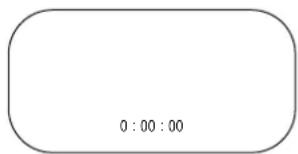
Press the COUNTER RESET/EXIT button repeatedly to reset the real-time counter to zero.
3
Press the COUNTER MEMORY button so that M appears on the screen beside the real-time counter.

4
To go to a tape location where the real-time counter was reset to zero, press the REWIND button or the F.FWD button when playback is stopped.
When the tape reaches the point at which the real-time counter was reset to zero, the tape will stop.
Press the PLAY button to watch the tape.

Helpful Hints
- You may only set the real-time counter memory at one location at a time. If you set the real-time counter to zero at a second location, the previous real-time counter to zero setting will be erased.
- To erase the real-time counter memory, press the COUNTER MEMORY button repeatedly so that the M disappears from the screen.
- The COUNTER MEMORY button does not function if AUTO REPEAT is set to [ON]. Details are on page 34.
38 Index Search
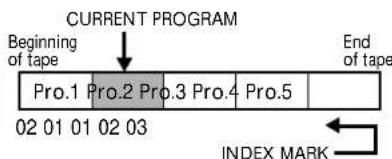
When you make a recording, the VCR places an index mark at the beginning of the recording. Essentially, an index mark is a type of "bookmark" for your tape. This feature is useful if you have several different programs recorded on a single tape.
You may skip over programs by following the steps below. Before you begin, make sure:
- The VCR is on and is in VCR position. (The VCR/TV light will appear. If it does not, press the VCR/TV button once.)
• There is a tape in the VCR.
1
Press the INDEX SEARCH button.

2
Within 30 seconds, press the PLAY button, the STOP button, or the INDEX SEARCH button repeatedly until the number of programs that you want to skip appears beneath INDEX SEARCH on-screen.
This number should include the current program. For example, if you are currently viewing program 2 and you want to skip to program 5, select 03 to skip three programs (2, 3, and 4). Playback will begin at program 5. If you want to skip to program 1, select 02 to skip two programs (2 and 1). Playback will begin at program

3
Within 30 seconds, press the REWIND button or the F.FWD button.
The VCR begins rewinding or fast forwarding to the beginning of the desired program. When the program is reached, the VCR will start playback automatically.


Helpful Hints
- Every time an index mark is passed during rewinding or fast forwarding, the number of programs beneath INDEX SEARCH on-screen decreases by one.
- Up to 20 index marks may be stored and searched.
- This function is not available during recording.
- Press the STOP button to stop the search.
• To exit Index Search mode, press the COUNTER RESET/EXIT button. - The time gap between index marks should be greater than 1 minute for SP recording, 2 minutes for LP recording, and 3 minutes for SLP recording.
- If the end of the tape is reached during an Index Search, the VCR will cancel the search and rewind the tape. Details are on page 41.
The Time Search function allows you to go to a specific point on a tape. You will enter the exact amount of playback time that you wish to skip in order to reach the specified point.
Make sure:
- The VCR is on and is in VCR position. (The VCR/TV light will appear. If it does not, press the VCR/TV button once.)
• There is a tape in the VCR.
1
Press the TIME SEARCH button.

2
Within 30 seconds, press the PLAY button, the STOP button, or the TIME SEARCH button repeatedly until your desired length of time appears. (Example: 2:50 for 2 hours 50 minutes) You may also press and hold the PLAY button or the STOP button until you reach the desired length of time.

3
Within 30 seconds, press the REW IND button or the F.FWD button. The VCR begins rewinding or fast forwarding to the specified point. The time counts down on-screen beneath TIME SEARCH as the searching progresses. When the tape finishes rewinding or fast forwarding, the VCR will start playback automatically.

Helpful Hints
- You can set a Time Search for up to 9 hours, 59 minutes (9:59).
- Time Search is not available during recording.
- To exit Time Search mode, press the COUNTER RESET/EXIT button.
- To cancel a Time Search already in progress, press the STOP button.
- If the end of the tape is reached during a Time Search, the VCR will cancel the search and rewind the tape. Details are on page 41.
40 Quick Find
The Quick Find feature locates the beginning of each recording on a tape, then plays the first portion of the recording at high speed for 30 seconds. After it plays the portion, the VCR fast forwards the tape to the next recording. This process is repeated until the end of the tape is reached, or until you stop the Quick Find.
1
Press the QUICK-FIND button.
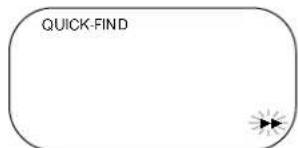
The VCR will fast forward the tape to the beginning of the next recording. The VCR will play the tape at high speed for 30 seconds, then go to the next recording.
To skip immediately to the beginning of the next recording on the tape, press the QUICK-FIND button on the remote control.
2
To resume normal tape playback, press the PLAY button.

Helpful Hints
• There must be a tape in the VCR.
- This function will not operate during a recording.
- To cancel a Quick Find that is in progress, press the STOP button.
- When the end of a tape is reached during a Quick Find, the VCR will rewind the tape. Details are on page 41.
Automatic Playback
When you put a tape in the VCR, the power will come on automatically. If the tape's record tab is missing, playback will begin. (If a timer recording is set, you may have to press the POWER button to turn on the VCR. Make sure you turn off the VCR for the timer recording later. If you insert a tape without a record tab when a timer recording is set, the VCR will eject the tape.)
Automatic Rewind, Eject, Off
When a tape is played, fast forwarded, or recorded to its end, the VCR will rewind the tape to the beginning, eject the tape, and turn itself off.
If the real-time counter memory is set, the VCR will only rewind the tape to the point at which the counter is set to zero, then stop. The VCR will not eject the tape or shut itself off.
Tape Eject
A tape can be ejected with the VCR power on or off (but the VCR must be plugged in). If a Timer Recording is programmed, a tape can only be ejected with the power on. Be sure to insert a tape for the Timer Recording, then turn off the VCR power.
Automatic Tracking Adjustment
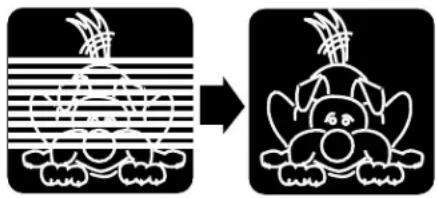
The VCR automatically adjusts tracking to give you the best possible picture quality. With some recordings, however, you may get a better picture using the manual tracking controls (see below).
Manual Tracking
To adjust the tracking manually, press the CHANNEL (▲/▼) buttons on the VCR during playback.
NOTES:
- Tracking is returned to automatic tracking adjustment when a tape is inserted or when the STOP button is pressed to halt playback.
- Automatic tracking adjustment will not work during slow motion playback. Instead, use the CHANNEL (▲/▼) buttons on the VCR or on the remote control to reduce noise lines in slow motion playback.
- Manual tracking will not operate when the VCR is in Still mode.
- Use the CHANNEL (▲/▼) buttons on the VCR or on the remote control to remove vertical jitter in a Still picture.
Before
Tracking
Adjustment
natural_image
Two black-and-white diagrams showing a stylized animal head with striped pattern and a rabbit head, both transforming into a separate abstract form (no text or symbols)After Tracking Adjustment
42 Helpful Hints
If you are having problems with your product, check this list of problems and possible solutions before requesting service. You may be able to solve the problem yourself.
If you need to call a customer service representative, please know the model number and serial number of your product before you call. This information is displayed on the back of the product. Also, please take a moment to identify the problem you are having, and be prepared to explain this to the representative. If you believe the representative will need to help you with operations, please stay near the product. Our representatives will be happy to assist you.
The VCR has no power.
- Make sure the power plug is completely connected to an AC (alternating current) outlet.
• Make sure the power is turned on.
A power failure occurred.
- Follow the steps on page 11 to select a language and set up channels, if necessary. Then, follow the steps on pages 14-15 to reset the clock.
- Timer recordings may be lost if the power fails for more than one minute. Reprogram the timer recordings. Details are on pages 26-30.
The remote control will not operate the VCR.
- Aim the remote control directly at the VCR's remote sensor. Details are on page 21.
- Remove all obstacles between the remote control and the VCR.
- Inspect and/or replace the batteries in the remote control. Details are on page five.
The VCR does not respond normally to the remote control. (For example, the VCR may change channels multiple times when you press the CHANNEL ▲ button once.)
• Install new batteries (preferably alkaline) in the remote control.
The motor (cylinder) rotates even when the VCR is in Stop mode.
- To enable the quick play mechanism, the cylinder will rotate for about five minutes. This is normal. The quick play mechanism switches the tape mechanism from Stop to Play in just one second.
A TV program cannot be recorded.
- Check the connections between the VCR, TV, antenna/cable, and Cable Box/DBS, if applicable. Details are on pages six-10.
- Make sure the tape has a record tab. Details are on page five.
The VCR will not perform a timer recording.
- Make sure the recording start and stop times are set correctly. Details are on pages 26-30.
- Make sure a tape is in the VCR and the tape has a record tab. Details are on page five.
• Make sure the VCR power is off. - Make sure the clock is set. Details are on pages 14-15.
- The VCR may not perform or continue a timer recording if a power interruption of more than one minute occurs before or during the timer recording, even if the power comes back on afterward. Set up channels and reset the clock before re-programming the timer recording(s).
- Finish programming a timer recording at least five minutes before the recording is scheduled to begin.
- If, after programming a timer recording, you turn off the VCR without inserting a tape, the TIMER light will blink. Insert a tape with the record tab intact.
- Noon is 12 p.m. Midnight is 12 a.m.
- If the tape runs out before the recording ends, the VCR will stop, eject the tape, and turn itself off. The TIMER light will blink.
- If a tape without a record tab is inserted (when the power is off for a timer recording), the VCR will eject the tape. The TIMER light will blink. Insert a tape that allows recording.
- If the preset time for a timer recording comes up during a One-Touch Recording, the OTR has priority.
- When two timer recordings overlap, the timer recording with the earliest start time will have priority. When the earliest program has finished recording, the next program number will begin recording.
Tape cannot be removed.
- Make sure the power plug is completely connected to an AC (alternating current) outlet.
- You have set a timer recording. Turn on the VCR power, then eject the tape. Be sure to insert a tape and turn off the VCR for your timer recording.
Tape cannot be inserted.
- Insert the tape, window side up, with the record tab facing you.
- Make sure a tape isn't already in the VCR by pressing the STOP/EJECT button on the VCR or the EJECT button on the remote control.
- Gently push on the center of the tape when putting it in the VCR. Never force the tape into the VCR.
- If a timer recording is set, the VCR will not accept a tape that does not have a record tab. You may only insert a tape with the record tab intact.
VCR ejects the tape when the RECORD button is pressed or when the VCR power is turned off to set a timer recording.
- Make sure the tape has a record tab. Details are on page five.
There is no playback picture, or the playback picture is noisy or contains streaks.
- Make sure the TV is on the same channel as the VCR's CH3/CH4 switch. Details are on page seven.
- Make sure the VCR is in VCR position. (The VCR/TV light will appear. If it does not, press the VCR/TV button once.)
- Make sure channel 3 or 4 is properly adjusted.
- Adjust the tracking. Details are on page 41.
- TVs placed too close to the VCR can cause interference during tape playback. Move the VCR away from the TV.
TV programs cannot be watched normally.
- Press the VCR/TV button to put the VCR in TV position. (The VCR/TV light will disappear.)
- Check the connections between the VCR, TV, antenna/cable, and Cable Box/DBS (if applicable). Details are on pages six-10.
The reception on all channels is poor.
- You may need to tune your TV again.
Line Input
- If you accidentally enter Line Input mode (Lineln Rear (L1) will appear on your TV screen briefly), press the CHANNEL (▲/▼) buttons or use the Number buttons to select another channel.
The playback picture is too dim, too bright, or fluctuates in brightness.
- Some programs may be broadcast with copyright protection technology in order to protect the rights of copyright owners. This technology is used on programs that are recorded on video tapes or Digital Video Discs (DVDs), as well as some programs broadcast by antenna/cable/satellite television channels. Programs broadcast with copyright protection technology may not record clearly. Likewise, if you play a tape that is a recording of a copyright protected program, the picture may not be clear. Tapes of copyright protected programs may have a picture that is dark or dim, or the brightness of the picture may fluctuate. Therefore, you should avoid recording or playing copies of copyright protected programs. This VCR incorporates copyright protection technology that is protected by method claims of certain U.S. patents and other intellectual property rights owned by Macrovision Corporation and other rights owners. Use of this copyright protection technology must be authorized by Macrovision Corporation and is intended for home and other limited viewing uses only, unless otherwise authorized by Macrovision Corporation. Reverse engineering or disassembly is prohibited.
44 Glossary
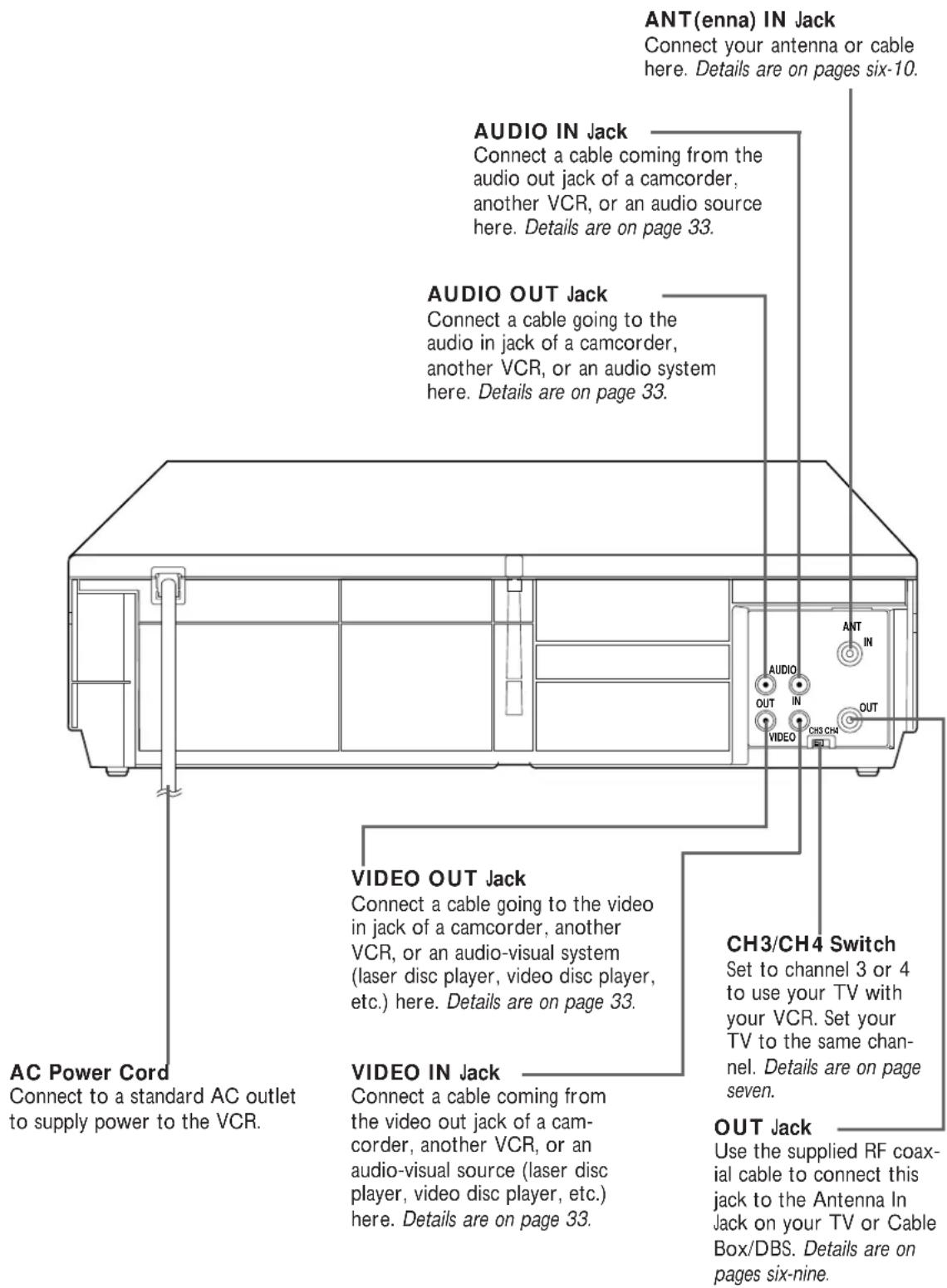
AUDIO IN/OUT Jacks: jacks located on the back of the VCR which are used to record audio from another source (IN) or to send audio to another system (OUT).
Automatic Channel Setup: process in which the VCR scans all available channels and places the ones you receive in its memory. Then, when you push the CHANNEL (▲/▼) buttons, you only scan through channels you receive.
Bands: settings that allow you to tune channels.
- Antenna – VHF (very high frequency; channels 2-13) and UHF (ultra high frequency; channels 14-69).
- Cable – all standard channels can be received without a Cable Box/DBS.
Cable Box/DBS Output Channel: Channel 3 or 4.
Dubbing: copying a tape using a second VCR.
Frame: a single still picture.
HQ: high quality; a feature in the VCR circuitry which provides enhanced picture detail.
Line Input: The channel to which you set your VCR during dubbing. The line input channel is always channel 00.
If you accidentally enter Line Input mode (Lineln Rear (L1) will appear on your TV screen briefly), press the CHANNEL (▲/▼) buttons or use the Number buttons to select another channel.
Mode: a VCR operation.
OTR: One-Touch Recording; programming a timed recording that starts immediately and records for 30 minutes to eight hours, whichever you specify.
Remote Control: the small electronic unit that came with your VCR; allows you to operate your VCR from a distance.
RF coaxial cable: The cable supplied with your VCR. Use it to connect your VCR to your TV (or Cable Box/DBS, if applicable). The supplied cable is a snap-on type. However, you may also use a screw-on type if you prefer.
Special Effects: forward and reverse searching; a still picture; slow motion playback.
Tape Speeds: how fast the tape travels during a recording or during playback.
- SP (standard play) – fastest tape speed (recording time for a T120 tape is approximately two hours); best picture quality.
- LP (long play) – average tape speed; playback only.
- SLP (super long play) – slowest tape speed (recording time for a T120 tape is approximately six hours).
VCR: video cassette recorder.
VIDEO IN/OUT Jacks: jacks located on the back of the VCR which are used to record video from another source (IN) or to send video to another system (OUT).
Video Heads
Four heads
Video Signal
EIA standards; NTSC color
Antenna
VHF/UHF - 75 ohm external antenna terminal
VHF Output Signal
Channel 3 or 4 (switchable)
75 ohms unbalanced
Power Requirement
120V AC; 60Hz
Power Consumption
12W
Operating Temperature
41irc F ( 5irc C) to 104irc F ( 40irc C)
Relative Humidity
10% to 80%
Weight
5.3 lbs. (2.4 kg.)
Dimensions
14-3/16" (W) × 3-5/8" (H) × 8-3/4" (D)
(360 mm x 92mm x 223mm)
Tuner Broadcast Channels
VHF 2-13, UHF 14-69
Cable TV Channels
1-125
NOTE: Designs and specifications are subject to change without notice.
RENEWED
90 DAY
LIMITED WARRANTY
ac power cord 7,22
accessories......48
ant(enna) in jack 6-10, 22
audio in/out jacks.....10, 22, 33
auto satellite link....31
automatic
playback......41
rewind, eject, off....41
batteries....5
cassette compartment......20
ch3/ch4 switch....7, 9, 22
channel
above 100 ....18
adding....13
deleting....13
setup....11, 12
(▲/▼) buttons.....19, 21, 41
clock on-screen display .....17
clock (setting) 14-15
connections......6-10, 33
contents, table of 4
controls
remote....5, 18-19
vcr....20-22
copyright protection ....33, 43
count on-screen display .....17
counter memory button.....19, 37
counter reset/exit button.....19, 37
cst. in light....20
display button 17-18
display panel....20
duplication 33
eject button....19
f.fwd button....19, 21
front panel....21
glossary....44
helpful hints....42-43
hookups
for tape duplication....33
with a cable box/dbs.....8-9
with a stereo tv....10
without a cable box/dbs .....6-7
index search....38
index search button .....19, 38
line input mode....33, 44
long play....44
Ip 44
menu button....18, 21
number buttons....18
on-screen status displays......17
one-touch recording 25
out jack 7-9, 22, 33
pause button 21
pause/still button....19, 24, 35
picture select....36
play button....18, 21, 23, 35
playing....23
power
button....18, 21
cord....7,22
light....20
quick find....40
quick-find button....18, 40
rear panel....22
rec(ord) light....20
rec/otr button....21
record button....18
record tab....5
recording
basic....24
one channel/watching another..32
prevention....5
timer 26-30
remote
control
buttons....18-19
using....5
sensor....5, 21
repeat play....34
rerecording....33
rew(ind) button....21
rewind button....18
rf coaxial cable 6-9, 33, 44
safety precautions ....3
searching
forward/reverse 35
index 38
time 39
sensor (remote)......5, 21
language selection .....11, 16
slow
button....18, 35
motion....35
slp....44
sp....44
speed button....18, 21
standard play....44
status display....17
still picture....35
stop button....19
stop/eject button....21
super long play....44
table of contents 4
tape
duplication 33
eject....41
speed....44
time search....39
time search button....19, 39
time (setting)......14-15
timer
light....20
recording
cancelling....29
correcting....30
setting......26-28
tracking....41
tv
hookups....6-10, 33
position....19, 21, 32, 43
vcr position....19, 21
vcr/tv button....19, 21
vcr/tv light....20
video in/out jacks.....10, 22, 33, 44
warranty....46
SUPPLIED ACCESSORIES
The following items are supplied with your VCR; they are provided to help you use or set up your VCR.

Remote Control 4835 218 37276
Two AA Batteries 4835 138 17012

natural_image
Line drawing of a coiled cable with two connectors and a black strap (no text or symbols)RF Coaxial Cable, 75 ohm
4835 323 27011
OPTIONAL ACCESSORIES
The following additional items are not provided with your VCR, but they are designed for use with your new VCR.
To order these optional accessories, contact us at:
Parts & Accessories Marketing Department 401 East Old Andrew Johnson Highway
P.O. Box 555
Jefferson City, TN 37760
1-800-851-8885.

natural_image
Illustration of a handheld electronic device with a black screen and cable (no visible text or symbols)VHS Cassette Rewinder
M61117

Monaural Audio and Video Cables (6 feet)
Color-coded for easy connection
M61103
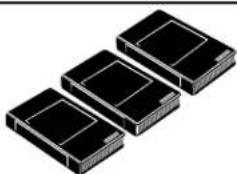
natural_image
Three identical black rectangular electronic components arranged in a row (no text or symbols visible)Three Cassette Storage Cases (plastic)
Fits VHS and Beta cassettes
M61104
- Return your Warranty Registration Card today to ensure you receive all the benefits you're entitled to.
- Warranty Verification
- Owner Confirmation
- Model Registration
- MAGNAVOX
- Dear Magnavox product owner:
- safety symbols
- Features
- Safety Precautions
- Declaration of Conformity
- Helpful Hints
- Table of Contents
- Setting Up Your VCR
- Description of Controls
- Basic Operations
- Recording
- Playing
- Information You May Need
- Putting Batteries in the Remote Control
- Using the Remote Control
- Recording Prevention
- VCR maintenance
- Hookups Without a Cable Box / Direct Broadcast System
- 1
- 2
- Hookups Without a Cable Box / Direct Broadcast System (cont'd) 7
- 3
- 4
- 5
- 6
- Hookups With a Cable Box / Direct Broadcast System
- Connections
- Recording/Viewing Any Channel
- Hookups With a Cable Box / Direct Broadcast System (cont'd) 9
- Recording One Channel/Watching Another
- Helpful Hint
- Hookups With a Stereo TV
- Turn on the TV.
- Automatic Channel Setup
- Adding/Deleting Channels
- Setting the Clock
- 7
- 8
- 9
- Language Selection
- Remote Sensor
- VCR/TV Button
- • VCR Position
- • TV Position
- F.FWD (Fast Forward) Button
- PLAY Button
- STOP/EJECT Button
- REW (ind) Button
- POWER Button
- SPEED Button
- CHANNEL ▲/▼ Buttons
- TRACKING Function
- REC(ord)/OTR Button
- PAUSE Button
- MENU Button
- S-VHS Quasi Play Back (SQPB)
- Recording
- Starting an OTR
- Stopping an OTR
- Timer Recording
- Timer Recording (cont'd)
- 10
- Cancelling a Timer Recording
- Timer Recording (cont'd)
- Correcting a Timer Recording
- Auto Satellite Link Using a Satellite Tuner 31
- Recording One Channel/Watching Another
- Audio cable from AUDIO OUT Jack of VCR 1 to AUDIO IN Jack of VCR 2
- Repeat Play
- Forward and Reverse Searching (SP/LP/SLP)
- Super High Speed Searching (LP/SLP)
- Viewing a Still Picture
- Viewing a Slow Motion Picture
- Picture Select
- Index Search
- Press the TIME SEARCH button.
- Quick Find
- Automatic Playback
- Automatic Rewind, Eject, Off
- Tape Eject
- Automatic Tracking Adjustment
- Manual Tracking
- Helpful Hints
- The VCR has no power.
- A power failure occurred.
- The remote control will not operate the VCR.
- The VCR does not respond normally to the remote control. (For example, the VCR may change channels multiple times when you press the CHANNEL ▲ button once.)
- The motor (cylinder) rotates even when the VCR is in Stop mode.
- A TV program cannot be recorded.
- The VCR will not perform a timer recording.
- Tape cannot be removed.
- Tape cannot be inserted.
- VCR ejects the tape when the RECORD button is pressed or when the VCR power is turned off to set a timer recording.
- There is no playback picture, or the playback picture is noisy or contains streaks.
- TV programs cannot be watched normally.
- The reception on all channels is poor.
- Line Input
- The playback picture is too dim, too bright, or fluctuates in brightness.
- Glossary
- Video Heads
- Video Signal
- Antenna
- VHF Output Signal
- Power Requirement
- Power Consumption
- Operating Temperature
- Relative Humidity
- Weight
- Dimensions
- Tuner Broadcast Channels
- Cable TV Channels
- RENEWED
- DAY
- LIMITED WARRANTY
- SUPPLIED ACCESSORIES
- OPTIONAL ACCESSORIES
- M61117
- M61103
- M61104
Brand : MAGNAVOX
Model : VR400BMG
Category : VCR