
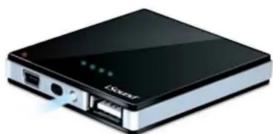
Isound-2140 - Power bank DREAMGEAR - Free user manual and instructions
Find the device manual for free Isound-2140 DREAMGEAR in PDF.


| Product Type | Portable Power Bank |
| Brand | DreamGEAR |
| Model | Isound-2140 |
| Battery Capacity | 4000 mAh (typical) |
| Battery Type | Lithium-ion |
| Input Port | Micro USB, 5V / 1A |
| Output Port | USB-A, 5V / 2.1A |
| Charging Time | Approximately 4 hours |
| Dimensions | 2.4 x 3.9 x 0.7 inches |
| Weight | 3.5 oz (100 g) |
| LED Indicators | 4 LED lights for battery level |
| Overcharge Protection | Yes |
| Short Circuit Protection | Yes |
| Operating Temperature | 0°C to 45°C |
| Storage Temperature | -20°C to 60°C |
| Compatibility | Most USB-charged devices (phones, tablets, etc.) |
| Charging Control | Automatic power off when not in use |
| Maintenance | Keep dry; charge at least once every 3 months |
| Safety Certification | CE, RoHS |
| What's Included | Power bank, Micro USB cable, user manual |
Frequently Asked Questions - Isound-2140 DREAMGEAR
User questions about Isound-2140 DREAMGEAR
0 question about this device. Answer the ones you know or ask your own.
Ask a new question about this device
Download the instructions for your Power bank in PDF format for free! Find your manual Isound-2140 - DREAMGEAR and take your electronic device back in hand. On this page are published all the documents necessary for the use of your device. Isound-2140 by DREAMGEAR.
USER MANUAL Isound-2140 DREAMGEAR
Universal PowerFlash
750mAh Backup Battery
ISOUND-2140
User's Guide

PACKAGE CONTENTS:
• Universal PowerFlash Backup Battery
• USB to mini USB cable for ch
• User's Guide/Warranty Card
• Registration Card
How to charge the Universal PowerFlash:
-
Plug the USB end of the included cable into a USB powered port.
-
Plug the mini USB end of that cable into the Universal PowerFlash's mini USB port
-
Charging begins automatically
-
Charging Dogs and Maternalry
How to charge your iPhone or iPod:
- Plug the USB end of your original iPhone or iPod charge/sync cable
into the USB port of the Universal PowerFlash
- Plug the dock connector of your iPhone or iPod charge/sync cable
into the dock connector of your iPhone or iPod.
- Charging begins automatically.
How to charge mini USB powered devices:
- Plug the USB end of included USB to mini USB cable into the USB
port of the Universal PowerFlash
-
Plug the mini USB end of the cable into your device
-
Charging begins automatically.
How to charge other USB powered devices:
- Plug the USB end of your original device's cable into the USB port of
the Universal PowerFlash
-
Plug the other end of your device's cable into your device.
-
Charging begins automatically.
NOTE: Please refer to the User's Guide of your device for charging times
and specifications.
How to Check the Battery Level of the Universal PowerFlash:
- Press the battery indicator light located next to the flashlight of the
Universal PowerFlash.

CONTENIDO DE LA CAJA:
- Check the blue LEDs on the top of the Universal PowerFlash, which
indicate 25%, 50%, 75% and 100% charge.
How to Use the Flash Light:
-
Make sure the Universal PowerFlash is charged
-
Press and hold the button on the side of the Universal PowerFlash to
engage the flashlight.
- Release the button to turn the flashlight OFF.
TROUBLESHOOTING:
Problem:
The Univ
Solution:
Make sure the USB power port which you are using to charge the Universal
PowerFlash is delivering power properly.
Make sure the connection points (USB and mini USB) are free of dirt and debris and are connected fully and properly.
soems and are connected fully and properly.
Problem
The iPhone, iPod, or other USB powered device is not charging.
Solution:
Make sure the Universal PowerFlash is charged up.
Make sure the connection points are free of dirt and debris and are
connected fully and properly.
Problem
The flash
The flashlight is not working.
Solution: Make sure
Make sure the universal Power flash is charged up. Make sure you are pressing and holding the butt
Mains sure you are pressing and holding the button on the side of the Universal PowerFlash.
[Non-Text]
WARNING.
Lithium Ion batteries are small, compact, and ideal for providing long
lasting power to lighting systems. However, they must be used and charged properly. Improper use can result in serious injury, fire, or de
charged property. Improper use can result in serious injury, fire, or death.
destellante del Universal PowerFlash
- Do not place the battery in fire or apply heat to the battery.
- Do not pierce the battery with nails, strike the battery with a hammer, step
on the battery, or otherwise damage the outer casing.
- Do not subject the battery pack to strong impacts or shocks
- Do not expose the battery to water or salt water, or allow the battery to
get wet.
- Do not disassemble or modify the battery. The battery contains safety
and protection devices which, if damaged, may cause the battery to
generate heat, rupture or ignite
- Do not place the battery on or near fires, stoves, or other high
temperature locations.
- Do not leave the battery in direct sunlight, or use or store the battery
inside cars in hot weather. Doing so may cause the battery to generate
heat, rupture, or ignite. Using the battery in this manner may also result in a loss of performance and a shortened life expectancy.
In a loss of performance and a shortened life expectancy.
- Never short circuit, reverse polarity, disassemble, damage or heat; the battery pack over 100°C (240°F). If an exposed lithium battery
the battery pack over 100°C (212°F). If an exposed lithium battery does start on fire, it will burn even more violently if it comes into
does start on fire, it will burn even more visible contact with water or even the moisture in air
A fire extinguisher must be used.
BATTERY CAPACITY INFORMATION
When stored at room temperature with
irreversibly lose approximately 20% capacity per year from the time they
are manufactured, even when unused. When stored at 40% charge level,
and at 4°C (40°F), the percentage loss is reduced to 6% per year.
less. Every deep discharge cycle decreases their capacity also.
Battery life will be extended by the following: 1. Store the battery at a 40% charge level and
- Store the battery at a 40% charge level and at a low temperature 4°C (40°F). The refrigerator provides good storage, as long as the
temperature does not go below 0°C (32°F).
- Never discharge the battery fully.
-
Charge early and often.
-
Always charge at least once per year to prevent over-discharge.
The following table is provided in the image.
Electronic Specifications:
Input: 5V 500mA DC Output: 5V 1A DC
Output: 3V TA DC
FCC Information
This equipment has been tested and found to comply with the limits for a Class B digital device, pursuant to part 15 of the FCC Rules. These limits are designed to provide reasonable protection against harmful interference in a residential installation. This equipment generates, uses and can radiate radio frequency energy and, if not installed and used in accordance with the instructions, may cause harmful interference to radio communications. However, there is no guarantee that interference will not occur in a particular installation. If this equipment does not cause harmful interference to radio or television reception, which can be determined by turning the equipment off and on, the user is encouraged to try to correct the interference by one or more of the following measures:
• Reorient or relocate the receiving antenna.
- Increase the separation between the equipment and receiver.
- Connect the equipment into an outlet on a circuit different from that to which the equipment is connected
which the receiver is connected • Consult the dealer or an experis
- Consult the dealer of an experience radiot V technician for help.
You are cautioned that any changes or modifications not expressly approved by the party responsible for compliance could void the user's authority to operate the equipment.
Brand : DREAMGEAR
Model : Isound-2140
Category : Power bank