
HCM2051 - Humidifier HONEYWELL - Free user manual and instructions
Find the device manual for free HCM2051 HONEYWELL in PDF.


| Product Type | Evaporative Humidifier |
| Brand | Honeywell |
| Model | HCM2051 |
| Dimensions (L x W x H) | 12 x 12 x 15 inches |
| Weight | 8 lbs |
| Power Supply | 120V AC, 60 Hz |
| Water Tank Capacity | 2 gallons |
| Coverage Area | Up to 1800 sq ft |
| Moisture Output | 1.5 gallons per day |
| Control Type | Manual dial |
| Filter Type | Wick filter (replacement recommended every 3 months) |
| Noise Level | Quiet operation (approx. 34 dB) |
| Auto Shut-Off | Yes, when tank is empty |
| Indicator Lights | Power and low water |
| Cleaning Frequency | Weekly cleaning recommended |
| Safety Features | Overheat protection, automatic shut-off |
| Spare Parts | Wick filter (model HC201), cleaning kit |
| Repairability | User-replaceable filter and accessible components |
| Warranty | 5-year limited warranty |
Frequently Asked Questions - HCM2051 HONEYWELL
User questions about HCM2051 HONEYWELL
0 question about this device. Answer the ones you know or ask your own.
Ask a new question about this device
Download the instructions for your Humidifier in PDF format for free! Find your manual HCM2051 - HONEYWELL and take your electronic device back in hand. On this page are published all the documents necessary for the use of your device. HCM2051 by HONEYWELL.
USER MANUAL HCM2051 HONEYWELL
4 GALLON OUTPUT PER DAY COOL MOISTURE HUMIDIFIER
Model HCM-2051 Series
* Output dependent on room temperature and humidity.
IMPORTANT SAFETY INSTRUCTIONS
READ AND SAVE THESE SAFETY INSTRUCTIONS BEFORE USING THIS HUMIDIFIER
When using electrical appliances, basic precautions should always be followed to reduce the risk of fire, electric shock, and injury to persons, including the following:
- Always place this humidifier on a firm, flat and level surface. This humidifier may not work properly on an uneven surface.
- Place this humidifier in an area where it is not accessible to children.
- Do not place the humidifier near any heat sources such as stoves, radiators, and heaters.
- Before using the humidifier, check the power cord for any signs of damage. If the cord is found to be damaged, DO NOT USE and return the humidifier to the manufacturer under the warranty agreement for repair.
- This appliance has a polarized plug (one blade is wider than the other). To reduce the risk of shock, this plug is intended to fit only one way in a polarized outlet. If the plug does not fit fully in the outlet, reverse the plug. If it still does not fit, contact a qualified electrician. DO NOT attempt to defeat this safety feature.
- To disconnect the humidifier, first turn controls to the OFF position, then grip the plug and pull it from the wall outlet. Never pull by the cord.
- A loose fit between the AC outlet (receptacle) and plug may cause overheating and a distortion of the plug. Contact a qualified electrician to replace loose or worn outlet.
- The humidifier should always be unplugged and emptied when not in operation or while being serviced or cleaned.
- Never tilt or attempt to move the humidifier while it is operating or filled with water. UNPLUG the humidifier before moving.
- This humidifier requires regular cleaning. Refer to the CLEANING instructions provided. Never clean the humidifier in any manner other than as instructed in this manual.
- Turn the humidifier OFF if the relative humidity exceeds 60%, or if you notice moisture on the inside of your windows. For proper humidity reading use a hygrometer.
INTRODUCTION
Thank you for purchasing a Honeywell Natural Cool Moisture® Humidifier. If you would like more information on our full line of products please visit our website at:
www.honeywell.com/yourhome.
HOW DOES IT WORK?
NATURAL COOL MOISTURE® SYSTEM
Dry air is pulled through the Natural Cool Moisture® system and a quiet fan blows out invisible, moisture-balanced air. Unwanted minerals and bacteria from the water are trapped inside the Natural Cool Moisture® filter. When the unit is running you will not see or feel a "mist". You will know your humidifier is putting moisture into the air as you watch the water level in your tank decrease throughout the day.
WHAT IS AgION™ ANTIMICROBIAL?
Your Honeywell Natural Cool Moisture® filter has been designed using new AgION™ technology which prevents surface growth and migration of mold, fungus, algae and bacteria in the filter for its life - approximately one season. Keep in mind, depending on your water quality, mineral deposits can still clog or discolor the filter, affect its life and that of the humidifier.
MODEL - HCM-2051
Your humidifier is made up of these parts:

SET UP
NOTE: We recommend that the humidifier be disinfected prior to first use. Please see CLEANING instructions.
- Select a firm, level, flat location - at least six inches from any wall for proper air flow (Fig. 1). Place the humidifier on a water-resistant surface, as water can damage furniture and some flooring.
The manufacturer will not accept responsibility for property damage caused by water spillage
FILLING
- Remove the water tank by grasping handle and pulling straight up (Fig. 1). Set aside.
- Lift up on the motor housing to remove and set aside (Fig. 2). Remove the Natural Cool Moisture® filter from the base before filling the unit with water. Soak filter in a sink full of cool water to help reduce mineral build up and place back in the humidifier while wet. DO NOT SQUEEZE OR WRING OUT THE NATURAL COOL MOISTURE® FILTER. To help extend the life of your filter repeat this step each time you fill your humidifier.
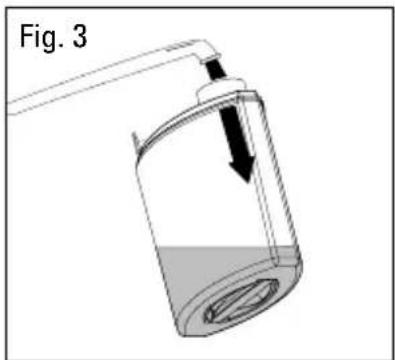
- Turn the Water Tank upside down so that the Fill Cap is facing up; unscrew the Fill Cap by turning it counter-clockwise and set aside.
- Fill the Water Tank with COOL tap water (Fig. 3). Distilled water is not necessary as the water is filtered by the Natural Cool Moisture® filter. DO NOT USE HOT WATER. Doing so may damage the humidifier.
- Replace the fill cap by turning it clockwise → DO NOT OVER TIGHTEN. Turn the Water Tank right-side up.
NOTE: WHEN CARRYING THE FILLED WATER TANK PLEASE USE THE HANDLE AND PLACE YOUR OTHER HAND UNDER THE TANK FOR ADDITIONAL SUPPORT.


FILLING CONTINUED
- Place the Motor Housing back into the base.
- Position the Water Tank in the humidifier and push into place. Some water will empty into the base.
- Once the filled tank has been positioned, do not attempt to move the humidifier. If it has to be moved, unplug the humidifier and remove the water tank first.
CAUTION: DO NOT POUR WATER INTO THE GRILLE ON TOP OF THE HUMIDIFIER. DOING SO MAY DAMAGE THE HUMIDIFIER OR CAUSE PERSONAL INJURY.
OPERATION
POWER
CAUTION: DO NOT PLUG IN THE HUMIDIFIER WITH WET HANDS AS AN ELECTRICAL SHOCK COULD OCCUR.
- With the power switch in the OFF position, plug the filled humidifier into a polarized 120V outlet. DO NOT FORCE THE POLARIZED PLUG INTO THE OUTLET; it will only fit one way.
HUMIDITY CONTROL
- Set the fan speed to the desired position (Fig. 4).
HIGH: For fast humidifying MED: For everyday moisture control LOW: For quieter nighttime operation
- Set the Moisture Control knob (Humidistat) to the highest setting by turning the dial clockwise ↗ to No. 9 (Fig. 4).
NOTE: If the humidifier fan will not start or restart when you select a fan speed, the Moisture Control may be set too low. Turn the dial clockwise to No.9. This is the highest setting. The Desired Humidity light will be Off when the unit is producing moisture (Fig. 4).

Turn the humidifier OFF if the humidity level feels too moist or you notice condensation forming on the walls and/or windows.
FEATURES
MOISTURE CONTROL KNOB/HUMIDISTAT
The Moisture Control Knob allows you to adjust and select the humidity level to your personal preference. Your humidifier will turn on and off throughout the day and night to maintain the desired humidity level you have selected.
HOW TO SET THE MOISTURE CONTROL KNOB/HUMIDISTAT
First run the humidifier per the operation instruction with the Moisture Control knob set to No. 9—the highest setting.
- Let the humidifier run on high for a least one hour or until your room has reached a
comfortable humidity level.
- At this point, slowly turn your Moisture Control knob counter-clockwise ↗ until the humidifier shuts off and the Desired Humidity light comes on (Fig. 5).
- Now that your Moisture Control knob is set, the humidifier will automatically turn back on when your room drops below your comfort setting and will automatically turn off again when the setting is reached.

AUTOMATIC SHUT OFF FEATURE - REFILL LIGHT
- AUTO-OFF
- The humidifier will turn off when both the Base and Water Tank are empty. The Refill light will glow to let you know your humidifier is empty.
- AUTO-ON
- Refill the tank per the FILLING instructions. Once the base begins to fill with water the Refill light will go off and the unit will automatically turn back on.
WEEKLY CLEANING
We recommend cleaning the humidifier once a week, more often if you have hard water, notice a build up of impurities or detect unpleasant odors.
Cleaning involves two steps SCALE REMOVAL and DISINFECTING. Be sure to perform these in the proper order to avoid harmful chemical interactions.
- First, turn off and unplug the humidifier.
- Remove the Water Tank and Motor Housing.
- Remove the Natural Cool Moisture® filter from the Base.
- Empty any water from the Base.
NOTE: REMOVE FILTER BEFORE CLEANING. Failure to remove filter during cleaning will destroy the filter.
STEP ONE: SCALE REMOVAL
BASE
- Fill the Base with either:
- 1 cup (8 oz) of undiluted white vinegar
or
- Use DuraRinse ® Humidifier Cleaner, part no. AC-816, following the instructions on the bottle.
- Let solution stand for 20 minutes.
- With the vinegar or DuraRinse ® in the Base clean all interior surfaces with a soft cloth or brush to help remove scale.
- Rinse the Base thoroughly with water to remove scale and cleaning solution.
STEP TWO: DISINFECTING
WATER TANK/BASE
- Fill the Water Tank with:
• 1 teaspoon of household bleach and
- 1 gallon of water
Pour some of this solution into the Base.
-
Let solution stand for 20 minutes.
-
Rinse with water until the odor of bleach is gone.
NOTE: THE USE OF OTHER WATER TREATMENT PRODUCTS AND CHEMICALS MAY CAUSE DETERIORATION OF THE FILTER OR DAMAGE THE HUMIDIFIER, THEREBY HINDERING THE HUMIDIFIER'S EFFECTIVENESS.
PROLONGING THE LIFE OF THE FILTER AND MAINTAINING A CLEAN HUMIDIFER
NOTE: DO NOT ATTEMPT TO CLEAN THE NATURAL COOL MOISTURE® FILTER WITH ANY CHEMICAL SOLUTIONS, DOING SO WILL DAMAGE THE FILTER.
- AgION™ prevents the surface growth and migration of mold, fungus, algae, and bacteria. It is normal for a filter to discolor from mineral build-up. This will vary depending on water quality.
- DO NOT clean the filter using any chemical solution.
- If a Natural Cool Moisture ® filter appears to be clogged by hard water or mineral deposits, soak it in a sink full of cool water for 10 minutes. DO NOT SQUEEZE OR WRING OUT THE NATURAL COOL MOISTURE ® FILTER. Always place filter back in the humidifier wet.
- To prevent mineral deposits use DuraFree Humidifier Water Softener, part no. AC-817, each time the Water Tank is refilled.
- Always purchase Honeywell Brand Natural Cool Moisture ® filters as the fan motor of this humidifier and the Natural Cool Moisture ® filter are designed to function efficiently as a set. Using any other filter could damage the motor or reduce the humidifier's performance.
- Be sure to empty water from the Water Tank and Base when not in use.
END-OF-THE-SEASON CARE AND STORAGE
- Follow weekly CLEANING instructions when the humidifier will not be used for at least one week or more, or at the end of the season.
- At the end of the season, remove and throw away the filter; do not store with a used filter.
- Dry the humidifier completely before storing. DO NOT store with water inside the Base or Water Tank.
- Pack the unit in its original carton and store in a cool, dry location.
- Before next use, remember to install a new filter and clean the humidifier.
Q: I hear the fan turning, but I don't see any mist. Is my humidifier operating properly?
A: Dry air is pulled through the Natural Cool Moisture® system and a fan disperses invisible, moisture balanced air. There is no “mist” emitted. When operating normally you will feel only cool air coming from the unit. Monitor the water level in your Tank/ Base. If you notice a decrease in the Water Tank over 24 hours then the unit is operating normally.
Q: My unit has been running for several hours. I hear the fan spinning, but I do not notice the water level in the tank decreasing.
A: First, check the Natural Cool Moisture® filter to ensure it is wet. If the pad appears dry, remove it from the Base and gently rinse under cool water. Reposition wet filter in the Base. You may also want to note the current moisture level in your home. If the humidity level is over 60% the unit will not put out much moisture as your air is already saturated.
Q: The humidifier is not running (the fan is not even spinning), but all (or some) of the lights are on.
A: If the Desired Humidity light is ON: The Moisture Control knob may be set too low. Moving the Moisture Control knob to No. 9 should restart the unit. If the Refill light is ON: The humidifier is out of water. Refill the Water Tank and the humidifier should restart.
Q: The Moisture Control knob was set according to the manual, but the humidifier never seems to turn back on. Is something wrong?
A: The Moisture Control knob may be set too low. Moving the Moisture Control knob to No. 9 should restart the unit. Reset the Moisture Control knob following the instructions under FEATURES.
Q: The Moisture Control knob was set according to the manual, but the humidifier never seems to turn off. Is something wrong?
A: The Moisture Control knob may be set too high. Reset the Moisture Control knob following the instructions under FEATURES.
Q: My filter has changed color. Do I need a new filter?
A: Probably not. Since your filter has been made with AgION™ technology the change in color indicates only a mineral deposit. Soak filter in a sink full of cool water to help break up deposits. The discoloration may remain but will not affect the humidifier's performance.
CARE PRODUCTS
If your local retailer is out of stock, Honeywell replacement parts and care products may be ordered directly from the manufacturer. You can call 1-800-332-1110 to order with a MasterCard, Visa or Discover or fill out the form below and mail it along with a check or money order (sorry no COD's accepted) to:
Honeywell
Consumer Service Center
250 Turnpike Road
Southborough, MA 01772
Please allow four to six weeks for delivery.
Massachusetts residents please add 5% Sales Tax.
| Item Item No. Qty. U.S. Price Total | |||||
| Natural Cool Moisture® Filter, one per pack HAC-504 14.00 | |||||
| DuraFree® Humidifier Water Softener (32 oz.) AC-817 5.00 | |||||
| DuraRinse® Humidifier Cleaner (32 oz.) AC-816 5.00 | |||||
| Water Tank and Fill Cap HCM-2051-1 19.99 | |||||
| Fill Cap HCM-2051-2 9.99 | |||||
| SUBTOTAL | |||||
| MA Residents add 5% Sales Tax | |||||
| Shipping and Handling | 4.95 | ||||
| TOTAL ENCLOSED | |||||
| Name Check or Money Order Enclosed | |||||
| Address Credit Card No. | |||||
| Exp. Date | |||||
| Day Time Phone Signature | |||||
ELECTRICAL RATINGS
Model HCM-2051 is rated 0.6 Amps at 120V, 60 Hz.
NOTE: IF YOU EXPERIENCE A PROBLEM WITH YOUR HUMIDIFIER'S POWER UNIT, PLEASE SEE THE WARRANTY FOR INSTRUCTIONS. PLEASE DO NOT ATTEMPT TO OPEN OR REPAIR THE HUMIDIFIER YOURSELF. DOING SO WILL VOID THE WARRANTY AND COULD CAUSE DAMAGE OR PERSONAL INJURY. IF THE PROBLEM PERSISTS, PLEASE CONTACT THE CONSUMER SERVICE CENTER.
CUSTOMER ASSISTANCE
Mail questions or comments to:
Honeywell
Consumer Service Center
250 Turnpike Road
Southborough, MA 01772
e-mail: service@honeywell.com
Please be sure to specify model number.
Call us toll-free at:
1-800-332-1110
Or visit our website at:
www.honeywell.com/yourhome
5 YEAR LIMITED WARRANTY
You should first read all instructions before attempting to use this product.
The enclosed Customer Response card should be filled out and returned within 7 days of purchase.
A. This 5 year limited warranty applies to repair or replacement of product found to be defective in material or workmanship. This warranty does not apply to damage resulting from commercial, abusive, unreasonable use or supplemental damage. Defects that are the result of normal wear and tear will not be considered manufacturing defects under this warranty.
HONEYWELL IS NOT LIABLE FOR INCIDENTAL OR CONSEQUENTIAL DAMAGES OF ANY NATURE. ANY IMPLIED WARRANTY OF MERCHANTABILITY FOR FITNESS FOR A PARTICULAR PURPOSE ON THIS PRODUCT IS LIMITED IN DURATION TO THE DURATION OF THIS WARRANTY.
Some jurisdictions do not allow the exclusion or limitation of incidental or consequential damages or limitations on how long an implied warranty lasts, so the above limitations or exclusions may not apply to you. This warranty gives you specific legal rights, and you also may have other rights which vary from jurisdiction to jurisdiction. This warranty applies only to the original purchaser of this product from the original date of purchase.
B. At its option, Honeywell will repair or replace this product if it is found to be defective in material or workmanship. Defective product
should be returned to the place of purchase in accordance with store policy. Thereafter, while within the warranty period defective product may be returned to Honeywell.
C. This warranty does not cover damage resulting from any unauthorized attempts to repair or from any use not in accordance with the instruction manual.
NOTE: THIS WARRANTY DOES NOT COVER THE NATURAL COOL MOISTURE® FILTER, WHOSE PERFORMANCE WILL DEPEND UPON THE CONDITION OF THE WATER USED IN THE HUMIDIFIER.
D. Return defective product to Honeywell Consumer Products with a brief description of the problem. Include proof of purchase and a \$10 US check or money order for handling, return packing and shipping charges. Please include your name, address and a daytime phone number. You must prepay shipping charges.
Send to:
Honeywell
Consumer Products,
Attn: Returns Department,
4755 South Point Drive, Memphis, TN 38118
1-800-332-1110


- 4 GALLON OUTPUT PER DAY COOL MOISTURE HUMIDIFIER
- IMPORTANT SAFETY INSTRUCTIONS
- READ AND SAVE THESE SAFETY INSTRUCTIONS BEFORE USING THIS HUMIDIFIER
- INTRODUCTION
- HOW DOES IT WORK
- NATURAL COOL MOISTURE® SYSTEM
- WHAT IS AGION™ ANTIMICROBIAL
- MODEL - HCM-2051
- SET UP
- NOTE: WE RECOMMEND THAT THE HUMIDIFIER BE DISINFECTED PRIOR TO FIRST USE. PLEASE SEE CLEANING INSTRUCTIONS
- FILLING
- FILLING CONTINUED
- OPERATION
- POWER
- CAUTION: DO NOT PLUG IN THE HUMIDIFIER WITH WET HANDS AS AN ELECTRICAL SHOCK COULD OCCUR
- HUMIDITY CONTROL
- FEATURES
- MOISTURE CONTROL KNOB/HUMIDISTAT
- HOW TO SET THE MOISTURE CONTROL KNOB/HUMIDISTAT
- AUTOMATIC SHUT OFF FEATURE - REFILL LIGHT
- WEEKLY CLEANING
- NOTE: REMOVE FILTER BEFORE CLEANING. FAILURE TO REMOVE FILTER DURING CLEANING WILL DESTROY THE FILTER
- STEP ONE: SCALE REMOVAL
- BASE
- OR
- STEP TWO: DISINFECTING
- WATER TANK/BASE
- PROLONGING THE LIFE OF THE FILTER AND MAINTAINING A CLEAN HUMIDIFER
- END-OF-THE-SEASON CARE AND STORAGE
- CARE PRODUCTS
- ELECTRICAL RATINGS
- CUSTOMER ASSISTANCE
- 5 YEAR LIMITED WARRANTY
- THE ENCLOSED CUSTOMER RESPONSE CARD SHOULD BE FILLED OUT AND RETURNED WITHIN 7 DAYS OF PURCHASE
- HONEYWELL IS NOT LIABLE FOR INCIDENTAL OR CONSEQUENTIAL DAMAGES OF ANY NATURE. ANY IMPLIED WARRANTY OF MERCHANTABILITY FOR FITNESS FOR A PARTICULAR PURPOSE ON THIS PRODUCT IS LIMITED IN DURATION TO THE DURATION OF THIS WARRANTY
Brand : HONEYWELL
Model : HCM2051
Category : Humidifier