
IPDS-20 - Computer accessory HAIER - Free user manual and instructions
Find the device manual for free IPDS-20 HAIER in PDF.


| Product Type | Computer Accessory (Surge Protector/Power Strip) |
| Brand | Haier |
| Model | IPDS-20 |
| Input Voltage | 100-240 V AC, 50/60 Hz |
| Output Voltage | 100-240 V AC |
| Number of Outlets | 6 |
| Surge Protection | Yes, up to 1000 Joules |
| Overload Protection | Yes, automatic shutoff |
| Power Cord Length | 1.8 meters (6 feet) |
| Dimensions (W x D x H) | 30 x 10 x 4 cm (11.8 x 3.9 x 1.6 inches) |
| Weight | 0.5 kg (1.1 lbs) |
| Material | Flame-retardant ABS plastic |
| Color | Black |
| LED Indicators | Power on, Surge protection active |
| Safety Certifications | UL, CE, RoHS |
| Operating Temperature | 0°C to 40°C (32°F to 104°F) |
| Storage Temperature | -20°C to 60°C (-4°F to 140°F) |
| USB Charging Ports | 2 (5V/2.4A each) |
| Mounting Option | Wall-mountable (keyhole slots) |
Frequently Asked Questions - IPDS-20 HAIER
User questions about IPDS-20 HAIER
0 question about this device. Answer the ones you know or ask your own.
Ask a new question about this device
Download the instructions for your Computer accessory in PDF format for free! Find your manual IPDS-20 - HAIER and take your electronic device back in hand. On this page are published all the documents necessary for the use of your device. IPDS-20 by HAIER.
USER MANUAL IPDS-20 HAIER
natural_image
Haier portable electronic device with a smartphone mounted on its side (no visible text or symbols on the device body)USER MANUAL
Copyright © 2011 Haier America Trading LLC. All rights reserved.
Table of contents
1. Safety ....3
1.1 Intended use ....3
1.2 Labels in this manual ....3
1.3 General safety instructions ....3
2. FCC Information ....4
2.1 FCC Part 15 4
3. Preparations for use ....5
3.1 Unpacking 5
3.2 Package contents 5
4. Installation 5
4.1 Connecting random equipment 6
4.2 Connecting to the mains 7
4.3 Remote control 7
5. Functions 8
5.1 iPod Music System 8
6. Operation 9
6.1 Quick start 9
7. Cleaning and maintenance ....11
8. Troubleshooting ....12
9. Technical data ....12
10. Disposal of used electrical and electronic equipment 13
11. Warranty ....14
Copyright notice
Design and specifications are subject to change without notice.
1. Safety
1.1 Intended use
This iPod Music System functions as a docking station to play music from an iPod/iPhone. Read the manual carefully before first use.
1.2 Label in this manual

WARNING
A warning means that injury or death is possible if the instructions are not obeyed.

CAUTION
A caution means that damage to the equipment is possible.

A note gives additional information, e.g. for a procedure.
1.3 General safety instructions

WARNING
Do not put force on the unit. The unit can fall and can cause serious injury.

CAUTION
Do not spill any liquid on the unit.

WARNING
Do not insert any objects in the ventilation holes.

CAUTION
Do not block the ventilation holes.

This appliance is double insulated; therefore no earth wire is required. Always check that the mains voltage corresponds to the voltage on the rating plate.
2. FCC INFORMATION
2.1 FCC Part 15
This device complies with Part 15 of the FCC Rules. Operation of this product is subject to the following two conditions: (1) this device may not cause harmful interference, and (2) this device must accept any interference received, including interference that may cause undesired operation. This equipment has been tested and found to comply within the limits for a class B digital device, pursuant to Part 15 of the FCC Rules. These limits are designed to provide reasonable protection against harmful interference in a residential installation. This equipment generates, uses, and can radiate radio frequency energy and, if not installed and used in accordance with the instructions, may cause harmful interference to radio communications. However, there is no guarantee that interference will not occur in a particular installation. If this equipment does cause harmful interference to radio or television reception, which can be determined by turning the equipment off and on, the user is encouraged to try to correct the interference by one or more of the following measures:
- Reorient or relocate the receiving antenna.
- Increase the separation between the equipment and receiver.
- Connect the equipment into an outlet on a circuit different from that to which the receiver is connected.
- Consult the dealer or an experienced technician for help.
FCC warning:
Changes or modifications not expressly approved by the party responsible for compliance with the FCC Rules could void the user's authority to operate this equipment.
3. Preparations for use
3.1 Unpacking
- Unpack the appliance carefully.
- Check the package contents as described below. If any item is missing, please contact your reseller.
- Remove the labels from the front panel carefully if present.

It is recommend that you retain the original carton and packing materials in case it ever becomes necessary to return your product for service. This is the only way to safely protect the product against damage in transit. If you do dispose of the carton and the packing materials, please remember to recycle with due care to the environment.
3.2 Package contents
The following items are included in the received package:
1 iPod Music System
1 Main AC adaptor
1 Remote control
1 Battery cell (CR2032 3V)
1 Operator manual
1 Carrying case

If any item is missing, please contact your reseller.
4. Installation
- Unpack the unit carefully.
- Connect the random equipment to the unit.
Read te paragraph "Connecting random equipment". - Connect the unit to power outlet.
• Install the batteries in the remote control.
Read the paragraph "Remote control".

CAUTION
- Do not place the unit near a heat source.
- Do not expose the unit to direct sunlight.

This unit is equipped with rubber feet to prevent it from moving. The feet are made from non-migrating material specially formulated to avoid leaving any marks or stains on furniture. However, certain types of furniture polishes, wood preservatives or cleaning sprays cause the rubber to soften and leave marks or a residue on the furniture, and potentially risk the surface to become damaged. To prevent damage to wooden surfaces, we recommend that you apply self-adhesive pads to the bottom of the rubber feet before installation.
4.1 Connecting random equipment
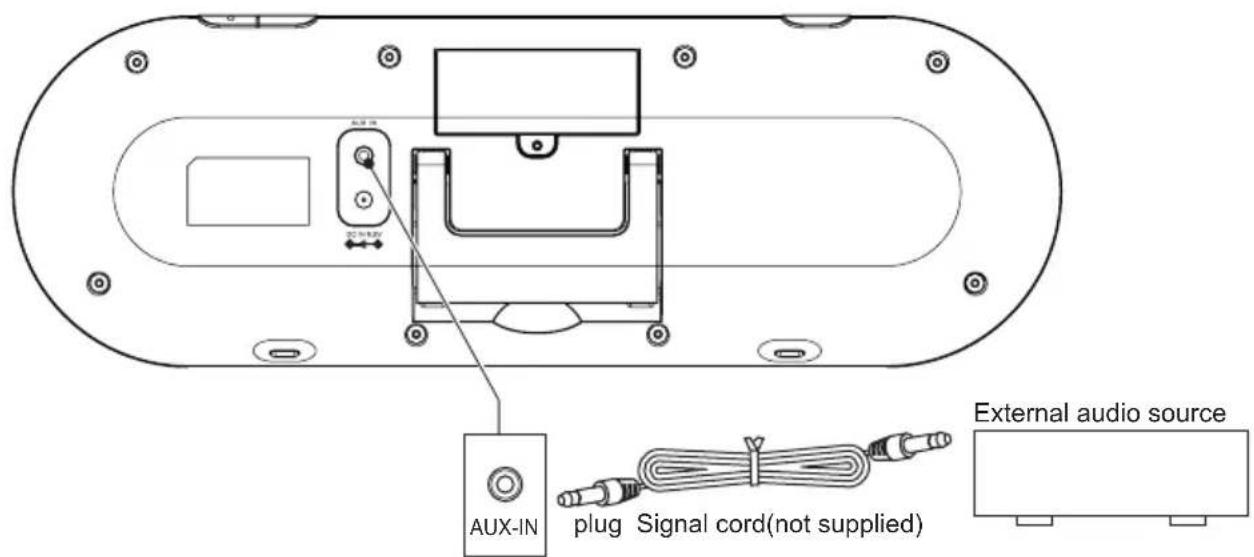
Audio connections (input)
These connections allow you to receive audio signal from a connected CD / DVD player, amplifier, or any MP3 player.
- Insert a suitable cable into the AUX IN connection.
4.2 Connecting to the outlet

- Connect the adaptor plug on the adaptor cable to the DC 8.5V input connection.
- Connect the adaptor to a wall socket.
4.3 Remote control
Installing the battery
- Press the catch and the same time pull out the battery tray.
- Insert 1 lithium battery, type CR2032 3 V battery with the stamped (+) mark facing upward.
- Insert the battery tray into the remote control.

5. Functions
5.1 iPod / iPhone Music System
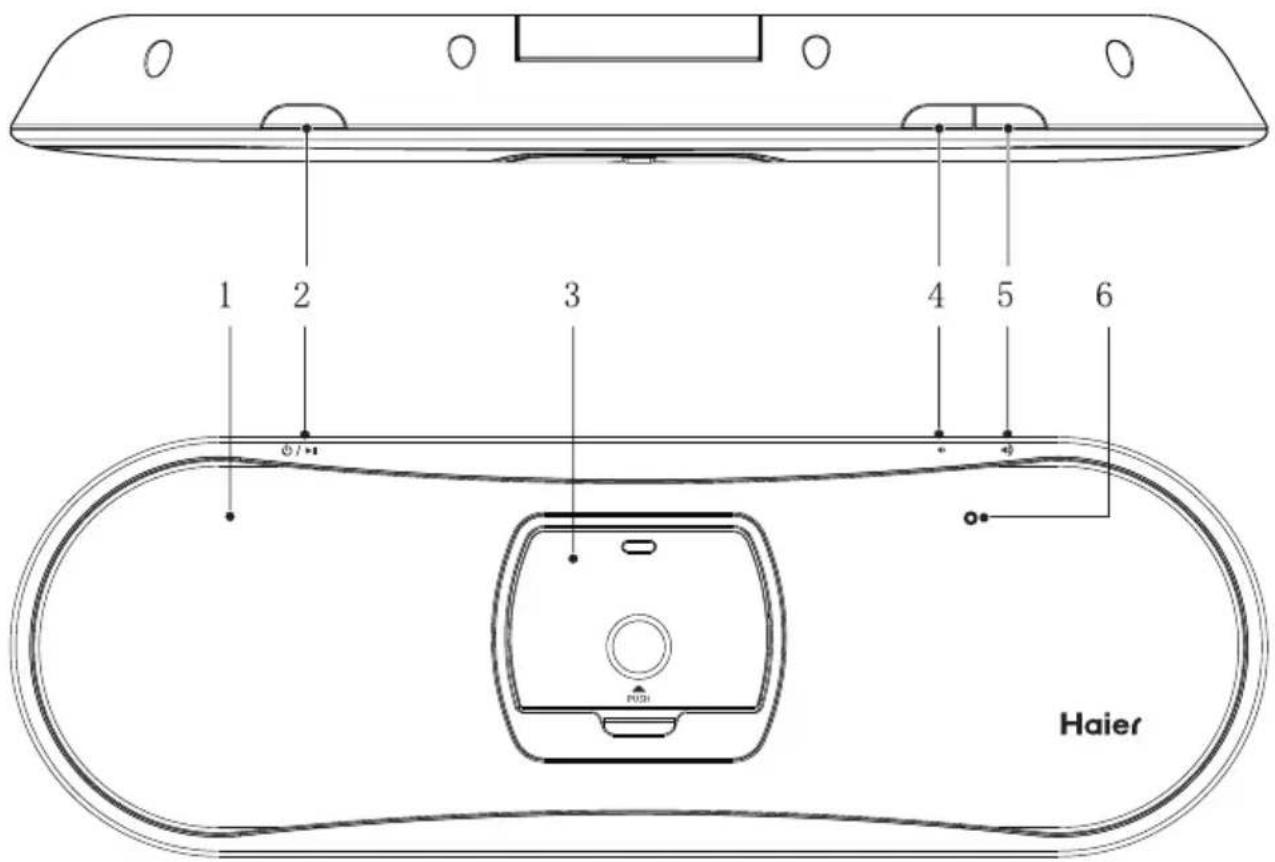
1 Power/Battery indicator
2 ⏻ / ▶ Power ON/OFF/PLAY/PAUSE button
3 Docking station
4 VOL-button
5 VOL+ button
6 Remote control sensor
Remote control
7 Remote control transmitter
8 ⏻ POWER button
9 PREV button
10 ENTER button
11 ▶ PLAY/PAUSE button
12 MUTE button
13 VOL-button
14 VOL+ button
15 3D SOUND button
16 MENU button
17 iPod MENU - button
18 ➤ ➤ ➤ ➤ ➤ ➤ ➤ ➤ ➤ ➤ ➤ ➤ ➤ ➤ ➤ ➤ ➤ ➤ ➤ ➤ ➤ ➤ ➤ ➤ ➤ ➤ ➤ ➤ ➤ ➤ ➤ ➤ ➤ ➤ ➤ ➤ ➤ ➤ ➤ ➤ ➤ ➤ ➤ ➤ ➤ ➤ ➤ ➤ ➤ ➤ ➢
19 iPod MENU + button

The + button, the - button, the PREV button and the NEXT button function as arrow buttons for navigation in the iPod / iPhone menus.

6. Operation
All functions of the appliance are accessible using the remote control.
All instructions refer to operation with the remote control, unless indicated otherwise.
6.1 Quick start
General functions
- To switch on the unit, press the POWER button (8). To switch off the unit, press the POWER button (8) again.
• To adjust the volume, press the VOL+ button (14) or the VOL- button (13). - To enable the surround, press the 3D SOUND button (15). To disable the surround, press the 3D SOUND button (15) again.
• To mute or restore sound, press the MUTE button (12).
iPod/iPhone functions
- Place the iPod/iPhone in the docking station.
- Switch on the unit.
- For iPod touch and iPhone select the iPod mode.
- To start playback, press the PLAY/PAUSE button (11) once.
- For extended instructions, read the paragraph "iPod functions" further on in this manual.
Installing and removing an iPod/iPhone
• To install an iPod/iPhone:
- Insert the iPod/iPhone into the docking station.
• To remove an iPod/iPhone:
- Pull the iPod/iPhone gently out of the docking station.

Whilst the iPod/iPhone is docked in the system, its battery is charged automatically. When the battery is fully charged, the charging process is completed.
Support models
| Model | Memory |
| iPod mini | 4 GB & 6 GB |
| iPod (4th generation) | 20 GB & 40 GB |
| iPod colour (4th generation) | 20 GB, 30 GB, 40 GB & 60 GB |
| iPod video (5th generation) | 30 GB, 60 GB & 80 GB |
| iPod nano (1st generation) | 1 GB, 2 GB & 4 GB |
| iPod nano (2nd generation) | 2 GB, 4 GB & 8 GB |
| iPod nano (3rd generation) | 4 GB & 8 GB |
| iPod nano (4th & 5th generation) | 8 GB & 18 GB |
| iPod classic (1st generation) | 80 GB & 160 GB |
| iPod classic (2nd generation) | 120 GB |
| iPod touch (1st & 2nd generation) | 8 GB, 16 GB & 32 GB |
| iPhone | 4 GB, 8 GB & 16 GB |
| 3G iPhone | 8 GB & 16 GB |
| 3GS iPhone | 16 GB & 32 GB |
| iPhone 4 | 16GB & 32 GB |
Audio playback
During playback, the following functions are available:
- To select a track, press the PREV button (9) or the NEXT button (18) until the desired track is set.
- To forward or rewind the track, press and hold the PREV button (9) or the NEXT button (18).
- To pause playback, press the PLAY/PAUSE button (11).
- To resume playback, press the PLAY/PAUSE button (11) again.
In order to operate the following functions, the iPod/iPhone must be unlocked.
• To select a playlist, press the MENU button (16).
• To enter the iPod menu, press the MENU buton (16).
• To enter and navigate through the menu:
- Press the + button (19) or the - button (17) to select a submenu.
- Press the ENTER button (10) to select a setting.
Charging the unit
The appliance is fitted with an internal battery. While the unit is connected to the power source, its battery is charged automatically.
The power/battery indicator provides the information regarding the power:
- blue: the appliance is switched on.
- green: the battery is fully charged.
- orange: the battery is charging.
- red: the battery is almost empty.
- Connect the adaptor plug on the adaptor cable to the DC 8.5 V input connection.
- Connect the main plug to a wall socket.
7. Cleaning and maintenance

WARNING
Before performing any cleaning or maintenance, switch off and unplug the appliance.
- Clean the outside of the appliance with a soft cloth. When the appliance is very dirty, dampen the cloth slightly with water and a neutral solution.
8. Troubleshooting
| Trouble | Action |
| No sound or incomplete audio | Check if the correct source is selected.Check volume or mute setting.Check if the random equipment are switched on and set correctly.Check cables for connection problems. |
| No power | Check if the power cord has been properly connected to the power outlet. |
| The operation keys do not work | Internal error. Reset the appliance. |
iPod/iPhone
| Trouble | Action |
| iPod/iPhone volume control does not increase audio volume | iPod/iPhone volume control only controls the volume output to the headphone jack. Set the unit volume control when the iPod/iPhone is docked on the unit. |
| No response to MENU function. | iPod/iPhone does not support these functions |
AUX
| Trouble | Action |
| No sound on the unit system Input source is low. | Increase the volume levelon the audio source device.Check cables for damage.Check if the input same is connected properly. |
9. Technical data
| Power requirements | AC Adaptor Model: GPE248-085220-1 |
| Voltage | 8.5V 2.2A 18.7W |
| Input voltage | 100 ~ 240V /c50 ~ 60Hz 0.75A |
| Max power consumption | 25W |
| Max. power output | 2 x 4 W |
Dimensions (W x H x D)
130x46x390 mm
Weight
0.76 kg
Remote control
| Power consumption | 3V |
| Battery size | CR2032 |
10. Disposal of used electrical and electronic equipment
The meaning of the symbol on the material, its accessory or packaging indicates that this product shall not be treated as household waste. Please, dispose of this equipment at your applicable collection point for the recycling of electrical and electronic equipments waste. By ensuring the correct disposal of this product, you will help prevent potentially hazardous to the environment and to human health, which could otherwise be caused by unsuitable waste handling of this product. Therecycling of materials will help conserve natural resources. Please do not therefore dispose of your old electrical and electronic equipment with your household waste.
For more detailed information about recycling of this product, please contact your local city office, your household waste disposal service or the shop where you purchased the product.

natural_image
Symbol of a trash bin crossed with no text or numbers, representing waste sorting or disposal (no text present)11. Warranty
This Haier brand product, when shipped in its original container, will be free from defective workmanship and Materials, and agrees that it will, at its option, either repair the defect or replace the defective product with a New or re-manufactured equivalent at no change to the purchaser, for parts or labor for the periods set forth Below:
This warranty does not apply to the appearance of the product or the exterior of the product, which has been Damaged or defaced, altered or modified in design or construction. It does not apply to the additional Excluded items set forth below:
The warranty commences on the date the item was purchased and the original purchase receipt must be Presented to the authorized service center before warranty repairs are rendered. The limited warranty described herein is in addition to whatever implied warranties may be granted to purchasers by law. ALL IMPLIED WARRANTIES INCLUDING THE WARRANTIES OF MERCHANTABILITY AND FITNESS FOR USE ARE LIMITED TO THE PERIOD(s) FROM THE DATE OF PURCHASE SET FORTH BELOW. Some states do not allow limitations on how long an implied warranty lasts, so the above limitation may not apply to you. Neither the sales personnel of the seller nor any other person is authorized to make any warranties other than those described herein, or to extend the duration of any warranties beyond the time period described herein on behalf of Haier.
The warranties described herein shall be the sole and exclusive warranties granted by Haier and shall be the sole and exclusive remedy available to the purchaser. Correction of defects in the manner and for the period of time described herein, shall constitute complete fulfillment of all abilities and Responsibility of Haier to the purchaser with respect to the product, and shall constitute full satisfaction of all claims, whether based On contract, negligence, strict duality or otherwise. In no event shall Haier be liable, or in any way responsible for any damages or defects in the product which were caused by repairs or attempted repairs performed by anyone other than an authorized service center or dealer; nor shall Haier be liable, or in any way responsible for incidental or consequential economic or property damage. Some states do not allow the Exclusion of incidental or consequential damages, so that above exclusion may not apply to you.
THIS WARRANTY GIVES YOU SPECIFIC LEGAL RIGHTS. YOU MAY ALSO HAVE OTHER RIGHTS WHICH VARY FROM STATE TO STATE. Warranty period for this product: One Year for Labor, and one Year for parts. Additional items excluded from warranty coverage: non rechargeable batteries.
Where to obtain service: For the location of the nearest Haier authorized service center or to obtain product Literature, accessories, supplies or customer assistance, please call 1-877-337-3639.
What to do to obtain service: ship or carry in your product to an authorized service dealer or center. Be Sure to have proof of purchase. If you ship the product, be sure it is packaged carefully.
Haier America
New York, NY 10018
iPhone, iPod, and iPod Shuffle are trademarks of Apple Inc., registered in the U.S. and other countries. Features and specifications subject to change without prior notice.


- USER MANUAL
- Table of contents
- Safety ....3
- FCC Information ....4
- Preparations for use ....5
- Installation 5
- Functions 8
- Operation 9
- Cleaning and maintenance ....11
- Troubleshooting ....12
- Technical data ....12
- Disposal of used electrical and electronic equipment 13
- Warranty ....14
- Copyright notice
- Safety
- Intended use
- Label in this manual
- WARNING
- CAUTION
- General safety instructions
- FCC INFORMATION
- FCC Part 15
- FCC warning:
- Preparations for use
- Unpacking
- Package contents
- Installation
- Connecting random equipment
- Audio connections (input)
- Connecting to the outlet
- Remote control
- Installing the battery
- Functions
- iPod / iPhone Music System
- Remote control
- Operation
- Quick start
- General functions
- iPod/iPhone functions
- Installing and removing an iPod/iPhone
- Support models
- Audio playback
- Charging the unit
- Cleaning and maintenance
- Troubleshooting
- iPod/iPhone
- AUX
- Technical data
- Disposal of used electrical and electronic equipment
- Warranty
Brand : HAIER
Model : IPDS-20
Category : Computer accessory