
EC26 - Thermostat ELRO - Free user manual and instructions
Find the device manual for free EC26 ELRO in PDF.


| Product Type | Programmable Temperature Controller |
| Brand | Elro |
| Model | EC26 |
| Supply Voltage | 230V AC / 50Hz |
| Maximum Load (Resistive) | 16A / 3680W |
| Maximum Load (Inductive) | 2A / 460W |
| Temperature Range | 5°C to 30°C |
| Temperature Accuracy | ±1°C |
| Operating Temperature | -10°C to +70°C |
| Differential (Span) | 4°C |
| Display Type | Digital LED |
| Control Modes | Heating or Cooling (selectable) |
| Indicator Light | Green/Red LED |
| Power Button | Yes |
| Reset Button | Yes (resets to 20°C) |
| Installation | Plug into wall socket; connect heater/cooler to controller outlet |
| Maintenance | Clean with soft dry cloth; do not use liquids or abrasives |
| Safety | Do not open; repairs by authorized personnel only |
| Wireless Interference | Keep at least 10.8m away from other wireless devices |
| Dimensions (Approx.) | 120mm x 80mm x 40mm |
| Weight (Approx.) | 200g |
Frequently Asked Questions - EC26 ELRO
User questions about EC26 ELRO
0 question about this device. Answer the ones you know or ask your own.
Ask a new question about this device
Download the instructions for your Thermostat in PDF format for free! Find your manual EC26 - ELRO and take your electronic device back in hand. On this page are published all the documents necessary for the use of your device. EC26 by ELRO.
USER MANUAL EC26 ELRO
| SAFETY AND MAINTENANCE INSTRUCTIONS |
| - Make sure that all electric connections and connection cables meet the pertaining regulations and are in conformity with the operating instructions.- Do not overload electrical outlets or extension cords, fire or electric shocks can be the result- Please contact an expert in case you have any doubts about the mode of operation, the safety or connecting the appliances.- Keep all parts away from young children's reach- Do not store this item on wet, very cold or warm places, this can damage the electronic circuit boards.- Does drop or shocks, then can damage the electronic boards.- Never replace damaged power cables yourself. In such a case, remove them from the net and take the devices to a workshop.- Repairs or opening of this item may only be performed by an authorised workshop.- Wireless systems are subject to interference from cordless phones, microwaves, and other wireless devices operating in the 2.4GHz range. Keep the system AT LEAST 10 ft away from the devices during installation and operation. |
| MaintenanceThe devices are maintenance-free, so never open them. The guarantee becomes void when you open the appliance. Only clean the outside of the devices with a soft, dry cloth or a brush. Prior to cleaning, remove the devices from all voltage sources. |
| Correct Disposal of This Product (Waste Electrical & Electronic Equipment) (Applicable in the European Union and other European countries with separate collection systems)This marking shown on the product at its literature, indicates that it should not be disposed with other household wastes at the end of its working life. To prevent possible harm to the environment or human health from uncontrolled waste disposal, please separate this from other types of wastes and recycle it responsibly to promote the sustainable reuse of material resources. Household users should contact either the retailer where they purchased this product, or their local government office, for details of where and how they can take this item for environmentally safe recycling. Business users should contact their supplier and check the terms and conditions of the purchase contract. This product should not be mixed with other commercial wastes for disposal. |
| SPECIFICATIONS | |
| Supply voltage | : 230V AC / 50HZ |
| Maximum load | : Resistive:16 A 3680W:Inductive:2A 460W |
| Temperature range | : 5^ 30^ |
| Temperature accuracy | : ± 1^ |
| Operating temperature | : -10^ +70^ |
| Span | : 4^ |

GB USER'S MANUAL
:
SIR. UDRUTSTVA ZA UPORABU


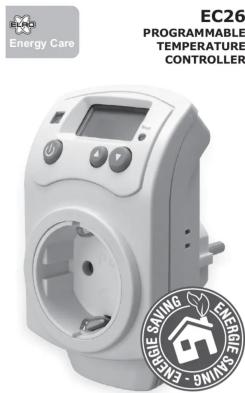
GB EC26 PROGRAMMABLE TEMPERATURE CONTROLLER This temperature controller can be used for controlling the temperature in a room or area. It can control either a heater or cooler, which will be activated by the sensor of the controller.
CONTENTS(1)
a. Temperature controller
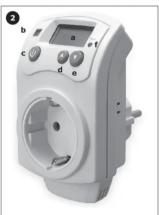
CONTROL PANEL VIEW (2)
a. Display: see Display View for more information
b. Indicator light: show working state on green/red
c. Power button: turn the device on and off
d. UP button: change settings higher e. DOWN button: change settings low
f. Reset button: reset the device to default settings: 20°C
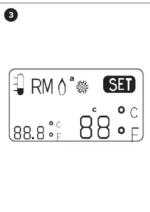
DISPLAY VIEW (3)
a. Heating / Cooling sy
b. Current temperature
c. Set temperature.
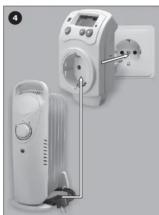
INSTALLATION (4)
Plug the controller into a wall socket, and connect the heater or cooler to the controller outlet.
of order to the other order
SETTING
- Choose if you want to use the EC26 as a heater controller
or cooler controller: You can do this by pressing the Power (2c) and UP (2d) buttons simultaneously for about 3
(2c) and (3) (2d) buttons simultaneously for about 5 seconds (5).
- Display shows the flame for heating, and the snowflake for
cooling. - Press the UP (2d) and DOWN (2e) buttons simultaneously
Press the 67 (26) and DOWN (2c) buttons simultaneously for about 3 seconds to switch between °C and °F (6).
(五)
USE
- Press the Power button (2c) to set the value of
temperature.
- You can always turn off the device by pressing the Power button. To continue operation, press Power button again
Button: To continue operation, press power button again; Heating
- To use the EC26 as a heater controller, set the value of
SET temperature higher than current temperature. Press the Power button (7c), LED (7b) will light up red:
- Press the Power button (2c), LED (2b) will light up red, press UP button (2d) repeatedly until the SET value is
higher than the current temperature (7).
- After 1\~3 minutes LED will turn green, outlet will turn on and heater will turn on.
- If current temperature is higher than set value, LED will
turn red, outlet will turn off and heater will turn off.
Cooling
- To use the EC26 as a cooler controller, set the value of
- SET temperature lower than current temperature. - Press the Power button (2c). LED (2b) will light up red:
press DOWN button (2e) repeatedly until the SET value is
lower than the current temperature (8).
- After 1\~3 minutes LED will turn green, outlet will turn on and cooler will turn on.
- If current temperature is lower than set value, LED will turn
red, outlet will turn off and cooler will turn off.
2019.5
TIPS - For restoring the device to default settings (20°C)
For restoring the device to default settings temperature) press the Reset button (2f).
- Recommended ambient temperature is 10°C to 40°C.
- Do not open the controller, which might damage the sensor
Repairs must be done by authorized service personnel.
D
EC26 PROGRAMMIERBARER TEMPERATURREGLER
| Year Ended December 31, | ||
| 2018 | 2017 | |
| (in millions) | ||
| Revenues | 1,465 | 1,395 |
| Costs and expenses | (1,048) | (1,008) |
| Net income | 1,465 | 1,395 |
| Year Ended December 31, | ||
| 2018 | 2017 | |
| (in millions) | ||
| Revenues | 1,465 | 1,394 |
| Costs and expenses | (1,038) | (1,038) |
| Net income | 1,465 | 1,394 |
| Year Ended December 31, | ||
| 2018 | 2017 | |
| (in millions) | ||
| Revenues | 1,465 | 1,394 |
| Costs and expenses | (1,038) | (1,038) |
| Net income | 1,465 | 1,394 |
| As of December | ||
| 2017 | 2016 | |
| Net earnings (loss) on continuing operations | 3,459 | 3,384 |
| Earnings per share: | ||
| (In per share) | 0.01 | 0.01 |
| Weighted average exercise price per share: | ||
| Basic | 0.01 | 0.01 |
| Diluted | 0.01 | $ 0.01 |
| As of December | ||
| 2017 | 2016 | |
| Net earnings | 1,384 | 1,359 |
| Non-Net earnings | 1,384 | 1,359 |
| Year Ended December 31, | ||
| 2018 | 2017 | |
| (in millions) | ||
| Revenues | 1,465 | 1,395 |
| Costs and expenses | (1,048) | (1,008) |
| Net income | 1,465 | 1,395 |
| Year Ended December 31, | ||
| 2018 | 2017 | |
| Revenues | 1,465 | 1,395 |
| Costs and expenses | (1,038) | (1,038) |
| Year Ended December 31, | ||
| 2018 | 2017 | |
| Revenues | 1,465 | 1,395 |
| Costs and expenses | (1,038) | (1,038) |
| Year Ended December 31, | ||
| 2018 | 2017 | |
| Revenues | 1,465 | 1,395 |
| Costs and expenses | (1,038) | (1,038) |
| Kasboliviliis amisiilis maddolosi, hemzin, allal usun, hemzori maddolosi, ludlangeovinin. Bu |
| Year Ended December 31, | ||
| 2018 | 2017 | |
| (in millions) | ||
| Revenues | 1,465 | 1,395 |
| Costs and expenses | (1,038) | (1,038) |
| Net income | 1,465 | 1,395 |
| SPECIFICATIONS | |
| Supply voltage | : 230V AC / 50HZ |
| Maximum load | : Resistive:16 A 3680W: Inductive:2A 460W |
| Temperature range | : 5^ 30^ |
| Temperature accuracy | : ± 1^ |
| Operating temperature | : -10^ +70^ |
| Span | : 4^ |





natural_image
Two views of a white industrial electrical outlet device with control buttons and a display (no visible text or symbols)
natural_image
Two views of a white industrial electrical outlet device with control buttons and a display (no visible text or symbols)
natural_image
Two views of a white industrial electrical outlet device with control buttons and a display (no visible text or symbols)
natural_image
Two views of a white industrial electrical outlet device with control buttons and a display (no visible text or symbols)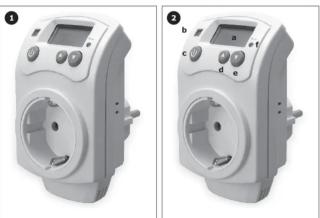
natural_image
Two views of a white industrial electrical switch device with labeled buttons (a-e), no visible text or symbols on the device itself.
natural_image
Two views of a white industrial electrical switch device with labeled buttons (a-e), no visible text or symbols on the device itself.
natural_image
Two views of a white industrial electrical switch device with labeled buttons (a-e), no visible text or symbols on the device itself.
natural_image
Two views of a white industrial electrical switch device with labeled buttons (a-e), no visible text or symbols on the device itself.
natural_image
Two views of a white industrial electrical switch device with labeled buttons (a-e), no visible text or symbols on the device itself.

natural_image
Two views of a white electrical outlet device with labeled buttons (a, b, c, d, e) and a digital display on the left (no text or symbols on the device itself)
natural_image
Two views of a white electrical outlet device with labeled buttons (a, b, c, d, e) and a digital display on the left (no text or symbols on the device itself)
natural_image
Two views of a white electrical outlet device with labeled buttons (a, b, c, d, e) and a digital display on the left (no text or symbols on the device itself)
natural_image
Two views of a white electrical outlet device with labeled buttons (a, b, c, d, e) and a digital display on the left (no text or symbols on the device itself)Brand : ELRO
Model : EC26
Category : Thermostat