
XR-EC10 - Hi-Fi System AIWA - Free user manual and instructions
Find the device manual for free XR-EC10 AIWA in PDF.


| Product Type | Hi-Fi System |
| Brand | Aiwa |
| Model | XR-EC10 |
| Dimensions (W x H x D) | Approx. 300 x 200 x 250 mm |
| Weight | Approx. 5 kg |
| Power Supply | AC 230V, 50Hz |
| Power Consumption | 50 W |
| CD Player | Plays audio CDs |
| Cassette Deck | Playback and recording |
| Tuner | AM/FM stereo |
| Aux Input | 3.5 mm stereo jack |
| Headphone Output | 3.5 mm stereo jack |
| Speaker Output | 2 x 10 W RMS |
| Remote Control | Included |
| Display | LCD with backlight |
| Timer | Programmable sleep/wake |
| Equalizer | Preset sound modes |
| Cleaning | Use soft dry cloth; avoid liquids |
| Safety | Do not expose to moisture; ensure proper ventilation |
| Spare Parts | Contact authorized service center for replacement parts |
| Repairability | Repairs should be performed by qualified personnel |
Frequently Asked Questions - XR-EC10 AIWA
User questions about XR-EC10 AIWA
0 question about this device. Answer the ones you know or ask your own.
Ask a new question about this device
Download the instructions for your Hi-Fi System in PDF format for free! Find your manual XR-EC10 - AIWA and take your electronic device back in hand. On this page are published all the documents necessary for the use of your device. XR-EC10 by AIWA.
USER MANUAL XR-EC10 AIWA
For your convenience, record the model number and serial number (you will find them on the rear of your set) in the space provided below. Please refer to them when you contact your Aiwa dealer in case of difficulty.
| Model No. Serial No. (Lot No.) | |
For assistance and information call toll free 1-800-BUY-AIWA (United States and Puerto Rico)
8C-CL3-903-01
020301ASW-H-M
To reduce the risk of fire or electric shock, do not expose this appliance to rain or moisture.
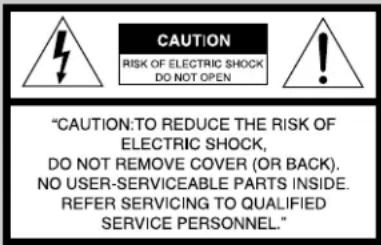
Explanation of Graphical Symbols:

The lightning flash with arrowhead symbol, within an equilateral triangle, is intended to alert the user to the presence of uninsulated "dangerous voltage" within the product's enclosure that may be of sufficient magnitude to constitute a risk of electric shock to persons.

The exclamation point within an equilateral triangle is intended to alert the user to the presence of important operating and maintenance (servicing) instructions in the literature accompanying the appliance.
IMPORTANT SAFETY INSTRUCTIONS
Read the Operating Instructions carefully and completely before operating the unit. Be sure to keep the Operating Instructions for future reference. All warnings and cautions in the Operating Instructions and on the unit should be strictly followed, as well as the safety suggestions below.
Warning
To prevent electric shock or injury, these safety instructions should be followed in the installation, use and servicing the unit.
Installation
Attachments - Do not use attachments not recommended by the unit manufacturer as they may result in the risk of fire, electric shock or injury to persons.
Water and Moisture - Do not use this unit near water - for example, near a bathtub, washbowl, kitchen sink, or laundry tub, in a wet basement, or near a swimming pool, and the like.
Heat - Do not use this unit near sources of heat, including heating vents, stoves, or other appliances that generate heat. It also should not be placed in temperatures less than 5°C (41°F) or greater than 35°C (95°F).
Mounting surface - Place the unit on a flat, even surface.
Accessories - Do not place this unit on an unstable cart, stand, tripod, bracket, or table. The unit may fall, causing serious injury to a child or an adult, and serious damage to the appliance. Use only with a cart, stand, tripod, bracket, or table recommended by the manufacturer, or sold with the unit. Any mounting of the appliance should follow the manufacturer's instructions, and should use a mounting accessory recommended by the manufacturer.
Portable cart - An appliance and cart combination should be moved with care. Quick stops, excessive force, and uneven surfaces may cause the appliance and cart combination to overturn.

Ventilation - The unit should be situated with adequate space around it so that proper heat ventilation is assured. Allow 10 cm clearance from the rear and the top of the unit, and 5 cm from the each side.
Slots and openings in the cabinet and the back or bottom are provided for ventilation, and to ensure reliable operation of the unit and to protect it from overheating, these openings must not be blocked or covered. The openings should never be blocked by placing the unit on a bed, sofa, rug or other similar surface. This unit should not be placed in a built-in installation such as a bookcase unless proper ventilation is provided.
Object and Liquid Entry - Never push objects of any kind into this unit through the cabinet slots as they may touch dangerous voltage points or short-circuit parts that could result in a fire or electric shock. Never spill liquid of any kind on the unit.
Electric Power
Power Sources - This unit should be operated only from the type of power source indicated on the marking label. If you are not sure of the type of power supply to your home, consult your appliance dealer or local power company. To operate unit on battery power, or other sources, refer to the operating instructions.
Grounding or Polarization - This unit is provided with a polarized alternating-current line plug (a plug having one blade wider than the other). This plug will fit into the power outlet only one way. This is a safety feature. If you are unable to insert the plug fully into the outlet, try reversing the plug. If the plug should still fail to fit, contact your electrician to replace your obsolete outlet. Do not defeat the safety purpose of the polarized plug.
Power-Cord Protection - Power-supply cords should be routed so that they are not likely to be walked on or pinched by items placed upon or against them, paying particular attention to cords at plugs, convenience receptacles, and the point where they exit from the product.
Overloading - Do not overload wall outlets, extension cords, integral convenience receptacles as this can result in a risk of fire or electric shock.
Outdoor Antenna
Power lines - An outside antenna system should not be located in the vicinity of overhead power lines or other electric light or power circuits, or where it can fall into such power lines or circuits. When installing an outside antenna system, extreme care should be taken to keep from touching such power lines or circuits as contact with them might be fatal.
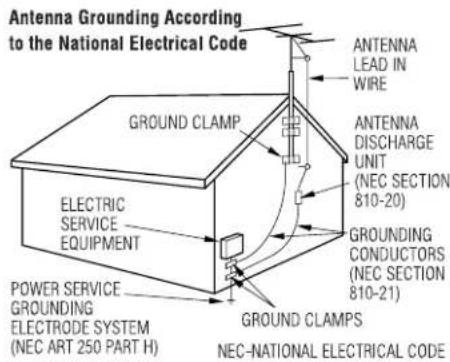
Outdoor Antenna Grounding - If an outside antenna or cable system is connected to the unit, be sure the antenna or cable system is grounded so as to provide some protection against voltage surges and built-up static charges. Section 810 of the National Electrical Code, ANSI/NFPA No. 70, provides information with regard to proper grounding of the mast and supporting structure, grounding of the lead-in wire to an antenna discharge unit, size of grounding conductors, location of antenna-discharge unit, connection to grounding electrodes, and requirements for the grounding electrode. See the figure.
Lightning
For added protection for this unit receiver during a lightning storm, or when it is left unattended and unused for long periods of time, unplug it from the wall outlet and disconnect the antenna or cable system. This will prevent damage to the unit due to lightning and powerline surges.
Maintenance
Cleaning - Unplug this unit from the wall outlet before cleaning. Do not use liquid cleaners or aerosol cleaners. Use a damp cloth for cleaning.
Damage Requiring Service
Unplug this unit from the wall outlet and refer servicing to qualified service personnel under the following conditions:
1) When the power cord or plug is damaged.
2) If liquid has been spilled, or objects have fallen into the unit.
3) If the unit has been exposed to rain or water.
4) If the unit does not operate normally by following the operating instructions. Adjust only those controls that are covered by the operating instructions as improper adjustment of other controls may result in damage and will often require extensive work by a qualified technician to restore the unit to normal operation.
5) If the unit has been dropped or the cabinet has been damaged.
6) When the unit exhibits a distinct change in performance - this indicates a need for service.
Do not attempt to service this unit yourself as opening or removing covers may expose you to dangerous voltage or other hazards. Refer all servicing to qualified service personnel.
Replacement Parts - When replacement parts are required, be sure the service technician has used replacement parts specified by the manufacturer or having the same characteristics as the original part. Unauthorized substitutions may result in fire, electric shock or other hazards.
Safety Check - Upon the completion of any service or repairs to this unit, ask the service technician to perform safety checks to determine that the unit is in proper operating condition.
TABLE OF CONTENTS
IMPORTANT SAFETY INSTRUCTIONS ..... 2
PREPARATIONS 4
PARTS AND CONTROLS 5
ADJUSTMENTS BEFORE OPERATION ..... 7
CD OPERATIONS 8
RADIO OPERATIONS ...... 10
SOUND ADJUSTMENTS ...... 11
TIMER OPERATIONS ...... 12
REFERENCE 14
System and accessories
Main unit CX-LEC10/12 Speakers SX-LEC10/12
Speaker cords Remote control
FM antenna AM antenna
BEFORE USE!
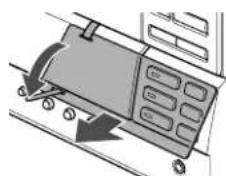
- Since precision parts are included in the unit, do not turn on or use the unit except at an upright position.
• Take off the protective tag before turning on the power.
natural_image
Diagram of a mechanical device with a control panel and directional arrows indicating motion (no text or symbols)Do not throw away the protective tag, since it will be required when transporting the unit, for example, when asking for repair. How to re-attach the tag, see page 14.
PREPARATIONS
Before starting connection, check that the protective tag has been taken off (see page 3).
Connection
Plug in the AC power cord to the AC outlet after all other connections are made.
1 Connect the speaker cords to the speakers. Connect the copper cords to the + terminals and the silver cords to the - terminals.

2 Connect the speakers to the main unit. Connect the right speaker to the SPEAKERS R terminals and the left to the SPEAKERS L terminals. The copper cords go to the + terminals.

3 Connect the supplied antennas.
Connect the FM antenna to the FM 75 Ω terminals and the AM antenna to the AM LOOP jack. Connect the FM antenna to the FM 75 Ω terminals without the π mark, as illustrated.

flowchart
graph TD
    A["FM antenna"] --> B["AM antenna"]
    B --> C["Sensor 1"]
    B --> D["Sensor 2"]
    B --> E["Sensor 3"]
    B --> F["Sensor 4"]
    B --> G["Sensor 5"]
    B --> H["Sensor 6"]
    B --> I["Sensor 7"]
    B --> J["Sensor 8"]
    B --> K["Sensor 9"]
    B --> L["Sensor 10"]
    style A fill:#f9f,stroke:#333
    style B fill:#ccf,stroke:#333
    style C fill:#cfc,stroke:#333
    style D fill:#fcc,stroke:#333
    style E fill:#cff,stroke:#333
    style F fill:#ffc,stroke:#333
    style G fill:#cfc,stroke:#333
    style H fill:#fcc,stroke:#333
    style I fill:#cfc,stroke:#333
    style J fill:#fcc,stroke:#333
    style K fill:#cfc,stroke:#333
    style L fill:#fcc,stroke:#333
4 Connect the AC power cord to an AC outlet.
The clock will flash on the display. For setting the clock, see page 12.
Speakers
- Do not short-circuit the + and - speaker cord leads.
- Do not leave objects generating magnetism or objects affected by magnetism near the speakers.
Antennas
Keep antennas away from metallic objects, electrical equipment and cords.
- FM antenna: Extend fully and position for the best reception. If reception is poor, connect an optional outdoor antenna to the FM 75 Ω terminals. When connecting an optional outdoor antenna, be sure to connect the shield braid of the antenna to the π terminal.
• AM antenna: Rotate to find best reception.
Remote control
Detach the battery compartment lid at the rear of the remote control and insert two R6 (size AA) batteries with correct polarity.

- Replace the batteries with new ones when the operational distance between the remote control and main unit becomes shorter.
- Remove the batteries if the unit is not going to be used for an extended period of time.
- The remote control may not operate if it is used under intense sunlight or if its line of sight is obstructed.
PARTS AND CONTROLS
Main unit

①POWER ⏻STANDBY/ON
Switches the unit on and off (standby).
②BASS, TREBLE
Adjusts the bass or treble level.
③DISPLAY
Changes the display in CD playback mode.
ECO/DIMMER
Selects ECO mode and dimmer mode.
SET
Determines the mode.
Stores the received station to preset.
④PRESET
Tune in a preset station.
TUNER/BAND
Selects Radio function and the radio band.
AUX
Selects the function of external equipment connected to LINE IN jacks.
⑤VOLUME
Adjusts the volume.
⑥ ■ CLEAR
CD: stops playback.
Radio: clears a preset station.
CD▶II
Starts and pauses play.
◀◀/I◀◀, ▶▶▶/▶▶ (TUNING DOWN, UP)
CD: skips to a previous or a succeeding track when pressed, searches a track in fast forward or reverse playback when held down.
Radio: manually tunes up or down within the band.
⑦ ▲ OPEN/CLOSE
Opens or closes the disc tray CD1, CD2 and CD3.
DISC DIRECT PLAY
Plays a single disc when pressed one of the buttons (CD1/CD2/CD3).
⑧ PHONES jack
Plug in optional headphones set with a stereo mini plug (ø3.5 mm). Speaker output is canceled.
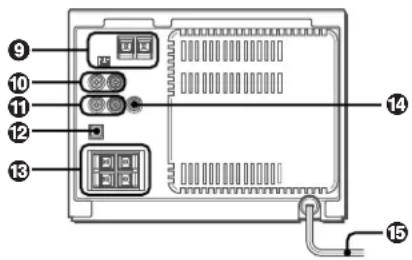
⑨ AM LOOP jack and FM 75 Ω terminal
Plug in the supplied AM and FM antennas.
⑩LINE IN jacks
Accept analog sound signals from external equipment.
Connect external equipment using an optional connecting cable with RCA phono plugs (red plug to R jack, white plug to L jack). Refer also to the operating instructions for your equipment.
To switch function to external input, press AUX.
To change a source name in the display of the AUX function
Hold down AUX and press POWER while the power is on.

⑪LINE OUT jacks
Analog sound signals for all functions can be output through these jacks. Use a cable with RCA phono plugs to connect audio equipment.
Signals input through the LINE IN jacks are not output from the LINE OUT jacks.
⑫ DIGITAL OUT (OPTICAL) jack
CD digital sound signals can be output through this jack. Use an optical cable to connect digital audio equipment. Remove the dust cap from the DIGITAL OUT (OPTICAL) jack. Then connect an optical cable plug to the DIGITAL OUT (OPTICAL) jack.
13SPEAKERS terminals
Connect the supplied speaker cords.
⑭SUB WOOFER jack
Connect an optional sub woofer with a built-in amplifier to the jack.
⑮ AC power cord
Remote control
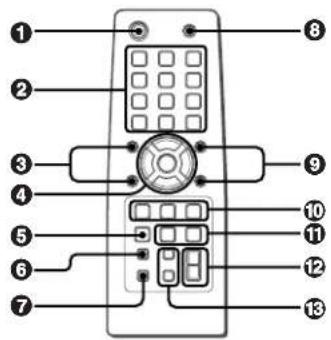
Buttons with the same or similar names on the main unit basically have the same function.
① POWER
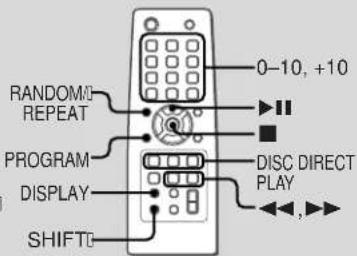
②0-10,+10
CD: selects a track of the specified number. Radio: tunes in the station with the specified preset number.
The numbered buttons take on these functions when pressed with SHIFT held down:
CLOCK
Selects clock mode.
TUNER MODE
Switches between stereo or monaural FM reception.
③RANDOM/REPEAT
Selects random or repeat CD playback mode.
PROGRAM
Selects programmed CD playback mode.
4▶II CD
AUX
TONE
Selects the sound adjusting mode, "BAS" (bass) or "TRE" (treble).
TUNER/BAND
CLEAR
5SET
⑥DISPLAY
7SHIFT
Hold down when pressing a numbered button to change its function to that printed above the number.
8FUNCTION
Switches the active function among TUNER, AUX and CD.
⑨PRESET +, -
⑩ DISC DIRECT PLAY ①, ②, ③
⑪ ◀◀/|◀◀, ▶▶/▶▶
⑫VOLUME +, -
13 TIMER
Selects timer mode.
SLEEP
Selects sleep-timer mode.
Turning the unit off
Press POWER ⬇STANDBY/ON again.
The unit goes into standby.
ECO mode
Reduces power consumption in standby mode with the following operations.
Press ECO/DIMMER while the power is off (standby). Each press of the button changes the mode as follows;
ECO ON: Power economizing mode is activated.
When the unit turns off, everything on the display clears and only the red indicator above POWER lights to show that the power is being supplied.
ECO OFF: Power economizing mode is canceled. When the unit turns off, the clock display appears.
- Initial mode is ECO OFF.
When operating while the power is on
1 Press ECO/DIMMER once and press SET.
2 Within 6 seconds, press ◀◀ or ▶▶ to select the desired mode and press SET.
Standby power consumption
ECO ON: 0.6 W
ECO OFF: 16 W
Dimmer
The display window brightness can be adjusted to the following four levels: "DIM OFF", "DIMMER 1", "DIMMER 2", and "DIMMER 3".
"DIM OFF" is the brightest level.
When "DIMMER 3" is selected, the display is darkest.
1 Press ECO/DIMMER twice while the unit is turned on.
'DIM MODE' is displayed.
2 Within 6 seconds, press SET.
The currently selected brightness is displayed.
3 Within 6 seconds, press ◀◀ or ▶▶ to select the desired brightness.
4 Within 6 seconds, press SET.
CD OPERATIONS

This unit plays back finalized CD-R/RW discs as well as audio CDs.
Playing CDs
1 Press CD1 ▲ OPEN/CLOSE to open the disc tray. Place a disc with the label side up.
- When loading an 8-cm disc, place it on the inner circle of the tray.
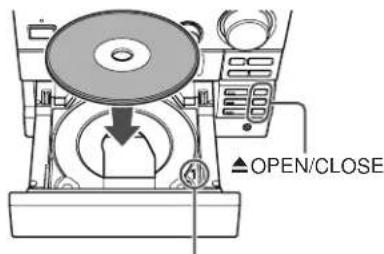
Disc tray number
2 To play two or three discs, load the second and third discs in disc tray 2 and 3, using CD2 and CD3 ▲OPEN/CLOSE respectively.
Finally, close the disc tray by pressing ▲OPEN/CLOSE. After reading the loaded disc, "○" lights up at the corresponding disc number 1-3 in the display. The corresponding DISC DIRECT PLAY (CD1/CD2/CD3) also lights up.
3 Press ▶II to play all the discs.
Play starts from the currently selected disc (◀ lights up by the selected disc number in the display).
To play a single disc (single disc play)
Press the desired DISC DIRECT PLAY (CD1/CD2/CD3). Only the selected disc number lights up in the display. Pressing the DISC DIRECT PLAY repeatedly during play changes the playback mode as follows. Single disc play All disc play
Replacing disc during play
While one disc is playing, the other discs can be replaced without interrupting play.
1 Press one of ▲ OPEN/CLOSE (CD1/CD2/CD3) corresponding to the disc which is not being played.
2 Remove the disc and replace with another one.
3 Close the disc tray.
To stop play
Press ■
To pause play
Press ▶II. Press again to resume play.
To skip to the beginning of the current/preceding/succeeding track
Press ◀◀ or ▶▶ repeatedly.
To search (playback in fast forward or reverse)
Hold down ◀◀ or ▶▶. Release at the desired point.
To select a track with the remote control (Direct play)
Press the numbered buttons to select a track.
- To select the 25th track, press +10, +10 and 5.
- To select the 11th track, press +10 and 1.
To change the display in playback mode
Press DISPLAY during play.
The display changes in the following order:
Track number being played and elapsed playing time Remaining time of play
- Remaining time of play cannot be displayed during 1, random or programmed play.
Random/Repeat play
In random play mode the unit plays all the tracks in random order. In repeat play mode it plays repeatedly all the discs or the track being played. You can select random and repeat all play at the same time.
1 Press RANDOM/REPEAT repeatedly on the remote control.
The mode changes as follows:
"1": Plays one track repeatedly. Select the track with

"←": Plays all the tracks repeatedly.
"RANDOM": Plays all the tracks randomly.
"RANDOM ➕": Plays all the tracks repeatedly in random order.
2 To play all discs: press ▶II
To play a single disc: press the desired DISC DIRECT PLAY (CD1/CD2/CD3).
To cancel random/repeat play
Press RANDOM/REPEAT on the remote control repeatedly until "RANDOM" or "→" disappears.
Direct selection of the tracks with the numbered buttons cancels random play mode.
To repeat a selected set of tracks
First select the tracks with programmed play (see "Programmed play").
Then select repeat playback.
Programmed play
Up to 30 tracks can be programmed from any of the loaded discs.
1 Press PROGRAM on the remote control in stop mode.
"PRGM" flashes on the display.
2 Press one of DISC DIRECT PLAY (CD1/CD2/CD3) to select a disc.
Wait for a while until the disc tray is selected.
3 Press the numbered buttons on the remote control to program a track.
-To select the 25th track, press +10, +10 and 5.
-To select the 11th track, press +10 and 1.
The selected track number lights up on the display.
4 Repeat steps 2 and 3 to program other tracks. The total number of selected tracks and total playing time will be displayed.
5 Press ▶II
- During programmed play, you cannot select a track with the numbered buttons. "Can't USE" is displayed when you try to select a track.
- If the total playing time of the program exceeds 99 minutes and 59 seconds, or if a track with a track number exceeding 30 is programmed, the playing time is displayed as "----".
- You cannot program more than 30 tracks. "FULL" is displayed.
To check the program
Press ◀◀ or ▶▶ repeatedly in stop mode. The track number and program number are displayed in succession.
To clear the program
Press ■ in stop mode. "PRGM" disappears from the display.
To add tracks to the program
Repeat step 2 before starting playback. The tracks are added to the end of the program.
To change the programmed tracks
Clear the program and repeat all the steps again.
Notes on CDs
- Do not place more than one disc.
- Do not tilt the unit with a disc loaded.
- The unit may not play CD-R/RW discs recorded on personal computers or certain kinds of CD-R/RW recorders.
- Do not attach adhesive label to either side of CD-R/RW discs, as doing so may cause malfunction.
- Do not load an unrecorded CD-R/RW disc. The disc may be damaged.
- Do not use irregular-shaped CDs.
RADIO OPERATIONS
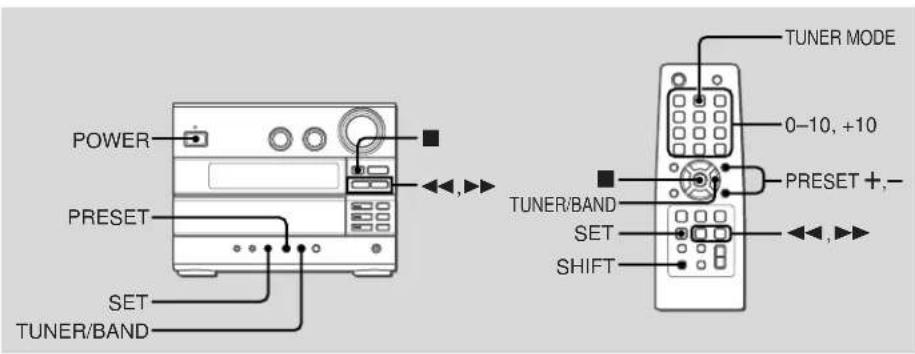
Manual tuning
1 Press TUNER/BAND repeatedly to select a band. The unit switches to the radio from any other function and alternales between FM and AM.
2 Press ◀◀ or ▶▶ repeatedly to tune in a station.
"TUNE" is displayed when a station is tuned in.
"STEREO" is displayed for FM stereo reception.
To search for a station automatically (Auto search) Hold down ◀◀ or ▶▶.
The unit searches for a station and stops at reception.
To stop the search manually, press ◀◀ or ▶▶.
• Auto search may not stop at stations with weak signals.
Preset tuning
Preset up to 32 of your favourite stations and tune them in directly.
Presetting stations
1 Tune in the desired station.
2 Press SET to store the station.
The preset number, beginning from "1" appears on the display.
3 Repeat steps 1 and 2 to preset other stations. The next station will not be stored if a total of 32 preset stations have already been stored. ("FULL" is displayed.)
- If power is interrupted for more than approximately 12 hours, all settings stored in memory after purchase need to be reset.
Tuning in preset stations
1 Select the band.
2 Press PRESET (PRESET +, - on the remote control) repeatedly.
With each press, the station with the succeeding (or preceding) preset number is tuned in.
You can tune in the desired preset station directly by pressing the numbered buttons on the remote control.
- T o select preset number 11, press +10 and 1.
- T o select preset number 15, press +10 and 5.
To clear a preset station
1 T une in the station by preset tuning.
2 Press ■, then press SET within 6 seconds.
Preset station numbers in the band which are higher than the cleared number decrease by one.
SOUND ADJUSTMENTS
Adjustments
To switch to monaural FM reception
Hold down SHIFT and press TUNER MODE on the remote control so that "MONO" is displayed.
To cancel, repeat the above so that "STEREO" is displayed.
Tip:
When FM stereo reception is poor, switching to monaural reduces noise.
To switch the AM tuning interval
The default setting of the AM tuning interval is 10 kHz/step. If you use this unit in an area where the frequency allocation system is 9 kHz/step, change the tuning interval. Hold down TUNER/BAND and press POWER on the main unit.
Tip:
When the AM tuning interval is changed, all preset stations are cleared.
Volume
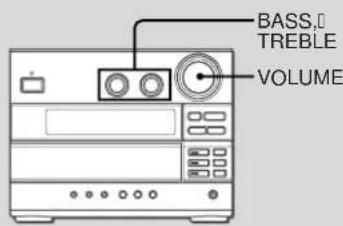
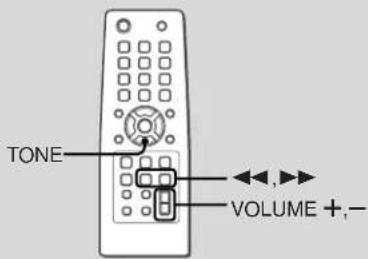
Turn VOLUME (press VOLUME +,- on the remote control).
Adjust from 0 (minimum) to 41 and MAX (maximum).
Tip:
Volume level setting is retained during power-off standby. If the unit is turned off with the volume set to 25 or higher, it is automatically turned down to 24 the next time the unit is turned on.
Bass and treble
Turn BASS or TREBLE.
The bass or treble level can be adjusted from “-5” to “+5”.
To operate on the remote control
1 Press TONE repeatedly to display "BAS" or "TRE".
2 Within 6 seconds, press ◀◀ or ▶▶.
- If the sound becomes distorted, lower the level.
TIMER OPERATIONS
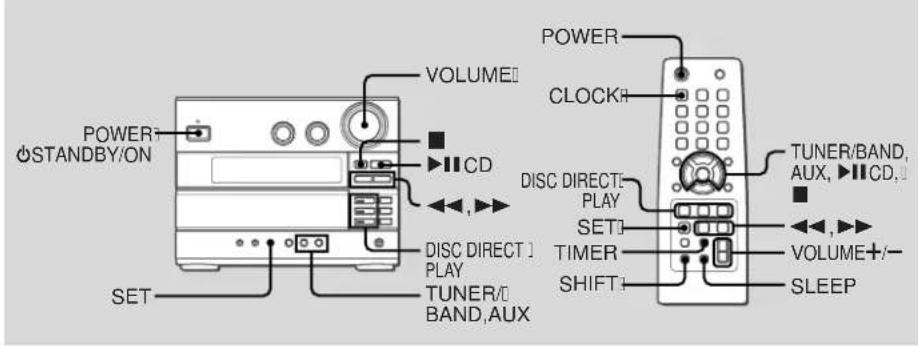
Setting the clock
1 Hold down SHIFT and press CLOCK on the remote control.
When the unit is turned off, you can also press SET.
2 Within 6 seconds, press ◀◀ or ▶▶ to set the time.
Each press changes the time in 1-minute steps.
Holding these buttons down will vary the time in 10-minute units.
3 Press SET.
The time display stops flashing and the clock starts from 00 seconds.
To display the time while the power is on
Hold down SHIFT and press CLOCK on the remote control.
The time will be displayed for 6 seconds.
To switch to the 24-hour standard
Display the time and press ■ within 6 seconds.
With each press, the clock alternates between 12- and 24-hour standard time.
Tip:
In the 12-hour standard, "AM12:00" indicates midnight and "PM12:00" noon.
If the clock display flashes when the unit is turned off
There has been a power interruption. Reset the clock.
Sleep timer
Turns off the unit automatically after a specified time.
1 Press SLEEP on the remote control. "SLEEP" is displayed.
2 Within 6 seconds, press ◀◀ or ▶▶ repeatedly to set the sleep timer duration.
With each press, the timer duration changes in 5-minute steps between 5 to 240 minutes. If there is no button input for 6 seconds, the current setting is entered automatically. The unit turns off after the selected time.
To check the remaining time until the unit turns off Press SLEEP on the remote control. The remaining time is displayed for 6 seconds.
To cancel the sleep timer
Press SLEEP on the remote control repeatedly so that 'SLEEP oFF' is displayed.
Timer playback
Turns on the unit at a specified time for the specified duration. Make sure the clock is set correctly.
1 Press TIMER on the remote control. "💡" lights up and "💡 PLAY" is displayed.
2 Within 12 seconds, press SET.
3 Press ◀◀ or ▶▶ to set the timer-on time, and press SET. Each press changes the time in 1-minute steps. Holding these buttons down will vary the time in 10-minute units.
4 Press ◀◀ or ▶▶ (TUNER/BAND, AUX or ▶II CD) to select the source, and press SET.
- For timer play of a CD, select "CD". - For timer play of a radio broadcast, select "TUNER". You will select the band later in step 7. - For timer play of the equipment connected to the LINE IN jacks, select "AUX (VIDEO or TV)".
5 Press ◀◀ or ▶▶ to set the timer-activated duration, then press SET. With each press, the timer-activated duration changes in 5-minute steps between 5 to 240 minutes.
6 Press ◀◀ or ▶▶ (turn VOLUME on the main unit, or press VOLUME —, + on the remote control) to adjust the volume for timer playback, and press SET. The volume level can be adjusted from 0 to 24.
7 Prepare the source. To play CD, load a disc. The currently selected disc is played. If you want to play a CD on another tray, play the desired CD, and then stop play. To play the radio, select the band and tune in the desired station.
To play external equipment connected to the LINE IN jacks, set an external timer for the equipment so that its playback begins at the same time.
8 Press POWER ⬤STANDBY/ON (POWER) to turn the unit off.
"⊖" remains on the display to indicate the timer standby mode (when ECO mode is deactivated). At timer-on time, the unit turns on and plays the selected source. After the specified timer-activated duration, the unit turns off again.
- Timer playback will not begin unless the unit is turned off first. - Connected equipment cannot be turned on or off by the built-in timer of this unit. Use an external timer.
To check the timer setting
Press TIMER on the remote control so that "∅ PLAY" appears on the display.
After 6 seconds, the timer-on time, the source and the timer-activated duration are displayed for 6 seconds.
To change the timer setting
Reset the timer again.
To cancel the timer
Press TIMER on the remote control twice until "OFF" is displayed. "Disappears from the display."
Tip:
Your timer setting is retained even if the timer is cancelled. Next time the timer is activated, you can change your previous setting, or simply use the same setting again.
REFERENCE
Care and maintenance
Occasional care and maintenance of the unit and the software are needed to optimize the performance of your unit.
To clean the cabinet
Use a soft and dry cloth. If the unit surfaces are extremely dirty, use a soft cloth lightly moistened with mild detergent solution. Do not use strong solvents such as alcohol, benzine or thinner.
Care of CDs
When a CD becomes dirty, wipe it from the center out with a cleaning cloth. After playing a CD, store it in its case. Do not keep it in hot or humid places.
Troubleshooting
If your unit fails to perform properly, check the following guide and the relevant sections of the Operating Instructions.
There is no sound
- Are the speakers and AC power cord connected properly?
The unit shut off suddenly
- Possibly a short circuit in the speaker terminals. Disconnect the AC power cord from the AC outlet and reconnect the speaker cords correctly.
Erroneous display
- Reset the unit. (See "Resetting the unit".)
Poor radio reception
- Check antenna connection. Adjust the antenna to find the best reception.
- Move the unit and antenna away from other electric appliances and cords.
The CD player works poorly
- Is the disc correctly loaded?
- Is the disc dirty?
- Is the lens affected by condensation? If so, wait approximately one hour and try again.
Condensation
Moisture may form on the CD pickup lens when:
- The unit is moved from a cold spot to a warm spot
• The heating system has just been turned on
• The unit is used in a very humid room
• The unit is cooled by an air conditioner
When this unit has condensation inside, it may not function normally. Should this occur, leave the unit for a few hours, then try to operate again.
Resetting the unit
If an unusual condition occurs in the display window, reset the unit as follows:
1 P ress POWER to turn off the power.
If the power cannot be turned off, disconnect the AC power cord, then plug it in again.
2 Hold down ■ and press POWER on the main unit. Everything stored in memory after purchase is cleared.
When transporting the unit with packing materials
When transporting the unit using the packing materials, for example, when asking for repair, be sure to re-attach the protective tag, which was attached when you purchased the unit, before packing the unit. Re-attach the protective tag as described below.
1 Reset the unit while the unit is turned off. (See "Resetting the unit".)
2 Press CD2 ▲ OPEN/CLOSE to open the disc tray
3 Disconnect the AC power cord from the AC outlet.
4 Attach the protective tag as illustrated.

5 Connect the AC power cord to an AC outlet.
6 P res AUX to turn on the power.
7 Press POWER to turn off the power.
Specifications
MAIN UNIT CX-LEC10, CX-LEC12 TUNER
FM tuning range 87.5 MHz to 108 MHz
FM usable sensitivity (IHF) 13.2 dBI
FM antenna terminal 75 ohms (unbalanced)
AM tuning range 530 kHz to 1710 kHz (10 kHz step)
531 kHz to 1602 kHz (9 kHz step)
AM usable sensitivity 350 μV/m
AM antenna Loop antenna
AMPLIFIER
Power output 24 W + 24 W (40 Hz - 20 kHz, THD
less than 1%, 6 ohms)
30 W + 30 W (1 kHz, THD 10 %,
6 ohms)
Total harmonic distortion 0.06 % (15 W, 1 kHz, 6 ohms, DIN
AUDIO)
Input LINE IN: 500 mV
Outputs LINE OUT: 200 mV
SPEAKERS: 6 ohms or more
PHONES: 32 ohms or more
DIGITAL OUT (OPTICAL) jack
CD PLAYER
Laser Semiconductor laser (λ = 780 nm)
D/A converter 1 bit dual
Signal-to-noise ratio 88 dB (1 kHz, 0 dB)
Wow and flutter Unmeasurable
GENERAL
Power requirements 120 V AC, 60 Hz
Power consumption 50 W
Power consumption in standby mode
With ECO mode on: 0.6 W
With ECO mode off: 16 W
Dimensions (W · H · D)
2 way, bass reflex (magnetic
shielded)
Speaker units
Woofer: 100 mm cone
Tweeler: 25 mm dome
Impedance
6 ohms
Dimensions (W · H · D)
215 · 169 · 200 mm
2 way, bass reflex (magnetic
shielded)
Speaker units
Woofer: 120 mm cone
Tweeter: 25 mm dome
Impedance
6 ohms
Dimensions (W · H · D)
155 · 250 · 218 mm
(6 1/8 · 9 7/8 · 8 5/8 in.)
Weight
2.3 kg (5 lbs 1 oz)
Specifications and external appearance are subject to change without notice.
COPYRIGHT
Check copyright laws relevant to recordings from discs or radio for the country where the unit is to be used.
As an ENERGY STAR® Partner, AIWA has determined
that this product meets the ENERGY
STAR® guidelines for energy efficiency.
NOTE
This equipment has been tested and found to comply with the limits for a Class B digital device, pursuant to Part 15 of the FCC Rules. These limits are designed to provide reasonable protection against harmful interference in a residential installation.
This equipment generates, uses, and can radiate radio frequency energy and, if not installed and used in accordance with the instructions, may cause harmful interference to radio communications. However, there is no guarantee that interference will not occur in a particular installation. If this equipment does cause harmful interference to radio or television reception, which can be determined by turning the equipment off and on, the user is encouraged to try to correct the interference by one or more of the following measures:
- Reorient or relocate the receiving antenna.
- Increase the separation between the equipment and receiver.
- Connect the equipment into an outlet on circuit different from that to which the receiver is connected.
- Consult the dealer or an experienced radio/TV technician for help.
CAUTION
Modifications or adjustments to this product, which are not expressly approved by the manufacturer, may void the user's right or authority to operate this product.
REMARQUE
TO PREVENT ELECTRIC SHOCK DO NOT USE THIS (POLARIZED) PLUG WITH AN EXTENSION CORD, RECEPTACLE OR OTHER OUTLET UNLESS THE BLADES CAN BE FULLY INSERTED TO PREVENT BLADE EXPOSURE.
This Class B digital apparatus complies with Canadian ICES-003.
Only for C models.
ATTENTION
POUR PREVENIR LES CHOCS ELECTRIQUES NE PAS UTILISER CETTE FICHE POLARISEE AVEC UN PROLONGATEUR, UNE PRISE DE COURANT OU UNE AUTRE SORTIE DE COURANT, SAUF SI LES LAMES PEUVENT ETRE INSERÉES A FOND SANS EN LAISSER AUCUNE PARTIE A DECOUVERT.
- Explanation of Graphical Symbols:
- IMPORTANT SAFETY INSTRUCTIONS
- Warning
- Installation
- Electric Power
- Outdoor Antenna
- Lightning
- Maintenance
- Damage Requiring Service
- TABLE OF CONTENTS
- System and accessories
- BEFORE USE!
- PREPARATIONS
- Connection
- Speakers
- Antennas
- Remote control
- PARTS AND CONTROLS
- ①POWER ⏻STANDBY/ON
- ②BASS, TREBLE
- ③DISPLAY
- ECO/DIMMER
- SET
- ④PRESET
- TUNER/BAND
- AUX
- ⑤VOLUME
- ⑥ ■ CLEAR
- CD▶II
- ⑦ ▲ OPEN/CLOSE
- DISC DIRECT PLAY
- ⑧ PHONES jack
- ⑨ AM LOOP jack and FM 75 Ω terminal
- ⑩LINE IN jacks
- To change a source name in the display of the AUX function
- ⑪LINE OUT jacks
- ⑫ DIGITAL OUT (OPTICAL) jack
- 13SPEAKERS terminals
- ⑭SUB WOOFER jack
- ⑮ AC power cord
- ① POWER
- CLOCK
- TUNER MODE
- ③RANDOM/REPEAT
- PROGRAM
- 4▶II CD
- TONE
- 5SET
- ⑥DISPLAY
- 7SHIFT
- 8FUNCTION
- TIMER
- SLEEP
- Turning the unit off
- ECO mode
- When operating while the power is on
- Standby power consumption
- Dimmer
- CD OPERATIONS
- Playing CDs
- To play a single disc (single disc play)
- Replacing disc during play
- To stop play
- To pause play
- To skip to the beginning of the current/preceding/succeeding track
- To search (playback in fast forward or reverse)
- To select a track with the remote control (Direct play)
- To change the display in playback mode
- Random/Repeat play
- To cancel random/repeat play
- To repeat a selected set of tracks
- Programmed play
- To check the program
- To clear the program
- To add tracks to the program
- To change the programmed tracks
- Notes on CDs
- RADIO OPERATIONS
- Manual tuning
- To search for a station automatically (Auto search) Hold down ◀◀ or ▶▶.
- Preset tuning
- Presetting stations
- Tuning in preset stations
- To clear a preset station
- SOUND ADJUSTMENTS
- Adjustments
- To switch to monaural FM reception
- Tip:
- To switch the AM tuning interval
- Volume
- Bass and treble
- To operate on the remote control
- TIMER OPERATIONS
- Setting the clock
- Sleep timer
- Timer playback
- To check the timer setting
- To change the timer setting
- To cancel the timer
- REFERENCE
- Care and maintenance
- To clean the cabinet
- Care of CDs
- Troubleshooting
- There is no sound
- The unit shut off suddenly
- Erroneous display
- Poor radio reception
- The CD player works poorly
- Condensation
- Resetting the unit
- When transporting the unit with packing materials
- Specifications
- MAIN UNIT CX-LEC10, CX-LEC12 TUNER
- AMPLIFIER
- CD PLAYER
- GENERAL
- COPYRIGHT
- NOTE
- CAUTION
- REMARQUE
- ATTENTION
Brand : AIWA
Model : XR-EC10
Category : Hi-Fi System