
NV-AM20004 - Car radio Fusion - Free user manual and instructions
Find the device manual for free NV-AM20004 Fusion in PDF.


| Product Type | Car Stereo |
| Brand | Fusion |
| Model | NV-AM20004 |
| Dimensions (W x H x D) | 178 x 50 x 160 mm (standard single-DIN) |
| Weight | Approx. 0.8 kg |
| Power Supply | 12V DC (negative ground) |
| Maximum Power Output | 4 x 50W |
| Display | LCD with adjustable backlight |
| Audio Formats Supported | MP3, WMA, WAV |
| Connectivity | USB, AUX input, Bluetooth (hands-free & audio streaming) |
| Tuner | FM/AM with RDS |
| Equalizer | Preset EQ modes (Rock, Pop, Classic, etc.) |
| Remote Control | Included (wired or infrared) |
| Security | Detachable faceplate with carry case |
| Maintenance | Clean with soft, dry cloth; avoid solvents |
| Spare Parts & Repairability | Standard fuses (5A, 10A) available; professional repair recommended |
| General Information | Single-DIN design, easy installation in most vehicles |
Frequently Asked Questions - NV-AM20004 Fusion
User questions about NV-AM20004 Fusion
0 question about this device. Answer the ones you know or ask your own.
Ask a new question about this device
Download the instructions for your Car radio in PDF format for free! Find your manual NV-AM20004 - Fusion and take your electronic device back in hand. On this page are published all the documents necessary for the use of your device. NV-AM20004 by Fusion.
USER MANUAL NV-AM20004 Fusion
NV-AM16001, NV-AM25001, NV-AM10002, NV-AM20004
FUSION CULTURE
There's no point doing something if no one notices. We've always believed the way to make things happen is by getting noticed. From our product, to our demo cars, to our events, FUSION is about making some noise.
And now you're about to. Step out of the shadows. Announce you've arrived in a world where the old limits are left behind. Where technology is creatively combined with the latest in product innovation. Where new levels of entertainment are delivered with outstanding performance and quality. Our development team evolve distinctively different products; subwoofers, amplifiers, speakers and peripherals that redefine what can be done in car audio.
Leave the old behind and push the limits of what can be achieved in car audio. Make some noise.
For more information about FUSION Car Audio visit our website at www.fusionelectronics.com or email technical@fusionelectronics.co.nz
NV SERIES
Embrace the ultimate in power. The NV Series is the pinnacle of modern car audio. State of the art engineering ensures the most refined sound available is delivered at unparalleled levels. The NV Series represents the finest work FUSION has achieved; designed and manufactured to the highest level with no compromises.
To optimise your FUSION experience, we recommend you have your FUSION product installed by an Authorised FUSION Dealer. Please read the warranty policy, keep your purchase receipt and original packaging.
If after reading this manual you still have questions regarding this product, please contact Technical Customer Services via email technical@fusionelectronics.co.nz
TABLE OF CONTENTS
- AMPLIFIER FEATURES....pg 4
- AMPLIFIER SPECIFICATIONS....pg 5
- AMPLIFIER RATINGS....pg 6
- AMPLIFIER DIMENSIONS: NV-AM16001....pg 7
- AMPLIFIER DIMENSIONS: NV-AM25001....pg 8
- AMPLIFIER DIMENSIONS: NV-AM10002....pg 9
- AMPLIFIER DIMENSIONS: NV-AM20004....pg 10
- INSTALLATION ...... pg 11
- WIRING....pg 12
- CONNECTION....pg 13
• CONTROL DESCRIPTIONS: MONOBLOCK AMPLIFIER NV-AM16001 ..... pg 16
• CONTROL DESCRIPTIONS: MONOBLOCK AMPLIFIER NV-AM25001 ..... pg 18
• CONTROL DESCRIPTIONS: 2 CHANNEL AMPLIFIER .....pg 20
• CONTROL DESCRIPTIONS: 4 CHANNEL AMPLIFIER .....pg 22 - WIRING DIAGRAM: MONOBLOCK AMPLIFIER....pg 24
- WIRING DIAGRAM: 2 CHANNEL AMPLIFIER....pg 27
- WIRING DIAGRAM: 4 CHANNEL AMPLIFIER....pg 30
- TECH TIPS ...... pg 34
- TROUBLE SHOOTING ...... pg 37
RECORD YOUR PRODUCT DETAILS HERE:
MODEL NUMBER ____ DATE OF PURCHASE ____
AFFIX RECEIPT HERE

WARNING! Audio Systems can produce sound levels over 135dB. Continuous exposure to sound pressure levels over 100dB may cause permanent hearing loss! Please watch for emergency vehicles as warning signals may not be heard. USE COMMON SENSE!
AMPLIFIER FEATURES
FUSION has designed and engineered a full range of efficient amplifiers, displaying a full cast aluminium heatsink with unique NV Series super graphic and the latest in ‘regulated amplifier technology’. The NV Series Amplifier range provide strength, style and great sound reproduction so you can be heard before you can be seen.
• 1 ohm stable D class amplifier design
- 2 ohm stable MOSFET amplifier design 2 and 4 channel
• Accurate stated amplifier ratings
- Nickle plated RCA input and output ports
• Variable LP and HP electronic x-over @ 18dB/Octave
- Variable bass boost; 0-+12dB @ 45Hz
- Variable subsonic
• F-Bass controller included
- 3 way protection circuitry (short circuit, overcurrent, thermal)
• Power and protection LED indicator
AMPLIFIER SPECIFICATIONS
| Specifications | NV-AM16001 | NV-AM25001 | NV-AM10002 | NV-AM20004 |
| MAX Power Rating (Watts/Channel) | 1600 2500 | 1000 2000 | ||
| MAX Current 100A 218A 60A 120A | ||||
| Full Rated Power Distortion (Max) 1kHz | 0.49% 0.43% | 0.08% 0.06% | ||
| THD @ Rated Power 1kHz/100Hz | 0.3 0.3 0.1 0.1 | |||
| Channel Separation — — | 50 | 50 | ||
| Frequency Response Hz (-3dB) | 10Hz – 250Hz | 10Hz – 250Hz | 10Hz – 40kHz | 10Hz – 40kHz |
| Signal To Noise | >90 | >90 | >90 | >90 |
| Variable High Pass Filters | — | — | 18dB/Octave | 18dB/Octave |
| Variable Low Pass Filters | 24dB/Octave | 24dB/Octave | 18dB/Octave | 18dB/Octave |
| Bass Boost @ 45Hz 12dB 12dB 12dB | ||||
| Input Sensitivity | 0.2 – 8V | 0.2 – 8V | 0.2 – 8V | 0.2 – 8V |
| Input Impedance | 47K | 47K 47K | 47K | |
| Fuse Rating | 25A x 4 | 200 Amp External | 30A x 2 | 40A x 3 |
AMPLIFIER RATINGS
NV-AM16001 - MONOBLOCK AMPLIFIER
Power Ratings @ 14.4VDC
450 Watts RMS x 1 Channel @ 4 Ohms and 1%THD+N
755 Watts RMS x 1 Channel @ 2 Ohms and 1%THD+N
1100 Watts RMS x 1 Channel @ 1 Ohms and 1%THD+N
Linked Power Ratings @ 14.4VDC
1000 Watts RMS x 1 Channel @ 4 Ohms and 1%THD+N
1800 Watts RMS x 1 Channel @ 2 Ohms and 1%THD+N
NV-AM25001 - MONOBLOCK AMPLIFIER
Power Ratings @ 14.4VDC
825 Watts RMS x 1 Channel @ 4 Ohms and 1%THD+N
1310 Watts RMS x 1 Channel @ 2 Ohms and 1%THD+N
1790 Watts RMS x 1 Channel @ 1 Ohms and 1%THD+N
NV-AM10002 - 2 CHANNEL AMPLIFIER
Power Ratings @ 14.4VDC
180 Watts RMS per Channel @ 4 Ohms and 1%THD+N
250 Watts RMS per Channel @ 2 Ohms and 1%THD+N
450 Watts RMS Bridged Channels @ 4 Ohms and 1%THD+N
NV-AM20004 - 4 CHANNEL AMPLIFIER
Power Ratings @ 14.4VDC
170 Watts RMS per Channel @ 4 Ohms and 1%THD+N
245 Watts RMS per Channel @ 2 Ohms and 1%THD+N
500 Watts RMS Bridged Channels @ 4 Ohms and 1%THD+N
AMPLIFIER DIMENSIONS
MONOBLOCK AMPLIFIER
NV-AM16001
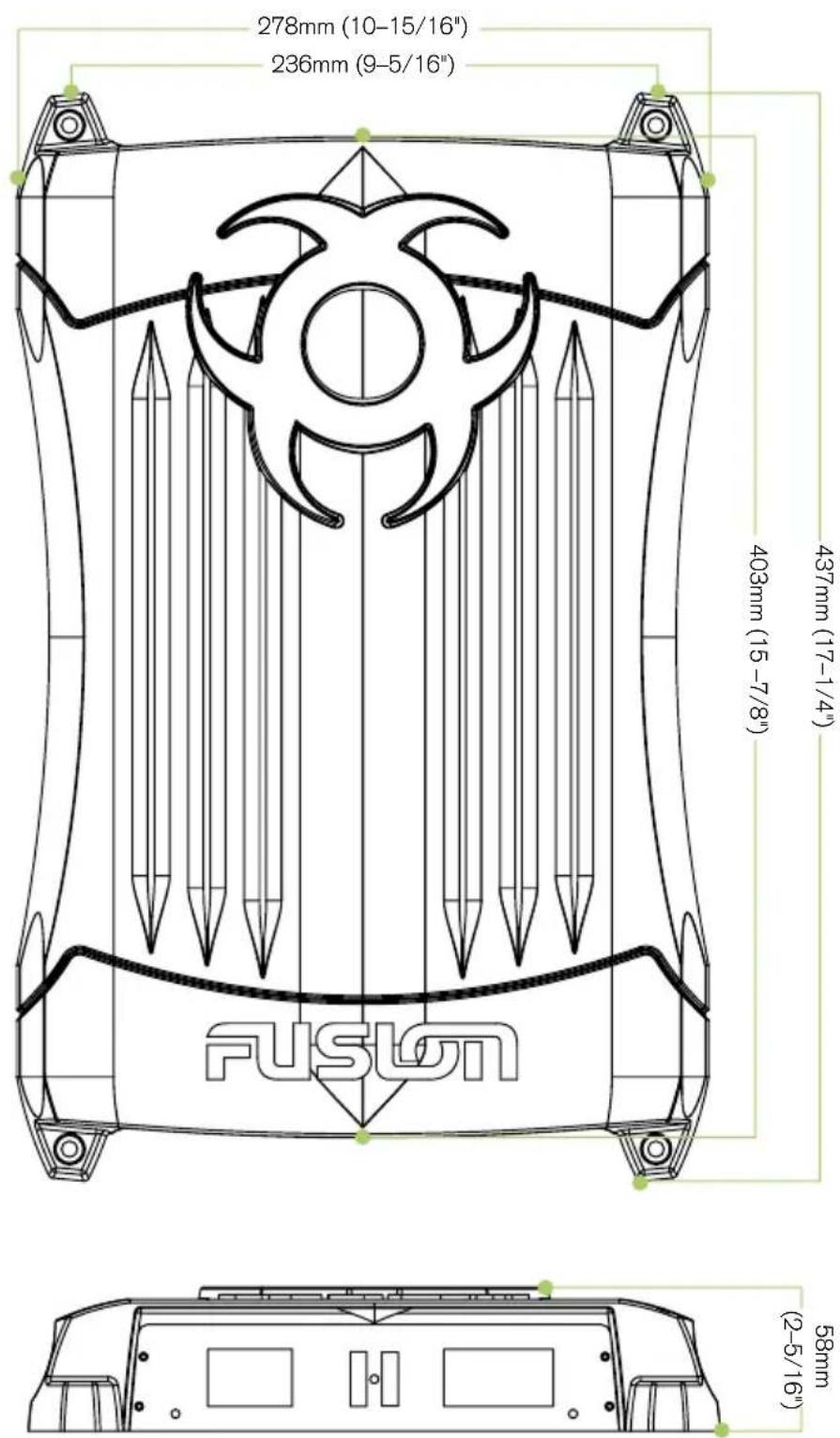
AMPLIFIER DIMENSIONS
MONOBLOCK AMPLIFIER
NV-AM25001
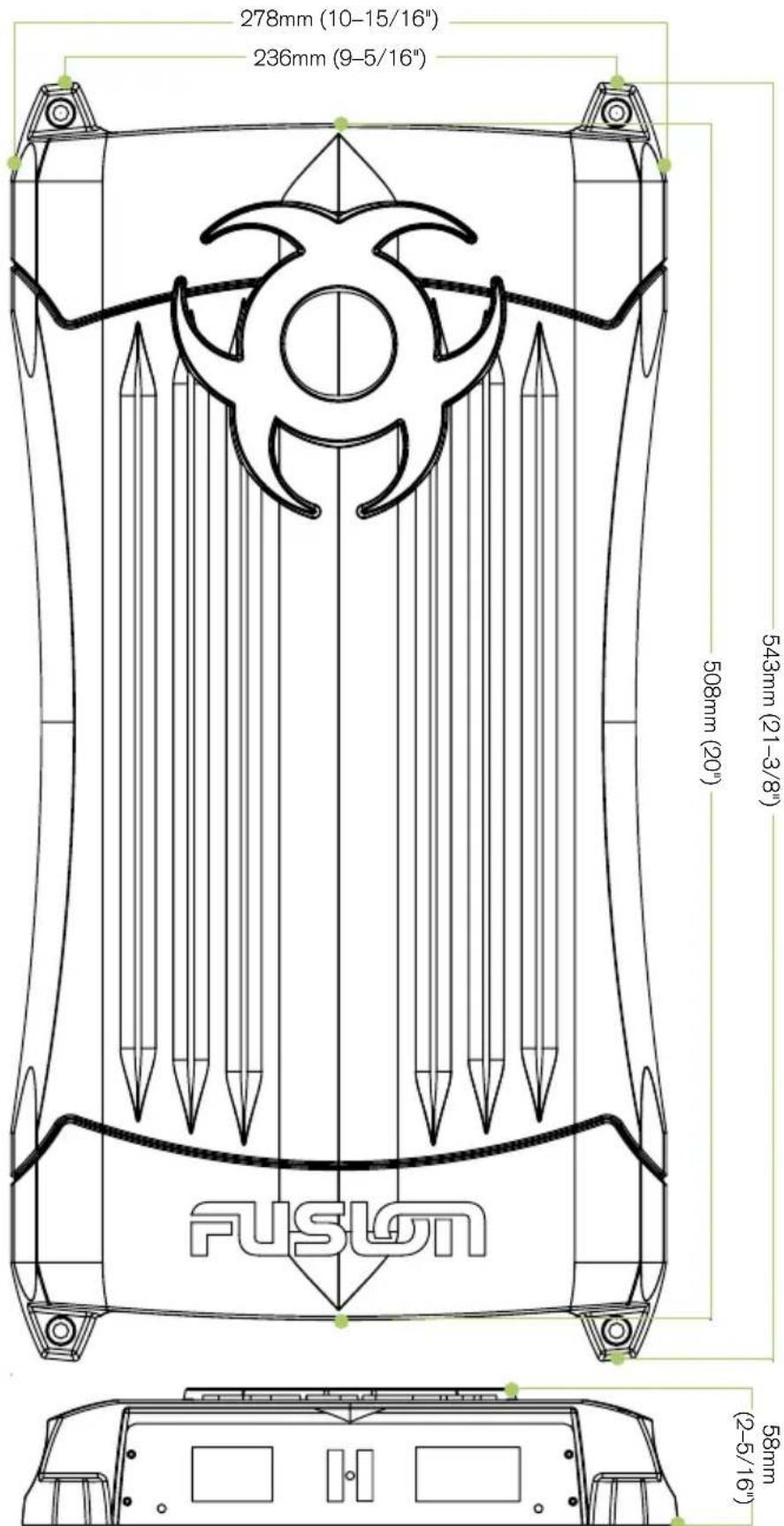
AMPLIFIER DIMENSIONS
2 CHANNEL AMPLIFIER
NV-AM10002

AMPLIFIER DIMENSIONS
4 CHANNEL AMPLIFIER
NV-AM20004
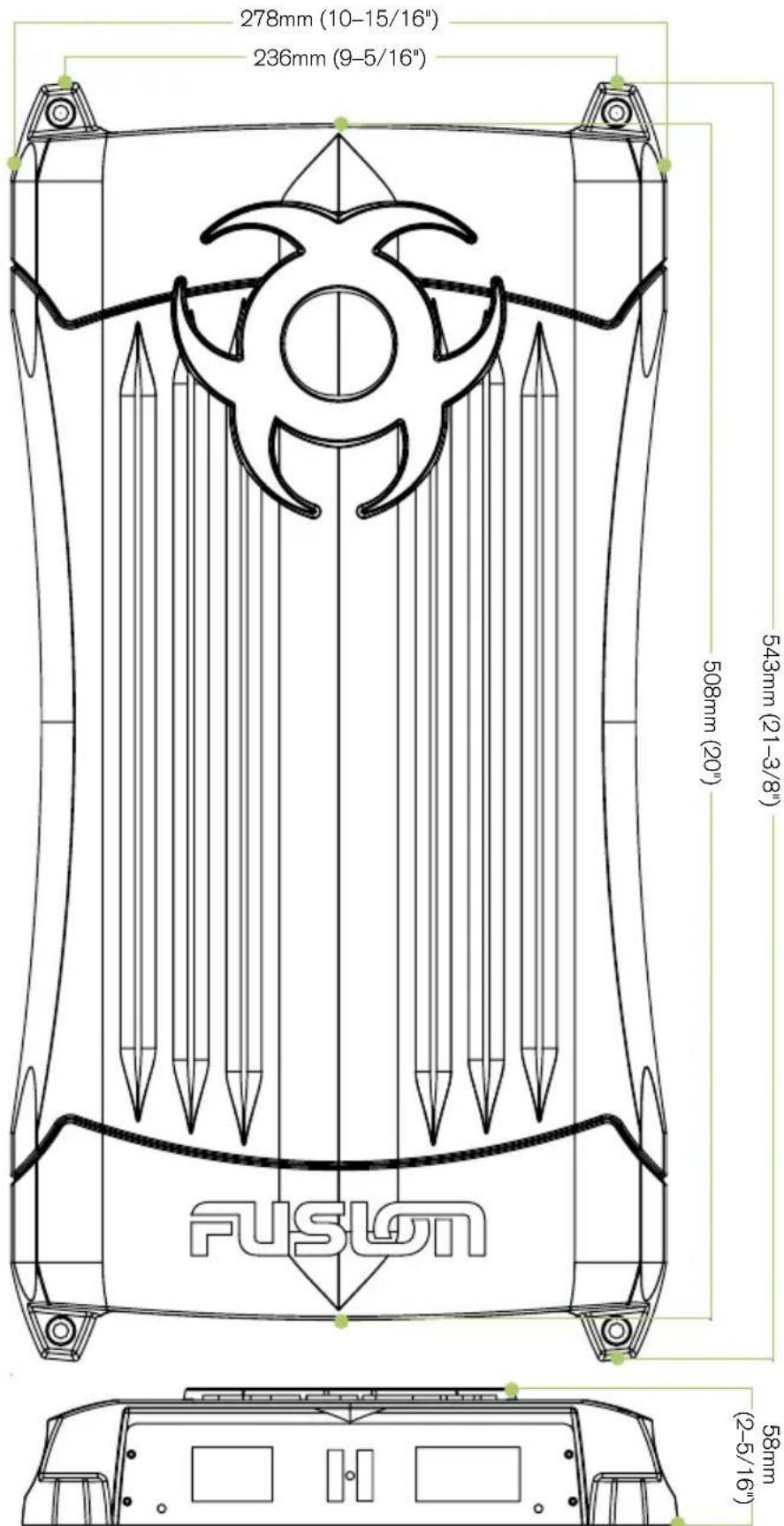
INSTALLATION
Before any wiring and installation is performed, FUSION recommends you first plan the complete installation. Look at wiring routing, amplifier location and fitment. Please re-check the installation at completion.
Appropriate mounting is very important for prolonged life expectancy of any amplifier. Select a location that allows enough space so sufficient airflow is maintainable and a location that provides protection from moisture. Keep in mind that an amplifier should never be mounted upside down. Upside down mounting will compromise heat dissipation through the heatsink and could engage the thermal protection circuit.
Excessive heat will shorten your amplifier's life. To maximise heat dissipation, be sure to leave at least 2.5 " of clearance around the amplifier. If space is of the essence and the amplifier must be mounted in an enclosed or restricted area, a small 3" fan should be used in correspondence with a duct so that the heat can flow past the heatsink.
WARNING: Do not mount any amplifier on a subwoofer enclosure, as extended exposure to vibration may cause malfunction of the amplifier.
To avoid scratching your new FUSION Amplifier, pre-drill the mounting holes with either a 3mm or 9/64" diameter drill bit and use the screws supplied in the accessory kit..
INSTALLATION WARNING
1: Ensure the vehicle 12 volt lead is removed from the battery before any equipment is connected.
2: Investigate the vehicle's gas tanks, brake lines and electrical wiring locations before you begin installation.
3: Attach the product securely to the vehicle to prevent damage in the event of an accident.
4: Ensure all wiring is protected to avoid damage or pinching of the cables.
WIRING
Make sure before any connection is made to the amplifier or source unit, ensure that you turn the audio system off. Failure to do so could result in either the stock system or your new FUSION product being damaged. FUSION does not warranty damaged amplifiers due to incorrect installation.
When wiring the FUSION amplifier, ensure that the wires are away from sharp objects and that rubber grommets and insulated bungs are used when wiring through door jams and any other steel panels. FUSION recommends using 4 gauge power and ground wire for power installation. Please see power cable calculator (Fig.1).
Ensure that when connecting the wires to the speakers and audio system, the terminals and connections are protected from the vehicle chassis and each other. If the wires short together or touch the vehicle chassis, the audio system could be damaged.
POWER CABLE CALCULATOR
| TOTAL AMPERAGE | 0-4 FT 4-7 FT 7-10 FT 10 -13 FT 13-16 FT 16-19 FT 19-22 FT 22-28 FT | |||||||
| 0 – 20 14 12 12 10 10 8 8 8 | ||||||||
| 20 – 35 12 10 8 | 8 | 6 | 6 6 4 | |||||
| 35 – 50 | 10 | 8 | 8 | 6 | 4 | 4 | 4 | 4 |
| 50 – 65 | 8 | 8 | 6 | 4 | 4 | 4 | 4 | 2 |
| 65 – 85 | 6 | 6 | 4 | 4 | 2 | 2 | 2 | 0 |
| 85 – 105 | 6 | 6 | 4 | 2 | 2 | 2 | 2 | 0 |
| 105 – 125 | 4 | 4 | 4 | 2 | 0 | 0 | 0 | 0 |
| 125 – 150 | 2 | 2 | 2 | 0 | 0 | 0 | 0 | 0 |
The above chart shows cable gauges to be used, if no less than a 0.5 volt drop is acceptable. If aluminium wire or tinned wired is used, the gauges should be of an even larger size to compensate. Cable gauge size calculation takes into account terminal connection resistance.
Fig.1
CONNECTION
Note: Ensure the audio system is off during the installation of FUSION product. Once the installation is complete FUSION recommends that you turn the volume of the source unit up slowly so not to damage the speakers. Please recheck the complete installation prior to turning the audio system on.
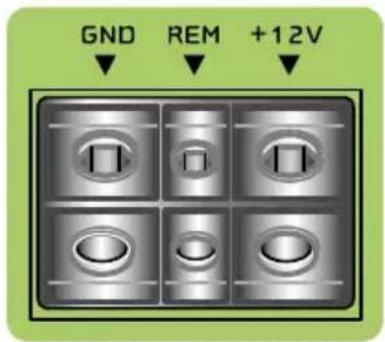
FUSION amplifiers should be wired directly to the vehicle battery using appropriately sized cable. Start at the vehicle battery and run the power cable through to the amplifier. FUSION recommends the use of grommets when passing the power cable through any metal wall. Avoid sharp corners or sharp body parts that may easily cut through the insulation on the cable.
Avoid running the power cable over engine components or near heater cores. The use of an inline fuse or circuit breaker is essential. This will prevent the risk of a potential fire caused by a short circuit in your power cable. Connect the fuse holder or circuit breaker as close to the battery positive terminal as possible. Use a fuse or circuit breaker of equal value as that found on the chassis of your FUSION amplifier. You may now connect the cable to the battery, but remember to leave the fuse out or circuit breaker off until all other cable connections are made.
GROUND
When grounding your FUSION Amplifier locate a metal area close to the amplifier that is a good source of ground (preferably the floor pan). Once again, investigate the area you wish to use for electrical wires, vacuum lines, and brake or fuel lines. Use either a wire brush or sandpaper to eliminate unwanted paint. This will allow a better contact for your ground. Use the same gauge cable for the ground as you did for the power. Secure the ground cable to the body using a bolt, star washer and nut. Spread silicon over the screw and bare metal to prevent rust and possible water leaks. Now it's time to connect the power and ground cables to the amplifier. Cut both cables to length. Loosen the +12V and the GND connections on the amplifier. Terminate the ground first, and then the +12V. Make sure that you terminate them into the correct terminals. Now tighten the screws down securely.
REMOTE TURN-ON
This terminal must be connected to a switched +12V source. Typically, remote turn-on leads are provided at the headunit to turn the amplifier on and off in correspondence with the source. If the head unit does not have a remote turn-on lead, then a power antenna wire can be used. If neither of these leads are present on the head unit then a switched +12V supply must be used, like the ACC +12V.
Run a minimum of 18 gauge wire from the amplifier location to the source of the switched +12V lead. If possible, route this wire on the same side of the vehicle as your power cable. Connect the source remote output to the wire. Go back to the amplifier and cut the wire to length. Loosen the screw terminal marked REM on the amplifier using a Hex type screwdriver. Slip the wire into the connector and tighten the screw securely.
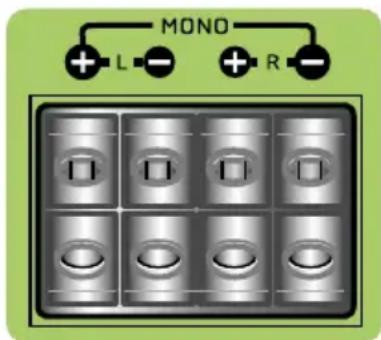
Keep in mind FUSION NV Series Amplifier series are high power amplifiers and not high current amplifiers. In other words, they require a minimum impedance of 2 ohms STEREO and 4 ohms bridged MONO to operate trouble free. Too low an impedance could send your FUSION amplifier into protection mode and/or damage the amplifier.
SPEAKER WIRING
Choose the correct speaker wire for your application. Most applications will require a minimum of 16 gauge. Route the speaker wire using the same precautions as you did when you ran the power cables. Terminate these wires at the speaker end by using insulated speaker terminals (not supplied) or by soldering the connection. Make sure the speaker connections are positive to positive and negative to negative. At the amplifier end, use a Hex type screwdriver to loosen the speaker terminals on the amplifier. Connect the speaker wires and tighten the screws securely. Check to make sure you've maintained proper polarity and balance.

RCA INPUT CONNECTION
LOW LEVEL INPUTS
Choose the correct length and style of RCA interconnects for your needs. The FUSION range of RCA's gives you a variety of alternative solutions. These have multiple layers of shielding or are a twisted pair variety for better noise rejection (consult your FUSION dealer if unsure which to purchase).
Be extra careful with your RCA interconnects. Car environments are notorious for poorly insulated wires. This means that hiss, engine noise, and fan noise can easily be picked up through RCA cables if run incorrectly. Avoid running your RCA's near large wire looms and electric fans if possible. Run your RCA cables on the opposite side of the vehicle to the power cable. Be sure to check for correct balance. (Red is right and black or white is left).
LEVEL CONTROL
The LEVEL control, allows you to match the input level of the amplifier to the output level of your head unit. Matching the input can be accomplished in three simple steps:
1: Turn the LEVEL control on the amplifier to minimum.
2: Turn up the headunit and adjust to 3/4 maximum volume ensuring that the BASS and TREBLE are set to zero.
3: Adjust the LEVEL control until desired volume is achieved without audible distortion. Remember, the gain control is not a volume control. Ignoring the three steps above may leave you with damaged speakers and/or a damaged amplifier.
CONTROL DESCRIPTIONS
MONOBLOCK AMPLIFIER
NV-AM16001
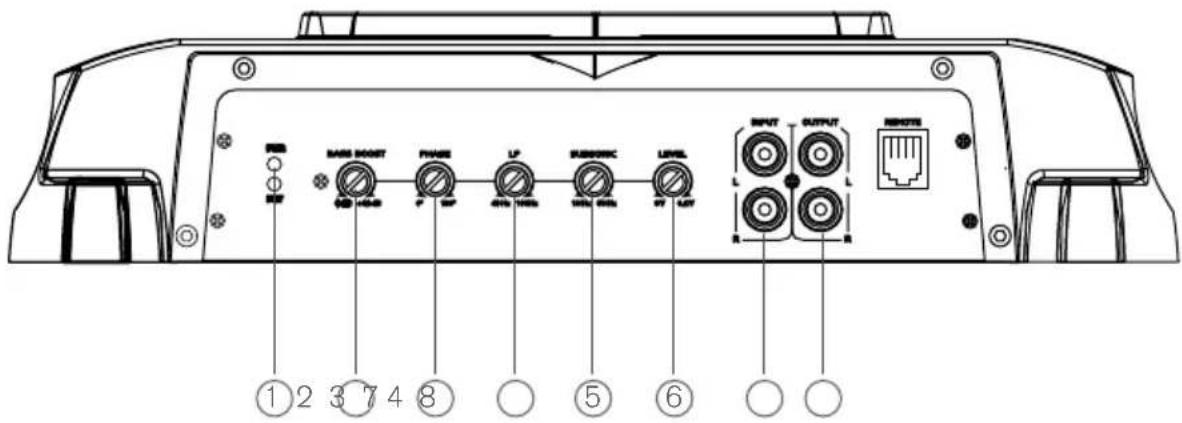
1 POWER AND STATUS LED'S:
This displays 'Green' if the amplifier has been correctly powered up and 'Red' if any faults are present.
2 BASS BOOST:
This is a variable control to increase the bass boost at 45Hz from 0-+12dB of gain, adjust to suit.
3 PHASE CONTROL:
Adjust the phase control from 0 to 180 degree to adjust the in phase or out of phase subwoofer direction to the vehicles system.
4 LOW PASS:
Ensure the crossover frequency is set at 100Hz or below. This feature is designed to filter out all mid to high frequencies that only full range speakers should produce.
Note: Failure to do so could result in speaker damage.
5 SUBSONIC:
This is a variable control that filters out all sub bass frequencies below the set point at 12dB/Octave.
6 LEVEL:
This allows level adjustment of the input signal. Use this control to correctly match the head unit to the amplifier. To set this control correctly, turn the amplifier level to MIN and the head unit to 3/4 volume, with the bass and treble on zero, then slowly turn up this amplifier level control towards the MAX end of the control. Note: If the sound becomes distorted, turn this control down.
7 RCA INPUT:
Connect these RCA connectors to a head unit with a low level output connection.
8 RCA OUTPUT:
Use these RCA output connectors to connect to a secondary amplifier. This output is a pass-thru connection derived from the RCA input connector so the signal level and frequency response is the same as the original input signal.
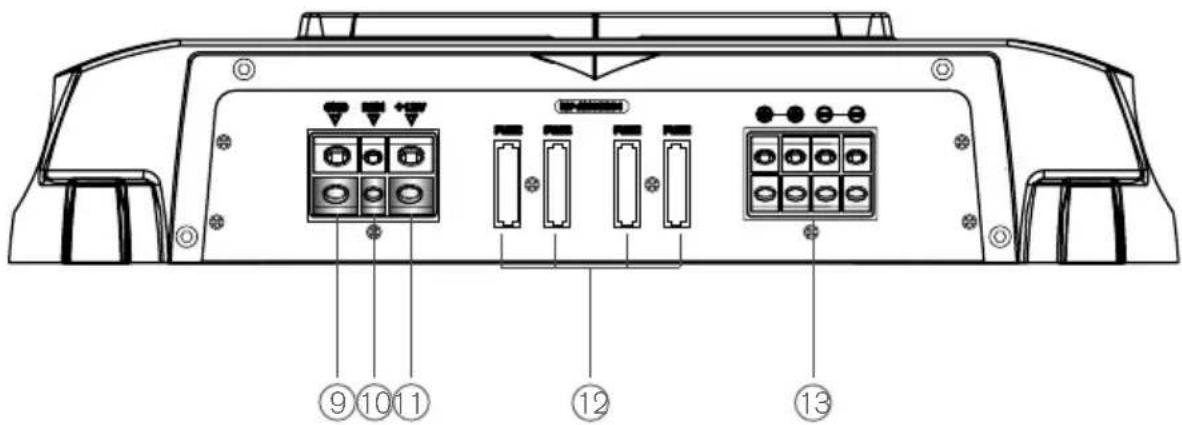
9 GROUND INPUT:
Connect directly to the vehicle's chassis via an 4 gauge power cable.
Note: This is the first wire to connect when wiring up an amplifier, damage could result if this is not done.
10 REMOTE INPUT:
This terminal is for turning the amplifier on and off. The remote input requires a switched positive (+12V) to power 'ON' the amplifier. This can be found on the rear of the head unit in the form of a electric antenna output, or a remote on output. If not available you can wire to the ACC position on the key.
11 +12V INPUT:
Connect directly to the vehicle battery positive (+) terminal via an 4 gauge power cable, with an inline fuse or circuit breaker at the battery end.
Note: This is the last wire to connect up during installation, damage could result if this is not done.
12 FUSES:
Please ensure correct type of fuse is fitted, as specified in this manual.
Note: NV-AM16001 has 4 x 25A fuses.
13 SPEAKER OUTPUT:
See 2/1 channel installation diagrams on page 24 for correct speaker connection.
CONTROL DESCRIPTIONS
MONOBLOCK AMPLIFIER
NV-AM25001
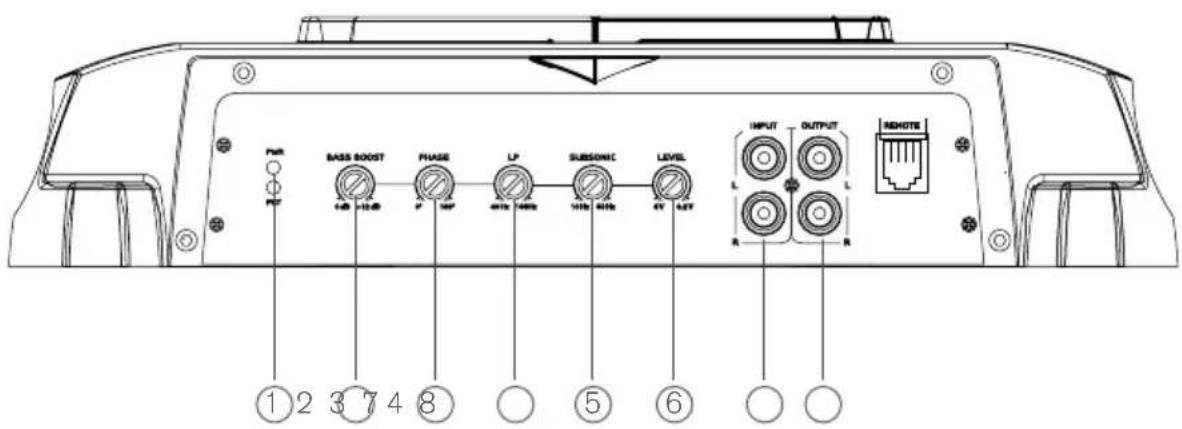

1 POWER AND STATUS LED'S:
This displays 'Green' if the amplifier has been correctly powered up and 'Red' if any faults are present.
2 BASS BOOST:
This is a variable control to increase the bass boost at 45Hz from 0-+12dB of gain, adjust to suit.
3 PHASE CONTROL:
Adjust the phase control from 0 to 180 degree to adjust the in phase or out of phase subwoofer direction to the vehicles system.
4 LOW PASS:
Ensure the crossover frequency is set at 100Hz or below. This feature is designed to filter out all mid to high frequencies that only full range speakers should produce.
Note: Failure to do so could result in speaker damage.
5 SUBSONIC:
This is a variable control that filters out all sub bass frequencies below the set point at 12dB/Octave.
6 LEVEL:
This allows level adjustment of the input signal. Use this control to correctly match the head unit to the amplifier. To set this control correctly, turn the amplifier level to MIN and the head unit to 3/4 volume, with the bass and treble on zero, then slowly turn up this amplifier level control towards the MAX end of the control. Note: If the sound becomes distorted, turn this control down.
7 RCA INPUT:
Connect these RCA connectors to a head unit with a low level output connection.
8 RCA OUTPUT:
Use these RCA output connectors to connect to a secondary amplifier. This output is a pass-thru connection derived from the RCA input connector so the signal level and frequency response is the same as the original input signal.
9 GROUND INPUT:
Connect directly to the vehicle's chassis via a 4 gauge power cable.
Note: This is the first wire to connect when wiring up an amplifier, damage could result if this is not done.
10 REMOTE INPUT:
This terminal is for turning the amplifier on and off. The remote input requires a switched positive (+12V) to power 'ON' the amplifier. This can be found on the rear of the head unit in the form of a electric antenna output, or a remote on output. If not available you can wire to the ACC position on the key.
11 +12V INPUT:
Connect directly to the vehicle battery positive (+) terminal via an 4 gauge power cable and with an inline fuse or circuit breaker at the battery end.
Note: This is the last wire to connect up during installation, damage could result if this is not done.
12 SPEAKER OUTPUT:
See 2/1 channel installation diagrams on page 24 for correct speaker connection.
FUSING:
Note: The NV-AM25001 is connected to the battery system via an external 200 amp fuse.
CONTROL DESCRIPTIONS
2 CHANNEL AMPLIFIER
NV-AM10002

1 POWER AND STATUS LED'S:
This displays 'Green' if the amplifier has been correctly powered up and 'Red' if any faults are present.
Set the appropriate mode of operation. The three positions available are OFF, LP and HP. See points 3 and 4 below.
3 LOW PASS:
Set the crossover switch 2 to LP when a subwoofer is connected. Ensure the crossover frequency is set at 100Hz or below, this feature is designed to filter out all mid to high frequencies that only full range speakers should produce.
Note: Failure to do so could result in speaker damage.
4 HIGH PASS:
Set the crossover switch 2 to HP and turn this control to 65Hz or above when using speakers smaller than 6 x 9". This feature is designed to filter out all low bass frequencies that only subwoofers should produce.
Note: Failure to do so could result in speaker damage.
5 BASS BOOST:
This is a variable control to increase the bass boost at 45Hz from 0-+12dB of gain. Adjust to suit.
6 SUBSONIC:
This is a variable control that filters out all sub bass frequencies below the set point at 12dB/Octave.
7 LEVEL:
This allows level adjustment of the input signal. Use this control to correctly match the head unit to the amplifier. To set this control correctly, turn the amplifier level to MIN and the head unit to 3/4 volume, with the bass and treble on zero, then slowly turn up this amplifier level control towards the MAX end of the control. Note: If the sound becomes distorted, turn this control down.
8 RCA INPUT:
Connect these RCA connectors to a head unit with a low level output connection.
9 RCA OUTPUT:
Use these RCA output connectors to connect to a secondary amplifier. This output is a pass-thru connection derived from the RCA input connector so the signal level and frequency response is the same as the original input signal.
10 GROUND INPUT:
Connect directly to the vehicle's chassis via a 4 gauge power cable.
Note: This is the first wire to connect when wiring up an amplifier, damage could result if this is not done.
11 REMOTE INPUT:
This terminal is for turning the amplifier on and off. The remote input requires a switched positive (+12V) to power 'ON' the amplifier. This can be found on the rear of the head unit in the form of a electric antenna output, or a remote on output. If not available you can wire to the ACC position on the key.
12 +12V INPUT:
Connect directly to the vehicle battery positive (+) terminal via a 4 gauge power cable and with an inline fuse or circuit breaker at the battery end.
Note: This is the last wire to connect up during installation, damage could result if this is not done.
13 FUSES:
Please ensure correct type of fuse is fitted, as specified in this manual.
Note: NV-AM10002 has 2 x 30A fuses.
14 SPEAKER OUTPUT:
See 2/1 channel installation diagrams on page 27 for correct speaker connection.
CONTROL DESCRIPTIONS
4 CHANNEL AMPLIFIER
NV-AM20004

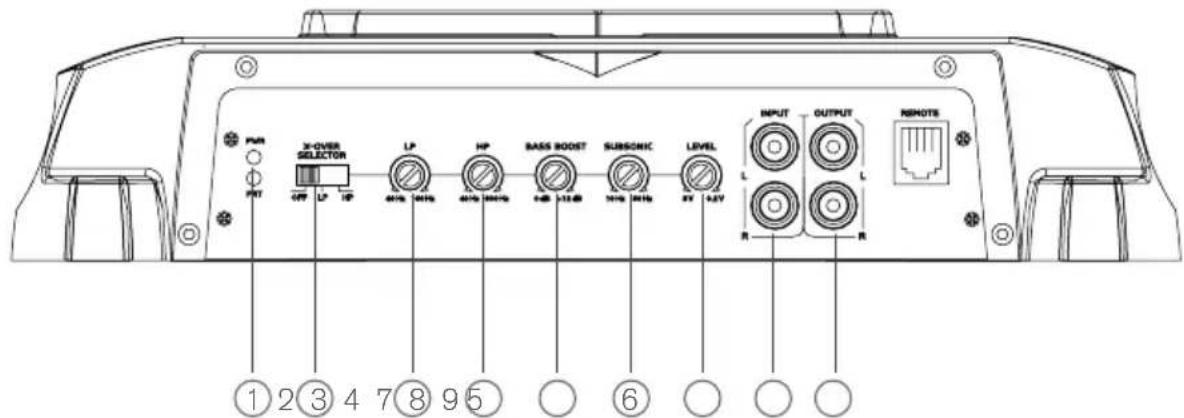
1 POWER AND STATUS LED'S:
This displays 'Green' if the amplifier has been correctly powered up and 'Red' if any faults are present.
Set the appropriate mode of operation. The three positions available are OFF, LP and HP.
See points 3 and 4.
3 LOW PASS:
Set the crossover switch 2 to LP when a subwoofer is connected. Ensure the crossover frequency is set at 100Hz or below. This feature is designed to filter out all mid to high frequencies that only full range speakers should produce.
Note: Failure to do so could result in speaker damage.
4 HIGH PASS:
Set the crossover switch 2 to HP and turn this control to 65Hz or above when using speakers smaller than 6 x 9". This feature is designed to filter out all low bass frequencies that only subwoofers should produce. Note: Failure to do so could result in speaker damage.
5 BASS BOOST:
This is a variable control to increase the bass boost at 45Hz from 0-+12dB of gain. Adjust to suit.
6 SUBSONIC:
This is a variable control that filters out all sub bass frequencies below the set point at 12dB/Octave.
7 LEVEL:
This allows level adjustment of the input signal. Use this control to correctly match the head unit to the amplifier. To set this control correctly, turn the amplifier level to MIN and the head unit to 3/4 volume, with the bass and treble on zero, then slowly turn up this amplifier level control towards the MAX end of the control. Note: If the sound becomes distorted, turn this control down.
8 FRONT RCA INPUT:
Connect these RCA connectors to the front low level output connection from the headunit.
9 REAR RCA INPUT:
Connect these RCA connectors to the rear low level output connection from the headunit.
10 RCA OUTPUT:
Use these RCA output connectors to connect to a secondary amplifier.
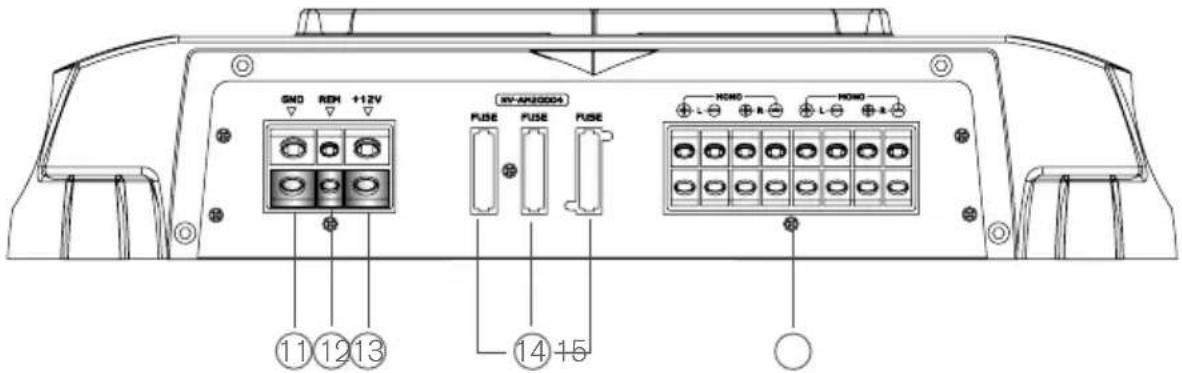
11 GROUND INPUT:
Connect directly to the vehicle's chassis via an 4 gauge power cable.
Note: This is the first wire to connect when wiring up an amplifier. Damage could result if this is not done.
12 REMOTE INPUT:
This terminal is for turning the amplifier on and off. The remote input requires a switched positive (+12V) to power 'ON' the amplifier. This can be found on the rear of the head unit in the form of a electric antenna output, or a remote on output. If not available you can wire to the ACC position on the key.
13 12V INPUT:
Connect directly to the vehicle battery positive (+) terminal via an 4 gauge power cable and with an inline fuse or circuit breaker at the battery end. Note: This is the last wire to connect up during installation, damage could result if this is not done.
14 FUSES:
Please ensure the correct type of fuse is fitted, as specified in this manual.
Note: the NV-AM20004 has 3 x 40A fuses.
15 SPEAKER OUTPUT:
See 4/3/2 channel installation diagrams on page 30 for correct speaker connection.
- FUSION CULTURE
- NV SERIES
- TABLE OF CONTENTS
- RECORD YOUR PRODUCT DETAILS HERE
- AMPLIFIER FEATURES
- AMPLIFIER SPECIFICATIONS
- AMPLIFIER RATINGS
- NV-AM16001 - MONOBLOCK AMPLIFIER
- POWER RATINGS @ 14.4VDC
- LINKED POWER RATINGS @ 14.4VDC
- NV-AM25001 - MONOBLOCK AMPLIFIER
- NV-AM10002 - 2 CHANNEL AMPLIFIER
- NV-AM20004 - 4 CHANNEL AMPLIFIER
- AMPLIFIER DIMENSIONS
- MONOBLOCK AMPLIFIER
- NV-AM16001
- NV-AM25001
- 2 CHANNEL AMPLIFIER
- NV-AM10002
- 4 CHANNEL AMPLIFIER
- NV-AM20004
- INSTALLATION
- INSTALLATION WARNING
- WIRING
- CONNECTION
- GROUND
- REMOTE TURN-ON
- SPEAKER WIRING
- LOW LEVEL INPUTS
- LEVEL CONTROL
- CONTROL DESCRIPTIONS
- 5 SUBSONIC
- 6 LEVEL
- 7 RCA INPUT
- 8 RCA OUTPUT
- 9 GROUND INPUT
- 10 REMOTE INPUT
- 11 +12V INPUT
- 12 FUSES
- 13 SPEAKER OUTPUT
- 12 SPEAKER OUTPUT
- 4 HIGH PASS
- 5 BASS BOOST
- 6 SUBSONIC
- 7 LEVEL
- 8 RCA INPUT
- 9 RCA OUTPUT
- 10 GROUND INPUT
- 11 REMOTE INPUT
- 12 +12V INPUT
- 13 FUSES
- 14 SPEAKER OUTPUT
- 8 FRONT RCA INPUT
- 9 REAR RCA INPUT
- 10 RCA OUTPUT
- 11 GROUND INPUT
- 12 REMOTE INPUT
- 13 12V INPUT
- 14 FUSES
- 15 SPEAKER OUTPUT
Brand : Fusion
Model : NV-AM20004
Category : Car radio