
ID-F510 - Alarm Clock Finlux - Free user manual and instructions
Find the device manual for free ID-F510 Finlux in PDF.


| Product Type | Alarm Clock Radio |
| Brand | Finlux |
| Model | ID-F510 |
| Display | LED, adjustable brightness |
| Radio Bands | AM / FM |
| Alarm Functions | Dual alarm, snooze, sleep timer |
| Power Supply | AC 230V~50Hz or 2x AAA batteries (backup) |
| Dimensions (approx.) | 15 x 10 x 8 cm |
| Weight (approx.) | 0.4 kg |
| Battery Backup | Retains time and alarm settings during power loss |
| Care Instructions | Wipe with a soft, dry cloth. Do not use liquids. |
| Safety Precautions | Keep away from water and moisture. Do not disassemble. |
| Spare Parts & Repairability | Batteries (user replaceable); no other spare parts specified. |
| General Information | Compact design suitable for bedside use. |
Frequently Asked Questions - ID-F510 Finlux
User questions about ID-F510 Finlux
0 question about this device. Answer the ones you know or ask your own.
Ask a new question about this device
Download the instructions for your Alarm Clock in PDF format for free! Find your manual ID-F510 - Finlux and take your electronic device back in hand. On this page are published all the documents necessary for the use of your device. ID-F510 by Finlux.
USER MANUAL ID-F510 Finlux
iPod/iPhone Docking High Fidelity Speaker System with FM PLL Radio Tuner and Alarm Clock Model: iP-3-AFP
Made for

iPod

iPhone



The lightning flash and arrowhead within the triangle is a warning sign alerting you of "dangerous voltage" inside the product.
CAUTION
RISK OF ELECTRIC SHOCK DO NOT OPEN
WARNING: To reduce the risk of electric shock, do not remove cover (or back). No user-serviceable parts inside. Refer servicing to qualified service personnel.

The exclamation point within the triangle is a warning sign alerting you of important instructions accompanying the product.
WARNING: TO REDUCE THE RISK OF FIRE OR ELECTRIC SHOCK,
DO NOT EXPOSE THIS APPLIANCE TO DRIPPING OR SPLASHING LIQUIDS. NOTE: CAUTION SYMBOLS ARE PRINTED ON THE BOTTOM OF UNIT. PLEASE REFER TO INSTRUCTION MANUAL.
CAUTION: GROUNDING OR POLARIZATION. THE PRECAUTIONS SHOULD BE TAKEN SO THAT THE WIDER BLADE OF THE AC PLUG MUST MATCH THE SLOT IN RECEPTACLE "WALL SOCKET".
THE APPARATUS SHOULD NOT BE EXPOSED TO DRIPPING OR SPLASHING AND NO OBJECTS FILLED WITH LIQUIDS SHOULD BE PLACED ON THE APPARATUS.
THE MARKING AND RATING LABEL IS LOCATED AT BOTTOM ENCLOSURE OF THE APPARATUS. THE MAINS PLUG IS USED AS THE DISCONNECT DEVICE AND IT SHALL REMAIN READILY OPERABLE. TO BE COMPLETELY DISCONNECTED THE POWER INPUT, THE MAINS PLUG OF THE APPARATUS SHALL BE DISCONNECTED FROM THE MAINS COMPLETELY. THE MAINS PLUG SHOULD NOT BE OBSTRUCTED OR SHOULD BE EASILY ACCESSED DURING INTENDED USE.
UNDER THE INFLUENCE OF ELECTROSTATIC PHENOMENON,
THE PRODUCT MAY MALFUNCTION AND USER TO POWER RESET
ELECTROSTATIC DISCHARGE (ESD) PRECAUTION
WHEN ELECTROSTATIC DISCHARGE (ESD) OCCURS AT THE FRONT SURFACE (WHETHER METAL OR PLASTIC) OR NEAR ANY PART OR ANY BUTTON OF THIS UNIT, OR AT THE USB PORT AND/ OR SD-CARD SLOTS (IF THEY EXIST ON THIS PRODUCT), THERE MAY BE A POSSIBILITY THAT THE PRODUCT MAY STOP OPERATION AND/ OR SHUT DOWN IMMEDIATELY. THIS IS A NORMAL CONDITION AND INTENDED TO PROTECT THE UNIT AND INTERNAL COMPONENTS AGAINST DAMAGE.
IN SUCH A CASE, PLEASE RESET THE UNIT (BY DISCONNECTING AND RECONNECTING AC-POWER SOURCE) TO REVERT THE UNIT TO NORMAL OPERATION.
DANGER OF EXPLOSION IF BATTERY IS INCORRECTLY REPLACED. REPLACE ONLY WITH THE SAME OR EQUIVALENT TYPE.
CAUTION
BATTERY SHOULD NOT BE EXPOSED TO EXCESSIVE HEAT SUCH AS SUNSHINE, FIRE OR THE LIKE.
FRONT VIEW:
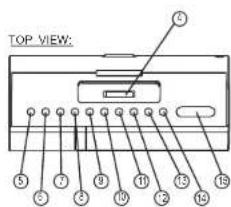
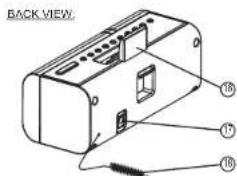
LOCATION OF CONTROLS
- LED DISPLAY
- SPEAKER
- BACK-UP BATTERY
COMPARTMENT (BOTTOM OF UNIT)13. VOL. - KEY
- CAVITY FOR DOCK ADAPTOR
- ON/ STANDBY KEY
- PLAY/ PAUSE KEY
- FUNCTION/CL. SET
- SEARCH - / SKIP - KEY
- SEARCH + / SKIP + KEY
- AL-MODE/AL-SET KEY
- EQ/SLEEP KEY
- MEMORY KEY
- VOL. - KEY
- VOL. + KEY
- SNOOZE/DIMMER KEY
- iPod/iPhone STAND BOARD
- DC JACK (DC 7V) — - © +
- FM ANTENNA WIRE
E-3
POWER SUPPLY
AC OPERATION (EXTERNAL AC-DC POWER ADAPTOR)
- THIS SET IS EQUIPPED WITH A "DC-JACK" CAPABLE OF ACCEPTING
AC-ADAPTORS WITH A RATING OF DC - 7V, 2A, AND WITH A PLUG WITH THE FOLLOWING POLARITIES AS SHOWN/CENTER POSITIVE
- PLEASE USE ONLY THE SUPPLIED AC-ADAPTOR TO OPERATE THE UNIT
USE OF OTHER ADAPTORS MAY DAMAGE THE UNIT OR CAUSE IT TO MALFUNCTION.
- PLUG THE TAIL END OF THE AC-ADAPTOR INTO THE DC-JACK (SOCKET)
ON THE REAR OF THE UNIT.
- INSERT THE PLUG OF THE AC-ADAPTOR INTO A WALL OUTLET WITH AC-POWER.
- PRESS THE ON/OFF KEY TO SWITCH ON THE UNIT.
- THIS UNIT IS DESIGNED TO OPERATE WITHOUT EVER BEING TOTALLY POWERED "OFF".
IT WILL EITHER BE ON OR IN STANDBY MODE
- IN STANDBY MODE, THE BLUE BACK-LIGHT OF THE DIGITAL DISPLAY WILL BE DIMMED
BUT THE DISPLAY WILL SHOW THE CURRENT TIME (CLOCK FUNCTION).
ANY TIME DURING STANDBY MODE, YOU CAN SWITCH ON THE UNIT BY PRESSING THE ON/OFF KEY.
THE ON/OFF KEY SAVE ENERGY BY
- SAVE ENERGY BY SWITCHING THE SYSTEM TO STANDBY MODE WHEN NOT IN USE.
BACK UP BATTERIES
- OPEN THE BATTERY DOOR AT THE BOTTOM OF THE UNIT.
- INSERT 2 PCS "AAA-CELL" (UM-4/LR03 TYPE) BATTERIES IN THE BATTERY
COMPARTMENT.
THESE 2 BATTERIES ARE FOR BACKUP OF THE "CLOCK" DURING BRIEF POWER
OUTAGES.
DIMMER FUNCTION
THIS SET HAS A DIMMER FUNCTION TO ADJUST THE BRIGHTNESS LEVEL
OF THE DISPLAY BACKLIGHT. SIMPLY ADJUST IT AS DESIRED BY PRESSING
THE SNOOZE/DIMMER KEY REPEATEDLY (HI-DIMMER / LOW-DIMMER / OFF)
TO REDUCE EYE STRAIN, AND TO SAVE ENERGY.
THE DISPLAY BACKLIGHT WILL ALWAYS RETURN IN HI-DIMMER AFTER RESET THE UNIT.
E-4
DIGITAL CLOCK FUNCTION
THE SET HAS A BUILT-IN DIGITAL CLOCK, WHEN THE SET IS IN "STANDBY MODE". (THE DISPLAY WILL CONTINUOUSLY SHOW THE CURRENT TIME).
HOW TO SET CORRECT TIME:![graph TD A["SWITCH UNIT TO 'STAND-BY' MODE"] --> B["PRESS & HOLD FUNC./CL-SET KEY FOR 3 SECONDS DISPLAY SHOWS ON HOUR OR YOUR (FLASHING)"] B --> C["PRESS SKIP / SEARCH OR SKIP / SEARCH + KEY TO SELECT 12-HOUR OR 24-HOUR CLOCK DISPLAY SYSTEM & PRESS FUNC./CL-SET KEY TO CONFIRM YOUR SELECTION"] C -->…](/content/2026/05/1069945/images/16c6872ee40d6f21c5bef0a52af75cd63381ed4e667c8cda135c5ed0be5d7997.jpg)
ALARM FUNCTION
- THIS SET IS EQUIPPED WITH 3 ALARM MODES: BUZZER, RADIO AND iPod. BEFORE SETTING THE ALARM, MAKE SURE TO SET THE CLOCK (SEE "DIGITAL CLOCK FUNCTION" IN THE PREVIOUS SECTION).
PREPARE FOR THE ALARM SETTINGS
PRESS THE ON/ STANDBY KEY TO SWITCH ON THE SET (DISPLAY BLUE LIGHT WILL BE "ON")
"ALARM" TIME SETTING
- PRESS THE ON/STANDBY KEY TO PUT THE SET INTO "STANDBY" MODE.
- PRESS AND HOLD AL-SET/AL-MODE THE DISPLAY WILL NOW SHOW:

- PRESS SKIP- / SEARCH- AND SKIP+ / SEARCH+ KEY TO REACH THE HOUR OF THE DESIRED WAKE UP TIME THEN PRESS AL-SET/ AL-MODE KEY TO CONFIRM THE DISPLAY WILL NOW SHOW:
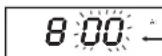
- PRESS SKIP- /SEARCH- AND SKIP+ /SEARCH+ KEY TO REACH THE MINUTES OF THE DESIRED WAKE UP TIME, THEN PRESS THE AL-SET/AL-MODE KEY TO CONFIRM.
5. "ALARM" MODE SETTING
NOW SELECT THE SOURCE THAT YOU WISH THE UNIT TO PLAY AT THE "WAKE UP" TIME AS BELOW: PRESS THE ON/STANDBY KEY TO SWITCH ON THE SET (DISPLAY BLUE LIGHT WILL BE "ON")
- FOR iPod/iPhone: CONNECT THE iPod/iPhone AS DESCRIBED. SELECT THE SONG OR THE DESIRED PLAYLIST TO PLAY AT THE 'WAKE UP' TIME. START AND PAUSE PLAYBACK OF THE SONG/PLAYLIST AT THE POINT FROM WHICH YOU WANT PLAYBACK TO BEGIN AT THE 'WAKE UP' TIME.
FOR RADIO: TUNE IN THE DESIRED STATION.
- ADJUST THE VOLUME LEVEL AS DESIRED BY PRESSING VOL. UP OR VOL. DN - KEY
ONCE THE DESIRED SOURCE HAS BEEN READY, PRESS THE ON/STANDBY KEY TO PUT THE SET INTO STANDBY MODE AND THEN SHORT PRESS THE AL-SET/AL-MODE KEY REPEATEDLY TO SELECT THE SOURCE AS DESIRED.
*REMARK: AL = BUZZER ALARM / FM = RADIO / iPod = iPod / iPhone
- THE ALARM TIME IS NOW FULLY PROGRAMMED AND THE ALARM SYMBOL WILL APPEAR TO INDICATE THAT THE ALARM FUNCTION IS "ACTIVE".

- THE SET WILL NOW AUTOMATICALLY SWITCH "ON" AT THE WAKE-UP TIME AS YOU HAVE CHOSEN, AS LONG AS THE ALARM FUNCTION IS "ACTIVE".
- TO TURN OFF THE UNIT AFTER IT HAS AUTOMATICALLY SWITCHED ON, SIMPLY PRESS THE ON/STANDBY KEY ONCE. THIS WILL SWITCH OFF THE SET BUT WILL NOT CLEAR THE ALARM SETTINGS, AND THE SET WILL SWITCH ON AGAIN AUTOMATICALLY ON THE NEXT DAY AT EXACTLY THE SAME PRESET TIME.
- TO DEACTIVATE THE ALARM, PRESS & RELEASE THE 'AL-SET/AL-MODE' KEY. THE ALARM SYMBOL "AL" DISAPPEARS FROM THE DISPLAY.
- TO ACTIVATE THE ALARM AGAIN, REPEAT THE PROCEDURE OF "ALARM TIME SETTING" AS DESCRIBED.
IMPORTANT:
IF THE ALARM IS SET AS WAKE TO iPod, YOU WILL NEED TO CONNECT THE iPod/iPhone PROPERLY AS DESCRIBED. OTHERWISE, THE BUZZER ALARM WILL SOUND AT THE SET TIME IF THE iPod HAS NOT BEEN CONNECTED. THE ALARM SET-UP MODE, WHERE THE SYMBOL "AL" IS FLASHING, WILL TIME-OUT IF THERE IS NO INPUT FOR 3 SECONDS AND RETURN TO "STANDBY MODE". SHOULD THE ALARM SET-UP MODE TIME-OUT, THE ALARM SYMBOL "AL" WILL NOT BE DISPLAYED AND THE ALARM TIME SETTING INSTRUCTIONS WILL HAVE TO BE REPEATED FOR THE ALARM TO BE SET.
SNOOZE FUNCTION
- WHENEVER THE ALARM COMES ON, IT CAN BE TEMPORARILY SUSPENDED FOR A SHORT PERIOD OF APPROXIMATELY 9 MINUTES BY PRESSING THE LONGSOLD DIMMER KEY ONCE
- THE ALARM WILL THEN AUTOMATICALLY COME ON AGAIN AFTER THE SNOOZE PERIOD HAS ENDED.
- THE PROCEDURE CAN BE REPEATED FOR APPROXIMATELY 90 MINUTES FROM ORIGINAL ALARM WAKE-UP TIME.
AUTOMATIC POWER OFF SLEEP FUNCTION
- THIS SET HAS A SPECIAL SLEEP TIMER FUNCTION WHICH CAN AUTOMATICALLY SWITCH OFF THE UNIT. THIS IS USEFUL FOR SLEEPING TO MUSIC AT NIGHT.
- AT ANY TIME WHILE THE UNIT IS OPERATING, PRESS & HOLD THE EQ/SLEEP KEY UNTIL THE "SL" SYMBOL FLASHES, THEN PRESS THE EQ/SLEEP KEY REPEATEDLY TO CHOOSE THE AUTOMATIC POWER OFF TIME.

(*OFF MEANS SLEEP TIMER IS DEACTIVATED)
ELECTRONIC VOLUME CONTROL
- THIS UNIT USES AN ELECTRONIC VOLUME CONTROL (PUSH BUTTON TYPE)
- TO INCREASE OR DECREASE THE LOUDNESS OF UNIT, PRESS THE VOLUME UP (VOL+) OR VOLUME DOWN (VOL-) KEYS RESPECTIVELY. RELEASE THE KEY WHEN VOLUME LEVEL IS AT THE DESIRED LOUDNESS.
- RELEASE THE KEY WHEN VOLUME LEVEL IS AT THE DESIRED LOUDNESS.
- SOMETIMES, ESPECIALLY DURING LISTENING TO THE RADIO, YOU MAY NOTICE A "CLICK-CLICK-CLICK" (REPEATING) SOUND WHEN YOU ARE INCREASING OR DECREASING THE VOLUME. THIS IS A NORMAL CONDITION & THE SOUND WILL DISAPPEAR WHEN YOU RELEASE THE VOLUME KEY (WHEN YOU REACH THE DESIRED VOLUME LEVEL).
OPERATION OF RADIO
- PRESS THE "ON/ STANDBY" KEY ONCE TO SWITCH ON THE UNIT.
- PRESS THE [FUNC./CL-SET] KEY REPEATEDLY UNTIL THE DISPLAY SHOWS 'FM'
- EXTEND AND ADJUST THE FM-WIRE ANTENNA TO OBTAIN THE BEST RECEPTION.
MANUAL FREQUENCY ADJUSTMENT (SCAN MODE)
- PRESS (AND IMMEDIATELY RELEASE) THE SKIP- /SEARCH- AND SKIP+ /SEARCH+ KEYS TO "SCAN" (MANUALLY ADJUST) THE RADIO
- THE RADIO DIGITAL DISPLAY WILL INDICATE THE EXACT FREQUENCY AT EACH STEP'S POSITION.
- WHEN A DESIRED FREQUENCY OR STATION IS REACHED. IT CAN BE SAVED INTO ONE OF THE "MEMORY" POSITIONS. (SEE "RADIO MEMORY" SECTION).
AUTOMATIC FREQUENCY ADJUSTMENT (SEEK MODE)
- PRESS AND HOLD (FOR 2 SECONDS) THE SKIP-/SEARCH- AND [SKIP+]SEARCH+] KEYS TO 'SEEK' (AUTOMATICALLY ADJUST) THE RADIO FREQUENCY "UP" OR "DOWN" TO THE NEXT AVAILABLE RADIO STATION.
- THE RADIO DIGITAL DISPLAY WILL INDICATE THE EXACT FREQUENCY OF THE NEXT STATION THAT IS FOUND.
- WHEN A DESIRED STATION IS REACHED. IT CAN BE SAVED INTO ONE OF THE "MEMORY" POSITIONS. (SEE "RADIO MEMORY" SECTION).
"Made for iPod. " "Made for iPhone. " mean that an electronic accessory has been designed to connect specifically to iPod, iPhone, respectively, and has been certified by the developer to meet Apple performance standards. Apple is not responsible for the operation of this device or its compliance with safety and regulatory standards. Please note that the use of this accessory with iPod, iPhone may affect wireless performance.
MUSIC EQUALIZER
- AT ANYTIME DURING PLAYBACK, PRESS EGY/REEEDLY TO CHOOSE THE DESIRED SOUND EFFECT ACCORDING TO THE MUSIC YOU ARE LISTENING TO :
![graph TD A["E-0 = EQ OFF"] --> B["E-1 = CLASSIC"] B --> C["E-2 = ROCK"] D["E-5 = BASS"] --> E["E-3 = POPE-4 = JAZZ"] E --> F["Feedback to E-3"]](/content/2026/05/1069945/images/4ef4d2cf167ea5250736bcfdf3acc2c37f796e4758033840294141d20bfa2f26.jpg)
E-9 E-10
iPod STAND BOARD
THIS UNIT IS DESIGNED TO ALLOW YOU TO CONNECT AN iPod/ iPhone WITHOUT THE NEED FOR DOCK CONNECTORS. THE DESIGN OF THE UNIT HAS BEEN STRUCTURED TO PROVIDE SUPPORT TO THE CONNECTOR UNDER NORMAL USAGE WITHOUT EXCESSIVE PRESSURE ON THE iPod/ iPhone WHEN CONTROLLING PLAYBACK USING THE iPod/ iPhone SCREEN. - iPod STAND BOARD CAN BE ADJUSTED BY THE SLIDER WHICH LOCATED AT THE REAROF UNIT. - SIMPLY SLIDE UP AND DOWN AS DESIRED.
iPod STAND BOARD SLIDER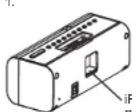

SPECIFICATIONS
POWER SUPPLY: DC 7V, 2A through built-in DC jack. External AC-DC power adaptor 100V-240V ~ 50/60Hz. Back-up battery: UM-4 "AAA" / LR03, 1.5V x 2 pcs (batteries not included). Power consumption: 15 W. Speaker: 2" speaker. Frequency: FM 87.5 - 106 MHz.
MODEL iP-3-AFP
ENGLISH MANUAL PLAN
MATERIAL: 80G WOODFREE PAPER
PRINTING COLOR: BLACK
FRONT VIEW
| COVER | E-2 E-3 | |
| E-4 E-5 | E-6 |
BACK VIEW
| E-7 | E-8 E-9 | |
| E-10 | BLANK BLANK | |
- CAUTION
- RISK OF ELECTRIC SHOCK DO NOT OPEN
- LOCATION OF CONTROLS
- POWER SUPPLY
- BACK UP BATTERIES
- DIMMER FUNCTION
- DIGITAL CLOCK FUNCTION
- ALARM FUNCTION
- PREPARE FOR THE ALARM SETTINGS
- ALARM" TIME SETTING
- ALARM" MODE SETTING
- IMPORTANT
- SNOOZE FUNCTION
- AUTOMATIC POWER OFF SLEEP FUNCTION
- ELECTRONIC VOLUME CONTROL
- OPERATION OF RADIO
- MANUAL FREQUENCY ADJUSTMENT (SCAN MODE)
- AUTOMATIC FREQUENCY ADJUSTMENT (SEEK MODE)
- MUSIC EQUALIZER
- IPOD STAND BOARD
- SPECIFICATIONS
Brand : Finlux
Model : ID-F510
Category : Alarm Clock