
SGY-PM68 - Bike computer PIONEER - Free user manual and instructions
Find the device manual for free SGY-PM68 PIONEER in PDF.


| Product Type | Power Meter Crank Set with Bike Computer |
| Model | SGY-PM68 |
| Brand | Pioneer |
| Compatibility | ANT+ cycle computers (Pioneer and non-Pioneer) |
| Power Measurement | Dual-sided power (left and right crank) |
| Magnet Placement (Drive Side) | 42 mm from bottom bracket center |
| Magnet Placement (Non-Drive Side) | 53 mm from bottom bracket center |
| Magnet Gap | 1.5 mm – 10.7 mm |
| Battery Type | CR2032 (2x, one per sensor) |
| Battery Life | Approximately 200 hours |
| Weight | Approximately 150 g (crankset only) |
| Water Resistance | IPX6 (splash proof) |
| Wireless Protocol | ANT+ |
| Data Storage | Via Cyclo-Sphere cloud or compatible head unit |
| Firmware Update | Over WiFi via SGX-CA500 computer |
| Cyclo-Sphere Integration | Ride analysis, MMP, GPS mapping, social sharing |
| Zero Calibration | Required for temperature changes; arms at 6 o'clock |
| Sensor LED Indicator | Green when magnet passes; orange on battery insertion |
| Installation Difficulty | Moderate (requires magnet placement template) |
| Support Contact | 1-800-421-1404 (USA) |
Frequently Asked Questions - SGY-PM68 PIONEER
User questions about SGY-PM68 PIONEER
0 question about this device. Answer the ones you know or ask your own.
Ask a new question about this device
Download the instructions for your Bike computer in PDF format for free! Find your manual SGY-PM68 - PIONEER and take your electronic device back in hand. On this page are published all the documents necessary for the use of your device. SGY-PM68 by PIONEER.
USER MANUAL SGY-PM68 PIONEER
New Installation Procedure
- A new installation procedure is available for SGY-PM90 and SGY-PM68 Series cranksets.
- The newest firmware for the SGX-CA500 is required for use with these cranksets – 2.43
- Compatible cranksets will have an orange sticker on the box and another on one of the crank arms.
- An updated owners manual will be included in those systems.
- Units not displaying this orange sticker should follow the installation instructions found in the owners manual provided with that product.
- The new installation procedure does not provide any performance enhancements to the product.
• Installation procedures on pages 3 and 4 of this Quick Guide are for this new procedure.
ATTENTION:
New Installation Procedure. See Owners Manual.


Pioneer
Easy Installation Power Meter Cranksets SGY-PM90 and SGY-PM68 with Non-Pioneer ANT+ Cycle Computer

1.) Magnet Placement
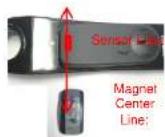
- Measuring from the center of the bottom bracket out, temporarily tape the magnet so that the center line of the magnet is:
• Right Drive Side - 42mm - Left Side - 53mm
- Use the supplied Magnet Placement Template to help locate the optimum locations for magnet placement on the frame.
- Position the magnets so the sensor line and magnet center line are parallel when the sensor passes over.


natural_image
Close-up of a bicycle's wheel and gear assembly with blue bounding boxes highlighting specific components (no text or symbols visible)Center hole on bottom bracket and use supplied double sided tape to temporarily secure while locating optimum magnet location
2.) Confirm Magnet Placement
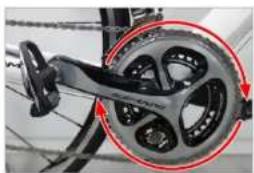
- Remove and replace both Left and Right batteries. Orange light will appear for 10 seconds.
- Rotate the crank slowly (30rpm). Check that the LED on each sensor lights green once for each revolution.
- Once confirmed, secure magnets for final placement.
natural_image
Close-up of a bicycle wheel and steering wheel assembly with red circular annotations (no text or symbols visible)
LED's light green
If no Green LED, check and adjust magnet placement
3.) Pair to your ANT+ Computer
- Spin the crank 3 – 4 rotations to activate the Power Meter
ANT+TM

See your ANT+ Cycle Computer Instructions for Power Meter Pairing and Zero Calibration procedures.

Sensor ID
For additional installation instructions visit the following on-line support locations www.pioneerelectronics.com/PUSA/CycleSportsProductsPower-Meters www.Youthba/PioneerCyseSportsUSA Please refer to the owners manual for detailed installation instructions. Visit https://cycle.sphora.com/ for the latest firmware and updates. Customer Support - 1-900-421-1824 E-Mail: cycle-sports@pioneer-usa.com
Pioneer
Easy Installation Power Meter Cranksets SGY-PM90 and SGY-PM68 with Pioneer Cycle Computer

• Magnet Placement
- Measuring from the center of the bottom bracket out, temporarily tape the magnet so that the center line of the magnet is:
• Right Drive Side - 42mm - Left Side - 53mm
- Use the supplied Magnet Placement Template to help locate the optimum locations for magnet placement on the frame.
- Position the magnets so the sensor line and magnet center line are parallel when the sensor passes over.

Sensor
ID

natural_image
Close-up of a bicycle's wheel and gear assembly (no visible text or symbols)Center Magnet Placement Template hole on bottom bracket and use supported double sized tape to temporarily secure while locating optimum magnet location.
- Mode Selection & Pairing to the Pioneer Computer
- Spin the crank 3 - 4 rotations to activate the Power Meter
- Pressing Pedaling Monitor will search sensor ID or local crank.


Press Option Press Pedding Settings Press Pedding Monitor Press Menu
Magnet Range
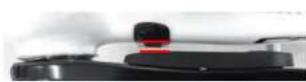
1.5mm-10.7mm

SGX-CA500 firmware must be 20150501.02.43 or higher.

• Magnet Calibration

Press Meau


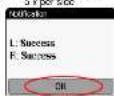
- Spin the crank FORWARD slowly (30 rpm) until both left and right sensors detect magnets at least 5 times for each side and press Save.
2.) Secure magnets for final placement.
Pine Stad: Designation
Spin Cork Slowy

5 x per side
Press Start Calibration Press OK
- Zero Calibration – Position Left or Right crank arm to the 6 o'clock position
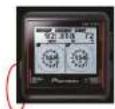
Press Menu Press OK
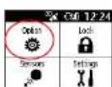
Press Option Press Pedaling Settings Press Magnet Calibration


For additional installation instructions visit the following on-line support
[Unreadable]
www.pioneaelectronics.com/PUSA/Gcycle+Sports-Products+Power+Materials
www.youliu@florist cyre sports 350
Please refer to the owners' market for detailed installation instructions. Visit interaction members page for the latest emergency and updates.
4.11 Imped by 0.005-0.03% for a fiscal year ended June 2016 and updated.
Customer Export +877-421-1574
Customer Support - 100-421-1024 E-Mail: cycle.sports@pioneer-use.csr
2. 100% of the company's shareholding
Pioneer
SGX-CA500
Pairing with a Power Meter
Pioneer Power Meter Other ANT+ Power Meters

flowchart
graph TD
    A["Press"] --> B["Sensors: Bike1 (Race)"]
    B --> C["Connect New"]
    C --> D["Device Type: Power, Pedaling Monitor L, Pedaling Monitor R"]
    D --> E["Connect New Sensor: Feaching Monitor T"]
    E --> F["Search"]
    F --> G["Specified Search"]
    G --> H["Device Number 1"]
    E --> I["Enter device number listed on side of left transmitter"]
    I --> J["Connect New Sensor: Feaching Monitor T"]
    J --> K["Search"]
    K --> L["Specified Search"]
    L --> M["Device Number 1"]

flowchart
graph TD
    A["Sensor"] --> B["Connect New Sensor"]
    B --> C["Device Type"]
    C --> D["Power"]
    D --> E["Specified Search"]
    E --> F["Search"]
    F --> G["Device Number"]
    style A fill:#f9f,stroke:#333
    style B fill:#ccf,stroke:#333
    style C fill:#cfc,stroke:#333
    style D fill:#fcc,stroke:#333
    style E fill:#cff,stroke:#333
    style F fill:#ffc,stroke:#333
    style G fill:#fcf,stroke:#333

STAGES
STAGESPOWER



Pioneer
SGX-CA500
Zero Calibration
Zero Calibration is required to adjust for changes in crank deflection at different temperatures. Pioneer power meters provide 6 temperature memories loaded each time temperature varies 4 degree's centigrade.


Select ZeroCal
Point left crank arm to 6 o'clock

Or
Point right crank arm to 6 o'clock

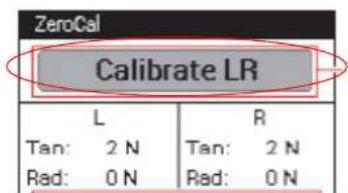
You can check zero calibration status on Cyclo-Sphere in individual ride analysis under Device Information
-
of times zero calibrated • Temperatures in memory
![Device Information Pioneer SGX-CA500 Serial Number : NCCZ001375WN Pioneer SGY-PM910H Device Number : 420 / 420 Left Temperature learning conditions Right ■■■■■= (5 times) Number of times learned ■■■■■= (5 times) — Learning accuracy — 72.7 [°F] Most recently learned temperature 70.3 [°F] ANT+ Heartrate Sensor Device Number : 48330](/content/2026/05/1069934/images/98e9e9caeec5cab12ac23beb0c23fa12a30d52f532544681072800ef9549df71.jpg)
Pioneer
SGX-CA500
Pageset Select / Pageset Edit
Pageset Select Pageset Edit
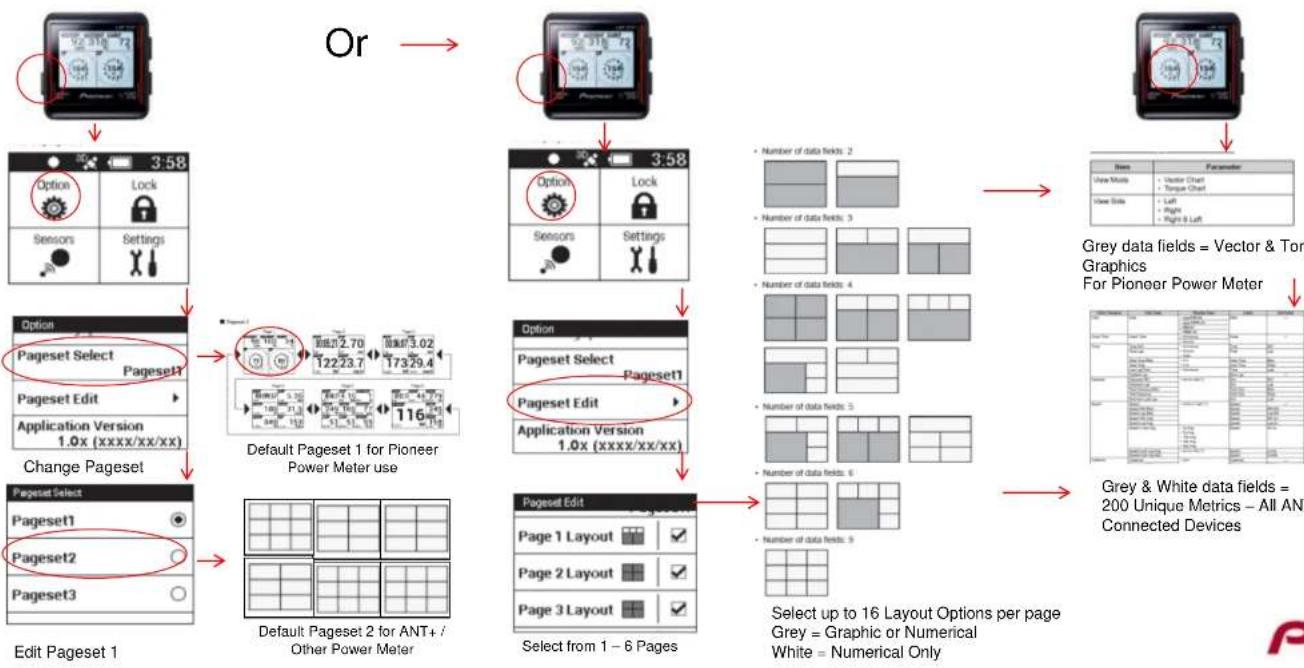
Press and Hold
Grey data fields = Vector & Torque Graphics
For Pioneer Power Meter
Pioneer
Wifi Ride Upload
1.) Connect to your WiFi Network
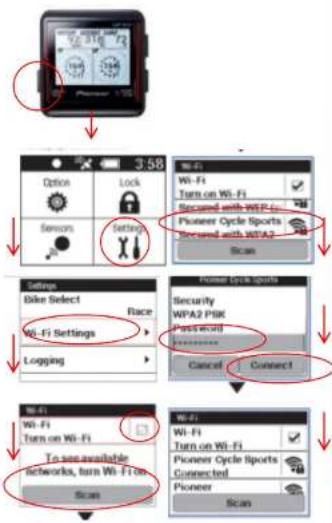
You can enter multiple wifi spots ie., your home, Starbucks...
2.) Create a Cyclo-Sphere Account With an E-mail and Password

https://cyclo-sphere.com/
3.) Provide your Cycle Computer with your Cyclo-Sphere E-mail and Password for Auto Upload

Hold Back Button to return to the upload section
4.) Charge your Computer before every ride...
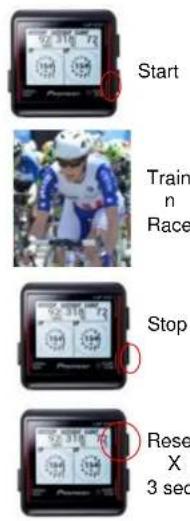
Ride data will auto-upload to Cyclo-Sphere when in range of your wifi networks.

Pioneer
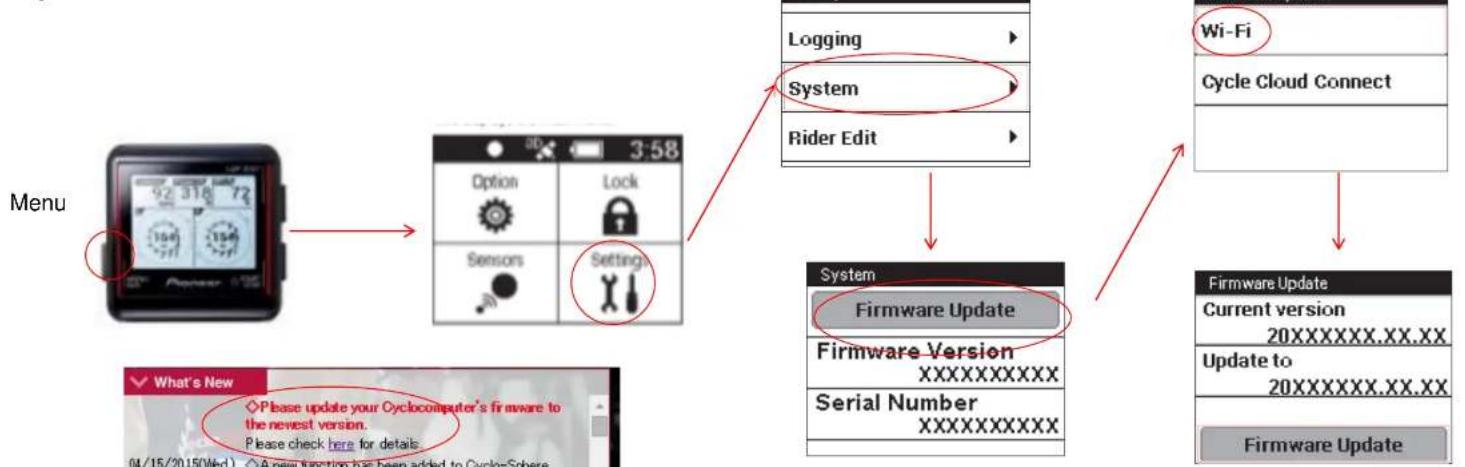
Firmware Update
Update Firmware via Wi-Fi
flowchart
graph TD
    A["Menu"] --> B["3D Display"]
    B --> C["Options"]
    B --> D["Lock"]
    B --> E["Sensors"]
    B --> F["Settings"]
    C --> G["Logging"]
    D --> H["System"]
    E --> I["Rider Edit"]
    F --> J["System"]
    J --> K["Firmware Update"]
    K --> L["Firmware Version"]
    L --> M["XXXXXXXX"]
    L --> N["Serial Number"]
    N --> O["XXXXXXXX"]
    J --> P["Wi-Fi"]
    P --> Q["Cycle Cloud Connect"]
    Q --> R["Firmware Update"]
    R --> S["Current version 20XXXXXX.XX.XX"]
    R --> T["Update to 20XXXXXX.XX.XX"]
    R --> U["Firmware Update"]
Cyclo-Sphere will announce new firmware and provide details of the updates.
Pioneer
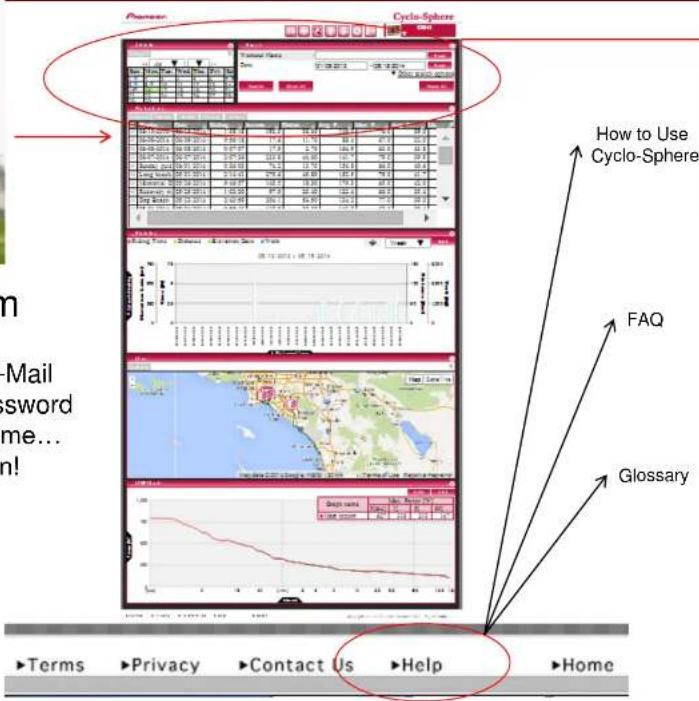
Cyclo-Sphere

https://cyclo-sphere.com

Basic E-Mail and Password User name... You're In!
* Cyclo-Sphere is optimized for Pioneer Cycle-Sports computers and Power Meters but works great with any ANT+ Cycle Computers, Power Meters, Cadence / Speed, and Heart Rate Sensors.

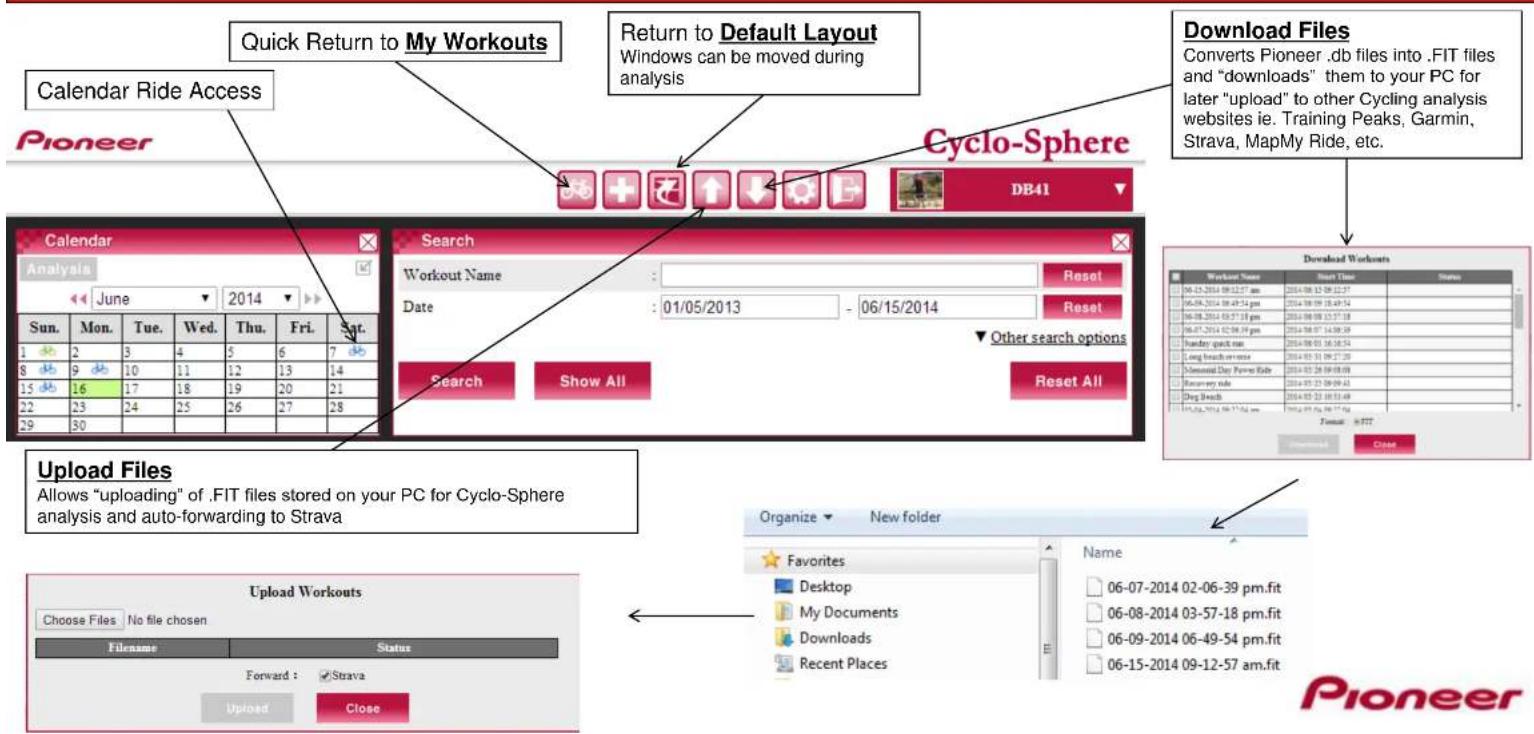
Pioneer
Search / Files
Pioneer
Workout List

![Change Metric in column Add Column Workout List Analysis Rename Delete Privacy Forward Workout N...也有Date Riding Time Accumulat... Distance [mi] Avg. Power... Max. Pedali... Avg. Pedal... Max... 06-21-2014 07:10: 06/21/2014 7:10:4 4:35:53 459.7 61.90 Distance [mi] Avg. Power... 37.4 704.0 06-15-2014 09:12: 06/15/2014 9:12:5 1:38:18 192.3 22.60 Workout Name 39.0 673.0 06-09-2014 06:49: 06/09/2014 6:49:5 0:56:18 17.6 7.30 Date 32.0 473.0 06-08-2014 03:57: 06/08/2014 3:57:11 0:07:07 17.9 1.70 Riding Time 43.8 501.0 06-07-2014 02:06: 06/07/2014 2:06:31 2:07:36 233.8 27.70 Elapsed Time 39.9 504.0 Sunday quick run 06/01/2014 4:16:5 0:36:03 74.2 8.50 Distance [mi] Public Flag 40.6 659.0 Long beach rever 05/31/2014 9:27:21 2:14:41 275.6 28.50 Max. Pedaling Efficiency [%] 41.7 746.0 Memorial Day Po 05/26/2014 9:08:01 0:46:57 140.5 11.40 Avg. Pedaling Efficiency [%] Max. Power [W] 42.0 738.0 Recovery ride 05/25/2014 9:09:4 1:02:30 97.5 12.60 Avg. Power [W] Max. Cadence [rpm] 35.4 674.0 Dog Beach 05/23/2014 10:53: 2:43:59 304.1 35.10 Max. Cadence [rpm] Max. Speed [mph] Avg. Speed [mph] Max. Heart Rate [bpm] Avg. Heart Rate [bpm] Max. Altitude [ft] Max. Heart Rate [bpm] 05-04-2014 09:27: 05/04/2014 9:27:0 0:55:42 118.9 12.60 Max. Altitude [ft]](/content/2026/05/1069934/images/7f8d134c50184ede32c2769be767a282781faede7c825c20f8a8a1bd47445420.jpg)
Pioneer
Statistics – Ride Group Charts & Graphs
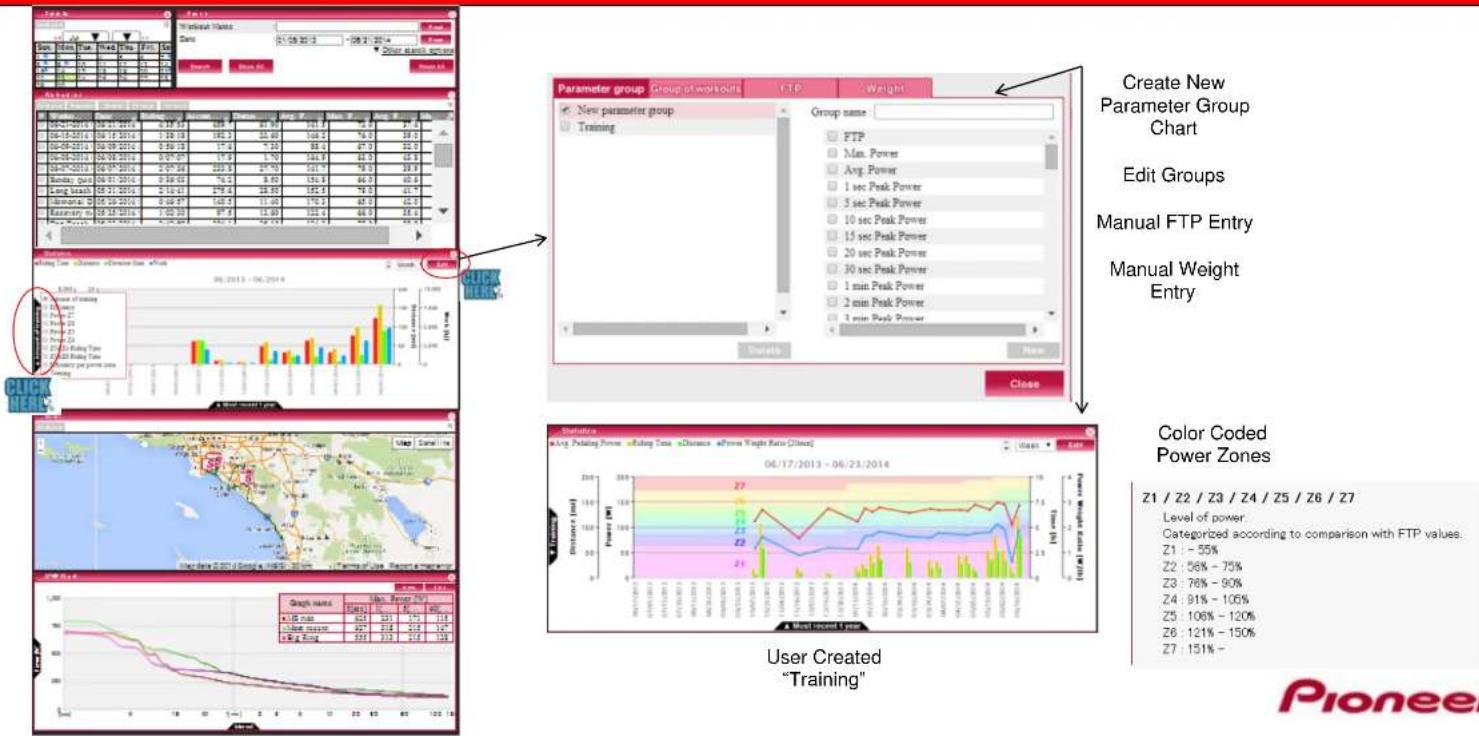
Create New Parameter Group Chart
Edit Groups
Manual FTP Entry
Manual Weight Entry
Color Coded Power Zones
Z1 / Z2 / Z3 / Z4 / Z5 / Z6 / Z7
Categorized according to comparison with FTP values.
21 - 55%
22:56%-75%
73 - 78% - 90%
20.10% - 60%
74.01% - 106%
24:515-100%
25:106%-120%
Z6:121%-150%
27 151% -
Pioneer
GPS – Maps & Route History
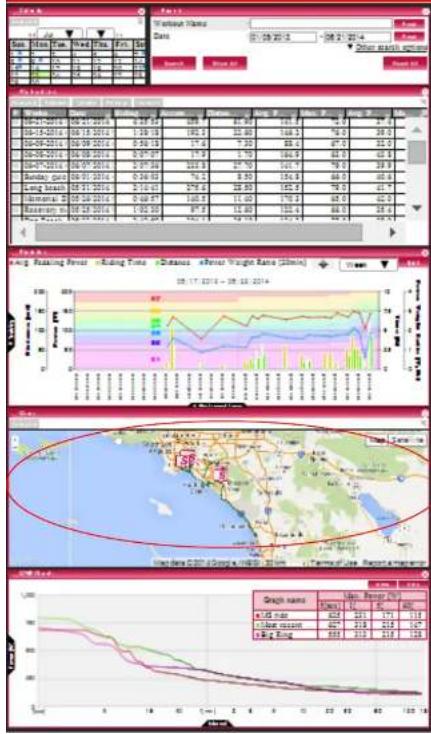
line
| Date | Value | |---|---| | 06-21-2014 | 8.37 | | 06-18-2014 | 1.28 | | 06-09-2014 | 5.58 | | 06-08-2014 | 7.4 | | 06-07-2014 | 1.75 | | 06-06-2014 | 2.79 | | 06-05-2014 | 2.36 | | 06-04-2014 | 2.10 | | 06-03-2014 | 0.99 | | 06-02-2014 | 1.05 | | 06-01-2014 | 1.28 | | 06-00-2014 | 1.55 | | 05-31-2014 | 1.75 | | 05-28-2014 | 1.95 | | 05-25-2014 | 2.15 | | 05-22-2014 | 2.35 | | 05-19-2014 | 2.55 | | 05-16-2014 | 2.75 | | 05-13-2014 | 2.95 | | 05-10-2014 | 3.15 | | 04-9-2014 | 3.35 | | 04-8-2014 | 3.55 | | 04-7-2014 | 3.75 | | 04-6-2014 | 3.95 | | 04-5-2014 | 4.15 | | 04-4-2014 | 4.35 | | 04-3-2014 | 4.55 | | 04-2-2014 | 4.75 | | 04-1-2014 | 4.95 | | 03-9-2014 | 5.15 | | 03-8-2014 | 5.35 | | 03-7-2014 | 5.55 | | 03-6-2014 | 5.75 | | 03-5-2014 | 5.95 | | 03-4-2014 | 6.15 | | 03-3-2014 | 6.35 | | 03-2-2014 | 6.55 | | 03-1-2014 | 6.75 | | 02-9-2014 | 6.95 | | 02-8-2014 | 7.15 | | 02-7-2014 | 7.35 | | 02-6-2014 | 7.55 | | 02-5-2014 | 7.75 | | 02-4-2014 | 7.95 | | 02-3-2014 | 8.15 | | 02-2-2014 | 8.35 | | 02-1-2014 | 8.55 | | 01-9-2014 | 8.75 | | 01-8-2014 | 8.95 | | 01-7-2014 | 9.15 | | 01-6-2014 | 9.35 | | 01-5-2014 | 9.55 | | 01-4-2014 | 9.75 | | 01-3-2014 | 9.95 | | 01-2-2014 | 10.15 | | 01-1-2014 | 10.35 | | 01-9-2014 | 10.55 | | 01-8-2014 | 10.75 | | 01-7-2014 | 10.95 | | 01-6-2014 | 11.15 | | 01-5-2014 | 11.35 | | 01-4-2014 | 11.55 | | 01-3-2014 | 11.75 | | 01-2-2014 | 11.95 | | 01-1-2014 | 12.15 | | 01-9-2014 | 12.35 | | 01-8-2014 | 12.55 | | 01-7-2014 | 12.75 | | 01-6-2014 | 12.95 | | 01-5-2014 | 13.15 | | 01-4-2014 | 13.35 | | 01-3-2014 | 13.55 | | 01-2-2014 | 13.75 | | 01-1-2014 | 13.95 | | 01-9-2014 | 14.15 | | 01-8-2014 | 14.35 | | 01-7-2014 | 14.55 | | 01-6-2014 | 14.75 | | 01-5-2014 | 14.95 | | 01-4-2014 | 15.15 | | 01-3-2014 | 15.35 | | 01-2-2014 | 15.55 | | 01-1-2014 | 15.75 | | 01-9-2014 | 15.95 | | Note: The values in the 'Value' column are estimated based on the provided data from the 'Graph Name' table below it, but they are not explicitly labeled in the image.Green = All Rides

Red = Selected Ride
Pioneer
MMP – Mean Maximum Power

line
| Date | Value | |---|---| | 01-01-2014 | 389 | | 01-15-2014 | 195.3 | | 01-29-2014 | 71.6 | | 02-03-2014 | 7.30 | | 02-16-2014 | 16.9 | | 02-29-2014 | 67.5 | | 03-03-2014 | 82.5 | | 03-16-2014 | 28.5 | | 03-29-2014 | 185.3 | | 04-03-2014 | 68.5 | | 04-16-2014 | 41.7 | | 04-29-2014 | 179.3 | | 05-03-2014 | 68.5 | | 05-16-2014 | 88.5 | | 05-29-2014 | 28.5 |
line
| Year | Value | |------|-------| | 2013 | 923 | | Most recent 1 year | 457 | | 2014 | 477 |MMP = Mean Maximum Power For increasing intervals of time
FTP = Max Power Avg. over 1 hour

Select Up to 4 Rides or Ride Groups To view and compare
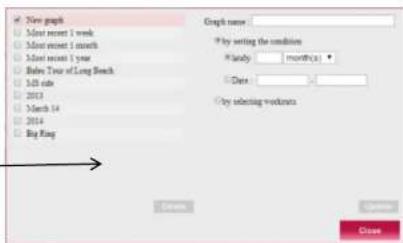
Create a Ride or Ride Group for Analysis and comparison to other groups
Pioneer
Individual Ride Analysis

| Workout List | ||||
| Analysis | Rename | Delete | Privacy | Forward |
| ■ | Workout N... | Date | Riding Time | Accum |
| √ | 06-21-2014 07:10 | 06/21/2014 7:10: | 4:35:53 | |
| □ | 06-15-2014 09:1 | 06/15/2014 9:12: | 1:38:18 | |
| □ | 06-09-2014 06:4 | 06/09/2014 6:49: | 0:56:18 | |
| □ | 06-08-2014 03:5 | 06/08/2014 3:57: | 0:07:07 | |
| □ | 06-07-2014 02:0 | 06/07/2014 2:06: | 2:07:36 | |
| □ | Sunday quick rur | 06/01/2014 4:16: | 0:36:03 | |
| □ | Long beach rever | 05/31/2014 9:27: | 2:14:41 | |
| □ | Memorial Day P | 05/26/2014 9:08: | 0:46:57 | |
| □ | Recovery ride | 05/25/2014 9:09: | 1:02:30 | |
| □ | Dog Beach | 05/23/2014 10:53 | 2:43:59 | |
| □ | 05-04-2014 09:2 | 05/04/2014 3:27: | 0:55:42 | |
Ride Summary Laps Segments

Histogram Scatter Chart
Pedaling Monitor
Pioneer Power Meter Only
Line Graphs
Select Metrics
Pedaling Graph
Pioneer Power Meter Only

line
| Month | S&P 500 Index | |-------|---------------| | Jan | 100 | | Feb | 95 | | Mar | 90 | | Apr | 85 | | May | 80 | | Jun | 75 | | Jul | 70 | | Aug | 65 | | Sep | 60 | | Oct | 55 | | Nov | 50 | | Dec | 45 |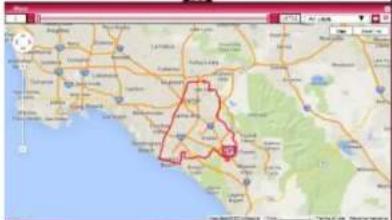

Satellite View
Ride MMP
Vs. Other
GPS Route
Pioneer
Auto "Forward" to STRAVA, Training Peaks, Facebook & Twitter
My Workouts Profile Settings

flowchart
graph LR
    A["Cyclo-Sphere"] --> B["My Workouts"]
    B --> C["Sign Out"]
    C --> D["Cyclo-Sphere"]
    D --> E["20:41"]
    E --> F["20:41"]
    F --> G["Cyclo-Sphere"]
Link and Forward to Strava

flowchart
graph LR
    A["Enter Strava Account address and password."] --> B["Cyclo-Sphere"]
    B --> C["Authorize Cyclo-Sphere to connect to your account"]
    C --> D["End"]
STRAVA
Pioneer
Post Ride Analysis to STRAVA, Training Peaks, Facebook & Twitter
Post a single event

Auto-Forward
My Workouts
Web Link
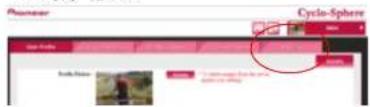
Twitter and Facebook

Profile Settings
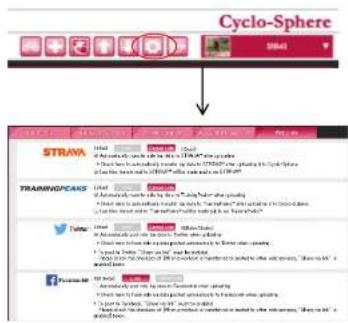
- Select Auto Forward
- Select Private or Public
STRAVA
TRAININGPEAKS™
facebook.
Pioneer
Make STRAVA Public
Laptop / PC:
Go to Dashboard Activity Feed Click on your ride
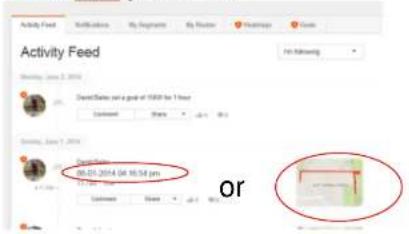
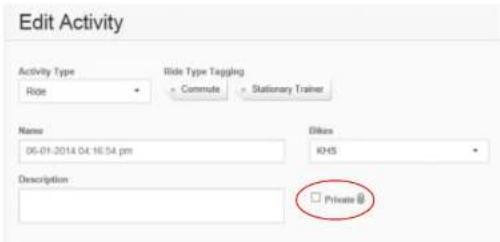
Click on the "Edit this Activity" pen Un-Click Private

Strava App:
Click Feed

Click the date or Map

Click on the
"Edit this Activity" pen

Click on the lock icon

Pioneer
Resources

N. America Site www.pioneerelectronics.com/PUSA/ www.powerisking.com

Global Site: http://pioneer-cyclesports.com/us-en/

https://cyclo-sphere.com/

natural_image
Close-up of a hand inserting a red component into a black helmet (no visible text or symbols)Magnet Calibration Installation Video http://www.youtube.com/watch?v=w4kF4Zx1bqk&feature=youtu.be

Facebook Pioneer Cycle Sports USA
Comments and Questions, E-Mail to: cycle-sports@pioneer-usa.com
Pioneer Customer Service 1 (800) 421-1404
- New Installation Procedure
- ATTENTION:
- New Installation Procedure. See Owners Manual.
- Easy Installation Power Meter Cranksets SGY-PM90 and SGY-PM68 with Non-Pioneer ANT+ Cycle Computer
- 1.) Magnet Placement
- 2.) Confirm Magnet Placement
- LED's light green
- 3.) Pair to your ANT+ Computer
- Easy Installation Power Meter Cranksets SGY-PM90 and SGY-PM68 with Pioneer Cycle Computer
- • Magnet Placement
- - Mode Selection & Pairing to the Pioneer Computer
- • Magnet Calibration
- - Zero Calibration – Position Left or Right crank arm to the 6 o'clock position
- SGX-CA500
- Pairing with a Power Meter
- Zero Calibration
- of times zero calibrated
- Pageset Select / Pageset Edit
- Wifi Ride Upload
- Firmware Update
- Cyclo-Sphere
- eff = \frac{\sum\limits_{i=0}^{n} Fxi}{\sum\limits_{i=0}^{n} Fi}
- Search / Files
- Workout List
- Individual Ride Analysis
- Auto "Forward" to STRAVA, Training Peaks, Facebook & Twitter
- Post Ride Analysis to STRAVA, Training Peaks, Facebook & Twitter
- Auto-Forward
- Make STRAVA Public
- Resources
Brand : PIONEER
Model : SGY-PM68
Category : Bike computer